
Applies to: Lasernet Core 11 and 10 (not Lasernet Essentials / Professional / Advanced)
Sheets that generate EDI output have the following settings:
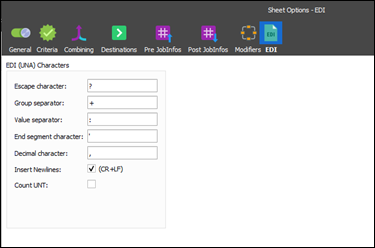
For successful conversion, you can set up EDI (UNA) characters for escaping, grouping, separations, decimal characters, and segments which are included in the (EDI) file. UNA characters are typically located in the first line of the EDI data.
Select Insert Newline to add a newline after each segment or clear it to create an EDI file without newlines.
Activate Count UNT to calculate and include the number of segments in the EDI file. It is necessary for the UNT segment to already be present in the message trailer.