Applies to: Lasernet Core 10
Job Events
Job Events are available as a setting (see tab) on most modules.
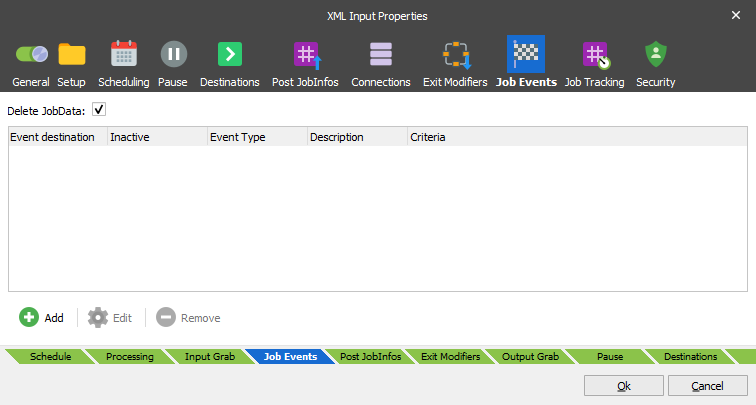
They are used to generate an event when a Job reaches a predefined condition. A Job Event is effectively a new type of destination activated at a later time if certain criteria are met.
It is possible to have Lasernet Core activate when a Job or Job group completes, succeeds or fails.
Completion
Once Lasernet Core has finished processing the Job, the event occurs regardless of whether it failed or was successful.
Success
Once Lasernet Core has finished processing the Job, the event will only occur if the job was successful.
Failure
Once Lasernet Core has finished processing the Job, the event will only occur if the job has failed.
Levels
Jobs flow through Lasernet Core in a tree-like fashion. Each time a Job is passed, a clone or branch is created.
The level of the tree where the Job Event is set up determines the outcome. Only Jobs below this level are considered when determining if a Job group is completed, successful or failed.
JobData
When a Job Event exists, Lasernet Core stores the Job on disk for later use. When the event occurs, the Job is loaded from disk and sent to the Job Event destination. Hence it is the input Job and not the output Job of the tree which is used.
Generally, JobData is not needed for the event and as such it is not stored to disk or used (by default). However, it is possible to store JobData and use it in the event destination, if needed. This is done via the “Delete JobData” checkbox.
JobEvent
A JobEvent is defined by the following properties:
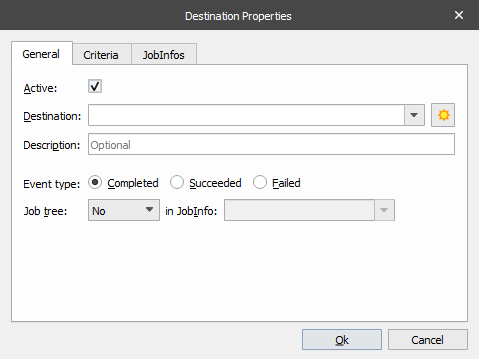
| Destination | Where to send the Job and Job tree when the event occurs. |
| Event Type | What to monitor for; completion, success or failure. |
| Job tree | An optional XML document containing info about the Jobs and their status from the Job Event level in the tree and below. This tree can be put in any JobInfo and kept alongside the original JobData. |
It is possible to have JobInfo criteria for determining if an event should occur or not.
A list of additional JobInfos to store in the XML Job tree is available.
Example
An input job is passed through an engine and out through an output module. A Job Event is defined for the input job.
When the event occurs, the Job is passed to the Job Event destination alongside the XML tree, which then contains info about these jobs:
Input Job
Engine Job
Output Job
Instead of placing the Job Event on the input Job, it is put on the output Job. Now the tree will only contain info about the output Job and not the engine Job nor the input Job.