Applies to: Lasernet Core 10
The JobInfo Scanner scans for JobInfos in text or XML (as input format).
Text as Input Format
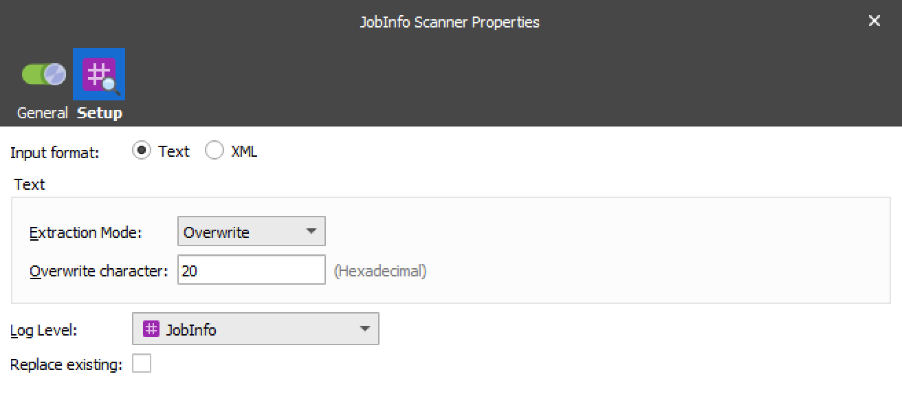
Scans text data for the syntax #JobInfo Name=Value# and works on 8-bit data only.
The table below provides a brief description of the action properties:
| Property | Description |
|---|---|
| Extraction Mode | Specifies whether the embedded JobInfo Syntax in data must be Leaved, Overwritten or Removed after scanning of data. |
| Overwrite Character | Character in hexadecimal to overwrite the characters in the JobInfo syntax string. |
| Log level | To extract the JobInfos from the document and create them on the current job, you need to specify a category under which the events related to the JobInfo are logged. JobInfo The events related to the JobInfo are logged under the JobInfo category. Debug The events related to the JobInfo are logged under the Debug category. NoLog The events related to the JobInfo are not logged. |
XML as Input Format
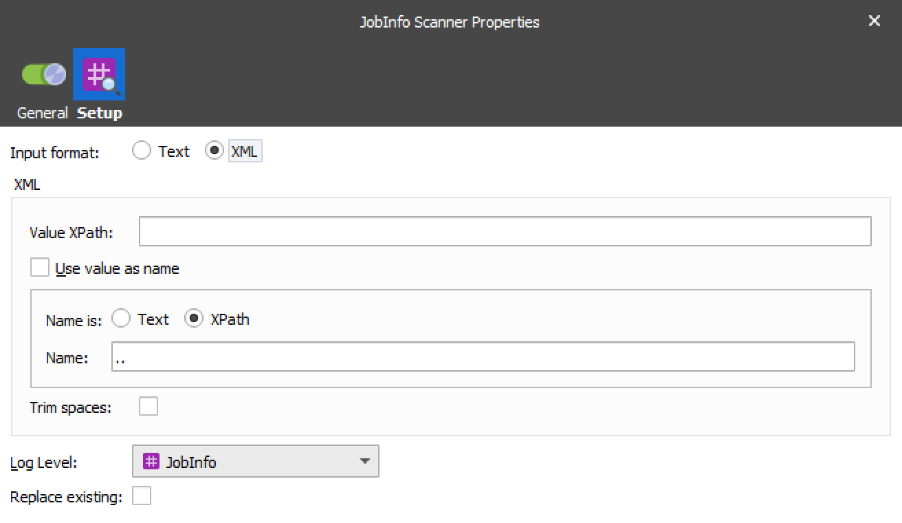
Scan XML data by defining an XPath for value and name. Works similar to the Create JobInfo action in the XML Transformer – see the Lasernet XML Transformer 10 Guide.
The table below provides a brief description of the action properties:
| Property | Description | |
|---|---|---|
| 1 | Value XPath | The XPath value specifies which nodes contain the values for JobInfos. |
| 2 | Name | Specify a JobInfo name. |
| 3 | Use value as name | Select the check box to apply the Value XPath as a JobInfo name. |
| 4 | Replace existing | Select the check box to replace any other JobInfo with the same name. Some JobInfos can contain a list of several values for example, an email distribution list. |
| 5 | Node name is | Text: select the radio button to interpret the value indicated in the Name field as text. XPath: select the radio button to interpret the value indicated in the Name field as an XPath. |
| 6 | Log level | To extract the JobInfos from the document and create them on the current job, you need to specify a category under which the events related to the JobInfo are logged. JobInfo The events related to the JobInfo are logged under the JobInfo category. Debug The events related to the JobInfo are logged under the Debug category. NoLog The events related to the JobInfo are not logged. |