

Applies to: Lasernet Core 11
A JobInfo is a unique and variable information string, which is automatically generated in a module or manually defined by a user when they create a Lasernet Core workflow. JobInfos can be used as keywords and to set up information across various modules. JobInfos have many varied uses; for example, you can use them to store an email address, an archive index, or printer-specific information.
JobInfos can also be very useful for setting up conditions for validating the data stream. Lasernet Core will automatically build up a system list depending on the input module receiver, although user-defined JobInfos can be added as well.
JobInfos are transferred between modules as a job passes through Lasernet Core. This provides the ability to check, print, update, and use current JobInfo values at various stages when processing a job through Lasernet Core. In turn, this ensures the seamless integration of Lasernet Core into a Windows environment.
To fully understand JobInfos, it is useful to first understand what constitutes a job. Think of a job as a package from the post office. It is a box with something in it, which in the case of a Lasernet Core job is the raw data that you want Lasernet Core to process. In this analogy, JobInfos can be thought of as all the various labels that are attached to the package from the post office. One is the address where the package is to be sent, another contains information about where the package originated, and another records that the package was processed by Customs on its way to its destination. All these extra pieces of key information that are attached to the package can be thought of as JobInfos.
As well as containing metadata about the package, JobInfos can also carry metadata about the job itself.
All JobInfos have a Name, which identifies the JobInfo and is used to access the data that it holds. All JobInfos also have a Value.
Because JobInfos are an essential part of a job, it is possible to assign values to them in many different ways and at multiple stages of a job’s processing. When assigning a value to a JobInfo you must specify the name of the JobInfo as well. The value does not have to be text.
Note
The name of a JobInfo is not case-sensitive. The lines below are considered identical.
job.setJobInfo('a jobinfo', 'Some data', true);
job.setJobInfo('A JobInfo', 'Some data', true);
However, the value is case-sensitive. This is important to remember when retrieving values and using them; for example, in comparisons.
JobInfo Naming Rules
Any Unicode character is allowed in a JobInfo name, with the following exceptions:
Control characters (ASCII < 32)
Space ( )
Equal sign (=)
Lasernet Core trims spaces from the start and end of a JobInfo name.
JobInfo Types
Most JobInfos can be represented as text, but sometimes the data type is such that it cannot easily be represented in this way. Internally, Lasernet Core handles all JobInfos (regardless of their type) as binary data. In technical terms, this means that when assigning a text to a JobInfo, Lasernet Core converts it to UTF-8 (a Unicode representation that can be stored byte-wise).
When using JobInfos as text (the most common usage), this does not pose any problems. However, a few situations require special attention. This includes the File Output module, which can embed JobInfos in the JobData. In this instance, it is possible to choose which code page the JobInfo should be converted to before embedding it.
JobInfo Arrays
JobInfo arrays are a way of storing multiple values in a single JobInfo.
For instance, when dealing with invoices, a JobInfo array can be used to store each line-item value from the input data and to create a final sum using a script, as shown below.
function calcTotal()
{
// set variable total value to zero
var totalValue = 0;
// loop through all the JobInfo array elements adding the value of each to a running total (totalValue)
for(i=0;i<=job.getJobInfoCount("LineItemTotal");i++)
{
totalValue += parseFloat(job.getJobInfo("LineItemTotal",i));
}
// send total value back to output
return totalValue;
}
The JobInfo array elements can be accessed in different ways. For example, for the JobInfo array above, called “LineItemTotal”, the third element can be accessed by:
Using a script function such as
job.getJobInfo("LineItemTotal",2)Creating a “fixed text” rearrange of type JobInfo and setting its value to
LineItemTotal[2]
Note
The indexing is zero-based, meaning that the first item of the array is
LineItemTotal[0].
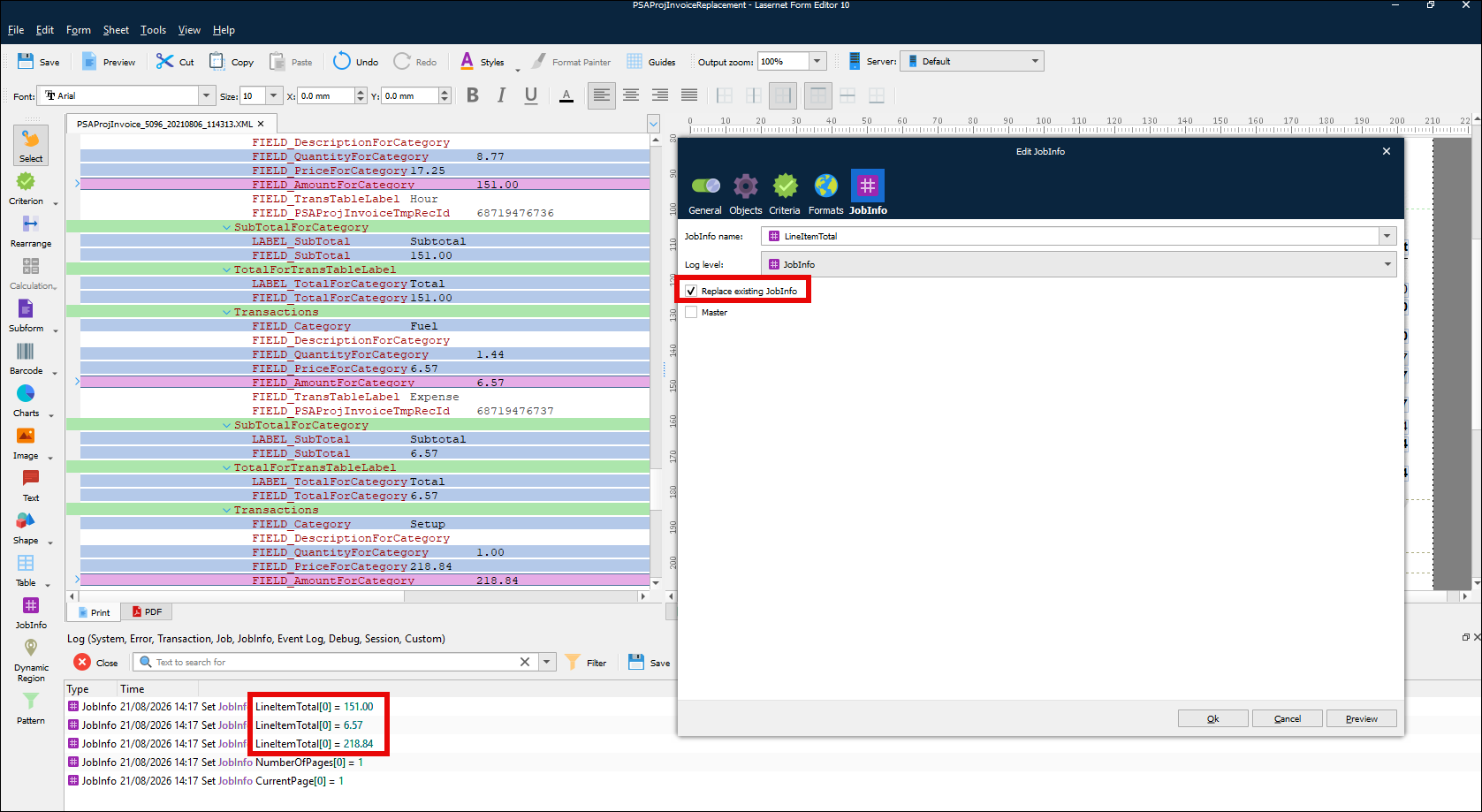
When the Replace existing JobInfo checkbox is selected, it overwrites the first element of the array.
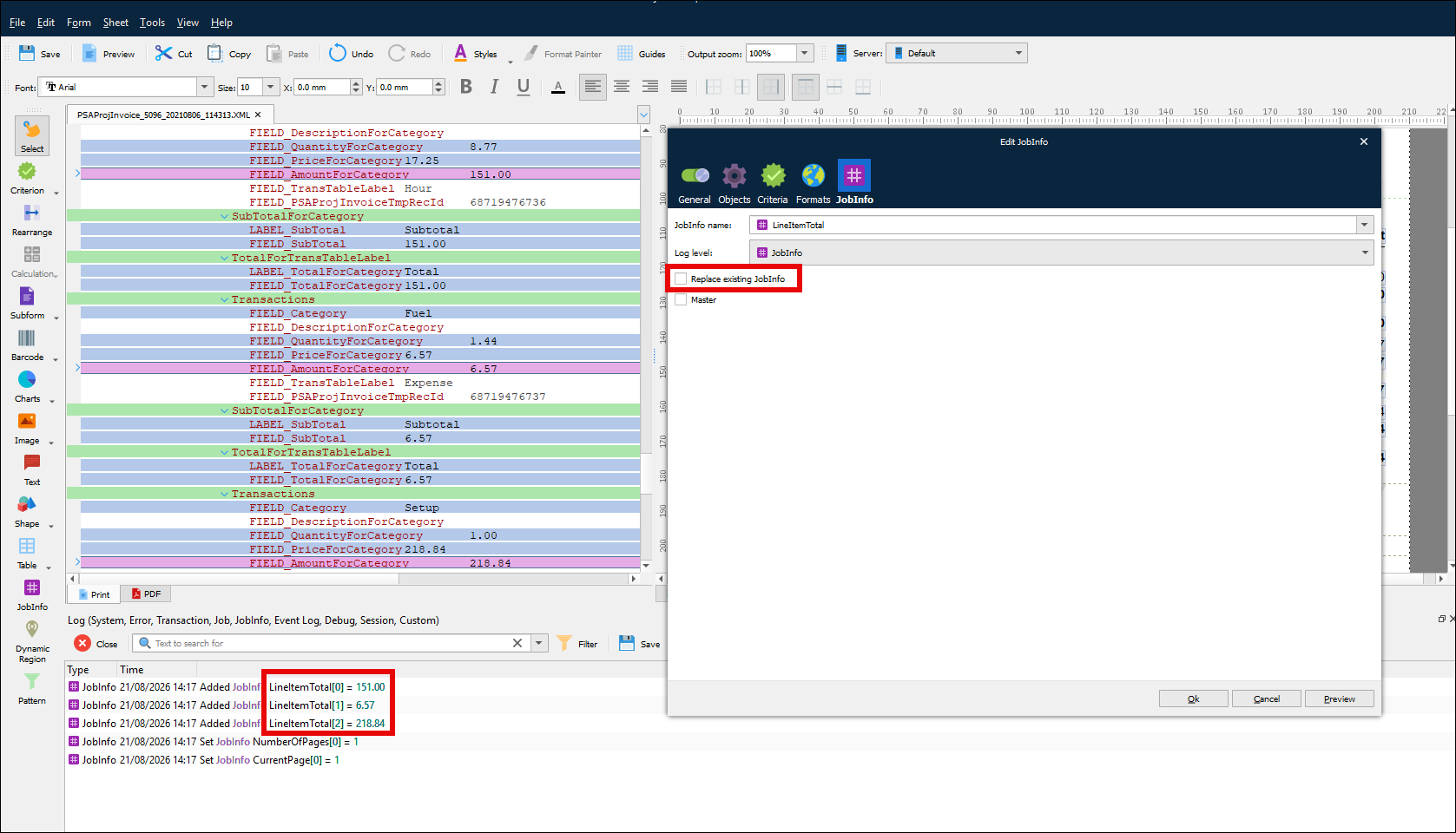
When the Replace existing JobInfo checkbox is unchecked, the array is able to grow up to index [n].
JobInfo Substitution
JobInfo substitution syntax enables you to insert JobInfos in parts of the Lasernet Core configuration that support substitution. For example, if you enter The job came from #InputPort# as the value of a module’s property, Lasernet Core will replace #InputPort# with the value of the InputPort JobInfo. A value can contain multiple JobInfo substitutions: The job came from #InputPort# and was created at #JobTime#
If a JobInfo is a list, you can access a specific value in the list by adding an index number to the substitution: The job came from #Source[0]#
You can also expand the list using a custom delimiter: The job has passed through these modules: #Source{,}#
To use # as a literal character within a value in Lasernet Core (where the value contains multiple # and you want to prevent JobInfo substitution occurring), you can use an escape character: the generic currency symbol – ¤ – (ASCII character 164; shortcut Alt+0164 on the numeric keyboard).
Putting a ¤ before the # instructs Lasernet Core to regard the # as a literal character. To use a ¤ as a literal character, enter two of them: ¤¤
If the value contains only one # character, you do not need to add a ¤ character to escape it.
If the value contains two consecutive # characters (##), they remain in the value.
If the value contains an invalid JobInfo name between two # characters, the text remains in the value. For example, #;# or # # remain in the value.
If the value contains the name of a nonexistent JobInfo between two # characters, the # characters and the text between them are removed because although the JobInfo does not exist, the text is still considered to be a JobInfo substitution. For example, if no JobInfo named “test” exists, and the text contains This is a #test# value, the value becomes This is a value.
In the following examples, |name| means the contents of the JobInfo that has that name.
abc¤###def => abc###def¤#results in a literal#.##remains in the value as##.
abc¤¤#def => abc¤#def¤¤results in a literal¤.A single
#does not require a¤to escape it.
abc¤¤#def# => abc¤|def|¤¤results in a literal¤.#def#is interpreted as JobInfo substitution for the JobInfo named “def”.
JobInfo substitution is not recursive, so if a JobInfo’s value includes another JobInfo’s name, only the outer JobInfo is substituted. For example, if there are two JobInfos (Inner=Value, Outer=#Inner#), entering #Inner# into a Lasernet Core module property that supports JobInfo substitution will yield Value; entering #Outer# will yield #Inner# (which will not be substituted further).
In Lasernet Developer, a hashmark icon indicates where JobInfo substitution is supported for module properties.
Due to historical implementation issues, there may be some places in Lasernet Core where JobInfo substitution does not work.
Characters That Must Be Escaped in JobInfo Names When JobInfo Substitution Is Used
The following characters must be escaped with a preceding escape character ¤ (ASCII character 164; shortcut Alt+0164 on the numeric keyboard) when used in JobInfo substitutions (#JobInfoName# syntax):
Pound/Hash sign (#)
Percent sign (%)
Ampersand (&)
Semi-colon (;)
Less than (<)
Greater than (>)
Apostrophe (')
Quotation mark (")
Currency symbol (¤)
JobData as JobInfo
As previously mentioned, JobInfos are incredibly versatile. This flexibility means that the raw received data that you want Lasernet Core to process (to create the output) is also stored in a JobInfo. By default, this JobInfo is called JobData.
Note
This means that you can change the value of the raw data by using normal substitution expressions as detailed above. Caution should be exercised when using this approach as the substitution is not foolproof, especially when working with a mixture of binary and text data. Whilst results are generally favorable, unexpected output may occur. As such, this function should only be used after careful consideration.
System-Generated JobInfos
These JobInfos are automatically generated by Lasernet Core. This information is generated by specific input modules that receive data.
Dynamic JobInfos give quick and easy access to key information.
JobInfo Name | Description |
|---|---|
JobSize | The size of the Job (in bytes) |
ConfigRevision | The revision of the configuration on a form. When read by Lasernet Developer, the value is |
CurrentTime | The current time as hh:mm:ss.zzz (where zzz is milliseconds) |
CurrentDate | The current date as yyyy-MM-dd |
CurrentSubmoduleID | The name of the module currently processing the Job. |
JobID | A unique ID for the Job. This can change for each submodule that the job passes through. |
JobData | The JobInfo that contains the raw data to process |
PublicID | The JobID of the Job when it was first created. |
CurrentModuleID | The full target URL of the module that is currently handling the Job. |
OriginatingModule | The module that created the Job. This is usually the same as the Lasernet Core workflow’s input module but could also be an instance of the Form Engine that creates and manipulates copies of the job. |
InputPort | The input module that created the first instance of the job. |
JobTime | The time the job was started. |
JobDate | The date the job was started. |
Source | A list of the modules that the job has passed through. |
JobInfo Defined via UI in Modules
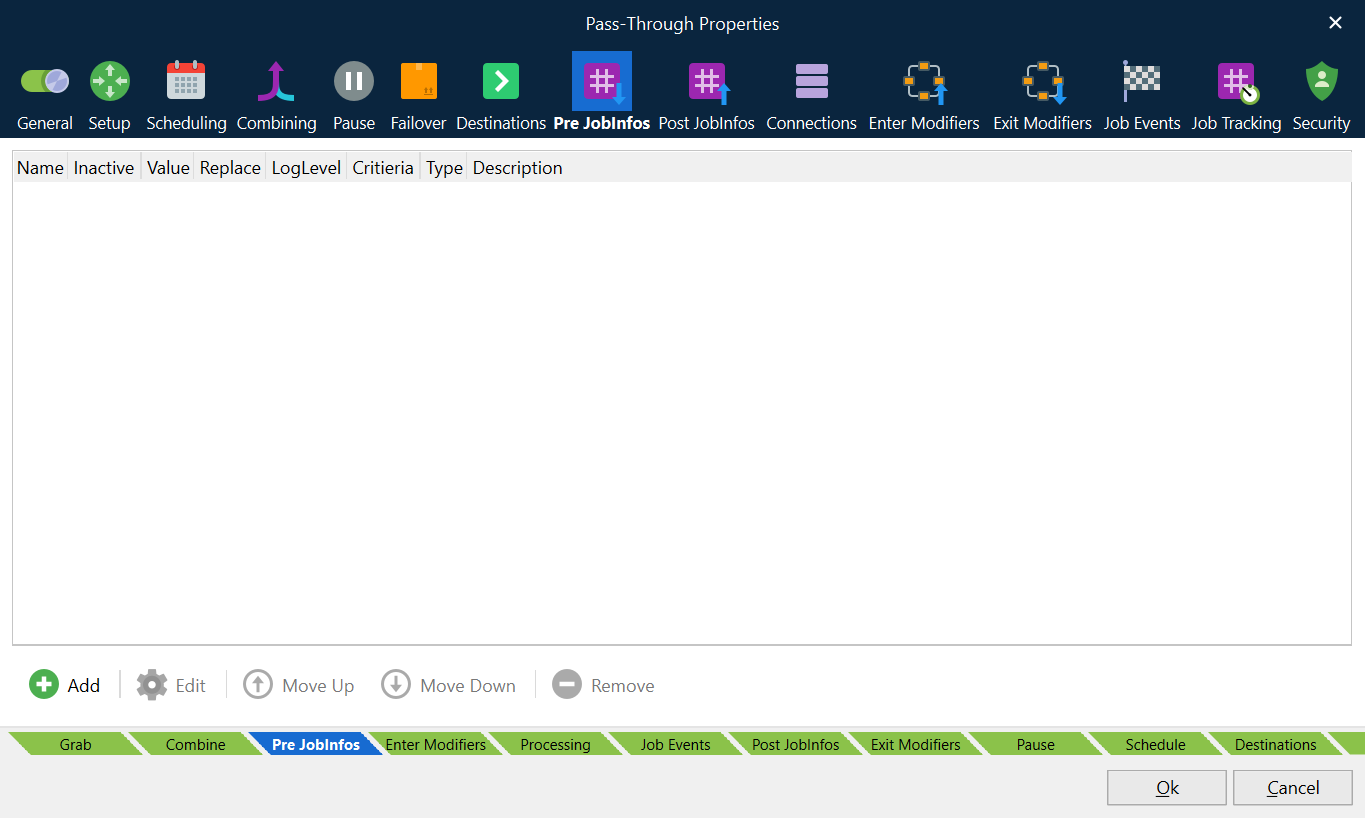
A JobInfo can be defined in any module, at different event types that are called Pre JobInfos and Post JobInfos (depending on the module type). The green tabs at the bottom of the module dialogs illustrate the processing order of jobs.
To set up a JobInfo in a Lasernet Core module, follow these steps:
Click Add.
In the Edit JobInfo window, define the new JobInfo.
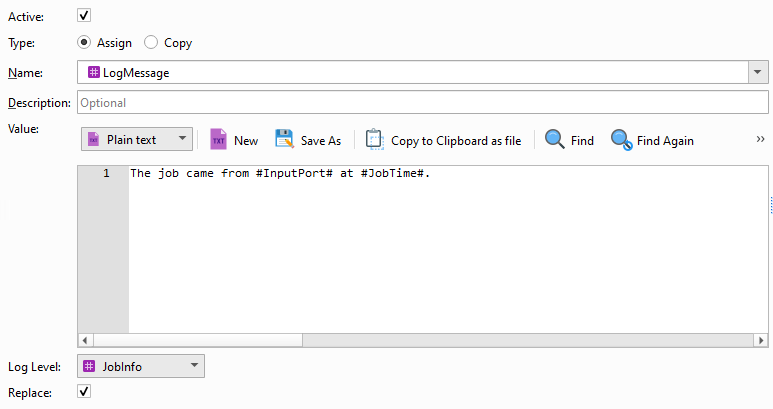
Active: Determines whether the JobInfo is active. If Active is not selected, this JobInfo assignment is defined in the configuration but Lasernet Core will not process it when processing jobs.
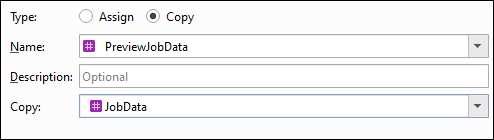
Type: Click Assign to assign a value in text mode. Click Copy to copy a value in binary mode.
Name: Select from a list of the most used pre-defined JobInfos, or enter a name to create a custom-named JobInfo.
Description: Optional description of the JobInfo.
Value (if Type is Assign) or Copy (if Type is Copy): This field is empty by default. However, several JobInfos include a list of typical values to choose from. These are only provided for guidance and do not have to be used.
In Assign mode the value can be set as a mix of a JobInfo and clear text. For example:
In Copy mode, a binary value is copied from one JobInfo to become the value of another JobInfo:
Log Level: Determines which log level includes messages about this JobInfo. You specify which types of log message are included in a Lasernet Core environment’s log when you configure that environment’s logging in Manage.
If you set Log Level to JobInfo in the Edit JobInfo window, logs will contain the JobInfo name and value if the Job Info logging level is selected in Manage.
If you set Log Level to Debug in the Edit JobInfo window, logs will contain the JobInfo name and value if the Debug logging level is selected in Manage.
If you set Log Level to NoLog in the Edit JobInfo window, log messages will not be created.
Replace: If you select Replace, this JobInfo will replace any other JobInfo that has the same name. If Replace is not selected, values are added to an existing JobInfo. Some JobInfos can contain a list of several values; for example, an email distribution list.
Click Ok.
The JobInfo is added to the list. Lasernet Core will create the JobInfo or assign a value to it before the module does its processing (if the JobInfo is defined in the Pre JobInfos list) or after the processing (if the JobInfo is defined in the Post JobInfos list).
The Move up and Move down buttons modify the order in which the JobInfos are defined.
Manually Generated JobInfo in the ERP System
A JobInfo can be declared in any Windows application, such as an ERP system. Type the JobInfo string as pure text. The syntax for manually setting up a JobInfo in a Windows application is:
#JobInfo JobInfoType=JobInfoValue#, for example:
#JobInfo MailTo=john.doe@hotmail.com#
#JobInfo MailTo=john.doe@hotmail.com; jane.doe@hotmail.com#
Comma and semicolon are valid as separator characters for multiple addresses.
The JobInfo text can be defined with any font, size, or typeface and Lasernet Core will still scan the spool job and pick up the keywords.
Master JobInfos
A Master JobInfo works in the same way as a standard JobInfo. However, its value is preserved across sheets.
An example scenario where Master JobInfos are useful is an invoice made up of several sheets. A specific value in the first sheet (Sheet 1) must be included in the third sheet (Sheet 3). A Master JobInfo retrieves this value from the first sheet and uses it in the third sheet.
// Store total value in Master JobInfo (masterTotalValue) from Sheet 1

masterJob.setJobInfo("masterTotalValue", job.getJobInfo("TotalValue"));

// In Sheet 3, use the value stored in Sheet 1
masterJob.getJobInfo("masterTotalValue",0);
Environment Variable Substitution
To substitute environment variables in a value, use % around the environment variable name.
For example, the following scripting code generates a log event that consists of the Lasernet Core server’s processor architecture: Logger.logEvent(Debug, job.substituteJobInfos("%PROCESSOR_ARCHITECTURE%")) results in a log event whose text is AMD64.
JobInfo Reference
The following table describes each JobInfo.
JobInfo Name | Description | |
|---|---|---|
ActiveCodePage | Lasernet Core attempts to keep this JobInfo up to date with the code page of any text currently residing in JobData. For example, UTF-8 or ISO-8859-1. This JobInfo is set by the Code Page Conversion Modifier, the Text Filter Modifier and the Filter Engine. The Code Page Conversion Modifier sets it to the name of the output codec. Since the Text Filter Modifier and the Filter Engine have options for disabling code page conversion, they both check on the value of the ActiveCodePage JobInfo. If it exists, they convert from the codec it suggests to UTF16, filter the data and then convert to the desired output format. If no output format is chosen it defaults to UTF8. The value of ActiveCodePage is then set to the name of the output codec (default UTF8). | |
ActualOutputFilename | The ActualOutputFilename JobInfo is created by the File Output module. The value is set to the name of the output file actually written to disk. The filename includes the entire path. The value could be used in a Data Written Modifier. | |
ArchiveFileName | Contains the name of the archive file. Created by the Compression module if decompress is enabled. | |
Autofill | Discontinued. | |
AutoPaperSource | Set value to "1", "Yes" or "True" to automatically select the paper source in the printer, by detecting the PDF page size, for PDF documents stored in the JobInfo PrintAttachment. Modules: Printer Output, Printer Service | |
AzureServiceBusContentType | Content-type of message contents (see also MimeType). Module: Azure Service Bus Input | |
AzureServiceBusCorrelationId | BrokeredMessage correlation identifier. Modules: Azure Service Bus Input, Azure Service Bus Output | |
AzureServiceBusDeliveryCount | Number of times this message has been delivered. Module: Azure Service Bus Input | |
AzureServiceBusExpiresAtUtc | Date and time in UTC at which the message is set to expire (RFC1123 format). Module: Azure Service Bus Input | |
AzureServiceBusForcePersistence | Sets a value to indicate whether the message is to be persisted to the database immediately instead of being held in memory for a short time. Ignored if message is sent to a non-express queue. Modules: Azure Service Bus Input, Azure Service Bus Output | |
AzureServiceBusLabel | Application specific label. Modules: Azure Service Bus Input, Azure Service Bus Output | |
AzureServiceBusMessageId | Identifier of the message. This is a user-defined value that Service Bus can use to identify duplicate messages. Modules: Azure Service Bus Input, Azure Service Bus Output | |
AzureServiceBusMessagePropertyNames | Array of metadata field names to associate with the message. Modules: Azure Service Bus Input, Azure Service Bus Output | |
AzureServiceBusMessagePropertyValues | Array of metadata field values to associate with the message. Modules: Azure Service Bus Input, Azure Service Bus Output | |
AzureServiceBusPartitionKey | Partition key for sending a transactional message to a queue that is not session-aware. Modules: Azure Service Bus Input, Azure Service Bus Output | |
AzureServiceBusQueue | The queue name for where the message was received. Module: Azure Service Bus Input | |
AzureServiceBusReplyTo | The address of the queue to reply to. Modules: Azure Service Bus Input, Azure Service Bus Output | |
AzureServiceBusReplyToSessionId | The session identifier to reply to. Modules: Azure Service Bus Input, Azure Service Bus Output | |
AzureServiceBusScheduledEnqueueTimeUtc | The date and time in UTC at which the message will be enqueued (RFC1123 format). Modules: Azure Service Bus, Azure Service Bus Output | |
AzureServiceBusSequenceNumber | The unique number assigned to this message. Module: Azure Service Bus Input | |
AzureServiceBusSessionId | The session identifier of the message. Modules: Azure Service Bus Input, Azure Service Bus Output | |
AzureServiceBusSubscription | The subscription of the message. Module: Azure Service Bus Input | |
AzureServiceBusTimeToLive | The messages time to live value in seconds. This is the duration after which the message expires, starting from when the message is sent to the Service Bus. Modules: Azure Service Bus Input, Azure Service Bus Output | |
AzureServiceBusTo | The send to address. Modules: Azure Service Bus Input, Azure Service Bus Output | |
AzureServiceBusTopic | The topic of the message. Module: Azure Service Bus Input | |
AzureServiceBusViaPartitionKey | Partition key value when a transaction is to be used to send messages via a transfer queue. Modules: Azure Service Bus Input, Azure Service Bus Output | |
AzureStorageMessageId | Unique ID of the message. Module: Azure Storage Queue Input | |
AzureStorageMessageDequeueCount | Dequeue count indicating the number of times the message has been retrieved from the queue. Module: Azure Storage Queue Input | |
AzureStorageMessagePopReceipt | Pop receipt of the message. Module: Azure Storage Queue Input | |
CleanJobInfos | Used by the Database Command. If set to 1, JobInfo Substitution will not occur on the JobInfos whose assigned values are returned from the database. If set to anything else they will be substituted. | |
ClientID | ClientID is used together with PreviewExtension to give the client further information. | |
ClientUserName | Discontinued. | |
ColorMode | Set the ColorMode to Default, Monochrome or Color for any printer device. The JobInfo will at runtime overrule the Color Mode defined in a Printer Profile. Modules: EMF2RAW, Printer Output, Printer Service Values: Monochrome; Color | |
Copies | Supported by Printer Output and Printer Service to control the number of printed copies. | |
CompressionLevel | The higher the value, the smaller is the ZIP file (0: No compression, 9: Maximum). Higher values take a longer time, but should not be set lower unless a real performance problem exists. The JobInfo will at runtime overrule the Compression Level defined in the Compression Module. | |
ConfigRevision | Contains the revision number of the configuration or 'Workspace'. | |
ConfigurationPath | Full path to the run-time configuration library. Module: Any | |
Copies | Set Copies to control number of printed copies (1 or higher). The JobInfo will at runtime overrule the setting for Copies defined in a Printer Profile Note: The values can be depended on language settings in printer driver. Module: Printer Output Values: 1; 2; 3; 4; 5 | |
CurrentDate | The CurrentDate JobInfo is always available. It contains the current date in the format | |
CurrentID | Set on JobEvent jobs and specifies the JobID of the job that triggered the JobEvent notification. Module: Any | |
CurrentModuleID | The CurrentModuleID JobInfo contains the full path to the module in which the job currently resides. | |
CurrentPage | The CurrentPage JobInfo is set in the Form Engine when the analysis has finished fitting text to the pages and has started running scripts on rearranges. It is set to the page number on which the script for rearranges is currently being run. | |
CurrentSubmoduleID | The name of the module that currently is processing the job. Module: Any | |
CurrentTime | The CurrentTime JobInfo is always available. It contains the current time in the format | |
DataFormat | The DataFormat JobInfo is used in the following ways:
DataFormat is also used by EMF2RAW. DataFormat can be set by user to control how to open the Print Output Module for printing a document. If DataFormat is set to EMF (Default) the module will open the printer device and spool the EMF format via the Windows printer driver. If DataFormat is set to RAW the module will not open the device, but simple copy the job directly to printer as a raw file (ensure that your data format contains a valid printer format supported by your printer). | |
DataParameters | Created by the Printer Input module. Contains parameters from the print processor which handled the job. | |
DataPrinterName | Created by the Printer Input module. Contains the name of the printer that printed the job. | |
DataStartTime | Created by the Printer Input module. | |
DataTotalPages | Created by the Printer Input module. Contains the total number of pages in the print job. May be zero if the job does not contain any page delimiting information. | |
DataUntilTime | Created by the Printer Input module. | |
Default, DefaultPrinter | The Default or DefaultPrinter JobInfos are options that can be set by several input modules. This value can be used to store a destination that can be used later, for example, in the form engine. This is convenient for pairing input and output modules but letting the job pass through the same engines somewhere in the middle. | |
Destination | Will be set each time a job is passed to another engine or an output module. It is set to the name of the receiver. | |
DetailInformation | Created by various modules. It is primarily used by the Lasernet Monitor to show module specific information about the job. It is possible for the user to add information to this JobInfo but be aware that it may be overwritten at any time. | |
DocName | Created by the Printer Input module. It contains the name of the print job as set by the Windows Print Spooler. If it is empty the default value set by Printer Input module is Unnamed – Lasernet document. DocName also is supported in the Printer Output, Printer Service modules to set name of print job for the Windows printer queue. | |
DocumentName | Discontinued. | |
DropboxURL | URL to publicly shared file. The JobInfo is only set when Sharing publicly is enabled in the GUI. | |
DriverName | The name of printer driver as set by the Windows Print Spooler, when the document is sent direct to the Printer Input module. | |
DuplexMode | Sets a value that determines whether a job is printed on both sides (if the printer supports this feature). Valid values are:
Modules: EMF2RAW, Printer Output and Printer Service. | |
Extension | Contains the extension of the file, e.g. '.txt', which is received by the following modules: Azure Storage input, Compression, Exchange, File Input, FTP, and Mail Input. When saving paused, scheduled, succeeded or archiving documents in the database used by the Lasernet Job Engine, the Extension JobInfo must be set. The value is used to associate the document with the proper application used to view the document. The extension must include the dot (.) in front. | |
ExitCode | Generated by the Process Modifier. It contains the actual exit code of the external application. | |
FailingPort | The FailingPort JobInfo is set when a job is failed. | |
FailingSubmodule | The FailingSubmodule JobInfo is set when a job is failed. It is set to the name of the submodule in which the job fails. | |
FileCreated | Set by File Input module to the time the file was created. The time is in the format | |
FileComment | Contains a comment embedded in the zip archive if available. Created by the Compression module if decompress is enabled. | |
FileID | ID of uploaded file returned after upload to OneDrive via the output module. | |
FileLastModified | Set by File Input or Compression module to the last modified time of the incoming file (for Compression module file(s) inside the archive). The time is in the format | |
FileLastRead | Set by File Input module to the last read time of the file. The date is in the format | |
Filename | The Filename JobInfo is created by the File Input module. The value is set to the filename (without the path – see Filepath) of the file which is picked up by File Input module. Also set by the Azure Storage Input and FTP modules to the name of the file (without URL) retrieved from the server. Created by the Compression Engine and contains the name for each stored file in the ZIP or RAR archive. Filename is used by the File Output module to specify where to save the job data. Filename is also used by the Mail Output module to set the filename of optional attachments. Filename is also used by the PDM Output module to specify the file to be archived. | |
FileNameWithoutExt | The FilenameWithoutExt JobInfo is created by the File Input module. The value is set to the name of the file which is picked up by File Input module, excluding the path, extension and the dot (.). If the filename picked up is called myfile.txt then FilenameWithoutExt is set to myfile. Modules: Azure Storage, File Input, FTP, HTTP, One Drive, Compression | |
FilePath | The FilePath JobInfo is created by the File Input module. The value is set to the path (excluding filename) where the file is picked up by the File Input module. The Compression module will set the JobInfo for each file embedded in the zip archive if available. Created if decompress is enabled. | |
FileRelativePath | The relative path to the root of the file is created by the File Input module. | |
FileRootPath | The path to the root of the file without filename is created by the File Input module. | |
FileSize | The FileSize JobInfo is created by the File Input module. The value is set to the size of the file which is picked up by the File Input module. If using the JobInfo Scanner feature, the FileSize JobInfo is not set as the actual data processed may be in one or more files. Instead, use the JobSize JobInfo which is set to the size (in bytes) of the job actually being processed Set by the FTP and Mail Input modules to the size of the file retrieved from the server. Also set by the Azure Storage Input module. | |
FileSizeCompressed | Contains the file size of the compressed archive file. Created by the Compression module if decompress is enabled. | |
FirstPageInJob | The value will be set to 1 (boolean) when the Form module processes the first page in forms running in page to job mode. Otherwise, it is set to 0 (zero). | |
FirstPageInSpoolJob | The value will be set to 1 (boolean) when the Form module processes the first page in a spool job. | |
FJobDate | The FJobDate JobInfo is always available. It contains the date on which the job was created. The date is in the format | |
FJobTime | The FJobTime JobInfo is always available. It contains the time at which the job was created. The time is in the format | |
FormName | FormName is used by EMF2RAW and Printer Output module to set a paper format supported by the printer driver. Examples of valid values are: A3, A4, Letter and Legal. Check your Windows printer driver for more valid values. The JobInfo will at runtime overrule the Formname defined in a Printer Profile. | |
Formtype | Set Formtype to define a custom queue name for paused, scheduled or failed jobs. Name of queue will figure as a child node to the module for where the job is being saved. If Formtype is not defined, for a job, an empty name is used as the queue name. | |
FQDN | Discontinued. | |
FTPStatusCode | FTP server return code. 100 series: The requested action is being initiated, expect another reply before proceeding with a new command. 200 series: The requested action has been successfully completed. 300 series: The command has been accepted, but the requested action is on hold, pending receipt of further information. 400 series: The command was not accepted and the requested action did not take place, but the error condition is temporary and the action may be requested again. 500 series: Syntax error, command unrecognized and the requested action did not take place. This may include errors such as command line too long. 600 series: Replies regarding confidentiality and integrity. 10000 series: Common Winsock Error Codes. Module:FTP Output | |
FTPStatusText | FTP server return message. Module:FTP Output | |
FullFilename | The FullFilename JobInfo is created by the File Input module, Azure Storage Input module, and Compression engine. The value is set to the full filename – including path, filename and extension (see Filepath and Filename) of the file which is picked up by the File Input module. The Compression module will only create the JobInfo if decompress is enabled and will be set to file path/name for each file embedded in the zip archive. | |
GrabWidth | The GrabWidth JobInfo is set by the Form Engine. The value is set to the maximum width of the grab being handled by the recognized form. | |
HTTPContentType | HTTP Content type for the message. Module: HTTP Modifier/Output | |
HTTPFieldName | Used when doing multipart requests to specify a field name for the part. Module: HTTP Output | |
HTTPStatusCode | The HTTP status code received by the HTTP modifier or output module. | |
HTTPStatusText | The HTTP status text received by the HTTP modifier or output module. | |
HTTPHeaderFieldName HTTPHeaderFieldValue | A pair of JobInfo lists that contain the names and values of the HTTP headers received by the HTTP modifier or output module. Each header’s name is an item in HTTPHeaderFieldName. That header’s value is the corresponding item in HTTPHeaderFieldValue. For example, if HTTPHeaderFieldName[5] = Content-Length, the value of the Content-Length header (in this example, 28) is in HTTPHeaderFieldValue[5]. Each header is also stored in a dedicated JobInfo (see HTTPHeader* below). | |
HTTPHeader* | Each response header received by the HTTP modifier or output module is stored in a dedicated JobInfo named HTTPHeader<header name>. For example, if the value of the Content-Length response header is 28, Lasernet Core creates a HTTPHeaderContent-Length JobInfo and gives it the value 28. | |
InputBody | Set by the Mail Input module to the body of the mail, if any, of an incoming email. | |
InputBodyHTML | The HTML contents of the mail body, if any, of an incoming email. | |
InputColorMode | The ColorMode as set by the Lasernet EMF driver. The value is always set to: color Modules: Printer Input Values: Monochrome; Color | |
InputCopies | The number of copies as set by the Lasernet EMF driver. Note: Use the JobInfo NumInputPages to detect total number of physical pages in the EMF spool job. Module: Printer Input | |
InputDefaultSource | Set by the Print Input module to the value of the selected default source for the incoming document. If available, the value is presented as a number. | |
InputDuplexMode | Set by the Print Input module to the value of the selected duplex mode for the incoming document. Known values are Simplex, Horizontal and Vertical. | |
InputFilename | Set by the Mail Input and Outlook Mail input modules to the filename of the attachment. | |
InputFormName | The paper form name for the incoming print document as created by the Lasernet EMF driver. Paper form name is a text containing the form name (like: A4 Paper). The value is not set by all applications. Modules: Printer Input | |
InputFromEmail | Set by the Mail Input module to the email address of the sender. | |
InputFromName | Set by the Mail Input module to the display name of the sender. | |
InputHeaderFieldName InputHeaderFieldValue | A pair of JobInfo lists that contain the names and values of the custom (X- or x- prefixed) mail headers in emails received by the Mail Input and Outlook Mail input module. Each header’s name is an item in InputHeaderFieldName. That header’s value is the corresponding item in InputHeaderFieldValue. For example, if InputHeaderFieldName[5] = x-Invoice-Number, the value of the x-Invoice-Number header (in this example, 13465) is in InputHeaderFieldValue [5]. | |
InputLongFilename | Set by the Mail Input module to the long filename of the attachment. Also set by the FTP Input module to the full name of the file – URL + filename. | |
InputMessageID | Set by the Mail Input module to an unique identifier for the incoming email | |
InputMimeType | Set by the Mail Input module to the MIME type of the attachment. | |
InputOrientation | Set by the Printer Input module as the Paper orientation for the incoming print document as created by the Lasernet Core EMF driver. | |
InputPaperHeight | Set by the Printer Input module as the length of the paper for the incoming print document in tenths of a millimetre as created by the Lasernet Core EMF driver. Margin size is not included. Example: 2970 | |
InputPaperSize | Set by the Printer Input module as the paper size for the incoming print document as created by the Lasernet Core EMF driver. Paper size is represented as a unique number (like A4 = 9) | |
InputPaperWidth | Set by the Printer Input module as the width of the paper for the incoming print document in tenths of a millimetre as created by the Lasernet Core EMF driver. Margin size is not included. Example: 2100 | |
InputPort | The InputPort JobInfo contains the full path to the module in which the job was originally created. That is usually the name of the Input module. The Form Engine uses the InputPort JobInfo in Page To Job mode. It is used for grouping the pages from a Job into the right queues. In theory you could manipulate the InputPort JobInfo to force pages into the same or different queues. | |
InputPrintQuality | Set by the Printer Input module as the print quality for the incoming print document as created by the Lasernet Core EMF driver. Value always contains a number set to 1. | |
InputScale | Set by the Printer Input module as the print quality for the incoming print document as created by the Lasernet Core EMF driver. Value always contains a number set to 100. | |
InputSubject | Set by the Mail Input module to the subject of the mail. | |
InTempFile | Created by the Process Modifier. Contains the name of the temporary file (if any) created with data from the external application. | |
JobDate | The JobDate JobInfo is always available. It contains the date on which the job was created. The date is in the format A filename-friendly version of this JobInfo is FJobDate. | |
JobID | The JobID JobInfo contains a fully unique ID for the job. The format of the JobID may change between Lasernet Core versions, so do not rely on it. | |
JobSize | The JobSize JobInfo is always available. It contains the size of the primary JobData (in bytes). Usually stored in the JobData JobInfo. | |
JobTime | The JobTime JobInfo is always available. It contains the time at which the job was created. The time is in the format A filename-friendly version of this JobInfo is FJobTime. | |
LastPageInJob | The value will be set to 1 (boolean) when the Form module processes the last page in forms running in page to job mode. Otherwise, it is set to 0 (zero). | |
LastPageInSpoolJob | Contains a Boolean that is set to true (1) by the Form module when last page in spool job is being processed. Otherwise, it is set to 0 (zero). | |
MachineName | Created by Printer Input. The name of the machine on which the job was printed from. Example of machine name formats: \\Lasernet (Printer Input). | |
MailAttachment | The Outlook Mail and Mail Output modules use the MailAttachment JobInfo array to add attachments to the email being sent. One attachment is added for each entry in this array. The following JobInfos are used together with this JobInfo:
| |
MailAttachmentFilename | The Outlook Mail and Mail Output modules use the MailAttachmentFilename JobInfo array to name the attachments added to the email being sent. Example: attachment.txt; attachment.pdf; attachment.pcl The following JobInfos are used together with this JobInfo:
| |
MailAttachmentInline | Can be set to 'true', 'yes', '1' and the content of MailAttachment will be considered to be inline/relative in/to the mailbody. Data must be put in the MailAttachment JobInfo. MailAttachmentMimeType is not used in this case (at least not for SMTP). Example: Note: Replace {} with XML open and closing tags Modules: Mail Output (SMTP), Outlook Mail | |
MailAttachmentMimeEncoding | The Outlook Mail and Mail Output modules use the MailAttachmentMimeEncoding JobInfo array to set the MIME encoding of the attachments added to the email being sent. If this JobInfo does not contain a corresponding entry for a MailAttachment entry, a default of base64 is used. The following JobInfos are used together with this JobInfo:
| |
MailAttachmentMimeType | The Outlook Mail and Mail Output modules use the MailAttachmentMimeType JobInfo array to set the mime type of the attachments added to the email being sent. If this JobInfo does not contain a corresponding entry for a MailAttachment entry, a default of text/plain is used. Example: text/plain; application/pdf; application/pcl The following JobInfos are used together with this JobInfo:
| |
MailBCC | The Outlook Mail and Mail Output modules use the MailBCC JobInfo to set the bcc mail recipient. This is typically the actual email address in the standard internet format: name@domain.com. Comma and semicolon are valid as separator characters if MailBCC contains multiple addresses. Example: test@lasernetgroup.com | |
MailBCCName | The Outlook Mail and Mail Output modules use the MailBCCName JobInfo to set the Display Name of the bcc mail recipient. | |
MailBody | The Outlook Mail and Mail Output modules use the MailBody JobInfo to set the actual contents of the mail. Example: This is the body of the mail. If you want to send HTML email, use MailBodyHTML instead. The contents of MailBody is overwritten by the contents of MailBodyHTML. | |
MailBodyHTML | The Outlook Mail and Mail Output modules use the MailBodyHTML JobInfo to set the actual contents of the mail when sending HTML email. Example: <html><body><p>This is the body of the mail.</p></body></html> A standard text email should use the MailBody JobInfo instead. The contents of MailBodyHTML overwrite the contents of MailBody | |
MailBodyMimeType | Discontinued. | |
MailCC | The Outlook Mail and Mail Output Modules use the MailCC JobInfo to set the cc mail recipient. This is typically the actual email address in the standard internet format: name@domain.com. Comma and semicolon are valid as separator characters if MailCC contains multiple addresses. Example: test@lasernetgroup.com | |
MailCCName | The Outlook Mail and Mail Output modules use the MailCCName JobInfo to set the Display Name of the cc mail recipient e.g., John Doe. | |
MailDraft | Use the MailDraft JobInfo as a Boolean to overwrite the setting "Create draft without sending it" in the Outlook Mail Output module.
| |
MailFolder | The mail folder from where the email was retrieved. The Mail Input and Outlook Mail modules use the MailFolder JobInfo. | |
MailFrom | The Outlook Mail and Mail Output modules use the MailFrom JobInfo to set the address of the mail sender. This is typically the actual email address in the standard internet format: name@domain.com. Example: test@lasernetgroup.com | |
MailFromName | The Outlook Mail and Mail Output modules use the MailFromName JobInfo to set the Display Name of the sender. The JobInfo will at runtime overrule the From e-mail name value defined in the module. | |
MailImportance | The Outlook Mail module uses this JobInfo.
The JobInfo will at runtime overrule the Importance value in the module. | |
MailJobData | The Outlook Mail and Mail Output modules use the MailJobData as a Boolean to overwrite the module’s Do not insert job data in an attachment setting.
| |
MailMessageID | A unique identifier created after a successful delivery to the SMTP server via the Outlook Mail and Mail Output modules. If a connection cannot be established the JobInfo will not be created. | |
MailReplyTo | Responses to messages you send with an alternative MailReplyTo address, via the Outlook Mail and Mail Output modules, are delivered to that address. Your MailTo address will still appear in the From field. Example: test@lasernetgroup.com | |
MailRequestDeliveryReceipt | The Outlook Mail module uses this JobInfo. At runtime, it will overrule the request delivery receipt selection in the module settings. When set to true, a receipt is returned upon successful delivery to the recipient’s mailbox.
| |
MailRequestReadReceipt | The Outlook Mail module uses this JobInfo. At runtime, it will overrule the request delivery receipt selection in the module settings. When set to true, the receiver of the mail is asked to send back a receipt upon receiving the mail.
| |
MailSubject | The Outlook Mail and Mail Output modules use the MailSubject JobInfo to set the subject line of the mail. | |
MailTo | The Outlook Mail and Mail Output modules use the MailTo JobInfo to set the mail recipient. This is typically the actual email address in the standard internet format: name@domain.com. Comma and semicolon are valid as separator characters if MailTo contains multiple addresses. Example: test@lasernetgroup.com | |
MailToName | The Outlook Mail and Mail Output modules use the MailToName JobInfo to set the Display Name of the mail recipient. Example: John Doe. | |
MatchedMask | The MatchedMask JobInfo is created by the File and FTP Input modules. The value is set to the mask used when a file is picked up by the module e.g., ‘*.txt’. | |
MD5FileName | Used to override the default name of the pre-uploaded checksum file. The ".md5" file extension indicates a checksum file containing 128-bit MD5 hashes in md5sum format. Module: FTP Output | |
MetaQueue | Discontinued. | |
MimeEncoding | MimeEncoding is used by the Mail Output modules to set the MimeEncoding of an optional attachment. | |
MimeType | The Mail Output module uses the MimeType JobInfo to set the mime type of an optional attachment. This is required if the mail reader cannot associate the attached file with an application for reading the attached file. See JobInfos for PrintMimeType, PrintAttachmentMimeType and MailAttachmentMimeType for additional features. Example: text/plain; text/html; application/pdf. Modules: Azure Service Bus Input, Azure Service Bus Output, HTTP Output, Mail Output, Outlook Mail Output | |
ModifierErrorMessage | Please see ModifierFailed. | |
ModifierFailed | An error can be tracked as a failed modifier and will set the JobInfo ModifierFailed to 1 (true). The JobInfo ModifierErrorMessage is set to the (internal) error message that caused the failure. For a list of modifiers, it is possible to add a criterion that will only run them if ModifierFailed is not 1 (true). | |
MSMQLabel | Label of the MSMQ message. | |
NotifyName | Created by the Printer Input module. Contains the name of the user that should be notified about print progress. | |
NumberOfPages | The NumberOfPages JobInfo is set in the Form Engine when the analysis has finished fitting the text to the page(s). It is set to the number of pages that the analysis has created. | |
NumInputPages | Total number of physical pages in the EMF spool job as received by the Lasernet Core EMF driver on the Printer Input module. | |
OCRAutoCapture | If OCRAutoCapture is equal 1 (true) the AutoCapture process was running in the OCR Engine and has created a temporary OCR Form. To differ from OCRMatch it will be true in both standard and AutoCapture OCR Forms. | |
OCRMatch | If OCRMatch is equal to 0 (false) the job is not recognized by an OCR Form in the OCR Engine. | |
OCRValidated | If OCRValidated is equal to 0 (false) the job is not validated successfully after being processed by the OCR Engine. | |
OffsetX | The OffsetX JobInfo is set by the Printer Input module. It contains the offset of the EMF print (in 1/10th mm) from the side of the page. | |
OffsetY | The OffsetY JobInfo is set by the Printer Input module. It contains the offset of the EMF print (in 1/10th mm) from the top of the page. | |
Orientation | Manage the orientation of the paper in EMF2RAW and Printer Output modules. Valid values are Portrait or Landscape. | |
OneDriveSharePublicly | Set the OneDriveSharePublicly JobInfo as a Boolean value to overwrite the setting for the Share publicly property. | |
OneDriveURL | URL to the publicly shared file. URL is returned after upload. The JobInfo is only set when Share publicly is enabled for the module. | |
OneDriveURLExpiration | This OneDriveURLExpiration JobInfo overwrites the offset of the Shared Link Expiration options defined in the OneDrive module. An expiration time for a shared document must be defined in the format | |
Orientation | The orientation of the paper. Example of values are Portrait or Landscape. Supported by EMF2RAW, Printer Output and Printer Service modules. Values: Default, Portrait, Landscape | |
OriginatingJobID | Set on Job Event jobs and specifies the JobID of the originating job (or jobs) tracked and used to generate the current job that triggered the Job Event notification. | |
OriginatingModule | The OriginatingModule JobInfo contains the full path to the module in which the job was originally created. This is usually the an input module’s name but could also be an instance of the Overlay or Form engine that creates copies of jobs and manipulates them. | |
OutTempFilename | Created by the Process Modifier. Contains the name of the temporary file (if any) created with data from the external application. | |
PageSeparators | The PageSeparators JobInfo is created by the File Input module. It matches the value of the page separators entered in the setup when using the JobInfo Scanner feature. | |
PageWidth | The PageWidth JobInfo is set by the Form Engine. The value is set to the maximum width of the page currently being processed. | |
PagesInSpoolJob | Number of input pages in the spool job as detected by the Form module when running in Text input mode. | |
PagesCombined | The PagesCombined JobInfo is set by the Form Engine. The value is set to the number of pages in the whole job being handled by the form. This is usually only relevant in connection with Page to Job forms. | |
PaperHeight | For printer devices only, overrides the length of the paper specified in the printer profile or printer driver settting for custom paper size. Length is in tenths of a millimeter. Supported by EMF2RAW, Printer Output and Printer Service modules. | |
PaperSource | PaperSource selects the Paper Source in the printer. The value must correspond to a paper source available for the printer. Example of values are: Auto Cassette, Upper Bin, Lower Bin. Note: Special care has to be taken into account when handling the Paper Source JobInfo, because the displayed names are localized. This means that they are written in the language set by the regional settings and the printer driver. When specifying the paper source in a JobInfo the value must match the language used in the regional settings/printer driver. This can become a problem in environments where mixed languages are used. This limitation is only specific to JobInfos, not if a paper source is selected in a printer profile dialog. Modules: EMF2RAW, Printer Output, and Printer Service modules. | |
PaperWidth | For printer devices only, overrides the width of the paper specified in the printer profile or printer driver settting for custom paper size. Width is in tenths of a millimeter. Supported by EMF2RAW, Printer Output and Printer Service modules. | |
PDMATT | Specifies only metadata is being sent. Possible values are “Yes” and “No”. | |
PDFAuthor | Content (if any) of the Author field in the PDF. Module: PDF Extract | |
PDFCompany | Content (if any) of the Company field in the PDF. Module: PDF Extract | |
PDFCreationDate | The Creation Date of the PDF. Module: PDF Extract | |
PDFCreator | Content (if any) of the Creator field in the PDF. Module: PDF Extract | |
PDFDecrypted | Result of decryption check in the PDF Security Module. 1 if successfully decrypted, o (zero) if unsuccessfully decrypted. | |
PDFEmbedAdditionalMetadataElement | Used by the PDF module and allows you to embed any number of additional XML metadata elements in the PDF by creating an array. Each entry must be one or more valid | |
PDFEmbedCreateDate | The creation date of the embedded file array. Module: PDF Extract | |
PDFEmbedData | Contents of the embedded file array. Module: PDF and PDF Extract | |
PDFEmbedDescription | Used by the PDF module. This JobInfo contains a plain text description of the embedded file. The field is optional. | |
PDFEmbedFilename | Used by the PDF module. Defines the name of the embedded file inside the PDF. | |
PDFEmbedModDate | The modification date of the embedded file array. Module: PDF Extract | |
PDFEmbedPDFAExtensionSchema | Used by the PDF module for PDF/A Extension Schemas. Any number of schemas can be embedded by creating an array. Each entry must be one or more valid | |
PDFEmbedRelationship | Used by the PDF module. This field must be set to either Source, Data, Alternative or Supplement: Source Data Alternative Supplement If no PDFEmbedRelationship is defined, or it is set to an invalid value, this will default to Supplement. | |
PDFEmbedSubType | Used by the PDF module. This JobInfo must contain the MIME type of the embedded file. If not specified it will default to application/octet-stream. | |
PDFFilename | Defines the name of the embedded file inside the PDF. Module: PDF | |
PDFKeywords | Content (if any) of the Keywords field in the PDF. Module: PDF Extract | |
PDFMetadata | Content (if any) of the XMP metadata block in the PDF. Module: PDF Extract | |
PDFModificationDate | The Modification Date of the PDF. Module: PDF Extract | |
PDFOwnerPassword | Used by the PDF Security module to set the owner password for an encrypted PDF file. The value will overwrite the defined owner password in the PDF Security module at runtime. Opening the PDF using the owner password will override the defined restrictions. You will also be able to change the operations allowed by the recipient. If the user password and the owner password are the same, the user password will have highest priority. This means you will not be able to circumvent the restrictions defined by the document permissions. Encryption is not allowed when working with PDF/A (ISO 19005-1-2005). | |
PDFProducer | Content (if any) of the Producer field in the PDF. Module: PDF Extract | |
PDFSignatureValid | Result of validation in the PDF Security Module. 1 if valid, 0 (zero) if not valid. | |
PDFSigned | Result of signing check in the PDF Security Module. 1 if signed, 0 (zero) if not signed. | |
PDFSubject | Content (if any) of the Subject field in the PDF. | |
PDFTitle | Content (if any) of the Title field in the PDF. | |
PDFUserPassword | Used by the PDF Security module to set the user password for an encrypted PDF file. Value will overwrite the defined user password in the PDF Security module at runtime. The user password is the password that must be supplied to the recipient of the PDF. When opening the PDF using the user password, the restrictions defined by the document permissions will be in effect. If the user password and the owner password are the same, the user password will have highest priority. This means you will not be able to circumvent the restrictions defined by the document permissions. Encryption is not allowed when working with PDF/A (ISO 19005-1-2005). | |
PDMCUK | Unique customer identification. | |
PDMDFMT | Datetime format. | |
PDMDKEY1-15 | Up to 15 datetime keys can be specified. The format is defined in the module. | |
PDMDOC | Name of the document definition. | |
PDMLINE | JobInfos starting with PDMLINE are read as extended keys. Extended keys are setup in the archive and the data type must be used accordingly. An example of an extended key: PDMLINEaccountnumber=12345 | |
PDMNKEY1-15 | Up to 15 numeric keys can be specified. The format is defined in the module. | |
PDMSKEY1-25 | Up to 25 string keys can be specified. | |
PDMUPD | Specifies if an existing document should be updated. Possible values are “Yes” and “No”. | |
PreviewExtension | Added by clicking “Add Copy JobInfo” button when adding a new JobInfo in Lasernet Developer (see also PreviewJobData). PreviewExtension contains the filename extension to be used for the preview module. When a destination is set to preview, Lasernet Core tries to route the job back to the client for preview. The PreviewExtension then tells the client how to do the preview. If no PreviewExtension has been set, the default value is .pdf. | |
Added by clicking “Add Copy JobInfo” button when adding a new JobInfo in Lasernet Developer. PreviewJobData contains a copy of document data when created. | ||
PreviewMode | Set to “1” by the Web Server module if the preview parameter is requested in the URL. http://+:8080/webinputport/WebServer/?preview | |
PreviousJob | The PreviousJob JobInfo is set each time a job is cloned. It is primarily used by the Lasernet Monitor to figure out the sequence of jobs. | |
PrintAttachment | The PrintAttachment JobInfo array is used by the Printer Output and Printer Service modules. It may contain a list of documents in binary representation for printing externally. It is used together with the PrintAttachmentFilename JobInfo. | |
PrintAttachmentCopies | PrintAttachmentCopies setting is used by Printer Output and Printer Service modules and can be set to control the number of printed copies for attached documents in the format PDF and DOCX. | |
PrintAttachmentDocName | PrintAttachmentDocName is used by the Printer Output and Printer Service modules to acompany PrintAttachmentFilename and PrintAttachmentMimeType to give the print attachment a custom name in the Windows Spooler System. | |
PrintDocName | PrintDocName is used by the Printer Output and Printer Service modules to accompany PrintFilename and PrintMimeType to give the print job a custom name in the Windows Spooler System. | |
PrinterDriver | The PrinterDriver JobInfo is a configuration specific JobInfo often used by the EMF2RAW and Printer Output modules, if the JobInfo substitution string #PrinterDriver# is defined as the Printer Name parameter. | |
PrinterFailureMessage | PrinterFailureMessage contains the error message, if printing fails due to a Printer Failure Profile, attached to a Printer Output module. | |
PrinterName | The PrinterName JobInfo is a configuration specific JobInfo, often defined in modules, if the JobInfo substitution string #PrinterName# is used as the name of the destination to the Printer Output module. | |
PrinterServiceAzureStorageAccountName PrinterServiceAzureStorageContainerName PrinterServiceAzureStorageSASToken PrinterServiceAzureStorageEndpointSuffix | The Printer Service module can be configured to read connection settings (for the Shared Access Signature (SAS) authentication option for Azure Storage) from JobInfos. This is an alternative to specifying the connection settings directly in the Storage area when SAS Token is selected in the New Print Server window (in Manage), or on the Shared Access Signature Token (SAS) tab of the Add Print Server window (in the Lasernet Config web app). If Overridable is selected there and one or more of the following JobInfos exist when Lasernet Core processes a job, the value of the JobInfos that are present will override the corresponding print server settings’ values currently set in Manage or the Lasernet Config web app:
| |
PrintFileName | Used by the Printer Output and Printer Service modules to extract and print jobs stored in a LnJob container. LnJob files are located in the runtime folder, as paused, scheduled or failed jobs. LnEMF and PDF documents are supported. The PrintFilename must be defined with the extension of the job stored in the LnJob container, like test.lnemf or test.pdf, to ensure that the document is printed in the expected format by the Printer Output module. This JobInfo is used combined with the PrintMimeType JobInfo. | |
PrintMimeType | The PrintMimeType JobInfo is used by the Printer Output and Printer Service modules. It contains the MIME type of the file to be printed. Only used to accompany PrintFilename. The MIME types application/Lasernet and application/pdf are supported. | |
PrintMode | Set to “1” by the Web Server module if a print is requested. | |
PrintProcessor | Set by the Printer Input module. Contains the name of the print processor that handled the job. | |
PrintQuality | Specifies the printer resolution. Example of values are: Default 300 x 300 600 x 600 The JobInfo will at runtime overrule the Print Quality defined in a Printer Profile. Modules: EMF2RAW, Printer Output | |
PrintToUNC | Used by Printer Output module to direct jobs to a printer using a UNC path instead of a predetermined printer in Windows. By setting this JobInfo to \\Server\PrinterShare the Printer Output module will send the job to that share using the driver chosen in the setup. | |
Priority | Set by the Printer Input module. It contains the priority of the print job. | |
ProcessTime | Created by the Process Modifier. Contains the approximate number of seconds that the external application runs for. Since most applications only run for a short time this JobInfo is usually set to 0 (zero). | |
PublicID | The PublicID JobInfo is another unique ID for a Job. The PublicID is different from the JobID in that it follows all clones of the job, whereas JobID is unique for each clone. The PublicID is usually assigned in an input module. | |
RecognizedForm | The RecognizedForm JobInfo is created by the Form, Overlay and XML Transformer modules. The value is set to the name of the form that is recognized. | |
RecognizedSubJob | The RecognizedSubjob JobInfo is set by the Form Engine. The value is set to the number of the current input page within the entire job. | |
RecordCount | The RecordCount JobInfo is set by the Database Command when it returns records from a database. It is set to the number of records actually returned from the database. If it is 0 (zero) no records have been returned. | |
RequestHeaderNames RequestHeaderValues | A pair of JobInfo lists that contain the names and values of the HTTP headers in a request received by the Web Server input module. Each header’s name is an item in RequestHeaderNames. That header’s value is the corresponding item in RequestHeaderValues. For example, if the received HTTP request has a header Content-Length: 11, then RequestHeaderNames[0] = Content-Length and RequestHeaderValues[0] = 11. Other headers received in the request are added as discrete items in the RequestHeaderNames and RequestHeaderValues JobInfo lists. | |
ResponseHeaderNames ResponseHeaderValues | A pair of JobInfo lists that contain names and values for custom headers that Lasernet Core will include in its response to a web service request made in preview mode. Each header's name is an item in ResponseHeaderNames. That header's value is the corresponding item in ResponseHeaderValues. For example, to include a header DocumentID: 123456 in the response, set ResponseHeaderNames[0] = DocumentID and ResponseHeaderValues[0] = 123456. Other headers are discrete items in the lists; for example, to include a second header CustID: Cust98765, set ResponseHeaderNames[1] = CustID and ResponseHeaderValues[1] = Cust98765. | |
Restarted | The Restarted JobInfo is set when a failed job is restarted. | |
Scale | Scale is used by EMF2RAW and Printer Output modules. Specifies the factor by which the printed output is to be scaled. The apparent page size is scaled from the physical page size by a factor of Scale /100. | |
ScaleMode | Specifies the factor by which the printed output is to be scaled, for PDF documents stored in the JobInfo PrintAttachment. Legal values are:
Modules: EMF2RAW, Printer Output, Printer Service | |
SchedulerQueue | The SchedulerQueue JobInfo is set by the scheduler on an engine or output module. It contains the name of the queue in which the job is placed. It is also set by the Scheduler Input module. | |
SFVFileName | Used to override the default name of the pre-uploaded checksum file. The ".sfv" file extension indicates a checksum file containing 32-bit CRC32 checksums in simple file verification format. | |
Sheet | Set by the Form Engine and Editor to the name of the sheet currently being processed (same as JobInfo for SheetName). | |
SheetName | Set by the Form Engine and Editor to the name of the sheet currently being processed (same as JobInfo for Sheet). | |
Source | The Source JobInfo is continuously updated with the names of the modules that the job has passed through. | |
Status | The Status JobInfo is set on JobEvent jobs to specify the current status of the monitored job. Module: Modules with Job Events | |
StdOut | Created by the Process Modifier. Contains the data output to stdout from the external application. | |
TimeOut | The TimeOut JobInfo is created by the File Input module. The value is set to the time out value entered in the setup when using the JobInfo Scanner feature. | |
TransparentText | If an overlay does not have a white background this JobInfo must be set to make the background of the text box transparent. Valid values are: '1' and 'yes'. Only applies to the overlay engine. | |
UserDomainName | Discontinued. | |
UserName | Created by the Printer Input module. Contains the name of the user who printed the job to a Lasernet Core Input Printer. | |
WebServiceCustomBody | Set custom body section in XML format if simple parameters in the SOAP body are not enough for the web service call. | |
WebServiceCustomHeader | Set custom header section in XML format if simple parameters in the SOAP header are not enough for the web service call. | |
WebServiceDetail | SOAP Fault detail. The detail element is intended for carrying application-specific error information related to the Body element. The absence of the detail element in the Fault element indicates that the fault is not related to the processing of the Body element. | |
WebServiceFaultCode | SOAP Fault code. The fault code element is intended for use by software to provide an algorithmic mechanism for identifying the fault. | |
WebServiceFaultString | SOAP Fault string. The fault string element is intended to provide a human-readable explanation of the fault and is not intended for algorithmic processing. | |
WebServiceResult | Default result JobInfo when used as a modifier. | |
WebserviceMethod | Name of Web Service method that corresponds to the HTTP request. | |
WinJobId | The WinJobId JobInfo is created by Printer Input module. The value is the job number assigned to the print job by the Windows Spooler. | |
WinPrinterName | The WinPrinterName JobInfo is created by the Printer Input module. The value is the name of the printer queue that was used by the input module. | |
WinPrintNotifyName | Specifies the notification contact of the print job. Windows does not allow the notify name to be set across network printers. Supported by Printer Output and Printer Service modules. | |
WinPrintUserName | Specifies the user name of the print job as shown in the job list for a local printer. This can be set to just about anything. Windows does not allow the user name to be set across network printers. Supported by Printer Output and Printer Service modules. | |
XMLValidationError | When running XML validation against a schema file, the XML Validation module will set this JobInfo to ‘1’ if a validation has not been completed successfully. | |
XMLValidationErrorMessage | Description of the error that occurred in the XML Validation module when running XML validation against a schema file. | |