
This page provides performance data showing Lasernet’s processing speed when performing specific tasks. These tests were performed under the hardware environment described below.
Note
This performance data should be regarded as indicative only. Your Lasernet system’s performance may differ.
This can be due to multiple factors such as hardware specification, software configuration, input data structure, and network parameters (for example, in Microsoft Azure).
Environment
The following sections describe the hardware, Lasernet configuration, and input and output data sizes that were used for these tests.
Hardware
The performance testing was done on dedicated hardware and used two hosts that had the following configuration:
1 x Intel i7 8700K 3.7 GHz (4.7 GHz Turbo) 6 Cores (12 Threads)
64 GB RAM
SSD drives
1 GB network adapter
These hosts ran virtual machines under the following configuration.
Host 1
Name | CPUs | Memory | Operating system | Notes |
|---|---|---|---|---|
SQL Server VM | 6 | 8 | Windows Server 2019 | MS SQL Server 2019 Standard Edition |
File Server VM | 2 | 6 | Windows Server 2019 | |
Lasernet server | 4 | 8 | Windows Server 2019 |
Host 2
Name | CPUs | Memory | Operating system | Notes |
|---|---|---|---|---|
Client VM | 6 | 8 | Windows Server 2019 |
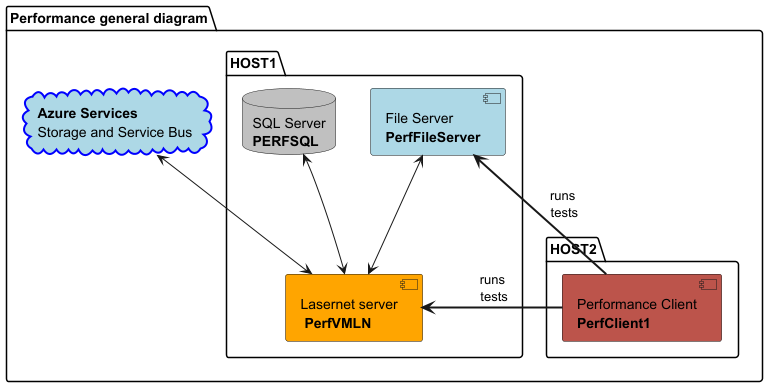
Lasernet Configuration
Lasernet Config and servers (instances/environments) used Microsoft SQL Server databases on a dedicated server.
All input and output folders were on a Performance File Server on the network.
Microsoft Azure elements like Azure Storage and Azure Service Bus used their standard configuration.
Input and Output Data Sizes
The tests used a variety of input and output file sizes to enable us to compare Lasernet speed across different data sizes.
Input Files
The performance tests for Azure Storage Output used four PDF sizes:
100 KB
200 KB
1 MB
2 MB
Note
The page count of the PDF documents is not relevant. Lasernet throughput is determined by file size.
Note
Small input files (4 KB and 14 KB) were used to generate the PDF files uploaded by these tests. The input file size did not affect the test.
Output Files
The performance tests used documents that had the following file sizes and page counts.
Output file size:
100 KB
200 KB
1 MB
2 MB
Page count:
One page
Multipage (4 pages)
Execution Standards and Measurements
The tests covered the following scenarios:
Web Server Input for XML on HTTP port > Form Engine with PDF modifier > File Output (applicable to Lasernet 10 only)
File Input for XML > Form Engine with PDF modifier > File Output
File Input for XML > Form Engine with DOCX output > File Output
File Input for XML > Form Engine with PDF modifier > DM Upload module output
SFTP Input for XML > Form Engine with PDF modifier > File Output
Azure Storage Input for XML > Form Engine with PDF modifier > File Output
Azure Service Bus Input for XML format messages > Form Engine with PDF modifier > File Output
File Input for PDF files > Azure Storage Output
Each combination in the data tables below is considered to be a distinct test. For example, one-page PDF — 100 KB file size, multipage PDF — 1 MB file size, and so on. We ran each test three times under the stated hardware and Lasernet configuration and then calculated the average of the results for that test.
We endeavored to eliminate temporary environmental problems. For example, we paused Windows updates during test execution to prevent background processes from affecting CPU load.
We measured throughput and execution time:
Throughput was measured in actions per second (a/s).
Execution time was measured in seconds.
Test Results
The following sections provide version-specific Lasernet performance data, which shows system performance in specified scenarios.
Lasernet 11 Beta 1
Web Input Port — XML to PDF Output
Note
Basic authentication is no longer supported in LN 11.
File Input — XML to PDF Output
Lasernet configuration:
File Input > Form Engine (PDF modifier) > Output file
Number of input ports: 1
Multithread/Pooling: Enabled
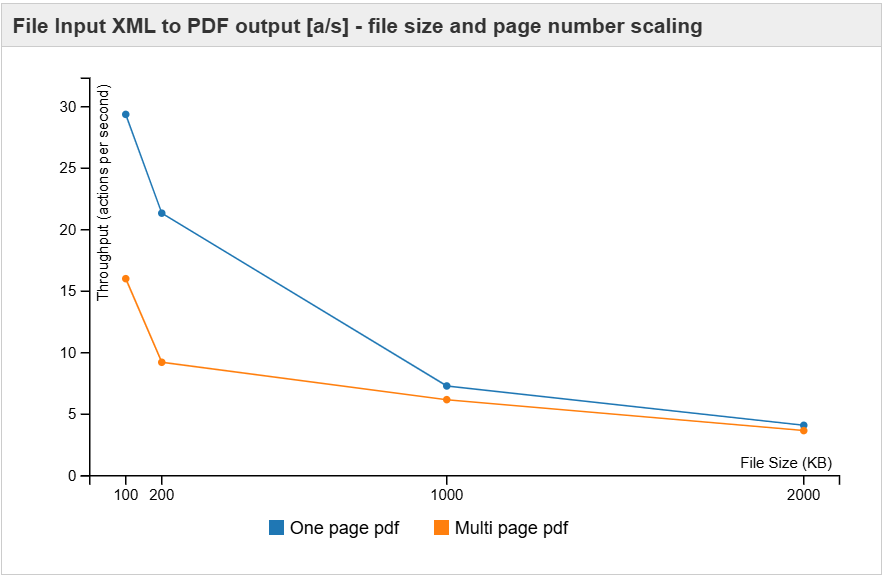
Summary table - Throughput [a/s]
Factor size | 100 KB | 200 KB | 1 MB | 2 MB |
|---|---|---|---|---|
One-page PDF | 29.30 | 21.29 | 7.28 | 4.09 |
Multipage PDF | 15.98 | 9.2 | 6.17 | 3.66 |
File Input — XML to DOCX Output
Lasernet configuration:
File Input > Form Engine (Dataset > DOCX output) > Output file
Number of input ports: 1
Multithread/Pooling: Enabled
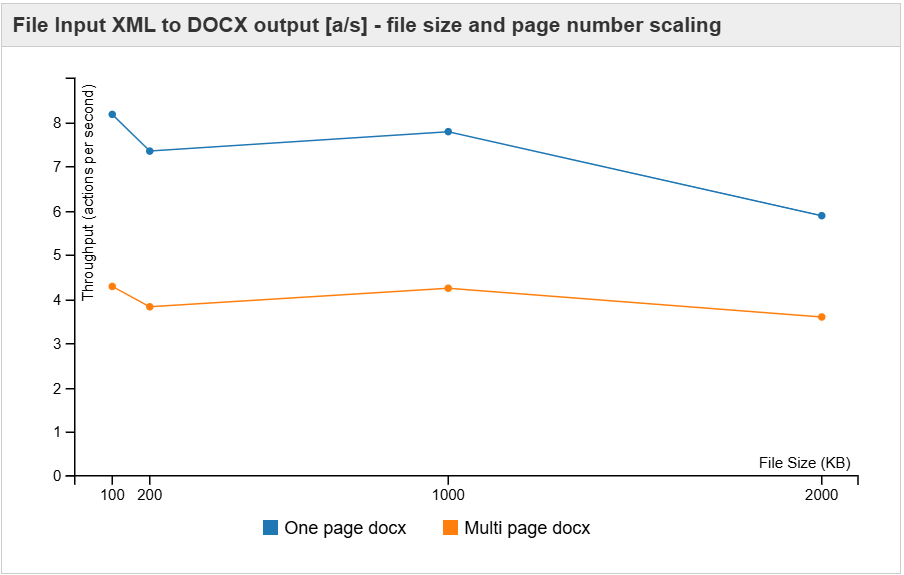
Summary table - Throughput [a/s]
Factor size | 100 KB | 200 KB | 1 MB | 2 MB |
|---|---|---|---|---|
One-page DOCX | 8.17 | 7.34 | 7.78 | 5.88 |
Multipage DOCX | 4.28 | 3.82 | 4.24 | 3.59 |
File Input — XML to PDF DM Upload
Lasernet configuration:
File Input > Form Engine (PDF Modifier) > DM Upload Module
Number of input ports: 1
Multithread: Disabled and Enabled
Pooling: Enabled
DM version: 10.5.0 standalone
DM size: Small database (10 million documents)
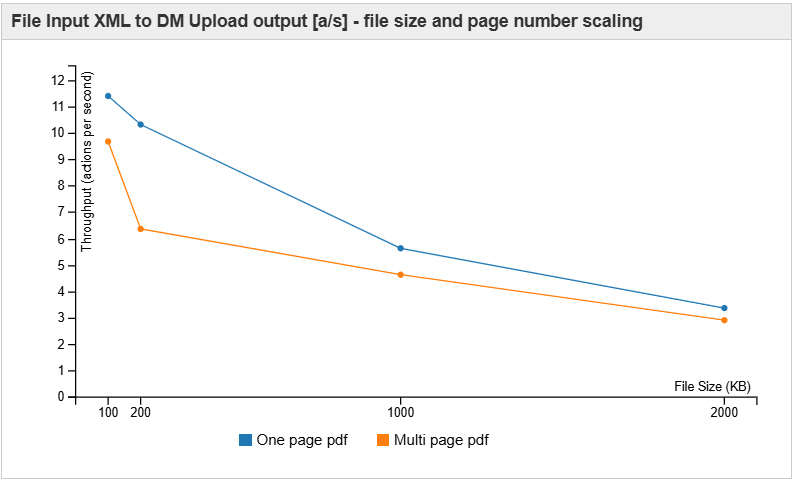
Summary table - Throughput [a/s]
Factor size | 100 KB | 200 KB | 1 MB | 2 MB |
|---|---|---|---|---|
One-page PDF | 11.39 | 10.31 | 5.63 | 3.37 |
Multipage PDF | 9.67 | 6.36 | 4.63 | 2.91 |
SFTP Input — XML to PDF Output
Lasernet configuration:
SFTP > Form Engine (PDF modifier) > Output file
Number of input ports: 1
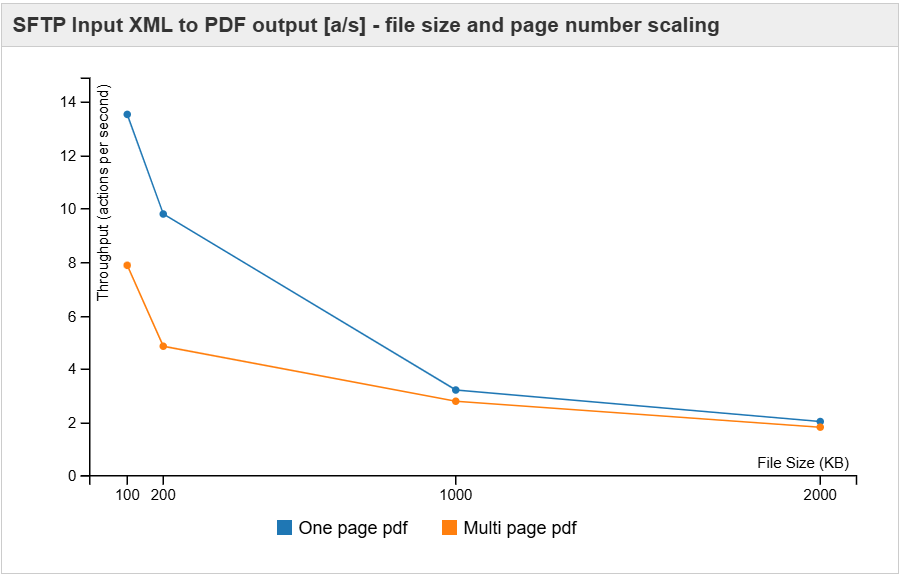
Summary table - Throughput [a/s]
Factor size | 100 KB | 200 KB | 1 MB | 2 MB |
|---|---|---|---|---|
One-page PDF | 13.53 | 9.8 | 3.21 | 2.03 |
Multipage PDF | 7.88 | 4.85 | 2.79 | 1.82 |
Azure Storage Input — XML to PDF Output
Lasernet configuration:
Azure Storage Input > Form Engine (PDF modifier) > Output file
Number of input ports: 1
Multithread/Pooling: Enabled
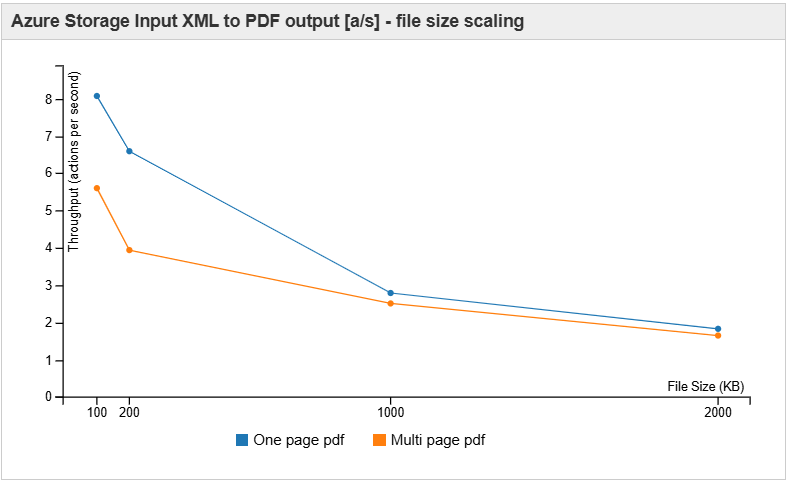
Summary table - Throughput [a/s]
Factor size | 100 KB | 200 KB | 1 MB | 2 MB |
|---|---|---|---|---|
One-page PDF | 8.07 | 6.59 | 2.79 | 1.83 |
Multipage PDF | 5.6 | 3.94 | 2.51 | 1.65 |
Azure Service Bus Input — XML to PDF Output
Lasernet configuration:
Azure Service Bus Input > Form Engine (PDF modifier) > Output file
Number of input ports: 1
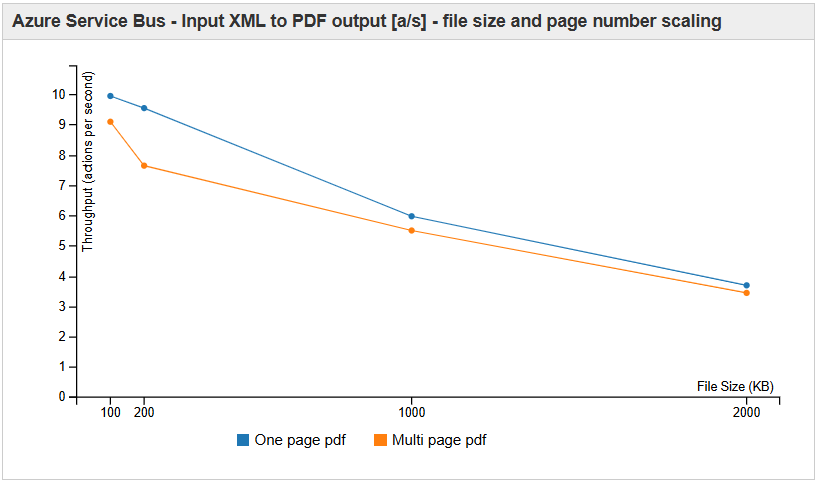
Summary table - Throughput [a/s]
Factor size | 100 KB | 200 KB | 1 MB | 2 MB |
|---|---|---|---|---|
One-page PDF | 9.94 | 9.54 | 5.97 | 3.69 |
Multipage PDF | 9.09 | 7.64 | 5.5 | 3.44 |
Azure Storage Output — PDF Upload
Lasernet configuration:
Input Folder (PDF) > Azure Storage Output
Number of input ports: 1
Multithread: Enabled
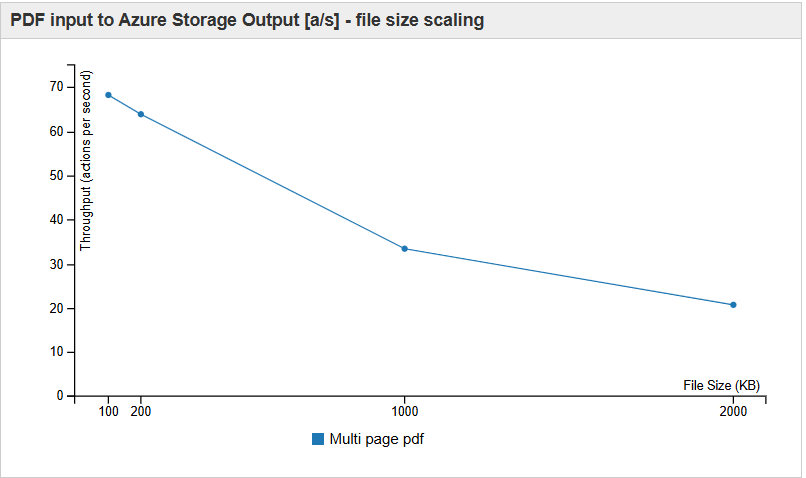
Summary table - Throughput [a/s]
Factor size | 100 KB | 200 KB | 1 MB | 2 MB |
|---|---|---|---|---|
Multipage PDF | 68.25 | 63.89 | 33.41 | 20.69 |
Lasernet 10.10.4 CPU Comparison (Benchmark Analysis)
These results relate to Lasernet 10.10.4 when using different CPU allocations.
Note
This benchmark analysis was conducted using data for multipage documents only.
Analysis
To compare how the number of CPUs affects speed, we selected two common use cases: Web Server input and File Input. The number of CPUs was adjusted only on the Virtual Machine (VM) hosting Lasernet, while the Client VM remained unchanged.
The biggest increase occurs between 2 and 4 CPUs, showing a noticeable 40-100% jump.
On the next level, 4 vs 6 CPUs, the increase is still present but not as significant as 2 vs 4. Here, the increase is approximately 20%.
The 8 CPUs case appears to be the most interesting, as small input files are better handled with 6 CPUs. However, there is approximately a 10% increase observed for “File Input” cases with files larger than 1MB.
Summary
We can see that more CPUs allow for better performance, but we need to take into account that adding more CPUs will increase the cost of hosting. If 4 CPUs are sufficient, there is no reason to increase costs by adding more CPUs. Conversely, if cost is not a concern, greater performance can be achieved by deploying additional CPUs.
Web Input Port — XML to PDF Output
Analysis Summary
Lasernet configuration:
Web Input Port > Form Engine (PDF modifier) > Output file
Number of input ports: 1
User threads: 4
Number of simultaneous requests: 250
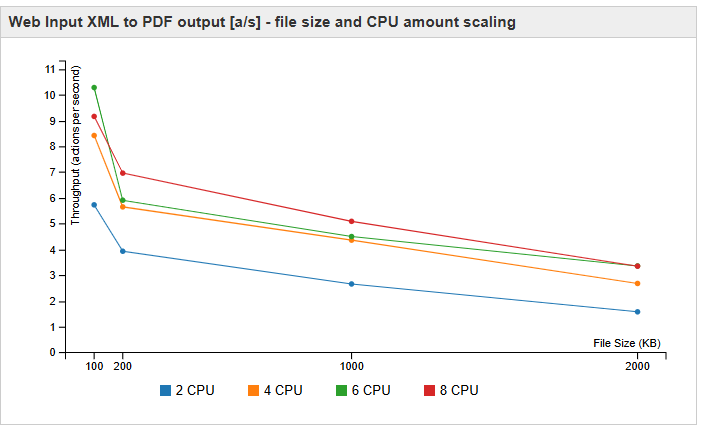
Summary table - Throughput [a/s]
Factor size | 100 KB | 200 KB | 1 MB | 2 MB |
|---|---|---|---|---|
2 CPU | 5.73 | 3.93 | 2.66 | 1.58 |
4 CPU | 8.42 | 5.65 | 4.36 | 2.68 |
6 CPU | 10.28 | 5.91 | 4.50 | 3.36 |
8 CPU | 9.16 | 6.96 | 5.09 | 3.35 |
File Input — XML to PDF Output
Analysis Summary
Lasernet configuration:
File Input > Form Engine (PDF modifier) > Output file
Number of input ports: 1
Multithread/Pooling: Enabled
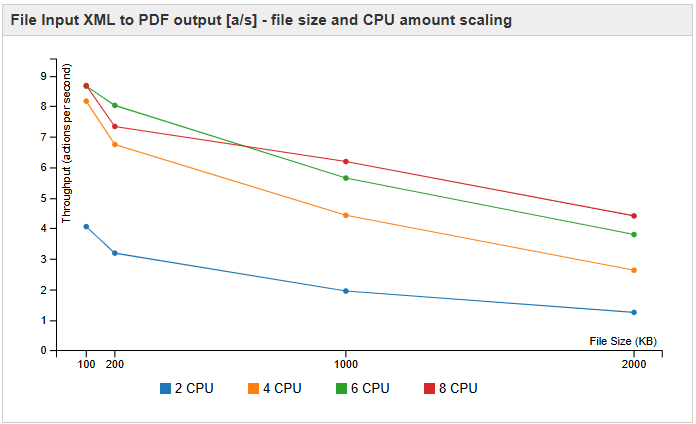
Summary table — throughput [a/s]
Factor size | 100 KB | 200 KB | 1 MB | 2 MB |
|---|---|---|---|---|
2 CPU | 4.06 | 3.19 | 1.95 | 1.25 |
4 CPU | 8.17 | 6.75 | 4.43 | 2.63 |
6 CPU | 8.66 | 8.03 | 5.65 | 3.80 |
8 CPU | 8.68 | 7.34 | 6.19 | 4.41 |
Lasernet 10.10.3
Web Input Port — XML to PDF Output
Lasernet configuration:
Web Input Port > Form Engine (PDF modifier) > Output file
Number of input ports: 1
User threads: 4
Number of the simultaneous requests: 250
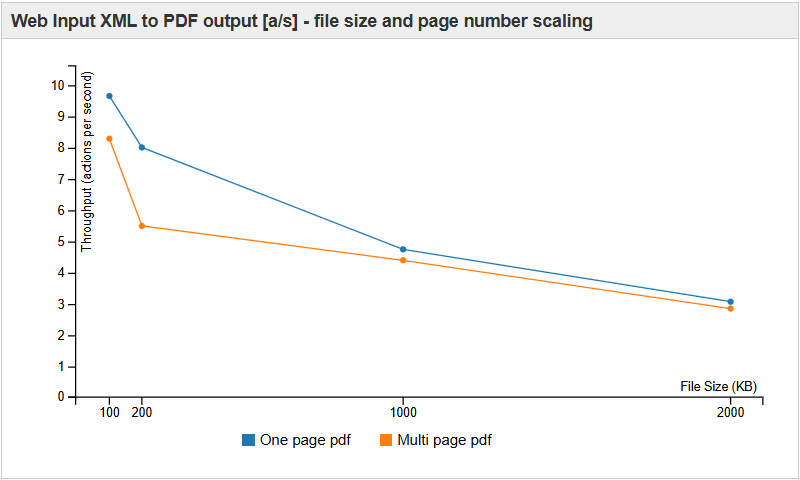
Summary table - Throughput [a/s]
Factor size | 100 KB | 200 KB | 1 MB | 2 MB |
|---|---|---|---|---|
One-page PDF | 9.66 | 8.01 | 4.74 | 3.06 |
Multipage PDF | 8.29 | 5.49 | 4.39 | 2.84 |
File Input — XML to PDF Output
Lasernet configuration:
File Input > Form Engine (PDF modifier) > Output file
Number of input ports: 1
Multithread/Pooling: Enabled
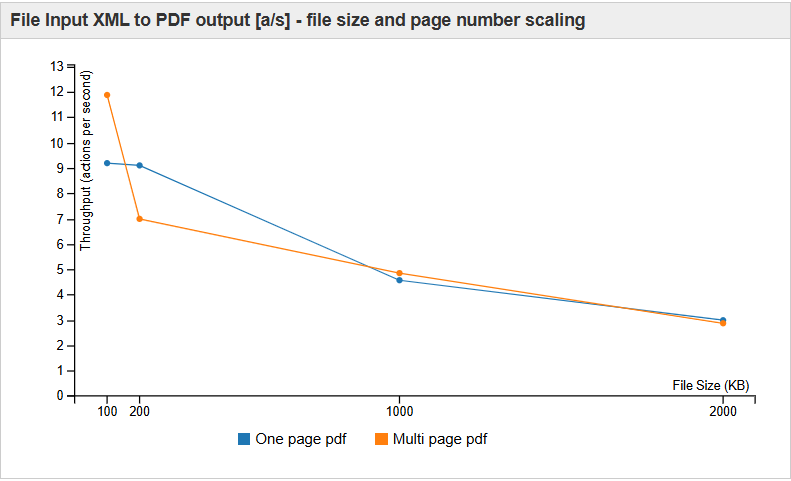
Summary table — throughput [a/s]
Factor size | 100 KB | 200 KB | 1 MB | 2 MB |
|---|---|---|---|---|
One-page PDF | 9.19 | 9.10 | 4.57 | 2.99 |
Multipage PDF | 11.88 | 6.99 | 4.85 | 2.87 |
File Input — XML to DOCX Output
Lasernet configuration:
File Input > Form Engine (Dataset > DOCX output) > Output file
Number of input ports: 1
Multithread/Pooling: Enabled
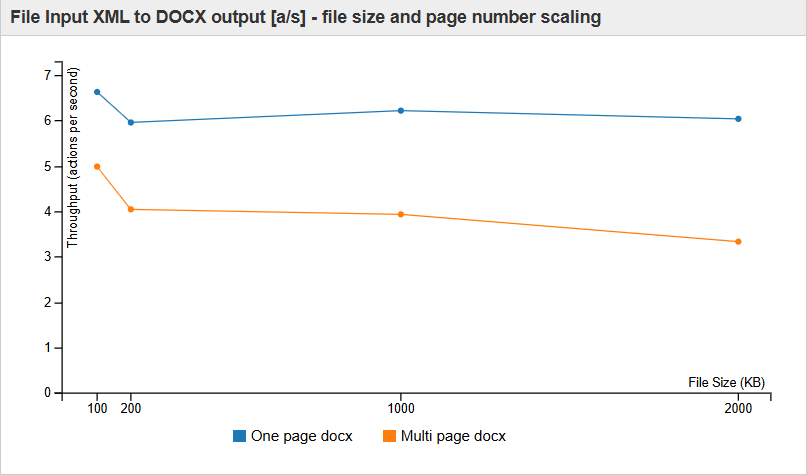
Summary table - Throughput [a/s]
Factor size | 100 KB | 200 KB | 1 MB | 2 MB |
|---|---|---|---|---|
One-page DOCX | 6.62 | 5.95 | 6.21 | 6.03 |
Multipage DOCX | 4.98 | 4.04 | 3.93 | 3.33 |
File Input — XML to PDF DM Upload
Lasernet configuration:
File Input -> Form Engine (PDF Modifier) -> DM Upload Module
Number of input ports: 1
Multithread: Disabled and Enabled
Pooling: Enabled
DM version: 10.5.0 standalone
DM size: Small database (10 million documents)
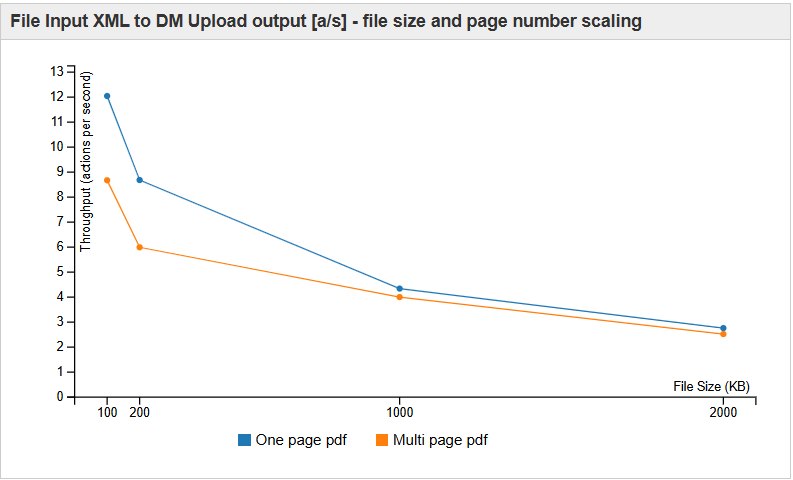
Summary table - Throughput [a/s]
Factor size | 100 KB | 200 KB | 1 MB | 2 MB |
|---|---|---|---|---|
One-page PDF | 12.04 | 8.68 | 4.34 | 2.76 |
Multipage PDF | 8.67 | 5.99 | 4.00 | 2.52 |
SFTP Input — XML to PDF Output
Lasernet configuration:
SFTP > Form Engine (PDF modifier) > Output file
Number of input ports: 1
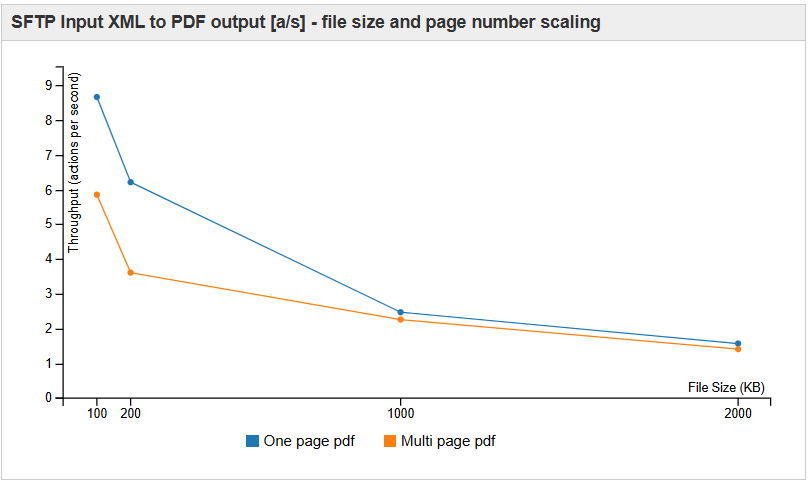
Summary table - Throughput [a/s]
Factor size | 100 KB | 200 KB | 1 MB | 2 MB |
|---|---|---|---|---|
One-page PDF | 8.66 | 6.21 | 2.47 | 1.57 |
Multipage PDF | 5.85 | 3.61 | 2.26 | 1.41 |
Azure Storage Input — XML to PDF Output
Lasernet configuration:
Azure Storage Input > Form Engine (PDF modifier) > Output file
Number of input ports: 1
Multithread/Pooling: Enabled
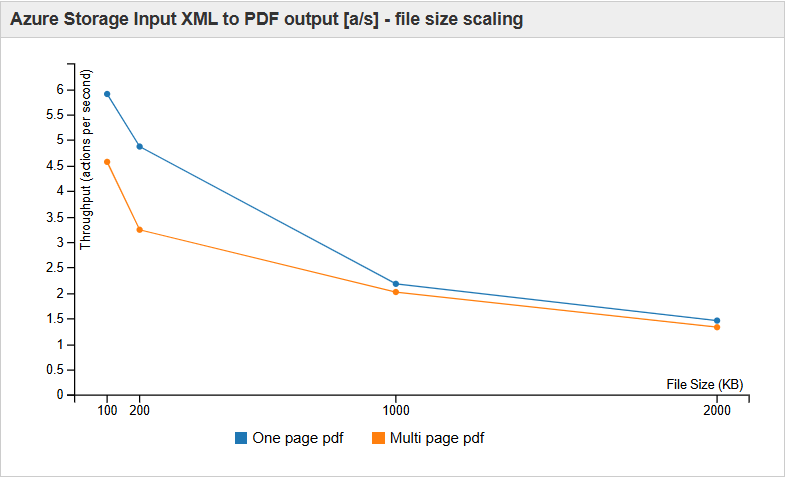
Summary table - Throughput [a/s]
Factor size | 100 KB | 200 KB | 1 MB | 2 MB |
|---|---|---|---|---|
One-page PDF | 5.90 | 4.87 | 2.18 | 1.46 |
Multipage PDF | 4.57 | 3.24 | 2.02 | 1.33 |
Azure Service Bus Input — XML to PDF Output
Lasernet configuration:
Azure Service Bus Input > Form Engine (PDF modifier) > Output file
Number of input ports: 1
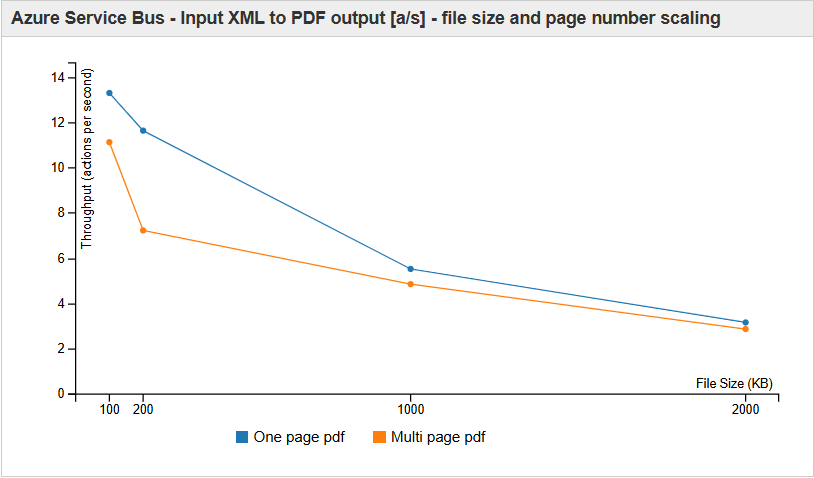
Summary table - Throughput [a/s]
Factor size | 100 KB | 200 KB | 1 MB | 2 MB |
|---|---|---|---|---|
One-page PDF | 13.28 | 11.62 | 5.52 | 3.16 |
Multipage PDF | 11.11 | 7.22 | 4.85 | 2.87 |
Azure Storage Output — PDF Upload
Lasernet configuration:
Input Folder (PDF) -> Azure Storage Output
Number of input ports: 1
Multithread: Enabled
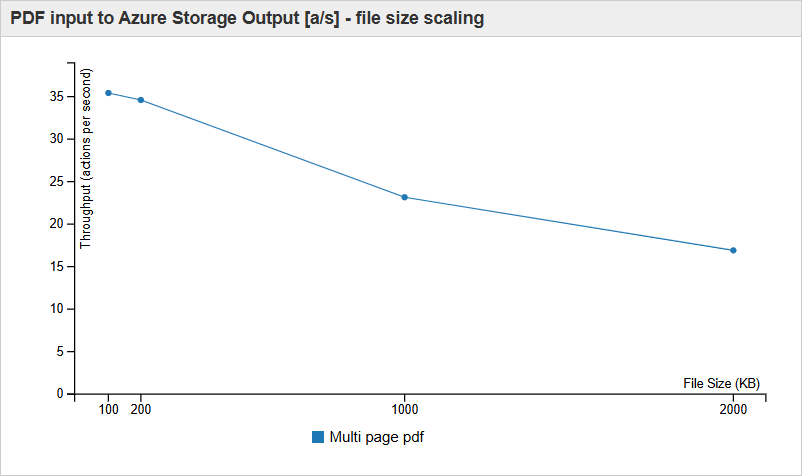
Summary table - Throughput [a/s]
Factor size | 100 KB | 200 KB | 1 MB | 2 MB |
|---|---|---|---|---|
Multipage PDF | 35.30 | 34.48 | 23.08 | 16.85 |
Lasernet 10.8
Web Input Port — XML to PDF Output
Lasernet configuration:
Web Input Port > Form Engine (PDF modifier) > Output file
Number of input ports: 1
User threads: 4
Number of simultaneous requests: 250
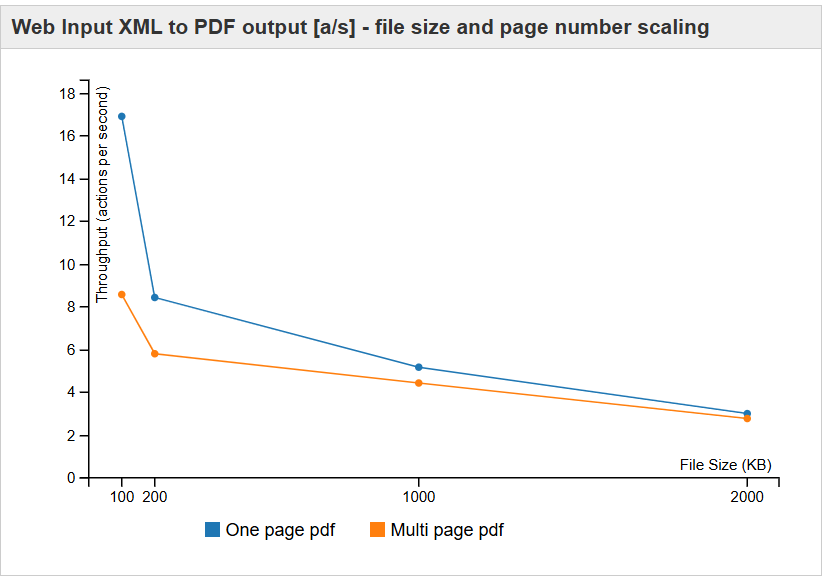
Summary table — throughput [a/s]
Factor size | 100 KB | 200 KB | 1 MB | 2 MB |
|---|---|---|---|---|
One-page PDF | 16.9 | 8.43 | 5.17 | 3 |
Multipage PDF | 8.57 | 5.8 | 4.43 | 2.77 |
File Input — XML to PDF Output
Lasernet configuration:
File Input > Form Engine (PDF modifier) > Output file
Number of input ports: 1
Multithreading/pooling: Enabled
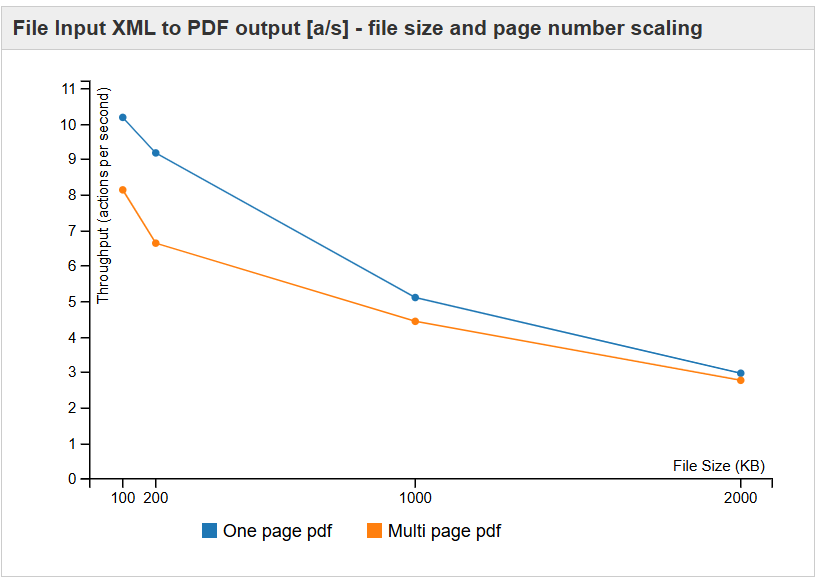
Summary table — throughput [a/s]
Factor size | 100 KB | 200 KB | 1 MB | 2 MB |
|---|---|---|---|---|
One-page PDF | 10.17 | 9.17 | 5.10 | 2.97 |
Multipage PDF | 8.13 | 6.63 | 4.43 | 2.77 |
File Input — XML to DOCX Output
Lasernet configuration:
File Input > Form Engine (Dataset > DOCX output) > Output file
Number of input ports: 1
Multithreading/pooling: Enabled
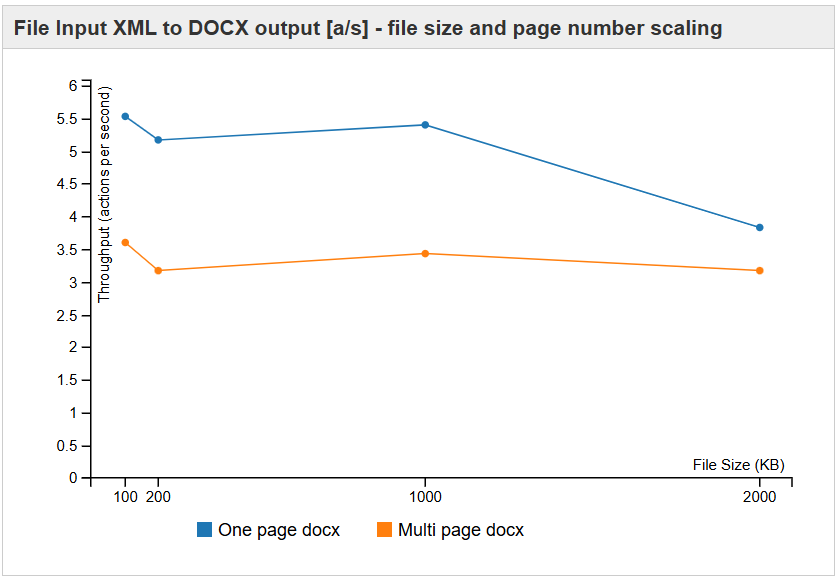
Summary table — throughput [a/s]
Factor size | 100 KB | 200 KB | 1 MB | 2 MB |
|---|---|---|---|---|
One-page DOCX | 5.53 | 5.17 | 5.40 | 3.83 |
Multipage DOCX | 3.60 | 3.17 | 3.43 | 3.17 |
File Input — XML to PDF DM Upload
Lasernet configuration:
File Input > Form Engine (PDF Modifier) > DM Upload Module
Number of input ports: 1
Multithreading: Disabled and enabled
Pooling: Enabled
Autoform DM version: 10.5.0 standalone
Autoform DM size: Small database (10 million documents)
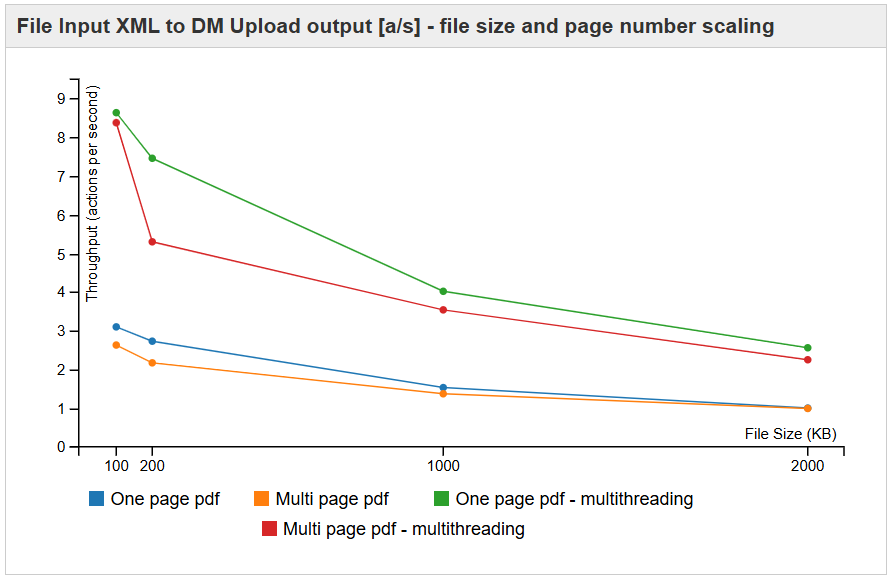
Summary table — throughput [a/s]
Factor size | 100 KB | 200 KB | 1 MB | 2 MB |
|---|---|---|---|---|
One-page PDF | 3.10 | 2.73 | 1.53 | 1.00 |
Multipage PDF | 2.63 | 2.17 | 1.37 | 0.33 |
One-page PDF - multithreading | 7.98 | 7.46 | 4.02 | 2.56 |
Multipage PDF - multithreading | 8.38 | 5.30 | 3.54 | 2.2 |
SFTP Input — XML to PDF Output
Lasernet configuration:
SFTP > Form Engine (PDF modifier) > Output file
Number of input ports: 1
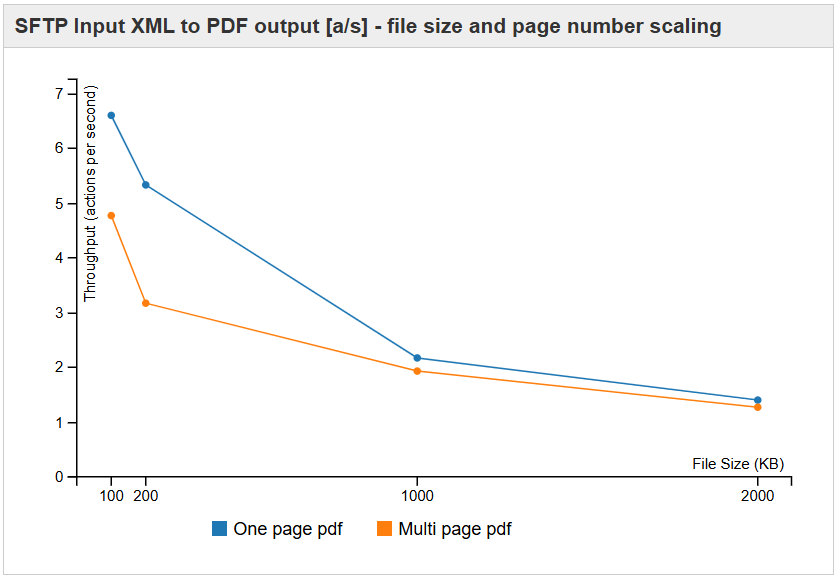
Summary table — throughput [a/s]
Factor size | 100 KB | 200 KB | 1 MB | 2 MB |
|---|---|---|---|---|
One-page PDF | 6.60 | 5.33 | 2.17 | 1.40 |
Multipage PDF | 4.77 | 3.17 | 1.93 | 1.27 |
Azure Storage Input — XML to PDF Output
Lasernet configuration:
Azure Storage Input > Form Engine (PDF modifier) > Output file
Number of input ports: 1
Multithreading/pooling: Enabled
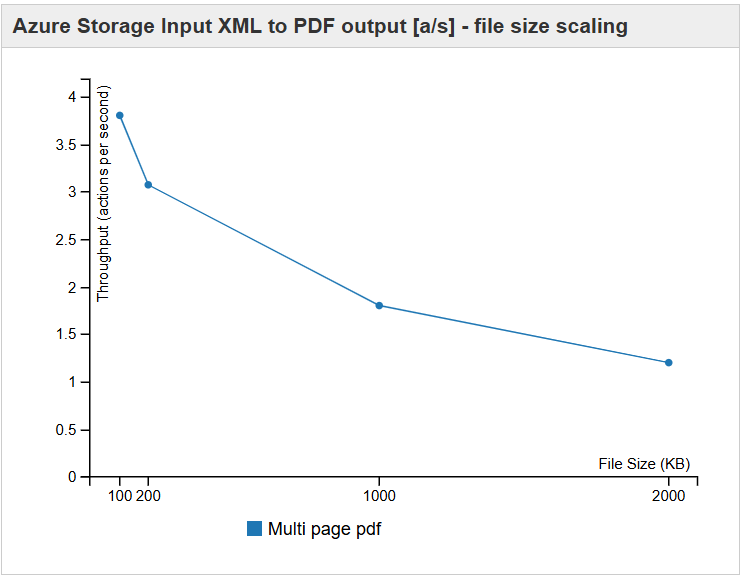
Summary table — throughput [a/s]
Factor size | 100 KB | 200 KB | 1 MB | 2 MB |
|---|---|---|---|---|
Multipage PDF | 3.80 | 3.07 | 1.80 | 1.20 |
Azure Service Bus Input — XML to PDF Output
Lasernet configuration:
Azure Service Bus Input > Form Engine (PDF modifier) > Output file
Number of input ports: 1
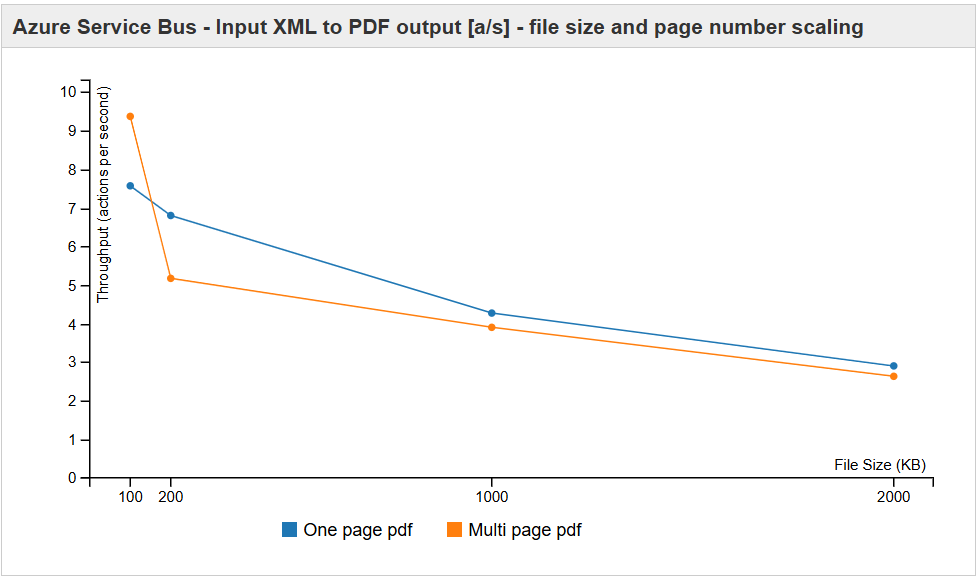
Summary table — throughput [a/s]
Factor size | 100 KB | 200 KB | 1 MB | 2 MB |
|---|---|---|---|---|
One-page PDF | 7.57 | 6.80 | 4.27 | 2.90 |
Multipage PDF | 9.37 | 5.17 | 3.90 | 2.63 |
Azure Storage Output — PDF Upload
Lasernet configuration details:
Input Folder (PDF) > Azure Storage Output
Number of input ports: 1
Multithreading: Enabled
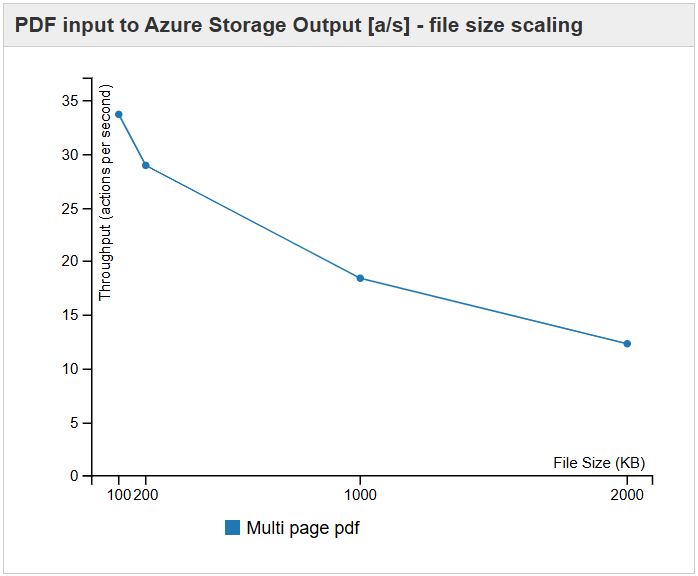
Summary table — throughput [a/s]
Factor size | 100 KB | 200 KB | 1 MB | 2 MB |
|---|---|---|---|---|
Multipage PDF | 33.66 | 28.91 | 18.40 | 12.30 |
Version Comparison (Benchmark Analysis)
This section contains performance benchmark comparisons for Lasernet since the 10.8.0 series.
Note
This benchmark analysis was conducted using data for multipage documents only.
Web Input Port — XML to PDF Output
Analysis Summary
From version 10.10.3 to 10.8.0, smaller files show a minor decrease in performance, while larger files show a slight improvement.
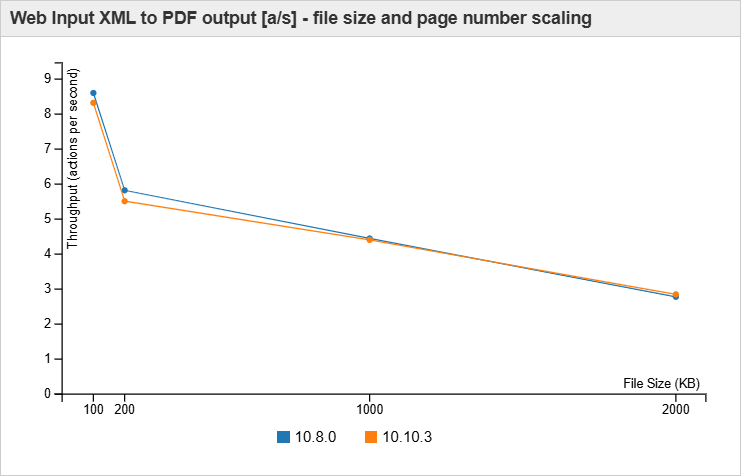
Summary table - Throughput [a/s]
Version | 100 KB | 200 KB | 1 MB | 2 MB |
|---|---|---|---|---|
10.8.0 | 8.57 | 5.8 | 4.43 | 2.77 |
10.10.3 | 8.29 | 5.49 | 4.39 | 2.84 |
File Input — XML to PDF Output
Analysis Summary
We notice speed improvements in version 11.0 and version 10.10.3 when compared to 10.8.0, especially for smaller file sizes.
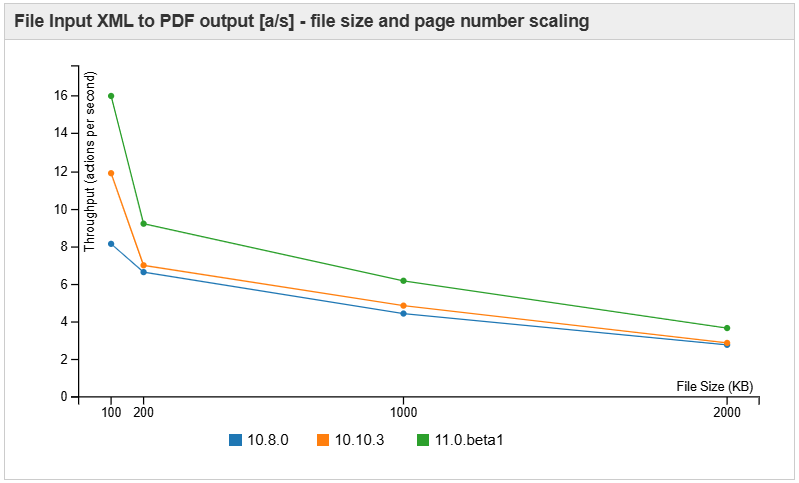
Summary table - Throughput [a/s]
Version | 100 KB | 200 KB | 1 MB | 2 MB |
|---|---|---|---|---|
10.8.0 | 8.13 | 6.63 | 4.43 | 2.77 |
10.10.3 | 11.88 | 6.99 | 4.85 | 2.87 |
11.0.beta1 | 15.98 | 9.2 | 6.17 | 3.66 |
File Input - DOCX to PDF Output
Analysis Summary
We observe speed improvements in version 10.10.3 compared to 10.8.0 and 11.0 for sizes over 1 MB.
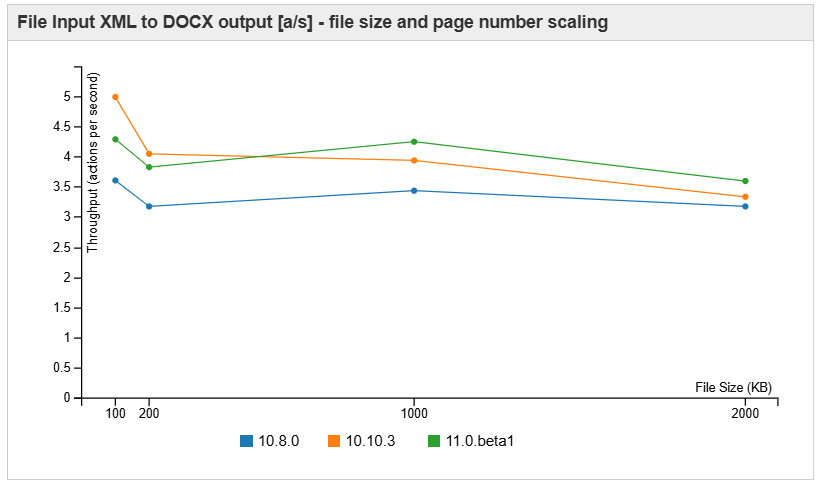
Summary table - Throughput [a/s]
Version | 100 KB | 200 KB | 1 MB | 2 MB |
|---|---|---|---|---|
10.8.0 | 3.60 | 3.17 | 3.43 | 3.17 |
10.10.3 | 4.98 | 4.04 | 3.93 | 3.33 |
11.0.beta1 | 4.28 | 3.82 | 4.24 | 3.59 |
File Input to DM Upload - XML to PDF
Analysis Summary
We observe speed improvements in versions 11.0 and 10.10.3 when compared to 10.8.0.
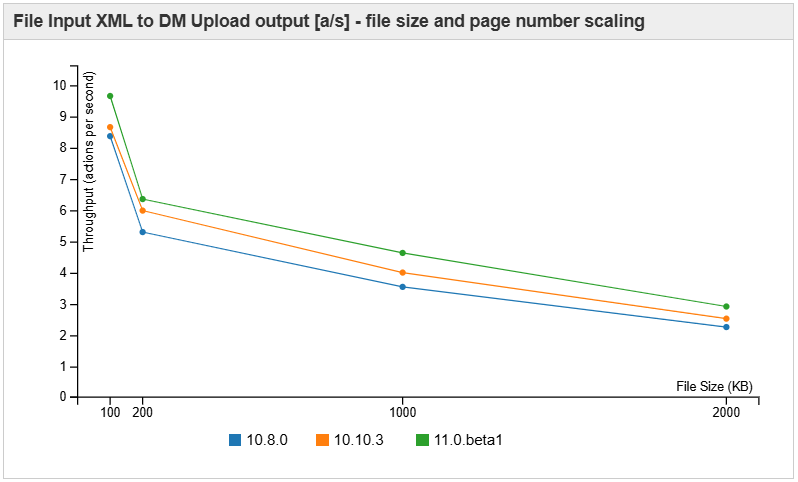
Summary table - Throughput [a/s]
Version | 100 KB | 200 KB | 1 MB | 2 MB |
|---|---|---|---|---|
10.8.0 | 8.38 | 5.30 | 3.54 | 2.25 |
10.10.3 | 8.67 | 5.99 | 4.00 | 2.52 |
11.0.beta1 | 9.67 | 6.36 | 4.63 | 2.91 |
SFTP Input - XML to PDF Output
Analysis Summary
We observe speed improvements of 15-22% in 10.10.3 compared to 10.8.0.
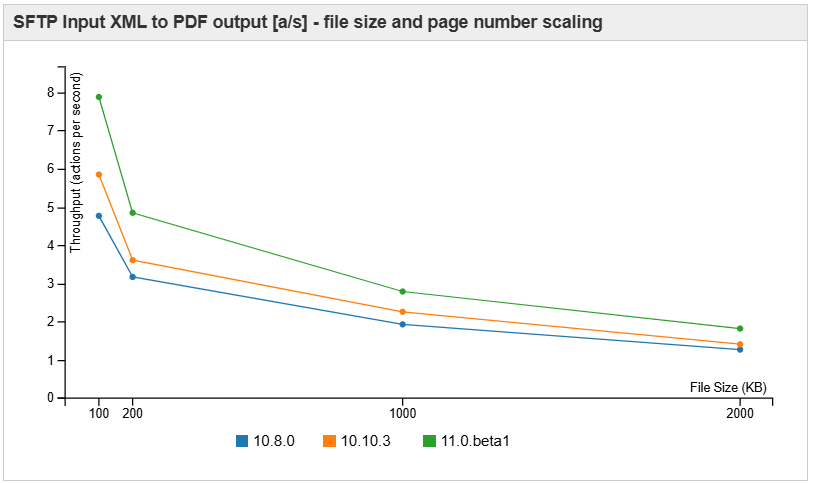
Summary table - Throughput [a/s]
Version | 100 KB | 200 KB | 1 MB | 2 MB |
|---|---|---|---|---|
10.8.0 | 4.77 | 3.17 | 1.93 | 1.27 |
10.10.3 | 5.85 | 3.61 | 2.26 | 1.41 |
11.0.beta1 | 7.88 | 4.85 | 2.79 | 1.82 |
Azure Storage Input - XML to PDF Output
Analysis Summary
We notice significant speed improvements in 11.0 compared to 10.x, which range from 10 to 20% depending on size. Lasernet 10.10.x introduces a major rewrite in the Azure Storage module, and it is good to see speed improvements alongside enhanced security in this area. Lasernet 11.0 also utilizes the latest library combined with an improved engine, which delivers the best results.
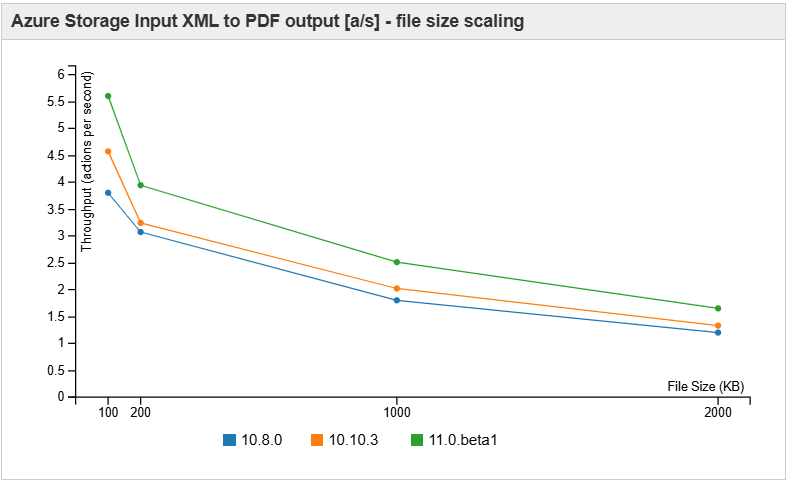
Summary table - Throughput [a/s]
Version | 100 KB | 200 KB | 1 MB | 2 MB |
|---|---|---|---|---|
10.8.0 | 3.80 | 3.07 | 1.80 | 1.20 |
10.10.3 | 4.57 | 3.24 | 2.02 | 1.33 |
11.0.beta1 | 5.6 | 3.94 | 2.51 | 1.65 |
Azure Service Bus Input - XML to PDF Output
Analysis Summary
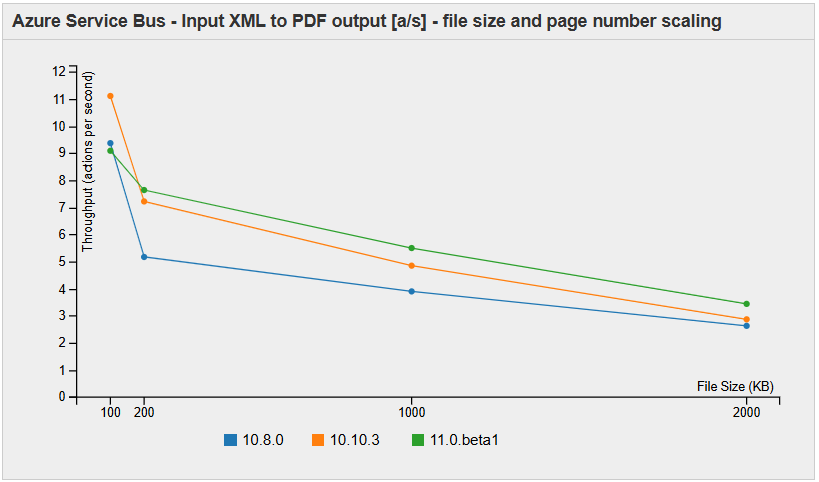
We observe speed improvements in 10.10.3 compared to 10.8.0, and in 11.0 against 10.x for sizes over 100 KB.
Summary table - Throughput [a/s]
Version | 100 KB | 200 KB | 1 MB | 2 MB |
|---|---|---|---|---|
10.8.0 | 9.37 | 5.17 | 3.90 | 2.63 |
10.10.3 | 11.11 | 7.22 | 4.85 | 2.87 |
11.0.beta1 | 9.09 | 7.64 | 5.5 | 3.44 |
Azure Storage Output - PDF Upload
Analysis Summary
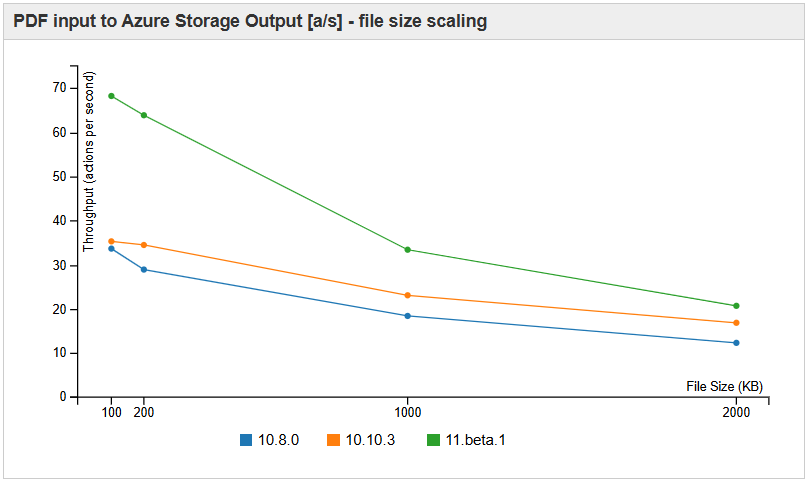
We observe significant speed improvements (nearly 100% in some sizes) in version 11.0 compared to version 10.x series. Additionally, when comparing version 10.10.3 to 10.8.0, we see improvements of around 30%, depending on the size.
Summary table - Throughput [a/s]
Version | 100 KB | 200 KB | 1 MB | 2 MB |
|---|---|---|---|---|
10.8.0 | 33.66 | 28.91 | 18.40 | 12.30 |
10.10.3 | 35.30 | 34.48 | 23.08 | 16.85 |
11.0.beta1 | 68.25 | 63.89 | 33.41 | 20.69 |
COMMON INPUTS COMPARISON in LN 10.8.0
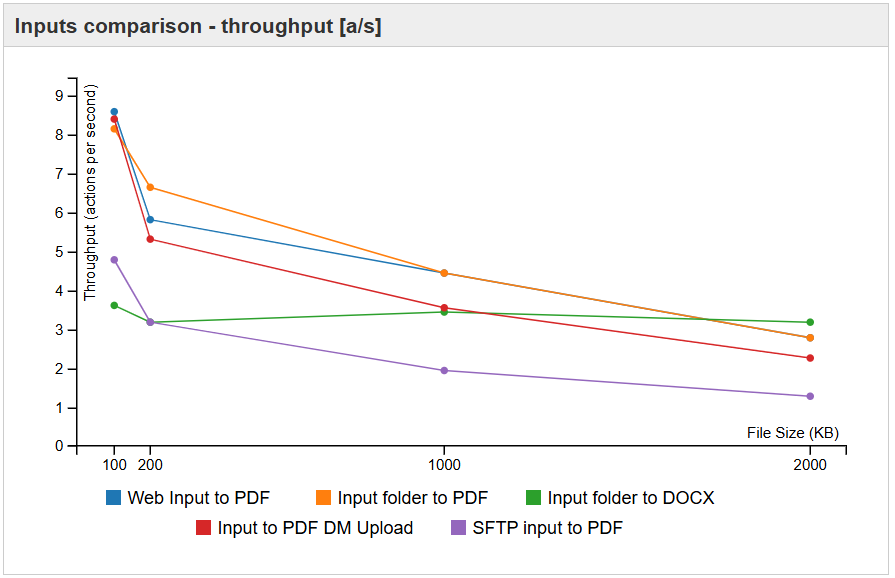
The results below were produced in Lasernet 10.8.0. To view configuration details, see the result benchmarks page.
Summary table - Throughput [a/s]
Version | 100 KB | 200 KB | 1 MB | 2 MB |
|---|---|---|---|---|
Web Input to PDF | 8.57 | 5.8 | 4.43 | 2.77 |
Input folder to PDF | 8.13 | 6.63 | 4.43 | 2.77 |
Input folder to DOCX | 3.60 | 3.17 | 3.43 | 3.17 |
Input folder to PDF DM Upload | 8.38 | 5.30 | 3.54 | 2.25 |
SFTP input to PDF | 4.77 | 3.17 | 1.93 | 1.27 |
AZURE INPUTS COMPARISON for 10.8.0
Analysis summary
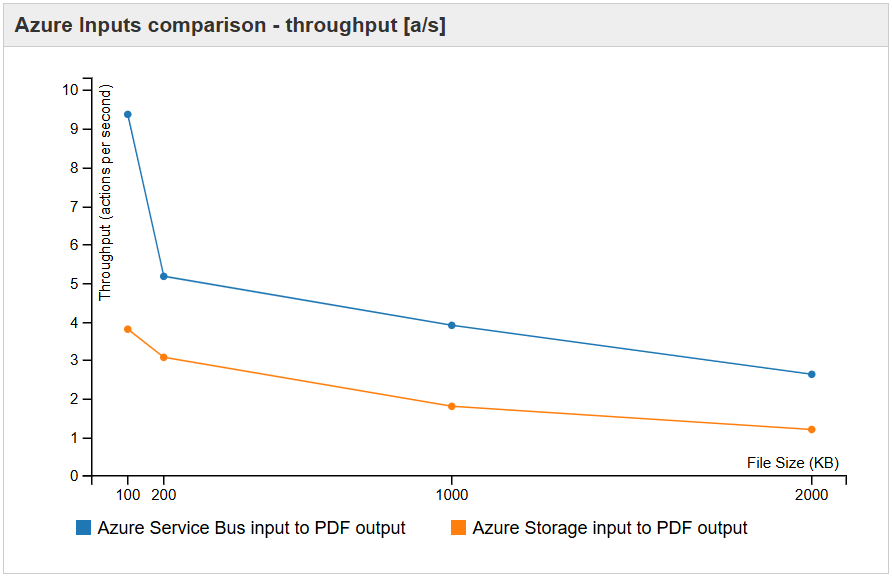
The input files are the same in both cases and are processed by the same form engine. Based on the benchmarks, we observe that the Service Bus is faster.
The results below were generated in Lasernet 10.8.0. Configuration details are available on the result benchmarks page.
Summary table - Throughput [a/s]
Version | 100 KB | 200 KB | 1 MB | 2 MB |
|---|---|---|---|---|
Azure Service Bus input to PDF | 9.37 | 5.17 | 3.90 | 2.63 |
Azure Storage input to PDF | 3.80 | 3.07 | 1.80 | 1.20 |