
Models
Lasernet Connector for Dynamics 365 Finance and Operations contains the following models, including the model for the integration with Lasernet CE Connector and the models for the Lasernet Print Buttons.
Model | Description | Location/Remark |
|---|---|---|
Lasernet | Core and main engine for Lasernet FO Connector | Lasernet Requires activation key Lasernet > Setup > Parameters > License terms |
Lasernet81Spec | Version specific additions for Finance & Operations version 8.01.00 and newer. | |
PRNButtons | Lasernet Print Buttons. Adds print/preview buttons to forms. Standalone, can work without Lasernet. | Print buttons Module |
PRNButtonsLACAdaptor | Couples Print Buttons to Lasernet. | |
LACCE | Provides the integration with Dynamics 365 CE/ Dataverse from Lasernet FO Connector | Lasernet > Dataverse/Dynamics 365 |
LACMSHotfixes | Hotfixes for standard Lasernet FO Connector | System administration > Setup > Hotfixes from Lasernet |
LasernetTestSuit | Test and Performance Suite | Lasernet > Test and performance suite Requires activation key Lasernet > Test and performance suite > Parameters (see Important note below this table) |
LasernetPU35Spec | Wave Label support. | |
LasernetAutoformDM | Archive Integration (Autoform DM (Archive), now called Lasernet Keep | Lasernet > Setup > Lasernet Keep |
Lasernet Engine | Embedded Lasernet Engine plus the Lasernet Designer installer. | Includes the Lasernet Engine and installer for the Lasernet Form Editor |
DynAzure Data Explorer | Lasernet Data Explorer | Lasernet > Test and performance suite > General tools > Data explorer Requires activation key Lasernet > Test and performance suite > Parameters |
DynAzure Electronic Reporting Connector | Lasernet E-Documents. ER formats, validation, network delivery. | Lasernet > Setup > Electronic reporting connector Requires activation key Lasernet > Setup > Electronic reporting connector > Electronic reporting connector Parameters |
DynAzure Tracking | Lasernet Tracking, Email, outbound, inbound, not-delivered. | Lasernet > Setup > Tracking Requires activation key Lasernet > Setup > Tracking > Tracking Parameters |
DynAzure OAuth tools | The model DynAzure OAuth provides OAuth 2.0 token handling. | |
DynaAzure Tracking Electronic Reporting | Bridge model: Makes e-documents appear in Tracking workspace.(The outbound/inbound tabs.) | |
DynAzure Mail Graph | Email via Microsoft Graph (modern auth) — the send/receive path behind Tracking and inbound. | |
DynaAzure Mail Merge | Lasernet Mail Merge | Lasernet > Setup > Mail Merge Requires activation key Lasernet > Setup > Mail Merge > Mail Merge Parameters |
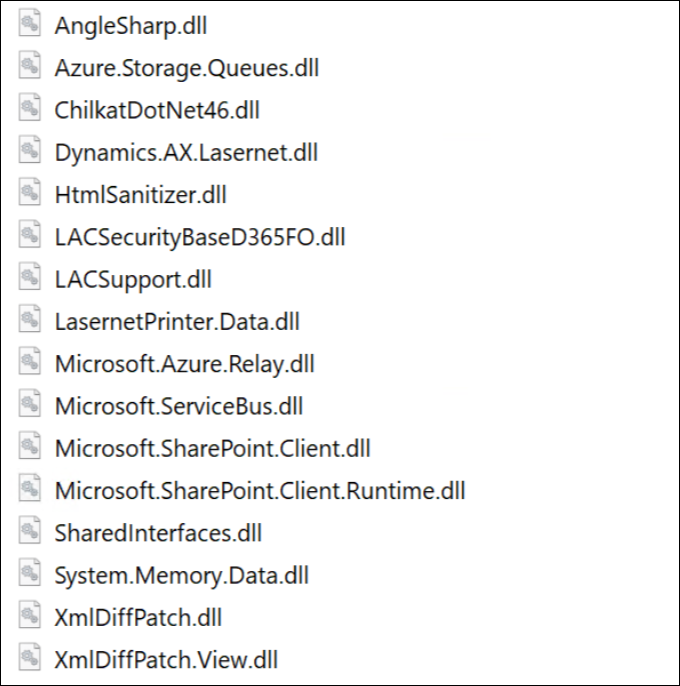
Ensure the following new objects/dll files are added to TFS in case you are not just installing/deploying the AOT package:
LACSupport.dll.config
XmlDiffPatch.dll
XmlDiffPatch.View.dll

The following is the complete list of objects that are not automatically added:
The version number should contain the intended version (such as in the following screenshot, 6.20) after either installing or deploying the AOT-package.
Lasernet > Setup > Parameters
.png "image (10).png")
Add the AOT package
Either through LCS - Apply a deployable package to an environment
Or by installing a deployable package – Requires RDP access to the environment
Different versions of Lasernet FO Connector are supported with different versions of Lasernet. A setup for each newer version of Lasernet is required for any new installation and when upgrading from an older version of Lasernet.
Prerequisite/Technical
It is best practice to refresh the Stylesheet after upgrading Lasernet FO Connector as this could help avoid potential issues.
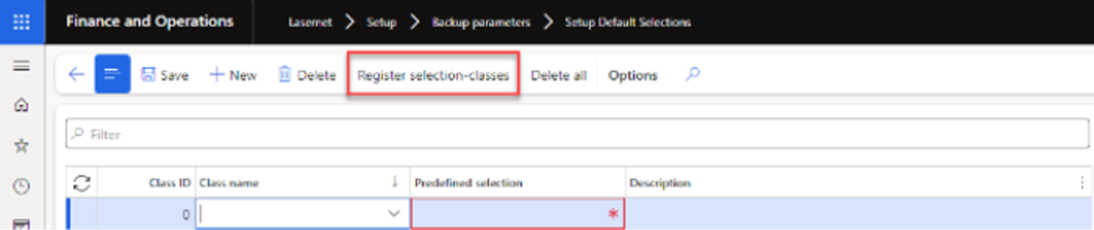
Please, also use the following Register selection classes, located in Lasernet > Setup > Backup parameters > Setup Default Selections, in case an error like the following is thrown when using Export, Import, or Copy across companies.
The newly introduced upgrade framework in Lasernet FO Connector 6.18 should manage but could fail when using a TFS/Dev build as this would require executing Microsoft.Dynamics.AX.Deployment.Setup.exe.
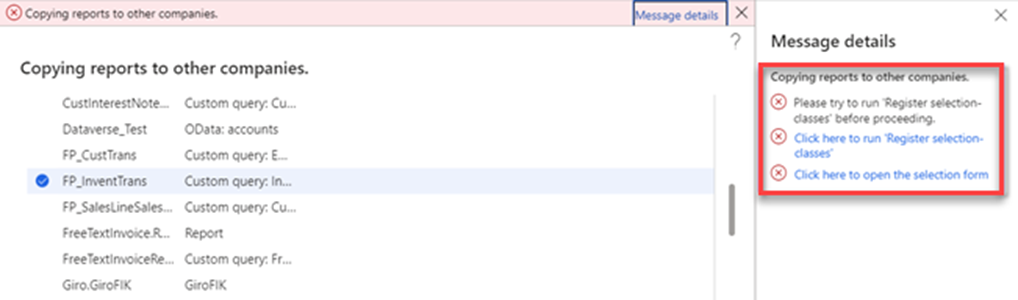
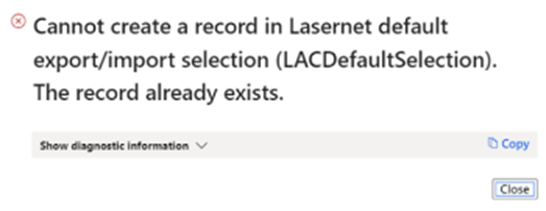
Error message:
Error
Please try to run ’Register selection-classes’ before processing.
or
Error
Cannot create a record in Lasernet default export/import selection (LACDefaultSelection). The record already exists.
Object reference not set to an instance of an object.