
Applies to: Lasernet Core 10
The OAuth 2.0 modifier is used for token-based security. It supports various flows, including a JSON Web Token (JWT) based flow. The modifier provides authorization for a given user or application identity and returns the access token. The access token is set as a JobInfo and available for HTTP requests in other modules.
You must create Lasernet Core as an app on the website of the service provider that you want to connect to. Then, you must configure the authentication and permissions to begin using the third-party API. All the settings values that you require for the OAuth 2.0 modifier are available from the setup of your third-party application.
User (Standard OAuth 2.0)
Standard OAuth 2.0 user authentication requires you to log in with a username and password to authorize the module to access content for the service account.
After you have entered appropriate values for the settings, click Obtain Authorization.
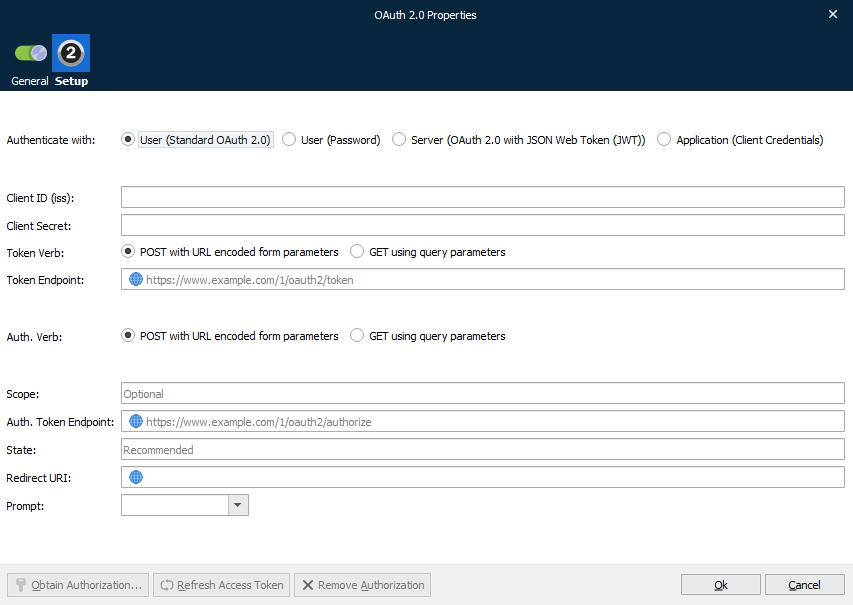
Settings
| Client ID (iss) | Lasernet Core app credentials (ID) as registered with the service provider. |
| Client Secret | Lasernet Core app credentials (secret key) as registered with the service provider. |
| Token Verb | Select the appropriate verb for the request to the token endpoint. Supported options are POST with URL encoded form parameters and GET using query parameters. To understand which option to select, refer to the endpoint API. |
| Token Endpoint | The token endpoint URL of the authorization server is used as a value for an "aud" element to identify the authorization server. |
| Auth. Verb | Select the appropriate verb for the request to the authorization endpoint. Supported options are POST with URL encoded form parameters and GET using query parameters. To understand which option to select, refer to the endpoint API. |
| Auth. Token Endpoint | The authorization URL that you will redirect the user to. |
| Scope | The request might have one or more scope values indicating additional access requested by the application. The authorization server will need to display the requested scopes to the user. This setting is optional. |
| State | The State parameter is used by the application to store request-specific data, prevent CSRF attacks, or both. The authorization server must return the unmodified state value back to the application. Using this setting is optional but recommended. |
| Redirect URI | The redirect URI is the URL within your application that will receive OAuth 2.0 credentials. For example: https://localhost |
| Prompt | Specifies the type of interaction that the authorization service will have with the user when they are taken to the Auth. Token Endpoint URL. To understand the specific interaction that each valid option (none, consent, select_account, and login) results in, refer to the endpoint API. |
User (Password)
This option configures the OAuth 2.0 modifier to use the OAuth 2.0 Password grant type.
After you have entered appropriate values for the settings, click Ok. Optionally, to test the credentials that you entered, click Refresh Access Token before you click Ok.
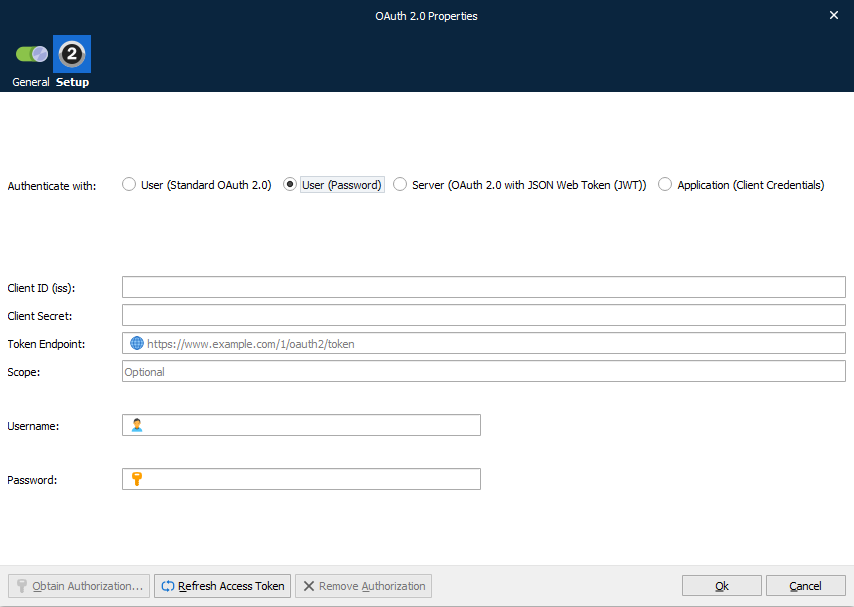
Settings
| Client ID (iss) | Lasernet Core app credentials (ID) as registered with the service provider. |
| Client Secret | Lasernet Core app credentials (secret key) as registered with the service provider. |
| Token Endpoint | The token endpoint URL of the authorization server. |
| Scope | The request might have one or more scope values indicating additional access requested by the application. The authorization server will need to display the requested scopes to the user. This setting is optional. |
| Username | Part of the user credentials that Lasernet Core will exchange for an access token. |
| Password | Part of the user credentials that Lasernet Core will exchange for an access token. |
Server (OAuth 2.0 with JSON Web Token (JWT))
OAuth 2.0 with JWT (Server Authentication) enables the module to authenticate directly to a service, using a digitally-signed JSON Web Token (JWT) instead of user credentials.
After you have entered appropriate values for the settings, click Ok. Optionally, to test the credentials that you entered, click Refresh Access Token before you click Ok.
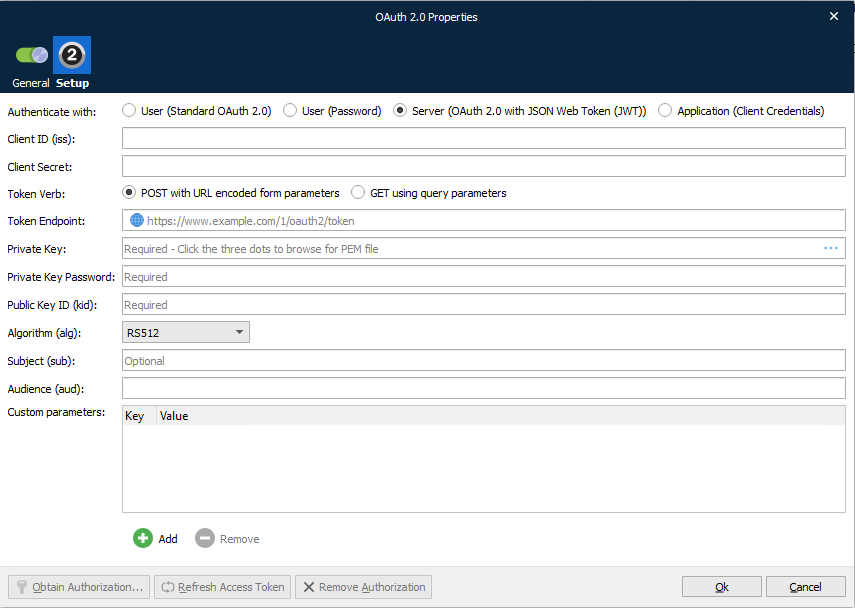
Settings
| Client ID (iss) | Lasernet Core app credentials (ID) as registered with the service provider. |
| Client Secret | Lasernet Core app credentials (secret key) as registered with the service provider. |
| Token Verb | Select the appropriate verb for the request to the token endpoint. Supported options are POST with URL encoded form parameters and GET using query parameters. To understand which option to select, refer to the endpoint API. |
| Token Endpoint (aud) | The token endpoint URL of the authorization server is used as a value for an "aud" element to identify the authorization server as an intended audience of the JWT. |
| Private Key | Generate an RSA keypair to sign and authenticate the JWT request made by your app. Download and save a copy of the private key (.pem file) in a Lasernet Core resource folder. Click Browse and then select the file. Example of the format of a private key: |
| Private Key Password | Password for the private key. |
| Public Key ID (kid) | ID for the public key. |
| Algorithm (alg) | Supported algorithms: RS256, RS384, RS512, ES256, ES384, ES512. |
| Subject (aud) | The "sub" (subject) claim identifies the principal that is the subject of the JWT. The claims in a JWT are normally statements about the subject. The subject value must either be scoped to be locally unique in the context of the issuer or be globally unique. The processing of this claim is generally application-specific. The "sub" value is a case-sensitive string containing a StringOrURI value. |
| Audience (aud) | The "aud" (audience) claim identifies the recipients that the JWT is intended for. Each principal intended to process the JWT must identify itself with a value in the audience claim. If the principal processing the claim does not identify itself with a value in the "aud" claim when this claim is present, then the JWT must be rejected. In the general case, the "aud" value is an array of case-sensitive strings, each containing a StringOrURI value. In the special case when the JWT has one audience, the "aud" value can be a single case-sensitive string containing a StringOrURI value. The interpretation of audience values is generally application-specific. |
| Customer parameters | Add the list of customer parameters required by the service provider. |
Application (Client Credentials)
This option configures the OAuth 2.0 modifier to use the OAuth 2.0 Client Credentials grant type.
After you have entered appropriate values for the settings, click Ok. Optionally, to test the credentials that you entered, click Refresh Access Token before you click Ok.
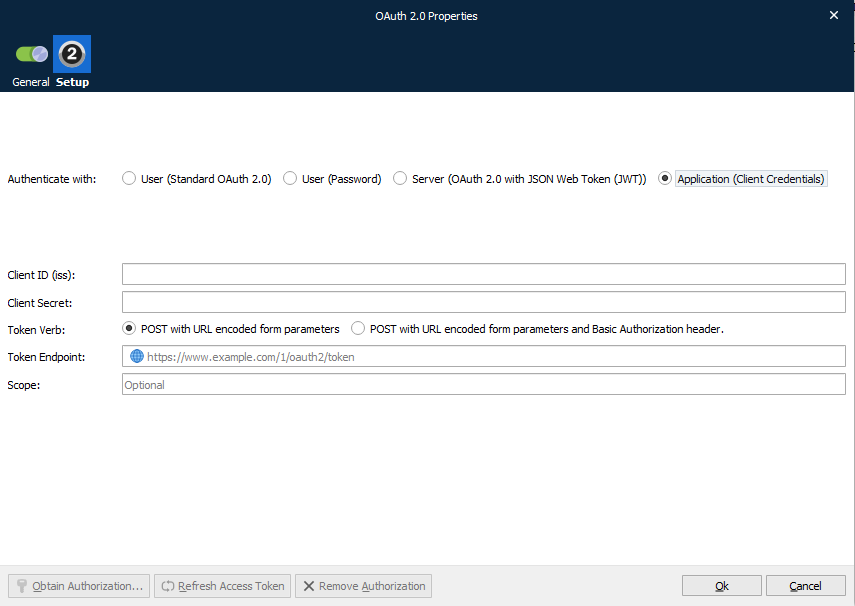
Settings
| Client ID (iss) | Lasernet Core app credentials (ID) as registered with the service provider. |
| Client Secret | Lasernet Core app credentials (secret key) as registered with the service provider. |
| Token Verb | Select the appropriate verb for the request to the token endpoint. Supported options are POST with URL encoded form parameters and POST with URL encoded form parameters and Basic Authorization header. To understand which option to select, refer to the endpoint API. |
| Token Endpoint | The token endpoint URL of the authorization server. |
| Scope | The request may have one or more scope values indicating additional access requested by the application. The authorization server will need to display the requested scopes to the user. This setting is optional. |
JobInfos
The OAuth 2.0 modifier sets a JobInfo.
| OAuth2AccessToken | Value of the OAuth 2.0 access token. |