Applies to: Lasernet Core 10
The PDF Engine converts EMF data that is created by the Lasernet Core EMF printer driver, the Overlay Engine or the Form Engine, to PDF (reference version 1.7). The PDF Engine sets paper size and orientation for the document based on the paper formats included in the EMF data.
Settings
The PDF Engine has the following settings:
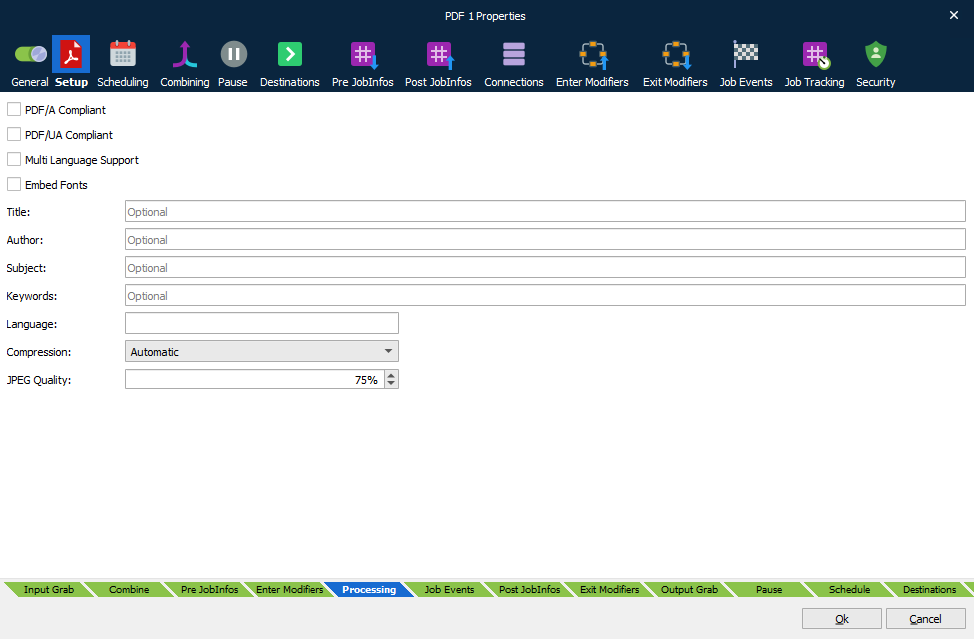
PDF/A Compliant
PDF/A is a PDF format typically used for the long-term archiving of electronic documents and is based on the PDF reference version 1.4. Fonts and color profiles will be embedded in the PDF file.
PDF/UA Compliant
The PDF/UA Compliant option is not applicable to the PDF engine. If you select this option, the PDF engine will not generate PDF/UA documents.
This option applies only to the Form engine (when it is selected as part of a sheet’s configuration). For information about using this option with the Form engine, see Configure PDF Output in the Lasernet Form Editor Guide.
Multi-Language Support
By default, the PDF format includes 7-bit ASCII characters only. Multi-language support must be activated for supporting and embedding additional characters and fonts.
Embed Fonts
Determines what fonts are embedded in the PDF file. Font embedding is used to ensure correct output on other client computers.
Title, Author, Subject, and Keywords
Descriptions to be included in the document properties of the PDF file.
Reference Printer
The physical name of a printer installed on the local computer (recommended) or on the network. The reference printer is used for rendering text on the output page. You should not pause this printer as it will stall all rendering. It is recommended that a new local printer be created as a reference.
Image Compression
Three options and a JPEG quality value (default 80%) are available for compressing images:
| Automatic | Prefers indexed and uses JPEG if image contains more than 256 colors. |
| Indexed | Creates indexed images (using a palette) if the image contains no more than 256 colors. Otherwise stored as bitmap. The setting will give the best image quality but the file size may increase. |
| JPEG | Compresses all images using JPEG. The setting will compromise image quality for smaller file size. |
PDF/A-3 - Tunneling Attachment(s) into PDF
The PDF engine and modifier have support for PDF/A-3 (ISO 19005-3:2012, PDF1.7). It allows embedding of various file formats (such as XML, CSV, word-processing documents, spreadsheet documents and others) into PDF/A compliant documents, plus additional PDF/A schemas in a Metadata section.
Embedding files in a PDF requires a set of JobInfos per file to be defined before PDF creation.
| PDFEmbedFilename | Defines the name of the embedded file inside the PDF. |
| PDFEmbedRelationship | Set JobInfo to either Source, Data, Alternative or Supplement: Source: used if the file specification is the original source material for the associated content. Data: used if the file specification represents information used to derive a visual presentation – such as for a table or a graph. Alternative: used if this file specification is an alternative representation of content, for example audio. Supplement: used if this file specification represents a supplemental representation of the original source or data that may be more easily consumable (for example, a MathML version of an equation). If no PDFEmbedRelationship is defined, or it is set to an invalid value, the default value is Supplement. |
| PDFEmbedDescription | This JobInfo contains a description of the embedded file. The field is optional. |
| PDFEmbedSubType | This JobInfo must contain the MIME type of the embedded file. If not specified it will default to application/octet-stream. |
| PDFEmbedData | This JobInfo must contain the (binary) content of the file to embed into the PDF. |
Any number of files can be embedded by creating an array of the JobInfos described above. The files are embedded at the PDF document level (it's currently not possible to embed files per page).
It is possible to embed files both when using regular PDF and PDF/A. If PDF/A is enabled, Lasernet Core will generate PDF/A-3B instead of PDF/A-1B.
Embedding PDF/A Extension Schemas and metadata in PDF/A
You can embed additional PDF/A Extension Schemas and additional XMP Metadata in a PDF document. This is a part of the ZUGFeRD format used for electronic invoicing in Germany.
The PDFEmbedPDFAExtensionSchema JobInfo is used for PDF/A Extension Schemas. Any number of schemas can be embedded by creating an array. Each entry must be one or more valid rdf:Description XML element(s).
The PDFEmbedAdditionalMetadataElement JobInfo enables you to embed any number of additional XML metadata elements in the PDF by creating an array. Each entry must be one or more valid rdf:li XML elements.
XMP Metadata (and PDF/A extension schemas) are only included in the PDF when using PDF/A.