Applies to: Lasernet Core 10
You can apply one or more text strings and images as stamps to pages in a PDF document.
Images must be loaded into a JobInfo, before the modifier is executed, as binary graphics in PNG, JPEG or TIFF format.
Notes:
The sheet design must be processed before using the PDF Stamp Modifier.
The modifier can be applied at sheet or module level.
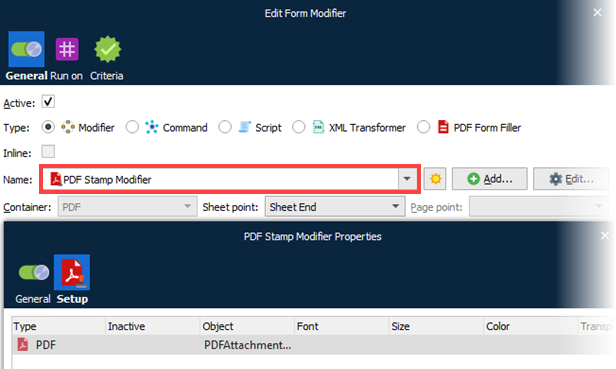
Click Add to configure a new stamper item.
Click Edit to edit an existing stamper item.
The modifier can contain a list of items, where the items are inserted as layers in the PDF document, in the specified order.
Settings
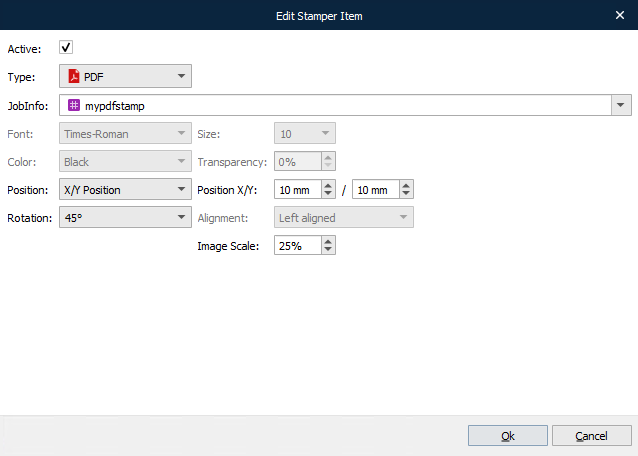
| Type | Select Text or Image formats. |
| Text & Image JobInfo |
A fixed text string with or without parameters for inserting page numbers. Type %P for current page and %T for total number of pages, like: “Page %P of %T”. Insert the contents of a JobInfo with binary graphics. Supported graphic formats: PNG, JPEG and TIFF. |
| Font | Times, Helvetica, Courier, Symbol and ZapfDingbats. |
| Size | Font sizes available: 4-12, 14, 16, 18, 20, 22, 24, 26, 28, 36, 48, 72 & 96 pt. |
| Color | Available values: Black, White, Red, Green and Blue |
| Transparency | Set a transparency value for the text where 0 % is opaque (darkest) and 100 % is fully transparent. Recommended for text inserted in the background. |
| Position & Margin X/Y |
Set the position of the text. The value of the X/Y Position will insert the text in a position relative to the upper left corner of the paper. Top, Center and Bottom positions are relative to the X/Y margins. |
| Rotation | Rotate the text by the following degrees: 0, 45, 90, 135, 180, 225, 270, 315 |
| Image Scale | Scale the image. Values below 100% will reduce the image size and higher than 100% will enlarge the image (compared to the original). |