
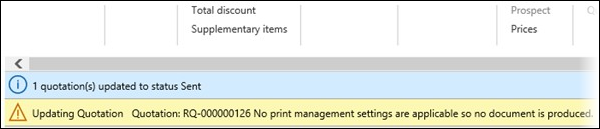
When working with and generating replacement reports, we use the SSRS endpoint to generate a replacement. Because we are using the SSRS endpoint, we need to configure the SSRS report.
In Dynamics (Lasernet FO Connector and AX), all SSRS reports that need to be generated must be configured in Print management in their respective modules.
The process of copying a Microsoft production database deletes the Print Management configuration by default to minimize the chance of sending documents to test environments. This results in the need to frequently configure these settings in a project.
Configuration
To configure Print Management, follow these steps:
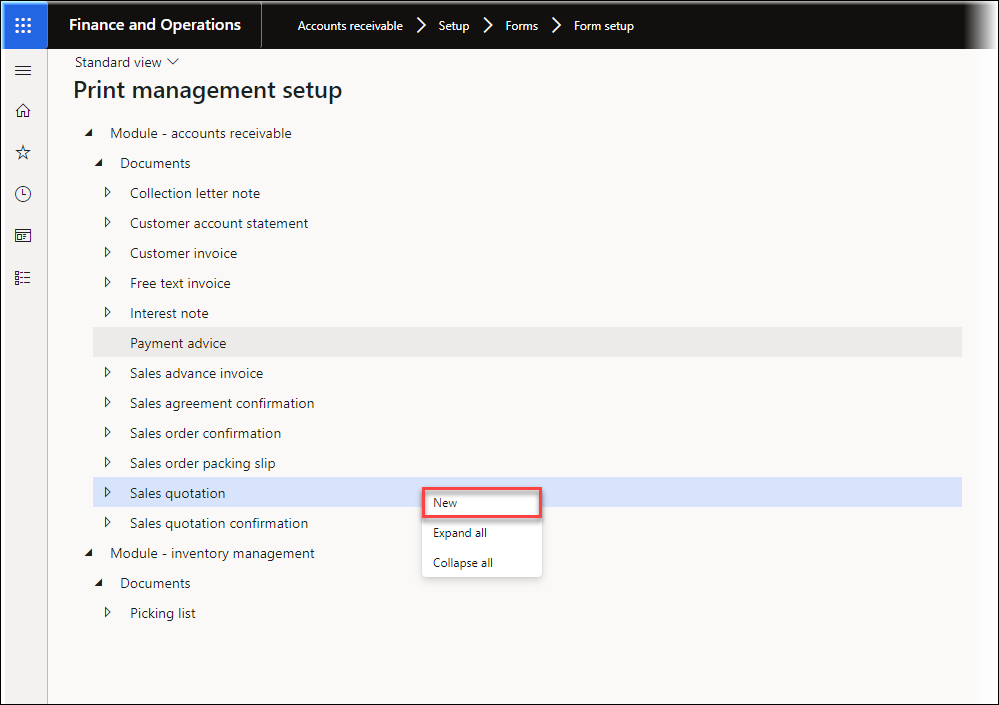
Navigate to Accounts receivable > Setup > Forms > Form setup.
In the General tab, click the Print management button and right-click Sales quotation.
Select New.
The report is now printing to the destination Default:
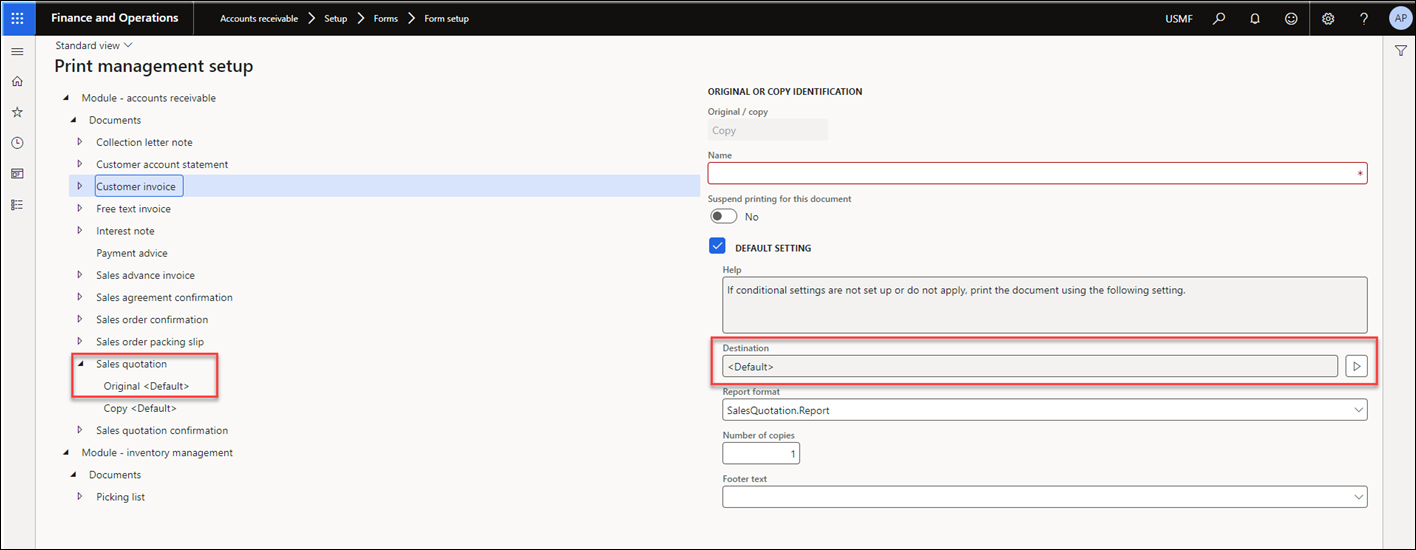
Default means that the report is not running in a batch, and the user can decide where it should be printed. If the report should run in a batch, the settings should be changed to Lasernet - predefined destinations, and the configuration in Lasernet destinations will determine where the report will go.
The SSRS report for the Sales quotation is now activated, and the error will no longer occur.
Print Management Matrix
The following is a matrix showing where to find Print Management for the more frequently used SSRS reports in Dynamics:
Module | Path to Print Management settings form | Document types | SSRS report name |
|---|---|---|---|
Accounts payable | Accounts payable > Setup > Forms > Form setup > General tab > Print management button | Payment advice | BankPaymAdviceVendV2 |
Purchase advance invoice | VendAdvanceInvoice | ||
Purchase agreement confirmation | AgreementConfirmation | ||
Purchase order | Purchase order | ||
Purchase order product receipt | PurchPackingSlip | ||
Purchase order purchase inquiry | PurchPurchaseOrder | ||
Purchase order receipts list | PurchReceiptsList | ||
Request for quotation | RFQSend | ||
Request for quotation - accept | RFQSend | ||
Request for quotation - reject | RFQSend | ||
Request for quotation - return | RFQSend | ||
Vendor invoice | VendInvoiceDocument | ||
Accounts receivable | Accounts receivable > Setup > Forms > Form setup > General tab > Print management button
| Collection letter note | CustCollectionJour |
Customer account statement | CustAccountStatementExt | ||
Customer invoice | SalesInvoice | ||
Free text invoice | FreeTextInvoice | ||
Interest note | CustInterestNote | ||
Payment advice | BankPaymAdvicCustV2 | ||
Sales advance invoice | CustAdvanceInvoice | ||
Sales agreement confirmation | AgreementConfirmation | ||
Sales order confirmation | SalesConfirm | ||
Sales order packing slip | SalesPackingSlip | ||
Sales quotation | SalesQuotation | ||
Sales quotation confirmation | SalesQuotationConfirmation | ||
Picking list (from Inventory management module) | WMSPickingList_OrderPick | ||
Inventory management | Inventory management > Setup > Inventory and warehouse management parameters > Print management tab > Print management tab | Picking list | WMSPickingList_OrderPick |
Procurement and sourcing | Procurement and sourcing > Setup > Forms > Form setup > General tab > Print and management button
| Payment advice | BankPaymAdviceVendV2 |
Purchase advance invoice | VendAdvanceInvoice | ||
Purchase agreement confirmation | AgreementConfirmation | ||
Purchase order | PurchPurchaseOrder | ||
Purchase order product receipt | PurchPackingSlip | ||
Purchase order purchase inquiry | PurchReceiptsList | ||
Request for quotation | RFQSend | ||
Request for quotation - accept | RFQSend | ||
Request for quotation - reject | RFQSend | ||
Request for quotation - return | RFQSend | ||
Vendor invoice | VendInvoiceDocument | ||
Project management and accounting | Project management and accounting > Setup > Forms > Form setup > General tab > Print and management button | Customer retention release | PSACustRetentionReleaseInvoice |
Project invoice with billing rules | PSAContractLineInvoice | ||
Project invoice without billing rules | PSAProjInvoice | ||
Project quotation | PSAQuotations | ||
User-defined project invoice | PSAManageInvoice | ||
Transportation management | Transportation management > Setup > Transportation management parameters > Print management tab > Print and management button | Certificate of origin | TMSCertificateOfOrigin |
Commercial invoice | TMSCommercialInvoice | ||
Load tender | TMSLoadTender | ||
Route | TMSRoute | ||
Warehouse management | Warehouse management > Setup > Warehouse management parameters > Print management tab > Print management button | Bill of lading | WHSBillOfLading |
Container contents | WHSContainerContents | ||
Load list | WHSLoadList | ||
Production pick list | WHSPickListProduction | ||
Shipping pick list for load | WHSPickListShipping | ||
Shipping pick list for shipment | WHSPickListShipping | ||
Shipping pick list for wave | WHSPickListShipping |
For more information on this topic, watch our feature video.