Applies to: Lasernet Core 11 and 10 (not Lasernet Essentials / Professional / Advanced)
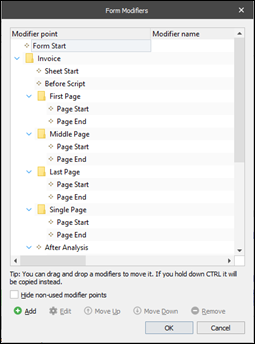
In a form, modifiers, database commands, scripts and XML Transformer forms can be connected to the following types of event points:
Form
Sheet
Page (only for the EMF, TIFF, and PDF output sheet types)
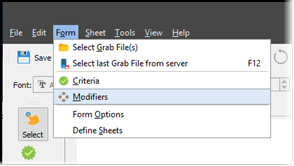
You can access and manage form modifiers for all sheets available in the application from the main menu Lasernet Developer > Form > Modifiers:
When processing a form, the modifiers, database commands, scripts, or XML Transformer forms are run in the following order:
Form Start modifier point:
Sheet Start modifier point
Definition of all JobInfos contained in the sheet
Sheet Before Script modifier point
NumberOfPages JobInfo contains the number of pages in the document produced
CurrentPage JobInfo is updated*
Page Start modifier point*
Rearrange scripts in the Conditional Area*
Page End modifier point*
Scripts attached to rearranges
Sheet After Analysis modifier point
Sheet End modifier point
Note
Steps marked with an asterisk (*) are repeated for each page.
Form End modifier point: