
The Lasernet Developer may crash or fail to start due to a faulty VMware graphics driver. This is related to a VMware defect involving the vm3dgl64.dll file used by the OpenGL driver that is packaged with the VMware Tools 12.5.0.
Analysis of crash files provides the following result: Access Violation exception in vm3dgl64.dll.
To get the Lasernet Developer to start again, perform one of the following actions:
Revert to a previous working version of VMware.
OR
For Lasernet 10, start Lasernet without OpenGL by starting the LnDeveloper.exe -noopengl application using a command line from
\program files \formpipe software\lasernet 10. An example is shown below: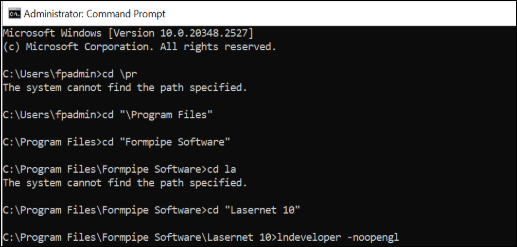
This solution can be used as a temporary method to validate if this is an OpenGL issue or a graphic driver issue, as the crash debug indicates.
OR
Install the Lasernet Developer on your local desktop and log in to the server remotely.
Note
For Lasernet 9 and earlier, use the following solution: Error when selecting Modules or Forms
Starting with Lasernet 10.10, all versions support the
-noopenglparameter for LnLogin.exe.LnLogin.exe is a commonly used application to start the Lasernet Developer to support synchronization of a version with the server.