

Introduction
Lasernet Keep applications are used within what are normally referred to as Form Links.
The integration provides the option to dynamically add a button to any form within Finance and Operations. This is done using runtime, so no code is required. It also provides the option to link the Search field in Keep with fields/data in Finance and Operations.
This indirectly supports security because it is possible to add a button that only specific users can access in Finance and Operations.
For more information about Form Links, consult this article, which explains the features included in the red box in the following image:
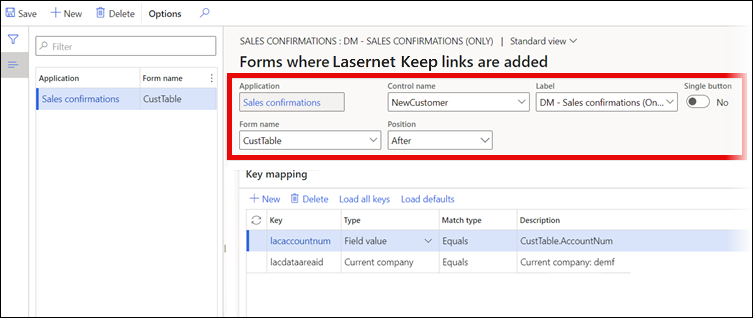
Key Mapping
The Search fields are mapped either through the data sources (tables) and fields in the Finance and Operations form, or using static values and predefined functions.
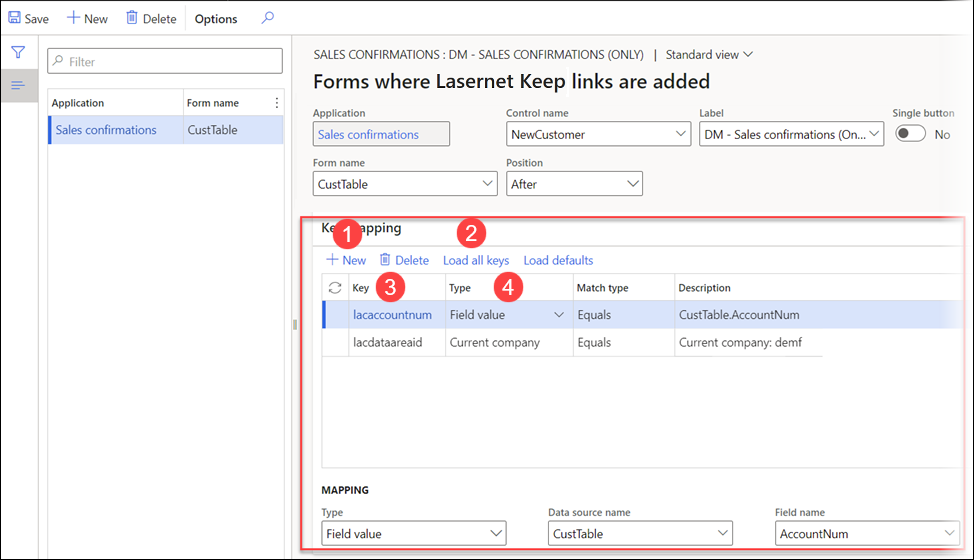
The following options are available:
New: Creates a new record ready for configuration. We recommend this option if you have several keys that you do not want to map.
Load all keys: Loads all keys from Keep for which the Search checkbox is selected.
Key: Select the Search checkbox for the Keep keys.
Type: Select one of the following options:
Field value: You have to map the table and field names.

Fixed value: You have to specify the expected value from Keep. For example, Sales, Purchase, Transport.

Current company: Automatically sets the company.

Current user: Automatically sets to the user.
