
Lasernet for Dynamics 365 Finance and Operations
Release version: 7.2.1
Release date: 7th October 2025
Notes
The following documentation and files are available:
Maintenance Report
This section briefly describes the bug fixes in Lasernet FO Connector 7.2.1.
Important!
If you are upgrading from 7.1.x and use the Test and Performance Suite, read the full description for this item from version 7.2 carefully.
Version Numbers
Dynamics Finance and Operations 10.0.44 PU68 Version: 7.2.1.2510062
Dynamics Finance and Operations 10.0.45 PU69 Version: 7.2.1.2510063
Bug Fixes
Case No. | Area | Description | Ticket No. | Status |
|---|---|---|---|---|
485852@LAC365FO | Test and Performance Suite | An error occurs when saving a new expense report and adding expense receipt attachments while the Task recorder is on. | #46219 | Bug fix |
485381@LAC365FO | Data table | Issues arise when using the Mapping and Table for archive fields for the AgreementConfirmationReplacement. | #46150 | Bug fix |
485245@LAC365FO | Runtime | The following error occurs when accessing Entity attribute: “A control with the name 'DAZTableBrowserSystemDefined' already exists on the form”. | #46136 | Bug fox |
485171@LAC365FO | Runtime | Error: “A control with the name 'FormButtonGroupControl4' already exists on the form after preview”. | Bug fix | |
485048@LAC365FO | Data formatting | The correct date format is not applied to the E-mail body parameter when using it through ReportValueFormatted. | #46039 | Bug fix |
484738@LAC365FO | Security | It should not be possible to edit and delete data in Microsoft-hosted environments through Data explorer. | Bug fix | |
484114@LAC365FO | Security | The ability to add new reports is too narrowly limited to the System Administrator’s role only. | #45964 | Bug fix |
484043@LAC365FO | Application | All modules included in the software are now listed. | Bug fix | |
458824@LAC365FO | Security | An issue arose when trying to access the Tracking functionality unless the user has System Administrator privileges. | Bug fix |
Models
Lasernet FO Connector 7.2.1 contains the following models, including the model for integration with D365CE (Dataverse) and the models for the Lasernet Print buttons.
Model | Description | Location/Remark |
|---|---|---|
Lasernet | Core and main engine for Lasernet FO Connector | Lasernet Requires activation key Lasernet > Setup > Parameters > License terms |
Lasernet81Spec | Additional requirements concerning 8.1 and newer versions of the standard Lasernet FO Connector | |
PRNButtons | Lasernet Print Buttons | Print buttons |
PRNButtonsLACAdaptor | Adaptor between the Lasernet Print Buttons and Lasernet | |
LACCE | Provide the integration to CE from Lasernet FO Connector | Lasernet > Dataverse/Dynamics 365 |
LACMSHotfixes | Hotfixes for standard Lasernet FO Connector | System administration > Setup > Hotfixes from Lasernet |
Lasernet Test Suite | Test and Performance Suite | Lasernet > Test and performance suite Requires activation key Lasernet > Test and performance suite > Parameters (see Important note below this table) |
LasernetPU35Spec | Support of Wave labels in Lasernet FO Connector | |
Lasernet Autoform DM | Integration to the Autoform (Archive) | |
Lasernet Engine | Embedded integration with Lasernet | Includes Lasernet Engine and installer for the Lasernet Form Editor |
DynAzure Data Explorer | Lasernet Data Explorer | Lasernet > Test and performance suite > General tools > Data explorer Requires activation key Lasernet > Test and performance suite > Parameters |
DynAzure Electronic Reporting Connector | Lasernet E-Documents | Lasernet > Setup > Electronic reporting connector Requires activation key Lasernet > Setup > Electronic reporting connector > Electronic reporting connector Parameters |
DynAzure Tracking | Lasernet Tracking | Lasernet > Setup > Tracking Requires activation key Lasernet > Setup > Tracking > Tracking Parameters |
DynAzure OAuth tools | The model DynAzure OAuth provides OAuth |
Note
We highly recommend that you install all models from the deployable package.
Important
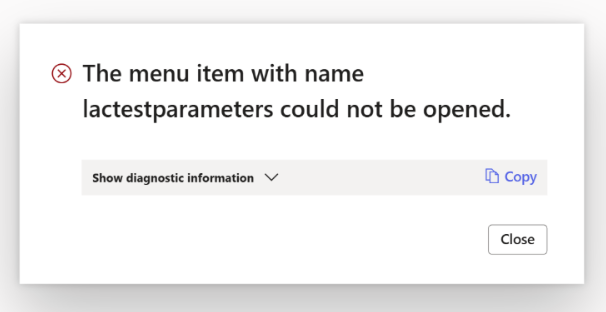
If the Data Explorer model is not installed, you will see the following error when you open the Test and Performance Suite Parameters form.
Error
The menu item with name lactestparameters could not be opened.
Add the AOT package
Either through LCS - Apply a deployable package to an environment
Or by installing a deployable package – Requires RDP access to the environment
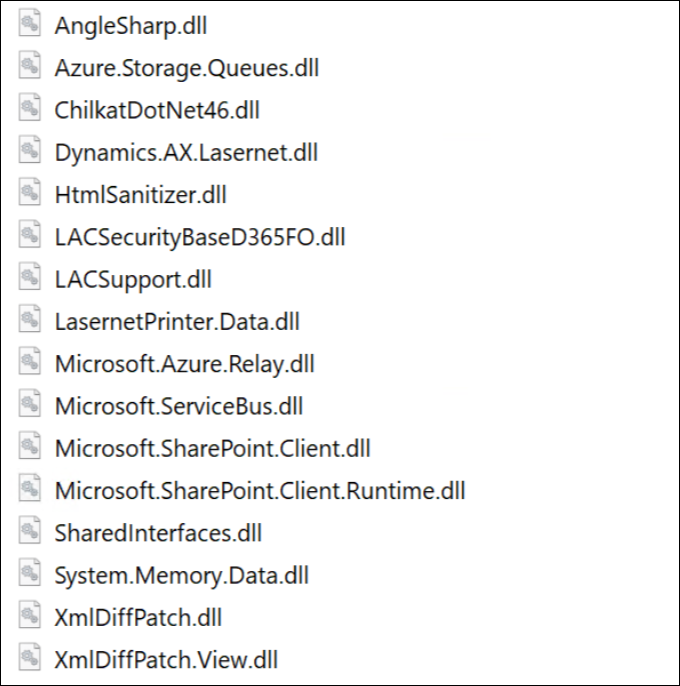
Ensure the following DLL file (new in Lasernet FO Connector 7.2) have been added to TFS if you are not just installing/deploying the AOT package:
Azure.Storage.Queues.dll
ChilkatDotNet46.dll
System.Memory.Data.dll
The following is the complete list of DLLs from the Lasernet model that are not automatically added:
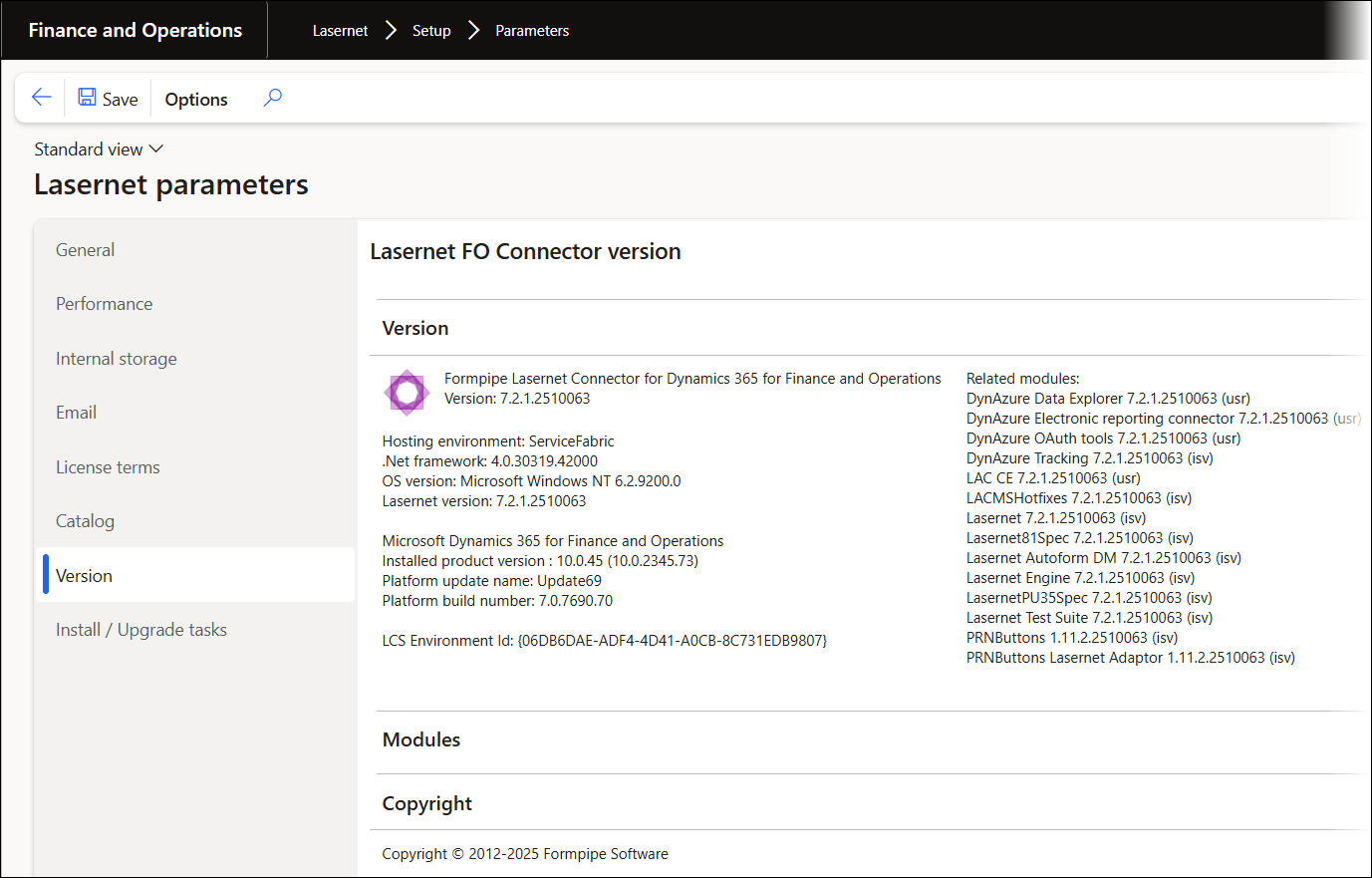
The version number should contain the number 7.2.1 after either installing or deploying the AOT package.
Lasernet > Setup > Parameters
If any files are missing, refer to Microsoft documentation.
Note
Different versions of Lasernet FO Connector are supported with different versions of Lasernet. A setup for each newer version of Lasernet is required for any new installation and when upgrading from an older version of Lasernet.
Prerequisite/Technical
Export the Lasernet FO Connector configuration, including all reports, to ensure data can be restored if needed.
It is possible to perform an in-place upgrade from a previous version as long as the previous version is relatively recent, such as Lasernet FO Connector 6.18.x.
How to Get Support
If you encounter difficulty using Lasernet FO Connector, contact Lasernet Support.