
Introduction
Sign a PDF document using a digital certificate, to allow the recipient to verify both the origin and the integrity of the file. This means that the recipient can verify that the PDF document came from your organization and has not been changed since it was created.
The PDF Security module can encrypt and sign PDF documents and decrypt and verify passwords included in PDF documents.
Dependencies
Lasernet Base Server Package including XML in & out
Recommended
Conversion Package to secure PDF documents created by Lasernet
Communication Package
Module
Encrypt
Encrypt allows you to secure the contents of your PDF document with a password. It also allows you to define which operations will be allowed by the user reading the PDF.
(34).png)
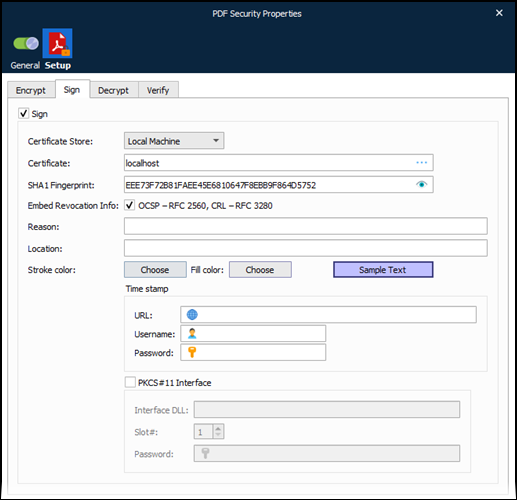
Sign
Sign your PDF document using a digital certificate, stored on the local machine or current user, to allow the recipient to verify both the origin and the integrity of the document.
Decrypt
Decrypt the PDF document, removing password encryption.
Note
You must enter a password to decrypt a PDF.
(28).png)
Verify
Verify the signature of a PDF document.
(23).png)
Example of Usage
The user wants to encrypt and sign PDF documents on-premises, with a certificate stored in a local certificate store on their Lasernet Server.