
Applies to: Lasernet Core 11
All the pages in a PDF document are converted to text format as output with a FormFeed character (HEX 0C) as a splitter character between the pages.
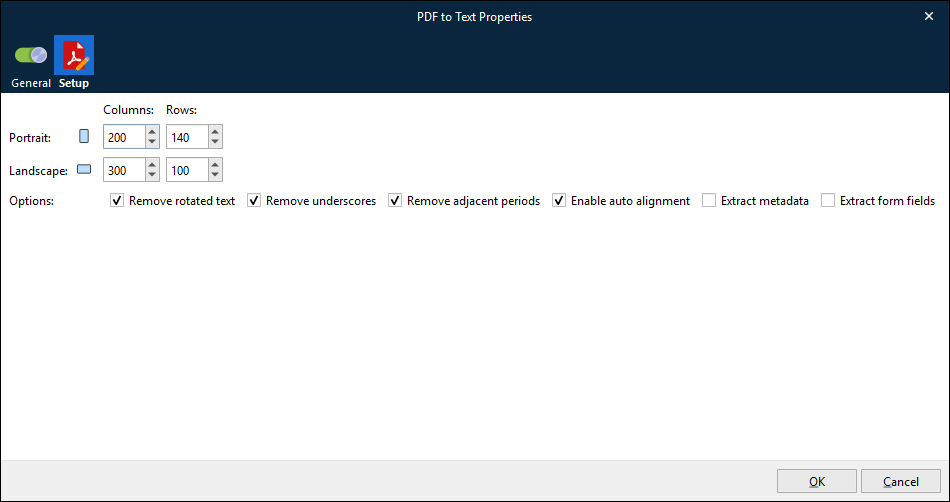
The parameters to define the output text settings are:
Portrait Columns: (Default=200). Recommended value for PDF documents (in Letter or A4 portrait format) is 200 columns.
Portrait Rows: (Default=140). Recommended value for PDF documents (in Letter or A4 portrait format) is 140 rows.
Landscape Columns: (Default=300). Recommended value for PDF documents (in Letter or A4 landscape format) is 300 columns.
Landscape Rows: (Default=100). Recommended value for PDF documents (in Letter or A4 landscape format) is 100 rows.
Options:
Remove rotated text: Prevent any characters rotated more than 5% in the PDF input from appearing in the text output.
Remove underscores: Prevent underscores (HEX 5F) from appearing in the text output.
Remove adjacent periods: Prevent adjacent period (HEX 2E) characters from appearing in text output. It might be expected that a single period character remains after removing adjacent periods in a string.
Enable auto alignment: Enable auto-alignment of scanned text. This ensures the best output quality.
Extract metadata: Highlight OCR Fields in the Lasernet OCR Editor > Preview window.
Note
This feature uses a lot of memory and greatly reduces the processing speed for multi-page documents.
Extract form fields: Extract filled form fields (such as text boxes, list boxes, and checkboxes) from the PDF. For backward compatibility, this option is not enabled by default.