Applies to: Lasernet Core 10
Used for picking up files from a Microsoft Exchange Server. The Exchange module integrates directly with Exchange Web Services (EWS) to retrieve emails.
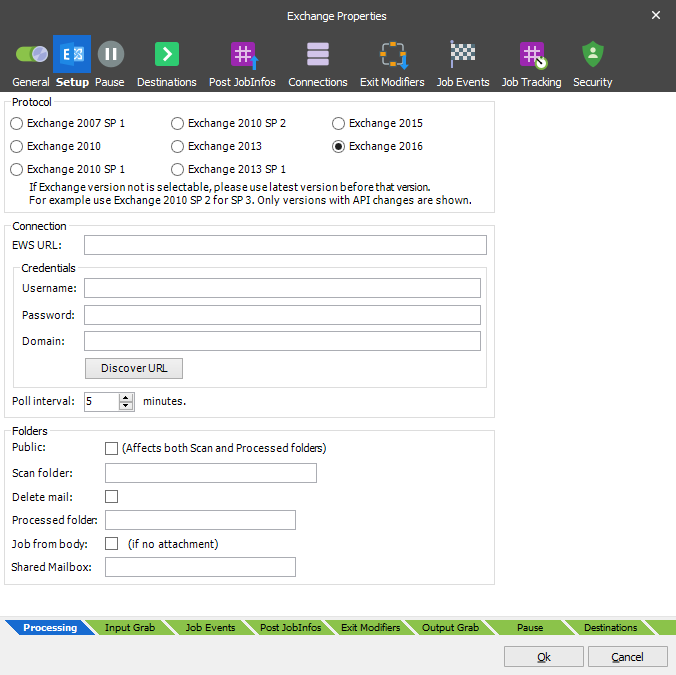
EWS was introduced by Microsoft in Exchange Server 2007, but will no longer receive feature updates. While the service will continue to receive security updates and certain non-security updates, product design and features will remain unchanged.
Microsoft has announced that EWS will still be available and supported for use in production environments. However, we suggest migrating to the Outlook Mail module, using Microsoft Graph API to access Exchange Online data and gain access to the latest features and functionality. The Outlook Mail module was introduced in Lasernet 9.5
Processed emails will be marked as read by Lasernet Core.
General
| Protocol | The version number of the Exchange Server being connected to. |
| EWS URL | Location of the Exchange Web Services. If connecting to Microsoft Online (Cloud solution), use the following URL: https://red002.mail.emea.microsoftonline.com/ews/exchange.asmx or https://amsprd0310.outlook.com/EWS/Exchange.asmx If the URL is left empty, Lasernet Core will run an auto discover service each time the poll interval is reached. If the URL is retrieved successfully it will be logged and a connection will be established. We recommend that you add the URL stored in the log, to the EWS URL field to enable faster connection to the Exchange Server in future. |
| Username | Email address or name of active directory user |
| Password | Password for the above account |
| Domain | Domain name for the active directory user |
| Poll interval | The interval between retrieval of new emails |
| Public | Activate to scan in public folder instead of private folder. This will also affect the location for the processed folder if defined. |
| Scan folder | Folder where emails are read from. If scanning a sub folder of the Inbox, the syntax is Inbox\test |
| Processed folder | If specified, processed emails will be moved here. If left blank, the mail will remain in the scan folder. If processed to a sub folder to Send, the syntax is Send\test |
| Job from body | A Job will be created from the email body, if no attachment available. |
| Profile Password | If the MAPI profile requires a password, enter it here. |
JobInfos
When a mail is received, a job is created for each attachment – JobData is set to the attachment and the following JobInfos are set:
| InputAttachmentCount | Total number of attachments included in the incoming email. |
| InputAttachmentNumber | Handling attachment number for the incoming email. |
| InputBody | The body of the mail. |
| InputFilename | The filename of the attachment. |
| InputFromEmail | The email address of the sender. |
| InputFromName | The display name of the sender. |
| InputMessageID | Unique identifier for the incoming mail. |
| InputMimeType | The mimetype of the attachment. |
| InputReplyTo | The ‘reply to’ address of the sender for the incoming email. |
| InputSubject | The subject of the mail. |