

When the Lasernet Config 11 service (Lasernet Config Server) starts, it connects to its SQL Server database. However, if Lasernet Config Server is installed on the same server as SQL Server, at server startup, the Lasernet Config 11 service might start before SQL Server is ready to accept connections. If this occurs, the following page persists in the user's browser when they try to navigate to the Manage or Lasernet Core Web App URL and the Lasernet Config Server log contains database connection errors.
.png)
Prevent the Issue
To prevent this issue on servers that host both Lasernet Config Server and SQL Server, ensure that the Lasernet Config 11 service starts after SQL Server.
Some possible solutions are described below.
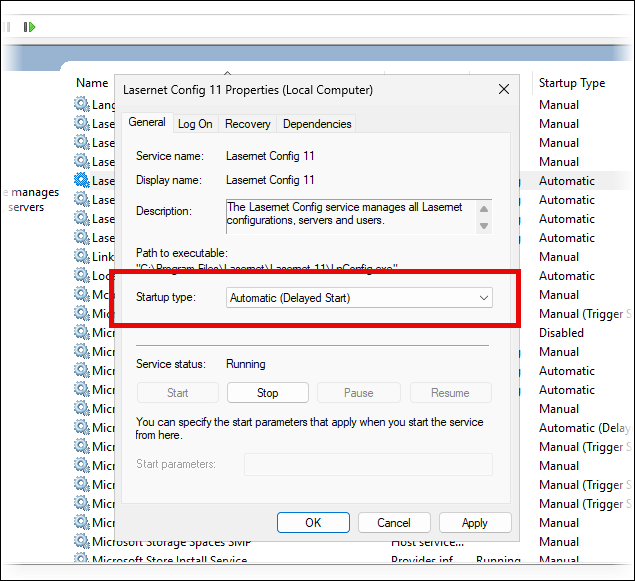
Change the Lasernet Config 11 Startup Type
Set the Startup type of the Lasernet Config 11 service to Automatic (Delayed Start).
Add a Dependency Between the Services
Configure the Lasernet Config 11 service to depend on the relevant SQL Server service. You can use the sc config "<name of service to modify>" depend= "<name of service to depend on>" command to achieve this.
Resolve the Issue If It Occurs
If Lasernet Config Server starts before SQL Server is ready and it fails to connect to its database, restart the Lasernet Config 11 service.