Lasernet for Dynamics 365 Finance and Operations
Release version: 7.3.1
Release date: 12th August 2026
Introduction
This page describes the fixes, and enhancements in Lasernet FO Connector 7.3.1.
The following documentation is available:
Warning
The Lasernet Connectors for Microsoft Dynamics 365 are currently not compatible with Lasernet Core 11. We are working towards launching these two products together, but until then, current customers and partners with the Dynamics 365 connectors should continue to use Lasernet Core 10.
Fixes, and Enhancements – Lasernet FO Connector 7.3.1
Lasernet FO Connector 7.3.1 is released for Dynamics 365 for Finance and Operations versions 10.0.47(PU71), 10.0.48(PU72), and 10.0.49(PU73).
The same source code is used across all versions.
This is a quality update provided through the following fixes, and enhancements in Lasernet FO Connector 7.3.1.
74431@LAC365FO – When 'Associated payment attachment' is enabled Lasernet report is not generated
Fixed a bug were enabling the 'Associated payment attachment' parameter prevented the Lasernet report from being generated. With the parameter switched on, printing or resending a customer invoice produced no Lasernet report, no archive record and no XML file, whereas with the parameter disabled the Lasernet invoice and the Giro report were generated as expected. The handling of the associated payment attachment was corrected so that the invoice report is now generated with the payment attachment (for example a QR bill) embedded, and the archive record and XML output are created accordingly.
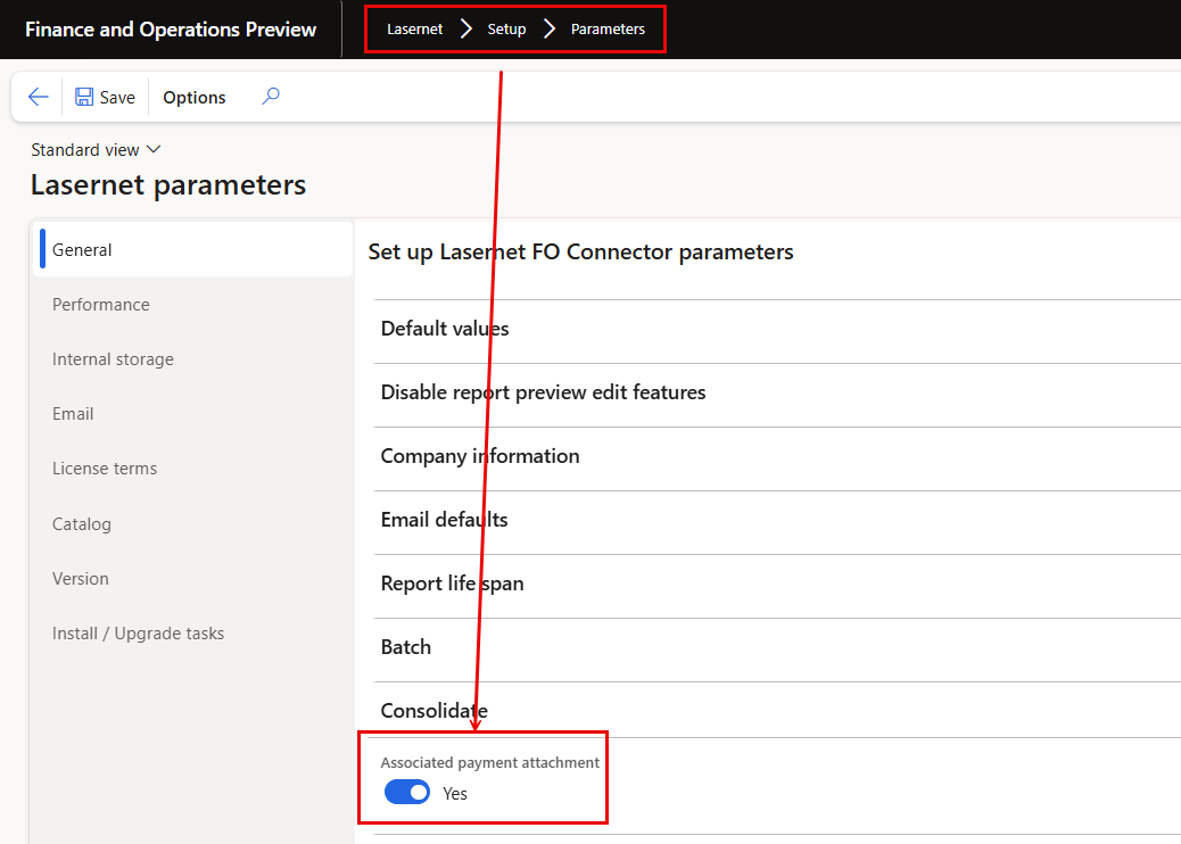
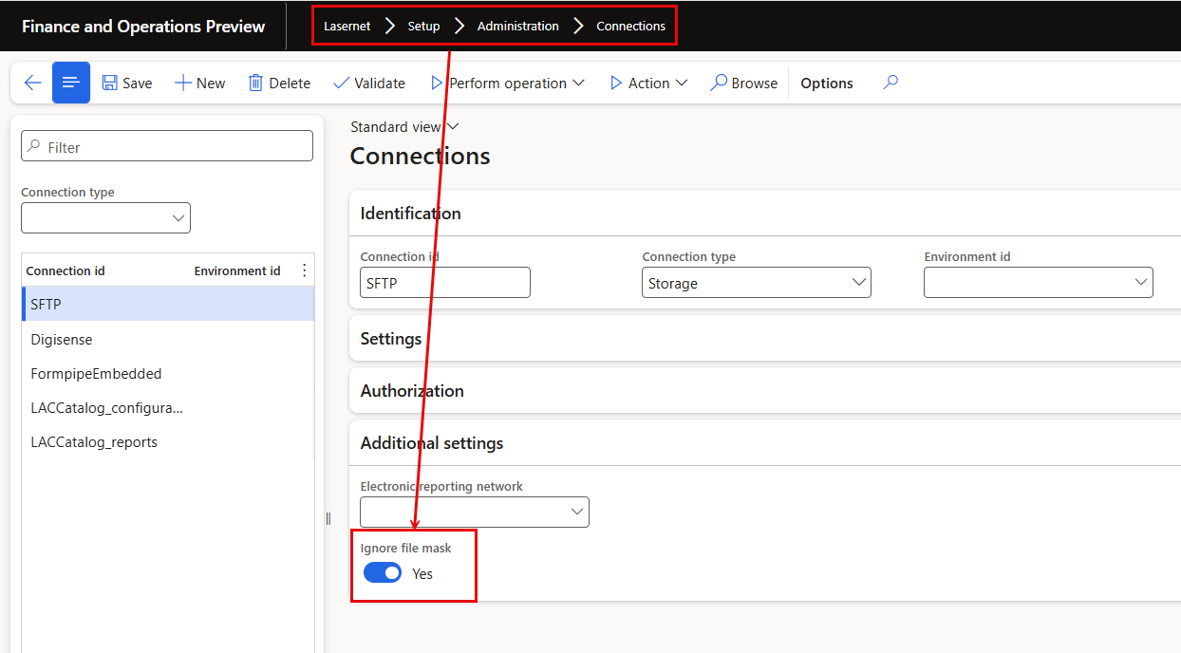
74428@LAC365FO - Option to IgnoreFileMask needs to be added to the Connection Form
Added the missing 'Ignore file mask' option to the connection setup form. The setting was supported by the underlying connection configuration but was not exposed on the form, so it could not be maintained through the user interface. The option is now available directly on the Connection form, allowing users to control whether the file mask filter should be ignored when files are picked up through the connection.
Ignore file mask is useful when there is a need to drop files like via sftp/ftp, such as electronic documents, into a specified file path or instance name.
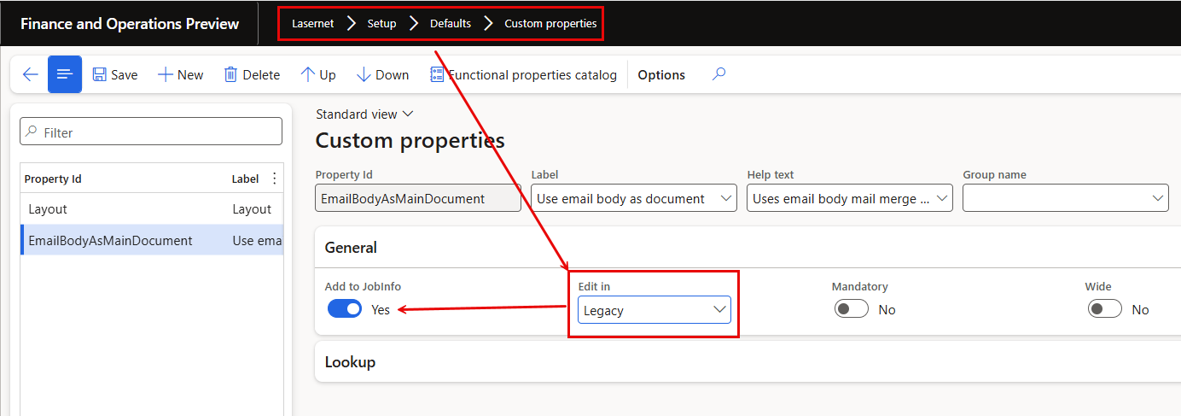
74424@LAC365FO - Legacy custom property does not show up in JobInfo
Fixed an issue where a custom property defined through the legacy custom-property mechanism did not show up in JobInfo. Because the property was missing from the JobInfo of the generated Lasernet job, its value was unavailable to configurations that relied on it. Legacy custom properties are now included in JobInfo again, restoring the previous behaviour for reports that still use the legacy custom-property approach.
Custom properties are extremely useful for e-documents such as e-invoices. They provide a powerful way to control and validate the electronic format, attach the required electronic format, and determine whether an email should include a PDF, the e-invoice (XML), both, or neither.
74415@LAC365FO – Issue when using LACStartup to pass parameters from an URL
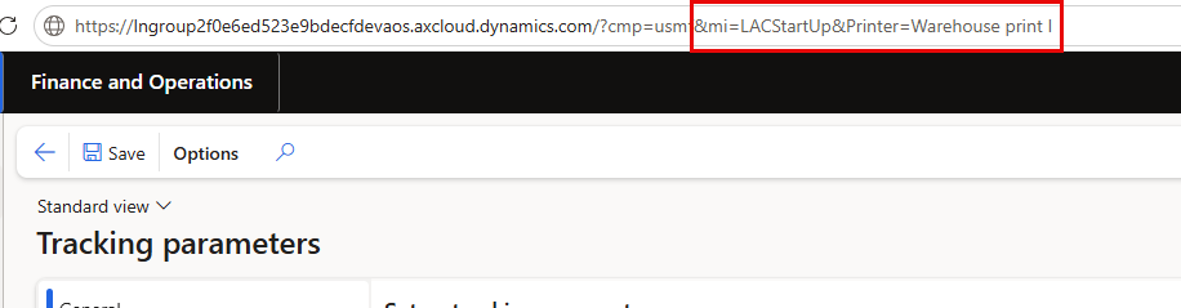
The following error was thrown when passing parameters via the LACStartup within the URL.
Using LACStartUp is a powerful option in scenarios like where a print station is used, as it allows a printer name to be passed when starting FinOps from a URL.
https://devaos.axcloud.dynamics.com/?cmp=usmf&mi=LACStartUp&Printer=Warehouse printer I
Possible to parse parameters via the URL:
And use the parameters within an expression via the Parameter like the following. However, the following error was thrown.
This issue has been fixed in version 7.3.1.
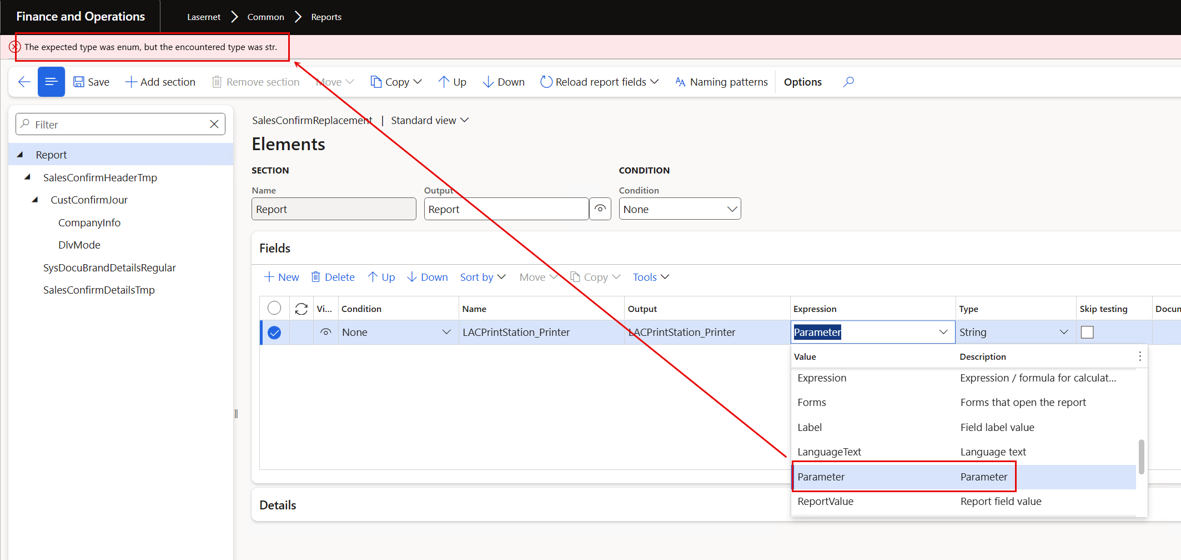
Error
The expected type was enum, but the encountered type was str.
74409@LAC365FO - 74175@LAC365FO - Option to open the selected Form directly from the Form-links
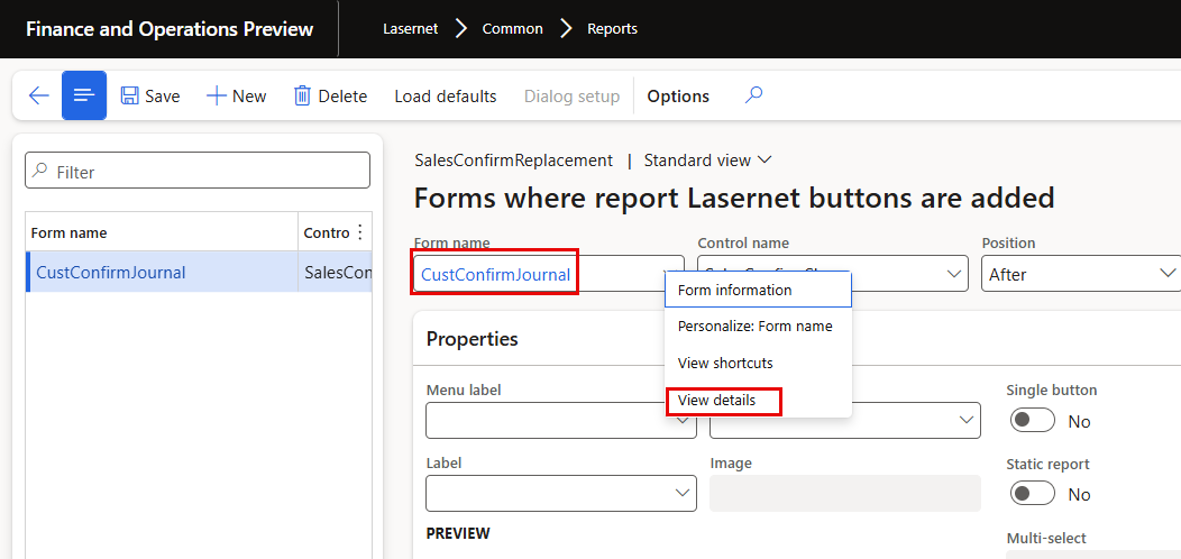
Added an option to open the selected form directly from the Form links setup. When configuring or troubleshooting form links, the linked form can now be launched straight from the form-link record instead of having to locate it manually in the menu structure. This is particularly useful in support scenarios that start from a form, and for unfamiliar forms delivered by another ISV that are referenced by a form link and need to be inspected quickly.
Either click the Form name or right click and select View details.
74346@LAC365FO – Form links to journal table with condition stops D365FO from creating new journals
Fixed a severe issue where a form link with a condition on a journal table prevented D365FO from creating new journals and could crash the AOS. Every form data event ran a full report-controller initialisation that pre-evaluated all parameter defaults and the report Language expression; against a new, uncommitted journal record this degraded into unranged query evaluation, hanging the client until the AOS crashed. Condition validation now uses a lightweight initialisation that skips controller packing and language-expression evaluation, evaluation is skipped entirely for uncommitted records (the button stays disabled until the record is saved), and the last result is briefly cached per record. Journal creation is instant again with conditional form links in place.
74180@LAC365FO - ConnectorAPI loading issue in SF
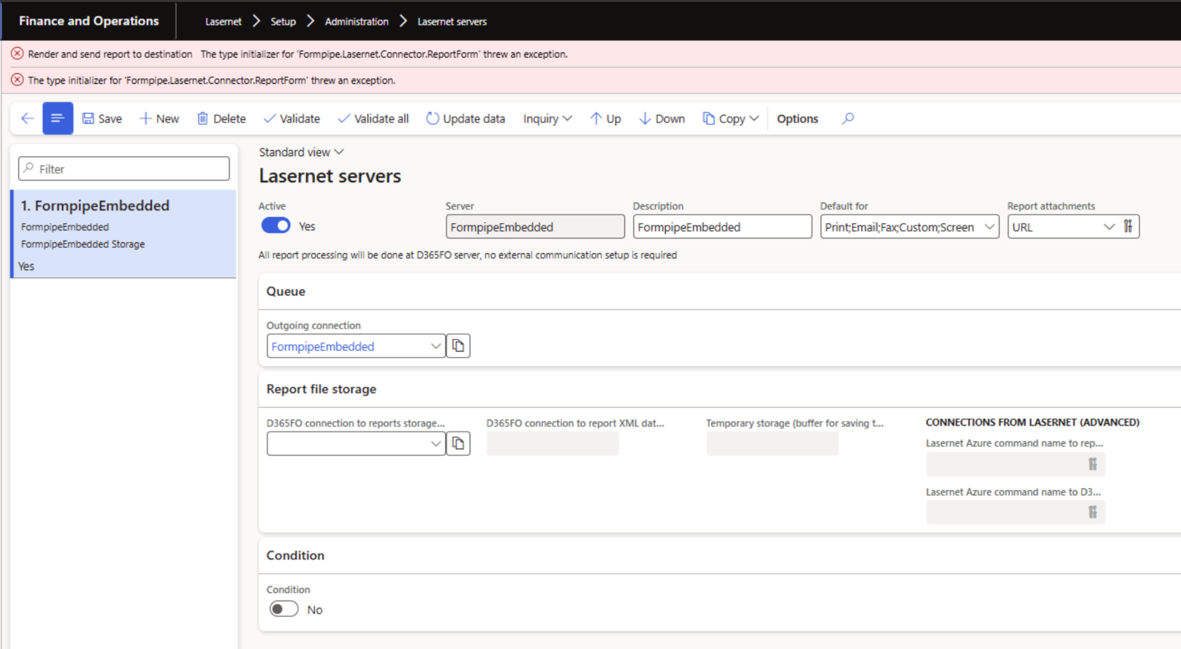
Fixed Lasernet report rendering crashing on Microsoft-hosted Tier-2+ (Service Fabric) environments while working correctly on Tier-1 development boxes: report initialization through the integrated connector failed with an external component exception. The root cause was traced to the Qt 6.8 framework shipped with Lasernet Engine 11.1, which unconditionally activated a Windows UI theming component that is not registered on headless Service Fabric nodes, so an unhandled exception aborted report initialization. The relevant upstream Qt fix was applied and the Windows platform plugin (qwindows.dll) was rebuilt so the call now falls back gracefully to the registry-based accent colour.
The following error was thrown:
74174@LAC365FO – FO 7.3: Query Range Ignored on Top-Level Table Causing Full Journal Data Retrieval
Fixed a regression in version 7.3 where default ranges defined through the LAC Query Wizard were ignored when a query-based report was executed. Ranges whose value was an expression referencing a field of another data source in the same query (for example filtering delivery modes by the sales order's delivery mode) were silently dropped at run time, so the report returned every record from the affected data source instead of the expected filtered subset. Queries exported from 7.3 also misbehaved when imported into earlier versions. The runtime range handling introduced by the 7.3 multiselection performance improvements failed to locate expression-based filters on secondary data sources; this was corrected so such ranges are applied again, restoring the filtering behaviour of versions 7.1.3 and 7.2.2.0
Having a range/filter like the following:
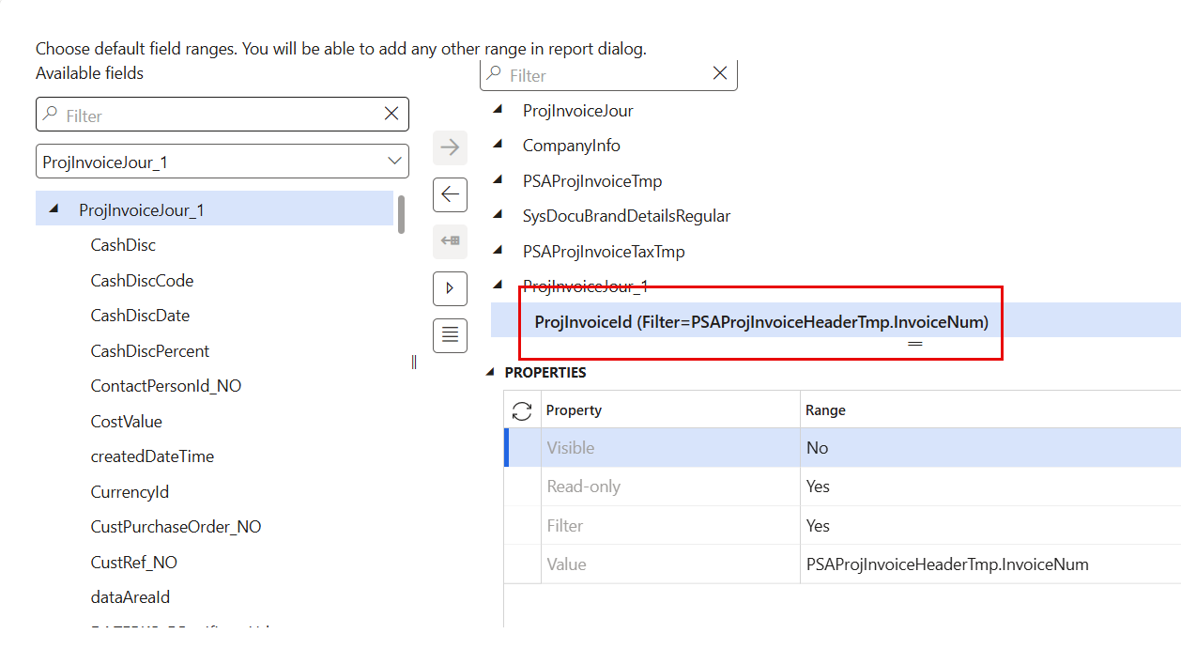
Would ignore the ranges and include all records in the output:
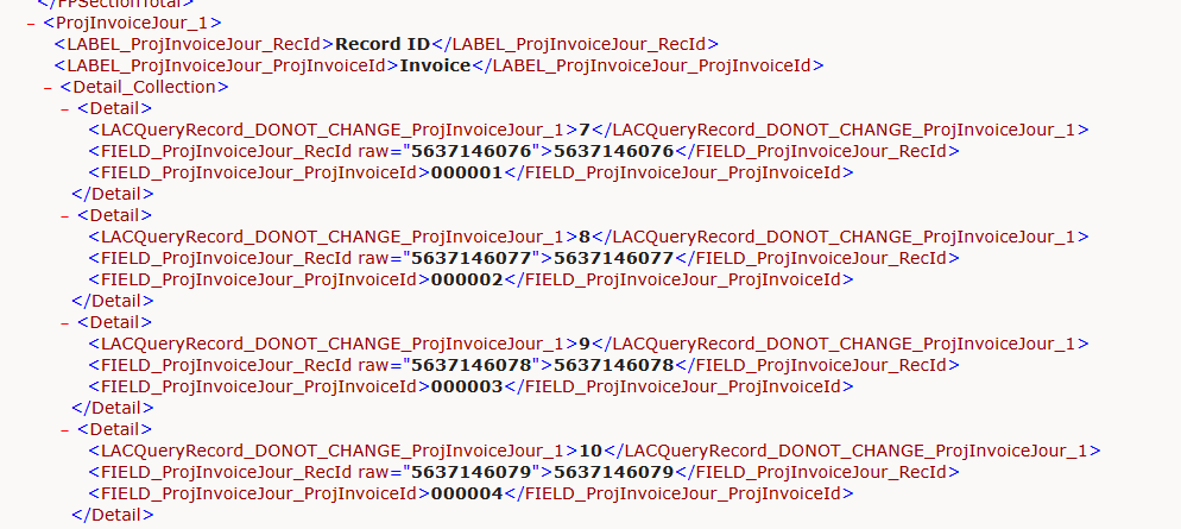
This is fixed in FO Connector version 7.3.1.
74142@LAC365FO - Re-add better support for displaying PDFs instead of downloading them in Dataverse/Dynamics 365
Re-added better support for displaying PDFs in the browser instead of downloading them when printing in Dynamics 365 with the destination set to Screen. In this scenario a URL to the generated PDF is sent to the Dynamics 365 solution together with a command that opens it, and the response metadata determines whether the browser shows the file inline or downloads it. The application/pdf content type had stopped being applied to these temporary files, causing browsers to download them. The file-upload strategy for temporary files returned to Dynamics 365 was changed to reapply the correct content type, so PDFs are once again displayed directly in most standard browser configurations, while users can still override the behaviour through their own browser settings.
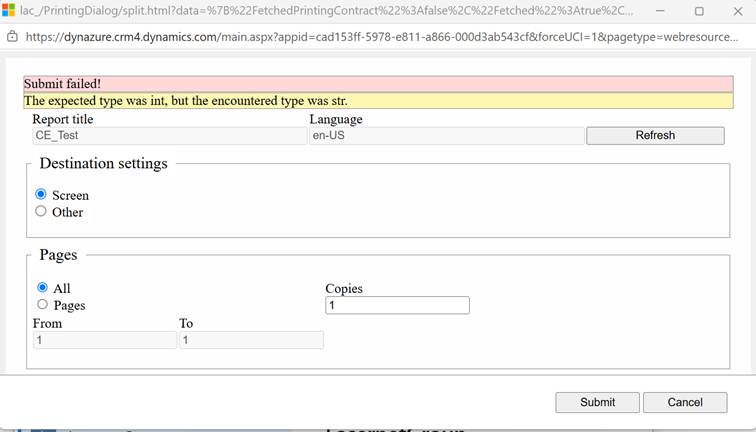
74118@LAC365FO - CE Reports fail with error "The expected type was int, but the encountered type was str." in 7.3
Fixed CE (Customer Engagement/Dataverse) reports failing after the 7.3 upgrade with the error 'The expected type was int, but the encountered type was str.' The failure was triggered by the default range on the entity report using the PrimaryItemIds parameter; removing the range was not a viable workaround because the report would then pull every record from CE. The building of the parameter run map was corrected so the PrimaryItemIds values are handled with the proper type, and reports triggered from CE dialogs now run with their default ranges as they did in 7.2.2
The following error was thrown:
Error
Submit failed!
The expected type was int, but the encountered type was str.
74110@LAC365FO - Minor fixes to expressions
Fixed a number of minor issues in the report expression functionality that were discovered while running through internal tests of the 7.3 release. The corrections improve the reliability of expressions used in report configuration, ensuring they evaluate as expected in the tested scenarios without changing any intended expression behaviour.
74346@LAC365FO – Form links to journal table with condition stops D365FO from creating new journals
Fixed a severe issue where a form link with a condition on a journal table prevented D365FO from creating new journals and could crash the AOS. Every form data event ran a full report-controller initialisation that pre-evaluated all parameter defaults and the report Language expression; against a new, uncommitted journal record this degraded into unranged query evaluation, hanging the client until the AOS crashed. Condition validation now uses a lightweight initialisation that skips controller packing and language-expression evaluation, evaluation is skipped entirely for uncommitted records (the button stays disabled until the record is saved), and the last result is briefly cached per record. Journal creation is instant again with conditional form links in place.
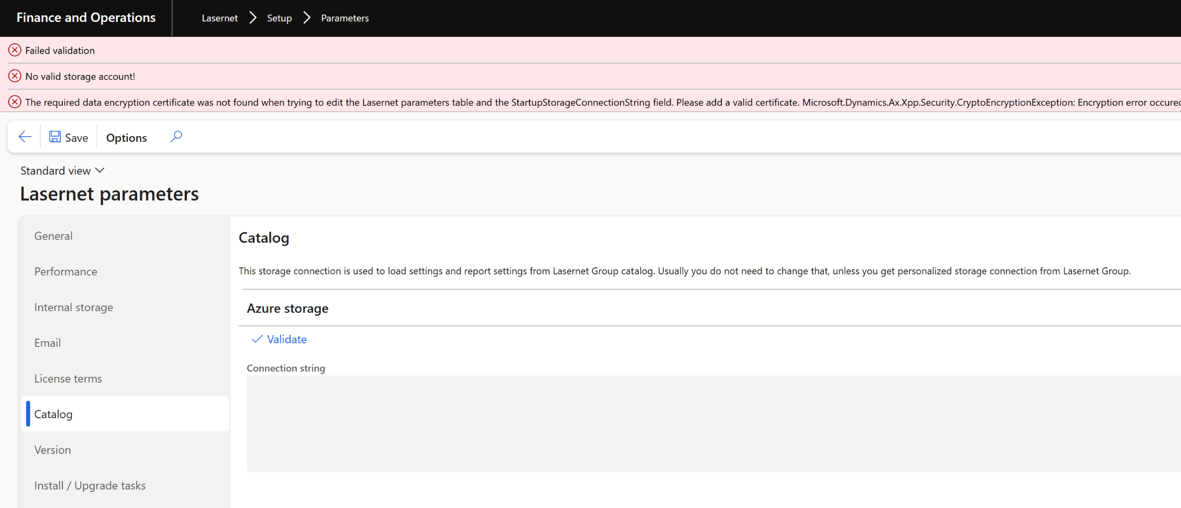
74090@LAC365FO - LAC 7.3 - LasernetGroupEmbedded connection not working on Service fabric environments + other ticket for Embedded
The following error occurred when using the setup wizard and within the Catalog connection:
Error
The required data encryption certificate was not found when trying to edit the Lasernet parameters table and the StartupStorageConnectionString field. Please add a valid certificate.
Microsoft.Dynamics.Ax.Xpp.Security.CryptoEncryptionException: Encryption error occured with exception: Microsoft.Dynamics.Ax.Xpp.Security.CryptoEncryptionException: Encryption error occured with exception:
Microsoft.Dynamics.AX.Configuration.CertificateHandler.NoCertificateFoundException: No certificate found for id '5CC00ADA2A90B6B80BC38C2A637EF5E6FE43E574'. at
74081@LAC365FO – LAC 7.3 - Sub report fields missing tags in xml
Fixed a 7.3 regression where fields coming from sub reports lost their surrounding XML tags and were written as attributes in a flattened structure, breaking Lasernet designs that expected the element-based output produced by LAC 7.2.2. The problem occurred in the simplified execution path, which builds the final document directly without intermediate transformation steps and had not handled sub-report structures correctly without 'yellow' report elements. A follow-up fix also restored the missing tags around header fields, and the element creation for simplified execution was reworked. Sub-report fields, including header-level fields, are now surrounded by proper XML tags again, matching the LAC 7.2.2 output
The sub-report did not produce the correct output structure:
FO Connector 7.3.0 | FO Connector 7.3.1 |
|
|


73984@LAC365FO - Mobile Device Menu - Endless serial number prompt when “Show serial number“ is enabled
Fixed an endless serial number prompt on mobile device menu items with "Show serial number" enabled. When reporting a production order as finished through the warehouse mobile app or emulator, the serial number prompt reappeared indefinitely, blocking the process on D365FO 10.0.47/10.0.48 with LAC 7.2.2 and 7.3.0. The Report as finished screen now pre-fills the serial number from the production order where one is available, displays a clear "Enter the serial number." message instead of silently repeating the prompt, and no longer suggests a serial number that has already been used for the next report. The fix covers both the "Report as finished" and the "Report as finished and put away" flows, restoring normal serial-number-tracked reporting on mobile devices.
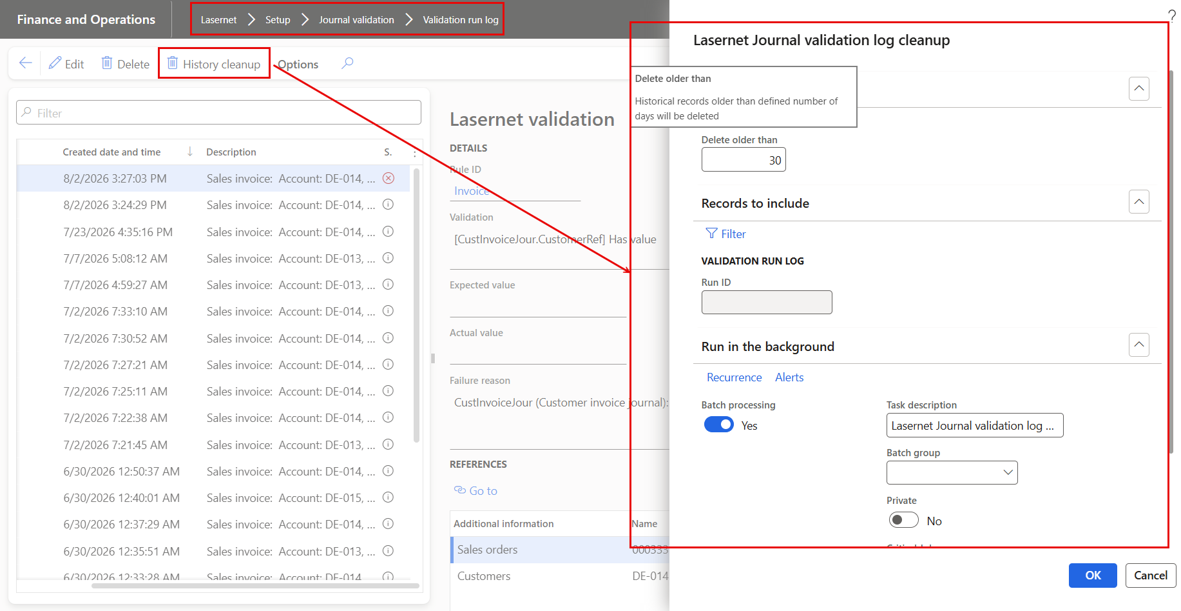
73862@LAC365FO – Clean-up function required for Journal validation logs
Added a clean-up function for Lasernet Journal validation logs, available from the Journal validation logs form via a new History cleanup button. The dialog offers a 'Delete older than' parameter (in days, defaulting to 30) that removes log entries older than the given age together with their detail lines and references, and a standard 'Records to include' query filter to narrow which entries are considered for deletion. The job can be run in the background as a recurring batch job - a daily recurrence is proposed by default - so the logs are kept trimmed automatically, and after each run the number of deleted records is reported. The function follows the pattern of the other Lasernet clean-up jobs and is available to users with maintain access to Lasernet journal validation.
The logs in the journal validation are generated by the pre-validation process, a powerful feature that ensures all required information is completed correctly. If any required information is missing, invoice posting is stopped. This approach prevents invoices from being posted with incomplete information and is especially useful for e-invoicing, which has strict requirements.
73848@LAC365FO - Ranges are ignored
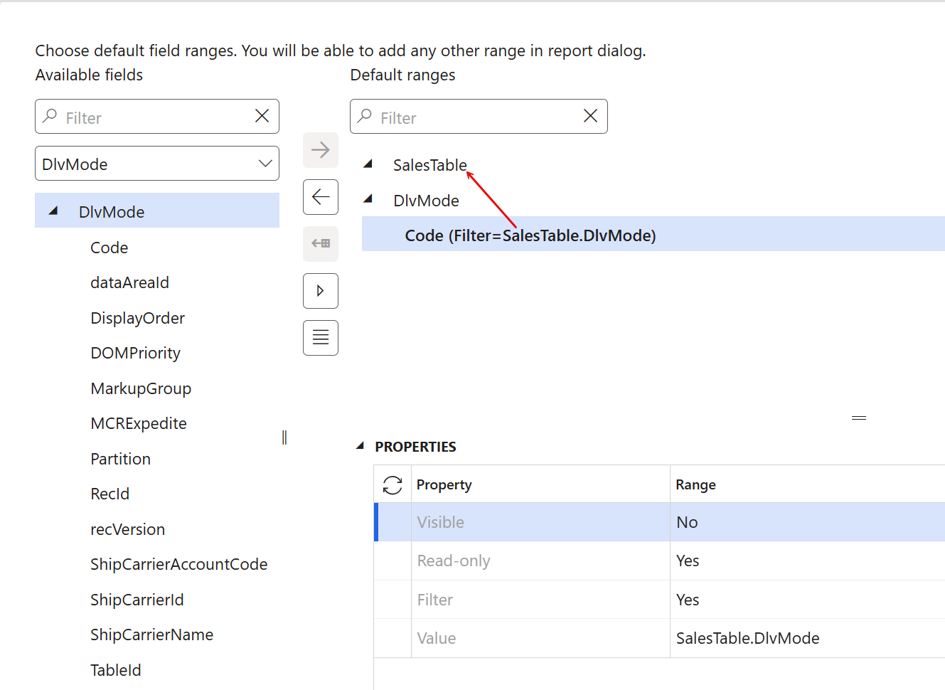
Fixed a regression in version 7.3 where default ranges defined through the LAC Query Wizard were ignored when a query-based report was executed. Ranges whose value was an expression referencing a field of another data source in the same query (for example filtering delivery modes by the sales order's delivery mode) were silently dropped at run time, so the report returned every record from the affected data source instead of the expected filtered subset. Queries exported from 7.3 also misbehaved when imported into earlier versions. The runtime range handling introduced by the 7.3 multiselection performance improvements failed to locate expression-based filters on secondary data sources; this was corrected so such ranges are applied again, restoring the filtering behaviour of versions 7.1.3 and 7.2.2.
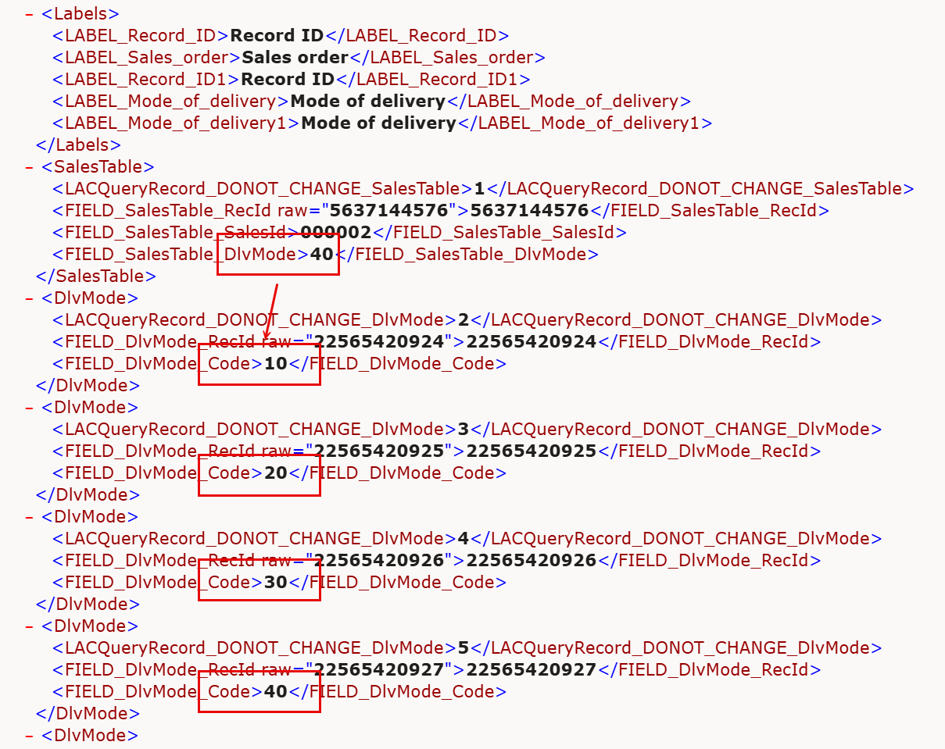
In the following example the value for the Code within the table DlvMode is retrieved from another branch:
Which would retrieve all entries from the table Dlvmode:
This is fixed in FO Connector version 7.3.1.
73846@LAC365FO - Embedding files into SSRS rendered PDF, Embedding DocuRef via expressions
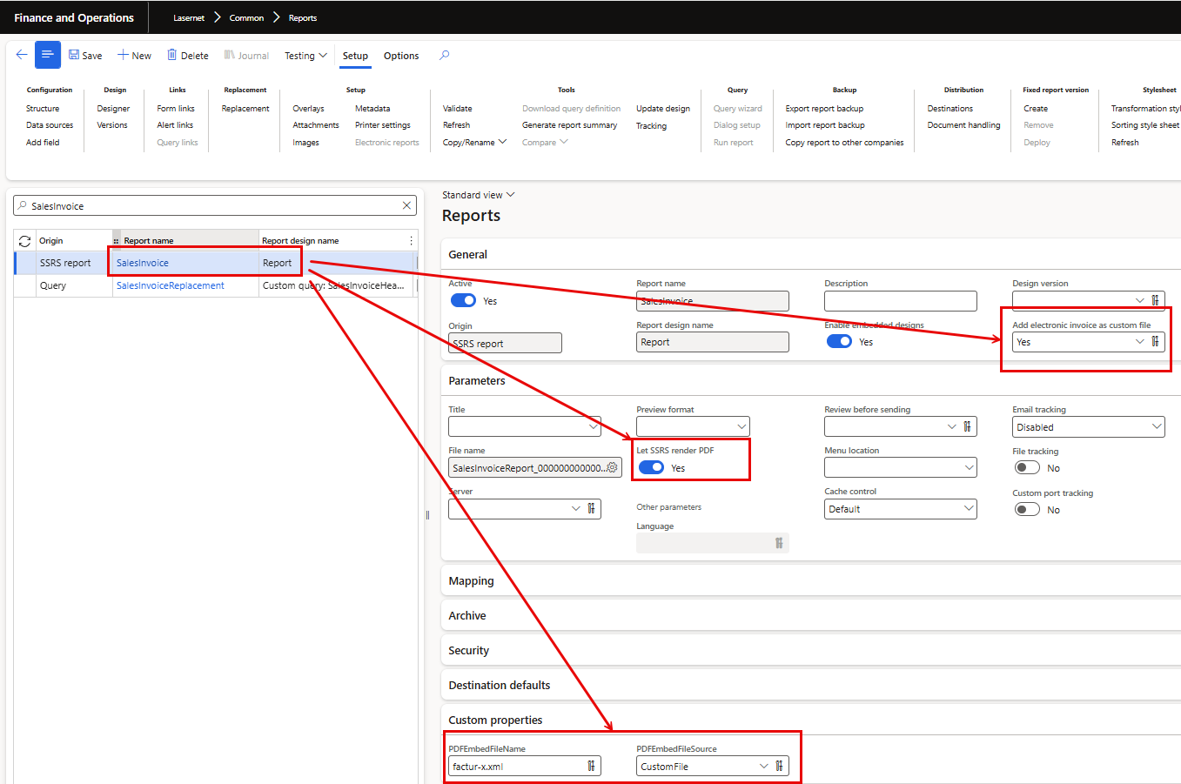
Implemented embedding of files into SSRS-rendered PDF output, including embedding of document attachments (document references) selected via expressions. Report configurations can now specify files, such as attachments stored on the underlying record, to be embedded into the resulting PDF when the report is rendered through SSRS, with expression-based custom properties controlling which attachments are included. As part of the work, the report custom properties form was updated where properties were still stored in an old format.
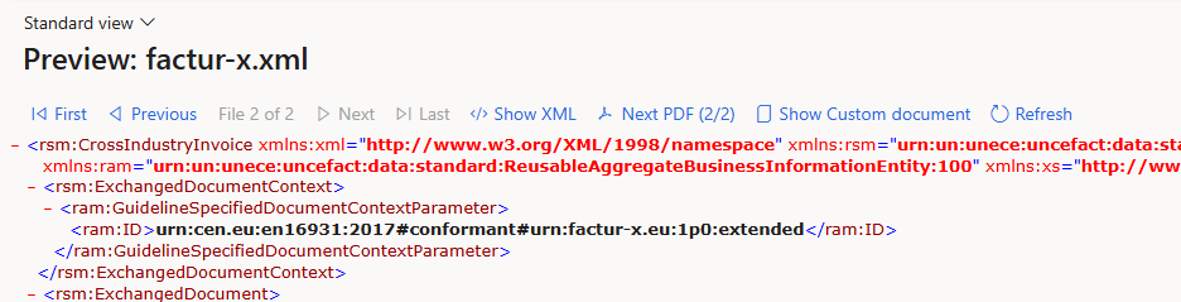
Useful when there is a need to support hybrid formats such as ZUGFeRD and Factur-X while using an SSRS report, as it provides the option to attach the electronic document (XML) to the SSRS-generated report. It is also useful when onboarding new customers whose starting point is SSRS.
73796@LAC365FO – Check Batch job Lasernet metadata rebuild. %2
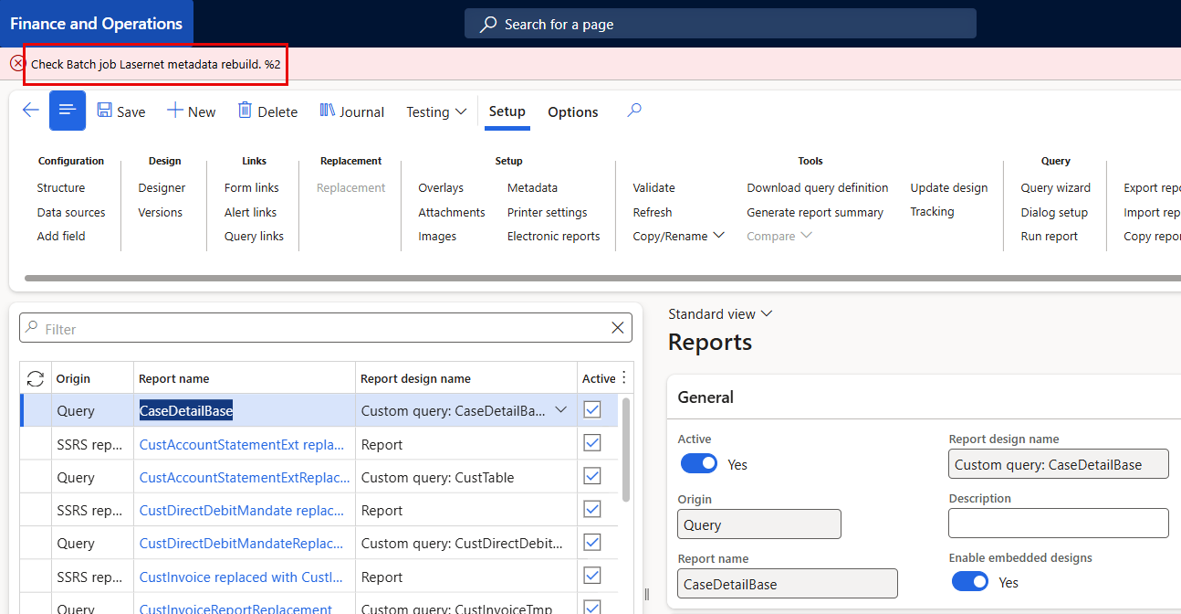
Fixed the error 'Check Batch job Lasernet metadata rebuild. %2' that could appear when opening the Reports page even though the metadata rebuild batch job had completed successfully. The batch-job status check and the message label were adjusted, and the metadata dictionary (LACDictData) load and rebuild process was updated in follow-up changes so that a stale 'rebuild is running' state no longer blocks the Reports page after the batch job has ended. Clearing the Lasernet cache or the entire cache is no longer required to get past the error, and the rebuild status shown to users now reflects the actual state of the metadata rebuild.
The following error may be displayed in 7.3.0 if there are issues with the newly introduced batch build-up date metadata (AOS objects). This is fixed in 7.3.1.
Error
Check Batch job Lasernet metadata rebuild. %2
73789@LAC365FO - Update LACTutorialProjTableExplode report used in tutorials and Test plans
Updated the Project table explode tutorial report (LACTutorialProjTableExplode) that is used throughout the Lasernet tutorials and referenced by the automated test plans, and reloaded the refreshed report definition into the package resources. Keeping the shipped resource aligned with the current report design ensures that users following the tutorial material and the test suite executing the corresponding test-plan flows both work against the same up-to-date report definition, avoiding discrepancies between documented tutorial steps, test-plan checkpoint expectations and the actual report output delivered with the product. The updated resource was checked into the Lasernet model for the 7.3.1 release.
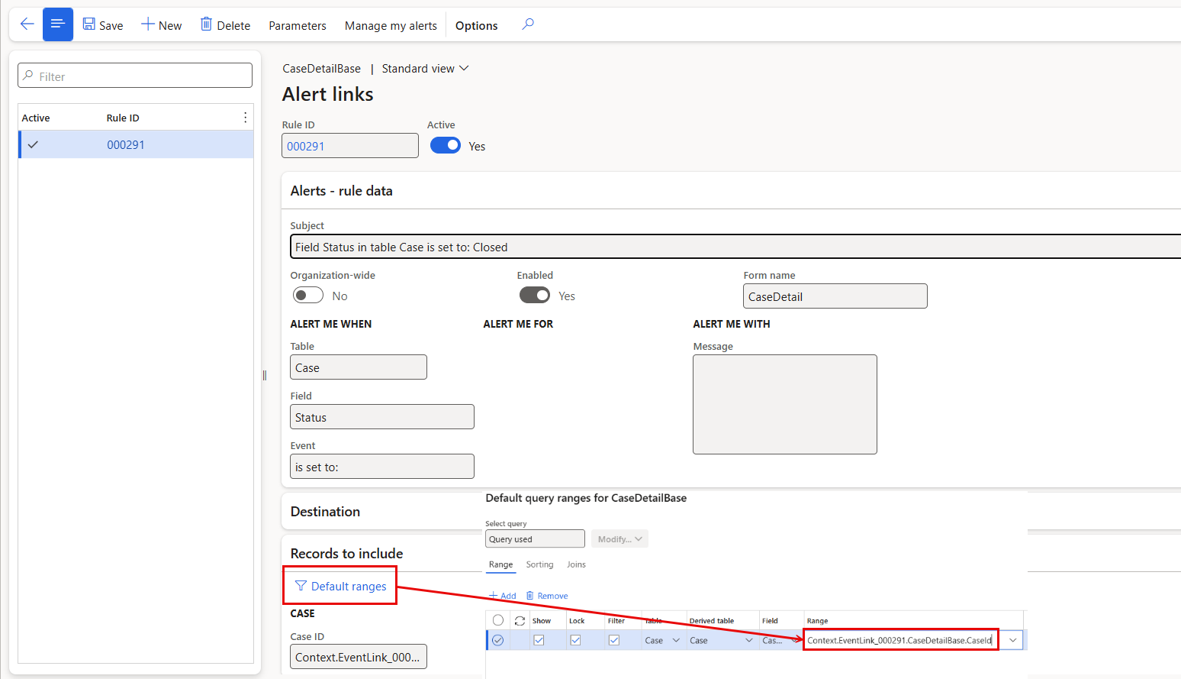
73771@LAC365FO – Alert links with cases are not working
Fixed alert links printing all records instead of the single record that triggered the alert. Reports based on the Cases tables (CaseDetailBase) were affected: the default range token that should resolve to the triggering case resolved to an empty value, leaving the report query unfiltered so every case was printed. Two defects were corrected - a regression that discarded the alert's registered context objects during multi-run initialisation, and a pre-existing table-inheritance bug that rebuilt the context record with the wrong table id, producing an empty record for inheritance-based tables such as Cases. Alert-link reports now output only the correct triggering record, including on tables using table inheritance, while form links, plain report runs and the ER connector behaviour remain unchanged.
Adding an Alert link to a query and applying a range using an extended table, such as CaseDetail (which extends CaseDetailBase), causes the Alert link to return all records instead of only the record that triggered the alert.
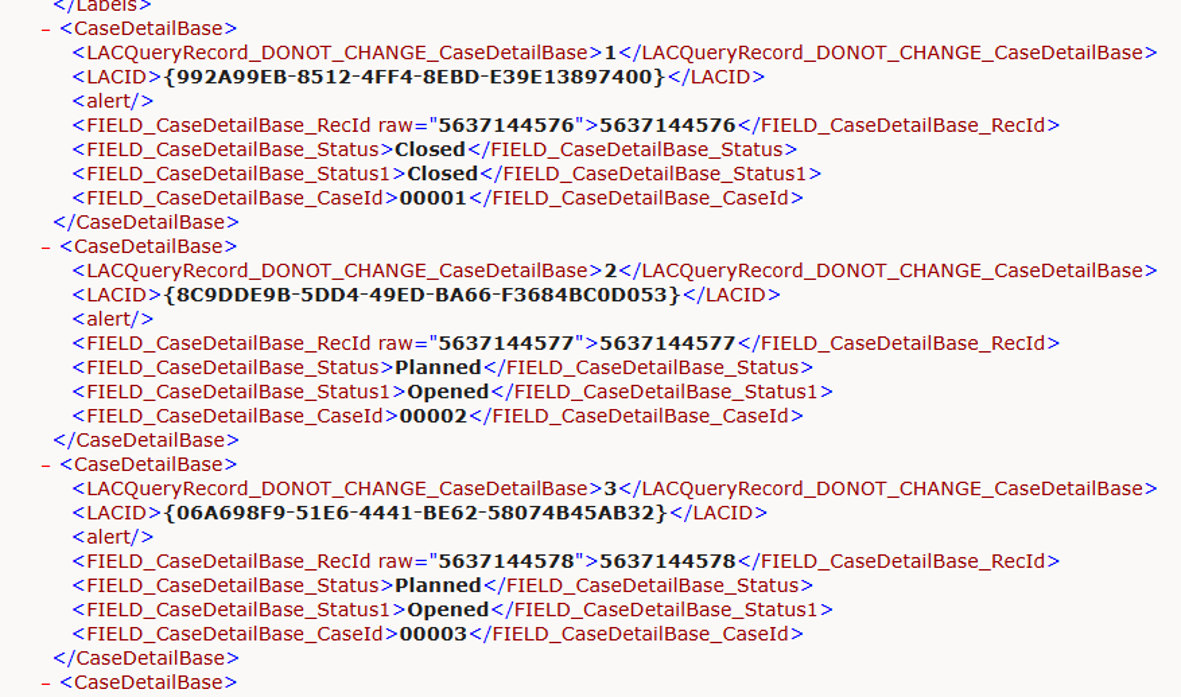
All records were added into the XML-file:
71990@LAC365FO – Error Handling for Connection Action Move Files
Real error messages instead of "Unknown error"
LACStorageOperationTaskService previously swallowed all exceptions during file processing and the queue line ended as "Unknown error", even when a meaningful message was already available. Now the actual infolog messages and the innermost CLR exception text are captured into the line status info. Verified with a locked source file – the line now reads: "The process cannot access the file 'c:\temp\wi71990\src\Invoice_00456.pdf' because it is being used by another process."
Queue flooding by "filter mismatch" lines stopped
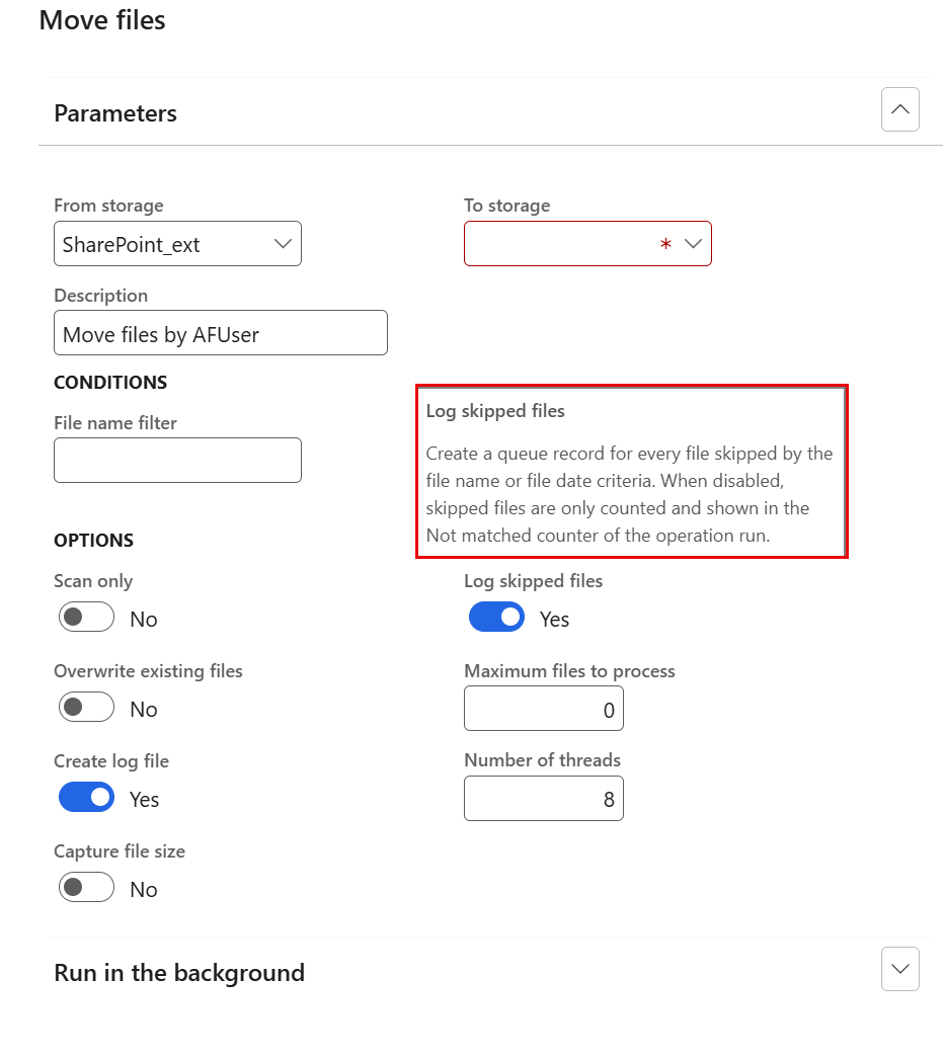
New parameter Log skipped files (default No) on Move/Copy/Cleanup files. When off, files skipped by the name/date criteria are only counted – shown in the new Not matched counter – instead of creating one Skip line per file. When on, the previous behaviour is kept, and skip lines now always carry a reason (name or date criteria mismatch).
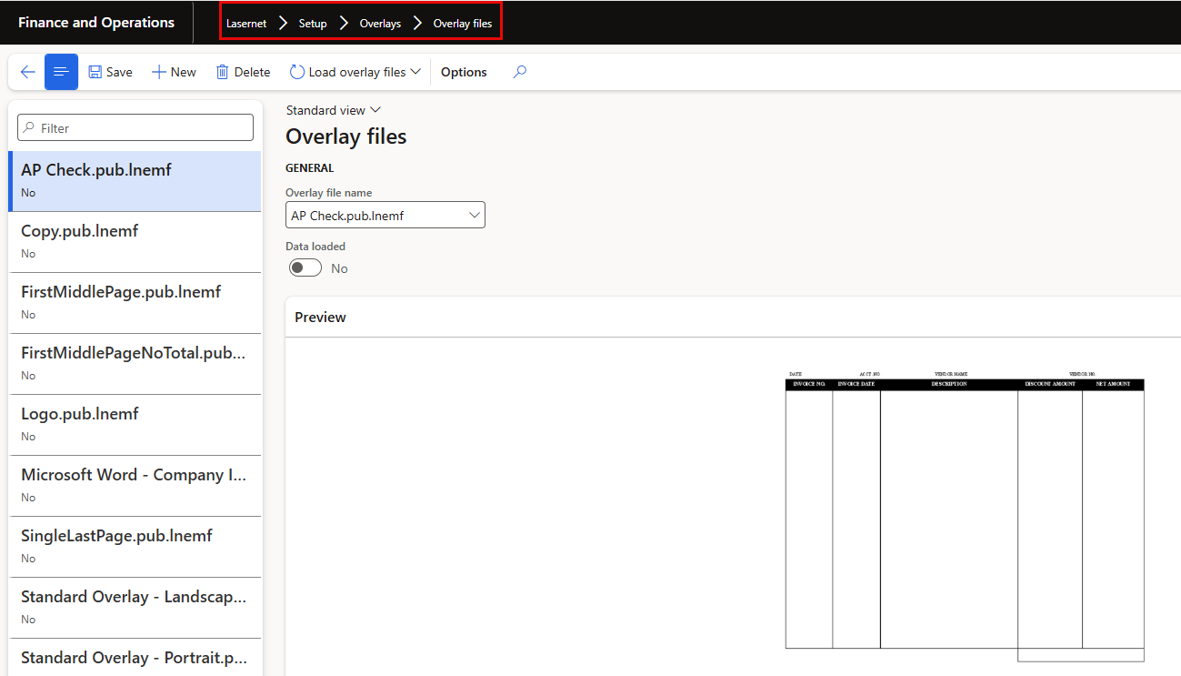
71510@LAC365FO – Lasernet overlay files form - takes minutes to load
Performance when opening the form for the overlays has been significantly improved.
Fixed the Lasernet overlay files form taking minutes to open, or hanging until timeout, whenever overlay files were loaded. The preview image for each overlay file was previously fetched from the Lasernet server synchronously during form rendering, producing one blocking web-service call per file - and on environments running only the embedded Lasernet server every call ended in a timeout. Preview loading was reworked to run asynchronously in the background: the form now opens instantly, a "Loading preview..." caption is shown while an image is being fetched, and on failure a clear message with the actual server error is displayed instead of blocking the UI. Preview results are cached per file for the session, and the overlay file lookup thumbnail received the same asynchronous treatment.
73906@LAC365FO - Option to preview EXCEL from Autoform DM/Keep-11 &
73905@LAC365FO - Preview word and excel files in Dynamics, when archived in Lasernet Keep
The document preview functionality in Autoform DM/Keep-11 has been expanded to support EXCEL, WORD, PowerPoint and image files etc., in addition to the existing PDF preview option.
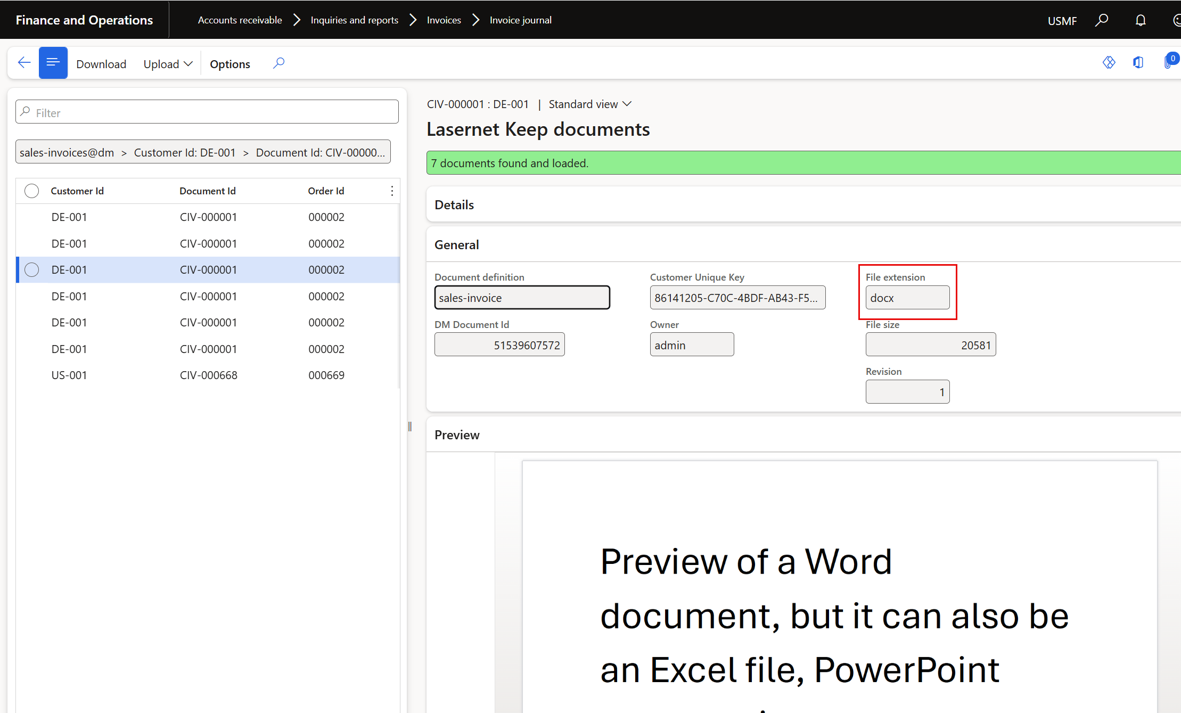
74175@LAC365FO - Lasernet Keep documents: Replace "Show" button with "Download"
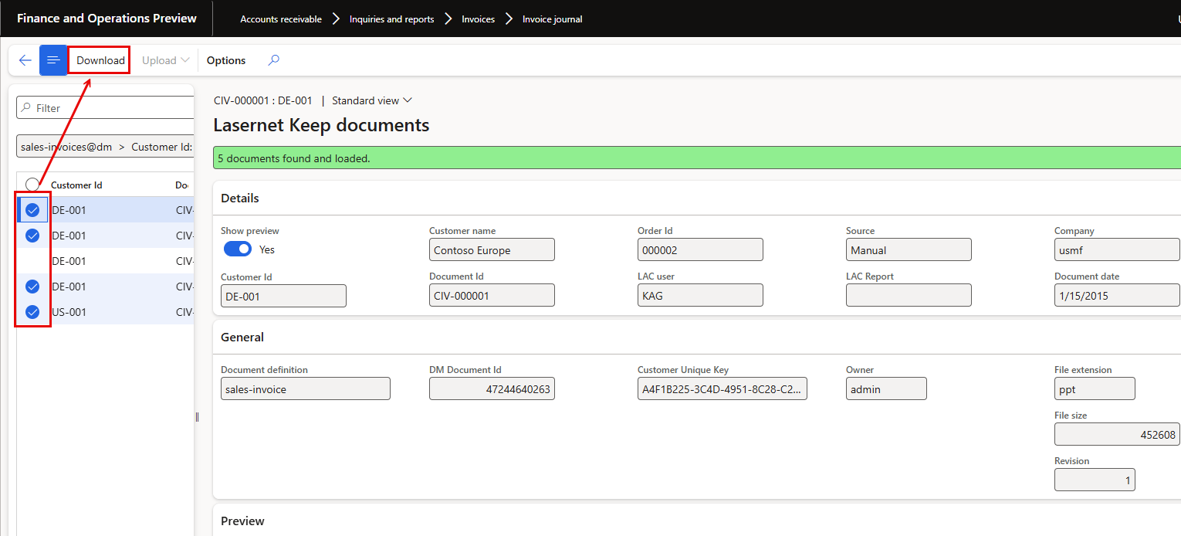
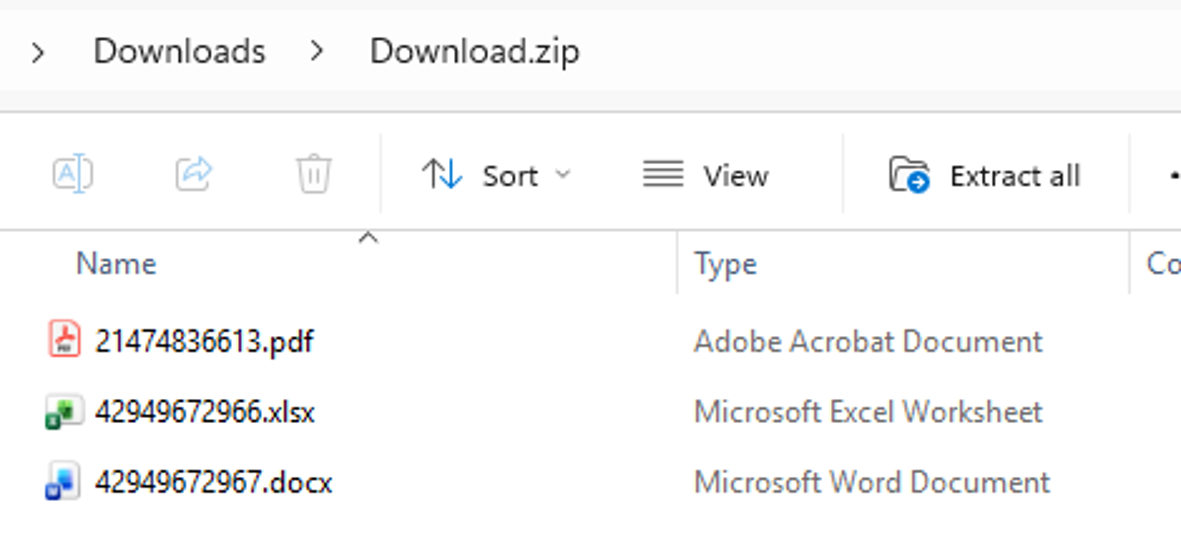
The previous Show button worked only for PDF files, opening them in the report preview form, while other document types could not be retrieved from within Dynamics 365 at all. Since preview support was extended to additional file types, the new Download button works for any document type stored in Keep. Multi-select support was also added: when several documents are selected in the grid, they are downloaded together as a single zip archive. Bulk retrieval of stored documents is now fast and practical directly from the Keep documents form, complementing the wider Keep usability improvements delivered in this release.
Selecting multiple entries will be downloaded as a ZIP file.
Downloaded ZIP
Bug fixes and enhancements – FO Connector 7.3.1
Status | Case no. | Area | Description | Ticket |
🟢 | 74506@LAC365FO | Workspace | Lasernet workspace error: "Data at the root level is invalid. Line 1, position 1." | |
🟢 | 74431@LAC365FO | Associated payment | When 'Associated payment attachment' is enabled Lasernet report is not generated | #50119 |
🟢 | 74428@LAC365FO | Connection | Option to IgnoreFileMask needs to be added to the Connection Form | |
🟢 | 74416@LAC365FO | Custom properties | LAC 7.3 - Custom properties not delivering values from destinations | #50134 |
🟢 | 74415@LAC365FO | Parameters | Issue when using LACStartup to pass parameters from an URL | #50105 |
🟢 | 74409@LAC365FO | Form links | Option to open the selected Form directly from the Form-links | |
🟢 | 74346@LAC365FO | Form links | Form links to journal table with condition stops D365FO from creating new journals | #50043 |
🟢 | 74180@LAC365FO | Embedded | ConnectorAPI loading issue in SF | |
🟢 | 74175@LAC365FO | Autoform DM Keep-11 | Keep documents: Replace "Show" button with "Download" | |
🟢 | 74174@LAC365FO | Query Range | FO 7.3: Query Range Ignored on Top-Level Table Causing Full Journal Data Retrieval | #50057 |
🟢 | 74146@LAC365FO | Form links | Form link parameter values are not fetched | #50047 |
🟢 | 74142@LAC365FO | CE | Re-add better support for displaying PDFs instead of downloading them in Dataverse/Dynamics 365 | |
🟢 | 74125@LAC365FO | Embedded | 7.3 Storage Account for Embedded errors for previous and current connector versions | #50018 |
🟢 | 74118@LAC365FO | CE | CE Reports fail with error "The expected type was int, but the encountered type was str." in 7.3 | #50024 #50011 #50028 |
🟢 | 74110@LAC365FO | Expressions | Minor fixes to expressions | |
🟢 | 74090@LAC365FO | Embedded | LAC 7.3 - FormpipeEmbedded connection not working on Service fabric environments + other ticket for Embedded | #49928 |
🟢 | 74081@LAC365FO | Subreport | LAC 7.3 - Sub report fields missing tags in xml | #49917 |
🟢 | 74061@LAC365FO | Query Range | LAC 7.3 - Report for each record doesn't work | #49968 |
🟢 | 73984@LAC365FO | Warehousing app | Mobile Device Menu - Endless serial number prompt when “Show serial number“ is enabled | #49613 |
🟢 | 73906@LAC365FO 73905@LAC365FO | Autoform DM Keep-11 | Option to preview EXCEL from Autoform DM/Keep-11 | |
🟢 | 73862@LAC365FO | Validation e-documents | Clean-up function required for Journal validation logs | |
🟢 | 73848@LAC365FO | Query Ranges | Ranges are ignored | #49778 #50057 |
🟢 | 73796@LAC365FO | Metadata | Check Batch job Lasernet metadata rebuild. %2 | |
🟢 | 73789@LAC365FO | Test plans Tutorials | Update LACTutorialProjTableExplode report used in tutorials and Test plans | |
🟢 | 73771@LAC365FO | Alert / Alert links | Alert links with cases are not working. | #49743 |
🟢 | 72216@LAC365FO | Autoform DM Keep-11 | DM/Keep File type to preview investigation | |
🟢 | 71990@LAC365FO | Archiving | Error Handling for Connection Action Move Files | #43548 |
🟢 | 71510@LAC365FO | Overlay | Lasernet overlay files form - takes minutes to load |
73846@LAC365FO – Embedding files into SSRS rendered PDF, Embedding DocuRef via expressions
FO Connector 7.3.1 do support the option for using a SSRS report and the electronic report in standard FinOps for preparing formats the German ZUGFeRD
and the France factur-x.
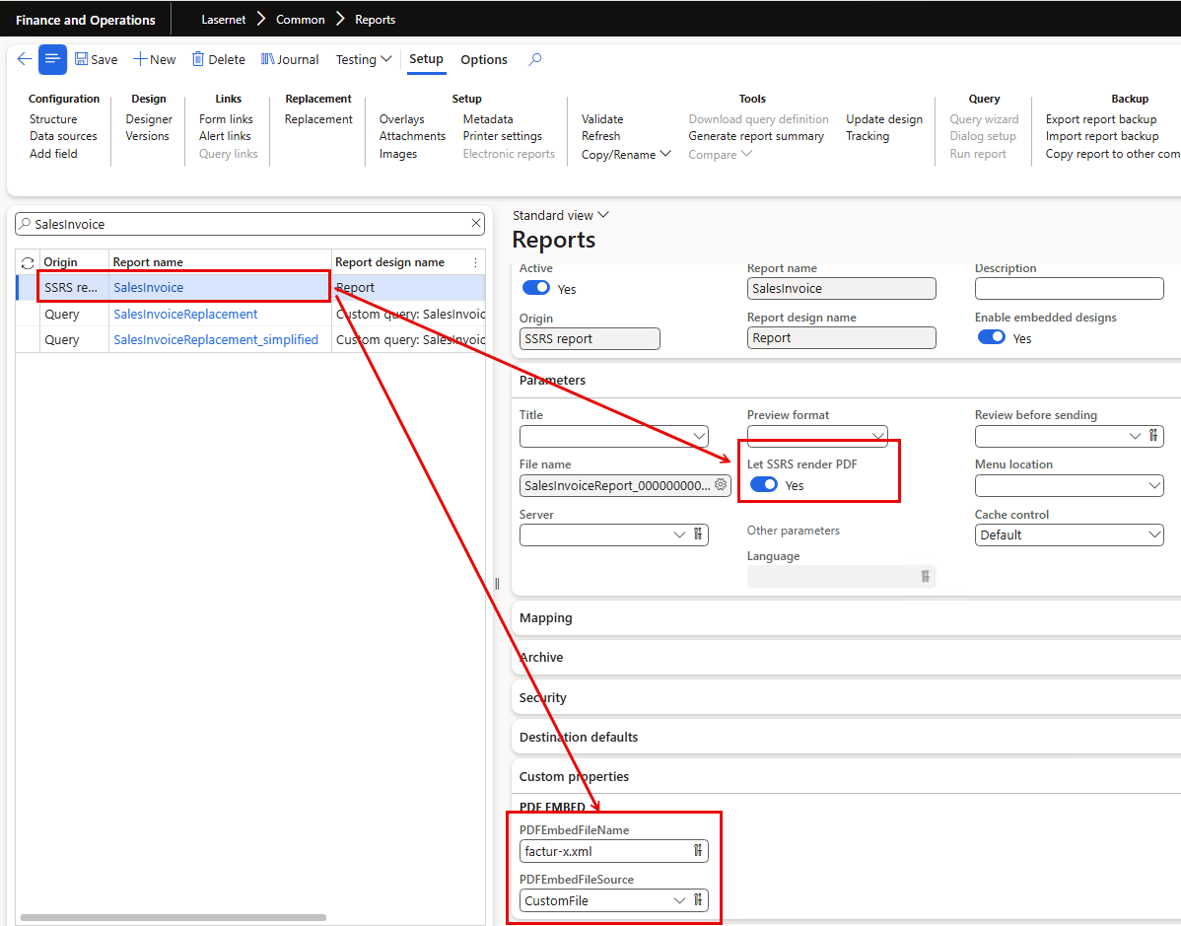
SSRS report output with attached e-invoice (XML) - ZUGFeRD/factur-x:
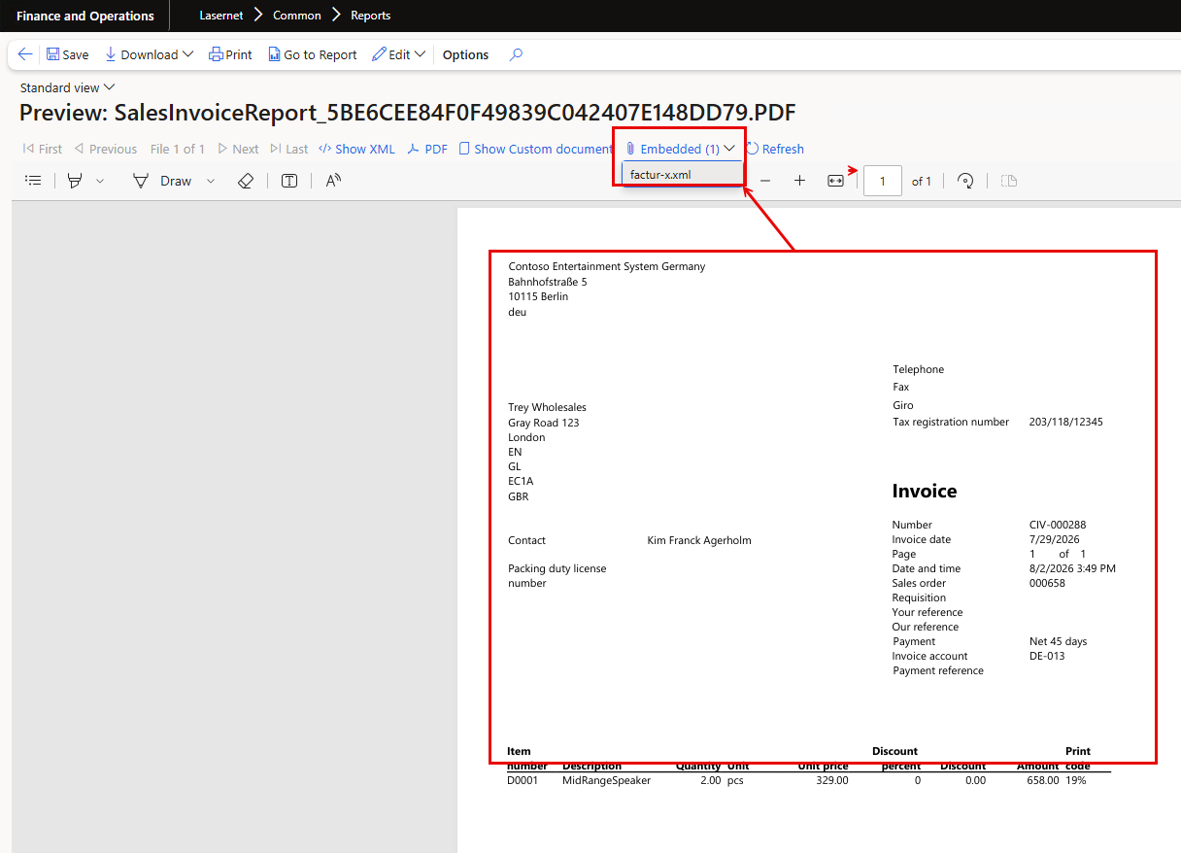
Embedded / factur-x.xml:
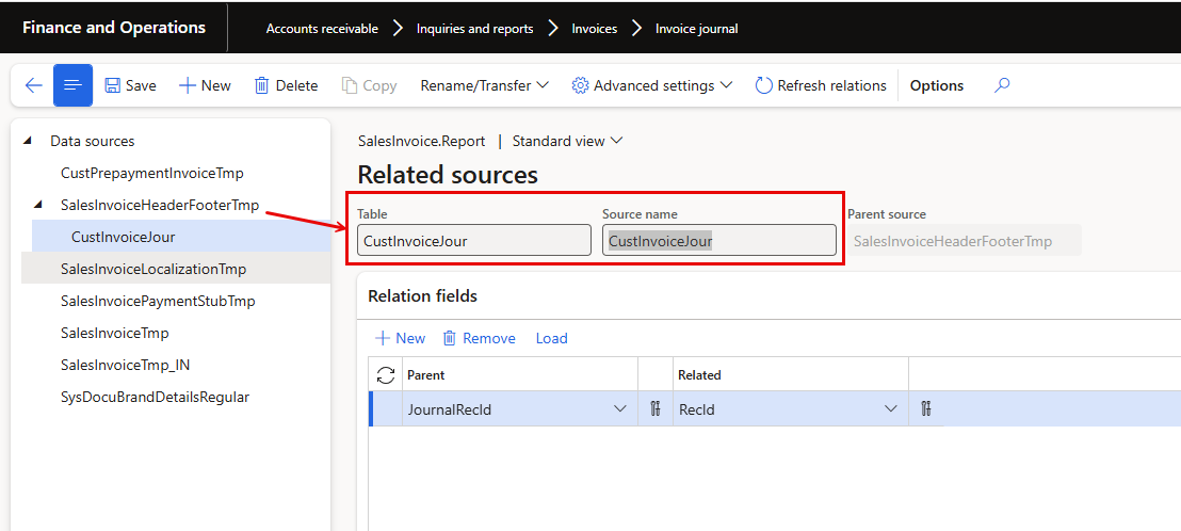
The table CustInvoiceJour needs to be added for enabling the Custom Format/e-invoice (XML):
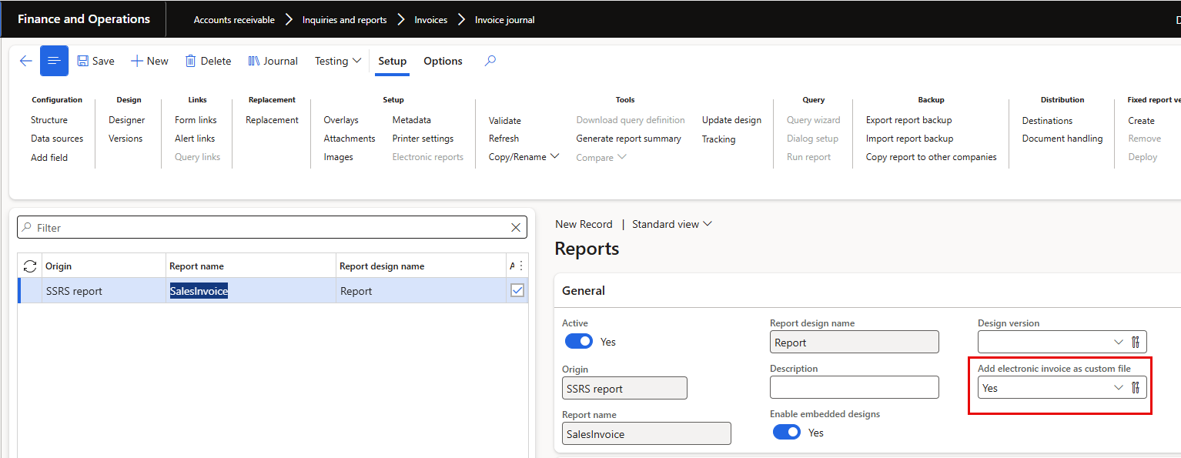
Adding the table CustInvoiceJour enables the option for the Custom file:
73891@LAC365FO – Digisense failed status update does not show up in Log
Fixed an issue where a failed Digisense status update did not show up in the log. When the connector attempted to update a document's status against the Digisense service and the update failed, the failure previously left no trace in the log, so users had no way of discovering that the status synchronisation had not gone through. The status update handling was corrected so that failed Digisense status updates are now recorded in the log, giving administrators visibility of the failures and the information needed to follow up on documents whose status could not be updated.
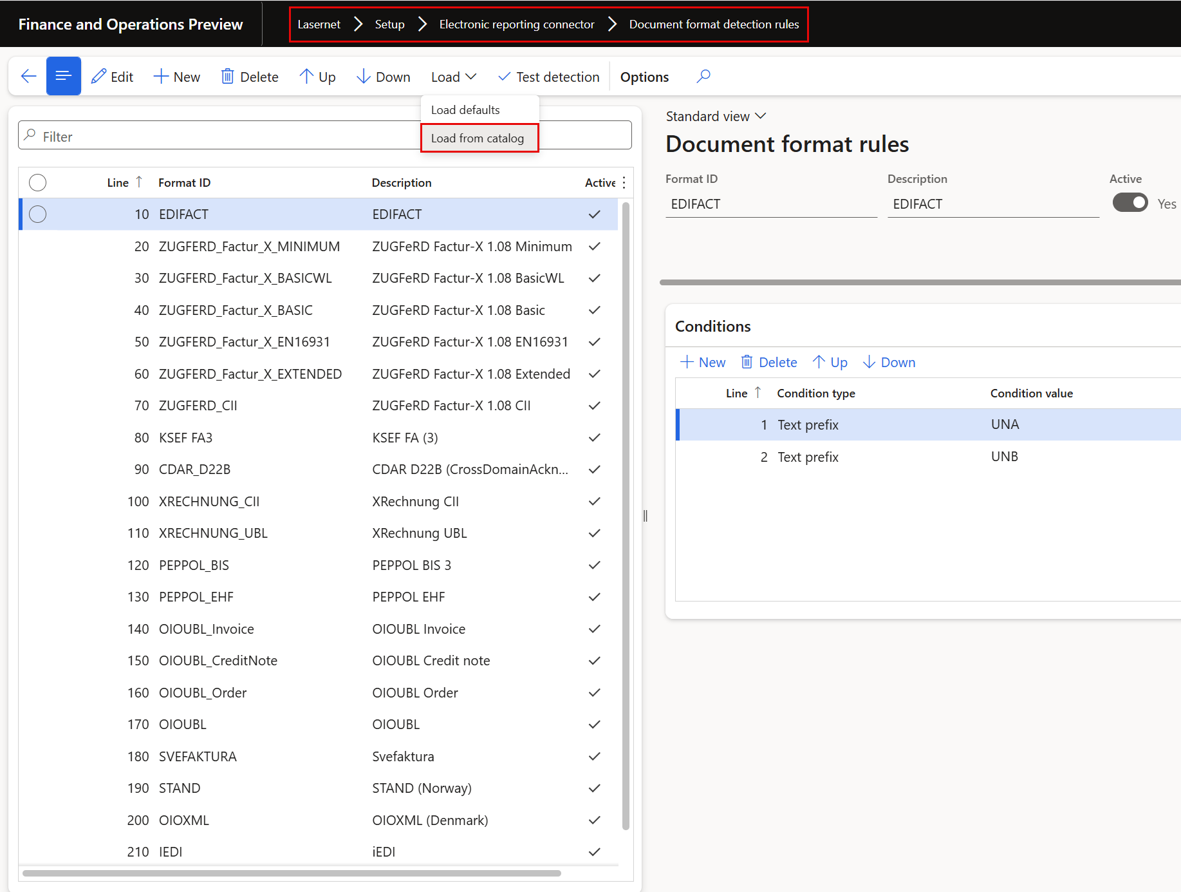
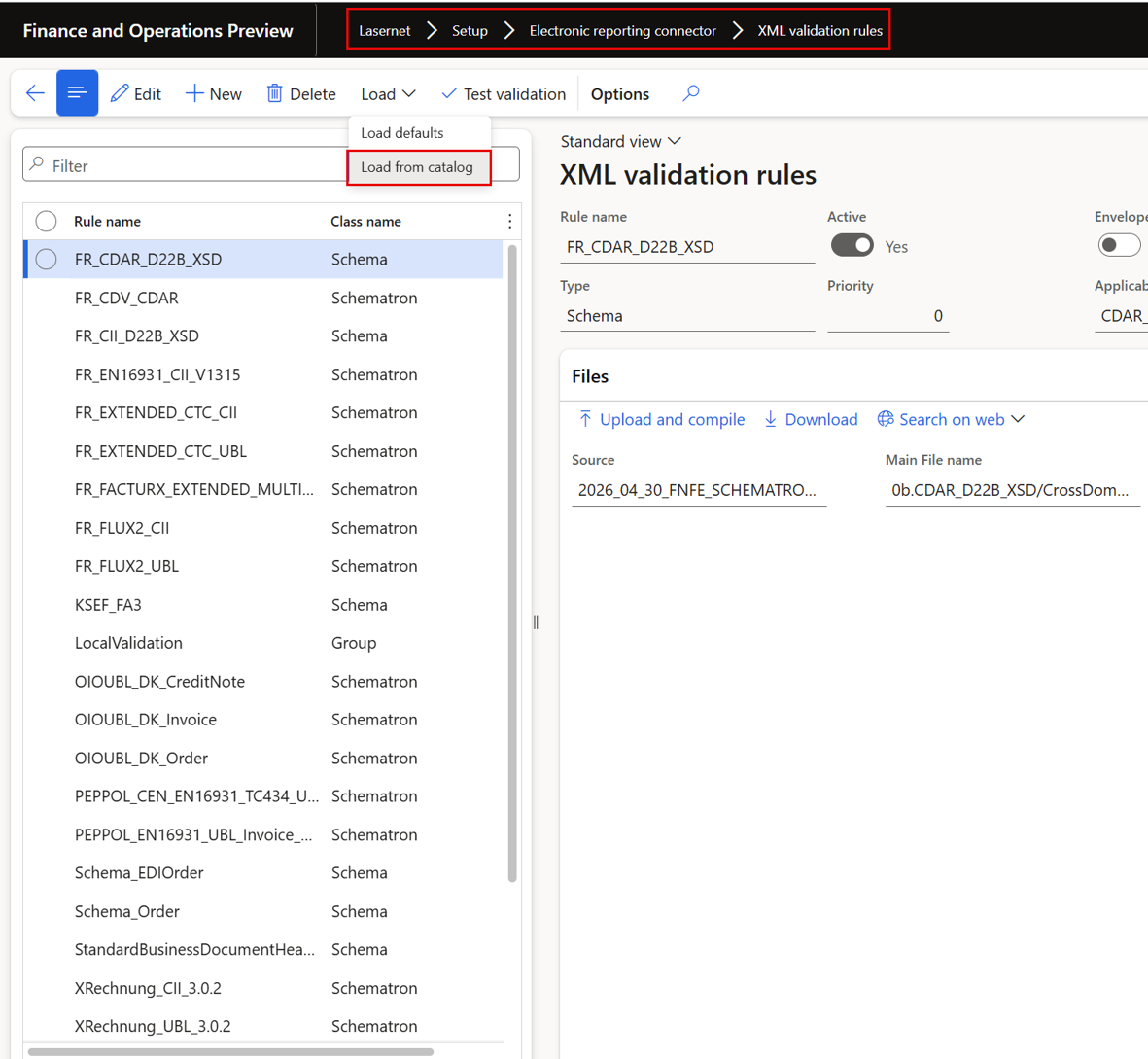
73790@LAC365FO – ER France validation and new Document types, Over air (load from catalog) updates to document types, and xml validation rules
Implemented Electronic Reporting validation for France together with new document types. The connector now provides the document types required for the French e-invoicing flows and XML validation rules that check the generated documents against the French requirements. Both document types and validation rules can also be updated 'over the air' by loading them from the catalog, so environments can pick up new and revised French document types and rule sets without a code deployment. This delivered the foundation for validating French e-invoices at generation time and for keeping the validation content current as the regulation evolves.
Possible to update the Format detection rules Over the air:
And possible to update the XML validation rules Over the air
Bug fixes and enhancements – e-documents 7.3.1
Status | Case no. | Area | Description | Ticket |
🟢 | 73846@DYN365FO | SSRS | Embedding files into SSRS rendered PDF, Embedding DocuRef via expressions | |
🟢 | 73891@DYN365FO | Preferred provider Digisense | Digisense failed status update does not show up in Log | |
🟢 | 73790@DYN365FO | France mandate | ER France validation and new Document types, Over air (load from catalog) updates to document types, and xml validation rules |
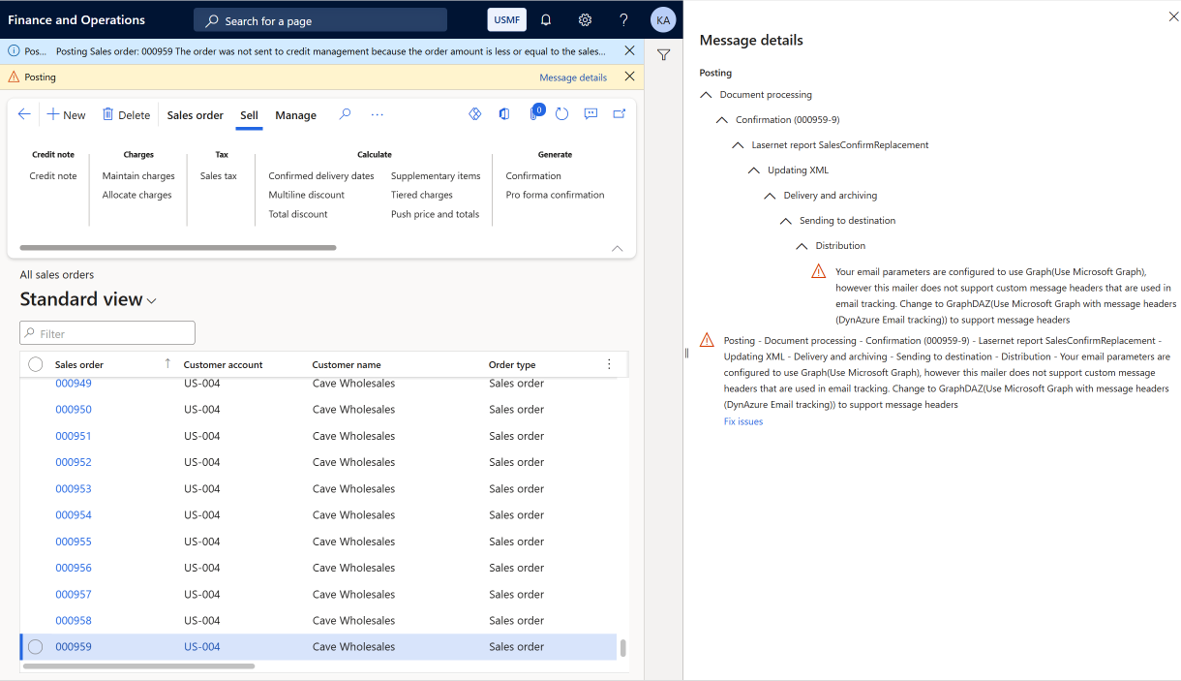
74193@LAC365FO – Warning about GraphDAZ should only be shown if report is configured for tracking
Changed the GraphDAZ warning so it is only shown when it is actually relevant. Previously, the warning about the GraphDAZ application could appear even for reports that were not configured for tracking at all. Extra checks were added so the warning is displayed only when report tracking is active for the report and the environment runs with an embedded Lasernet server. This removed misleading warnings for users printing reports that do not use tracking, while keeping the guidance visible for the configurations where the GraphDAZ setup genuinely matters.
Warning
Your email parameters are configured to use Graph(Use Microsoft Graph), however this mailer does not support custom message headers that are used in email tracking. Change to GraphDAZ(Use Microsoft Graph with message headers (DynAzure Email tracking)) to support message headers
GraphDAZ
It’s essential to use GraphDAZ with email tracking when FinOps sends emails, such as through embedded scenarios, as this ensures that the correct and unique information is included in the email header as this isn't possible if using the Graph in standard FinOps.
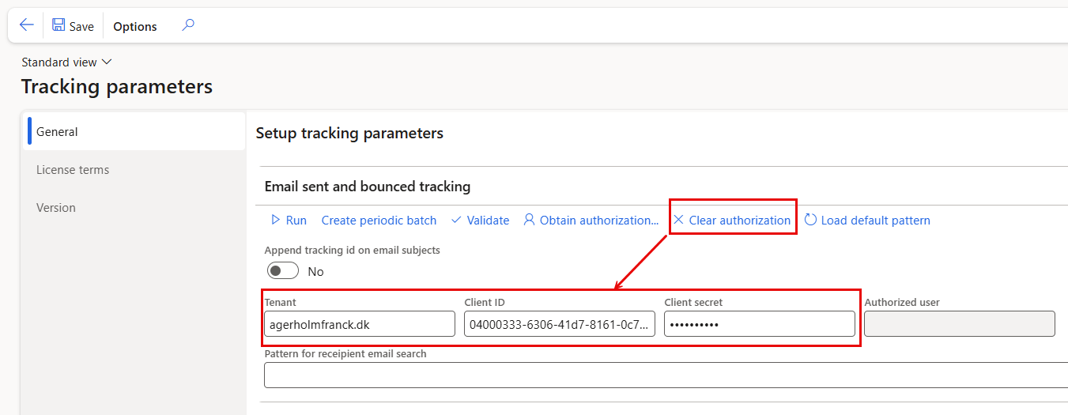
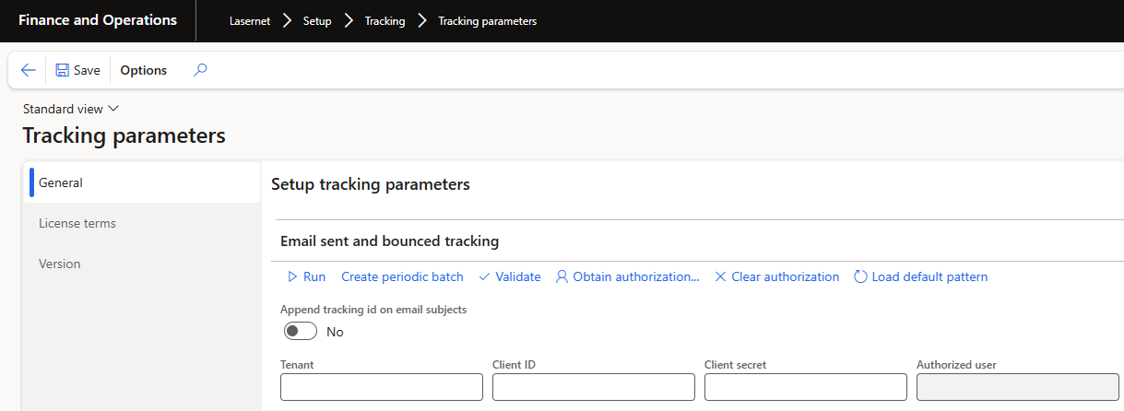
73847@LAC365FO – Save/refresh the Form for Mail-tracking when 'Clear authorization' is used
Improved the mail-tracking setup form so that using 'Clear authorization' now saves the record and refreshes the form immediately. Previously, after clearing the authorization the form could be left in an unsaved, stale state, and a subsequent attempt to use 'Obtain authorization' could then fail with an error because the cleared state had not yet been committed. With this change, the save is performed as part of the Clear authorization action and the form is refreshed to show the current state, so users can clear an existing mail-tracking authorization and immediately obtain a new one without errors or manual workarounds.
Previous version of the Lasernet Tracking | Lasernet Tracking 7.3.1 |
|
|
73646@LAC365FO – Remove the info about a batch-task for tracking already exists
Removed the informational message stating that a batch task for tracking already exists. This message appeared repeatedly when working with report tracking even though it carried no actionable information for the user, since the already-created tracking batch task was simply reused. The redundant notification was removed so users are no longer interrupted by it when printing or configuring tracked reports, which reduces infolog noise and avoids confusion about whether something needs attention. The underlying behaviour is unchanged: the existing tracking batch task continues to be used as before.
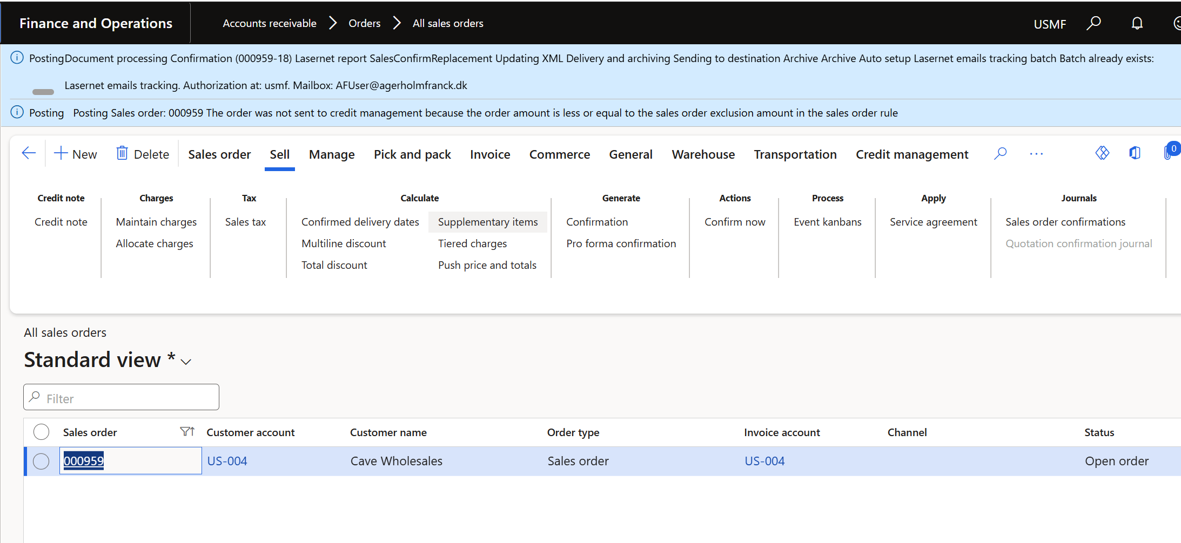
Info
PostingDocument processing Confirmation (000959-18) Lasernet report SalesConfirmReplacement Updating XML Delivery and archiving Sending to destination Archive Archive Auto setup Lasernet emails tracking batch Batch already exists: Lasernet emails tracking. Authorization at: usmf. Mailbox: AFUser@agerholmfranck.dk
Bug fixes and enhancements – Tracking 7.3.1
Status | Case no. | Area | Description | Ticket |
🟢 | 74193@DYN365FO | Tracking | Warning about GraphDAZ should only be shown if report is configured for tracking | |
🟢 | 73847@DYN365FO | Tracking | Save/refresh the Form for Mail-tracking when 'Clear authorization' is used | |
🟢 | 73646@DYN365FO | Tracking | Remove the info about a batch-task for tracking already exists |
74179@LAC365FO – 'ER XML test rule' as part of the Check-points/Test-flows and option to disable warnings/info's
Using the validation of the e-documents provides a powerful option to use historical documents to verify everything is working as expected after an update of the format – Including an update provided by Microsoft.
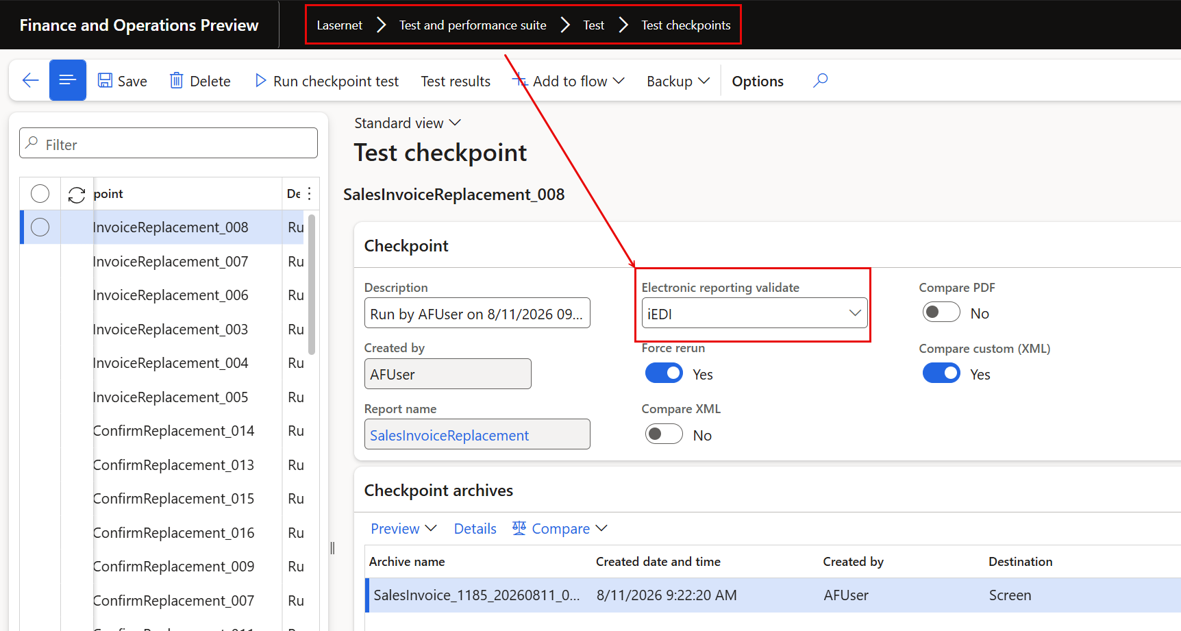
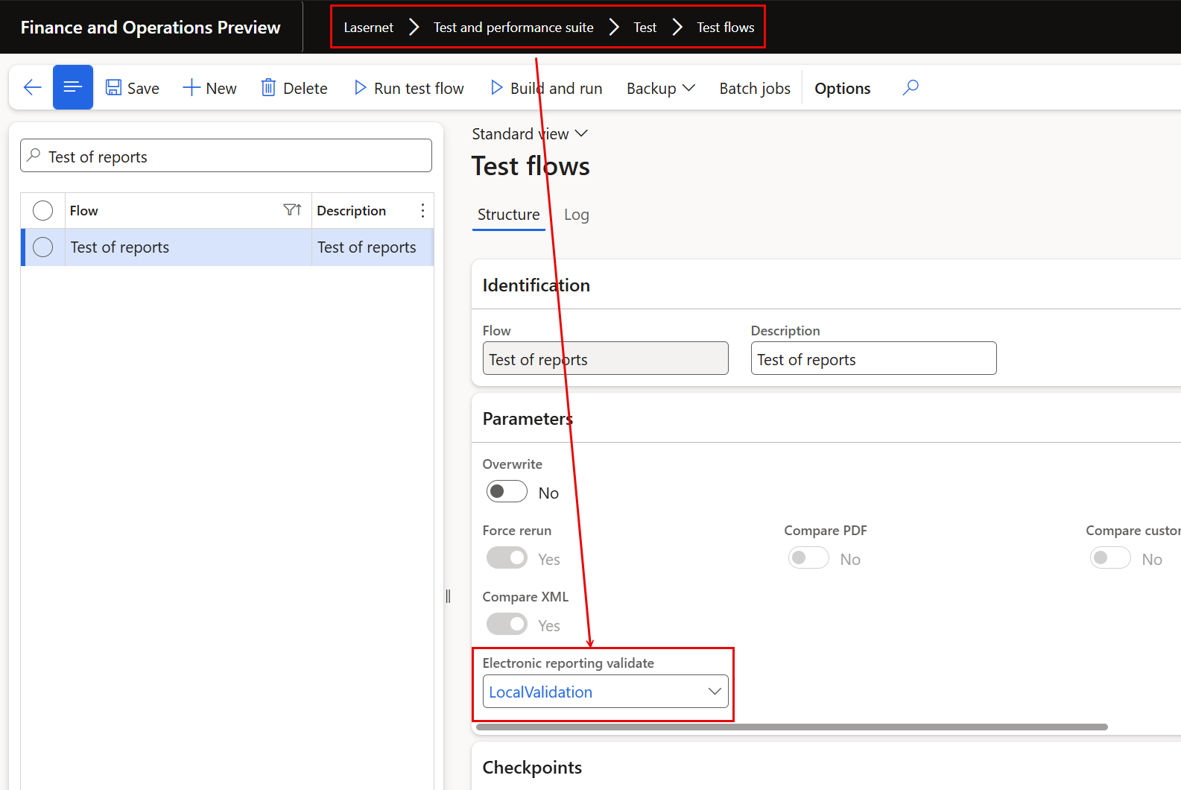
The ER XML validation rule setting has been moved from the Test & Performance suite parameters onto the individual test checkpoint and test flow, so validation can now be configured specifically for custom e-documents. A new 'Electronic reporting validate' field with a lookup of the XML validation rules was added to both the Test checkpoint and the Test flow, with a clear fallback order: a flow run uses the rule on the flow, then the checkpoint, then the report's 'Electronic reporting validate' custom property; a checkpoint run uses the checkpoint rule, then the report property. When nothing is configured, validation is skipped as before. Additionally, ER XML validation now reports only errors to the infolog and test result log, while warnings and informational messages remain available in the review pane.
In Test checkpoints and using validation via preferred broker (online):
In Test flows and using LocalValidation which do not require a provider or broker:
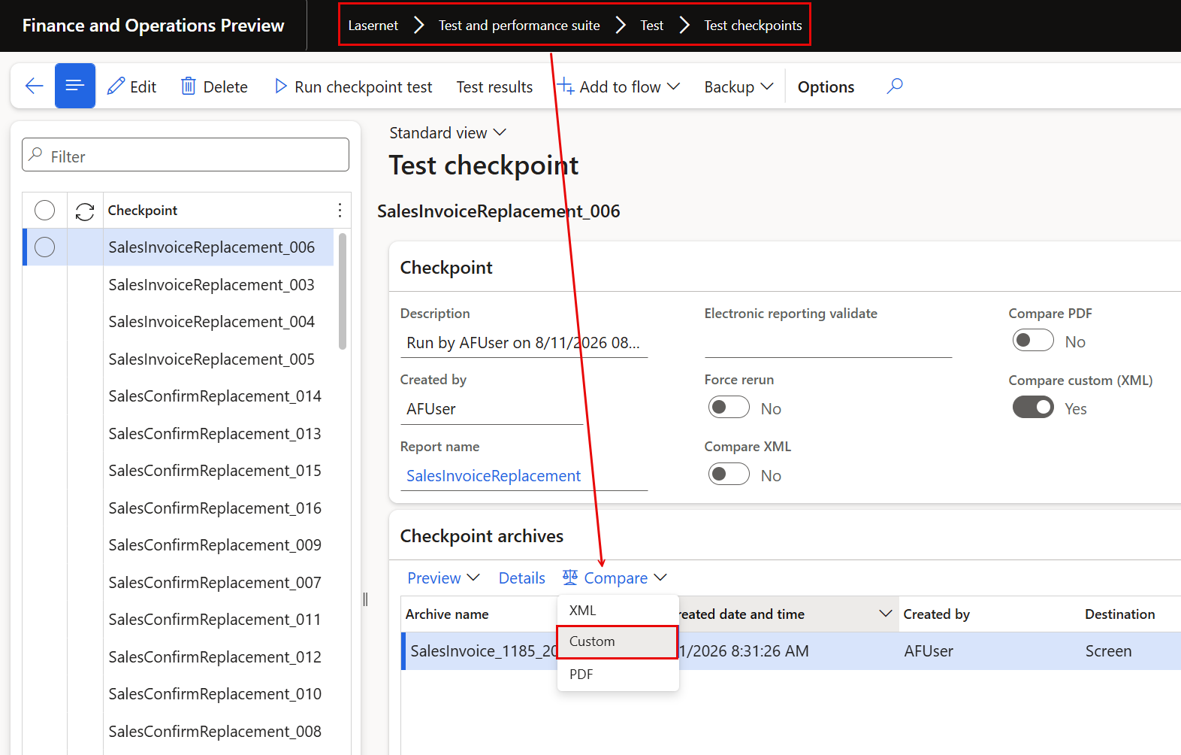
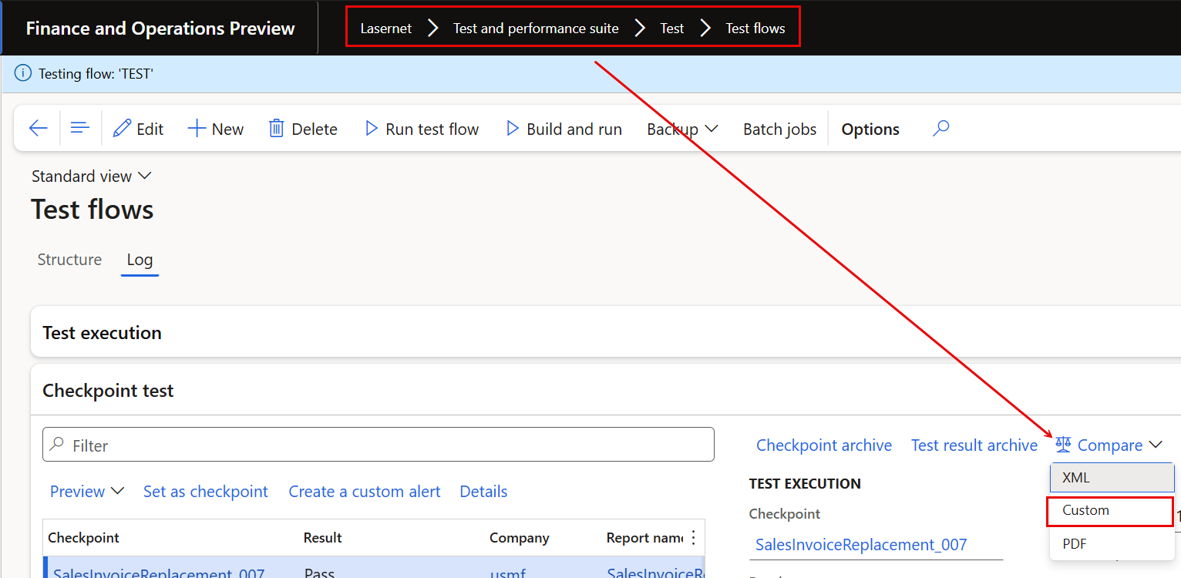
74178@LAC365FO – Option to compare the Custom files (e-documents) in Checkpoints and in Test-flows
Added the option to compare the custom files (e-documents) in checkpoint tests and in test flows within the Lasernet test suite. Custom files produced alongside a report - such as electronic documents - could previously only be inspected through the Lasernet archive, where a comparison option already existed; checkpoints and test flows were limited to comparing the report XML and PDF output. The comparison capability was extended so that the custom e-document output is verified in the same way in both checkpoint runs and test-flow executions, aligning the test suite's coverage with what the archive already offered and enabling automated regression verification of e-document content alongside the existing report output checks.
Compare e-documents/e-invoices (Custom) from the Test checkpoints:
Compare e-documents/e-invoices (Custom) from the Test flows:
74177@LAC365FO – Option only to compare custom (XML)
Added the option to run a checkpoint comparison on the custom (XML) e-document files alone. The "Compare custom (XML)" checkmark already existed in the Lasernet test suite, but it could not be selected on its own: if both "Compare XML" and "Compare PDF" were disabled, a warning was thrown insisting that at least one of those comparison types had to be enabled. The validation was adjusted so that "Compare custom (XML)" is accepted as a valid comparison selection in its own right, letting testers verify only the generated custom e-documents without also having to compare the report's XML or PDF output. This complements the custom-file comparison capability added to checkpoints and test flows in this release.
FO Connector 7.3.0 didn’t allow checkpoint for the e-document/e-invoice without PDF and/or XML.
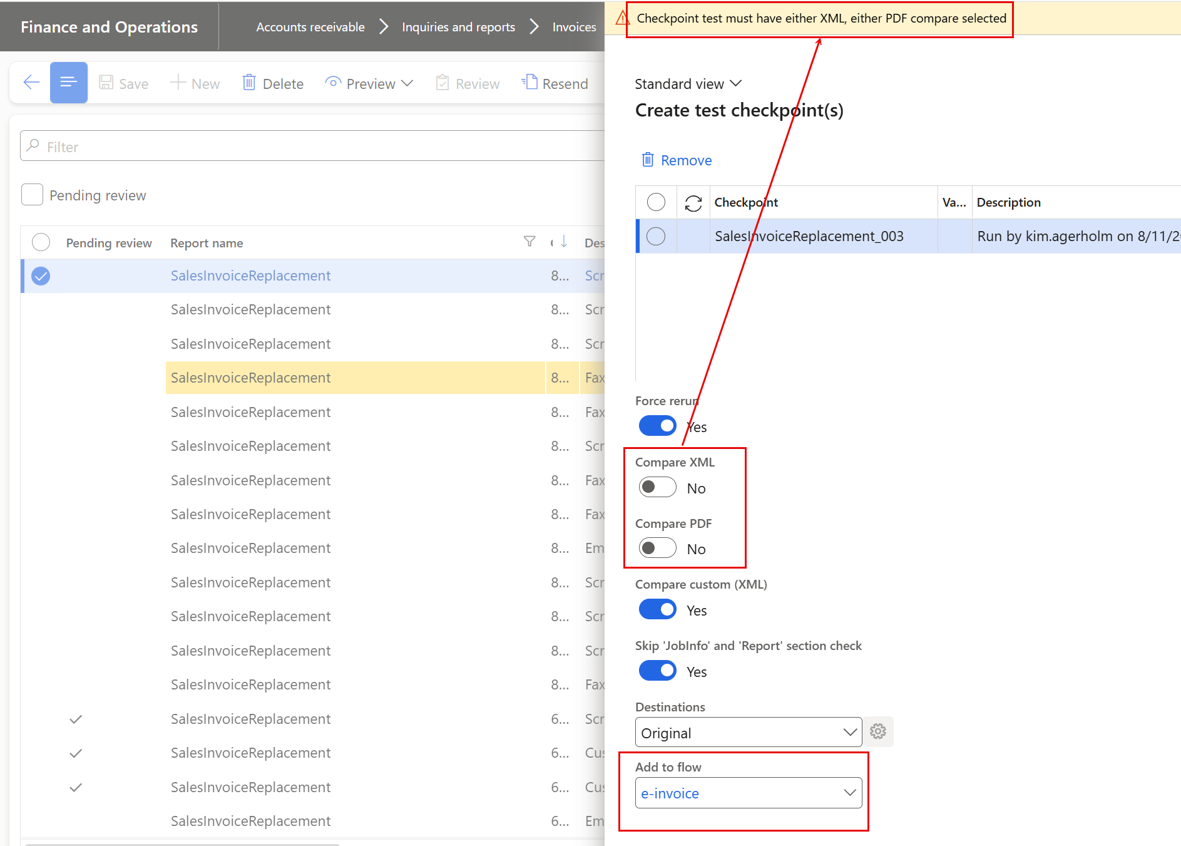
Warning
Checkpoint test must have either XML, either PDF compare selected
74044@LAC365FO – T&P - Checkpoint test - Compare can be selected when result archive has been removed
Fixed the checkpoint test result offering the Compare option after the result archive had been removed. When a checkpoint test had passed and its result archive was subsequently deleted, the Compare action remained selectable: choosing the XML comparison silently did nothing, while choosing the PDF comparison threw an "Unable to load compare data" error. The availability of the Compare option is now aligned with the actual presence of the archived result data, so users are no longer presented with a comparison action that cannot succeed. This fine-tuning issue, reported through support during 7.3 testing, improves the polish of the Test and Performance checkpoint testing experience in the Lasernet test suite.
Removing the result archive will disable the option to compare: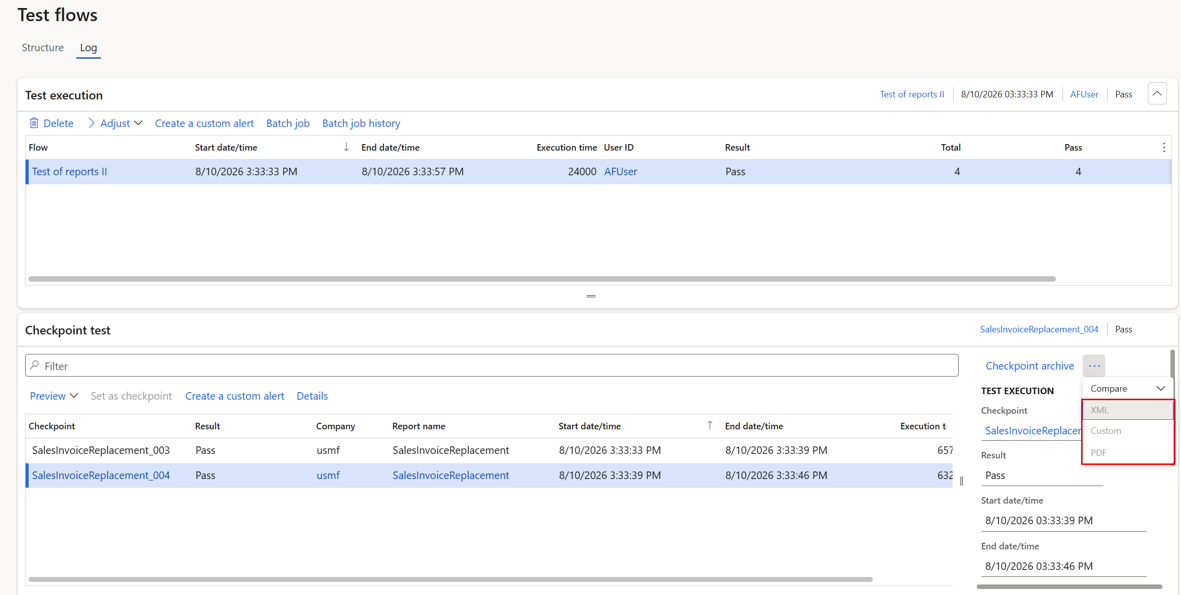
69490@LAC365FO – T&P: Report summary (Excel) to show differences highlighted when 2 reports selected
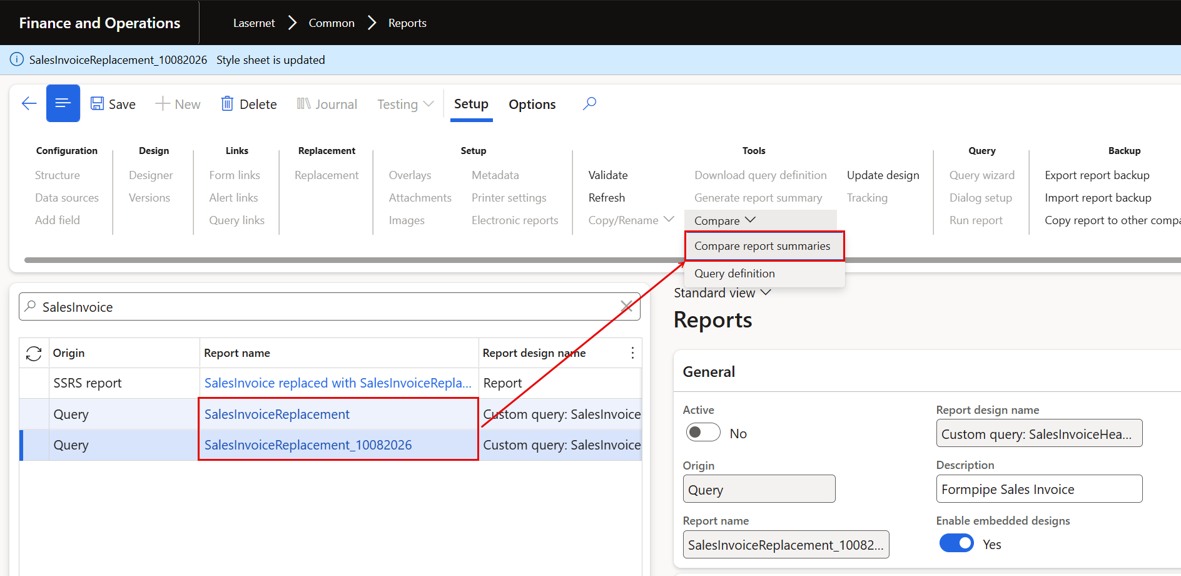
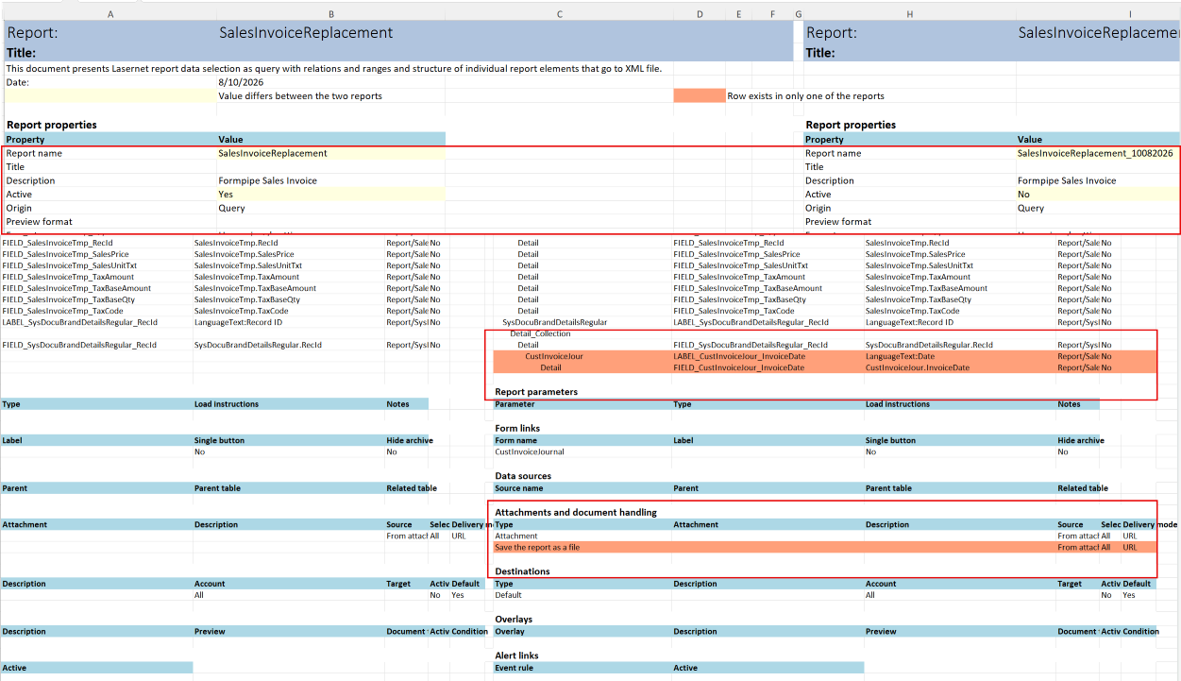
Extended the report summary Excel export available from the Reports form and added a report comparison option. The generated summary now includes all of the report's properties as shown on the Reports form, attachment and document handling details, destinations, overlays, images, data sources, alert and query links, and the query and data source properties presented in the Report wizard, in addition to the previously exported content. When exactly two reports are selected, the workbook presents both reports side by side with differences highlighted: values that differ are marked in yellow, while lines that exist in only one of the reports are marked in salmon. Clear warnings were added for unsupported selections, such as more than two reports or a report that is not query-based, and the Excel-building code was redesigned and optimized as part of the work.
Useful for quickly comparing report configurations and highlighting discrepancies and especially useful when something works in one environment but not another, as it helps identify differences between environments.
Using Compare report summaries to compare to queries/reports:
Will produce the following summary in Excel:
Bug fixes and enhancements – T&P 7.3.1
Status | Case no. | Area | Description | Ticket |
🟢 | 74179@DYN365FO | Check point | 'ER XML test rule' as part of the Check-points/Test-flows and option to disable warnings/info's | |
🟢 | 74178@DYN365FO | Comparison | Option to compare the Custom files (e-documents) in Checkpoints and in Test-flows | |
🟢 | 74177@DYN365FO | Comparison | Option only to compare custom (XML) | |
🟢 | 74044@DYN365FO | T&P | T&P - Checkpoint test - Compare can be selected when result archive has been removed | #49948 |
🟢 | 69490@DYN365FO | T&P | T&P: Report summary (Excel) to show differences highlighted when 2 reports selected |