Lasernet for Dynamics 365 Finance and Operations
Release version: 7.3.2
Release date: 16th September 2026
Introduction
This page describes the fixes, and enhancements in Lasernet FO Connector 7.3.2.
The following documentation is available:
Fixes, and Enhancements – Lasernet FO Connector 7.3.2
Lasernet FO Connector 7.3.2 is released for Dynamics 365 for Finance and Operations versions 10.0.47(PU71), 10.0.48(PU72), and 10.0.49(PU73).
The same source code is used across all versions.
This is a quality update provided through the following fixes, and enhancements in Lasernet FO Connector 7.3.2.
LAC365FO Modules — 11 items
ID | Area | Title | Ticket Number |
74688 | Test & Performance Suite | T&P - report Excel comparison adjustments | #50321 |
74876 | E-invoice validation | ProjectInvoiceProposal with related sales order cannot be posted | #50315, #50461 |
74966 | Formlinks | Dialog parameter values are empty in XML after upgrade to 7.3.1 | #50359 |
74969 | Test & Performance Suite | T&P Test Checkpoint - compare PDF even when destination validation fails | |
75082 | Test & Performance Suite | Compare with resend only possible with System administrator role | #50437 |
75102 | License | Security Governance - not enough users in license | #50384, #50522 |
75104 | License | Labels should mention the new license user count batch job | |
75121 | License | LACLicenseUserCount should be possible to open from systablebrowser | |
75156 | Batch | Recurrent batch job - expressions with non-static values are not recalculated | #50470 |
75184 | Warehouse App | Warehouse app - error Enter the serial number after serial number is added | |
75344 | E-invoice | New relation LACTransRefRecId between GSTInvoiceTmp_IN and CustInvoiceTrans |
74688 — T&P: report Excel comparison adjustments
Noticed while checking the Excel comparison of two reports: the comparison reported the two reports as different although they were identical, most likely because information had been added in the structure and elements. The item also covers adding the data source for attachments and document handling to the comparison.
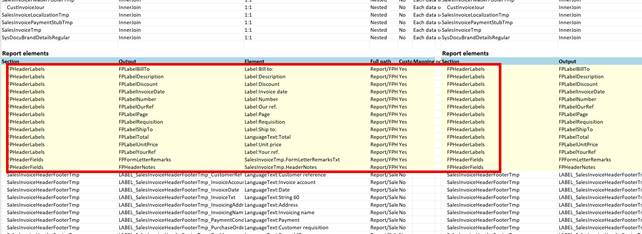
The Excel comparison of two reports. The boxed report elements were flagged as differences even though both reports were identical.
74876 — ProjectInvoiceProposal with related sales order cannot be posted
A project invoice proposal with a related sales order could not be posted. Repro: take an open project invoice proposal, use Manage > Related item to create a sales order, confirm it, then pick and post the packing slip, and finally try to post the project invoice proposal. The posting fails with PostingException has been thrown by the target of an invocation. Reported on D365 FO 10.0.48 with LAC 7.3 / 7.3.1. This has been fixed in 7.3.2.
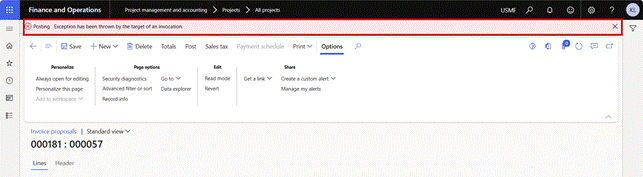
Invoice proposal 000181 in USMF. Posting fails with 'Posting: Exception has been thrown by the target of an invocation'.
74966 — Dialog parameter values are empty in XML when using Form Link multi-select or "Report for each record" after upgrade to 7.3.1
After upgrading to Connector 7.3.1, dialog parameters that previously worked on an existing Form Link were no longer populated in the generated XML. The dialog selections remained visible to the user and the structure fields were still mapped to the corresponding parameter values, but the resulting XML contained empty parameter nodes. The configuration had not been changed, and recreating the dialog parameter and remapping the structure field did not help. This has been fixed in 7.3.2.
74969 — T&P Test Checkpoint (original destination): generate and compare PDF even when destination validation fails
A user-experience improvement. When a test checkpoint runs against the original destination and that destination is no longer valid — for example an email destination whose address was removed after a database refresh — the destination validation fails and the test stops before the PDF is generated and compared. Because customers routinely remove or anonymize email addresses in test environments, the request is that the checkpoint should still confirm that the report generates correctly and that the PDF matches the checkpoint, and report the destination validation failure separately. This has been fixed in 7.3.2.
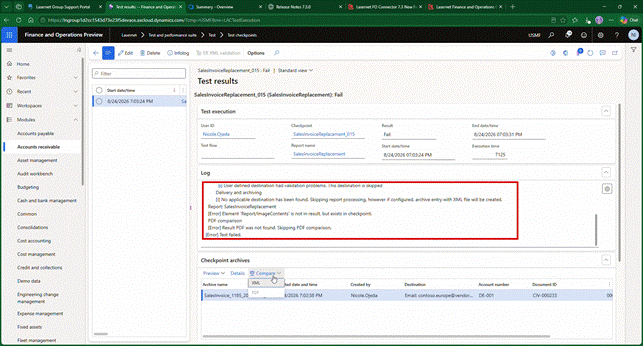
The test result log. The destination has validation problems and is skipped, so the result PDF is never produced and the PDF comparison is skipped before the test fails.
75082 — T&P: compare with resend only possible with System administrator role
Resend with compare could only be used by a user holding the System Administrator role; the Lasernet roles did not grant sufficient access. The expectation is that resend with compare works for the same user roles that already allow a resend from the archive. Reported on LAC 7.3.1. This has been fixed in 7.3.2.
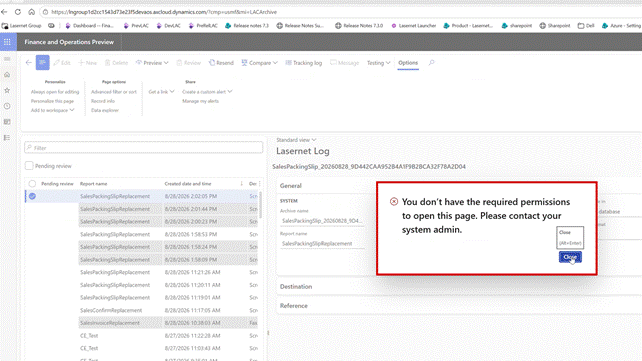
Resend with compare from the Lasernet Log, run with a Lasernet role: 'You don't have the required permissions to open this page. Please contact your system admin.'
75102 — Security Governance: not enough users in license
After upgrading to 7.3 or later and changing the user counting method from Count to Security Governance, customers received Not enough users in license even though the required user count was lower than the number of purchased licences. The cause was traced to the calculation in GetMinimumNumberOfRequiredUsers(), which did not pick up the lowest actual count. This has been fixed in 7.3.2.
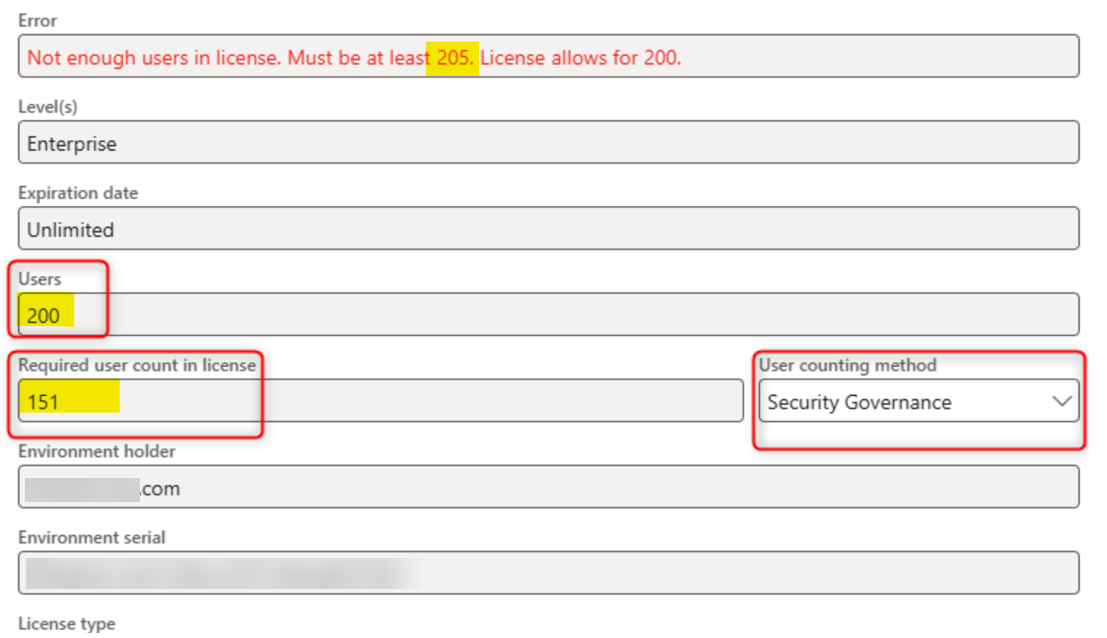
The license page: the error demands at least 205 users against 200 purchased, while the required user count in the licence reads 151 and the user counting method is Security Governance.
75104 — Labels should be updated to mention the new Lasernet license user count batch job
In 7.3 and 7.3.1 customers received the Missing user count warning even though the Named User License Count batch job was running, because the new Lasernet - License user count processing batch job had not been executed. The labels were updated to refer to that new batch job instead of the standard D365 FO batch job, which is no longer used.
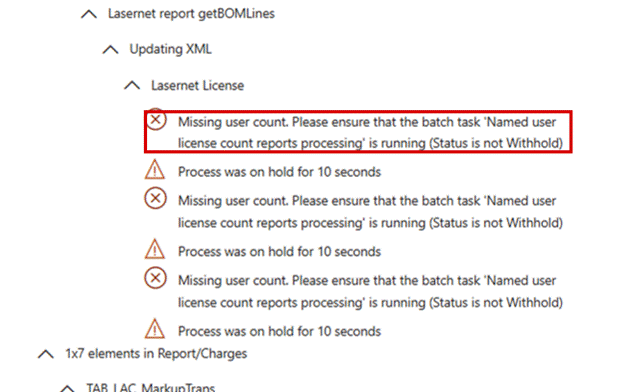
The infolog from a report run: 'Missing user count. Please ensure that the batch task Named user license count reports processing is running', which names the superseded D365 FO job.
75121 — It should be possible to open LACLicenseUserCount from systablebrowser
Opening the User counting table (LACLicenseUserCount) through the table browser failed with the message that the user is not authorized to access table User counting, and the systablebrowser menu item could not be opened at all. This has been fixed in 7.3.2.
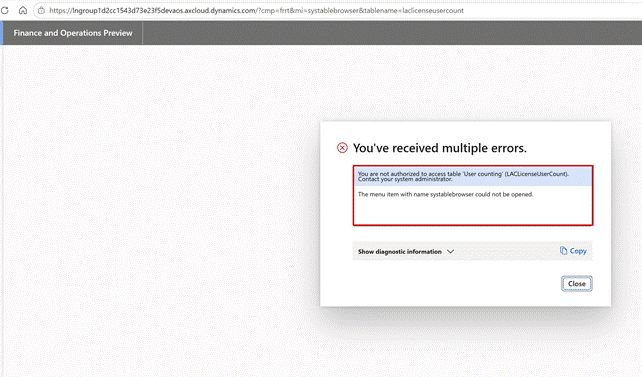
The table browser on laclicenseusercount: 'You are not authorized to access table User counting (LACLicenseUserCount)' followed by 'The menu item with name systablebrowser could not be opened'.
75156 — Recurrent batch job: expressions with non-static values keep the value from the first execution
A customer uses an expression containing date values to select the data for a number of reports run by a daily batch job. After upgrading to LAC 7.3.0 and 7.3.1 the expression values are evaluated only during the first execution of the batch job and are then reused, so every later run filters on the original value — a TimeNow() parameter used as a filter on an account number range no longer reflects the actual run time. Earlier LAC versions recalculated the expression on each run, as verified on 7.2.2. This has been fixed in 7.3.2.
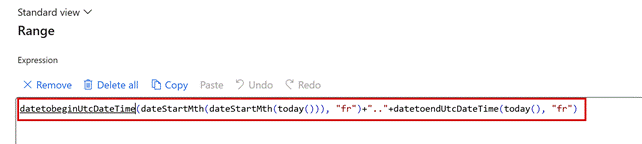
The report range expression built from today(). From 7.3.0 this expression was evaluated once, on the first run of the batch job, and the result reused for every later run.
75184 — Warehouse app: error "Enter the serial number" after the serial number is added
The problem occurred on a physical mobile device after the customer upgraded to LAC 7.3. and LAC 7.3.1. This has been fixed in 7.3.2.
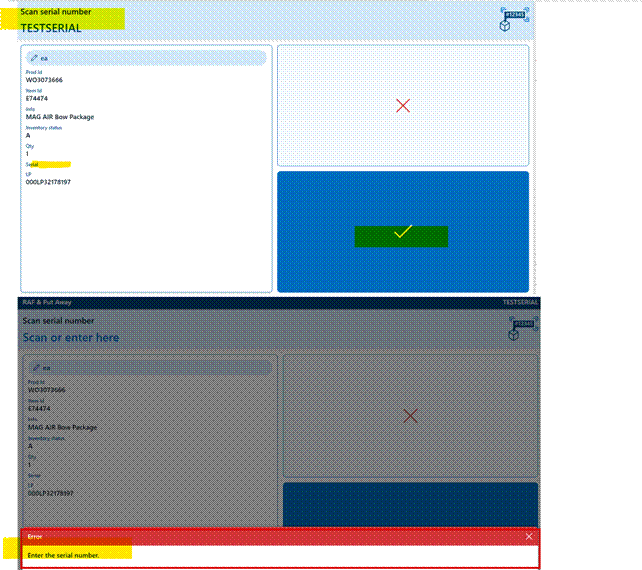
The warehouse app on RAF and Put Away. The serial number TESTSERIAL has been scanned, and the app still answers 'Enter the serial number'.
75344 — New relation LACTransRefRecId between GSTInvoiceTmp_IN and CustInvoiceTrans
Adds a relation, LACTransRefRecId, between the Indian GST invoice temporary table and the customer invoice lines, equivalent to the relation already provided between SalesInvoiceTmp and CustInvoiceTrans. This allows a GST replacement report to join the invoice transactions.
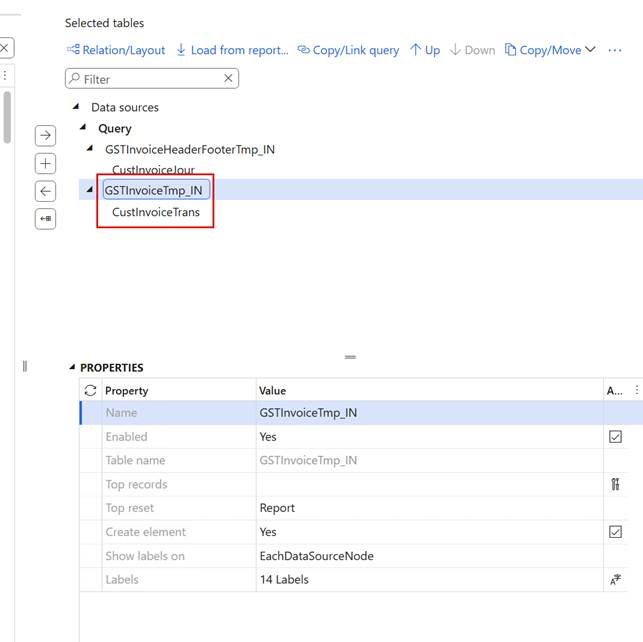
The report query data sources: CustInvoiceTrans joined under GSTInvoiceTmp_IN, the join the new LACTransRefRecId relation makes possible.
LAC-Dynazure Modules — 4 items
ID | Area | Title | Ticket |
74873 | E-documents | Option for Electronic reporting validation without any comparison | |
75075 | Test & Performance Suite | T&P Checkpoint - add report validate option | |
75081 | E-documents | Option to avoid check of XML, PDF and Custom (XML) | |
75101 | Test & Performance Suite | Result view shows the checkpoint instead of the result |
74873 — Option for Electronic reporting validation without any comparison (PDF, Customer, XML)
Adds the ability to run an Electronic reporting validation on its own, without it being tied to a PDF, custom or XML comparison.
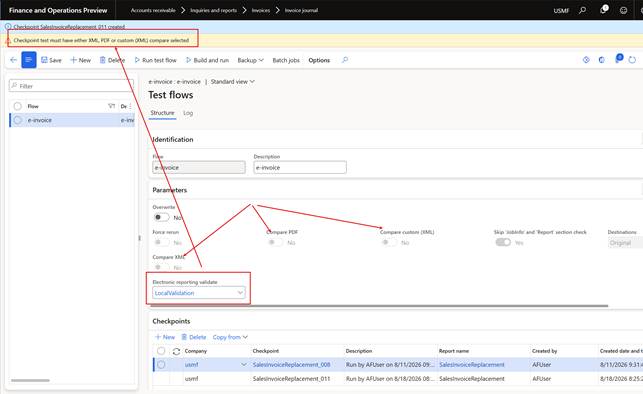
Test flow parameters in USMF. Electronic reporting validate is set to LocalValidation, but the flow is still blocked by 'Checkpoint test must have either XML, PDF or custom (XML) compare selected'.
75075 — T&P Checkpoint: add report validate option
A new field Validate report (enum NoYes) was added to the Checkpoint — not to the flow. When the checkpoint runs it now calls Report > Validate, and the resulting infolog is captured into the checkpoint result in the same way as the other test segments. A validation failure marks the checkpoint as failed, but the remaining tests (XML compare, PDF compare and so on) still continue.
75081 — Option to avoid check of XML, PDF and Custom (XML)
Provides an option to switch off the XML, PDF and Custom (XML) checks, since these are not always wanted when the purpose of the run is schema or Schematron validation.
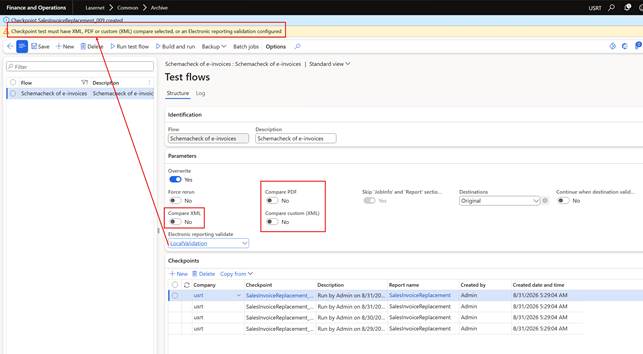
The Schemacheck of e-invoices flow with Compare XML, Compare PDF and Compare custom (XML) all set to No. The validation message now reads 'or an Electronic reporting validation configured', so LocalValidation alone is accepted.
75101 — Result view shows the checkpoint instead of the result
When showing XML, PDF or custom properties, the system always opened the checkpoint file rather than the produced result — including when comparing two PDFs. The same item also covered the inconsistent commands between the two areas, where results offered Show and checkpoints offered Download.
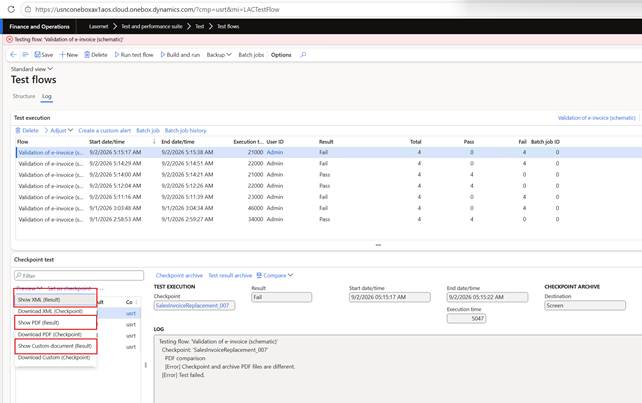
The Preview menu on a failed checkpoint test. Show XML, Show PDF and Show Custom document are the Result commands that were opening the checkpoint file instead.