
Lasernet for Dynamics 365 Finance and Operations
Release version: 7.3.2
Release date: 16th September 2026
Notes
The following documentation and files are available:
Maintenance Report
This section briefly describes the fixes, and enhancements in Lasernet FO Connector 7.3.2.
Version Numbers
Dynamics Finance and Operations 10.0.47 PU71 Version: 7.3.2.2609144
Dynamics Finance and Operations 10.0.48 PU72 Version: 7.3.2.2609145
Dynamics Finance and Operations 10.0.49 PU73 Version: 7.3.2.2609146
Fixes, and Enhancements
ID | Area | Description | Ticket No. |
|---|---|---|---|
74688 | Test & Performance Suite | T&P - report Excel comparison adjustments | #50321 |
74876 | E-invoice validation | ProjectInvoiceProposal with related sales order cannot be posted | #50315, #50461 |
74966 | Formlinks | Dialog parameter values are empty in XML after upgrade to 7.3.1 | #50359 |
74969 | Test & Performance Suite | T&P Test Checkpoint - compare PDF even when destination validation fails | |
75082 | Test & Performance Suite | Compare with resend only possible with System administrator role | #50437 |
75102 | License | Security Governance - not enough users in license | #50384, #50522 |
75104 | License | Labels should mention the new license user count batch job | |
75121 | License | LACLicenseUserCount should be possible to open from systablebrowser | |
75156 | Batch | Recurrent batch job - expressions with non-static values are not recalculated | #50470 |
75184 | Warehouse App | Warehouse app - error Enter the serial number after serial number is added | #50442 |
75344 | E-invoice | New relation LACTransRefRecId between GSTInvoiceTmp_IN and CustInvoiceTrans |
LAC-Dynazure Modules — 4 items
ID | Area | Description | Ticket No. |
74873 | E-documents | Option for Electronic reporting validation without any comparison | |
75075 | Test & Performance Suite | T&P Checkpoint - add report validate option | |
75081 | E-documents | Option to avoid check of XML, PDF and Custom (XML) | |
75101 | Test & Performance Suite | Result view shows the checkpoint instead of the result |
Models
Lasernet FO Connector 7.3.2 contains the following models, including the model for integration with D365CE (Dataverse) and the models for the Lasernet Print buttons.
Model Label | Module | Description | Location/Remark |
|---|---|---|---|
Lasernet | Lasernet | Core and main engine for Lasernet FO Connector | Lasernet Requires activation key Lasernet > Setup > Parameters > License terms |
Lasernet81Spec | Lasernet81Spec | Version specific additions for Finance & Operations version 8.01.00 and newer. | |
PRNButtons | PRNButtons | Lasernet Print Buttons. Adds print/preview buttons to forms. Standalone, can work without Lasernet. | Print buttons Module |
PRNButtonsLACAdaptor | PRNButtonsLACAdaptor | Couples Print Buttons to Lasernet. | |
LACCE | LACCE | Provides the integration with Dynamics 365 CE/ Dataverse from Lasernet FO Connector | Lasernet > Dataverse/Dynamics 365 |
LACMSHotfixes | LACMSHotfixes | Hotfixes for standard Lasernet FO Connector | System administration > Setup > Hotfixes from Lasernet |
LasernetTestSuit | LasernetTestSuit | Test and Performance Suite | Lasernet > Test and performance suite Requires activation key Lasernet > Test and performance suite > Parameters (see Important note below this table) |
LasernetPU35Spec | LasernetPU35Spec | Wave Label support. | |
LasernetAutoformDM | LasernetAutoformDM | Archive Integration (Autoform DM (Archive), now called Lasernet Keep | Lasernet > Setup > Lasernet Keep |
Lasernet Engine | Lasernet Engine | Embedded Lasernet Engine plus the Lasernet Designer installer. | Includes the Lasernet Engine and installer for the Lasernet Form Editor |
DynAzure Data Explorer | DAZDataExplorer | Lasernet Data Explorer | Lasernet > Test and performance suite > General tools > Data explorer Requires activation key Lasernet > Test and performance suite > Parameters |
DynAzure Electronic Reporting Connector | DAZERConnector | Lasernet E-Documents. ER formats, validation, network delivery. | Lasernet > Setup > Electronic reporting connector Requires activation key Lasernet > Setup > Electronic reporting connector > Electronic reporting connector Parameters |
DynAzure Tracking | DAZTracking | Lasernet Tracking, Email, outbound, inbound, not-delivered. | Lasernet > Setup > Tracking Requires activation key Lasernet > Setup > Tracking > Tracking Parameters |
DynAzure OAuth tools | DAZOAuth | The model DynAzure OAuth provides OAuth 2.0 token handling. | |
DynaAzure Tracking Electronic Reporting | DAZTrackingER | Bridge model: Makes e-documents appear in Tracking workspace.(The outbound/inbound tabs.) | |
DynAzure Mail Graph | DAZMailGraph | Email via Microsoft Graph (modern auth) — the send/receive path behind Tracking and inbound. | |
DynaAzure Mail Merge | DAZMailMerge | Lasernet Mail Merge | Lasernet > Setup > Mail Merge Requires activation key Lasernet > Setup > Mail Merge > Mail Merge Parameters |
Note
We highly recommend that you install all models from the deployable package.
Important
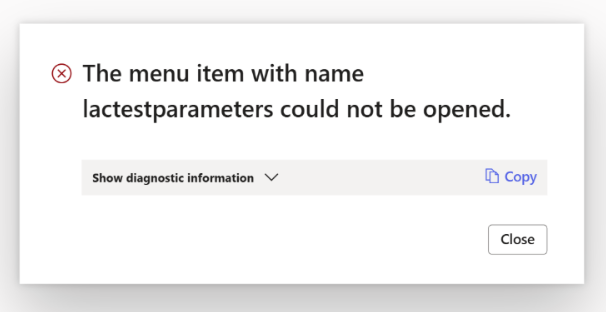
If the Data Explorer model is not installed, you will see the following error when you open the Test and Performance Suite Parameters form.
Error
The menu item with name lactestparameters could not be opened.
Add the AOT package
Either through LCS - Apply a deployable package to an environment
Or by installing a deployable package – Requires RDP access to the environment
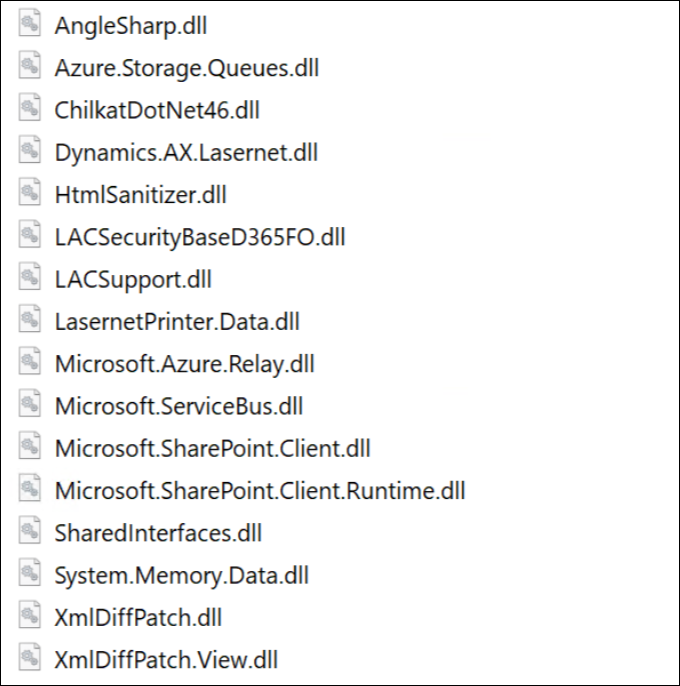
Ensure the following DLL files (new in Lasernet FO Connector 7.2) have been added to TFS if you are not just installing/deploying the AOT package:
Azure.Storage.Queues.dll
ChilkatDotNet46.dll
System.Memory.Data.dll
The following is the complete list of DLLs from the Lasernet model that are not automatically added:
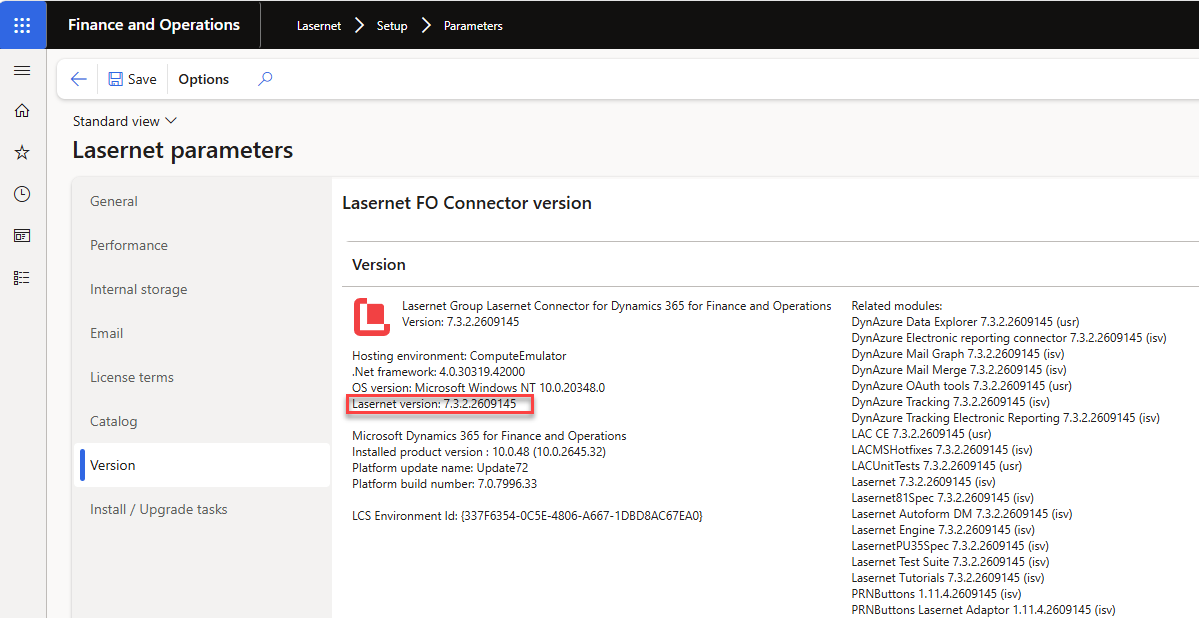
The version number should contain the number 7.3.2 after either installing or deploying the AOT package.
Lasernet > Setup > Parameters
If any files are missing, refer to Microsoft documentation.
Note
Different versions of Lasernet FO Connector are supported with different versions of Lasernet. A setup for each newer version of Lasernet is required for any new installation and when upgrading from an older version of Lasernet.
Prerequisite/Technical
Export the Lasernet FO Connector configuration, including all reports, to ensure data can be restored if needed.
It is possible to perform an in-place upgrade from a previous version as long as the previous version is relatively recent, such as Lasernet FO Connector 7.3.x.
How to Get Support
If you encounter difficulty using Lasernet FO Connector, contact Lasernet Support.