
Lasernet for Dynamics 365 Finance and Operations
Release version: 7.4.1
Release date: 17th November 2026
Introduction
This page describes the fixes, and enhancements in Lasernet connector version 7.4.1 for Dynamics Finance and Operations.
The following documentation is available:
Fixes, and Enhancements – Lasernet FO Connector 7.4.1
Lasernet FO Connector 7.4.1 is released for Dynamics 365 for Finance and Operations versions 10.0.47(PU71), 10.0.48(PU72), and 10.0.49(PU73).
The same source code is used across all versions.
Version 7.4.1 builds on 7.4.0 and contains everything in it. The major enhancements in 7.4.1:
E-invoices for four more countries: Lasernet e-documents sends Italian FatturaPA, Spanish Facturae and Romanian e-Factura through the Inhouse transformation (XSLT), and Peppol BIS invoices for the Slovak mandate of 1 January 2027, with the Slovak tax ID (DIČ) as Peppol address 0245 and the seller's legal form. Received Italian FatturaPA and Spanish Facturae invoices are imported as pending vendor invoices, signed .p7m files included, and received Slovak Peppol BIS invoices are imported and matched to the vendor by that address.
Peppol BIS Billing validation rules 3.0.21, mandatory since 17 August 2026, replace 3.0.18, so local validation of PEPPOL_BIS and EHF documents agrees with the access points again. This applies to every country that sends Peppol BIS.
Storecove as an e-document provider: a new connection type sends Peppol BIS, EHF and XRechnung invoices over Peppol through Storecove, collects the delivery status and evidence, loads received documents, and exchanges buyer responses as lifecycle statuses.
OIOUBL validation rules 1.17.2, in production on NemHandel since 18 May 2026, replace 1.12.2, and OIOUBL, Peppol BIS, XRechnung, FR CTC and ZUGFeRD/Factur-X invoices keep a taxed and an untaxed charge apart.
Received e-invoices: one mailbox can load vendor invoices for several companies, routed by the vendor's VAT number, and the PDF of a received e-invoice is archived and locked with its XML.
Polish JPK-V7M and JPK-V7K VAT files can run as a Lasernet Query report and land in the Lasernet archive.
E-invoice content can be steered without changing a stylesheet: the document type code (BT-3) comes from a report expression, and the delivery date (BT-72) comes from the packing slip the invoice line covers.
Source info starts from the validation message, so a missing element can be traced to the Dynamics 365 setup where its value is maintained. Local validation no longer passes a document that is cut off or isn't XML.
The E-document checklist – Inbound (receiving) lists only real gaps and shows whether receiving actually runs. Every connection has a purpose and keeps its last test result, and mailbox sign-ins are kept alive before they expire.
Received invoices that cover several purchase orders, or name a product variant by colour and size, are matched line by line.
Prints are faster: the e-document part of a print reads its setup once and each invoice line once, proforma invoices skip the e-invoice data, report imports and catalog loads are about twice as fast, and formats a company doesn't send can be switched off.
With a Lasernet server, the server delivers every e-mail, also when the e-document embeds the PDF or is validated first. An invalid document isn't sent.
The Lasernet connector takes a restore point before a report backup is imported or copied, the retention backfill can be filtered and run in parallel, Lasernet Keep can be the source or target of storage operations, and section conditions of type Code and Query work again.
The Electronic reporting connector menu is now a group of its own in the Lasernet menu, no longer under Setup.
Major enhancement in 7.4.1
E-invoices for four more countries
Lasernet e-documents gets the e-invoice formats of Italy, Spain, Romania and Slovakia. The table shows for each format whether it can be sent and received. Send means that a posted sales invoice or credit note is turned into the format, validated and delivered through its destination. Receive means that a received file is recognized and imported as a pending vendor invoice.
Country | Format | Send | Receive |
|---|---|---|---|
Italy | FatturaPA 1.2 (FATTURAPA), for private customers (FPR12) and the public administration (FPA12) | Yes | Yes, also as a signed file (.xml.p7m). Document types the buyer issues itself and files with several invoices aren't imported |
Spain | Facturae 3.2.2 (FACTURAE) | Yes | Yes, Facturae 3.2.2, 3.2.1 and 3.2. Self invoices and invoices issued by the buyer aren't imported |
Romania | e-Factura, CIUS-RO 1.0.1 on UBL 2.1 (RO_CIUS_UBL) | Yes | Recognized, not imported |
Slovakia | Peppol BIS Billing 3.0 with the Slovak tax ID (DIČ) as Peppol address 0245 (PEPPOL_BIS), for the mandate of 1 January 2027 | Yes | Yes, through the existing Peppol BIS import, with the supplier found from its 0245 address |
Sending: the file goes out through the destinations a company sets up, such as e-mail, a storage connection or an e-invoicing provider. A direct connection to the Italian SDI, the Spanish FACe or the Romanian ANAF system, and digital signatures, aren't part of 7.4.1. Slovak invoices travel over Peppol through a delivery provider accredited in Slovakia.
Receiving: a received FatturaPA or Facturae invoice is turned into a pending vendor invoice, also when it arrives as a signed .p7m file. Italian and Spanish values that Dynamics 365 doesn't post from the file, such as withholding tax, stamp duty and split payment, raise a warning on the document. A Romanian file that arrives is recognized by its format, but it isn't imported and shows as Not importable. A Slovak Peppol BIS invoice is imported like any other Peppol BIS invoice. The supplier is found from its 0245 address: by the DIČ as a Tax ID registration, or else by the VAT number SK followed by the DIČ.

Document formats, FATTURAPA: Importable is Yes, and the Canonical transform turns a received FatturaPA invoice into a pending vendor invoice.
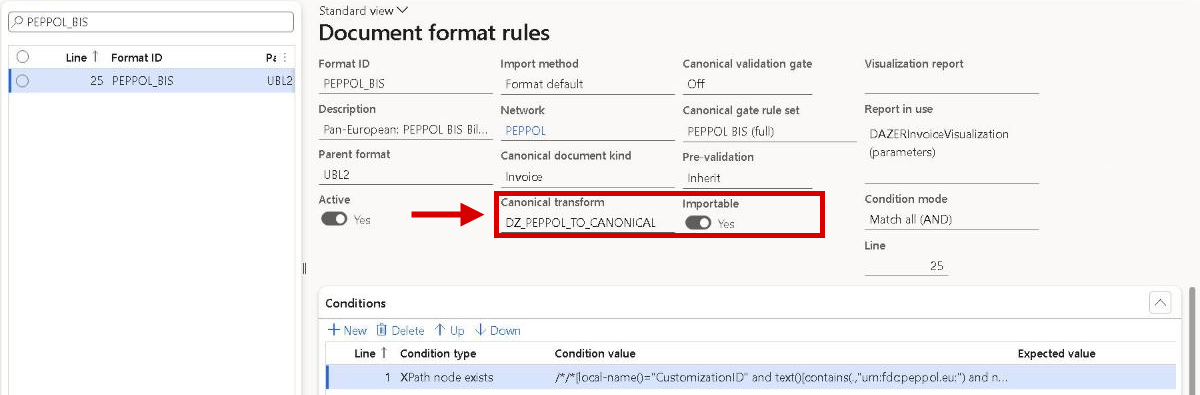
Document formats, PEPPOL_BIS: Importable is Yes, and the Canonical transform turns a received Peppol BIS invoice, a Slovak one included, into a pending vendor invoice.
Lasernet connector New and improved
A restore point before a report backup is imported or copied
Lasernet took a restore point of a report only before a load from the catalog. Import report backup, Import Lasernet backup and Copy report to other companies overwrote a report with no way back. Now every report that already exists in the company gets a restore point before the import or copy writes it, with the reason Before import of report backup and the file name, or Before copy from company. The message bar reports each one, Previous versions lists it, and Restore previous version brings the report back. A new check box Take restore points, Yes by default, switches them off for large migrations.
Report imports take restore points: Import report backup, Import Lasernet backup and Copy report to other companies save a restore point of every report they overwrite. Clear Take restore points for large migrations.
Faster printing, report import and catalog loads
A print through Lasernet read the same setup rows again and again, and an e-document read the invoice header once for every line. They are now read once per print, so a sales invoice with an e-document does about a sixth less database work, and far less on long invoices. Importing a report over an existing one, or loading it from the catalog, deleted the old elements one at a time and exported the report three times. The elements are now deleted in one step and the report is exported once, so a load or import of an e-document report is about twice as fast. The output is unchanged.
Retention backfill: filters and parallel threads
Retention backfill under Lasernet > Periodic > Archive always covered the whole company in one batch task, so a first run on years of archive took hours and couldn't be tried on one report or one month first. The dialog now has a Filter group with Report name, From date and To date, all optional. The filter applies to every step and to Count only, and every message names it. Number of threads, 1 by default, splits a run in the background into bundles that the threads work on in parallel, with a summary task that logs the totals. An entry that fails is logged and left for the next run.
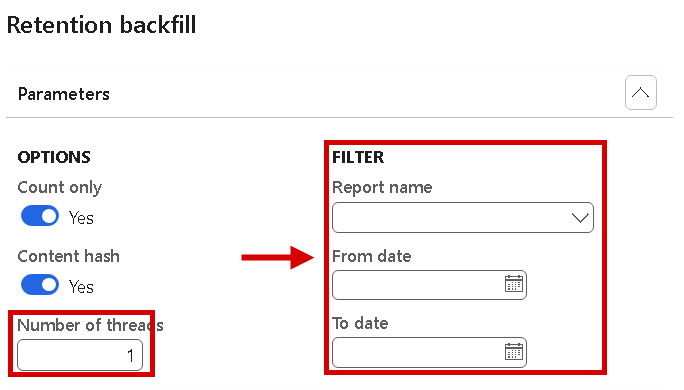
Retention backfill: the Filter group limits a run to one report or period, and Number of threads runs it in parallel in the background.
Retention backfill: Number of threads applies only with Run in the background = Yes.
Lasernet Keep as source or target of storage operations
The storage operations Copy, Move and Adjust and the file operations now accept a Lasernet Keep storage as From storage or To storage. With Keep as the target, a To document definition field appears and Scan only is locked on, so the lines are reviewed first. The review form shows one column per key of the document definition. The new Set metadata button fills the keys of the selected lines from the archived XML, a field of the archive entry, a query from the reference record or a fixed value. Execute list is refused while a mandatory key is missing. Removing documents from Keep needs the Delete documents in Lasernet Keep approval.
Storage operations to Lasernet Keep always run with Scan only and need a To document definition. Moving or cleaning up documents out of Keep needs the Delete documents in Lasernet Keep approval. Storage drop-downs list only connections of the current Lasernet environment.
File tracking for archives in Lasernet Keep
File tracking now covers archives stored in Lasernet Keep, with the same statuses Pending, Exists and Missing as the other storages. With Lasernet Embedded the file is uploaded while archiving, so its status is Exists at once. With a Lasernet server it starts as Pending, and the periodic file check asks Keep for the document: Exists when Keep has it, Missing when it still isn't there after the expected time. A storage that can't answer no longer stops the file check. The file stays Pending, the check continues, and the reason is shown in the new Message column under Lasernet log > Tracking log > File tracking, for every storage.
The Preview menu of the archive shows files only
In 7.4.0 the Preview menu of the archive, under Lasernet > Journal > Archive, also offered Download XML, Download PDF and Download Custom document. They duplicated the download buttons on the General FastTab and were the only place where a Preview menu started a download. The menu now shows only Show XML, Show PDF and Show Custom document again. Downloading stays with the button next to XML File, PDF File and Custom File on the General FastTab, which for a resend entry downloads the file its job resent. The Preview menus of the Test & Performance forms keep their Download entries.
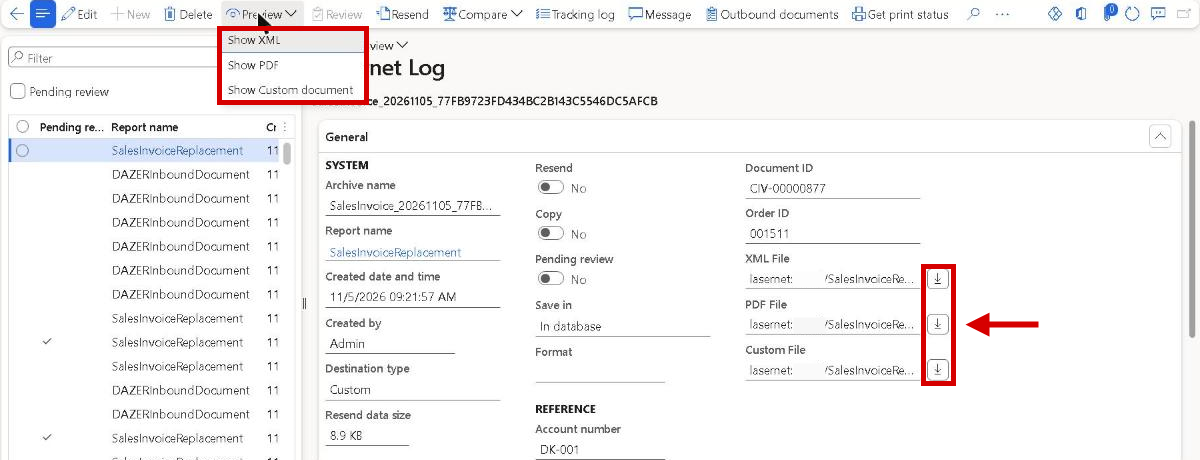
Lasernet log: the Preview menu shows the files. Download them with the buttons next to XML File, PDF File and Custom File.
Deliver report in Review before sending is faster and can send the reviewed PDF unchanged
Deliver report in Review before sending took 7 to 14 seconds per document, because it read the archive storage again for every output file and always produced the PDF a second time. It now reads the storage once. The new report setting PDF delivered after review, under Other parameters on Lasernet > Common > Reports, decides which PDF is sent. Automatic, the default, sends the reviewed PDF unless the design uses a value that changes at delivery. Reviewed PDF always sends it, and Render again produces a new PDF as before. A signature added in the review, a changed design or a Lasernet server always gives a new PDF.
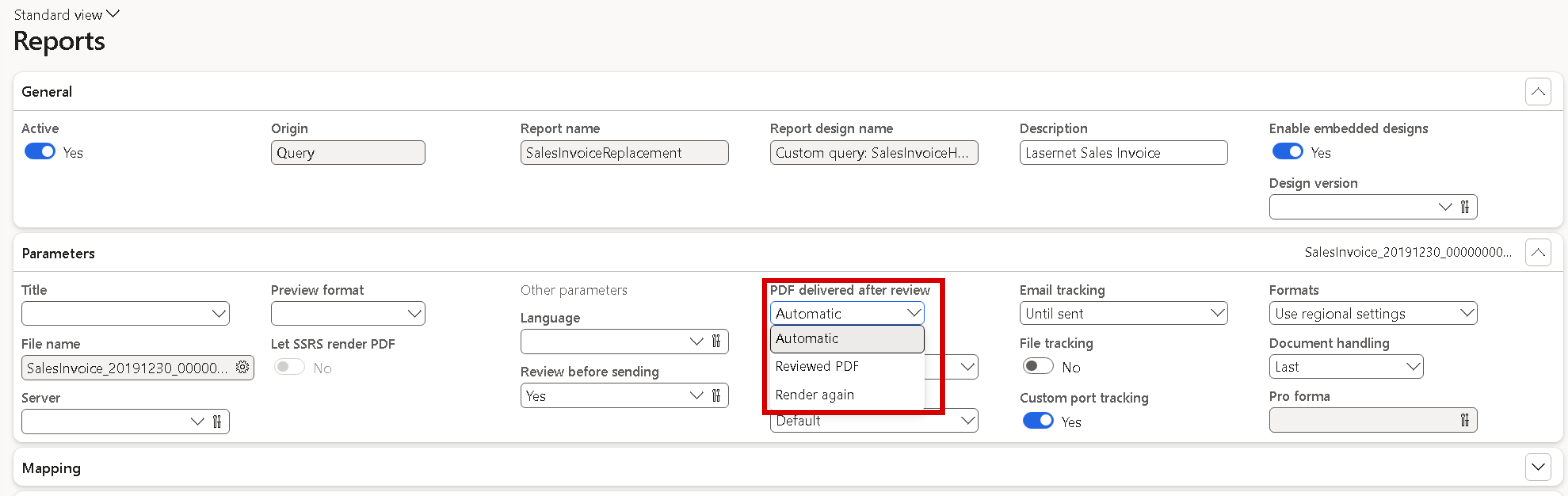
Reports, FastTab Parameters: PDF delivered after review offers Automatic, Reviewed PDF and Render again.
PDF delivered after review: existing reports get Automatic. The standard designs of the sales invoice and sales confirmation replacement reports use a value that changes at delivery, so they keep producing a new PDF. Set PDF delivered after review = Reviewed PDF on a report to send the reviewed PDF unchanged, or Render again to always get a new one.
Lasernet connector fixed
Section conditions of type Code or Query were ignored at print
Since 7.4.0, a report section whose Condition was Code or Query was always printed, because the print no longer read the condition it had to evaluate. This also hit sections hidden with the eye toggle in earlier versions, which are stored as the code 0, and data-driven conditions, such as a component section printed only for lot items. Code and Query conditions on structure sections and custom sections are evaluated at print again, so a section with the code 0 is left out of the report XML. Sections set to Hidden or None behave as before, and conditions on elements were never affected.
Resend ignored Review before sending without Force re-run
In the resend dialog of the Lasernet log, Review before sending could be ticked without Force re-run, but the archived documents were sent straight away and the new log entry wasn't a review. Review before sending is decided when the report runs, and a plain resend doesn't run the report: it sends the archived files as they are. Now the option can only be ticked together with Force re-run. Without it the option is cleared and unavailable, and its help text says why. If such a resend still arrives with the option set, nothing is sent and a message explains it.
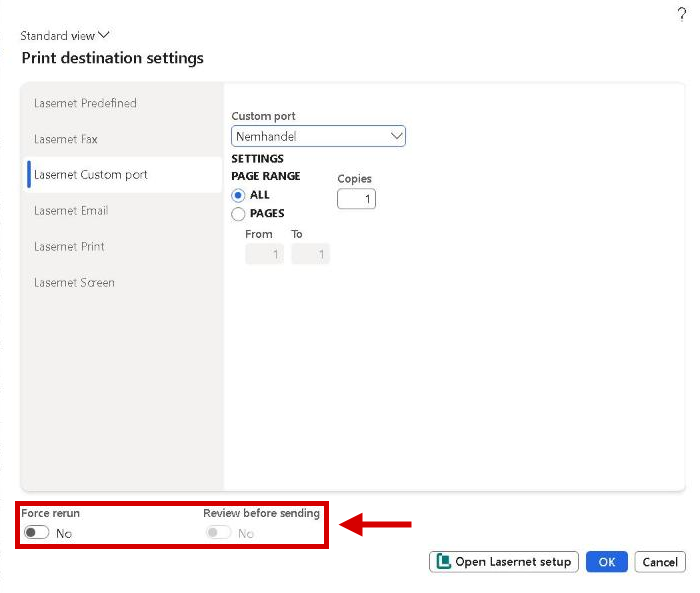
Resend from the Lasernet log: Review before sending stays unavailable while Force rerun is No.
Resend with Review before sending now needs Force re-run. Without it, the option is unavailable.
Lasernet business events couldn't be activated with Dataverse connected
On an environment connected to Dataverse, activating a business event on a Lasernet report trigger endpoint failed with 400 invalid_client when the sign-in from Dynamics 365 to Dataverse was broken, and deleting an activation failed the same way. Activation registers each event in Dataverse and gives up when that fails, although Dataverse plays no part in delivering events to Lasernet: Dynamics 365 hands each event straight to Lasernet, which runs the linked report. Activating or deleting an activation on a Lasernet endpoint now skips the Dataverse registration, so Lasernet business events can be activated on every environment. Events on Microsoft's own endpoint types still go through Dataverse as before.
Auditor export had no drop-down for the hand-over connection
In Lasernet > Periodic > Archive > Auditor export, Hand-over connection was a plain text box. The user had to know the exact connection id, and a user with only the Archive auditor role couldn't look one up, because the role has no access to Connections. The field now has a drop-down that lists exactly the connections the export accepts: storage connections of type File system, SFTP or Azure storage in the current company and Lasernet environment, each id once, with Storage type and Instance name. It works for the Archive auditor role too. Test archive readiness and the storage operations get the same drop-down.
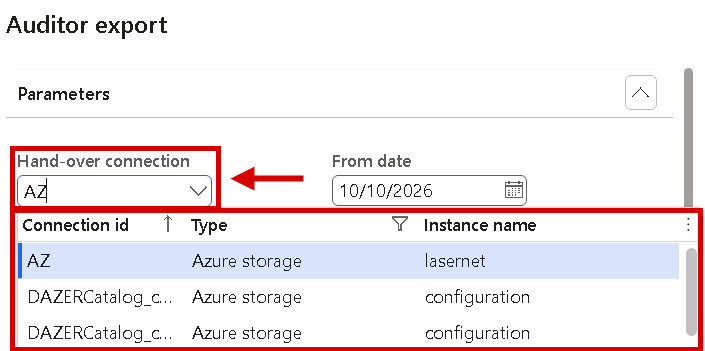
Auditor export: Hand-over connection lists the storage connections the export accepts, with their type and instance name.
What's used highlighting stayed after the parameter was switched off
When What's used was switched off in Lasernet parameters, the What's used button disappeared from the report structure, but the green and red highlighting a user had switched on earlier stayed in the structure tree and grid, in the query wizard and in the label list. The only way out was to switch the parameter on again, switch the highlighting off in the dialog, and switch the parameter off again. While the parameter is off, no What's used highlighting is shown anywhere. Each user's own choices are kept, so when the parameter is switched on again the highlighting comes back as it was set, without opening the dialog again.
Review before sending mixed up the destinations of grouped documents, and the e-mail preview didn't refresh
When one run produced several documents, for example with Group data in files, and they went to Review before sending, the Destinations list showed the lines of all documents on every document, and First, Previous, Next and Last didn't move the Destination FastTab, so a change could land on another document's e-mail. Each document now shows only its own destination, the FastTab follows the displayed document, and a change is saved before moving on. With an e-mail merge document (Use email body as document = Yes), the preview kept the old e-mail after Edit until Refresh was clicked. It now refreshes at once.
Lasernet server validation timed out when the environment address ended with a slash
When the Internet address of an environment under Lasernet > Setup > Administration > Environments ended with a slash, Validate on a Lasernet server with a Service Bus connection tied to that environment sent nothing and waited until it timed out. No message reached the queue, nothing showed in Lasernet Monitor, and the user saw only the timeout. Lasernet compared the saved address with the host address, which has no slash, so the environment and its connection were never found. The address is now saved exactly as entered, and the environment is recognised with or without the slash. Environments that already carry one, imported ones included, work without any change.
The printer lookup failed when a network printer and a quick destination shared a name
Under Warehouse management > Setup > Document routing, opening the printer name lookup on a routing line failed with The record already exists when a network printer and a Lasernet quick destination had the same name, so no printer could be selected. The printer lookup of Wave label templates with the label generator type Lasernet failed the same way. Both lookups now open without an error. A name that exists in both sources is listed once, as the Lasernet quick destination with the description Lasernet, because that is the one used when the label prints. The other printers and quick destinations are listed as before.
Data Explorer could change or delete records under a retention lock
In Data Explorer's developer mode, the table preview could delete a received document whose archive entry was under the retention lock, and could edit a locked archive entry in a way that ended its lock. Developer mode stays as a support tool, but a record under a retention lock can no longer be created, edited or deleted through Data Explorer, on any environment. Delete, the Edit dialog and changes in the grid are refused with the retention message and its end date. With several records selected, one locked record refuses the whole action. A locked row is read-only, and a notice above the grid shows why.
Data Explorer lost the preview when a name that isn't a table was typed into the table field
In Data explorer, the table field of an empty preview shows <New>. Typing a table name after that text, or any name that isn't a table, gave Object reference not set to an instance of an object, and the preview disappeared until the page was reloaded. A name that isn't a table or view now gives the warning Table ... does not exist, please provide a valid table name, and the tree and the preview stay as they were. A table name typed after <New> opens that table, as picking it from the drop-down does. A saved tree whose table no longer exists shows Nothing to display for that node.
The Storage browser showed an empty container or kept loading with a container-limited SAS
On an Azure storage connection that signs in with a shared access signature limited to one container, such as a user delegation SAS, the Storage browser under Lasernet > Setup > Administration > Connections showed an empty container or stayed on Loading... for ever. Lasernet now lists and reads the files directly, which a container SAS allows. When the list can't be read, for example because the SAS has no List permission, the Storage browser shows the reason. Loading always ends: a failed or cancelled load shows its error, Stop ends at once, and a storage that doesn't answer gives an error after 2 minutes.
Designer was missing from the Edit menu when an archived file was previewed
When a PDF, XML or custom file was opened with Preview from the Lasernet log, the Edit menu of the preview often had no Designer entry, only an empty gap. Designer now shows for every archived file type, under the same rules as in other Lasernet previews: enabled when the report has an archived design version, and disabled with a help text that says why when it has none. The empty gap is gone. Refresh on an archived file now renders it again with the report's current design, where it used an empty design before. When the report of the entry no longer exists, Designer and Refresh are hidden.
Missing user count was reported although the Lasernet user count job had run
With the user count method Count, Lasernet reported a missing user count, and Required user count showed Unknown, when the newest count of the standard batch job Named user license count reports processing was more than a month old. The message pointed to the batch job Lasernet - License user count processing, which was running fine. A count now stays valid for 30 days after the Lasernet job stored it, for both count methods, and the age of the standard count no longer matters. If the Lasernet job itself hasn't stored a count for more than 30 days, the count is still reported as missing.
Deliver report failed on write-once storage and removed the archived PDF
On a storage connection with Archive tier = Immutable storage or Write archive sidecar = Yes, Deliver report in Review before sending failed with already exists ... with different content. The failed attempt had already deleted the reviewed PDF, so the entry could be neither delivered nor cancelled. With the integrated engine, Deliver report no longer deletes or overwrites an archived file on such a connection. A new PDF is stored as its own file next to the reviewed one. Cancel review is now always available for a pending review, which also frees entries stuck earlier.
Reviews stuck on write-once storage: a pending review that lost its PDF in an earlier version can now be ended with Cancel review; print the document again afterwards.
With a Lasernet server, Deliver report deleted the reviewed PDF before the request was sent
With a Lasernet server, Deliver report in Review before sending deleted the reviewed PDF before it sent the request. When the request or the delivery failed, the entry stayed under review without a PDF. The Lasernet server now writes the delivered PDF as its own file next to the reviewed one, on any storage, and the reviewed PDF is never deleted or overwritten. When the review is released, the archive entry points at the delivered file, and its audit log records both file names. If the request doesn't reach the server, the entry keeps its reviewed PDF, and you can deliver again or cancel the review.
Overlay previews showed the wrong overlay when another one was selected too quickly
On Lasernet > Setup > Overlay > Overlay files, selecting another overlay while the first preview was still loading could show the picture of the wrong overlay. The mix-up could then stay, also in other legal entities, until a leftover file was deleted from the storage by hand. The Overlay files page and the overlay drop-down in Overlays now ask for one preview at a time, and only for the overlay that is selected. Overlays that are clicked past load when they are selected again. When the Lasernet server is slow to answer for one overlay, the next one shows Loading preview... until that request has ended.
Overlay previews load one at a time. When the Lasernet server doesn't answer for one overlay, the next preview waits until that request has timed out, 100 seconds by default.
Forms failed with an object reference error at the first logon after a restart
Since 7.3, some environments showed Object reference not set to an instance of an object, or a message that the default dashboard couldn't be opened, on the first forms a user opened after a server restart. It came from the Test & Performance recording check, which ran on every form, also without a Test & Performance license, and failed when a message box opened before the logon had finished. The check now reads the recording state from the current session and does nothing when there is none. If Test & Performance logic fails while a form opens, the form still opens with its standard view and a warning.
Force rerun and resends to predefined destinations failed after the report was renamed
When a report was renamed with Copy/Rename after a document was archived, Force rerun and a resend to predefined destinations stopped with Report ... is not found, from the journal and from the Lasernet log. Lasernet now regenerates the document with the report that replaces the original report today, and a message names both reports. When no report, or more than one, could take over, nothing is regenerated and the message says what to do: print the document again, or resend it without Force rerun. Copy/Rename now tells how many archive entries keep the old name and which report regenerates them.
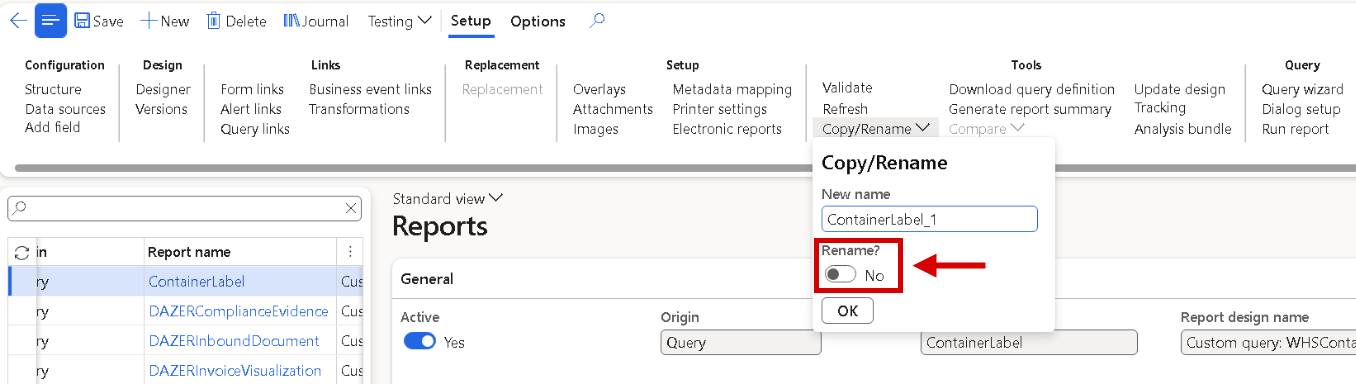
Reports: Copy/Rename on the Setup tab, with the option Rename?. After a rename, archived documents of the old report are regenerated with the report that replaces it.
Archive entries of renamed reports: Force rerun and resends to predefined destinations now regenerate such an entry with the report that replaces the original report today. When no report, or more than one, qualifies, nothing is sent and the message says what to do.
Export Lasernet backup warned that a table had no version assigned
Export Lasernet backup showed the yellow warning Table ... does not have a version assigned under Envelope placeholders on every backup of a company whose metadata templates use named placeholders. The export finished, but the warning left users unsure whether the backup was usable. The same warning appeared for business event links in Export report backup, Copy report to other companies and the catalog package export. The warnings are gone, and the records are written with their proper version. Backups taken before and after this change import the same way, and nothing needs to be set up.
PDF embed values were applied to the wrong embedded file
A Lasernet PDF can embed several files, each with its own set of PDF embed custom properties on the destination (PDF EMBED, PDF EMBED 1 and so on). The print matched the values by their order in the custom properties catalog, not by set, so a value entered for one file could be applied to another. A set without a file name stopped all embedding, so hybrid destinations sent a plain PDF. Each value now applies to the file of the set it is shown under, whatever the catalog order. E-invoices completed before the PDF is first saved now embed the second and further sets too.
Several PDF embed sets on one destination: each value now applies to the file of the set it is shown under. Where a value was entered under another set on purpose to get the right result, move it to its own set. Destinations with one set aren't affected.
A form link printed data from all legal entities when the report's range held an expression
A query report with a fixed range that holds an expression, for example the current company on the legal entity table, printed correctly from Run report. Started from a form link whose Default ranges didn't hold that range, the range was dropped without a message, and the output carried the data of every legal entity. A form link now runs with the report's range whenever the link holds no value of its own, and the Default ranges dialog shows that range. A value on the link still wins, and Reset works as before. Reports embedded as sub-reports aren't changed: they use the ranges of their own sub-report setup.
Form link ranges: a form link that holds no value for a range now runs with the report's range, so an empty row on the link no longer switches a report range off, and such a link can select fewer records than before. Enter the value on the link to use a different one. Alert links, business event links and CRM entity links follow the same rule. A report embedded as a sub-report is not covered: enter the company range in the Filter of the sub-report element in the main report's structure, and don't use Reset there.
The form link condition didn't decide whether the Lasernet button was enabled
A form link with a Data source on a form that shows totals, such as the on-hand list, kept its Lasernet button disabled whatever the condition said. Lasernet took those rows for records that weren't saved yet. A form link without a data source never checked its condition, so the button was always enabled. Rows that show totals are now checked like saved records, each row on its own. A link without a data source is checked against the form's first data source, when the user moves to another record or opens the Lasernet menu. A new record that isn't saved yet still keeps the button disabled.
Form link conditions: a form link without a Data source now enables and disables its Lasernet button by its condition, where the condition was ignored before. Check the conditions of such links: one that is never true now keeps the button disabled.
Copy report lost the replacement mapping of the source report
Copy/Rename copied the replacement mapping of a replacement report, with its data source choices, disabled rows and actions, and then removed all of it again in its last step. Every copy started without a mapping, so manual choices had to be made again. A copy now keeps the mapping of the source report. When the copy is chosen in the Replacement dialog, the rows are there, and rows for new data sources are added as before. Reload mapping still resets the rows. A related fault that removed mapping rows straight after creating them is corrected as well.
Failed prints left their report data behind, and a print could read the data of other documents
When a print setting of a replacement report failed, the data prepared for that print stayed in the report tables. The batch job Lasernet periodic cleanup removed old data properly for one report only and stopped at a record it couldn't clean. A failed print now removes its data, and the cleanup handles every report: a record it can't clean gives a warning and no longer stops the job. A print whose prepared data was removed while it waited could carry lines of other documents. It now stops with The data prepared for printing ... is no longer available, so no such document is created or sent.
A long review lost the data that the document's next print setting needed
A document printed with Review before sending keeps its prepared print data while the review form is open, because its next print settings, such as the copy, read the same data. The batch job Lasernet periodic cleanup removed that data by Data age (in minutes) alone, 60 by default. After a longer review, the next print setting stopped with The data prepared for printing ... is no longer available. The cleanup now keeps prepared print data for at least 24 hours, whatever the data age is; a longer data age applies as before. A review left open for more than 24 hours still needs a new print.
Lasernet periodic cleanup: make sure the batch job runs. It keeps the data prepared for a print for at least 24 hours, whatever Data age (in minutes) says, so a review can stay open that long. When a review stays open for more than 24 hours and the document has more than one print setting, the second print setting stops with The data prepared for printing ... is no longer available and the document has to be printed again. Data left by failed prints before the upgrade stays in the report tables; removing it isn't part of 7.4.1.
Unable to build URL for file was reported for every attachment
With the Lasernet parameter Demo only! Use open azure storage links for images and attachments switched on, a resend from the Lasernet log or a delivery wrote the error Unable to build URL for file once per attached file, although the document was sent correctly with the stored file location. For storage that can never give an open link, such as a file system, SFTP or SharePoint, no message is shown now. Where Azure storage can't give the link, one warning per print says that the stored file location is used. Nothing changes when the parameter is off, or where the link can be built.
A locked archive entry could lose its retention lock through a state change or a backup import
An archive entry under the retention lock could still be switched to another Archive state or to Test archive by an update, which ended the lock. Such a change is now refused with a message that names the field and the lock's end date, and the refusal is written to the retention log. Importing a Lasernet backup could also overwrite a locked entry, even with a shorter retention end, and replace its files. The import now leaves a locked entry, its files and its references unchanged, and shows one warning with the number of entries it skipped and the first 10 of them.
Locked archive entries: an entry under the retention lock can no longer change its Archive state or Test archive, and importing a Lasernet backup skips entries that are locked in the target environment, with one warning that counts them. Data Explorer refuses to create, edit or delete a locked record, also in developer mode.
Archive connection verified stayed green after the storage of the connection was changed
Test archive readiness stored its result on the connection, but not which storage it had tested. When the connection was later pointed at another container, folder, host or sign-in, the old result stayed, and the checklist row Archive connection verified could stay green for up to 90 days. The result now counts only for the storage settings and the environment it was tested with. After a change, the row shows Missing, saving the connection gives a warning, and the monthly compliance run tests again when Re-probe archive connections is on. A rotated password, key or secret of the same account keeps the result.
An Azure storage connection with an authentication profile kept a shared access signature
An Azure storage connection that signs in with an authentication profile should keep only the storage address in its connection string. An account key was removed, but a shared access signature stayed, without a warning, when it was pasted as a SAS URL or sat behind the ? of an endpoint value. The signature was stored and went into every Lasernet backup export of the connections. It is now removed when the value is entered on Lasernet > Setup > Administration > Connections and whenever the connection is saved, with a warning. Connections without an authentication profile keep their signature, because they sign in with it.
A batch print of a report with Review before sending failed with An internal error has occurred
A print without a user session, such as a batch job or posting in batch, failed when the report had Review before sending = Yes. It ended with An internal error has occurred and a print management error, because Lasernet tried to open the review preview with no user to show it to. The document is now archived as pending for review, and the job gets one message per document that says where to review it: Lasernet > Common > Archive, Review. Nothing is sent before a user has reviewed it. A batch print to Lasernet Screen now gives the standard warning that Screen isn't valid in batch.
The first screen preview of a new document failed with Wrong parameters specified
The first time a new document was shown on screen, for example by a resend to Lasernet Screen, the Preview form could stay empty with Wrong parameters specified. Lasernet stores the preview file as a temporary attachment and didn't check that the company had a document type. It now uses Document type for preview under Lasernet parameters > Performance > Document preview when it is set and exists. Otherwise it takes the company's default File document type, or the first document type of group File, when that type stores files in Azure storage. A company without a usable document type gets a message that names the setting to fill in.
Document type for preview: where the first screen preview now says that the company has no document type for the preview file, set Document type for preview under Lasernet parameters > Performance > Document preview to a document type of group File that stores files in Azure storage
Test & Performance fixed
Checkpoint test and Resend with compare failed when the design placed an attachment
Resend with compare in the Lasernet log and Checkpoint test in Test & Performance run the report again without sending anything. That test run left out the files from the report's attachment setup, so a design that places such a file on the page, for example an image attached to an invoice, produced a document without it, and the comparison reported Image(PNG) Removed although the original was correct. The test run now includes those attachments, so the result compares with the original. The tests still send nothing, and normal printing is unchanged. A checkpoint test that compares the job information ignores attachment values that change on every run.
A Dataverse connection error failed test plan lines
On an environment that is linked to Dataverse but can't sign in to it, standard pages such as the customer page show Failed to connect to Dataverse in the Action center. A test plan run treats every error message as a failure of the step it appeared in, so lines failed although the test had run the report and validated its values correctly. This one message no longer fails a step or a test plan line. It stays visible in the log of the step, so the Dataverse problem can still be seen. Any other error fails the line as before.
A test plan condition on a table that doesn't exist stopped the run
A test plan line with a Query condition on a table that doesn't exist in the environment stopped the test plan run with an error. The condition now returns False, the line is skipped, and a warning names the test plan, the line and the table. The run carries on with the next lines. The same applies to a Form condition whose form or control doesn't exist, to a Parameter condition whose parameter is no longer on the test plan, and to any other problem while a condition is checked. The Conditions editor opens for such a line and shows N/A.
Lasernet e-documents new and improved
Italian FatturaPA and Spanish Facturae through the Inhouse transformation (XSLT)
Lasernet e-documents had no Italian or Spanish e-invoice format. Two formats are now delivered for posted sales invoices and credit notes: FATTURAPA, the Italian FatturaPA 1.2 for private customers (FPR12) and the public administration (FPA12) in one stylesheet, chosen by the length of the customer's Authority office code, and FACTURAE, the Spanish Facturae 3.2.2. Both read the setup a company already made for Microsoft's formats: Electronic invoice parameters, the electronic document properties (PEC, Bollo, DocumentType, DIR3 centres), Nature codes, base documents with CIG and CUP, and the methods of payment, so nothing is entered twice. Each file is validated against the official schema, the invoice PDF is embedded, and the E-document checklist lists each prerequisite. Received FatturaPA and Facturae files are imported too; see the next block. Select the format with XSLT transformation format on the destination. Sending through SDI or FACe, signing, status messages and SII aren't part of 7.4.1.
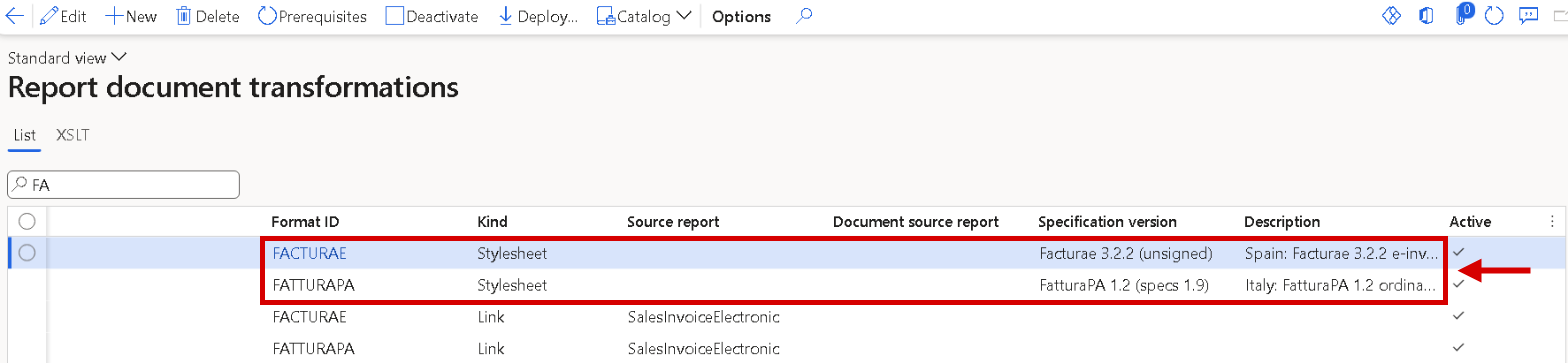
Report document transformations: the new FACTURAE and FATTURAPA stylesheets with their specification versions.
Italy and Spain: received FatturaPA and Facturae invoices are imported
A received Italian or Spanish e-invoice was recognised but stopped as Not importable. FatturaPA 1.2 and Facturae 3.2, 3.2.1 and 3.2.2 are now imported as pending vendor invoices: header, seller and buyer with VAT ID and fiscal code or NIF, lines, discounts and charges, VAT, payment, references and attachments. Signed SDI files (.xml.p7m) are opened at load, and the signed original stays attached. National values aren't posted, but raise a warning on the document: withholding tax, stamp duty, pension fund contribution, split payment, Natura codes and the Spanish equivalence surcharge. Document types the buyer issues itself, Facturae self invoices and files with several invoices stay Not importable, with an error naming the reason. Tax category rules gets the optional key National tax code, so exempt lines with different Natura codes can take different sales tax codes. A Spanish invoice number is the series plus the number.

Document formats, FACTURAE: the Spanish formats FACTURAE, FACTURAE_321 and FACTURAE_32 are importable in the same way, each with its Canonical transform.
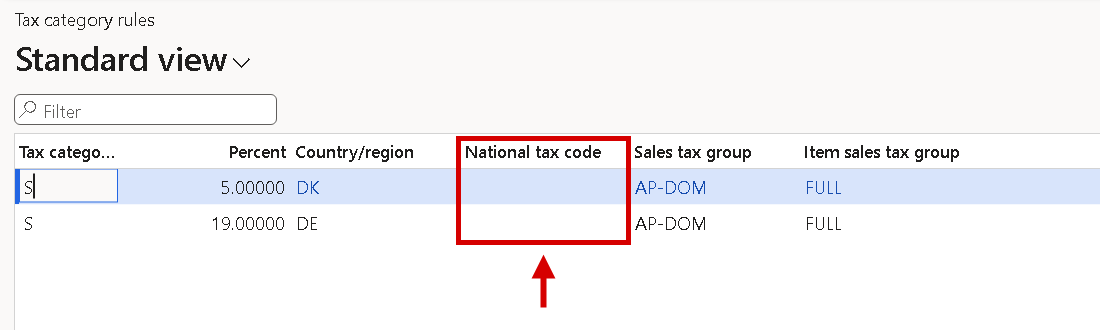
Tax category rules: the new key National tax code lets exempt lines with different Natura codes take different sales tax codes.
Romanian e-Factura (CIUS-RO) through the Inhouse transformation (XSLT)
A Romanian legal entity could only send the generic PEPPOL BIS file, which ANAF rejects: wrong specification identifier, no county code, no buyer CUI. The new format RO_CIUS_UBL produces the Romanian e-Factura (EN 16931 with CIUS-RO 1.0.1, UBL 2.1) for posted sales invoices and credit notes. It writes the county in ISO 3166-2:RO form for the seller, buyer and delivery addresses, whether entered as a code or as a name with or without diacritics, the Bucharest sector as the city, the buyer's CUI from its registration IDs, and the seller's legal information (BT-33) and legal mentions (BT-22) from row parameters. Free texts are cut to the lengths ANAF allows; identifiers and names never. The PDF isn't embedded by default, and attachments over 3 MB are left out with a warning. A validation package with ANAF's rules, Romanian checklist rows with Go to setup and a Romanian test data profile are included. Sending to ANAF isn't part of 7.4.1.

Report document transformations: the RO_CIUS_UBL stylesheet on the e-document source report, and its link from the sales invoice replacement report.
Slovakia: Peppol BIS invoices with the Slovak tax ID (DIČ) as Peppol address
From 1 January 2027, Slovak VAT payers must send domestic B2B invoices as Peppol BIS Billing 3.0 through a delivery provider accredited in Slovakia. A Slovak company is addressed on Peppol by the scheme 0245 and its 10-digit tax ID (DIČ). Lasernet e-documents now writes this for a Slovak seller and its Slovak buyers. Provision registration categories plans the Slovak tax ID rule with scheme 0245, so seller and buyer get the electronic address 0245 + DIČ (BT-34/BT-49) without manual setup. A value entered as the VAT number (IČ DPH, SK followed by the DIČ) is sent as the bare DIČ. A value that still isn't 10 digits is never sent: posting stops, and the checklist and the print log give the reason. The IČ DPH stays the VAT number (BT-31/BT-48), and the IČO is written as the legal registration ID.
A Slovak seller's invoice and credit note carry the date of taxable supply (BT-7) when the delivery date differs from the invoice date, and a self-billed invoice of a Slovak supplier carries the Slovak self-billing note. The E-document checklist - Outbound gets two Slovak rows, one for the seller's DIČ and one for the buyers', and the seller bank account becomes mandatory for a Slovak seller. A Slovak test data profile is included. Invoices to the public sector aren't part of 7.4.1, and a send over the Peppol test network through an accredited provider hasn't been tested yet. Slovak Peppol BIS invoices that are received are imported like other Peppol BIS invoices.
Slovakia: seller legal form (BT-33), tax point date in XRechnung and item names on blank line texts
The Slovak Commercial Code asks for the seller's legal form and commercial register entry (BT-33), which Dynamics 365 holds only for Czech legal entities. A legal entity can now hold this text in the electronic document property SellerLegalForm under Accounts receivable > Setup > Electronic document properties. It is written on every customer-facing e-document; without a value nothing changes. The E-document checklist - Outbound (sending) gets an optional Slovak row for it.
XRechnung invoices of a Slovak seller now carry the tax point date (BT-7), as Peppol BIS does. And a line text holding only blanks no longer leaves the item name empty: the item number is written instead.
Item name on blank line texts: a line whose text holds only blanks or line breaks now carries the item number as the item name (BT-153), where it was empty before. Real line texts are unchanged.
Slovakia: a received Peppol invoice finds the vendor from its 0245 electronic address
A received Peppol BIS invoice whose supplier was identified only by 0245 and the DIČ wasn't matched to a vendor, because the import knew the vendor only by its VAT number or an external identifier. It is now matched to the vendor that has this DIČ as a Tax ID registration, and otherwise to the vendor whose VAT number is SK followed by the DIČ, as on the outgoing side. A customer or the legal entity is looked up the same way; a 0245 value that isn't 10 digits is never matched. No setup is needed beyond the Slovak Tax ID registration type that Provision registration categories creates.
Received Slovak invoices: a supplier identified only by its 0245 address is now matched by the DIČ as a Tax ID registration, then by the VAT number SK followed by the DIČ. No setup is needed beyond Provision registration categories.
Storecove as an e-document provider
Storecove is a new provider for e-documents over Peppol. The new connection type Storecove API takes an API key and the Storecove legal entity ID, and Validate tests it. Invoices and credit notes go out through a custom port with the Peppol envelope, as Peppol BIS, EHF, XRechnung UBL or XRechnung CII. Delivery status and evidence are collected from Storecove, which never calls Dynamics 365. A refused document shows as Validation failed with the text from Storecove. Received documents arrive through Load received documents, also for several companies on one account. Buyer responses are recorded as lifecycle statuses, and Send status on a received invoice sends a Peppol Invoice Response. Storecove registration, opened from the connection, shows the legal entity, its Peppol identifiers and the event subscriptions it needs, and both E-document checklists have Storecove rows. The Peppol envelope now takes sender, receiver and document type from the print, per destination. OIOUBL, the French CTC formats and ZUGFeRD XML can't be sent through Storecove, and India, Poland (KSeF), Italy and the French regulated flow through Storecove aren't part of 7.4.1.
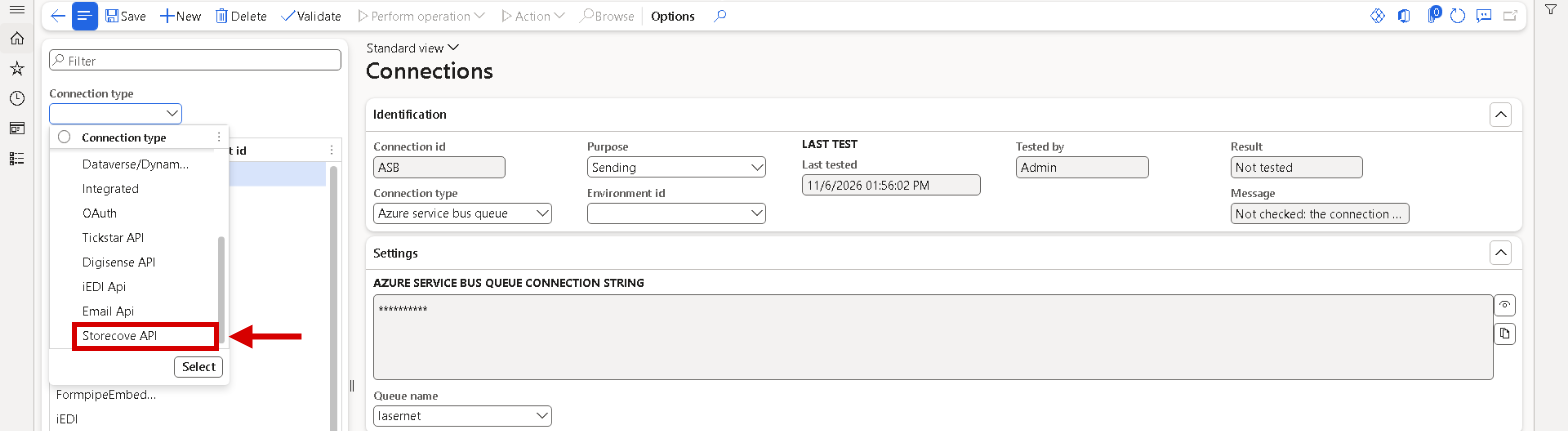
Connections: the filter Connection type lists the new connection type Storecove API.
Peppol BIS Billing validation rules 3.0.21
The Peppol BIS Billing rules shipped for local validation were release 3.0.18 from November 2024, while access points validate against 3.0.21, which has been mandatory since 17 August 2026. A document could pass local validation and still be rejected by the access point, and valid new codes, such as the Slovak address scheme 0245, were rejected locally. The rules for PEPPOL_BIS and PEPPOL_EHF are now release 3.0.21, including its hotfix of 28 October 2026. The address schemes 0244 and 0245 are accepted, and 14 codes that were listed by mistake are gone. Some checks are stricter, for example the format of Danish P-numbers (0096) and ERSTORG numbers (0198), a CustomizationID with a version suffix, and the currencies BGN and ANG. Rule updates now ship with the product, so the package's update feed is set to Manual. The Peppol invoice response rules were already release 3.0.17 and are now labelled that way.
OIOUBL validation rules 1.17.2
Lasernet e-documents shipped the Danish OIOUBL 2.1 validation rules as release 1.12.2 from May 2022, while NemHandel has validated against 1.17 since 18 May 2026. A document could pass Validate locally and still be refused after sending, and received OIOUBL documents were checked with the same rules. The shipped rules are now the official release 1.17.2 for all eight OIOUBL document types, and XML validation packages shows the version 1.17.2 on the OIOUBL_DK package. The newer rules check VAT amounts and totals more strictly and compare the VAT codes on the lines with the VAT summary. The OIOUBL output itself needed no change. A validation rule that runs but returns no result is now an error, never a silent pass.
OIOUBL validation is stricter: a document that passed under 1.12.2 can fail under 1.17.2, for example an invoice with two different standard VAT rates, or line VAT codes that don't match the VAT summary. NemHandel applies the same rules. A validation rule that runs but returns no result is now an error where it counted as 0 findings before.
Polish JPK-V7M and JPK-V7K VAT files as a Lasernet Query report
JPK-V7M, the Polish VAT declaration with registers, and its quarterly variant JPK-V7K came from an Electronic reporting format only, so the file never reached the Lasernet archive. It can now be built by a Lasernet Query report from Microsoft's own JPK tax data, checked against the official Ministry of Finance schema, archived with legal entity, period and version (original or correction), and delivered through the report's destinations. Users keep the Electronic messages routine: the Generate file action can use the Lasernet executable class, which attaches the file to the message as before. The file can also be started from Lasernet > Electronic reporting connector > Country specific > Poland > JPK VAT, or as a recurring batch job for the previous period. Corrections and sole traders are covered, and marker lookups from the Electronic reporting application-specific parameters are read automatically. Setup is Load JPK defaults, the tax office code and a review of the reporting code mapping. The Electronic reporting route is unchanged.
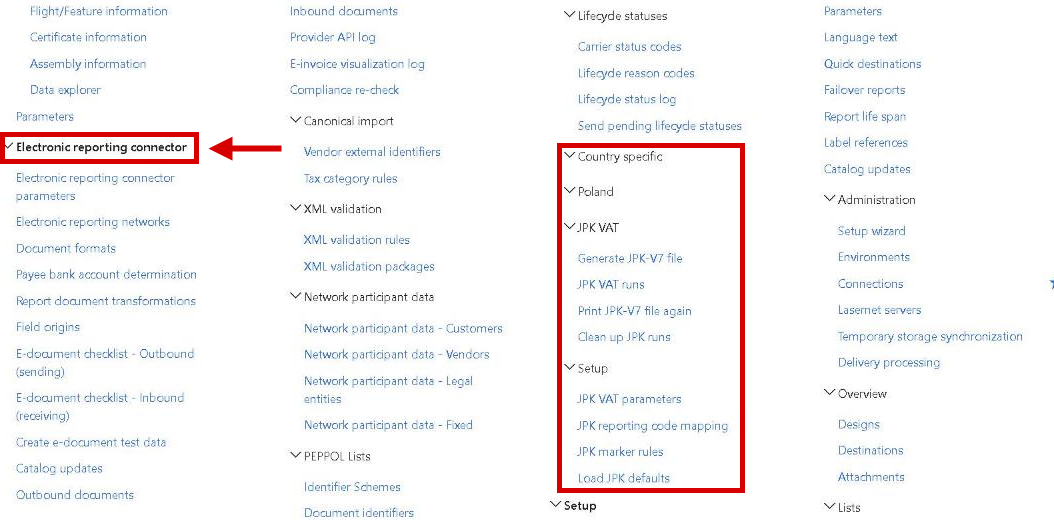
The Lasernet menu: Electronic reporting connector is a group of its own, no longer under Setup. Country specific > Poland > JPK VAT holds the file, the runs, the reprint, the clean-up and the setup.
The document type code (BT-3) comes from a report expression
The document type code of the EN 16931 e-invoices (380, 381, 389, 326) was decided inside the stylesheets, so a customer who needed another code, for example 380 instead of 389 on a self-billed vendor invoice, or 384 for a corrected invoice, had to fork the stylesheet. A new report element, DAZInvoiceTypeCode, now holds the code on every e-document source report, and XRechnung, PEPPOL BIS and EHF, FR CTC, OIOUBL and the ZUGFeRD/Factur-X profiles write it as BT-3 for invoices and credit notes. Change its expression on the source report under Lasernet > Reports > Elements, and the code changes per legal entity without touching a stylesheet. The shipped expression gives exactly the codes written before, and LocalValidation reports a code the target format doesn't allow.
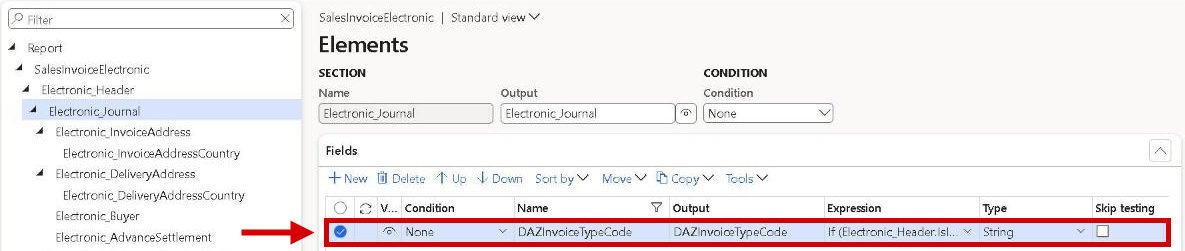
Elements of the e-document source report: the element DAZInvoiceTypeCode in Electronic_Journal holds the expression that gives the document type code (BT-3).
Delivery date (BT-72) from the packing slip the invoice covers
The delivery date of an e-invoice was taken from the newest packing slip of the order line, not from the packing slip the invoice line actually invoices. With partial deliveries an invoice showed the date of a later packing slip, and a reprint or resend changed its BT-72 once a newer packing slip was posted. The header date also came from the first line only. Each line now carries the date of the packing slip(s) it invoices, and the header BT-72 of every UBL and CII format is the latest delivery date over the goods lines, the day the delivery was completed. KSeF FA(3) keeps one date per line. A line without a packing slip uses the invoice date, never the session date, so a reprint gives the same file.
The delivery date (BT-72) changes on some invoices: each line takes the date of the packing slip it invoices, and the header of the UBL and CII formats carries the latest line date instead of the first line's. Invoices with one packing slip, or none, keep their date.
KSeF FA(3): invoice notes are sent as DodatkowyOpis
A note written on a Polish sales invoice never reached the KSeF FA(3) e-invoice. The KSEF FA3 stylesheet, version 2.6.0, now sends the external invoice notes that Dynamics 365 prints on the invoice as DodatkowyOpis: one entry per non-empty line of a header note, and one per line of a line note, with the number of its invoice line. The key (Klucz) is Uwagi by default and can be changed per legal entity in Parameters (JSON) of the transformation row, for example to note. A line of more than 256 characters is split at a space into several entries, so nothing is cut off. Internal notes are never sent. Invoices without notes and advance invoices are unchanged.

Report document transformations, tab XSLT, of the KSEF FA3 stylesheet: Parameters (JSON) is where the key of the invoice notes can be changed.
KSeF FA(3) notes are sent: external invoice notes on the header and the lines of a Polish invoice now go to KSeF as DodatkowyOpis. Check that these notes are meant for the buyer.
Source info starts from the validation message and ends at the Dynamics 365 setup
Show source info could only be opened by right-clicking a node, so a missing element, which most XRechnung BR-DE messages are about, couldn't be traced. The XML validation pane has Show source info on every message. For a missing element, the page names it, shows the stylesheet condition that wasn't met with the report elements it reads, and Show in transformation opens that condition. The page lists one row per report element, values first and conditions apart. Under each Dynamics 365 field, an origin line says where the value is maintained, for example the primary phone of the worker in Sales taker, and Go to setup opens that record. Origins live in a new Field origins catalogue. Field references in custom expressions no longer show as not a report element: a custom element referenced by its name is found when exactly one element matches, a value read directly from a data source is described as such, and a path that can't be resolved is shown as unresolved.
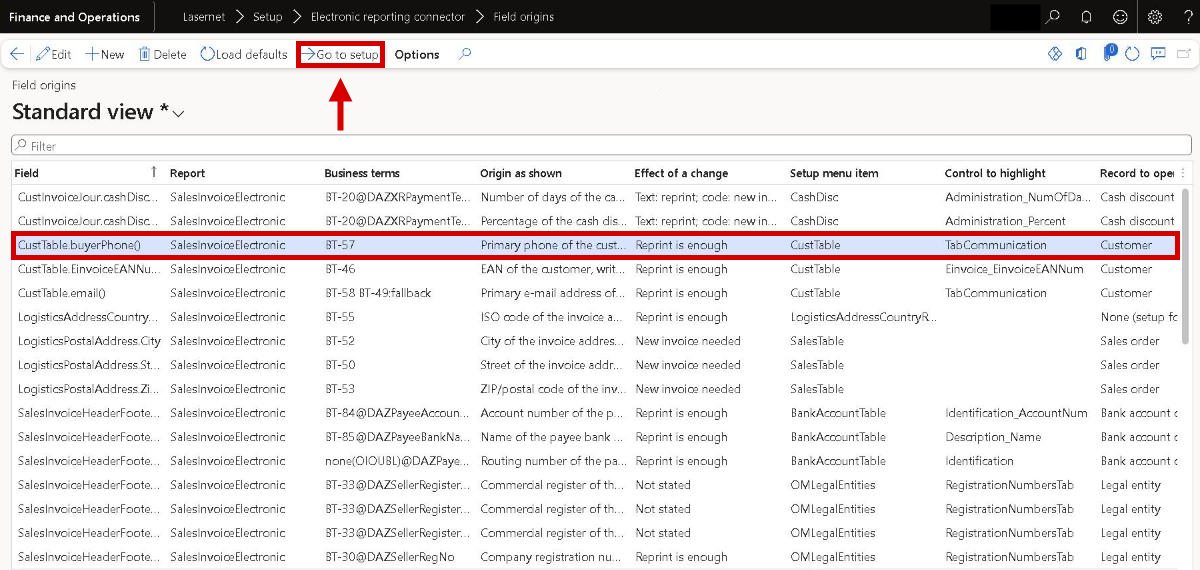
Field origins: for each Dynamics 365 field an e-document reads, where its value is maintained and what a change means. Go to setup opens that record.
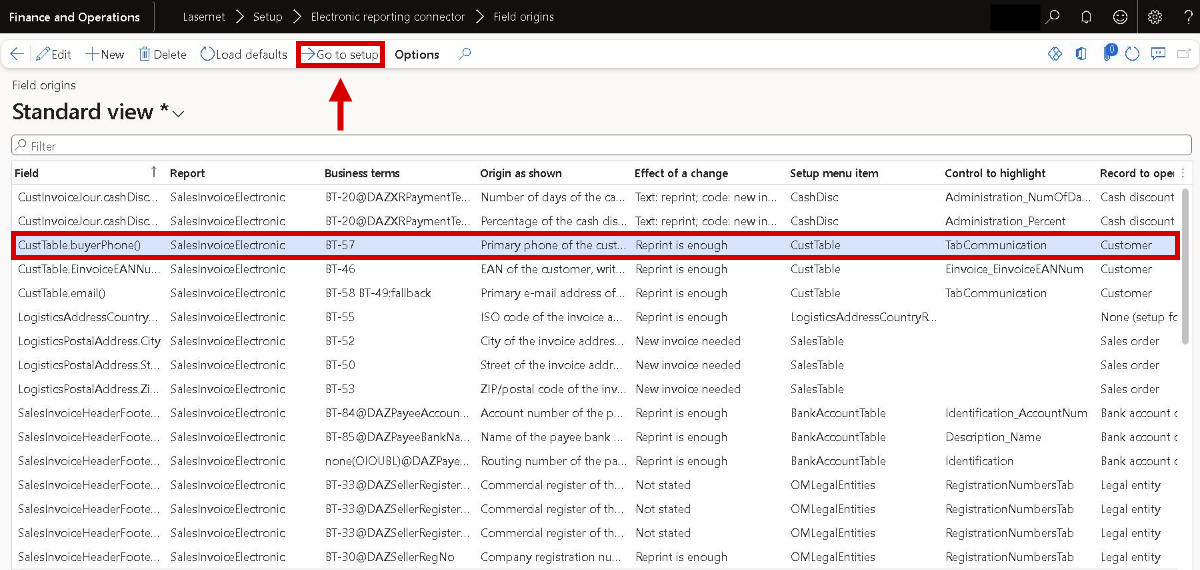
Field origins: for each Dynamics 365 field an e-document reads, where its value is maintained and what a change means. Go to setup opens that record.
Deactivate the e-document formats a report doesn't use, for faster prints
Every e-document source report carries the elements that all formats need, so every invoice calculated them all, whichever format the company sends. On Report document transformations, one Activate / Deactivate button now switches a format off, several rows at once. The elements that only inactive formats need are then hidden and no longer calculated: 15 to 33 % fewer database statements per print, with an identical e-document. With formats in its header, the E-document checklist warns about the other active formats, and Resolve automatically deactivates them. Validate on the report warns when a destination uses an inactive format, and such a print warns instead of producing an incomplete e-document. Nothing changes until a format is deactivated. Unticking Visible on a report element now also stops its evaluation.
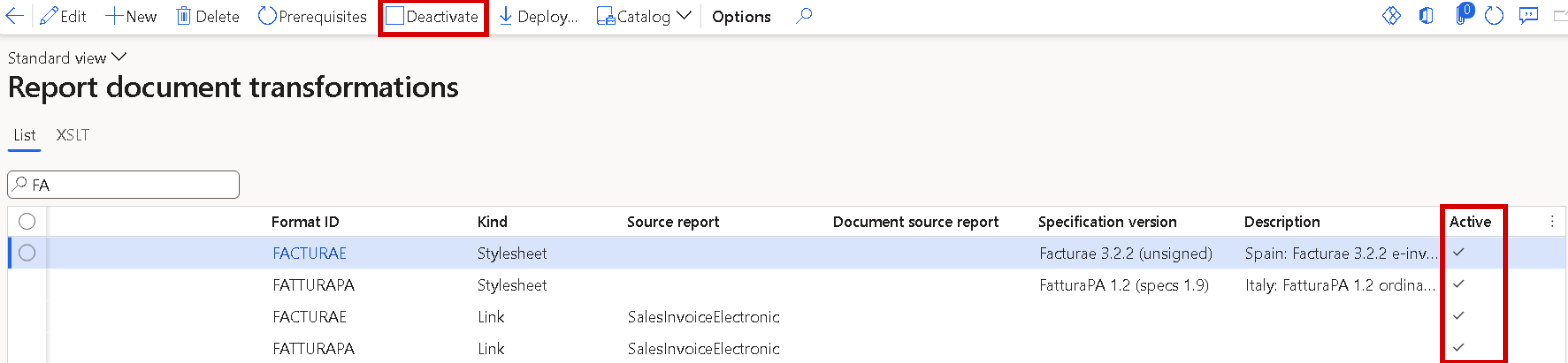
Report document transformations: Deactivate switches the selected formats off, and the Active column shows which formats are still calculated.
Deactivated e-document formats: nothing changes until a format is deactivated on Report document transformations. After that, a destination that still names the inactive format gives a warning and no e-document. Unticking Visible on a report element now also stops its evaluation, so the condition Hidden can't be used on destinations, overlays, document attachment setup or archive forms.
Faster e-invoice prints, checklist resolves and posting
Customers reported slow e-invoice prints and a wait at posting. The e-document part of a print now reads setup and master data once per print instead of once per field or line, from the endpoint network and format to the party identifiers. On test invoices a print sends 24 to 44 % fewer database statements, long invoices gain the most, and the e-documents are unchanged. Resolve automatically on the checklist no longer loads the same source report twice, so it runs about twice as fast. Posting no longer waits for the e-document license check, which now starts when the invoice journal is created. Report validation warns when the e-document custom properties are still at the level Legacy (All) or Dialog, which costs time and gives the first destination no e-document.
Custom property level: report validation warns when the e-document custom properties are still at the level Legacy (All) or Dialog. Switch them to Report and destination under Lasernet > Setup > Defaults > Custom properties.
Collective invoices and product variants on received invoice lines
One vendor invoice that covers several purchase orders now imports on the default import, without Header-only import. Each line is matched inside the purchase order that its own order reference names; a line without one uses the header order. An order that doesn't exist or belongs to another vendor gives Purchase order not found or Purchase order vendor mismatch on that line, and the document gets Action required. The pending vendor invoice shows <multiple> in the header and links each line to its own order line.
When the supplier's item number or barcode finds the item but not its variant, item properties such as Colour and Size now identify it, but only when exactly one released variant matches them all. The issue details show the step Item properties (colour, size).
Received collective invoices: documents that wait with Line not matched because a line names a second purchase order are imported after Recheck document. Pending invoices created before the upgrade from such invoices may have a line linked to the wrong order line; check them before posting. When item properties on a received line name exactly one variant that the purchase order doesn't have, the line is now Line not matched instead of being linked to another variant.
Inbound checklist: only real gaps, and proof that receiving runs
The E-document checklist - Inbound (receiving) reported gaps that stopped nothing. A storage connection without an inbound folder is now a warning that names the root folder it reads. Formats shipped without an import route, such as the self-billed formats and the header-only ZUGFeRD profiles, no longer offer Resolve automatically: the row gives the import's own advice, and Go to setup opens the format on Importable. Only connections that receive get connection rows and load jobs. Resolve automatically creates one load job per provider account, after a confirmation listing every job, and other connections on the same account get a warning.
Two new rows show whether receiving runs. Connection - last load warns when the load job hasn't run on time, and is invalid with the error when it failed. The optional Received documents waiting counts documents that have waited more than three days, and Go to setup opens them. The row Loaders byte-exact can now reach OK: the attachment repair it names is under Archive on Inbound documents.
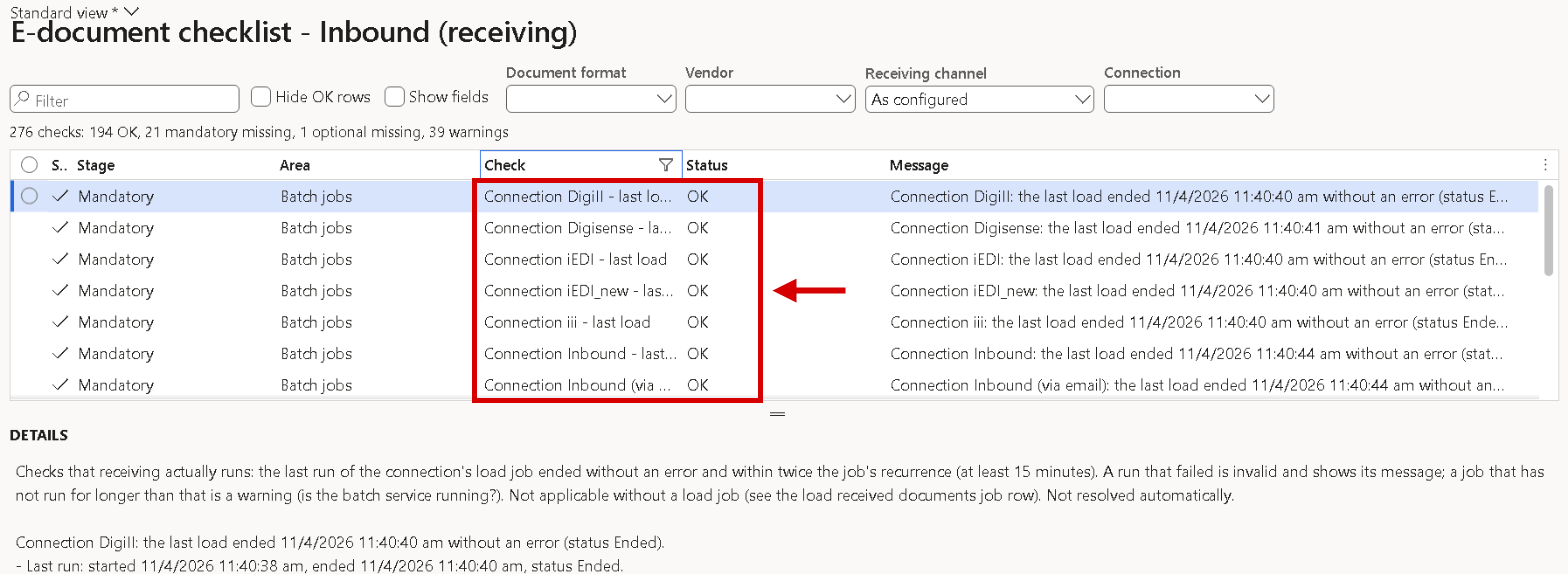
E-document checklist - Inbound (receiving): one row per receiving connection shows whether its last load ran without an error.
Go to setup puts the red box on the field or button that fixes the checklist row
On most checklist rows with a gap, Go to setup opened the form with only the record boxed, or nothing at all. Every Missing, Invalid or Warning row now gets the red box on what to fix: the field, with its FastTab or tab page expanded first, or the button that creates the missing record, such as New, Destinations, Metadata mapping or Add under Contact information on the customer. A button inside a menu is boxed together with the menu. A missing batch job opens the dialog that starts it, with Batch processing and Recurrence proposed. Reports carry a retention rule offers both places for Retention life span: the report and Lasernet parameters. Show fields names the same field or button.
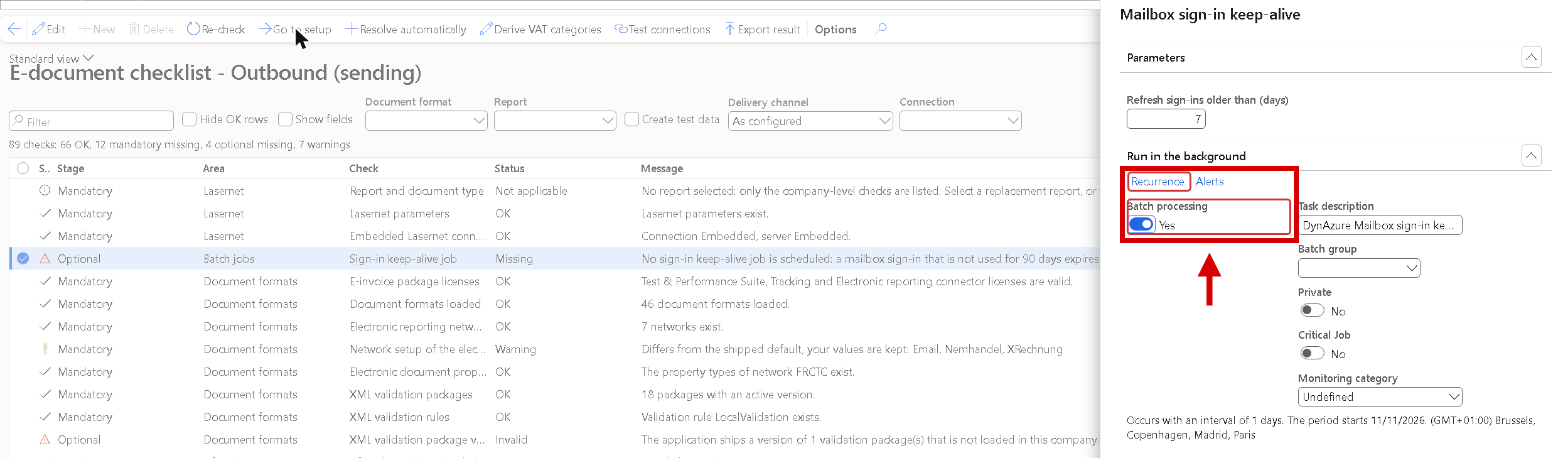
E-document checklist - Outbound (sending): Go to setup on the missing Sign-in keep-alive job opens the dialog that starts the job, with Batch processing switched on and Recurrence boxed.
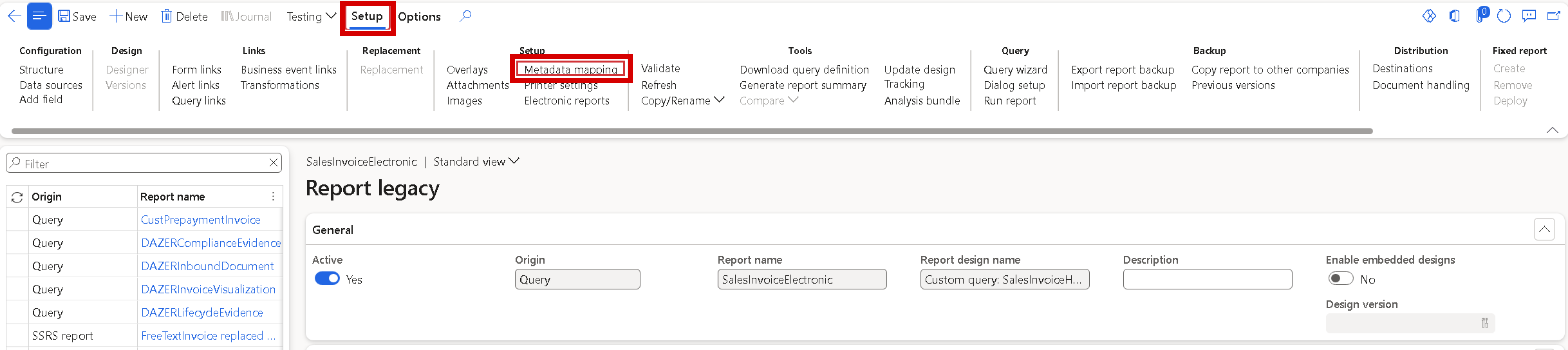
Reports, opened with Go to setup from a Keep mapping row of the checklist: the Setup tab and its button Metadata mapping are boxed.

Lasernet parameters, opened with Go to setup from the row Retention enforcement: the FastTab Report life span is expanded and the field is boxed.
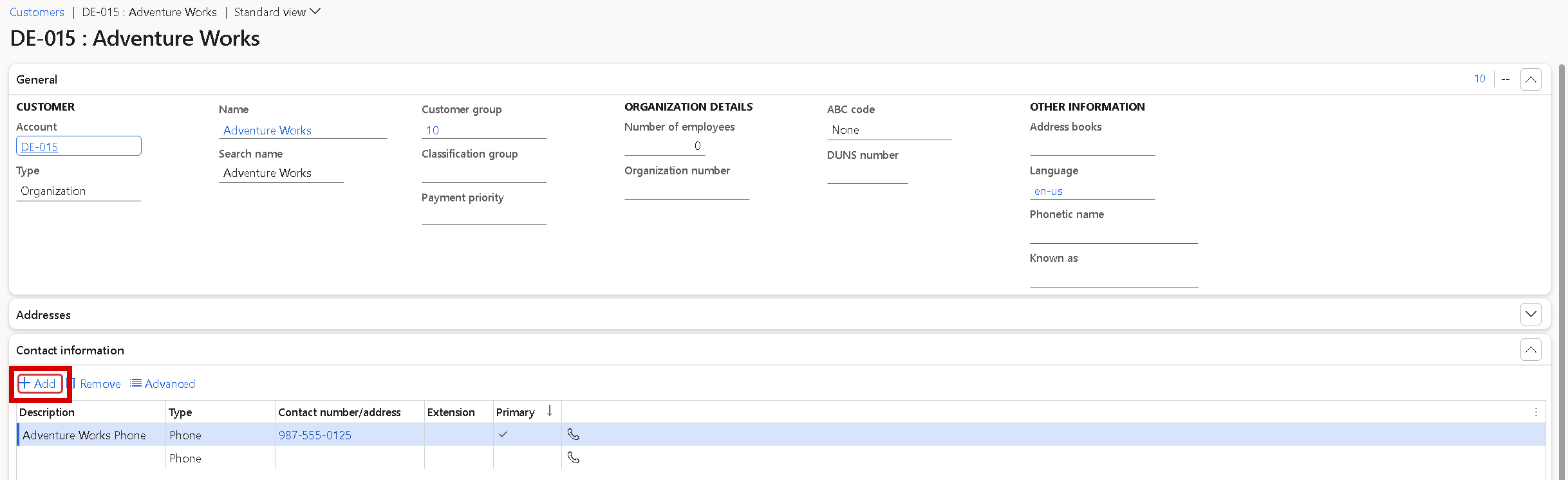
Customers, opened with Go to setup from a customer row that lacks a primary e-mail address: Contact information is expanded and Add is boxed.
Go to setup on a missing batch job opens the dialog that starts the job, for example Load received documents from network or Mailbox sign-in keep-alive, with Batch processing = Yes and a recurrence proposed, not the user's last values. Nothing is created until OK. The plain Batch jobs entry is gone from the Go to setup list.
Inbound checklist: Resolve automatically proposes tax category rules, and the row checks the rates received
The row Tax category rules had no Resolve automatically, so rules were typed by hand or created one issue at a time. The button now opens Propose tax category rules: one row per VAT category, rate and supplier country without a rule, taken from the Tax rule missing issues of waiting documents and from the company's sales tax codes. Each row proposes a sales tax group and an item sales tax group. A single candidate is marked Apply; with several, the user chooses. Nothing is written before OK, and existing rules are never changed. The row now checks the exact rate and supplier country the import looks up, so a rule for another rate no longer shows OK.
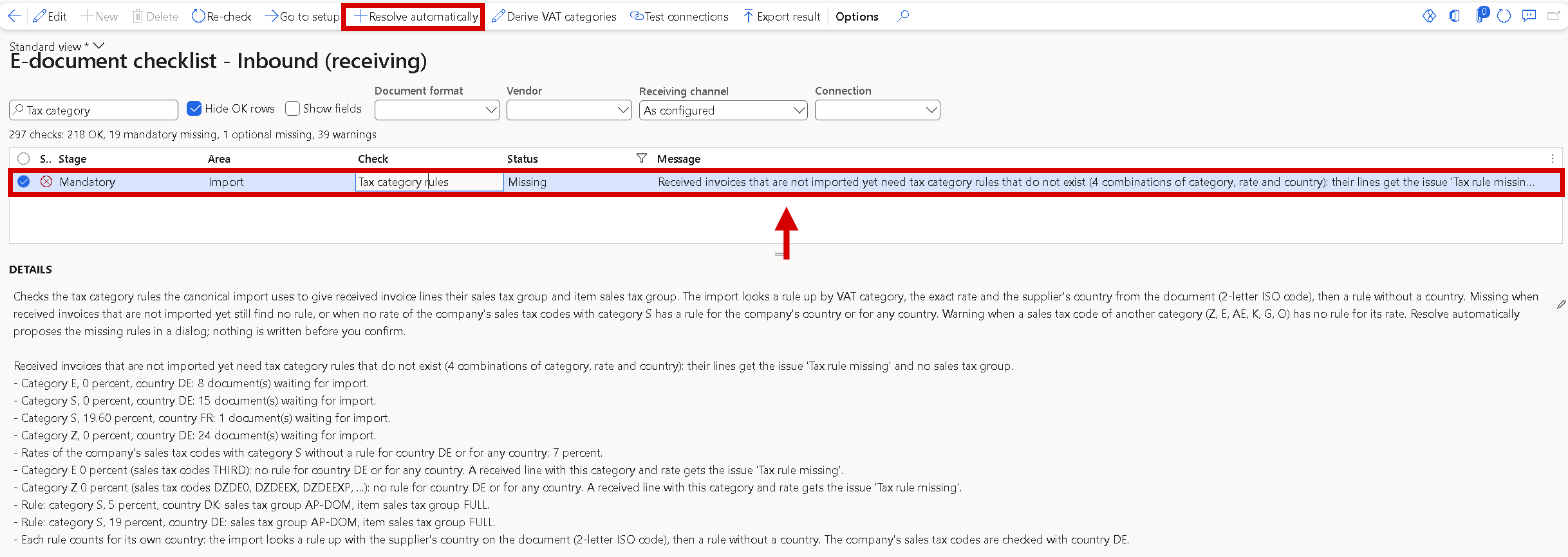
E-document checklist - Inbound (receiving): the row Tax category rules lists the categories, rates and countries the waiting invoices need, and Resolve automatically is available on it.
Tax category rules row: the row can turn from OK to Missing where the existing rules don't match the rate or supplier country of the invoices received. Use Resolve automatically to get proposals. Batch and unattended runs skip the row, because the rules are a VAT posting decision.
Connections for sending and receiving: purpose, saved test results and sign-in health
Every connection now has a Purpose on the Connections form: Sending, Receiving or Sending and receiving. Left at Not set, it follows how the connection is used, so existing connections need no change. The Outbound checklist lists only sending connections and the Inbound checklist only receiving ones, and the Network connection lookup on Load received documents lists receiving connections, storage included. A new warning, Shared provider account, names connections of the same type on the same account.
The last test is kept: Validate and Test connections write Last tested, Tested by, Result and Message on the connection, without secrets, and the checklist's live rows show it until the connection or the company's participant ID on the network is changed. Saving checks the type's required settings, as an error for a new connection and a warning for existing ones, and no longer calls the provider. The Peppol custom port check no longer blocks delivery when the receiver supports the document type.
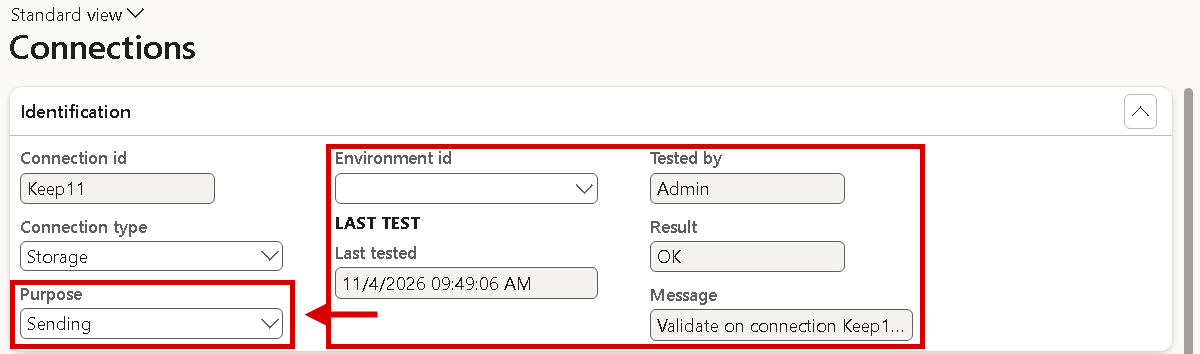
Connections: Purpose says whether a connection sends, receives or both, and Last test keeps the result of the last Validate or Test connections.
Mailbox sign-in: safe re-authorisation, one clear error and a keep-alive job
Obtain authorization on an e-mail connection that already has a sign-in replaces it at once, and an abandoned or refused sign-in leaves the old one working, so re-typing the client ID is no longer needed. The sign-in page pre-fills the mailbox account of the last sign-in. When a sign-in can't be renewed, the load stops with one message that names the connection, company, mailbox account, the Microsoft error, such as AADSTS9002313, and what to do.
A new daily job, Mailbox sign-in keep-alive, created from the checklist, renews every sign-in before the 90-day inactivity limit. A sign-in that fails or has gone unused for 75 days raises one warning and the business event Mailbox sign-in at risk. The Connections list shows the state in a new Authorization column.

Connections: the Authorization column shows the state of each mailbox sign-in.
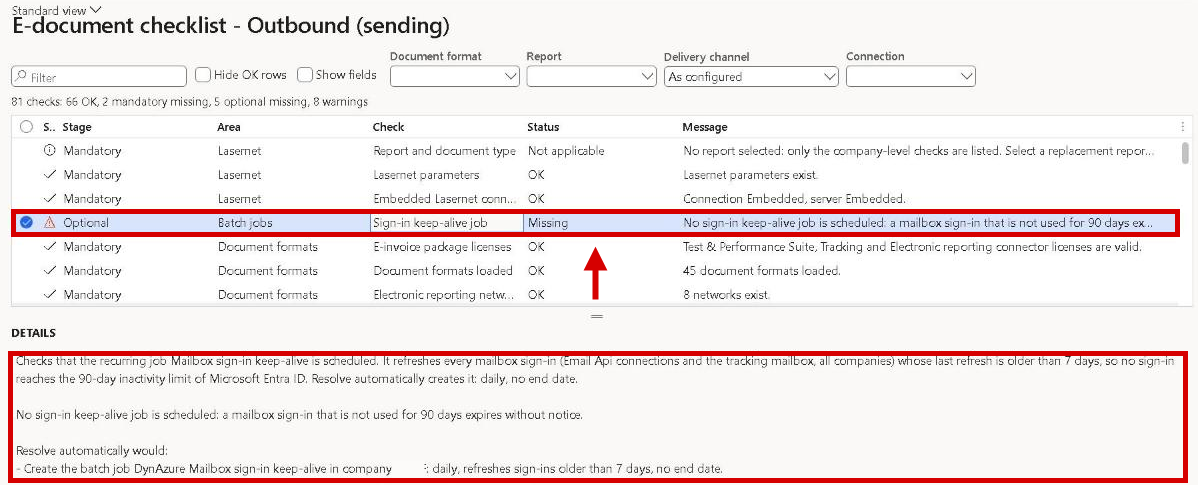
E-document checklist - Outbound (sending): the row Sign-in keep-alive job warns when the daily keep-alive job is missing, and Resolve automatically creates it.
Inbound e-mail: one mailbox for several companies, routed by the vendor's VAT number
A group that receives vendor invoices in one central mailbox needed a mailbox, a folder or a connection with its own sign-in for each company. An Email Api connection now has Load into companies on the Inbound FastTab: Current company (the default), All companies or Selected companies. With the last two, Load reads the mailbox once and creates each invoice in the company where the vendor's VAT number is found. With several matches, the buyer's VAT number or electronic address decides. From there the document uses that company's formats, validation, archive and import. An invoice that can't be placed stays in the connection's company with Action required and the issue Company not resolved. Inbound documents shows Loaded by company, the load summary counts the documents per company, and no e-mail is loaded twice. A receiving company's Inbound checklist shows its load job as covered.
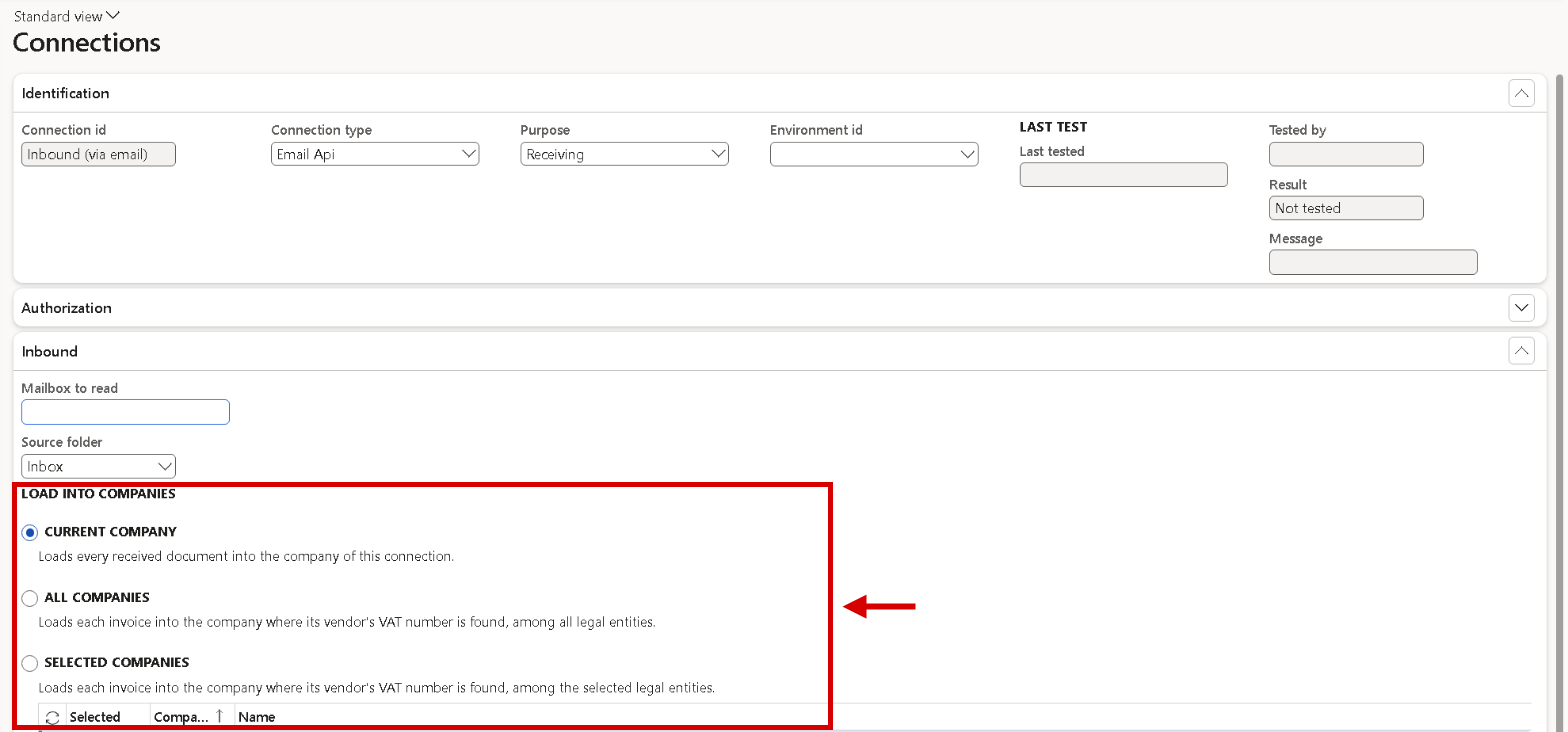
Connections, an Email Api connection, FastTab Inbound: Load into companies decides whether the mailbox loads into the current company, all companies or selected companies.
Inbound archive: the PDF of a received e-invoice is archived and locked with the XML
For a received ZUGFeRD or Factur-X invoice, only the XML taken from the PDF was archived. The PDF the supplier sent was a plain attachment: it could be deleted, and it wasn't in the auditor export. It is now a file of the same archive entry, and the received document shows it in Carrier PDF attachment. XML e-invoices that carry the supplier's PDF inside get the new connection option Save embedded PDFs as files. With Yes, each PDF becomes an attachment of the received document, and the first one is archived next to the unchanged XML. With Retention enforcement = Enforce, an archived PDF can't be deleted or replaced. For older documents, Archive now adds the PDF.
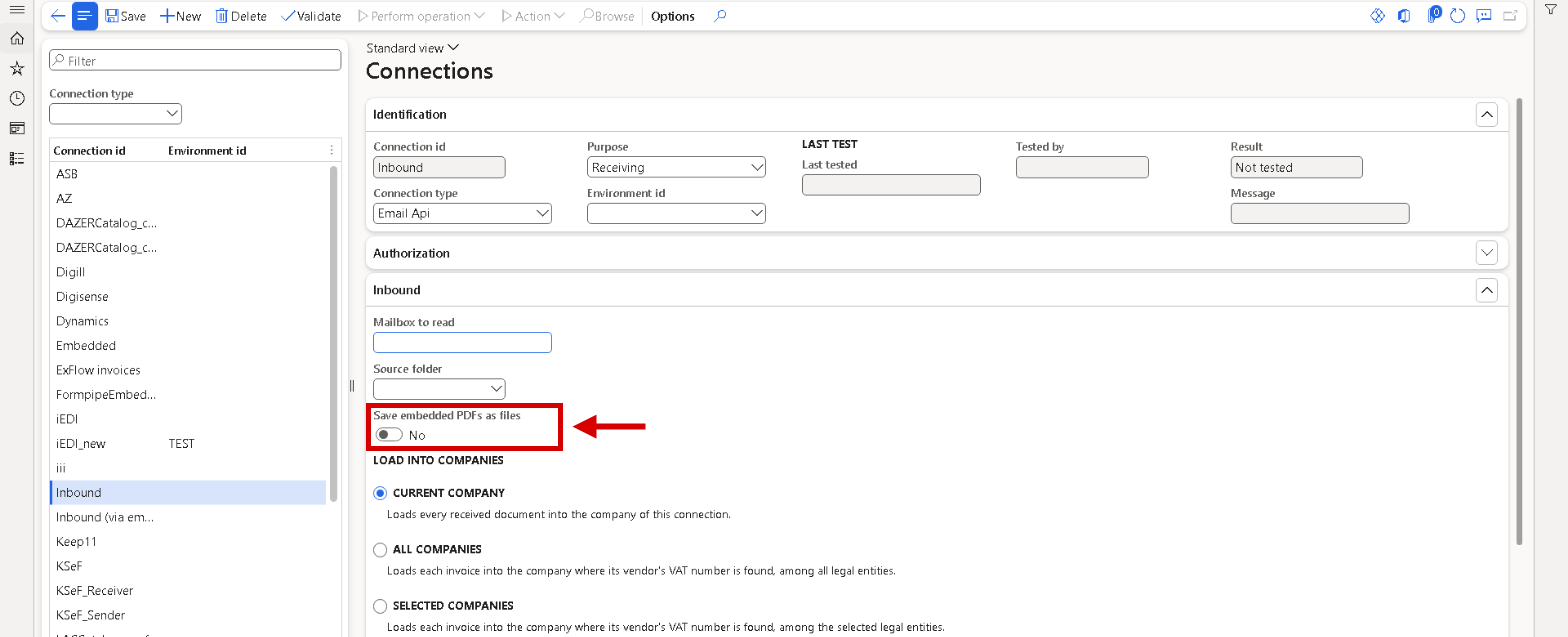
Connections, a receiving Email Api connection, FastTab Inbound: Save embedded PDFs as files turns the PDFs inside a received XML e-invoice into attachments of the received document.
PDFs of received e-invoices in the inbound archive: new ZUGFeRD and Factur-X invoices get their PDF archived and locked without any setup. For PDFs inside XML invoices, set Save embedded PDFs as files = Yes on each inbound connection that should keep them. For documents received before the update, run Archive received documents once with Add missing PDF and signed files = Yes; this also adds the signed file of .p7m invoices. Under Retention enforcement = Enforce, these attachments can no longer be deleted or replaced.
Test participant ID on Electronic reporting networks shows how the participant ID, SIREN and SIRET are found
It was hard to see why a network used a certain participant ID, above all in France. On the new FastTab Test participant ID on Electronic reporting networks, choose Customer, Vendor or Legal entity, the account and a date, and click Calculate. The grid shows a fixed participant ID, each step of the generation sequence with its result, such as Used or Skipped with the reason, every source of the SIREN and SIRET, and the party identifiers sent. The Result line shows the participant ID a document would carry. The electronic address and French settings move to the new FastTabs Electronic address and French identifiers.
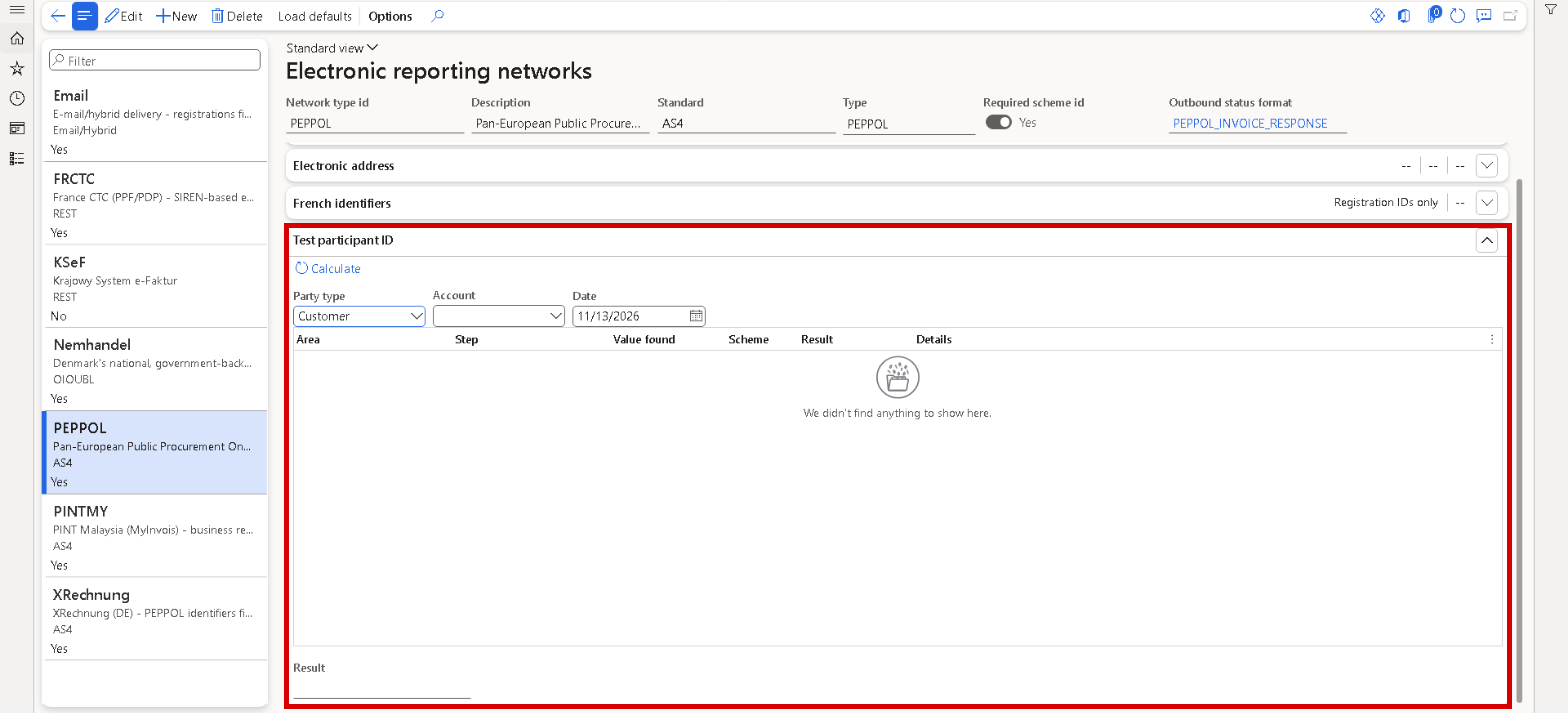
Electronic reporting networks, network PEPPOL: the new FastTab Test participant ID with Party type, Account, Date and Calculate; the grid lists each step and Result shows the participant ID a document would carry.
E-documents fixed
Picking OIOUBL_CreditNote as the document format checked the wrong setup
OIOUBL is split into OIOUBL_Invoice and OIOUBL_CreditNote, served by one report whose default destination must carry a routing expression. The checklist knew this only from the invoice side. With OIOUBL_CreditNote in Document format, alone or first, the row Format property on the destination was a warning instead of a mandatory gap, and Resolve automatically would have written the plain credit note format into the destination, so every OIOUBL invoice would have failed. The outbound Document format lookup no longer lists OIOUBL_CreditNote. Pick OIOUBL_Invoice: it covers the credit notes, whose rows are listed with the format in front of the title. Any OIOUBL value that is typed is checked as the pair, with the same rows and counts, and the row always expects the routing expression.
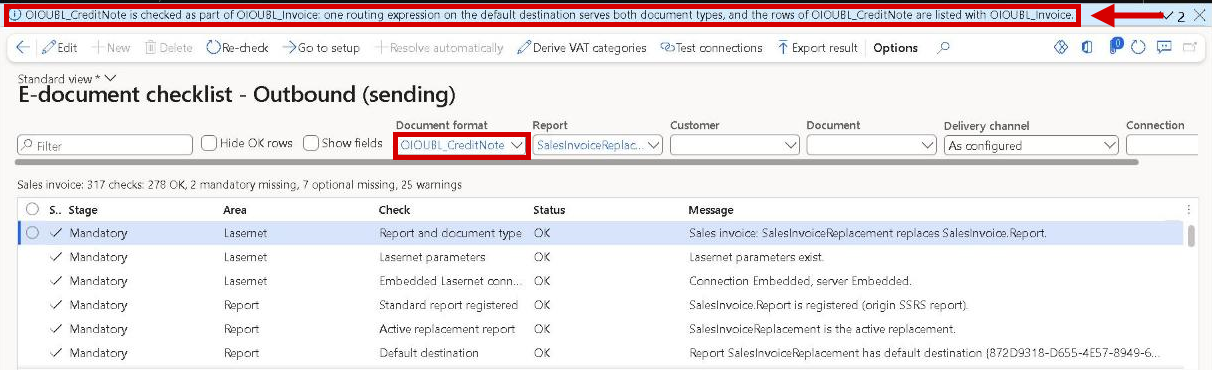
E-document checklist - Outbound (sending) with OIOUBL_CreditNote typed as the document format: it is checked as part of OIOUBL_Invoice.
OIOUBL in the checklist: the outbound Document format lookup no longer lists OIOUBL_CreditNote; use OIOUBL_Invoice, which covers both. A default destination resolved earlier to a plain OIOUBL_CreditNote is now reported as invalid, and Resolve automatically writes the routing expression.
Go to setup marked nothing when the legal entity doesn't show the field
The customer EAN (BT-46) is a field that Dynamics 365 shows only in Danish legal entities. Elsewhere, Go to setup on its Field origins row opened Customers on General, with nothing boxed and no message. The red box now goes on the nearest section that is shown, here the e-invoice group under Invoice and delivery, scrolled into view, and a message says that the field isn't on the page in this legal entity and why. The same applies to Go to setup in the E-document checklist. In Field origins, the EAN row shows Filled by standard only in = DK, so Source info warns that BT-46 is always empty on a non-Danish invoice. The contact person row now lands on Contact on the sales order.
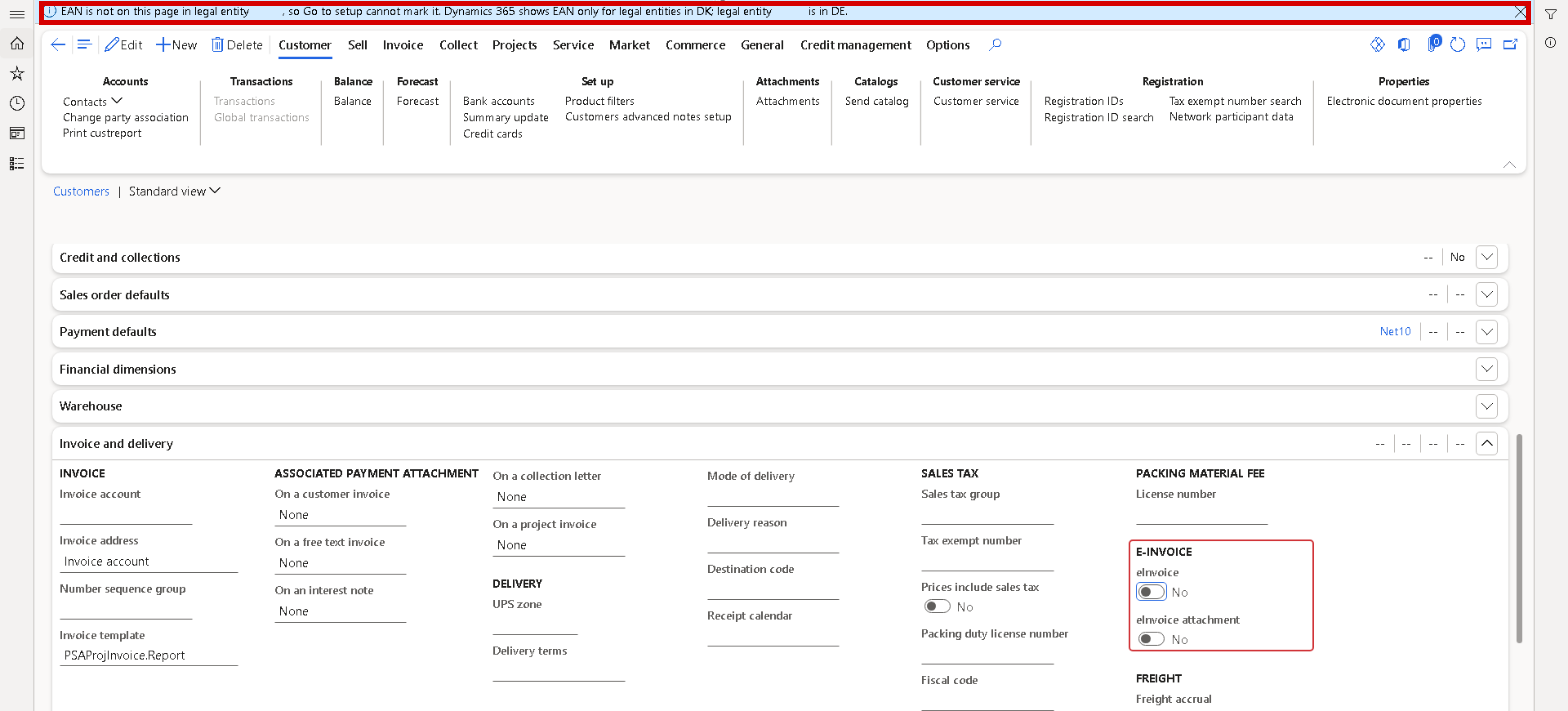
Customers, opened with Go to setup from the customer EAN row of Field origins: the message says that the field is not on the page in this legal entity, and the nearest section, E-invoice under Invoice and delivery, is boxed.
Electronic addresses weren't re-resolved per destination on reports with Layout depth Maximum or Medium
When a print was built for one network, such as PEPPOL, and a destination's e-document format belonged to another, such as ZUGFeRD or XRechnung on the Email network, the seller and buyer electronic addresses (BT-34/BT-49) were re-resolved for that destination only on reports with Layout depth Minimum. On a host report with Layout depth Maximum or Medium, or with the cache disabled, every posting gave the warnings could not be re-resolved ... (Detail|) and the report data and the transformation disagree, and the e-document went out with the addresses of the wrong network. The addresses are now re-resolved for every layout and cache setting, and the destination log shows the network they were resolved on. If a re-resolution still fails, one warning names the data source and the section.
With a Lasernet server, the server mails the e-document, with the PDF embedded and only after validation
With a remote Lasernet server, such as an Azure Service Bus queue, the server mailed the e-document it had received with the job. With Embed PDF in e-document that copy carried the raw PDF placeholders instead of the PDF, and with Electronic reporting validate the mail left before the validation ran, so an invalid invoice was mailed although the entry said Not delivered. A first fix let Dynamics 365 send these e-mails itself, which bypassed the sender, mail server and tracking set up on the Lasernet server, and failed where Dynamics 365 e-mail isn't set up.
Now the Lasernet server delivers every e-mail, as in standard Lasernet. With Electronic reporting validate, the e-document is validated before the job goes to the server: a valid document is mailed by the server as usual, and an invalid one isn't delivered, so the entry says Not delivered with the validation messages. With Embed PDF in e-document, Dynamics 365 embeds the PDF once the server has rendered it and hands the finished files back to the server, which mails them. Deliver in Review before sending and Resend from the Lasernet log go through the server too. Dynamics 365 still delivers to a custom port with a connection, and delivers everything when the integrated engine is used.
The new Lasernet server setting Server completes embedded PDF, No by default, lets the server do the embedding itself. With Yes, the server fills the rendered PDF into the e-document and mails it in the same job, so Dynamics 365 sends no second job and only waits for the PDF for its own archive copy. A destination with an Electronic reporting validate rule keeps the route through Dynamics 365, so the document is still validated first.
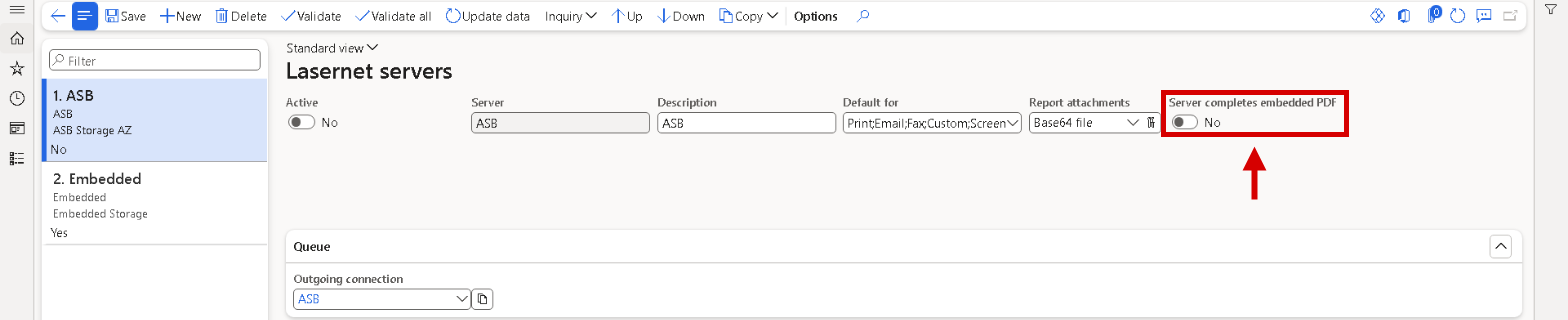
Lasernet servers, a server with an Azure Service Bus queue: the setting Server completes embedded PDF.
View as PDF gave no reason when no PDF came back
View as PDF on an e-invoice sometimes showed only The report ... returned no PDF., with no reason, and nothing was logged, so an intermittent failure couldn't be traced the next day. The message now adds the reason, the destination and the design version, for example that a pinned design version doesn't exist, in one infolog line. A new form, E-invoice visualization log, next to the provider API log under Lasernet e-documents, keeps one row per failed visualization with time, company, user, report, design version, source file and the kind of failure: Not rendered, Rendering failed or PDF lost. Only failures are written, and rows stay until an administrator deletes them. The automatic visualization at load still gives one warning in the document log, now with the reason.

E-invoice visualization log: one row per failed visualization, with the kind of failure and its reason.
With performance indicators on, View as PDF showed the performance log as the reason
When Performance indicators was switched on for the user under Lasernet parameters > Tracking, a View as PDF that returned no PDF showed about 4,000 characters of queries and timings as the reason. It looked like an SQL error, hid the real reason, and turned PDF lost into Rendering failed, also in the E-invoice visualization log. The reason is now built from the errors and warnings of the run only, so message and log row are the same with performance indicators on or off, and the performance lines stay in the message list under Performance information. The log also gets Clear log, as on the provider API log: after a confirmation with the number of rows, it deletes every row, in all companies.

E-invoice visualization log: Clear log empties the log after a confirmation, and the Reason is the short text of the failure.
E-invoice visualization log: rows written before the upgrade with performance indicators on keep their long reason. Clear log removes them; it deletes the rows of all companies and needs delete access to the log.
Open external item descriptions opened the item description groups form
On a Line not matched issue, the link Open external item descriptions opened the standard External item description groups form instead of the vendor's external item descriptions. The grid was always empty, had no field for an item number, and a line saved there created a hidden group that didn't help the import. The link now opens the same form as All vendors > Procurement > Set up > External item description for the vendor, and the hint reads Add a line for the ordered item with External item number .... When the vendor in a link no longer exists, or any other issue link has nothing to open, the dashboard opens with the warning The link did not name a known fix target instead of a blank tab.
The catalog showed a restored report as changed, and a misplaced e-invoice setting went unreported
After a snapshot restore, a catalog load or a report import, a report could come back with a different fingerprint although nothing in it had changed, so the catalog showed Modified locally or Different for a report nobody had touched. Lasernet now generates a report's stylesheets the same way every time, and printed output is unchanged.
An India GST e-invoice could stay missing because Add electronic invoice as custom file was No on the replacement report, while the value on the standard report it replaces is ignored, and nothing said so. The new checklist row Electronic reporting e-invoice on the report that runs warns when the report that runs doesn't ask for the e-invoice, or when a destination asks for both Electronic reporting and an XSLT format.
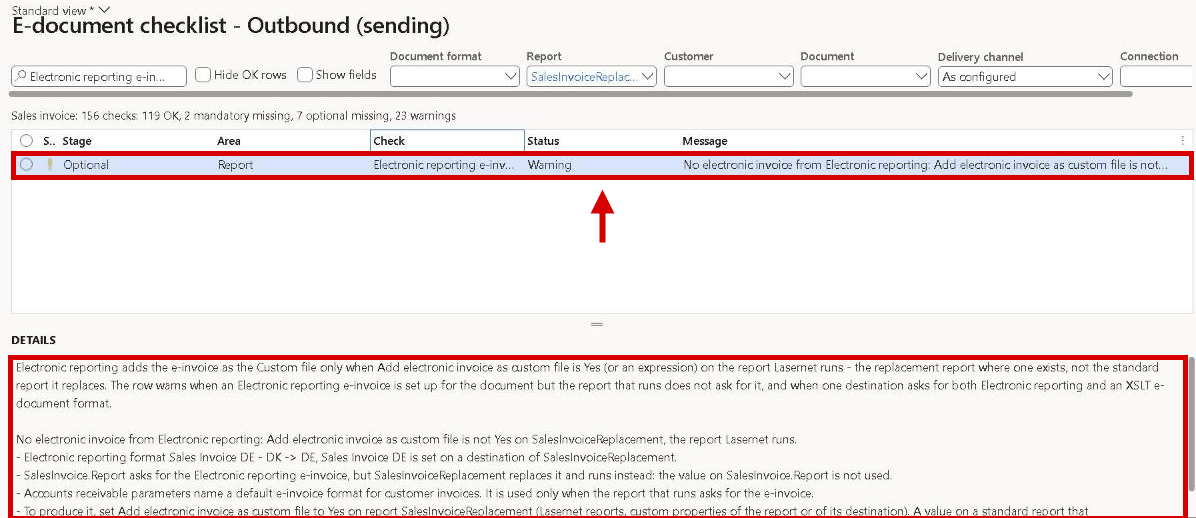
E-document checklist - Outbound (sending): the row Electronic reporting e-invoice on the report that runs says that the replacement report doesn't ask for the Electronic reporting e-invoice, and where to set it.
Electronic reporting e-invoices through a replacement report need Add electronic invoice as custom file = Yes in the replacement report's custom properties, not on the standard report it replaces.
Local validation passed a cut-off or non-XML e-document, and a rule that couldn't evaluate gave a blank error
An archived e-document that was cut off, or wasn't XML at all, passed local validation with 0 errors, because no rule applied and "no rule" counted as success, so the checklist's sample posting rows showed it as valid. Such a document now fails with The document is not well-formed XML, so it was not validated and the parser's reason, and a blank document fails because no XML could be read from it.
When a rule stopped on the document's content, for example NaN amounts, the error line was empty; it now names rule and reason. Vendor (self-billing) checklists no longer log Company ... is already associated with a legal entity.
Local validation is stricter: an e-document that is blank, cut off or not XML now fails validation with the parser's reason, where it passed with 0 errors before. This can show on the checklist's sample posting rows for old archive entries.
The test data run didn't link the vendor replacement report it created
A test data run from E-document checklist > Test data that created a company with vendor samples created the vendor replacement report but didn't link it to its e-document source report or deploy its transformations. The checklist row Transformations on the replacement report stayed Missing, and the vendor sample invoices printed no e-document. The row Active replacement report now links a report it creates and deploys its transformation rows in one step; if that fails, a warning names the row to resolve. The row E-document source report reloads the stylesheet report only when needed, saving about 40 seconds per document kind. A row whose check fails now shows its error.
Generate JPK-V7 file failed with a menu item error and hid the real reason
In a legal entity where Load JPK defaults hadn't been run, Generate JPK-V7 file stopped after OK with The menu item ... could not be opened and no reason. The cause, that the JPK Lasernet report doesn't exist in the company, was only in the Run log of a new Failed run under JPK VAT runs, and each attempt added another. Now OK first checks that the report exists: if not, the dialog stays open, its message bar says to run Load JPK defaults, and nothing is started or logged. A run that fails later ends in a normal error notification with the cause under Message details.
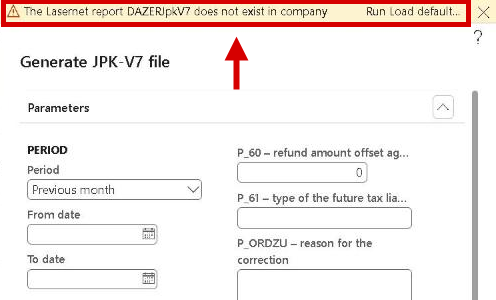
Generate JPK-V7 file after OK in a company where Load JPK defaults hasn't been run: the dialog stays open and the message bar says what to do.
Print JPK-V7 file again failed with a menu item error and Report is not found
In a legal entity where Load JPK defaults hadn't been run, Print JPK-V7 file again stopped with The menu item ... could not be opened and Report ... is not found, without saying what to do. It now shows one message: the JPK Lasernet report doesn't exist in the company, run Load JPK defaults. In a legal entity that is set up, the run report dialog opens as before, and an error raised from it shows as a normal message.
Load received documents loaded the inbound archive's own files as new invoices
When the storage location of the inbound archive was also read by Load received documents from network, the archive's copies of a received invoice were loaded as new received documents, in the same or another company, and could become pending vendor invoices. The load now leaves every file the inbound archive wrote alone: no download, no document and no post action such as Delete. Setup warns when a load job reads the archive folder: on saving the parameters or the connection, and in the new compliance row Inbound archive folder not read by a load job. The new Inbound row Archive copies among the received documents lists copies loaded earlier; Resolve closes those without a vendor invoice and deletes nothing.
Load received documents also loaded files of the outbound archive and of an auditor export
When Load received documents from network read a folder that Lasernet itself writes to, the files of the outbound archive or of an Archive auditor export were taken for received documents. 7.4.1 warns where the setup causes this. Saving the receiving connection, or the connection Lasernet writes to, gives a warning that names both connections and the folder, and never blocks the save. The Inbound checklist row Inbound folder settings shows the same as a warning, with Go to setup on Inbound folder. Give received files a folder of their own. A change to the load itself isn't part of 7.4.1.
An unreachable archive storage stopped a received e-mail from loading
When the inbound archive storage couldn't be reached, an e-mail with an e-invoice wasn't loaded at all. The log said that the e-mail was not loaded and was skipped, and it was tried again at every poll. Storage folders and provider connections didn't have this problem. The e-mail is now loaded, the document is marked Archive pending with the issue Archive failed, and Archive now or the job Archive received documents completes the archive when the storage is back. The same happened when the visualization at load failed, for example because no Lasernet server could be reached. That is now a warning in the log, and the e-mail is loaded.
An e-mail with several PDF invoices and no XML archived and handed over only the first one
With Any attachment type = Yes, an e-mail without XML that carried several PDF invoices became one received document. Only its first attachment was archived as the original and handed over to the external storage; the other PDFs never reached the AP automation tool. A signature logo could become the invoice. Each PDF attachment now becomes its own received document, with the Source OTHER_1, OTHER_2 and so on, and the log line Attachment n of m with the file name. Other attachments are added to each document as plain attachments. E-mails with an XML or a single PDF load as before.
E-mails with several PDFs give several received documents: with Any attachment type = Yes, an e-mail without XML now gives one received document per PDF, so an invoice sent with its terms or a delivery note gives two. The extra document has the Source OTHER_n and can be discarded. Documents loaded before the upgrade don't change.
The signed file of a received .p7m invoice wasn't archived, and a broken .p7m file stopped the whole e-mail
An Italian invoice received as a signed file (.xml.p7m) is loaded as the XML inside it. The signed file itself, the proof of origin, stayed a plain attachment, outside the archive entry and the retention lock. It is now archived with the XML, exactly as received, shown in Envelope attachment on the received document and locked under Enforce. For older documents, Archive now adds it, as does Archive received documents with Add missing PDF and signed files = Yes.
An e-mail with an invoice and a .p7m file that couldn't be opened, for example cut off or renamed, was skipped at every poll. The invoice now loads, the broken file stays a plain attachment, and a warning names the file.
The visualization PDF of a received document became a second default attachment
With Visualization on load switched on, the PDF produced for a received e-invoice was marked as the default attachment, although the loaded e-document already was the default, and each new PDF added one more. Dynamics 365 allows one default attachment per record, so later changes to the attachments were refused: the retention lock couldn't update the source attachment, and Process again failed at the attachment step. The loaded e-document now stays the only default attachment, and the visualization PDF is added beside it as a normal attachment. A visualization is the default only while the document has no other default attachment.
Peppol orders, order responses and despatch advices were detected as invoices
A received Peppol BIS Order, Order Response or Despatch Advice was detected as PEPPOL_BIS and offered for import as a vendor invoice, and a plain UBL order as UBL2. It then waited for import, or got Action required because it carries no supplier party. These documents now get their own formats, PEPPOL_ORDER, PEPPOL_ORDER_RESPONSE and PEPPOL_DESPATCH_ADVICE, and any other UBL document that isn't an invoice or credit note gets UBL2_OTHER. All of them are Not importable, with no issues and no pending invoice. Invoices, credit notes and Peppol invoice responses are detected as before. The change takes effect in a company when its document formats are loaded again; the Inbound checklist row Document formats loaded lists what is missing.
Received Peppol orders, order responses and despatch advices show as Not importable instead of waiting as invoices, once the document formats are loaded again.
Load defaults on Document formats removed conversions and put older rule packages back
Load defaults on Document formats loaded a configuration that was older than the application. A company that used it after the setup checklist lost what the checklist had set up. FatturaPA and Facturae became Not importable again, OIOUBL invoices lost their conversion, received invoices failed with Canonical transform ... was not found, and ZUGFeRD / Factur-X validation went back to an older version without a message. The shipped configuration now matches the application, so Load defaults and Resolve automatically on the checklist give the same result. Running Load defaults once also repairs a company that lost conversions; the older package versions stay as Superseded. A company's own formats are left untouched, but the shipped formats get the application's Sequence.
After an update, the new conversion package stayed staged and received invoices failed
On an existing installation, Resolve automatically on the checklist switched new conversions on for the document formats, but only staged the package version that holds them. Received FatturaPA, Facturae and OIOUBL invoices then failed with Canonical transform ... was not found until someone activated the version on XML validation packages. The setup now activates the conversion package shipped with the release and keeps the previous version as Superseded. A version that a user uploaded or activated is left alone. Rule packages of the authorities, such as Peppol and OIOUBL, are still only staged, because new rules can change validation results. The checklist row Validation package versions now shows a waiting version as a warning, with Go to setup.
Inbound Keep metadata template had no drop-down, and a wrong value archived without Keep metadata
On Electronic reporting connector parameters, FastTab Archive, Inbound Keep metadata template and Inbound archive report were plain text fields that accepted any text. With a template that didn't exist or wasn't a Lasernet Keep template, received documents were archived without Keep metadata and without a message, and Lasernet Keep refuses such an upload. Both fields now have a drop-down: the template field lists only the company's Lasernet Keep templates, the report field its Lasernet reports. A typed value that doesn't fit is refused. Saving warns when the inbound archive connection is a Lasernet Keep connection and the template is empty. The checklist gets the row Inbound Keep metadata template in the area Compliance (GoBD); Go to setup opens the field.
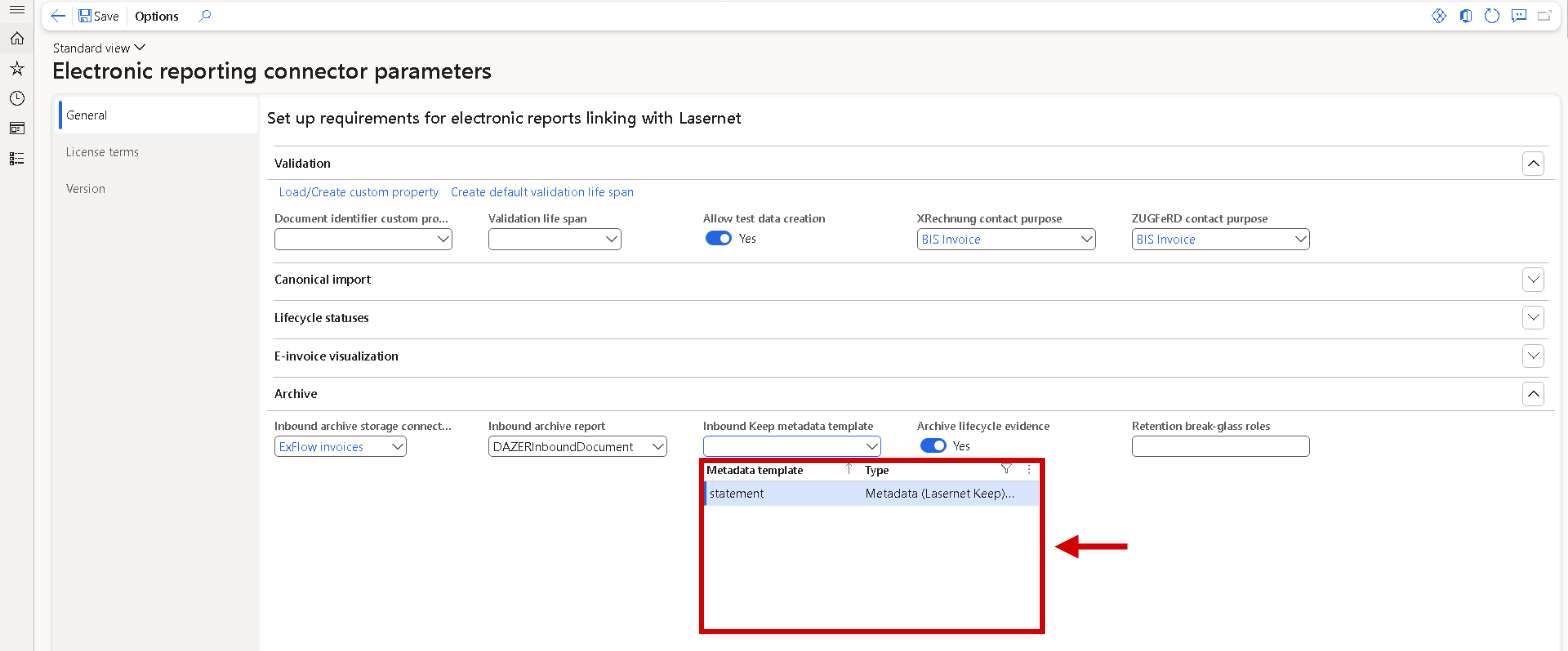
Electronic reporting connector parameters, FastTab Archive: Inbound Keep metadata template now has a drop-down that lists only the Lasernet Keep templates.
The checklist dropped the result of the e-mail token test on the next run
The checklist rows that call a provider or a server lost their result when the checklist ran again: Re-check, Resolve automatically or a filter change turned them back to Not checked. The connection, Peppol registration, mailbox and inbound folder tests already keep their last result in 7.4.1. The token test of the row E-mail parameters now does too, with the time and the user. A failed token test stays Missing with its reason instead of turning green on the next run, and the row says when the e-mail parameters were changed after the last test. A stored result is reset when the company's participant ID on the network changes, or when the database is copied to another environment.
Seller endpoint on the network was Missing on KSeF although the VAT number was found
The row Seller endpoint on the network was Missing whenever the seller's identifier had no ISO 6523 scheme, also on KSeF, which uses none. A Polish legal entity whose NIP comes from its VAT number got a mandatory gap it couldn't clear, and the details called the source that was used Skipped. On a network that requires no scheme, the identifier alone is now enough. On KSeF the row checks that it is a Polish NIP, 10 digits with a valid check digit, with or without the prefix PL, and says why if it isn't. Customer identifiers no longer reports a missing endpoint on KSeF; a Polish buyer whose VAT number isn't a valid NIP gets a warning. Other networks are unchanged.
KSeF seller and buyer rows: if *\Entity Tax exempt number was removed from the search order of the KSeF network to clear the row Seller endpoint on the network, put it back; Load defaults doesn't overwrite a search order you edited. A legal entity whose VAT number isn't a Polish NIP is now Missing for the KSeF format, also where a foreign VAT ID made the row OK before. Where a readiness rule enforces the checklist, such a posting is blocked.
Resolve automatically failed with The record already exists on the naming pattern
On the row Naming pattern of the document, Resolve automatically could end with Cannot create a record in Naming patterns ... The record already exists, shown twice. The pattern was already in the database, created by another server, a batch job, an import or cross-company data sharing, but the checklist didn't see it yet. The checklist now reads the setup fresh on every run, and Resolve automatically uses a pattern that is already there. It never overwrites one that was set in the meantime, and asks for Re-check instead. When companies share naming patterns through cross-company data sharing and aren't aligned, one message names the other company and what the administrator has to do. Other resolve actions that meet an existing record explain it the same way, once.
ZUGFeRD PDF/A-3 design was Missing when the report's design already had PDF/A compliant on
The row ZUGFeRD PDF/A-3 design only recognised a locked design version PDF-A with a Design version expression. When PDF/A compliant was switched on in the report's normal design, the row still said Missing, printed as plain PDF, and Resolve automatically offered a redundant copy. The row now accepts a latest design with PDF/A compliant on. It is OK when a destination also embeds the e-invoice as Custom file; otherwise a warning says that the PDF is PDF/A without the XML, not a ZUGFeRD PDF. Resolve automatically then changes nothing for this row. A latest design with PDF/A compliant off is still Missing, and the setup with the PDF-A version gives the same results as before.
ZUGFeRD PDF/A-3 design: a report whose latest design has PDF/A compliant on is no longer a mandatory gap. The row is OK or a warning, and Resolve automatically creates no PDF-A design version for it, so the checklist counts change.
No checklist row asked for the embedded file name factur-x.xml with a single ZUGFeRD or Factur-X format
The name of the XML inside a ZUGFeRD or Factur-X PDF comes from the custom property PDF embed file name of the destination. Without it, the XML was embedded under a generated name where receivers expect factur-x.xml, and with one format in the checklist header no row said so. The new mandatory row ZUGFeRD / Factur-X embedded file in the Report area checks the report default destination for PDF embed source = CustomFile and PDF embed file name = factur-x.xml. Resolve automatically registers the custom properties and writes the two values after a confirmation. A value set by an expression gives a warning and is never changed.
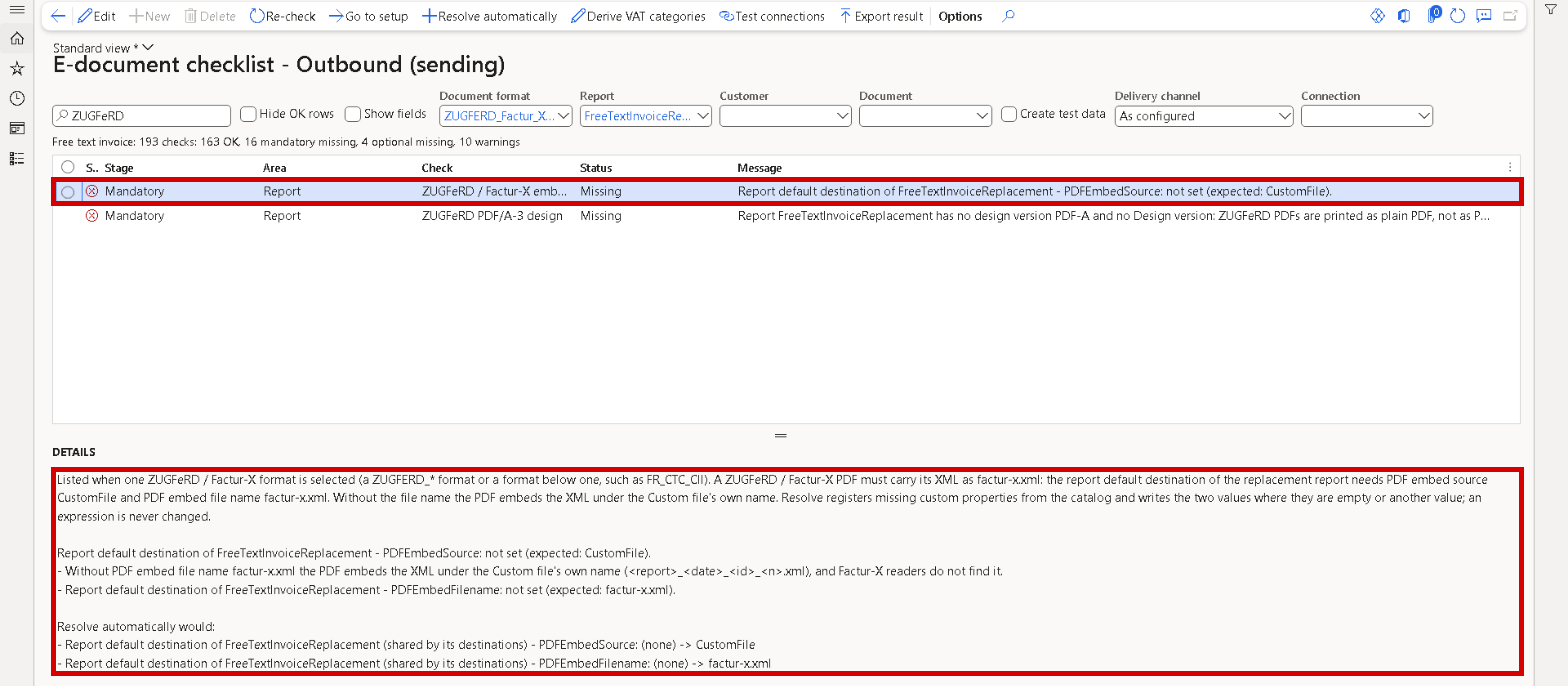
E-document checklist - Outbound (sending) with a ZUGFeRD / Factur-X format in the header: the new mandatory row ZUGFeRD / Factur-X embedded file, and under Details what is missing and what Resolve automatically would write.
The seller VAT number row checked the legal entity's field, not the number the invoice prints
The row Legal entity VAT number looked only at the VAT number field of the legal entity. An invoice can take the seller VAT number from elsewhere: the tax registration selected on the invoice, the legal entity's registration IDs, or the registration of a delivering warehouse abroad. A legal entity with an empty field was blocked at posting under Enforce, although every invoice printed a number. The row now judges the number the invoice prints and names its source when it isn't the field. Where field and printed number agree, the row reads as before.
The e-invoice of a blind shipment carried no seller name and no seller VAT number
A sales invoice marked as a blind shipment prints without the company block. Its e-invoice was built from the same data and went out without the seller's name and VAT number, which EN 16931 requires. The e-invoice goes to the invoiced customer, so it now always carries the seller name, VAT number, registration number and phone of the legal entity, in every e-invoice format of the sales invoice. The VAT number of a delivering warehouse abroad still takes priority. The printed invoice stays blind as before. The checklist and the posting check no longer warn about a blind shipment without a seller VAT number.
XRechnung-only fields were Mandatory for ZUGFeRD, Factur-X and FR CTC
XRechnung CII, FR CTC CII and the ZUGFeRD / Factur-X profiles MINIMUM, BASIC WL, BASIC and EN 16931 share one stylesheet. Its prerequisites listed the XRechnung requirements for every format, so the Formats area of the checklist and Show fields called the customer reference (BT-10), the seller contact (BG-6) and the IBAN (BT-84) Mandatory for ZUGFeRD and FR CTC too. These are now Mandatory for XRechnung only and Optional elsewhere, and terms a smaller profile never writes, such as invoice lines in MINIMUM, are no longer listed for it. The e-invoices themselves are unchanged. On the shipped source reports these rows were OK before and after; only a source report without one of the elements showed a false gap.
The payee bank account warning said a value mapped to two bank accounts is always skipped
On Payee bank account determination, saving a second bank account for the same dimension value always warned that Financial dimension - mapping rules skip the value. With Only bank accounts in the invoice currency = Yes and bank accounts in different currencies, that was wrong: the rule picks the account in the invoice currency, the normal setup for one bank account per currency. The warning now appears only when a rule can really skip the value: the two accounts share a currency, or a mapping rule for the dimension has the currency option at No. It names both bank accounts with their currencies and says what to set. Saving a rule warns the same way. Which bank account an e-invoice gets is unchanged.
Payee bank account determination: saving a mapping line or a rule now warns only when a rule can really skip the dimension value. One bank account per currency for the same value, with Only bank accounts in the invoice currency = Yes, saves without a warning. The bank account an e-invoice gets doesn't change.
Show source info showed Expression must evaluate to a node-set
Show source info on a value that the stylesheet writes when no earlier condition holds, such as the document type code 380 of an XRechnung invoice, opened with the error Expression must evaluate to a node-set. and marked the condition cannot be told from this document. On some values the page didn't open at all. The page now opens without an error, shows such a condition as none of the earlier conditions held and marks it met in this document when that is the case. Alternatives read Written as one of: .... An element that only other source reports have is shown in grey with the reports that have it, no longer in red as Could not be traced to a report element.
Archive fields showed the field name instead of the label
On Electronic reporting connector parameters > General > Archive, a toggle was named ArchiveLifecycleEvidence, and the Inbound documents list had a column ArchivePending, both without a help text. They now read Archive lifecycle evidence and Archive pending and show their help text as a tooltip. Several ID and hash fields also get their tooltip back: Format ID on Document format rules, XML validation rules and Report document transformations, and Package ID, Active version hash and File hash on XML validation packages.
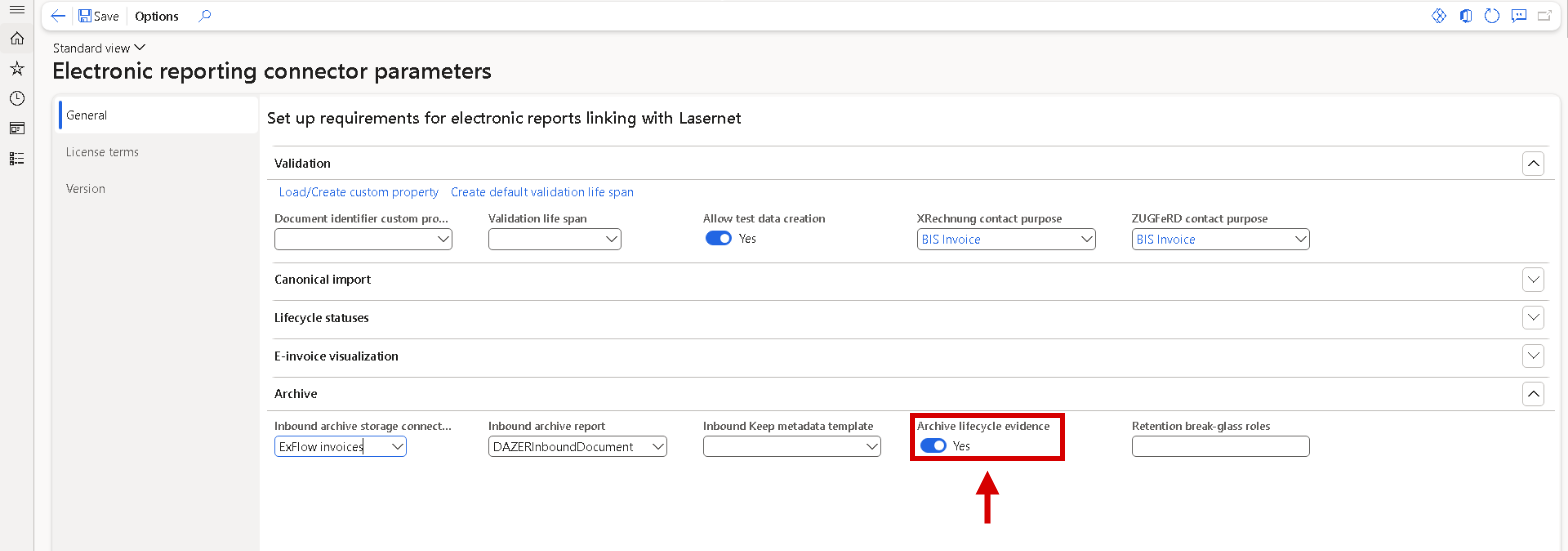
Electronic reporting connector parameters, FastTab Archive: the toggle now reads Archive lifecycle evidence instead of its field name.
E-invoices could contain lines and totals of other invoices
On a replacement report whose e-document section wasn't limited to the print run, for example a report without replacement mapping, an e-invoice made through the Inhouse transformation (XSLT) could pick up rows of other prints, running at the same time or aborted earlier. The file then carried extra lines, totals summed over them, and sometimes another invoice's number and buyer. The e-document section is now always limited to the print run, with no setup. As a last check, an e-document is only created when its data holds exactly one document header, that of the printed document. Otherwise the destination shows Not delivered and an error says to print the document again. E-invoices made by an Electronic reporting format weren't affected.
An untaxed charge next to a taxed charge was written as taxed
An e-invoice or credit note with two kinds of charges, one with sales tax and one without, such as taxed freight and an untaxed fee, was written with one document-level charge for the whole amount, in the tax category of the taxed part. The untaxed amount was in no VAT subtotal, so the receiver could reject the document (OIOUBL rule F-LIB402, EN 16931 rule BR-S-08) or book the fee with VAT. It now carries two charges: the taxed part as before, and the untaxed part in the zero-rated VAT subtotal. This applies to OIOUBL, PEPPOL BIS, EHF, XRechnung, FR CTC and the ZUGFeRD/Factur-X profiles. Other documents are unchanged. PINT MY, MyInvois and RO CIUS aren't part of 7.4.1.
An untaxed charge on an invoice with zero-rated lines gave two zero-rated VAT subtotals
An invoice with zero-rated lines and untaxed header charges was written with two VAT subtotals of category Z at 0 %: one for the lines and one for the charges. EN 16931 rules BR-Z-01 and BR-Z-08 fail on that, so receivers rejected the document. When the document already has a zero-rated subtotal, the untaxed charges are now added to its taxable amount. Without one, the charges keep their own subtotal as before. Tax amounts, the document-level charge and all totals are unchanged. This applies to PEPPOL BIS, EHF, XRechnung, FR CTC, RO CIUS and the ZUGFeRD/Factur-X profiles. PINT MY and MyInvois aren't part of 7.4.1.
A charge on an invoice line was written as a document-level charge
A charge on an invoice line, such as freight, was added to the document-level charge together with the header charges. It is now written on its line (BG-28) with the charge code text as the reason, when it has the same sales tax setup and the same sign as the line. The line net amount (BT-131) and the sum of line net amounts (BT-106) include it, the document-level charge (BT-108) is reduced by it, and all other totals are unchanged. This applies to PEPPOL BIS, XRechnung UBL and CII, FR CTC CII and the ZUGFeRD/Factur-X profiles BASIC and EN 16931. Other formats and line allowances aren't part of 7.4.1.
FR CTC: the buyer SIRET (BT-46) was taken from any address of the customer
A French CTC invoice sent as buyer SIRET (BT-46) the Siret registration of any address of the customer. A warehouse SIRET went out as the buyer SIRET on every invoice. The buyer SIRET now comes from the customer's French Siret field, else from the invoice address, else from the primary address, and never from another address. When the invoice is delivered to an address that has a Siret registration, that SIRET is sent as the deliver-to identifier (BT-71), in FR CTC UBL and FR CTC CII. The E-document checklist row for the customer's identifiers shows the SIRET that is sent and its address, and warns when none is sent. The buyer SIREN and the electronic address are unchanged.
FR CTC buyer SIRET: a customer whose only Siret registration is on a delivery or other address no longer sends a buyer SIRET (BT-46). The invoice stays valid, and the checklist row for the customer's identifiers shows a warning. Enter the SIRET on the primary or invoice address, or in the French Siret field. Customers with the SIRET there are unchanged. An invoice delivered to an address with a Siret registration now carries that SIRET as deliver-to identifier (BT-71).
Proforma invoices printed slowly with the e-document source report linked, and posted invoices read each line many times
A proforma invoice never produces an e-document, but its print still read and calculated all e-invoice data once the e-document source report was linked to the invoice report. The proforma print now skips that data: on a test order with 40 lines, the print part fell from about 13 seconds to about 3. The e-invoice print of a posted sales invoice read the same invoice line and its sales tax dozens of times per line. Each line is now read once, and Indian and Malaysian tax data only where it applies: a 10-line invoice sends 56 % fewer database statements, which counts most on hosted environments. The e-documents are unchanged. Free text invoices aren't part of this change in 7.4.1.
Lifecycle statuses: a credit note was reported as an invoice, a status before import wasn't sent, and a damaged file stopped the import
A lifecycle status for a received credit note could still call it an invoice (380): when Invoice type code was cleared in the Send lifecycle status dialog, and in the automatic statuses Approved and Payment sent. The code is now read from the received document, and a typed code is checked before anything is recorded. A status sent before the invoice was imported, or after the pending invoice was deleted, wasn't sent when the vendor was mapped only in Vendor external identifiers. It now finds the vendor there, like the import; otherwise the Not sent text says where to map it. An automatic status no longer makes the import, approval, close or delete fail when the received file is damaged.
Lifecycle statuses: a typed Invoice type code that isn't a valid code for the document is refused before the status is recorded. Automatic Approved and Payment sent statuses for a received credit note now carry its own code, such as 381, where they carried 380. Statuses that waited as Not sent for a vendor mapped in Vendor external identifiers go out with the next Send pending lifecycle statuses run or with Resend status. When the invoice date can't be read from a damaged file, the vendor invoice date is used with a warning, or the status isn't recorded and the log says so.
ZUGFeRD and Factur-X PDFs weren't produced when the PDF already carried metadata
When the PDF is produced before Lasernet, by SSRS or by a configurable business document, the e-invoice XML is embedded afterwards to make a ZUGFeRD or Factur-X PDF/A-3 file. This failed with The document already has /Metadata for every PDF that already carried metadata, which is always the case for a configurable business document with a Word template. The run ended without a hybrid PDF. The existing metadata is now kept, and the PDF/A-3 and Factur-X information is added to it. PDFs without metadata are produced as before. A PDF that already contains the Factur-X file doesn't get a second copy; the run says so.
The checklist row External code VATCATEGORY was OK as soon as one sales tax code had a VAT category
The optional row External code VATCATEGORY reported OK when any one sales tax code of the company had a VAT category, even a test code. The codes the invoices use could all be blank, and their e-invoices then carried a guessed category. The row now checks the sales tax codes the invoices in scope use, the same codes as the row Standard sales tax code. It is OK only when each of them has a category that the e-invoice can read. Otherwise it is Missing and names the codes. Enter the category under External codes on the sales tax code and run Re-check. The row stays optional.
External code VATCATEGORY: the optional checklist row can turn from OK to Missing and names the sales tax codes without a VAT category. Enter the category under External codes on each code.
Remove fixed participant id stored an empty participant ID
On Network participant data for customers, vendors and legal entities, the button Remove fixed participant id said that it switched back to automatic calculation. When the party had no fixed participant ID, the first click stored an empty one, so documents to that party on that network carried no participant ID. Only a second click brought the calculated ID back. When the party has a fixed participant ID, with a value or empty, the button now reads Revert to automatic calculation, and one click removes it. When there is none, the button reads Set empty participant id and asks for confirmation first. Existing fixed IDs are kept.
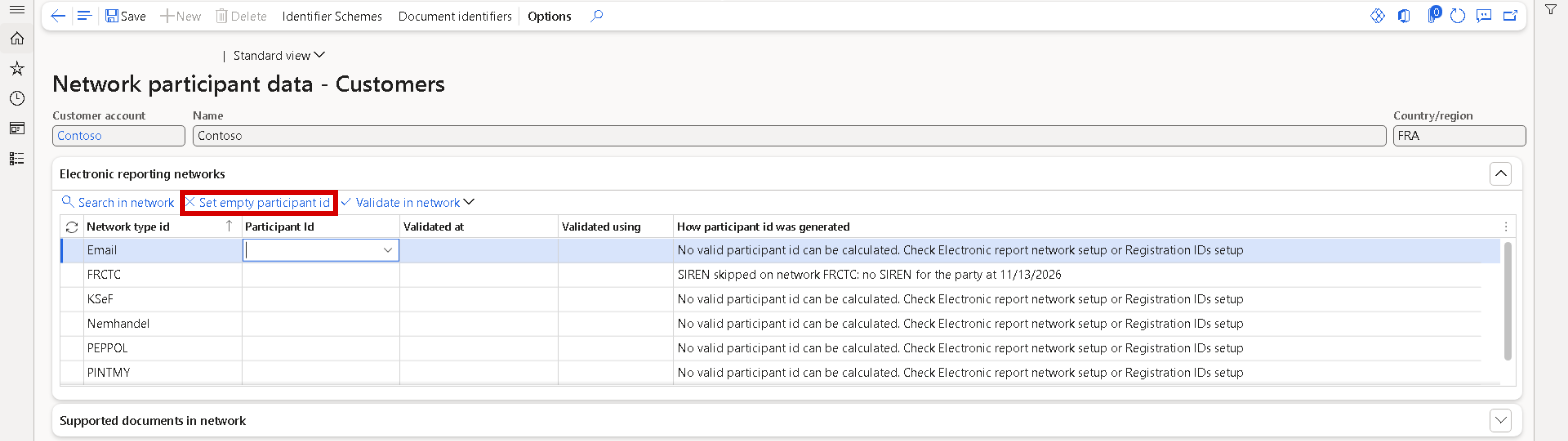
Network participant data - Customers: for a party without a fixed participant ID the button reads Set empty participant id.
Fixed participant IDs: on Network participant data the button reads Revert to automatic calculation or Set empty participant id. Existing fixed IDs, empty ones included, are kept: where a party should get its calculated participant ID again, click Revert to automatic calculation once.
The tax category rule proposal allowed new and deleted rows, and a button and two privileges had no description
A number of form and security settings were never applied, without any message. Three of them were visible. The proposal dialog that Resolve automatically opens on the checklist row Tax category rules let you add an empty row or delete a proposed one; it no longer offers New or Delete, and Apply still decides which rules are created. The button Cancel delivery at provider in the Tools menu of Outbound documents now shows its help text. In Security configuration, the privileges View document format detection rules and Maintain document format detection rules show their description. The other corrections change nothing on screen.
Tracking fixed
The Tracking workspace couldn't be opened with an empty Selected companies filter
When the tracking company filter, under Settings on the Tracking workspace, was Selected companies with no company ticked, the filter was saved anyway. The workspace then failed with an error that the company isn't valid and, on every later open, with an error that its menu item couldn't be opened, while the filter could only be changed from the workspace itself. Filter settings now refuses Selected companies without a company. The workspace always opens, whatever is stored: blank or unknown companies are skipped, and when none is left it shows the current company with one warning. The company filter is now on Tracking parameters too, under General > Company filter, with a Filter settings button, so a broken filter can be corrected without the workspace.

Tracking parameters: the company filter of the Tracking workspace, with Filter settings to correct it.
Tracking company filter: a stored Selected companies filter without a valid company now opens the workspace on the current company, with a warning. Correct it under Settings on the workspace or under Tracking parameters > General > Company filter.
Nine tiles and lists of the Tracking workspace were visible to system administrators only
Nine lists of the Tracking workspace weren't part of the two Tracking privileges, so only a system administrator got their tiles and tab pages: Awaiting delivery, Delivery failed, AP dispatch failed, Format rejected, Purged, Attempting retry and Retry cancelled under Outbound documents, and Not delivered and In review. These are the statuses that need follow-up. All nine are now in View tracking, with read access, and in Maintain tracking, so the roles Lasernet user, Lasernet advanced user, Lasernet Cloud Print user and Lasernet administrator cover every tile and list of the workspace. The In review tile now checks access to the In review list.
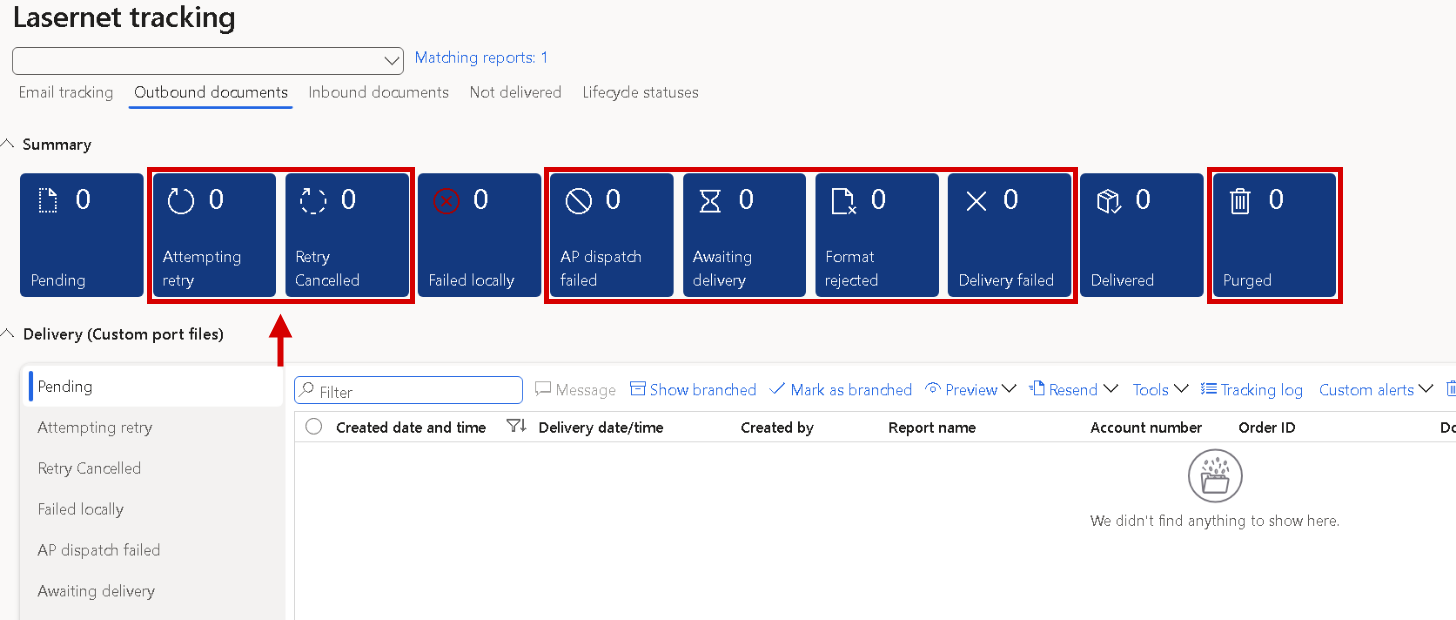
Lasernet tracking, tab Outbound documents: the seven boxed tiles and their lists are now part of the Tracking privileges.
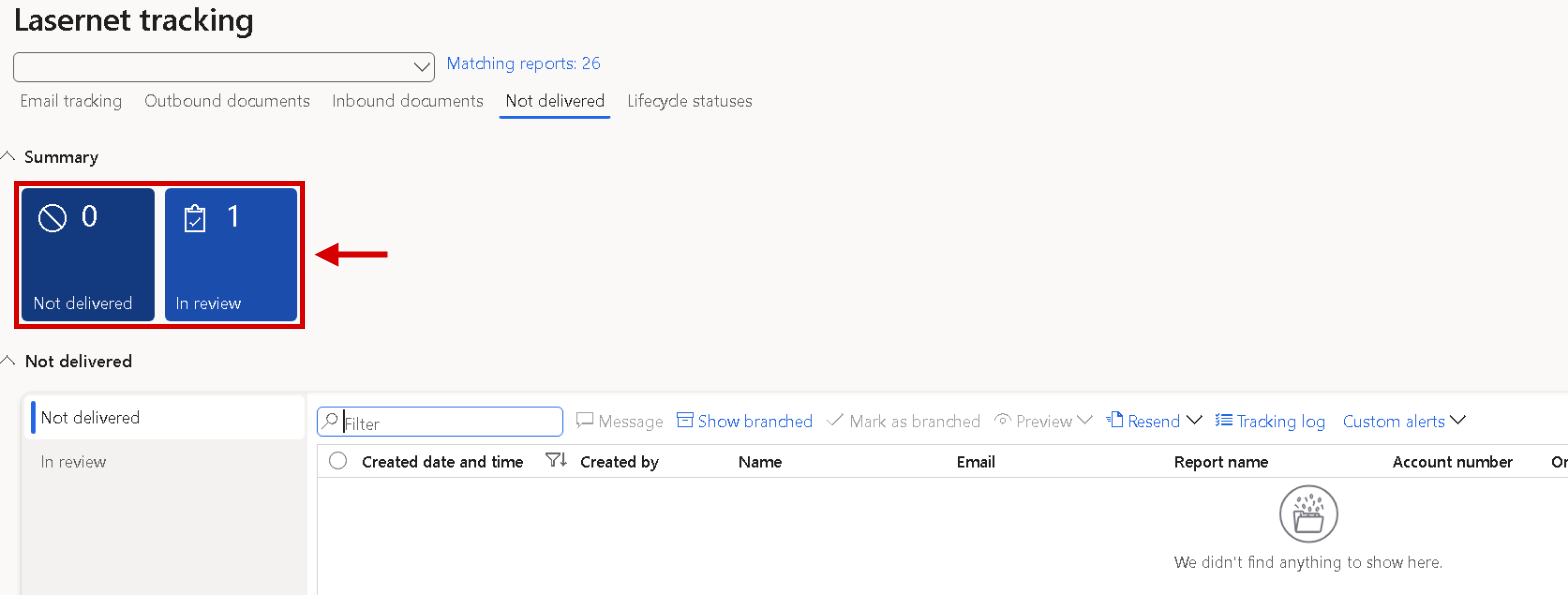
Lasernet tracking, tab Not delivered: the tiles Not delivered and In review and their lists are covered by the same privileges.
After upgrade information
E-documents setup
New e-invoice formats: in each company that invoices from Italy, Spain or Romania, run Load defaults on Report document transformations, Document formats and XML validation rules, and Deploy the transformation. This creates FATTURAPA, FACTURAE and RO_CIUS_UBL, their transformation rows and validation packages. Then set XSLT transformation format on the sales invoice destination. Italy and Spain also need the external code FATTURAPA on each method of payment and Sales tax specification = Currency on the form setup. Romania needs the county on the legal entity address, the sector as the city for Bucharest, a CUI registration type on customers and RON as the accounting currency. The E-document checklist lists each prerequisite. The same Load defaults on Document formats makes received FatturaPA and Facturae invoices importable.
Slovakia: in a Slovak company, run Provision registration categories, so the Slovak tax ID rule gets the scheme 0245. Give the legal entity and the Slovak customers a 10-digit DIČ (Tax ID registration) or a VAT number that contains it, and load the e-document transformations again to get the current PEPPOL BIS stylesheet (2.9.0 in 7.4.1). Check that the delivery provider is accredited in Slovakia: on 3 November 2026, iEDI, Digisense and Storecove weren't on the Slovak list.
Slovak seller legal form (BT-33): enter the legal form and commercial register entry of a Slovak legal entity as the electronic document property SellerLegalForm under Accounts receivable > Setup > Electronic document properties. The optional checklist row names it. Load the e-document transformations again to get the current stylesheets (PEPPOL BIS 2.9.0, XRechnung UBL 2.8.0 and CII 2.12.0 in 7.4.1); until then nothing changes.
Peppol BIS rules 3.0.21: new companies get them as the active version. In an existing company, Load defaults on Document formats makes 3.0.21 active and keeps 3.0.18 as Superseded. Resolve automatically on the checklist and Load defaults on XML validation packages only stage 3.0.21: the checklist row Validation package versions then shows it as waiting, and it is activated on XML validation packages. Documents that passed under 3.0.18 can fail the stricter checks, for example a Danish P-number in the wrong format. Where the update feed of the PEPPOL_UBL package was switched on, set it to Manual.
Reload the e-document source reports and transformations in each company that sends e-invoices: answer Yes to the reload prompt on the Transformations form, or use Resolve automatically on the checklist row Source reports match the application, then load the e-document transformations again. This brings the document type code element (BT-3) and the new delivery date rule (BT-72). Until then, everything prints as before. Change the BT-3 expression on the source report, not on the replacement report's copy, which the next link synchronisation overwrites.
JPK-V7M and JPK-V7K through Lasernet are opt-in. Run Load JPK defaults under Lasernet > Electronic reporting connector > Country specific > Poland > JPK VAT > Setup, enter the tax office code in JPK VAT parameters and review the JPK reporting code mapping. Generate JPK-V7 file refuses OK until Load JPK defaults has been run in the company. To keep the Electronic messages routine, point its Generate file action at the Lasernet executable class. The Electronic reporting route is unchanged.
Re-check the E-document checklist in each company. The Inbound checklist has the new rows Connection - last load and Received documents waiting. Both checklists get Shared provider account and Sign-in keep-alive job, and the Report area gets Electronic reporting e-invoice on the report that runs. Some rows that were mandatory gaps are now warnings or Not applicable, so the counts change.
The first catalog load after the upgrade renumbers seven sections of the sales invoice replacement report. Order and content don't change.
Run Resolve automatically on the checklist once per company: it is offered because the update adds document formats. The conversion package shipped with 7.4.1 becomes active and the previous version stays as Superseded, so received FatturaPA, Facturae and OIOUBL invoices import without a manual activation. A version that a user uploaded or activated is left alone; activate the new one on XML validation packages when you want it. Then check the row Validation package versions and activate the waiting rule packages you want.
Load defaults on Document formats is safe again and gives the same result as the checklist. Run it once in a company where Load defaults was used in 7.4.0 after the setup checklist: it brings back the conversions, formats and package versions as shipped. If the company has document formats of its own, check their Sequence afterwards, because the shipped formats are renumbered.
Italian and Spanish invoices are imported: after Load defaults on Document formats, or Resolve automatically on the Inbound checklist, FATTURAPA, FACTURAE, FACTURAE_321 and the new FACTURAE_32 are Importable = Yes with the validation gate Warn only. Set Importable back to No on a format you don't want to import; that choice is kept. Add tax category rules with a National tax code where exempt lines must post with different sales tax codes.
Peppol orders and other non-invoice UBL documents: nothing changes until the document formats are loaded again. Use Resolve automatically on the row Document formats loaded, or Load defaults on Document formats. If you changed the detection condition of PEPPOL_BIS or PEPPOL_EHF yourself, the checklist leaves it alone, and Load defaults overwrites it.
Inbound Keep metadata template: stored values stay as they are. Run the checklist once; if the row Inbound Keep metadata template is Missing or Invalid, use Go to setup and pick a Lasernet Keep template. Saving the parameters warns while a Lasernet Keep archive connection has no template.
Tracking security: run the security synchronisation. The privileges View tracking and Maintain tracking now include nine more lists of the Tracking workspace, from Awaiting delivery to Not delivered and In review. Users with the roles Lasernet user, Lasernet advanced user, Lasernet Cloud Print user or Lasernet administrator get these tiles and lists without being system administrator. A role or privilege copy made as a workaround is no longer needed.
Field origins: run Load defaults once under Lasernet > Electronic reporting connector > Field origins. It refreshes the shipped rows nobody changed: the customer EAN row gets Filled by standard only in = DK, and the contact person row points at Contact on the sales order. It also adds the four rows of the seller fields for blind shipments. Rows you changed stay as they are. It doesn't run by itself.
ZUGFeRD, Factur-X and FR CTC prerequisites: load the e-document transformations of the sales invoice source report again with Load defaults. The row Deployed stylesheets match shipped is then OK, and the Formats area shows customer reference, seller contact and IBAN as Mandatory for XRechnung only. The e-invoices don't change.
Naming patterns shared between companies: when Resolve automatically says that a naming pattern can't be created because another company already has one, open System administration > Setup > Configure cross-company data sharing. Make the naming patterns the same in the companies of the policy, or take naming patterns out of the policy, then Re-check.
Rebuild the dictionary and reload the e-document source reports: run Rebuild dictionary under Lasernet parameters > General with only Extension method = Yes. Then, in each company that sends e-invoices, reload the e-document source reports: Load defaults on the Transformations form, or Resolve automatically on the checklist row Source reports match the application. This brings OIOUBL_Invoice 2.5.0 and OIOUBL_CreditNote 2.4.0, PEPPOL BIS 2.9.0, EHF 2.6.0, XRechnung UBL 2.8.0, FR CTC UBL 2.9.0, RO CIUS 1.0.3, the CII stylesheet 2.12.0, Factur-X/ZUGFeRD EXTENDED 2.6.0 and KSEF FA3 2.6.0, with the new report elements for line charges and for the seller of a blind shipment. Until both steps are done, every e-document stays as before; the order of the two steps doesn't matter. A company with its own local copy of a stylesheet keeps that copy and the old behaviour until the row follows the shipped stylesheet again.
OIOUBL rules 1.17.2: in each company that uses OIOUBL, run Load defaults under Lasernet > Electronic reporting connector > Document formats. The OIOUBL_DK package then switches to 1.17.2 and keeps 1.12.2 as Superseded. Load defaults on XML validation packages only stages 1.17.2, which then has to be selected and activated. Check that XML validation packages shows OIOUBL_DK with the version 1.17.2. Nothing has to be deleted.
KSeF FA(3) notes: after the reload, check the invoice note type and the documents setting in Form setup; with None no note is sent. To use another key than Uwagi, enter it in Parameters (JSON) of the KSEF FA3 row, for example {"noteKey":"note"}, and enter it again after every Load defaults, because the reload replaces the row.
ZUGFeRD / Factur-X embedded file: a company with exactly one ZUGFeRD or Factur-X format in the checklist header gets the new mandatory Report row ZUGFeRD / Factur-X embedded file. Where it is Missing or Invalid, use Resolve automatically, or set PDF embed source = CustomFile and PDF embed file name = factur-x.xml on the report default destination by hand.
Blind shipments: run Load defaults for the sales invoice e-document source report in each company that sends e-invoices, and Load defaults on Field origins, so the e-invoice of a blind shipment gets the seller name, VAT number, registration number and phone. Field origin rows you changed are kept.
Connections, mailboxes and load jobs used for e-invoicing flow
Connection purpose: existing connections take their purpose from how they are used. A connection that only sends drops out of the Inbound checklist and the Network connection lookup of Load received documents. Set Purpose on the Connections form where the automatic value is wrong.
Saving a connection is stricter: a new connection with a required setting missing can't be saved, and an existing one, or an import, gets a warning. Saving no longer calls the provider; use Validate to test.
One load job per provider account: where several connections of the same type share one provider account, all jobs but one now get a warning. Keep one job per account, or let Resolve automatically create the one that is needed.
Mailbox sign-ins: an e-mail connection whose sign-in broke before the upgrade now says so on the connection and in the checklist. Click Obtain authorization once; nothing needs re-typing. Create the daily job Mailbox sign-in keep-alive with Resolve automatically on the row Sign-in keep-alive job, and activate the business event Mailbox sign-in at risk to be told before a sign-in expires.
Remote Lasernet server and e-mail: the Lasernet server delivers every e-mail, also with Embed PDF in e-document = Yes or an Electronic reporting validate rule. Nothing needs to be set up. Dynamics 365 e-mail isn't used for these e-mails, and Send instantly applies only to e-mails that Dynamics 365 sends itself with the integrated engine.
Run Test archive readiness again: results stored before the upgrade no longer count. On every storage connection with Archive tier = Immutable storage or Lasernet Archive, the checklist row Archive connection verified shows Missing and saving the connection gives a warning, until Test archive readiness has been run once on the Connections form or with Create on the checklist row. The monthly compliance run does it by itself when Re-probe archive connections is on. A database copied to another environment also needs a new test.
Remote Lasernet server and embedded PDF: the new Lasernet server setting Server completes embedded PDF is No after the upgrade, so nothing changes. Set it to Yes only where the Lasernet server configuration fills the rendered PDF into the e-document itself. Destinations with an Electronic reporting validate rule keep the route through Dynamics 365.
One mailbox for several companies is opt-in: existing Email Api connections stay on Current company. To use it, set Load into companies on the connection, load the document formats in the connection's company, and make sure the vendors carry their VAT number in the receiving companies. A receiving company that still has its own connection on the same mailbox folder gets a warning on the checklist; keep one of the two.
E-mails that were skipped are loaded at the next poll: an e-mail that was skipped because the archive storage or the Lasernet server couldn't be reached, or because it held a broken .p7m file, now arrives. Expect such documents as Archive pending, or with a warning in the log.
A load job must not read the inbound archive folder: saving the parameters or the connection now warns, and the checklists show it. Point the inbound archive at a storage location that no load job reads. Then use the Inbound checklist row Archive copies among the received documents in each company: Resolve closes the copies without a vendor invoice. Copies with a pending or posted vendor invoice are listed for you to decide.
Signed .p7m files: a storage connection with the file filter \.xml* now also takes \.xml.p7m*. The signed original is kept on the received document, inside a .zip while Document management doesn't allow the .p7m file type.
Saved connection tests read Not checked once: after the update every stored test result says that the connection was changed after its last test. Click Test connections on the checklist, or Validate on the connection, to store it again.
Storecove connection: create a connection of the type Storecove API with the API key and the Storecove legal entity ID, and test it with Validate. In the Storecove portal, the legal entity needs two event subscriptions in pull mode, one for sending results and one for received documents, each limited to that legal entity, and it must be set to receive invoices and invoice responses. On some Storecove accounts the legal entity is created in the portal; Storecove registration then shows the steps. Sandbox and production are separate Storecove accounts with their own keys.
Peppol envelope: the envelope of a Peppol custom port now takes sender, receiver, document type and process from the print, per destination. Replace an existing Peppol envelope once: Resolve automatically on its checklist row, or delete it and use Create PEPPOL envelope again. A print with an incomplete envelope is refused before sending, for Tickstar as well as Storecove.
Azure storage connections with an authentication profile: open and save each of them under Lasernet > Setup > Administration > Connections. If the warning about a removed shared access key shows, regenerate or revoke that shared access signature in the storage account: it may be in an earlier Lasernet backup or data export. Importing a Lasernet backup taken before the upgrade can bring the signature back; save the connection again afterwards.
A load job must not read a folder Lasernet writes to: saving a connection now also warns when Load received documents from network reads the folder of an outbound archive or of an auditor export, and the Inbound checklist row Inbound folder settings shows a warning. Give received files a folder of their own. The load itself still takes such files in 7.4.1.
Received documents with two default attachments: a document received before the upgrade with Visualization on load on can show two default attachments. Open its Attachments and clear Default on the visualization PDF; the retention lock and Process again then work again. New documents need nothing.