
This article explains how to use the PDF Merge tool to merge a Job with PDF files. Some prerequisites are needed:
Prerequisites
A PDF folder with PDF files to pick up.

A data file with reference to external PDF files.

A setup with a PDF Merger.
Steps
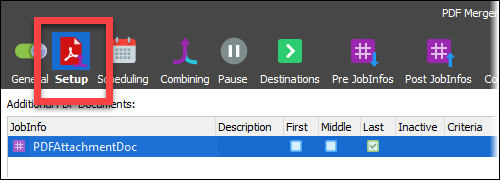
Open the PDF Merger, click Setup, and add the JobInfo attachment.
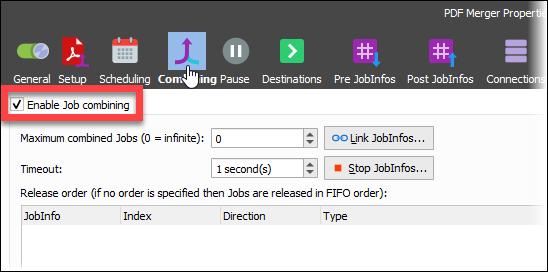
Open the Combining tab and select the Enable Job combining checkbox.
Add a File Retriever to pick up the PDF files.
Select the File radio button and enter #PathToFile# into the Path field and the picked-up document is inserted into the Output JobInfo field.
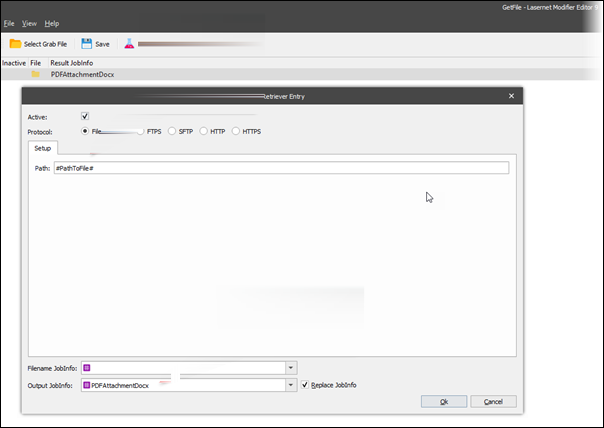
Click Ok.
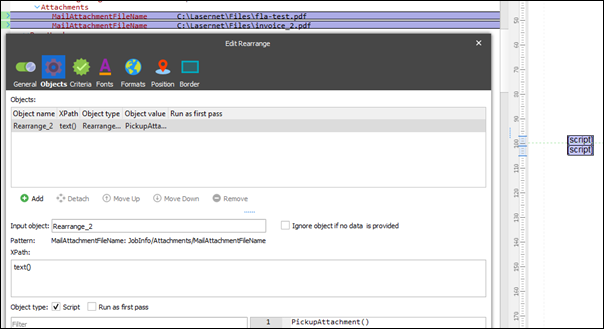
Add a script to read the path from data, and then run the modifier to pick up the extra files.

Ensure that a form with a pattern and a rearrange on the path where the script is run has been created.
Additional Information
See the attached small setup, data file, and pdf attachments. This can be used to test in a small setup (attached); changes may be necessary to implement in your own specific setup.