Applies to: Lasernet Core 10
Used for printing documents to a local or network printer. This module work for on-premises only and for best performance connected to a local printer, since latency must be expected to a printer shared on a network.
Note
You can read more about the alternative Printer Service module and stand-alone application, in the Lasernet Printer Service 10 Guide, which is a solution to manage your custom printer settings remotely and deploy these to local printers, or anywhere globally using Microsoft Azure cloud services.
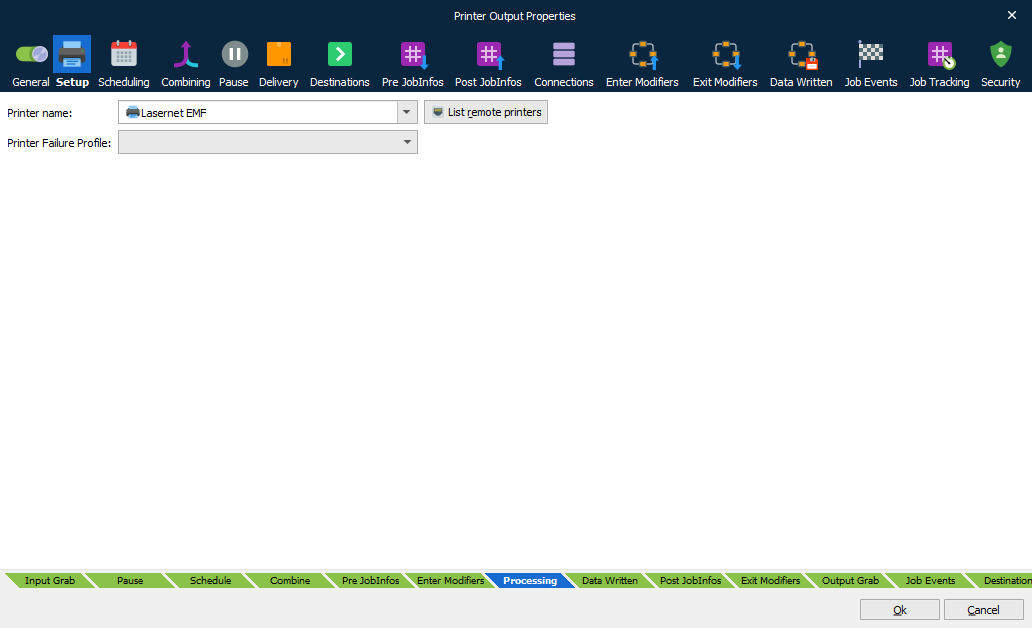
In the Printer Output module, you specify what Windows printer name to print to. It can be the name of a local printer or a printer shared on the network. Once a valid name is entered, the printer profiles can be setup for the output module. Printer profiles are supported for documents created in the EMF format. To learn more about printer profiles, see Printer Profiles and, for scripting, Manipulating Printer Profiles in the Lasernet Core 10 Scripting Guide article Use Scripting to Expand Lasernet Core Functionality.
The Printer Output module also has a built-in functionality to auto-detect and print PDF and DOCX documents, called printer attachments, without the need for third-party applications, including selection of paper source in the printer by detecting the PDF page sizes in the PDF documents. Other printer settings are selected by the default printer settings defined in the Windows printer settings.
Note
Printer Profiles are not objects and, therefore, cannot be seen in the object list when using "File - Export Objects". However, Printer Profiles are linked to the Printer Output objects for which they were created. When you export a Printer Output object, any associated Printer Profiles will be included with that object, making them available when you import the printer into another configuration.
You cannot select individual Printer Profiles under the printer object when exporting. All associated Printer Profiles will be included in the .lnobjectx export file.
Printer Failure Profile
Maintaining Many Output Printers
For easier maintenance of similar output printers, without creating the equivalent number of Printer Output modules, you can set a JobInfo PrintToUNC which overrules the printer name set in Printer Setup – Printer name. This makes it possible to use Printer Profiles for these printers.
For example, if you set the Printer name to \\Server1\SharedDemoPrinter and then set the JobInfo PrintToUNC to \\Server2\SharedPrinter, the Printer Output module will print the job to Server2 but use the printer profiles defined for Server1.
Note
Remember that the Printer name entered in Printer Setup still counts for 1 in the number of licenses used.
JobInfos
A list of JobInfos can overrule the printer settings:
| ColorMode | ColorMode is used set monochrome or color printing. Known values are: Default, monochrome and color. |
| Copies | Set Copies to control the number of printed copies. |
| DocName | DocName JobInfo is used to control the name of the print job for the Windows Print Spooler. If not set the default value is set to “Unnamed – Lasernet document”. |
| DuplexMode | Duplex printing allows the printing of a sheet of paper on both sides automatically. Examples of values are: Default, Simplex, Vertical and Horizontal. |
| Orientation | Manage the Orientation of the paper. Example of values are Portrait or Landscape. |
| PaperHeight | Defines the height of the paper form. |
| PaperSource | Selects the Paper Source in the printer. Example of values are: Auto, Tray 1, Tray 2, Upper Tray, Lower Tray. |
| PaperWidth | Defines the width of the paper form. |
| PrintAttachment | May contain a list of documents in binary representation for printing externally. It is used together with PrintAttachmentFilename and PrintAttachmentMimeType JobInfos. |
| PrintAttachmentCopies | Used to set control the number of printed copies for attached documents in the format PDF and DOCX. |
| PrinterDriver | The PrinterDriver JobInfo is a configuration specific JobInfo often used by the EMF2RAW and Printer Output modules, if the JobInfo substitution string #PrinterDriver# is defined as the Printer Name parameter. |
| PrinterName | The PrinterName JobInfo is a configuration specific JobInfo, often defined in modules, if the JobInfo substitution string #PrinterName# is used as the name of the destination to the Printer Output module. |
| PrintFilename | If it is not empty, it is assumed that the JobData is a PDF or Word document type which should printed separately. It is used together with PrintMimeType. |
| PrintMimeType | Contains the mime type of the file to print. It is used together with PrintFilename JobInfo. |
| PrintToUNC | Directs jobs to a printer using a UNC path instead of a predetermined printer in Windows. By setting this JobInfo to \\Server\PrinterShare the Printer Output module will send the job to that share using the driver chosen in the setup. |
| WinPrintNotifyName | Specifies the notification contact of the print job. Windows does not allow the notify name to be set across network printers. |
| WinPrintUserName | Specifies the username of the print job as shown in the job list for a local printer. This can be set to just about anything. Windows does not allow the user name to be set across network printers. |