Applies to: Lasernet Core 10
Combining is available in the list of modules below and can be used to merge a list of jobs into a single job. The JobInfo named ‘JobData’ will contain the data for all the combined jobs. It will be attached to the JobInfos that were created in the first job. JobInfos for all other Jobs except the first job will be deleted.
Some of the modules require additional properties depending on the input and output format.
| Module | Type | Input Format | Output Format |
|---|---|---|---|
| Binary Merger | Engine | RAW | RAW |
| Compression | Engine | * | ZIP |
| EMF to RAW | Engine | EMF | RAW |
| Pass-Through | Engine | EMF, TEXT | EMF, TEXT |
| Engine | EMF | ||
| PDF Merger | Engine | ||
| TIFF | Engine | EMF | TIFF |
| XML Merger | Engine | XML | XML |
| Exchange | Output | ** | ** |
| File | Output | EMF, TEXT | EMF, TEXT |
| Output | ** | ** | |
| Printer | Output | EMF | EMF |
* Compression Engine can combine various job formats into a ZIP-archive for output. A filename for each input file is required and should be added to a user specified JobInfo.
** Exchange and Mail modules do not combine lists of jobs into a single job. Instead, a single email will be generated containing several attachments.
EMF format can be combined into a multi-page EMF, PDF or TIFF job.
TEXT format can be concatenated into a single TEXT job.
XML format can be merged into a single XML job but requires special XPath properties.
Setting Up Combining
Select the combining tab and activate Enable Job combining.
The default settings for combing are: Maximum combined Jobs equal zero, Time out in seconds’ equal one and Link JobInfos and Stop JobInfos are left empty;
Using the default settings, Lasernet Core is only able to combine jobs if the input job is received as a single job. If Lasernet Core receives multiple jobs to the same input module, a Link JobInfo or Stop JobInfo is required.
Lasernet Core is not able to combine jobs from a mix of input modules, all jobs must be from same input module.
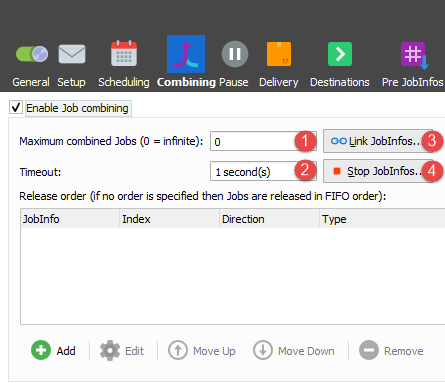
There are several ways to enable or empty combiner queues.
Maximum combined Jobs (1)
The queue will be emptied each time the number of jobs in the queue reaches the number specified here (except if it is set to zero).
Time out in seconds (2)
If the given amount of seconds pass without any new jobs coming in then the queue is emptied.
Link JobInfos (3)
Selecting Link JobInfos criteria means that all the JobInfos have to be equal for them to end up in the same queue. For example, if you combine using the JobInfo Extension, only jobs with the same Extension will be combined.
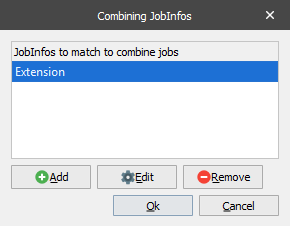
The parameters for Maximum combined Jobs, Time Out and Stop JobInfos have a higher priority and will empty the queue even if Link JobInfos is true.
Stop JobInfos (4)
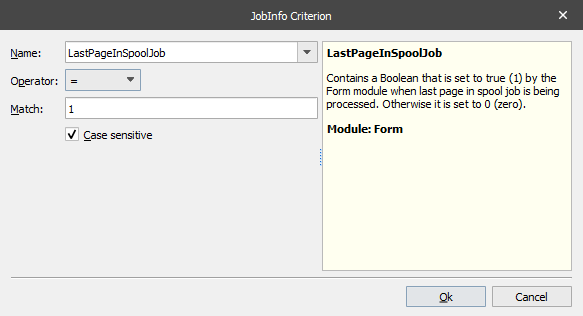
If a listed expression is true, the queue is emptied. For example, if you enable combining using an expression that LastPageInSpoolJob equals 1, any job will be combined until expression is true.