

Support for the Lasernet Keep 11 API has been implemented in Lasernet FO Connector 7.3. When creating a new connection and storage, the system checks whether Autoform DM or Lasernet Keep is being used and makes API calls accordingly. This enables it to support both versions of the software.
For the Keep integration to work and communicate via the API, a new connection must be added.
To do so, follow these steps:
Navigate to Lasernet > Setup > Administration > Connections.
Click New.
Give the Connection id a suitable name, such as Keep11.
Select Storage from the Connection type dropdown, and Lasernet Keep from the Type dropdown.
Add the API key from Keep to the LASERNET KEEP (API KEY) field.
Note
For more information, see REST API Authentication.
Add the URL from Keep to the Site field.
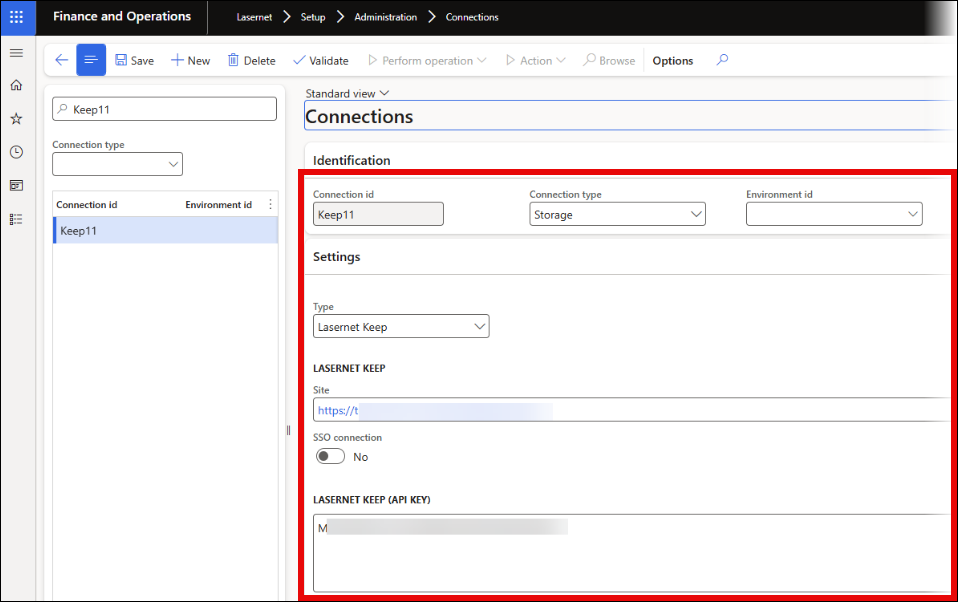
If you are using SSO, toggle the SSO connection button to Yes.