
Release version: 11.1
Release date: 1st April 2026
This page describes the new features in Lasernet Keep 11.1.
Note
New Features
This release introduces:
Document Sharing Using Secure Links
Keep search has been extended to include document sharing. You can now configure and share a secure link to any document found through search and send it to a user from an external organization.
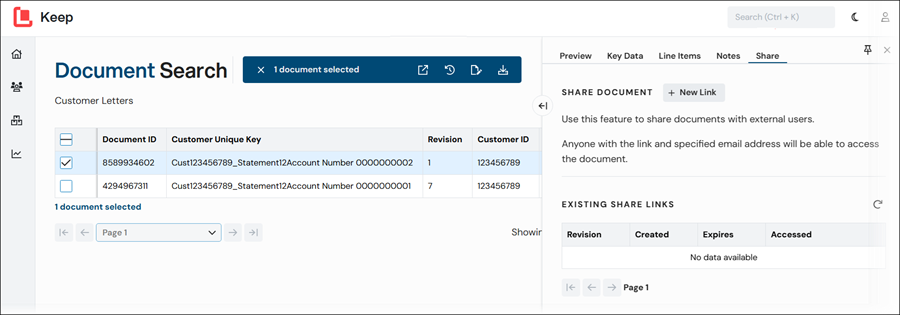
When the user clicks the link and enters their email address, they can view or download the associated document from within Keep – no user account is required.
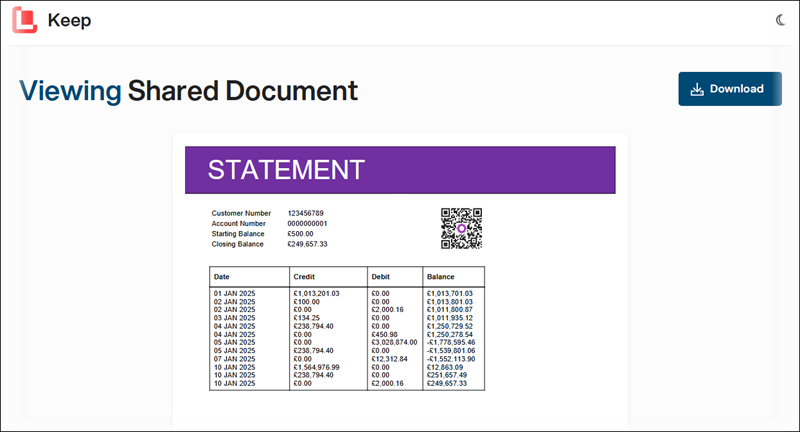
Security Features
Secure links include the following built-in protections:
Email verification: As proof of identity, users must enter their email address before they can use the secure link.
Expiry time: Each link is valid for a configurable number of days. After this time, the associated document is no longer available to view or download.
Lock to revision: You can specify which document version a link opens.
Revocation: You can delete or revoke a link at any time from within Keep. For example, if a user leaves their organization.
Tokenization: Each secure link uses a token to prevent unauthorized access to the document archive, rather than a direct link to a document file.
Analytics and Auditing
Document sharing also provides:
Link management: View the details of all active links, and basic analytics for link usage.
Audit trail: Document sharing events are logged for security and compliance purposes.
Enable Document Sharing
To enable this feature, you must turn on the following settings:
Document Sharing in the Keep server settings.
Settings > Allow Document Sharing for each search configuration where you want to give access to document sharing.
Lasernet Group Branding
Lasernet Group branding has been introduced across the Keep web application.
Installer Updates
The Lasernet Keep installer has also been updated with the new company branding, along with the following changes:
The default installation path has been updated from
C:\Program Files\Formpipe Software\Lasernet Keep\...toC:\Program Files\Lasernet\Lasernet Keep\....The default alias and password values for generated HTTPS certificates have been updated. For full details, see Installation Guide or Upgrade Guide.
Notes Auditing
Audit events are now available for notes.
How to Get Support
If you encounter difficulties using Lasernet Keep, contact Lasernet Support.