Applies to: Lasernet Core 10
To allow Lasernet Meta to connect to the Lasernet Core environment, a Meta Input Queue must be running. Configure the listening port, authentication and queues type in the Meta Input properties.
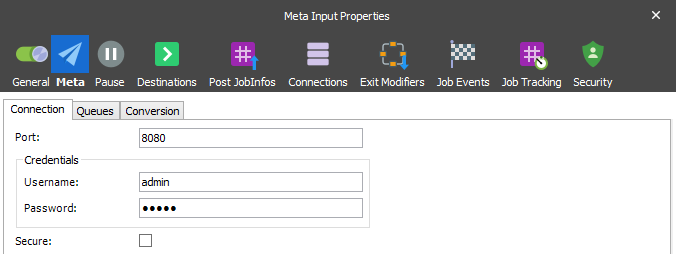
Please refer to the “Lasernet 10 – Meta” manual for more information.
JobInfos
When a document is received a job is created. The following JobInfos are set, if available:
| Autofill | Available when the Autofill button  is activated from the Lasernet Meta application. Value is set to 1. is activated from the Lasernet Meta application. Value is set to 1. |
| ClientUserName | Username for the login client as defined in the Lasernet Meta > Tools > Client settings. When running with default credentials the value will be left empty. |
| DocumentName | The name of the print job as set by the Windows Print Spooler, when the document is printed to Lasernet Meta. Or, the name of the file as set by the Windows File System, when the document is retrieved via polling in Lasernet Meta. |
| DriverName | The name of the printer driver as set by the Windows Print Spooler, when the document is printed to Lasernet Meta. |
| Extension | The extension is always set to .pdf if the document is printed to Lasernet Meta or the extension of the filename if the document is retrieved via polling in Lasernet Meta. |
| FQDN | Fully qualified domain name for the user running Lasernet Meta. |
| MachineName | The machine name for the user who has sent the document. |
| MetaQueue | The name of the meta queue from which the document has been sent. |
| PreviewJobData | Contains a copy of the document data in Autofill mode. |
| PreviewExtension | Contains the extension of the document in Autofill mode. |
UserName UserDomainName |
Name of the user running Lasernet Meta. Domain name for the user running Lasernet Meta. |