

Lasernet for Dynamics 365 Finance and Operations
Release version: 7.3
Release date: 29th June 2026
Notes
The following documentation and files are available:
New features, fixes, and enhancements for Lasernet FO Connector 7.3
Set Up the Integration Between Lasernet FO Connector and Lasernet Keep
Warning
The Lasernet Connectors for Microsoft Dynamics 365 are currently not compatible with Lasernet Core 11. We are working towards launching these two products together, but until then, current customers and partners with the Dynamics 365 connectors should continue to use Lasernet Core 10.
Maintenance Report
This section briefly describes the new features, fixes, and enhancements in Lasernet FO Connector 7.3.
Version Numbers
Dynamics Finance and Operations 10.0.46 PU70 Version: 7.3.0.2606267
Dynamics Finance and Operations 10.0.47 PU71 Version: 7.3.0.2606268
Dynamics Finance and Operations 10.0.48 PU72 Version: 7.3.0.2606269
New Feature, Fixes, and Enhancements
Case No. | Issue/Feature | Ticket No. | Status |
|---|---|---|---|
73437@Dynazure | MailMerge document handling implementation. | Bug fix | |
73434@LAC365FO | Storage browser when clicked multiple times on same folder, was building wrong path. | Bug fix | |
73433@LAC365FO | Custom properties calculation issues were causing some issues. | Bug fix | |
73365@LAC365FO | The label translations for version 7.3 have been completed. | Enhancement | |
73308@Dynazure | The initial check-in of the iEDI document loading feature has been performed. | New feature | |
73264@Dynazure | The initialization of email, FTP, and SFTP inbound loading has been updated to handle cases where the loaded file is not XML. | Enhancement | |
73263@Dynazure | An invalid number of hours is initialized for Email Tracking status updates, and labels are missing. | Bug fix | |
73259@LAC365FO | Several small fixes to the SFTP and FTP handling have been applied, and error reporting has been improved. | Bug fix | |
73243@LAC365FO | Custom properties with similar expressions reuse cached values instead of recalculating, producing incorrect results. | Bug fix | |
73231@Dynazure | The HTML editor format painter does not work. | Bug fix | |
73230@LAC365FO | The Order ID and Document ID fields have been extended to 40 characters to accommodate a GUID. | Enhancement | |
73229@Dynazure | Custom properties have been removed from the Azure Service Bus message. | Enhancement | |
73228@LAC365FO | The PDFEmbed custom property for Embedded has been fixed, since it was failing and duplicating file names. | Bug fix | |
73226@LAC365FO | Report attachments are missing for the CaseDetailBase table. | Bug fix | |
73167@Dynazure | Multiple Email Tracking batch jobs have been created. | Bug fix | |
73163@LAC365FO | The re-printing of label layouts from a mobile device has been fixed. | Bug fix | |
73154@Dynazure | The initial check-in for the MailMerge module has been performed. | New feature | |
73129@LAC365FO | Support has been added for new authentication methods in the Cloud Print Connector. | Enhancement | |
73128@LAC365FO | Support has been added for manual Cloud Print Connector setup in Lasernet FO Connector. | Enhancement | |
73095@LAC365FO | The way LACDictData metadata dictionary (tables, classes, and forms) is populated has been redesigned. | Enhancement | |
73091@LAC365FO | A custom script to clear cache for Event (Alert) rule and Report link has been created: | New feature | |
73090@LAC365FO | The Test and Performance Suite error “Expected type Date, got type String” occurs during automatic type conversion when running reports with Top picking or Batch bundling. | Bug fix | |
73066@Dynazure | The redirect behavior for custom alerts used in the Lasernet Tracking workspace has been updated. | Enhancement | |
73049@Dynazure | The file name of the inbound file import is autogenerated. | Bug fix | |
73048@Dynazure | Better throttling handling in mail reader. | Enhancement | |
73031@LAC365FO | Opening an attachment from the report review form strips the file extension. | Bug fix | |
73030@Dynazure | Loading of inbound files from FTP and SFTP sources has been implemented. | New feature | |
73029@LAC365FO | An issue arises regarding attachments when the server has remote report storage. | Bug fix | |
73010@LAC365FO | The HTML source editor switch control is unexpectedly visible. | Bug fix | |
73008@LAC365FO | Support has been added for embedding multiple files within the Embedded PDF renderer. | Enhancement | |
73007@LAC365FO | Lasernet Embedded: emailing fails for multiple recipients due to comma separator. | Bug fix | |
73000@Dynazure | The mail reader and sender functionalities have been separated into their own dedicated module. | Enhancement | |
72981@LAC365FO | The envelope sub XPath must come from the document, not from the root element. | Bug fix | |
72980@LAC365FO | XML viewer performance update. | Enhancement | |
72827@Dynazure | The email batch status batch job has been improved so it no longer requires specifying which companies to update, since the message ID already determines the affected archive records and company. | Enhancement | |
72759@Dynazure | Major validation update. | Enhancement | |
72670@Dynazure | It is now possible to compare Electronic Reporting-generated XML documents as part of Test checkpoints and Test flows. | New feature | |
72654@Dynazure | An error occurs when opening an alert from an email. | Bug fix | |
72561@Dynazure | A custom alert has been added to Email Tracking. | New feature | |
72560@Dynazure | A custom alert has been added to Electronic Documents. | New feature | |
72191@LAC365FO | In the Test and Performance Suite, subreports are incorrectly added to the Lasernet Archive during a checkpoint test. | Bug fix | |
72180@LAC365FO | Lasernet FO Connector has been migrated from the legacy Azure Service Bus SDK to the new SDK libraries. | Enhancement | |
72179@LAC365FO | All Service Bus Queue and Topic logic are now forced to use AMQP. | Enhancement | |
72176@LAC365FO | It is now possible to use a custom script to fill the Lasernet Dictionary table, when an error occurs in the Query Wizard (version 2, step 2). | New feature | |
72175@LAC365FO | It is now possible to use a custom script to fill the Lasernet Dictionary table, when an error occurs in the Query Wizard (version 2, step 1). | New feature | |
72163@LAC365FO | It is now possible to use a custom script to fill the Lasernet Dictionary table, when an error occurs in the Query Wizard (version 1). | New feature | |
72154@LAC365FO | A memory leak and AOS crash happen when updating LACDictData with table information. | Bug fix | |
72133@LAC365FO | Support has been added for Document type URL in Lasernet report attachments. | Enhancement | |
72111@LAC365FO | Attachment setup enables unsupported document types (Note/URL), causing confusion. | Bug fix | |
72072@LAC365FO | AOS restart is sometimes required to trigger Lasernet alert report. | Bug fix | |
507051@LAC365FO | A Base64 content viewer has been added to the report Preview screen. | New feature | |
506957@LAC365FO | XML validation rules have been updated. | Enhancement | |
506771@LAC365FO | A header is missing in the Connections form. | Bug fix | |
506724@Dynazure | The default value for the Show data for last number of days parameter should be 1. | Bug fix | |
506723@LAC365FO | The Designer option is missing for the Preview and Resend actions when Force rerun is not enabled. | Bug fix | |
506478@LAC365FO | An option has been implemented to automatically send emails in Embedded mode once they reach the Waiting status in the Email history. | Enhancement | |
506466@LAC365FO | An issue arises regarding the file types previewed through the Lasernet Keep integration. | Enhancement | |
506371@LAC365FO | In the Expression Editor, typing characters before a string value containing a space corrupts the JSON syntax highlighting. | Bug fix | |
506330@Dynazure | iEDI validation support for ZUGFeRD documents has been added. | New feature | |
505713@LAC365FO | The following error occurs intermittently: “A control with the name 'LACDownloadButton_SalesInvoice_20260502_DE096CBCC267413A970BD862A1E9D896PDF' already exists on the form”. | Bug fix | |
505710@LAC365FO | An option has been implemented to validate documents before distribution and skip sending if any validation errors are detected. | New feature | |
505708@Dynazure | Using ER import format in the Import as Vendor invoice configuration causes an error in relation to the model mapping. | Bug fix | |
505707@Dynazure | A Validate button and supporting validation logic for ZUGFeRD embedded documents have been added. | New feature | |
505706@Dynazure | A Tenant label has been added to the tenant identifier field displayed during Email API connection configuration. | Enhancement | |
505704@LAC365FO | Sending a ZUGFeRD (PDF+XML) document without enabling Include Custom Doc in Email results in an email with no attachments. | Bug fix | |
505696@LAC365FO | It is now possible to open embedded files directly within the Dynamics 365 Finance and Operations interface. | Enhancement | |
505695@LAC365FO | It is now possible to jump directly to the predefined destination associated with the displayed document. | Enhancement | |
505646@Dynazure | The initial Email API integration for importing files from email has been implemented. | New feature | |
505372@Dynazure | License enforcement has been added for Inbound and E-Document functionality. | Enhancement | |
505097@LAC365FO | Lasernet Keep system keys are not returned or displayed. | Bug fix | |
505094@LAC365FO | A header is missing in the Lasernet Keep integration module. | Bug fix | |
505090@LAC365FO | The Search feedback has changed and needs to be updated in the Lasernet Keep integration module. | Enhancement | |
505086@LAC365FO | Search request issue in the Lasernet Keep integration module. | Bug fix | |
504603@LAC365FO | The status of FTP and SFTP deliveries has been updated to correctly reflect the Delivered status upon a successful file transfer. | Enhancement | |
504584@LAC365FO | Data from tables added as data sources to a report configuration is not included in the report’s XML output. | Bug fix | |
504310@LAC365FO | Journal validation functionality for Electronic Reporting invoices has been implemented. | New feature | |
504169@LAC365FO | An option to override or ignore validation errors during ER XML online validation has been introduced. | Enhancement | |
504002@Dynazure | The custom property | Bug fix | |
504001@Dynazure | The Digisense network registration process has been enhanced to support constrained API keys. | Enhancement | |
503985@Dynazure | The vendor invoice import process has been updated to run only against a user-selected subset of records. | Enhancement | |
503984@Dynazure | In the Digisense inbound document loading, the look-back days parameter is not respected during file retrieval. | Bug fix | |
503982@Dynazure | In multi-format ER rendering, predefined destinations configured with different | Bug fix | |
503890@LAC365FO | A bug affects the formatting of the Review before sending form. | #48728 | Bug fix |
503790@LAC365FO | The option to collapse the FastTab in the Destinations form has been added. | Enhancement | |
503730@LAC365FO | Lasernet FO Connector has been moved to the new Azure Service Bus SDK libraries. | Enhancement | |
503712@LAC365FO | Now, all Service Bus Queue and Topic logic must use AMQP. | Bug fix | |
503683@LAC365FO | An issue arises regarding the Wide setting for custom properties in Predefined Destinations. | Bug fix | |
503540@LAC365FO | The | Enhancement | |
503519@LAC365FO | A custom deployable script (version 2, step 2) is required for Lasernet table | New feature | |
503518@LAC365FO | A custom deployable script (version 2, step 1) is required for Lasernet table | New feature | |
503514@LAC365FO | In Lasernet FO Connector 7.2.2, cross-company SharePoint attachments do not work as expected. | #48170 | Bug fix |
503508@LAC365FO | Files can now be downloaded from Base64 nodes in XML viewer. | New feature | |
503240@LAC365FO | Include Custom Doc in Email and Include PDF in Email features are not respected at the report level and within Predefined Destinations. | Bug fix | |
503238@LAC365FO | Errors occur for all inbound ER documents, but no message appears. | Bug fix | |
503233@LAC365FO | Base64-encoded content is truncated. | Bug fix | |
503232@LAC365FO | The Subject and E-mail body fields in the Archive view have been updated to provide a larger display area and resizing capability. | Enhancement | |
503231@Dynazure | iEDI is now supported as a broker when using the ER Connector. | New feature | |
502810@LAC365FO | Lasernet Keep 11 is now compatible with Lasernet FO Connector. | Enhancement | |
502799@LAC365FO | Delivery status update handling has been overhauled and two new custom properties ( | New feature | |
502608@LAC365FO | The product name “Autoform DM” has been rebranded to “Lasernet Keep” throughout the Lasernet module. | Enhancement | |
502457@LAC365FO | A custom deployable script is now required in the Lasernet table | New feature | |
502443@Dynazure | Error reporting for network participant ID search operations needs improvement. | Bug fix | |
502358@LAC365FO | The following error occurs when running reports via Form Links: “ | #48491 | Bug fix |
502229@Dynazure | An Offline mode selector has been introduced to the KSeF values form, with the option to hold the mode value. | Enhancement | |
502228@Dynazure | A dedicated security role has been created for the KSeF values functionality, covering both Customer Invoice Journal and Project Invoice Journal. | Enhancement | |
502136@LAC365FO | A new KSeF Offline mode field has been introduced. | Enhancement | |
502051@LAC365FO | In the Test Flow import process, test checkpoints with duplicate names are silently skipped. | #48461 | Bug fix |
501974@Dynazure | The resource key | Bug fix | |
501971@LAC365FO | The following API Connections error occurs when a timeout value is not specified: "Specified argument was out of the range of valid values. Parameter name: value". | Bug fix | |
501954@LAC365FO | A memory leak causes AOS crashes when updating | Bug fix | |
501940@LAC365FO | A spurious warning is displayed when validating a connection: “File delete from storage failed”. | Bug fix | |
501928@LAC365FO | It is not possible to reset any added or customized ranges in Top Picking within the Test and Performance Suite. | Bug fix | |
501927@LAC365FO | The | #48229 | Bug fix |
501636@Dynazure | License validation for ER Connector has been enforced at runtime. | Enhancement | |
501635@LAC365FO | Configuring report attachments with multiple document types, specifically mixing File and MyFile types, causes attachments for only one of the configured types to be generated. | Bug fix | |
501625@LAC365FO | The copyright year in the Test and Performance Suite has been updated from 2012 to 2025. | Enhancement | |
501624@LAC365FO | The following error occurs when creating a new Digisense connection: “Authentication API Key is required”. | Bug fix | |
501280@Dynazure | An issue arises that prevents documents from being successfully resent after correcting underlying data problems | Bug fix | |
501278@LAC365FO | Renaming a custom query report deletes Lasernet Embedded Form Design revisions. | #48367 | Bug fix |
501255@LAC365FO | The Copy/Rename option adds a duplicate | #48341 | Bug fix |
501245@LAC365FO | All Formpipe branding references have been updated to Lasernet Group, including logos, copyright notices, and metadata files. | Enhancement | |
501199@LAC365FO | Resending a document to a custom port erases the UUID (KSeF number) and QR barcode. | Bug fix | |
501034@LAC365FO | Resending a document to a custom port without enabling Force rerun leaves the outbound record stuck in Pending status. | Bug fix | |
501031@LAC365FO | A font size selector has been introduced to the Lasernet HTML editor. | Enhancement | |
500986@LAC365FO | Duplicate action handling has been implemented for the Document Handling configuration in Lasernet reports. | Enhancement | |
500982@LAC365FO | An option has been added to save and reuse the last-entered values for Form Link fields and parameters when running a test plan. | New feature | |
500971@LAC365FO | Multi-selection support has been added for Form Link and parameter fields in Test Plans. | Enhancement | |
500970@LAC365FO | An option has been added to suppress the creation of Batch print review records when no documents are processed in a batch run. | Enhancement | |
500969@LAC365FO | Resending a document via a custom port using Force rerun to the Digisense network clears the KSeF number (UUID) and QR barcode. | Bug fix | |
500963@LAC365FO | A predefined destination configured to send a document to both Screen and Email produces an extra, unexpected PDF on screen. | #48253 #48485 | Bug fix |
500819@LAC365FO | An error message has been added to test run logging for when a form control referenced in a recording is not visible or is disabled at replay time. | Enhancement | |
500737@Dynazure | Several updates have been delivered, including HTML new features, inbound tracking, and tracking updates. | New feature | |
500407@LAC365FO | Embedded Designer: Saving an imported design creates a new version without incrementing the version name. | #47962 | Bug fix |
500073@LAC365FO | When using the embedded delivery mode, recipients specified in the CC and BCC fields of a destination configuration are ignored. | #48156 #48243 #48263 | Bug fix |
500023@LAC365FO | New features and updates for Tickstar, Digisense KSeF URL, and ZuGFeRD have been implemented. | New feature | |
499899@LAC365FO | In Lasernet FO Connector 7.2.2, PDF Compare operations fail when the compared PDF documents contain rotated elements. | #48149 | Bug fix |
499729@Dynazure | The Number of days to check parameter on Email Tracking batch tasks reverts to 30 every time the task is reconfigured or re-saved. | Bug fix | |
499337@Dynazure | Several ER-related bugs have been fixed. | Bug fix | |
499254@LAC365FO | The following error occurs when using Bindings or Setup options within a test plan: “Query extended range failure: | Bug fix | |
498764@LAC365FO | Several display issues were reported regarding the Lasernet rich text email editor for users accessing the system via Google Chrome. | #47873 | Bug fix |
498555@LAC365FO | An issue in the Fix Report function causes the following error when attempting to fix any SSRS report: “Cannot find descriptor file for model at”. | #48019 | Bug fix |
498301@LAC365FO | In the TMSInvoiceTable form, the buttons added through Form Links are added twice. | #47979 | Bug fix |
498120@LAC365FO | In the Top Picking batch job setup, the task Description field is not refreshed when a user selects a different report name from the lookup. | Bug fix | |
498102@LAC365FO | In the Top Picking batch job functionality, an invalid argument exception is thrown when the method | #47947 | Bug fix |
498060@LAC365FO | In Lasernet Essentials, the Document type field is unavailable, causing random document type selection and SharePoint errors. | #47924 | Bug fix |
497966@LAC365FO | The option to embed files into PDF via Custom Properties has been implemented, and a Custom Properties catalog has been introduced. | New feature | |
497965@LAC365FO | The HTML editor email body is overwritten when changing destinations. | #47873 | Bug fix |
497617@LAC365FO | Pro forma invoices printed to the Lasernet Screen destination in non-production environments cause cause the error: “Connection '<Non existing connection>' is not found”. | #47937 #47933 #47605 #48201 | Bug fix |
497569@LAC365FO | The processing logic for the Test Flow Build and run feature has been updated with several improvements related to data cleanup and archive management. | Enhancement | |
497564@LAC365FO | In the Lasernet Editor, an email template created through code cannot be edited while sending an email. | #47851 | Bug |
497487@LAC365FO | ER support has been extended for embedding ER-generated documents as custom file attachments, validation logic has been updated, and Digisense network validation support has been introduced. | Enhancement | |
497362@LAC365FO |
| #47875 #47960 #48047 | Bug fix |
497357@LAC365FO | If, in a test flow, a report checkpoint test fails and the report contains a subreport, the Set as checkpoint button is incorrectly disabled. | #47772 | Bug fix |
497329@LAC365FO | In the Test Plan run dialog, the Force and show print destinations option does not display Lasernet destinations in the available destination list. | Bug fix | |
496898@LAC365FO | Force rerun and Copy are always enabled when using a print button. | Bug fix | |
496570@LAC365FO | New ParticipantID generation for multiple networks and from multiple available sources has been introduced. Inbound document loading from Digisense has been implemented. | New feature | |
496558@LAC365FO | The Archive button on the Form Link menu is not always correctly displayed. | #47759 | Bug fix |
496557@LAC365FO | In the Test Plan form, the Load all parameters feature fails to populate the parameter fields. | Bug fix | |
496439@LAC365FO | The | #47708 #46804 | Bug fix |
496391@LAC365FO | Enhancements have been made to the Test and Performance Suite Tools forms by adding placeholder buttons that serve as anchors for quick automated action creation. | Enhancement | |
496384@LAC365FO | In Top Picking, documents are distributed through Lasernet when a record is added to a test flow using the Add to test flow option. | Bug fix | |
496141@LAC365FO | A new validation option has been introduced, enabling existing Archive entries to serve as the basis for Test Flow checkpoint creation via Resend with compare. | New feature | |
496064@LAC365FO | A | Enhancement | |
496063@LAC365FO | Opening a form via a menu recording closes or replaces the calling context, preventing users from rolling back to the previous state. | Bug fix | |
496062@LAC365FO | The quick automated action creation process in the Test and Performance Suite has been updated to prompt the user to reload the current form after a new automated action is created, following the same pattern used when entering a license code in the system parameters. | Enhancement | |
496052@LAC365FO | The | #47634 | Bug fix |
495738@LAC365FO | The menu label for Form Link buttons appears differently depending on whether the user holds the Lasernet Administrator role versus the Lasernet User or Advanced User role. | #47460 | Bug fix |
495729@LAC365FO | The Culture info adjustment form does not consistently accept the SPACE separator. | #47557 | Bug fix |
495597@LAC365FO | An error occurs when using Custom Alerts for Custom Ports. | Bug fix | |
495595@LAC365FO | An error occurs when attempting to export a report in electronic reporting format. | Bug fix | |
495516@LAC365FO | The Test and Performance Suite automated record for the non-Task Recorder Test Plan line from a Form Link removes recording from the previous UX Test. | Bug fix | |
495515@LAC365FO | When opened from a Test Plan parameter, the Binding setup dialog opens the setup for the first parameter in the list rather than the parameter from which the user initiates the action. | Bug fix | |
495513@LAC365FO | A cross-company preview issue arises in the Test and Performance Suite Background print preview form, where previewing log entries for a company other than the current session company fails. | Bug fix | |
495275@LAC365FO | In the Test and Performance Suite, a View details option is missing, and there is no direct link to jump to the associated Lasernet report from the Test Plan or Test Flow context. | Enhancement | |
495216@LAC365FO | Usability improvements have been made to the Test Flow interface by disabling the XML and PDF action buttons when no entries are present in the current view. | Enhancement | |
494999@LAC365FO | A new custom property type has been introduced to enable Electronic Reporting validation rules. | New feature | |
494778@LAC365FO | Envelope building must include HTTP decoding of field values during document processing. | Bug fix | |
494325@LAC365FO | A new user calculation method has been introduced for the Lasernet Connector base license. | Enhancement | |
494211@LAC365FO | The FileName for | Bug fix | |
494139@LAC365FO | A validation error in the Autoform DM field mapping configuration within Lasernet FO Connector prevents special characters from being used in metadata field values. | #47349 | Bug fix |
493972@LAC365FO | Custom properties have been enhanced to specify whether a given custom property should apply to Print Button operations, Predefined Destination operations, or both. | Enhancement | |
493934@LAC365FO | An error occurs regarding the email editor for Predefined Destinations. | Bug fix | |
493907@LAC365FO | A new Lasernet rich-text editor for email bodies has been introduced. | New feature | |
493895@LAC365FO | The Autoform DM SSO connection configuration has been consolidated into the | Enhancement | |
493748@LAC365FO | The Adjust archive connection function has been updated to clearly communicate to users that the operation was performed in the context of the currently active legal entity only, not across all legal entities. | #47027 | Enhancement |
493581@LAC365FO | The addressing parameter binding for a test plan incorrectly inherits the binding configuration from a different test plan. | Bug fix | |
493219@LAC365FO | The UX Test form layout has been redesigned to follow the same structural pattern used in the Test Plan form. | Enhancement | |
493218@LAC365FO | A test plan whose name contains parentheses causes an error when the test plan is opened via a Form Link button. | Bug fix | |
493132@LAC365FO | The LACTransRefRecId field is populated with incorrect values on order confirmations and invoices when using the new Bundle Product functionality introduced in Dynamics 365. | #47047 | Bug fix |
492963@LAC365FO | The FTP and SFTP attachment location handling has been updated to correctly distinguish between a bare directory path and a path-plus-file-mask pattern. | Enhancement | |
492362@Dynazure | The LAC Mailer Graph integration references the wrong object during error handling. | Bug fix | |
492272@LAC365FO | In Top Picking, the system fetches all records from the associated table instead of applying the intended query filter. | #46782 | Bug fix |
492126@LAC365FO | Security roles and permissions have been implemented for the action buttons added to forms through the UX Test and Test Plan features. | New feature | |
492079@Dynazure | Clicking the clear (X) button on a lookup or reference field does not successfully remove an existing value. | Bug fix | |
491822@LAC365FO | Full support for PDF embedded files has been implemented to meet ZUGFeRD e-invoicing requirement. | New feature | |
491785@LAC365FO | The preview file logic has been extended to all Test and Performance Suite locations. Previously, these forms used an older approach that did not correctly reflect Pending or Custom preview states. | Enhancement | |
491650@LAC365FO | Documents containing validation errors are incorrectly transitioned to the Delivered status instead of the Failed status when using FTP or SFTP as the delivery channel. | Bug fix | |
491431@LAC365FO | In the Test and Performance Suite, the Adjust and Set as checkpoint actions fail when test checkpoints or test flows exist across multiple legal entities. | Bug fix | |
491345@LAC365FO | The literal placeholder text | Bug fix | |
491288@LAC365FO | An error occurs when a user attempts to open or navigate to the source record from an Alert notification email. | Bug fix | |
491281@LAC365FO | The delivery record creation process has been updated to proceed even when validation errors are present on the outbound document. | Bug fix | |
491279@LAC365FO | Error messaging has been improved by adding a conditional check that suppresses stack trace output in the infolog. | Bug fix | |
491277@LAC365FO | Using a query as the data source for a destination does not work on certain platform builds in Predefined Destinations. | Bug fix | |
491243@Dynazure | The Reports form has been updated to automatically refresh its list after a new Electronic Reporting format configuration is created. | Enhancement | |
491237@Dynazure | An error about a missing license for the Electronic reporting connector module must occur when trying to access the PEPPOL-related information and forms. | Enhancement | |
491235@LAC365FO | Query warnings are displayed at the time of validation when the query contains a subquery with an | #46905 #48233 | Bug fix |
490806@LAC365FO | The option to save the latest selection for the printer settings when the printer is used via Test Plan parameters has been introduced. | Enhancement | |
490785@LAC365FO | Cross-company tracking and API delivery response logging have been implemented. | New feature | |
490363@Dynazure | The Tracking module has been updated to persist the user report selection as part of the last-value and usage-data mechanism in FinOps. | Enhancement | |
489889@LAC365FO | Validation behavior has been improved when envelope configuration is not set on an outbound document. | Bug fix | |
489751@LAC365FO | An error occurs when a customer-level attachment and the Render as PDF option are active on an SSRS report with no Replacement Document Model, and Document Handling is enabled on | Bug fix | |
489563@LAC365FO | It is not possible to record and play back a recording involving the loading of ER documents. | Bug fix | |
489560@LAC365FO | An option has been introduced to enable logging of UX tests and test plans to be disabled. | Enhancement | |
489371@LAC365FO | ER license validation has been added to the PDF attachment creation path triggered from Lasernet FO Connector. | Bug fix | |
489342@LAC365FO | An enum value replay defect in the UX Test playback causes extendable enum values recorded in one environment to be played back incorrectly in a different environment. | Bug fix | |
489341@LAC365FO | Single Sign-On connection support has been implemented for the Autoform DM integration. | New feature | |
489260@Dynazure | The Tracking log for Custom Port deliveries has been updated to display the correct delivery status. | Enhancement | |
489215@Dynazure | Web links for XML validation have been added to the Electronic Reports interface. | Enhancement | |
489214@LAC365FO | Documents processed through a Custom Port destination in a batch job get stuck in Processing status indefinitely. | Bug fix | |
488922@Dynazure | Asynchronous search has been implemented for the PEPPOL directory lookup. | New feature | |
488869@LAC365FO | A database synchronization error for the | #46606 #46603 | Bug fix |
488043@LAC365FO | Date dialog fields including static values are not displayed. | Bug fix | |
488013@LAC365FO | Validation of the Custom Port configuration has been introduced at the point of destination selection. | Enhancement | |
488005@Dynazure | XML validation for custom file outputs has been extended beyond the Custom Port destination and made available across all destinations whenever a report preview is initiated. | Enhancement | |
487989@LAC365FO | Output files generated during the SalesInvoice posting process are not passed to the originally configured destination when a predefined destination is in use. | Bug fix | |
487927@LAC365FO | Electronic report sending has been corrected to be withheld during sales invoice and project invoice posting when the Review before sending option is active. | Bug fix | |
487206@Dynazure | A Forward to option has been implemented for Custom Port delivery records within the Delivery view of the Tracking module. | Enhancement | |
487205@Dynazure | An issue arises regarding Email Tracking when a graph is configured. | Bug fix | |
487079@LAC365FO | A lookup capability has been added to the Addressing and Address fields within the Test and Performance Suite. | Enhancement | |
487077@LAC365FO | The Form Links filter interface in the Test and Performance Suite has been enhanced to support searching for form links by their content. | Enhancement | |
487076@LAC365FO | Users can jump directly to the record from which the button created via Form Links originates. | Enhancement | |
486365@LAC365FO | The option to send a custom format Electronic Reporting file and a PDF attachment simultaneously for the same document has been implemented in the Lasernet destination configuration. | New feature | |
486189@Dynazure | The Data Explorer has been enhanced to enforce read-only mode automatically when operating in non-development environments. | Enhancement | |
486081@LAC365FO | DocuValue records are not deleted by Lasernet periodic cleanup batch job. | #46220 | Bug fix |
485305@LAC365FO | The Hide actions pane on replay setting is not respected when a recording is run as part of a test plan. | Bug fix | |
485301@LAC365FO | An option has been introduced in the Test and Performance Suite to specify a pause duration after the run of a recording segment. | Enhancement | |
485234@LAC365FO | A new feature has been implemented throughout the Tracking module and Archive views, enabling users to jump directly to the related Account number, Order ID, or Document ID record. | Enhancement | |
485233@Dynazure | The Matching reports list displayed in the Custom Port tracking view shows incorrect or unrelated reports. | Bug fix | |
485179@Dynazure | An issue arises that prevents documents sent via Custom Ports from being branched. | Bug fix | |
485153@LAC365FO | Support for document entry creation has been extended to non-Custom Port destinations, including Email and Predefined Destinations. | Bug fix | |
484908@Dynazure | New PEPPOL participant ID lookup functionality has been introduced, providing methods to resolve and validate participant identifiers across supported networks. | New feature | |
484000@LAC365FO | The Set as checkpoint button remains incorrectly enabled after a test run completes with a passing result, when the Remove archive if passed option is active. | #45979 | Bug fix |
483760@Dynazure | An error occurs when attempting to save a tree structure in Data Explorer. | Bug fix | |
483369@LAC365FO | A new connection type for the Digisense API has been implemented. | New feature | |
482901@LAC365FO | A Troubleshooting Tools panel has been introduced, which includes configuration options, features, flights, certificates, and an optional registry. | New feature | |
482886@LAC365FO | A usability improvement has been implemented in the Test Flow interface to automatically refresh the Test Flow view after the Run test flow action is used from within the Test Flow form. | Enhancement | |
482726@LAC365FO | Housekeeping changes in preparation for Lasernet FO Connector 7.3.0. | Enhancement | |
479912@LAC365FO | Compatibility issues with the new HTML editor on the FinOps platform 10.0.44 have been addressed. | Bug fix | |
479737@LAC365FO | Handling of the Archive the last entry option during export causes an issue. | #45482 #45673 #46066 | Bug fix |
479148@LAC365FO | The multi-selection process of records through a batch job stops on records containing errors and does not continue. | #44731 | Bug fix |
464131@LAC365FO | Parameter and condition support has been added to test plans. | Enhancement | |
463359@LAC365FO | BATCH JOB RETRYABLE: Documents are sent multiple times when using Lasernet and Microsoft in batch jobs. | Bug fix | |
460892@LAC365FO | The Multicompany parameter has been added to the Batch multithread printing job (Top picking) dialog. | Enhancement | |
459648@LAC365FO | A cross-contamination issue arises in the report selection tree. In Lasernet FO Connector 7.1, interacting with the selected tables tree in the lower portion of a configuration form inadvertently affects the selected reports list at the top. | #43346 | Bug fix |
455936@LAC365FO | Several updates and optimizations have been implemented for test plans. | Enhancement | |
452795@LAC365FO | The Global Batch feature has been introduced in the Test and Performance Suite. | New feature | |
381928@LAC365FO | UX Test run validation steps disappear from the test replay preview pane and are not evaluated during playback. | Bug fix |
Models
Lasernet FO Connector 7.3 contains the following models, including the model for integration with D365CE (Dataverse) and the models for the Lasernet Print buttons.
Model | Description | Location/Remark |
|---|---|---|
Lasernet | Core and main engine for Lasernet FO Connector | Lasernet Requires activation key Lasernet > Setup > Parameters > License terms |
Lasernet81Spec | Version specific additions for Finance & Operations version 8.01.00 and newer. | |
PRNButtons | Lasernet Print Buttons. Adds print/preview buttons to forms. Standalone, can work without Lasernet. | Print buttons Module |
PRNButtonsLACAdaptor | Couples Print Buttons to Lasernet. | |
LACCE | Provides the integration with Dynamics 365 CE/ Dataverse from Lasernet FO Connector | Lasernet > Dataverse/Dynamics 365 |
LACMSHotfixes | Hotfixes for standard Lasernet FO Connector | System administration > Setup > Hotfixes from Lasernet |
LasernetTestSuit | Test and Performance Suite | Lasernet > Test and performance suite Requires activation key Lasernet > Test and performance suite > Parameters (see Important note below this table) |
LasernetPU35Spec | Wave Label support. | |
LasernetAutoformDM | Archive Integration (Autoform DM (Archive), now called Lasernet Keep | Lasernet > Setup > Lasernet Keep |
Lasernet Engine | Embedded Lasernet Engine plus the Lasernet Designer installer. | Includes the Lasernet Engine and installer for the Lasernet Form Editor |
DynAzure Data Explorer | Lasernet Data Explorer | Lasernet > Test and performance suite > General tools > Data explorer Requires activation key Lasernet > Test and performance suite > Parameters |
DynAzure Electronic Reporting Connector | Lasernet E-Documents. ER formats, validation, network delivery. | Lasernet > Setup > Electronic reporting connector Requires activation key Lasernet > Setup > Electronic reporting connector > Electronic reporting connector Parameters |
DynAzure Tracking | Lasernet Tracking, Email, outbound, inbound, not-delivered. | Lasernet > Setup > Tracking Requires activation key Lasernet > Setup > Tracking > Tracking Parameters |
DynAzure OAuth tools | The model DynAzure OAuth provides OAuth 2.0 token handling. | |
DynaAzure Tracking Electronic Reporting | Bridge model: Makes e-documents appear in Tracking workspace.(The outbound/inbound tabs.) | |
DynAzure Mail Graph | Email via Microsoft Graph (modern auth) — the send/receive path behind Tracking and inbound. | |
DynaAzure Mail Merge | Lasernet Mail Merge | Lasernet > Setup > Mail Merge Requires activation key Lasernet > Setup > Mail Merge > Mail Merge Parameters |
Note
We highly recommend that you install all models from the deployable package.
Important
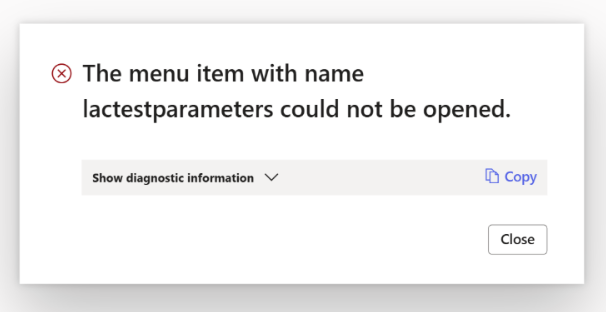
If the Data Explorer model is not installed, you will see the following error when you open the Test and Performance Suite Parameters form.
Error
The menu item with name lactestparameters could not be opened.
Add the AOT package
Either through LCS - Apply a deployable package to an environment
Or by installing a deployable package – Requires RDP access to the environment
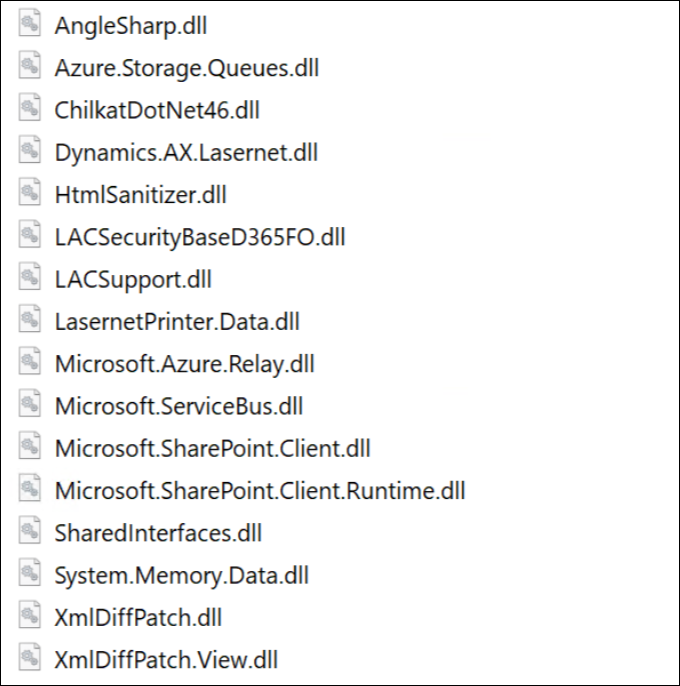
Ensure the following DLL files (new in Lasernet FO Connector 7.2) have been added to TFS if you are not just installing/deploying the AOT package:
Azure.Storage.Queues.dll
ChilkatDotNet46.dll
System.Memory.Data.dll
The following is the complete list of DLLs from the Lasernet model that are not automatically added:
The version number should contain the number 7.3 after either installing or deploying the AOT package.
Lasernet > Setup > Parameters
.png)
If any files are missing, refer to Microsoft documentation.
Note
Different versions of Lasernet FO Connector are supported with different versions of Lasernet. A setup for each newer version of Lasernet is required for any new installation and when upgrading from an older version of Lasernet.
Prerequisite/Technical
Export the Lasernet FO Connector configuration, including all reports, to ensure data can be restored if needed.
It is possible to perform an in-place upgrade from a previous version as long as the previous version is relatively recent, such as Lasernet FO Connector 6.18.x.
How to Get Support
If you encounter difficulty using Lasernet FO Connector, contact Lasernet Support.