

Lasernet for Dynamics 365 Finance and Operations
Release version: 7.3
Release date: 29th June 2026
Introduction
This page describes the new features, fixes, and enhancements in Lasernet FO Connector 7.3.
The following documentation is available:
Warning
The Lasernet Connectors for Microsoft Dynamics 365 are currently not compatible with Lasernet Core 11. We are working towards launching these two products together, but until then, current customers and partners with the Dynamics 365 connectors should continue to use Lasernet Core 10.
New Features, Fixes, and Enhancements – Lasernet FO Connector 7.3
Lasernet FO Connector 7.3 is released for Dynamics 365 for Finance and Operations versions 10.0.46 (PU70), 10.0.47 (PU71), and 10.0.48 (PU72).
The same source code is used across all versions.
This is a quality update provided through the following new features, fixes, and enhancements in Lasernet FO Connector 7.3.
User Counting Method
In Lasernet FO Connector 7.3, Security Governance is available as an option to determine the number of users required for the connector’s license. This enables users to switch between the legacy user count and the Security Governance–based count. Using Security Governance typically reduces the number of users that need to be licensed.
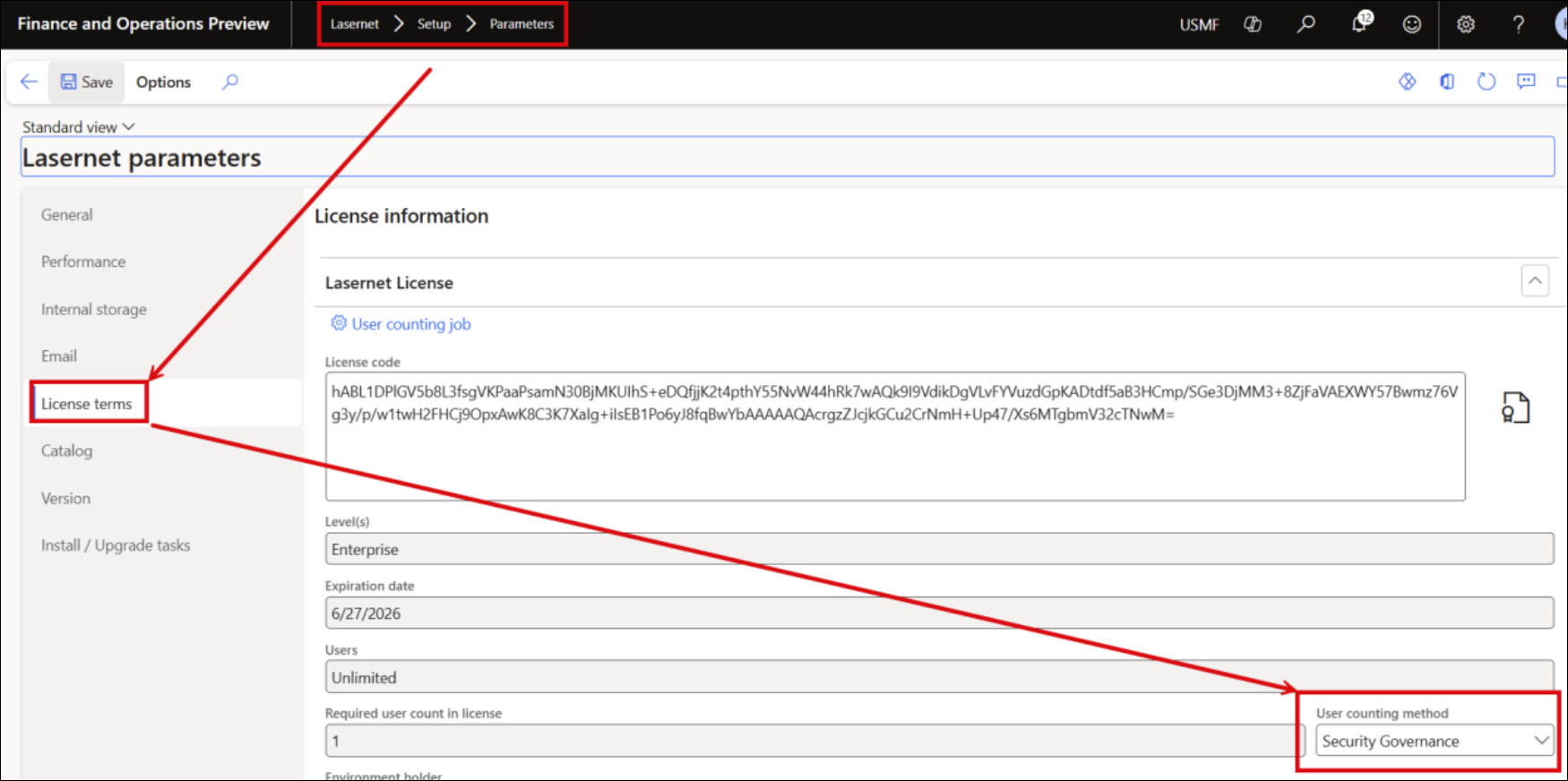
This option is only available within Microsoft-hosted (Service Fabric) environments. Therefore, it cannot be used in on-premises environments, local DEV boxes, or non-Microsoft-hosted (non–Service Fabric) environments.
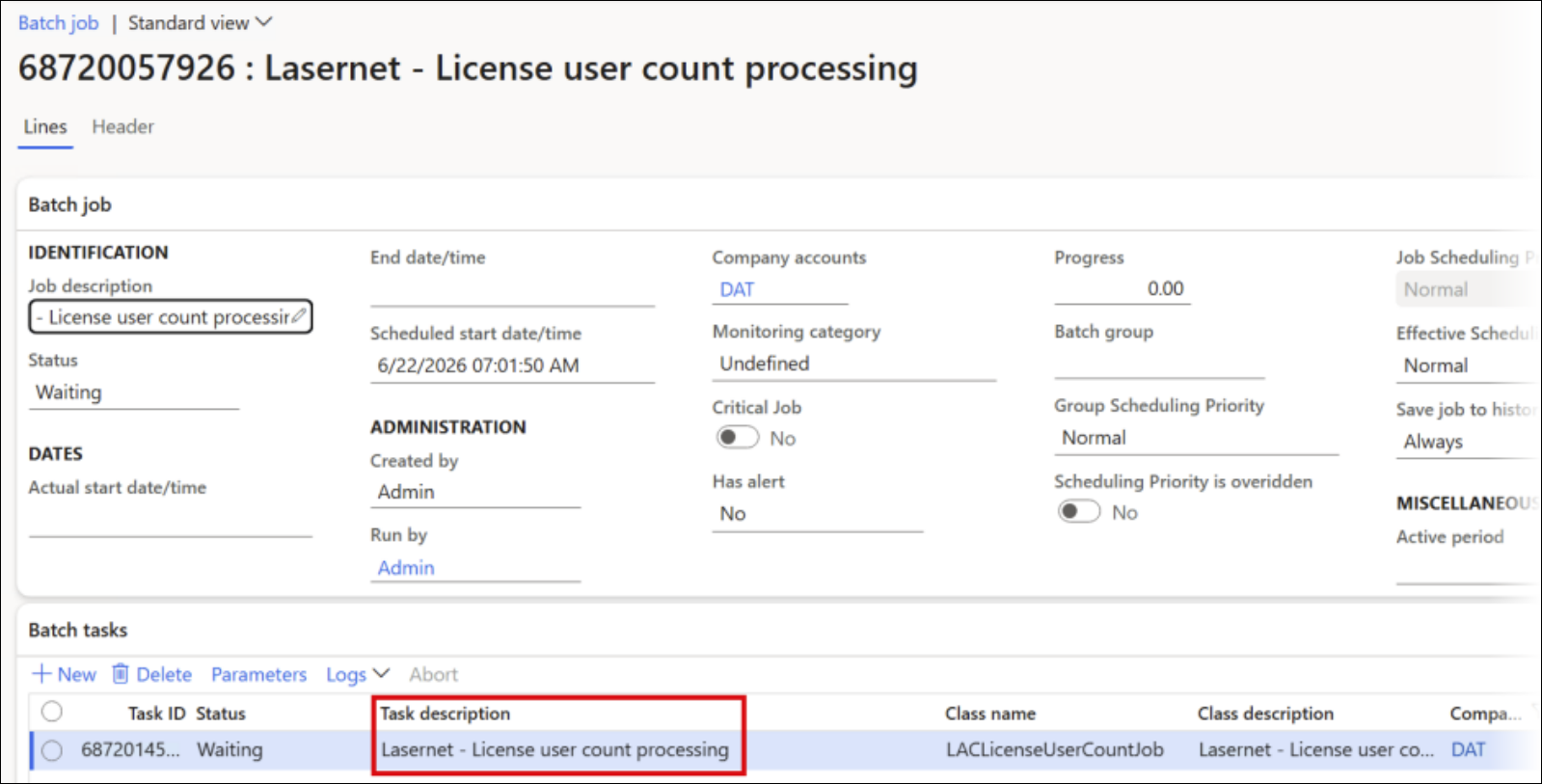
The Lasernet - License user count processing batch job is used:
How to see the number of base users in Power platform
View license consumption for finance and operations apps - Power Platform | Microsoft Learn
How to see the number of base users in Dynamics F&O.
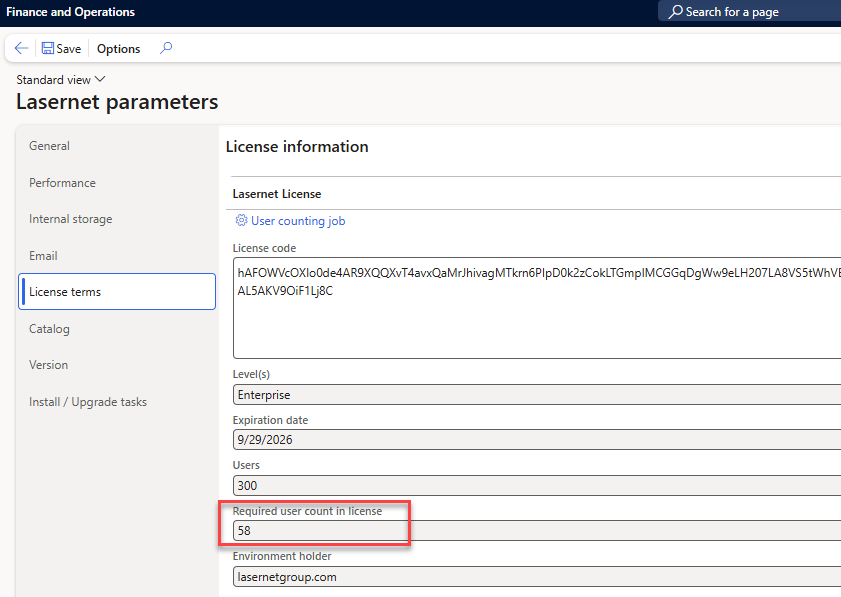
If customer have installed LAC they can find the number of required users in Lasernet parameters form, License terms, Required user count in license:
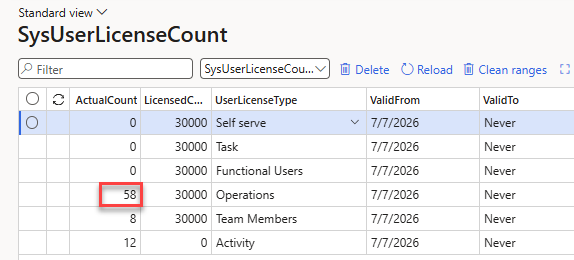
If not - they can find the number of Operations users from table browser from SysUserLicenseCount table generated by “Named user license count reports processing” batch job.
Go to Predefined Destination
An option to jump directly to the report’s destination is now available. It is used by right-clicking anywhere in the XML file and selecting Go to Predefined Destinations. This is useful for checking and identifying which destination is used, especially when several rules are configured.
This option is only available when a predefined destination was used, and a matching destination is found, as indicated by the presence of a value in the PreDefinedDestination node.
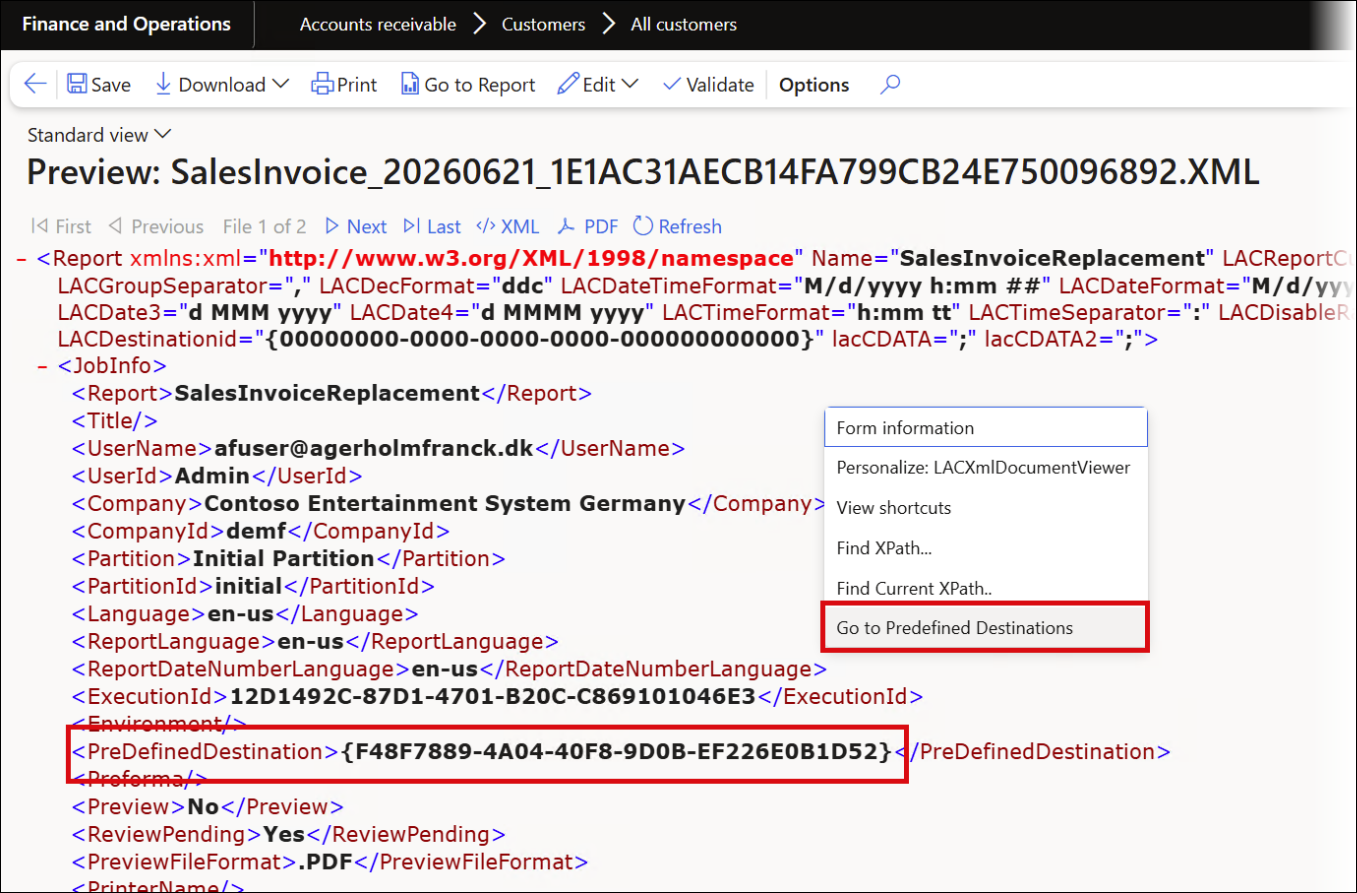
The system jumps directly to the destination that was used for the document:
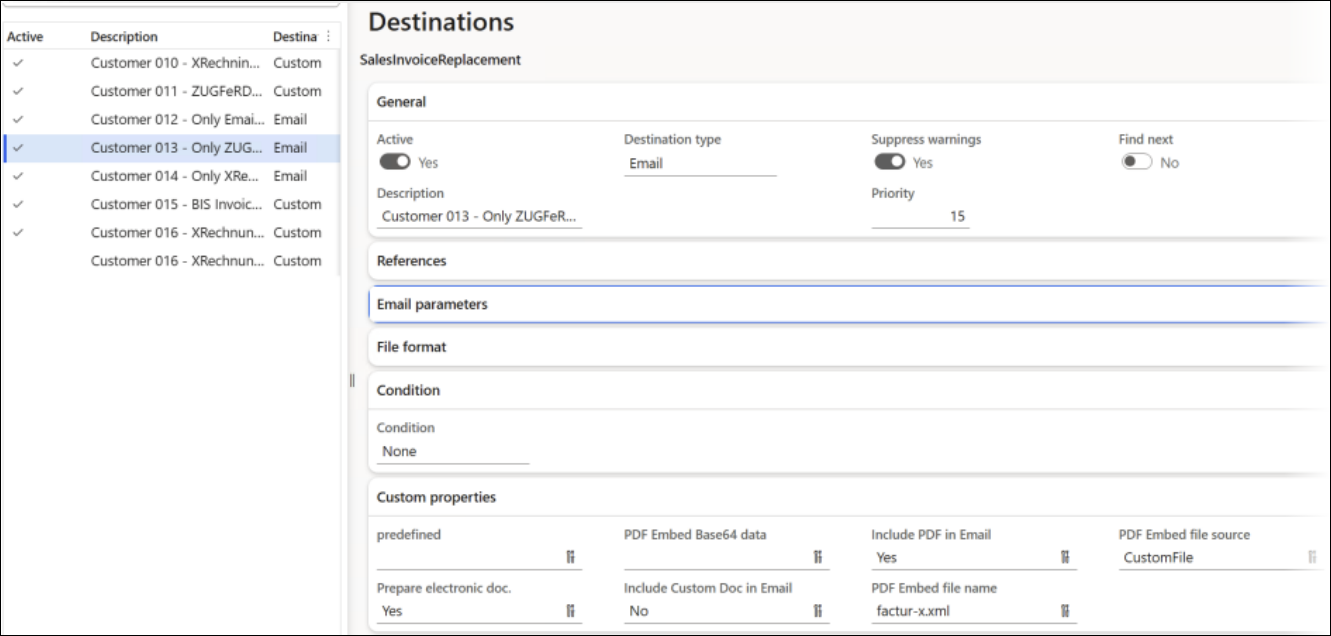
Download and Preview Embedded Document
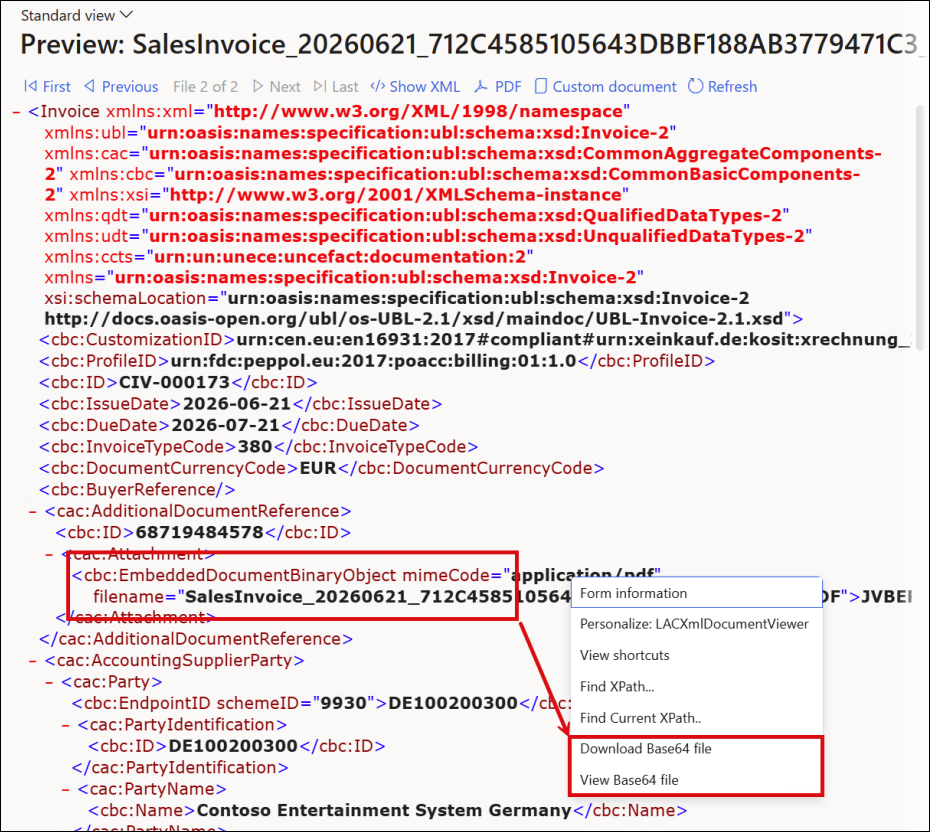
An option is now available to download or view the embedded document within an e-document by right-clicking its attachment:
Lasernet Embedded – Send Emails Instantly
An option has been introduced for Lasernet Embedded to send emails directly after processing a report by toggling the Send instantly button to Yes.
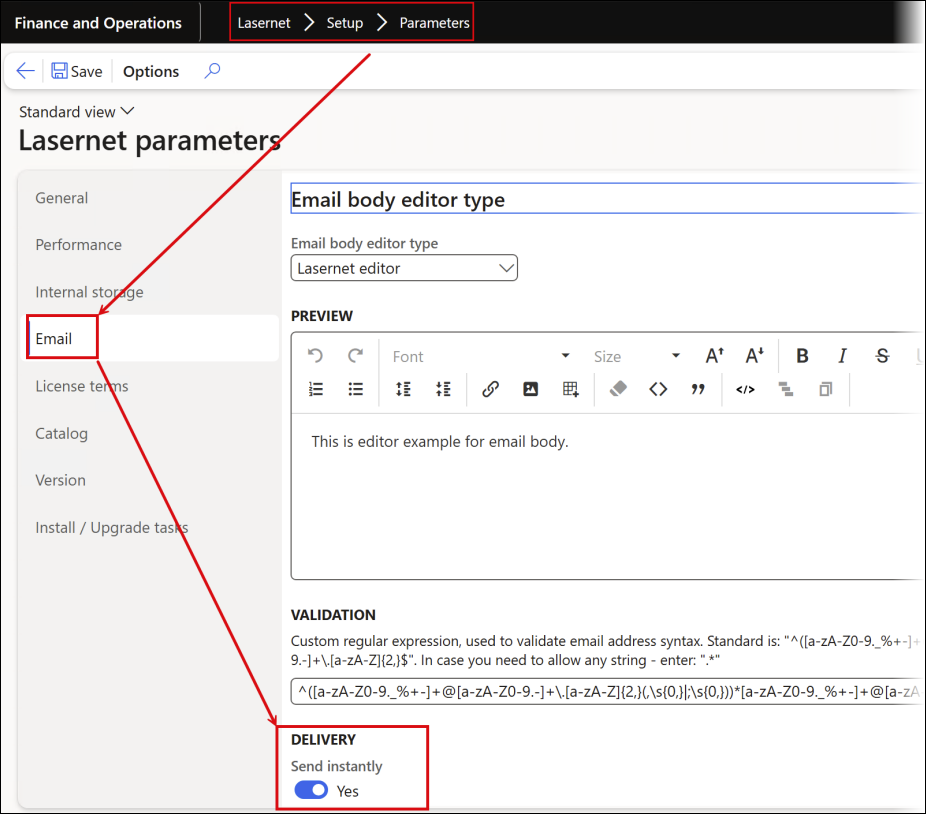
This is a useful feature for real-world scenarios as well as demonstrations, particularly when showcasing the Tracking module and report emailing.
Tracking
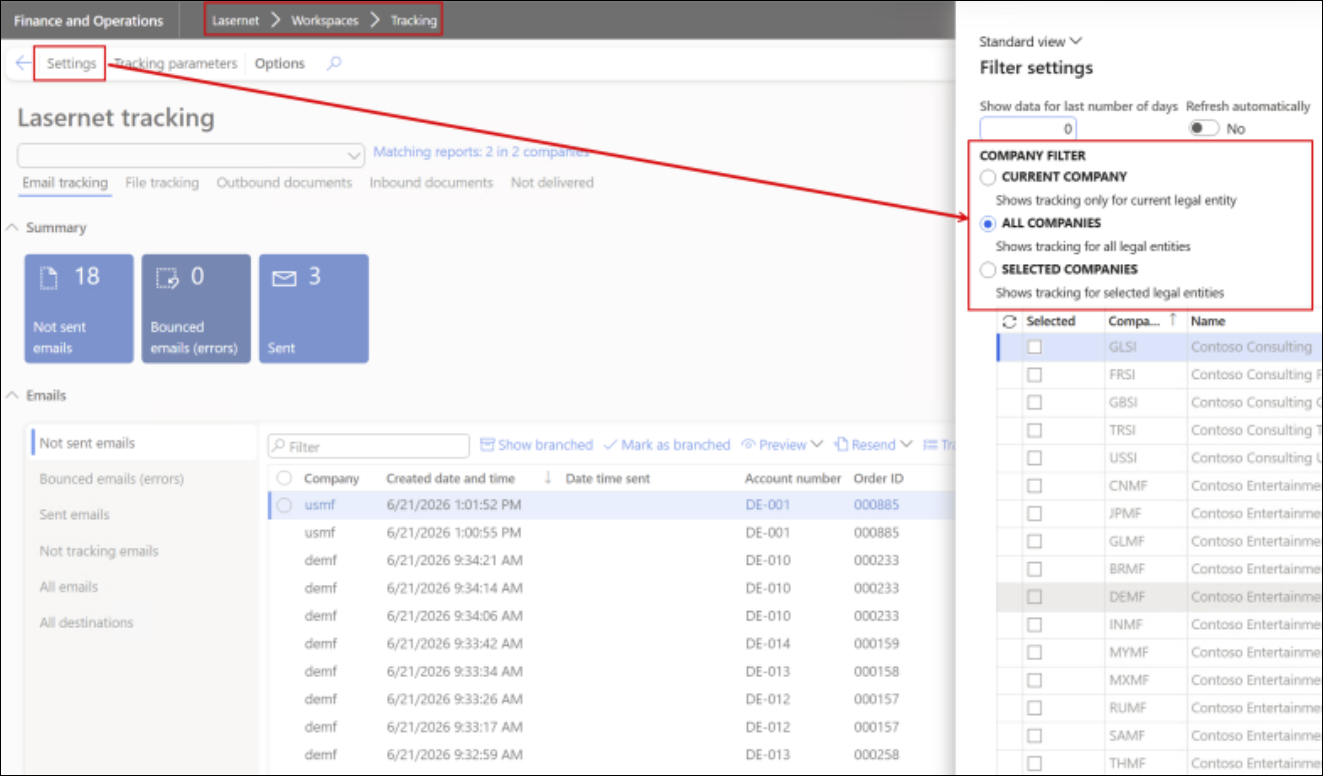
Email tracking works with both the Lasernet Server and Lasernet Embedded.
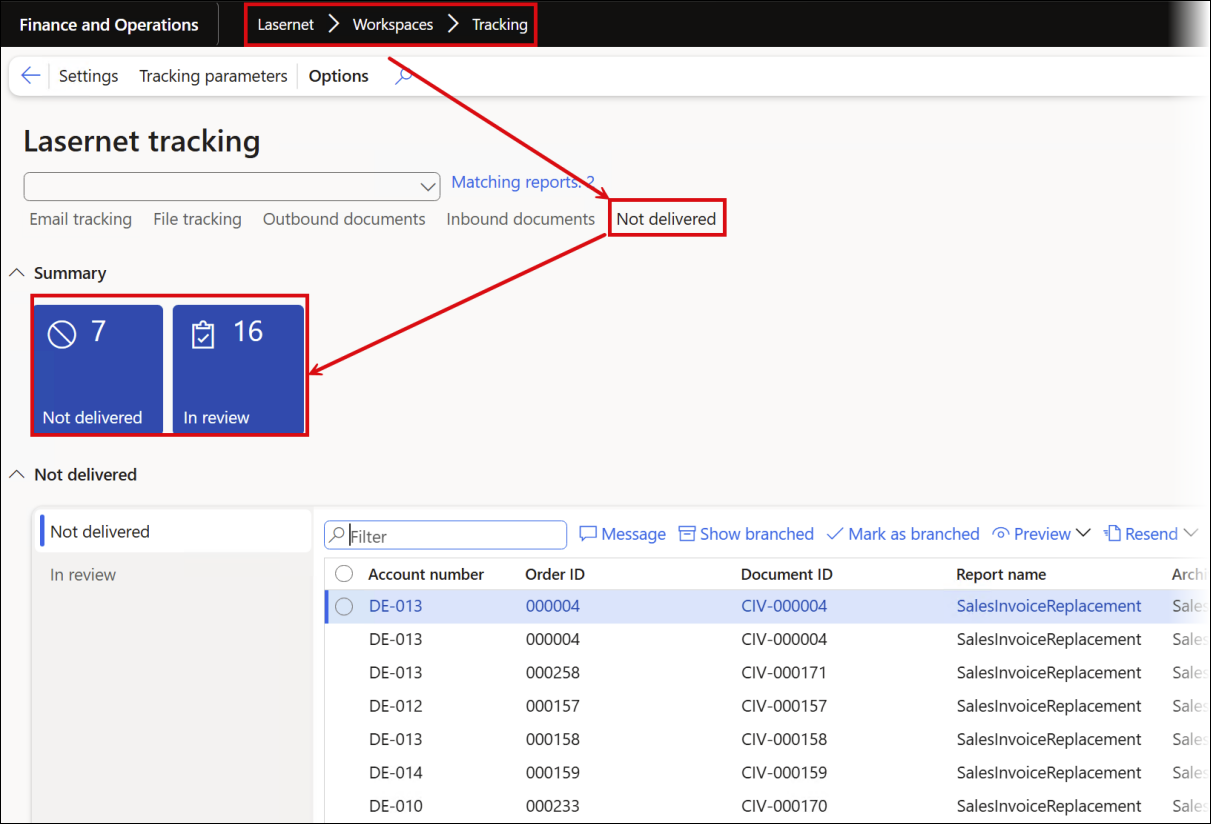
Tracking of inbound, undelivered, and in-review documents is now included in the Tracking module. E-documents such as e-invoices appear in the Not delivered section when validation is enabled for the report, and the e-document contains validation errors.
Enabling validation for e-documents is recommended, as it prevents documents from being sent if any validation issues are detected. It is also a cost-saving feature if costs are calculated per transaction.
Reuse of a Configuration Across Legal Entities
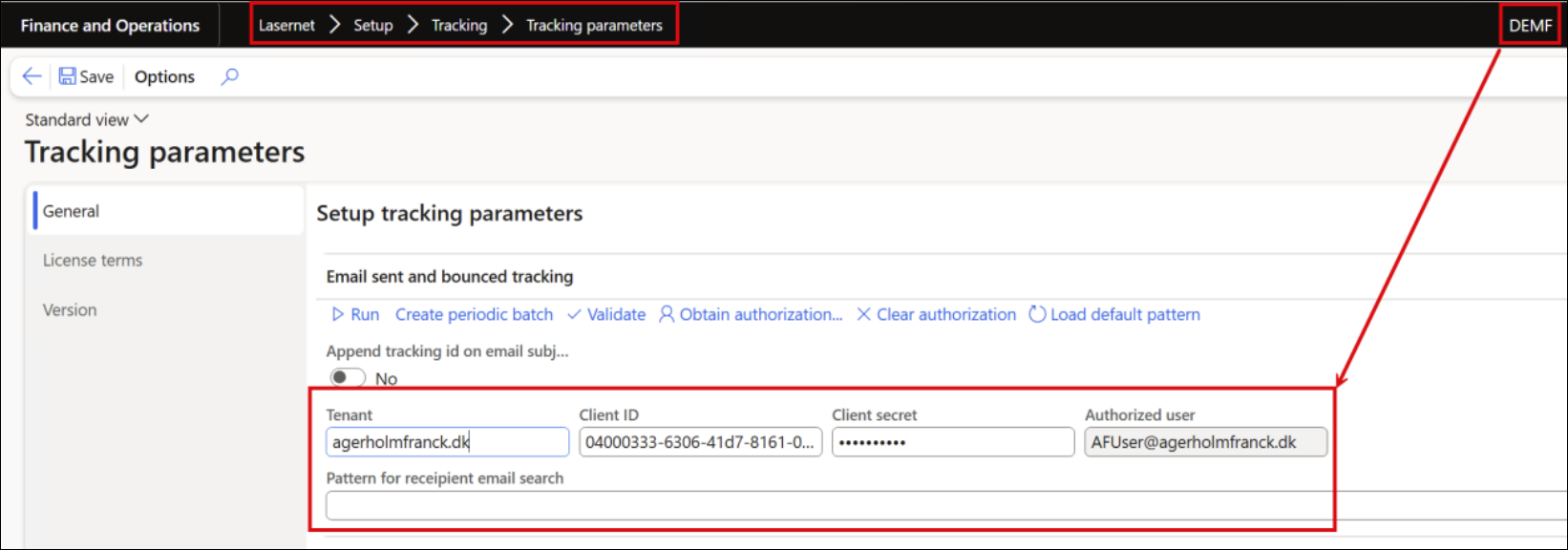
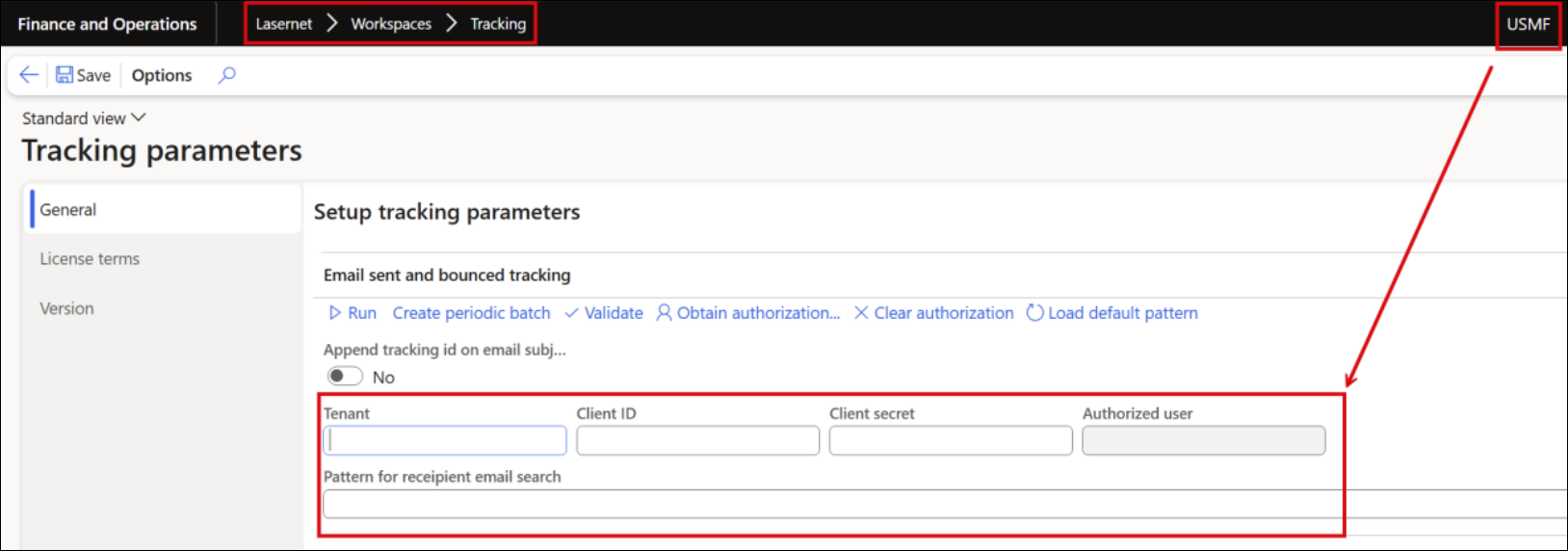
In Lasernet FO Connector 7.3, it is sufficient to configure Tracking for one legal entity if other companies use the same sender email.
In the following example, Tracking is configured only for the legal entity DEMF:
The Tracking feature is enabled for any other legal entities that use the same sender email:
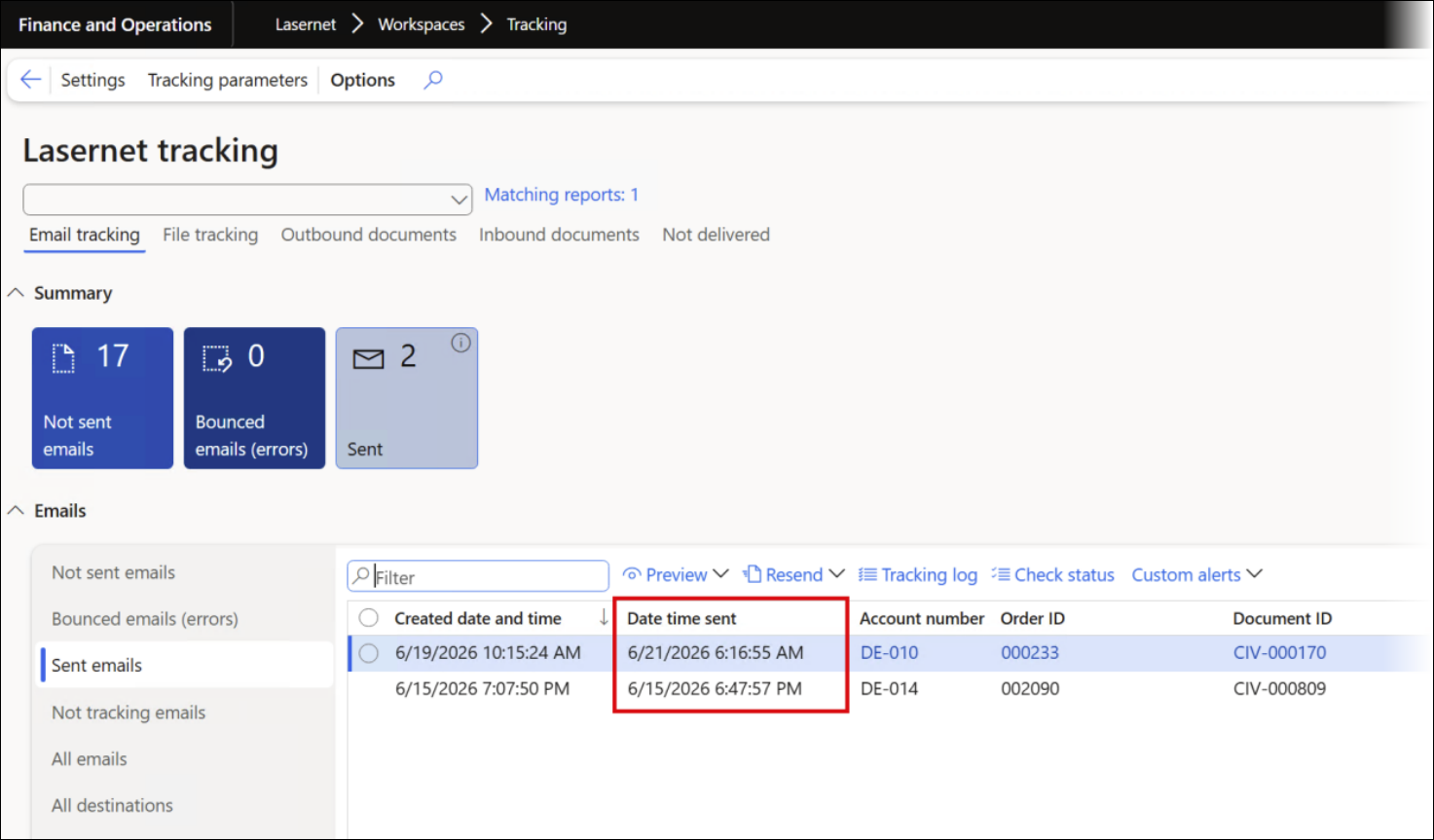
The Date time sent field is now included as well. This field is useful for verifying the exact distribution date and is particularly helpful when using the Lasernet client, where document distribution may occasionally be delayed, for instance, while waiting for a Bill of Lading (B/L).
It is also useful to include documents such as the Conditions for Sales and Delivery (PDF) within the main document or as an attachment to ensure proper documentation in the event of a dispute.
Ensure that the following settings are configured in the Outlook Mail module of Lasernet when using the Lasernet Server:
In the Properties tab, select the Save copy in Sent Item folder checkbox.
In the Headers tab, add a header with the name X-DAZTRTrackingId and value #EmailTrackingId#.
It is possible to manage multiple companies from one single legal entity.
Lasernet Embedded works out of the box with no setup required.
Test and Performance Suite
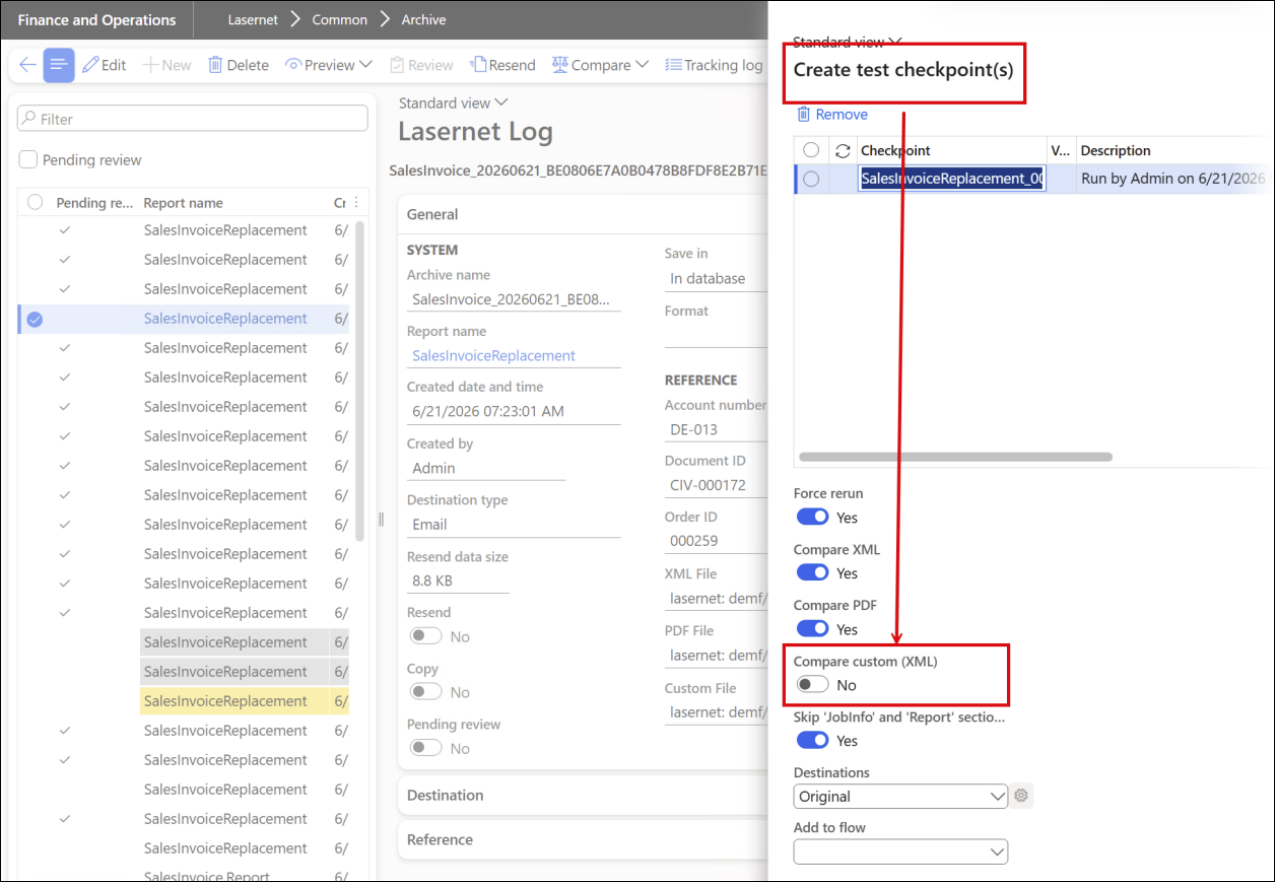
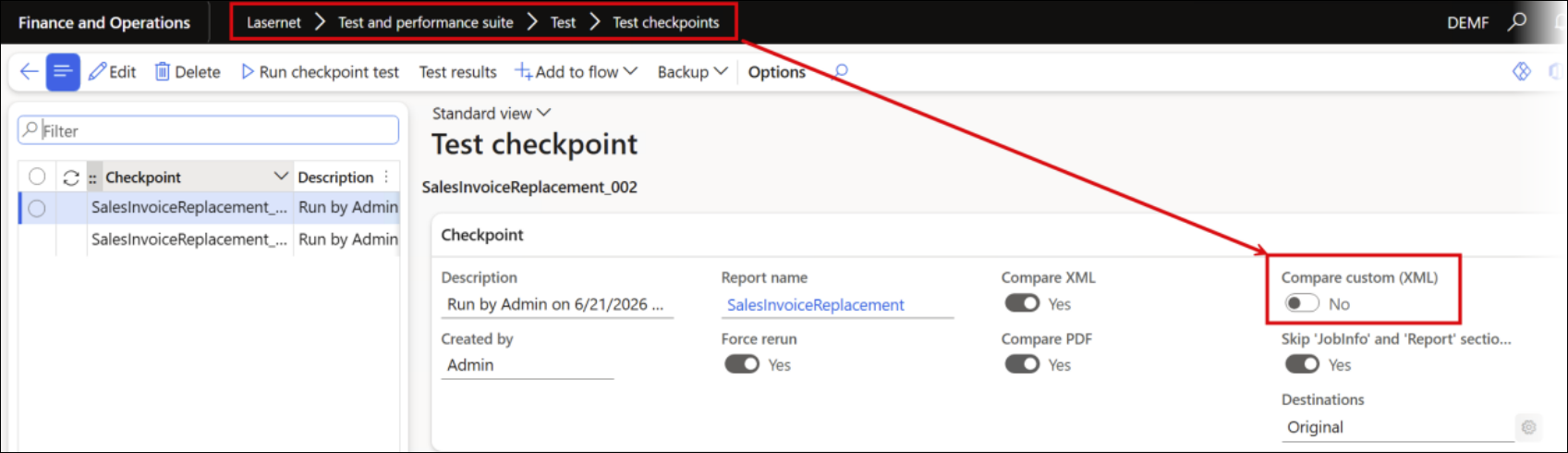
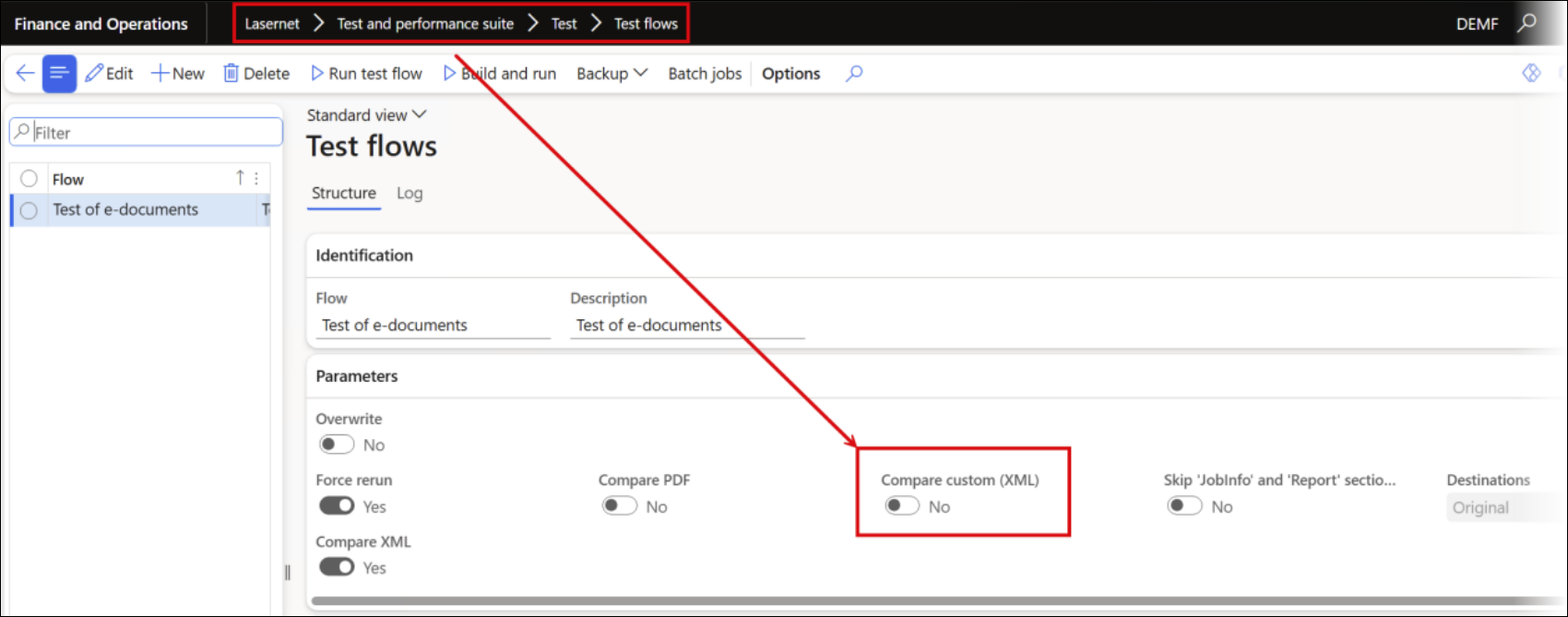
The Compare custom (XML) option introduced in Lasernet FO Connector 7.3 enables the use of e-documents (custom format) as checkpoints. This helps ensure stability.
When creating checkpoints from the Lasernet Archive:
From the Test checkpoints form:
From the Test flows form:
It is also possible to use e-document validation at checkpoints to ensure stability. This enables validation to run after the e-document has been updated, such as after a new Microsoft or Lasernet update is installed.
This uses the same validation process as in a preview and at the report level to hold back distribution.
Build and Run
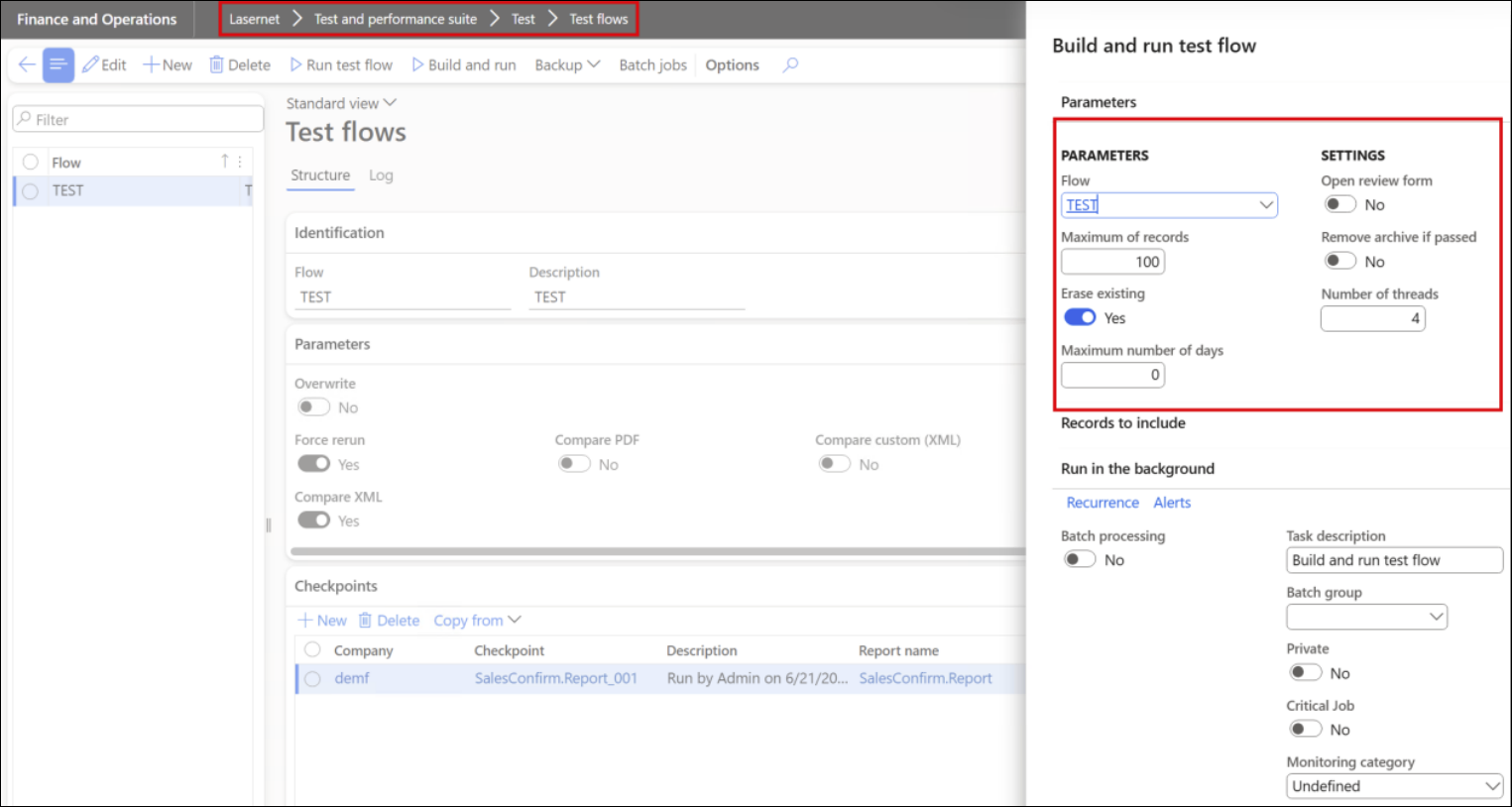
A new option has been introduced to the Test Flow Build and run feature that does not require checkpoints. It enables the system to automatically re-run multiple documents and compare them (PDF, XML, and e-documents).
Automation (Playback in Context From a Button)
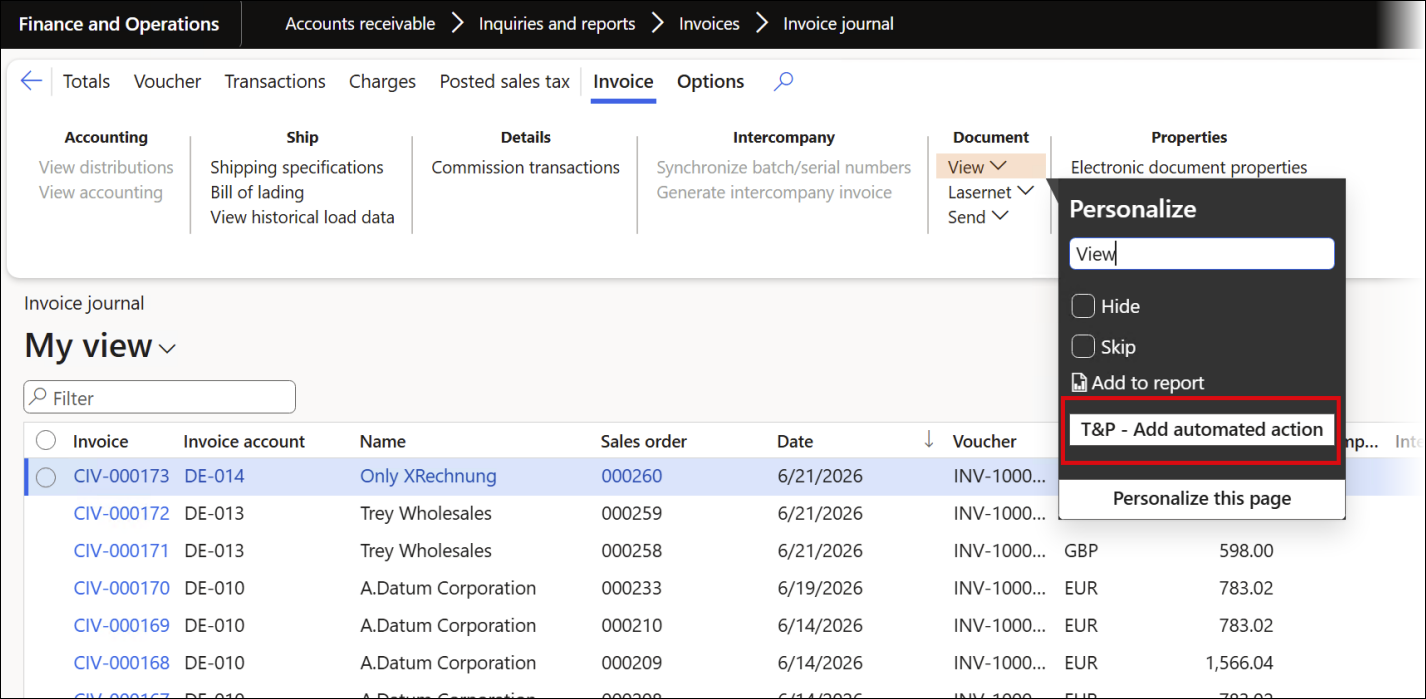
Using a recording as playback from a button minimizes the number of tasks for the user and enables the playback to use information (table/fields) from the current context. Another advantage of this approach, available in Lasernet FO Connector 7.3, is that it returns the user to the same context (form) from which the playback was triggered.
E-documents
The electronic documents module includes several menus. Among them are the Outbound documents menu, which contains logs for outbound documents (for instance, customer invoices), and the Inbound documents menu, which contains logs for inbound documents (for instance, vendor invoices).
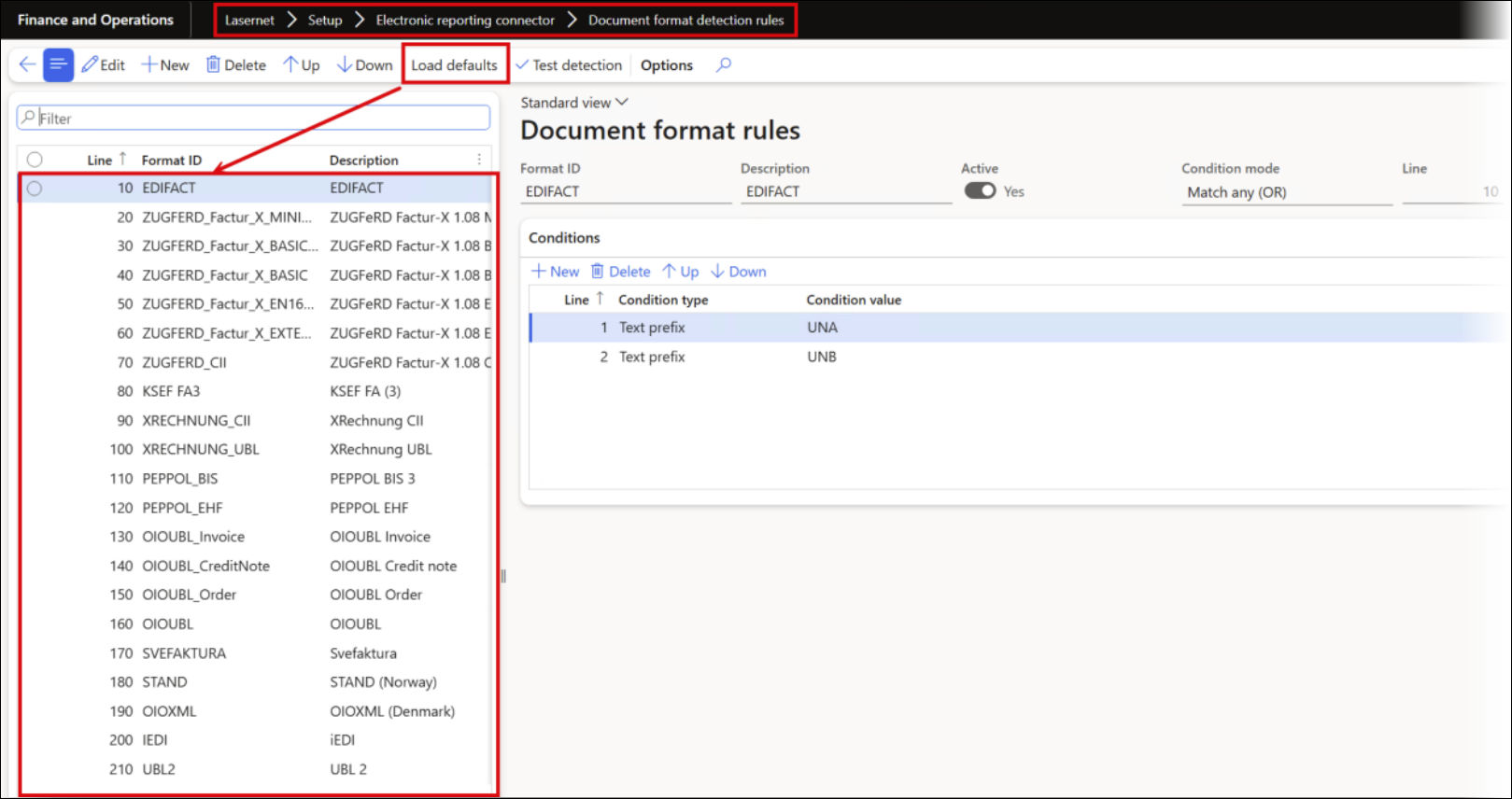
Document format detection rules and XML validation rules must be configured to validate invoices.
Journal validation enables pre-validation and can stop invoice posting if the required information is missing.
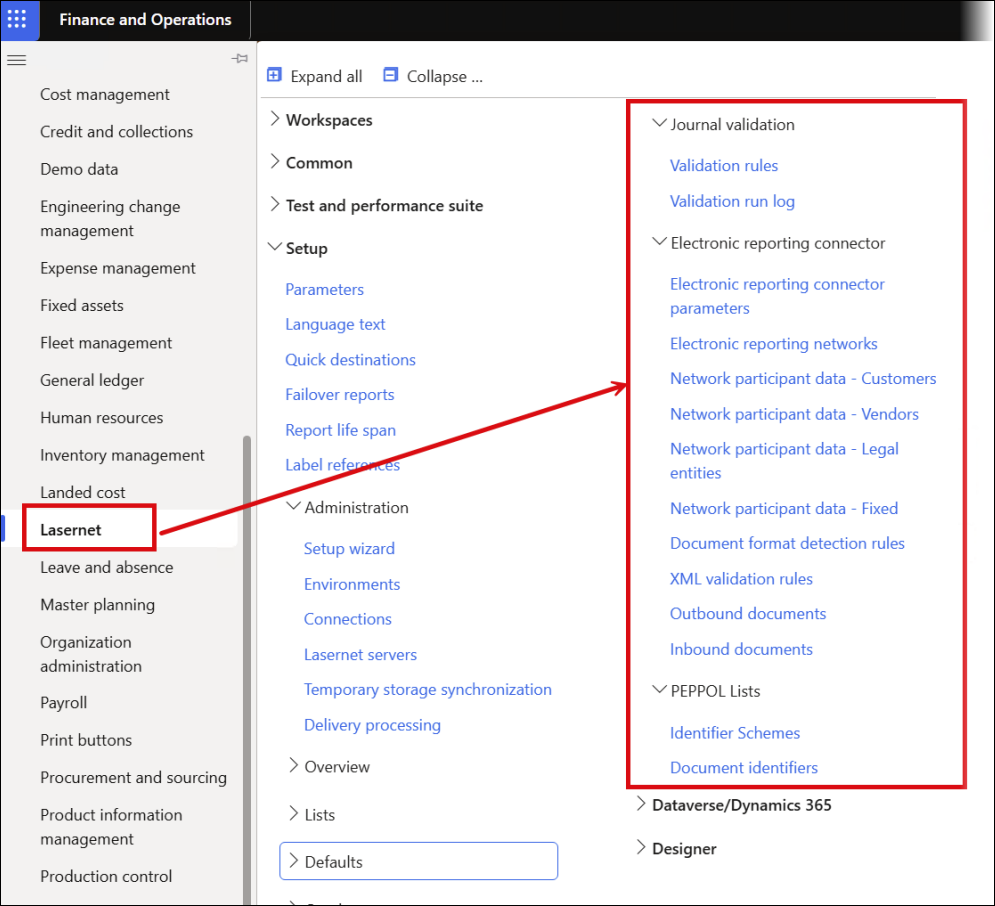
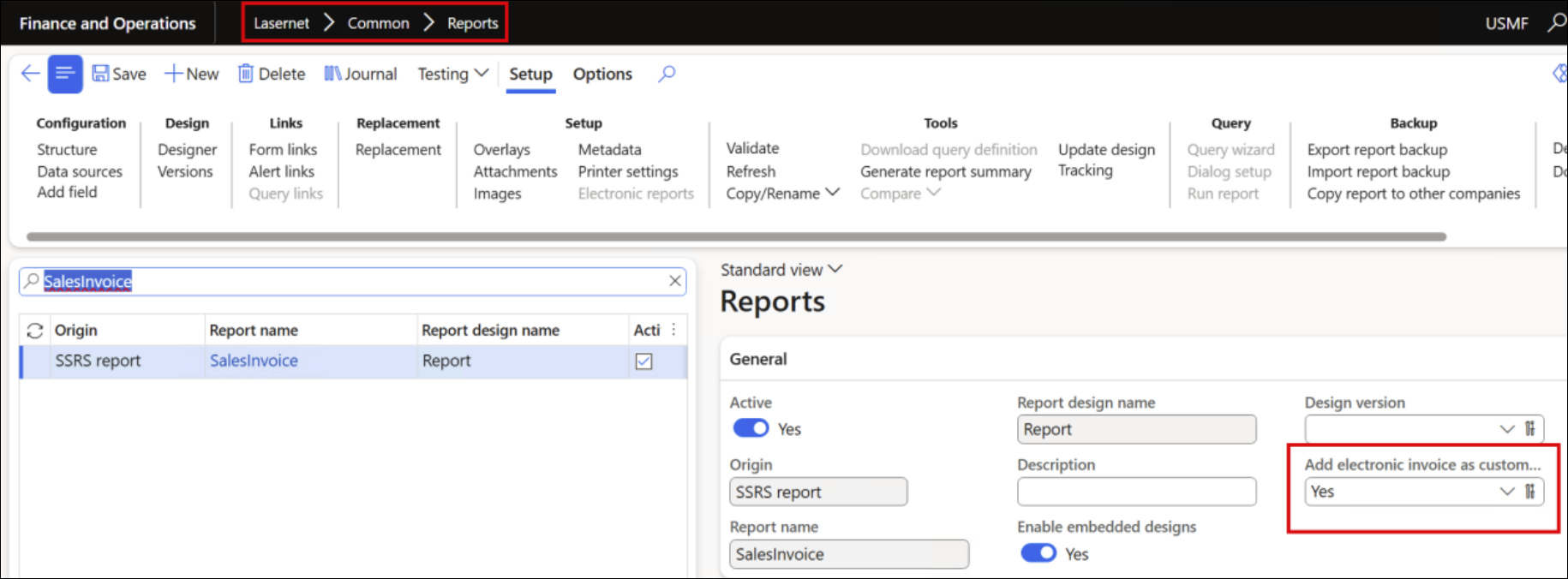
Enabling the rendering of e-invoices (Sales, Free Text, and Project Invoices) is plug-and-play using the option highlighted in the screenshot below. The e-invoice format must be enabled in FinOps, but this can be done easily using standard FinOps functionality.
Once enabled, users can either embed the Lasernet (or SSRS) document into the e-invoice or attach the e-invoice to the Lasernet (or SSRS) report.
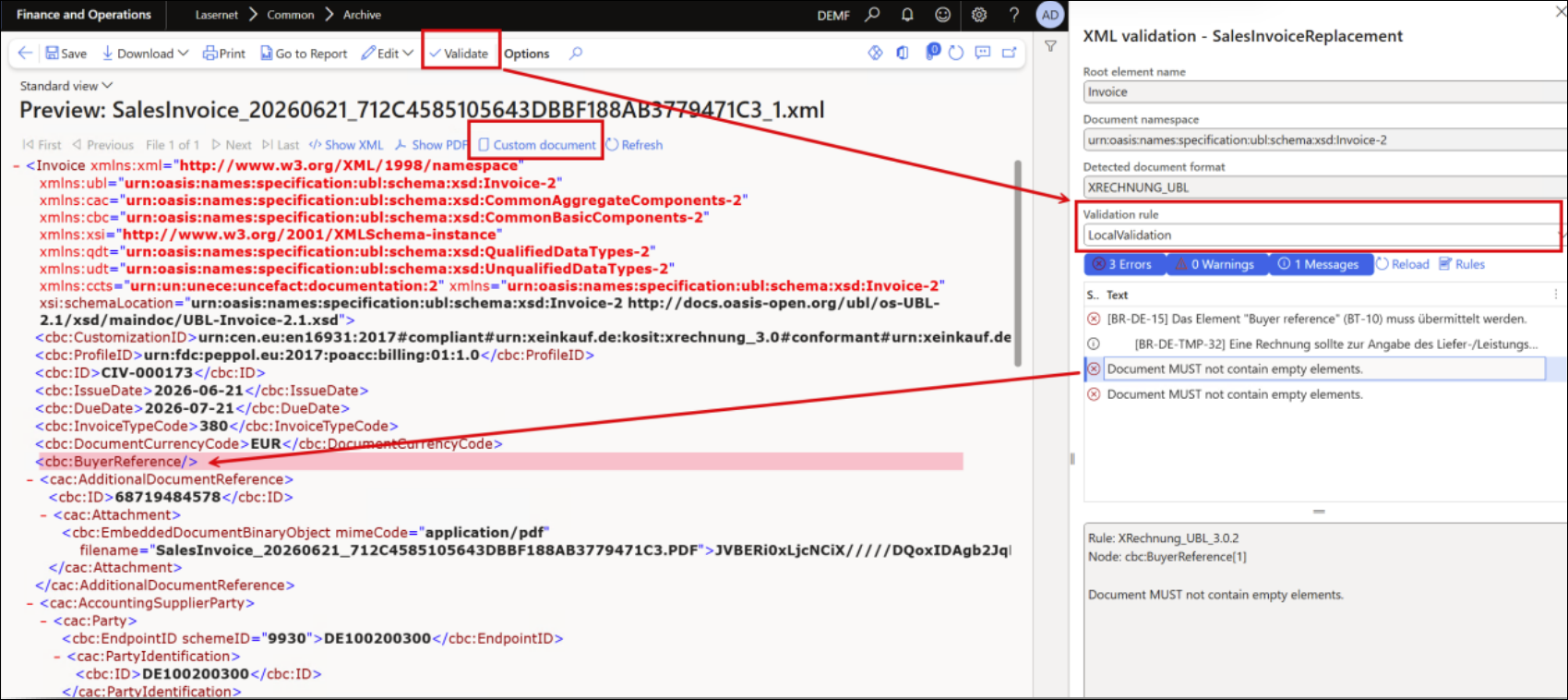
Validation
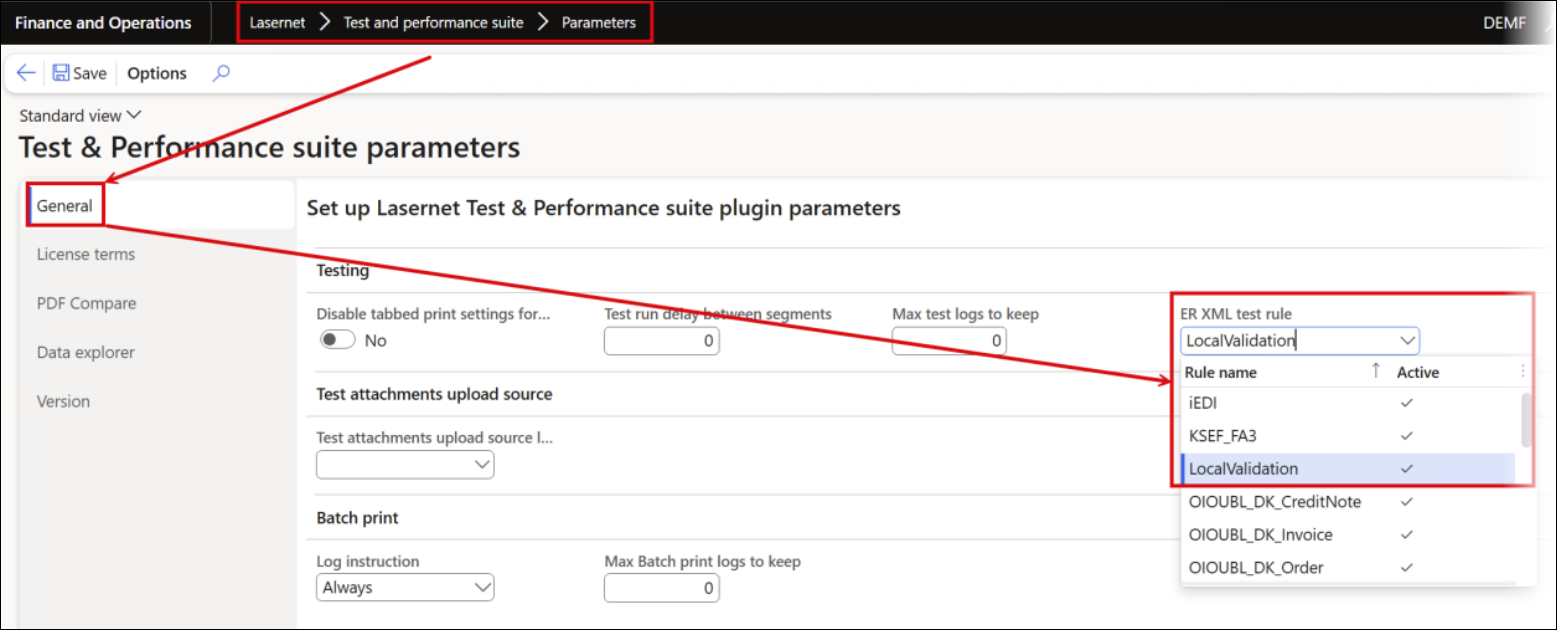
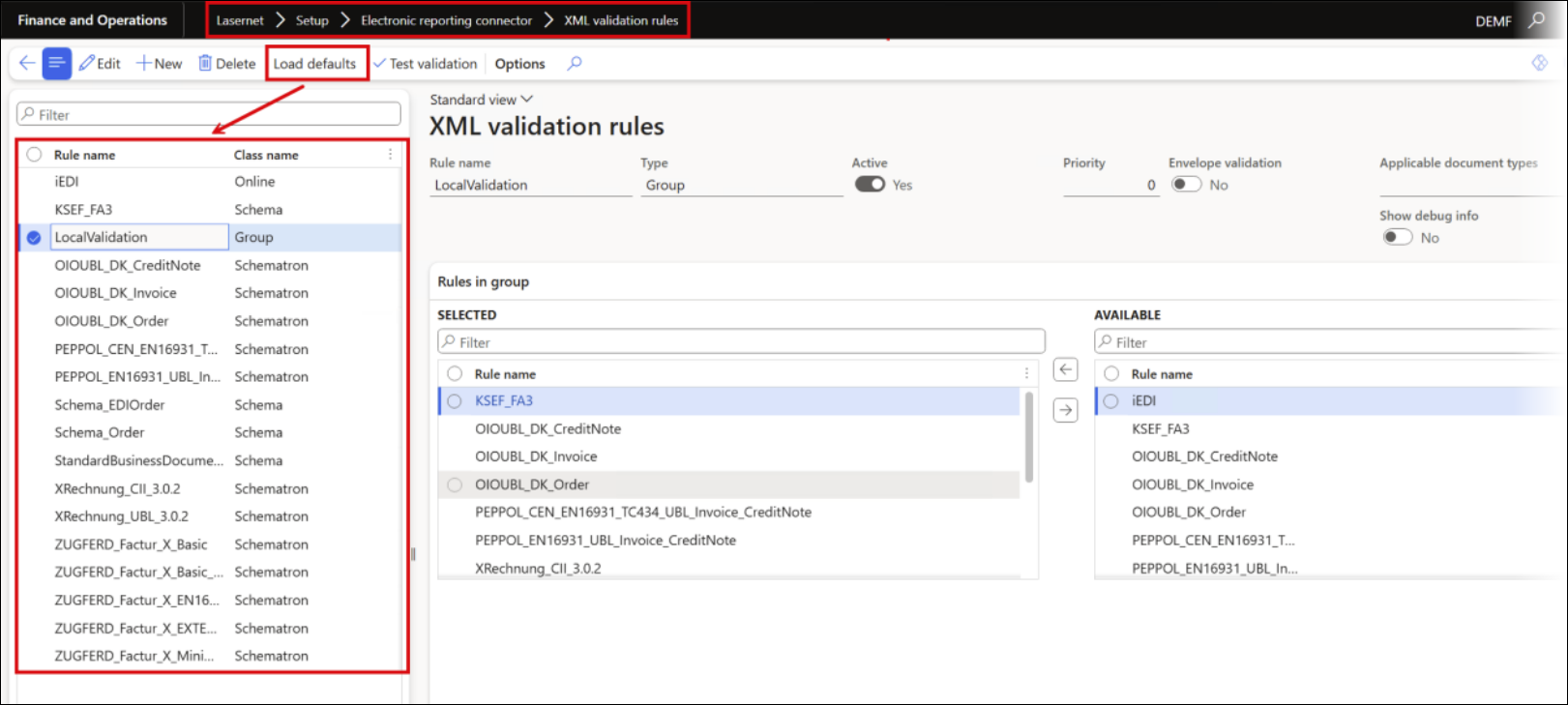
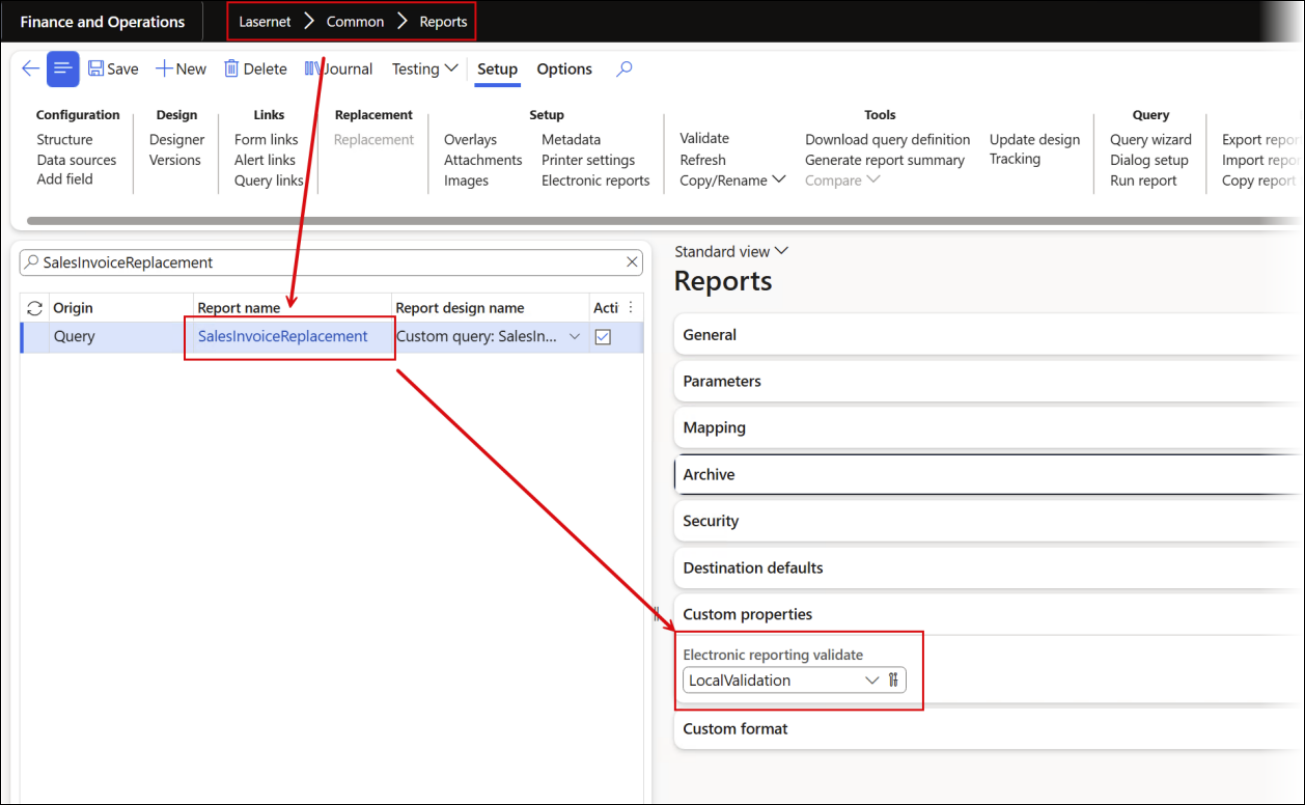
It is also possible to combine local and online e-document validation within the same rule set. LocalValidation detects and validates documents without requiring a specific provider or broker, enabling users to continue using an existing provider or broker alongside LocalValidation:
Configure Document format detection rules by using Load defaults first:
Then, use Load defaults in the XML validation rules:
At this point, local validation can be performed in review or as part of a custom property, either via a button, Predefined destinations, or directly at the report level.
Journal Validation
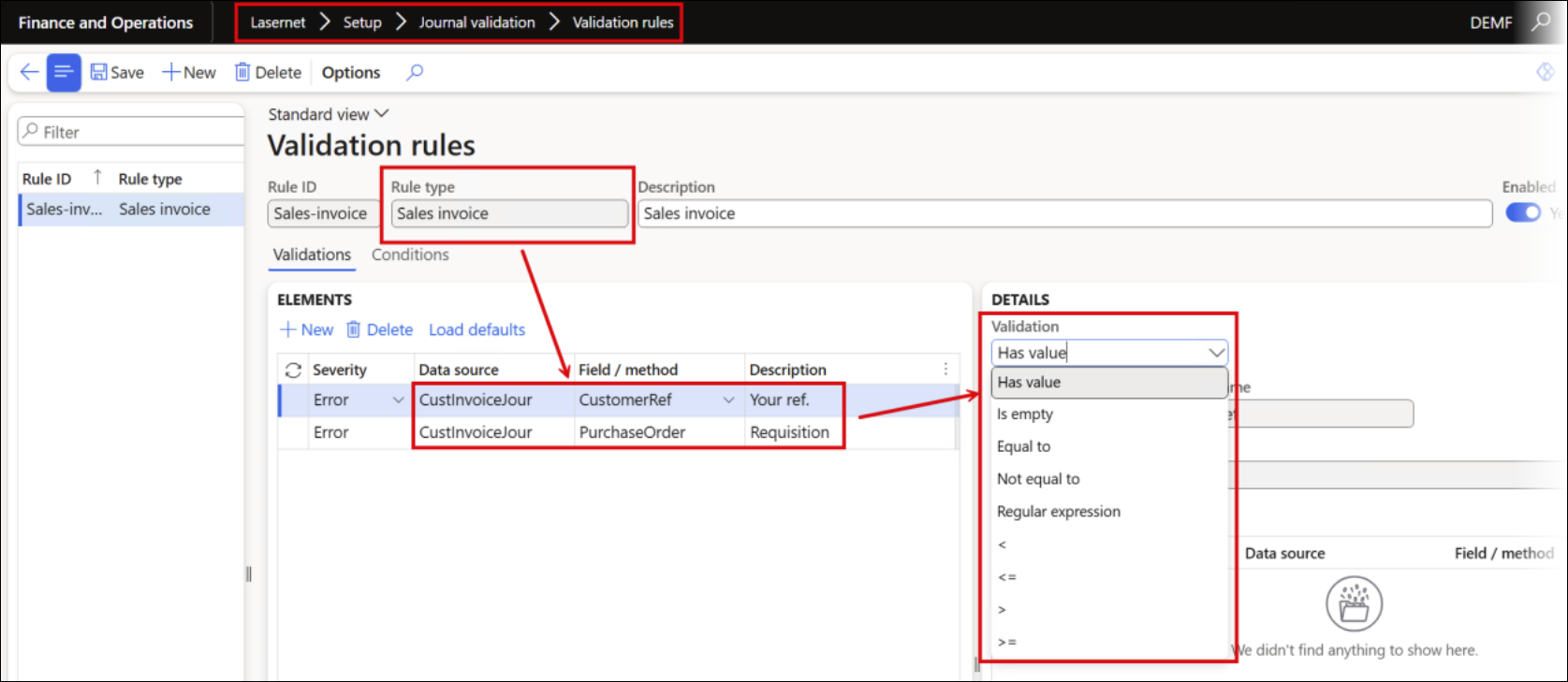
A new option has been introduced to validate missing data and prevent the posting of Sales, Free Text, and Project Invoices. This ensures that all required information is completed before posting and is particularly important for e-invoicing, where legal requirements apply.
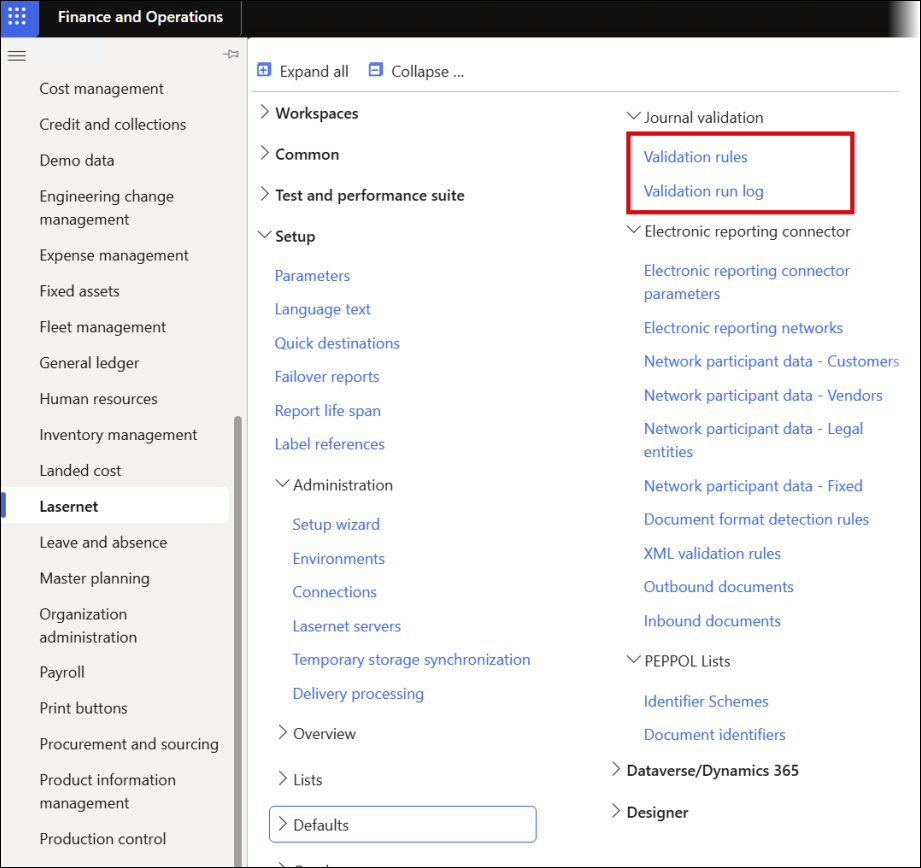
In the Validation rules form, it is possible to specify different validation types, as well as the Rule type applicable to Sales, Free Text, and Project Invoices.
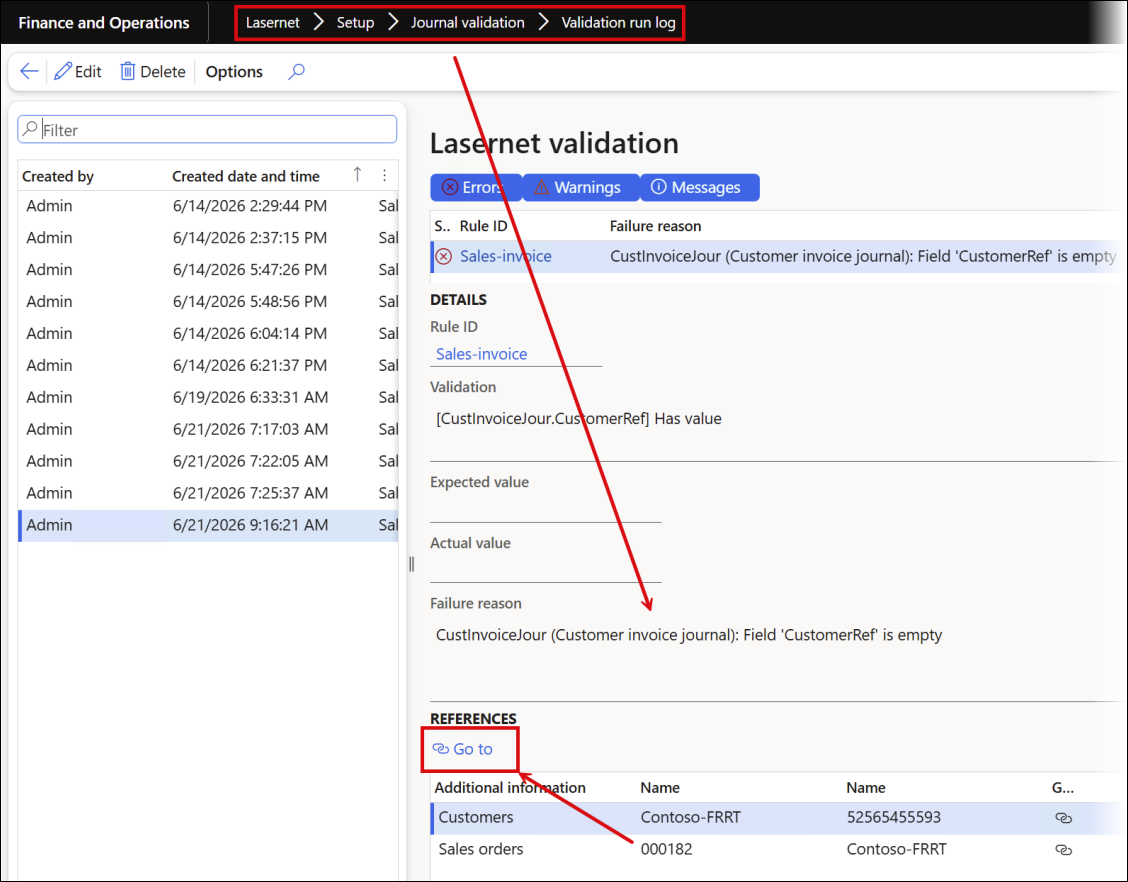
The Validation run log enables users to identify issues, navigate directly to the relevant sales order or project, and fix the issues. This is especially useful when posting documents using a batch task.
Document Handling
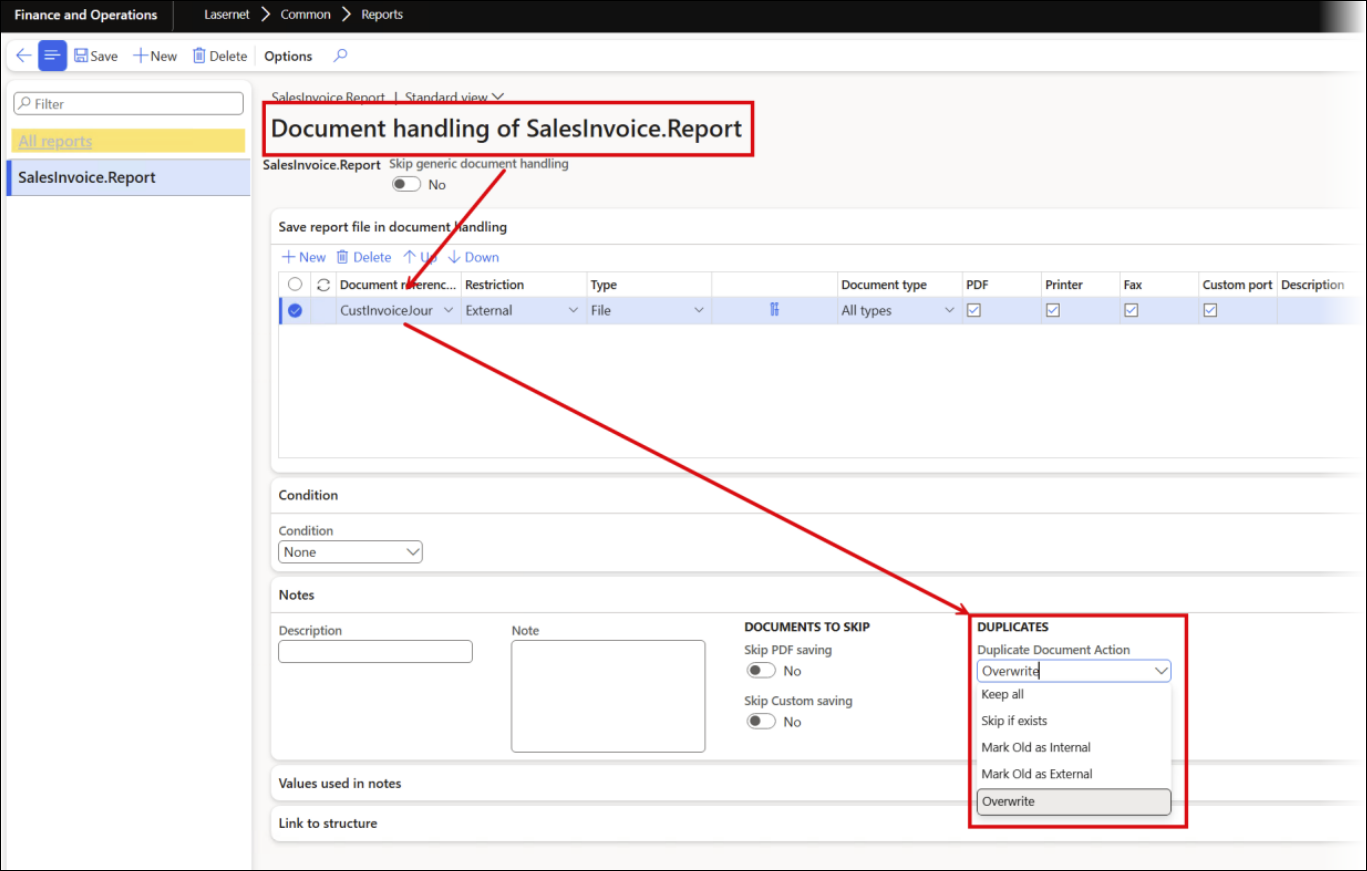
Enabling Document Handling for CustInvoiceJour or ProjInvoiceJour ensures that the SSRS or Lasernet report (PDF) is embedded in the e-invoice.
All the attachments of an invoice journal (Free Text, Sales, or Project) with an External restriction are included, enabling multiple attachments per e-invoice.
To handle duplicates, Overwrite can be used to keep only the latest PDF attachment. Alternatively, Skip if exists preserves the original document, while Mark Old as internal retains history and ensures only the newest document is added to the e-invoice.
Custom Properties
Custom properties can be used to define e-document formats, enable validation, and specify whether email attachments should include a PDF or an e-document (without validation).
They can also be used to attach additional documents, such as Conditions for Sales and Delivery (PDF), to an existing report with the option to add multiple attachments to the same Lasernet report.
All configurations are applied automatically when selected from the Functional properties catalog:
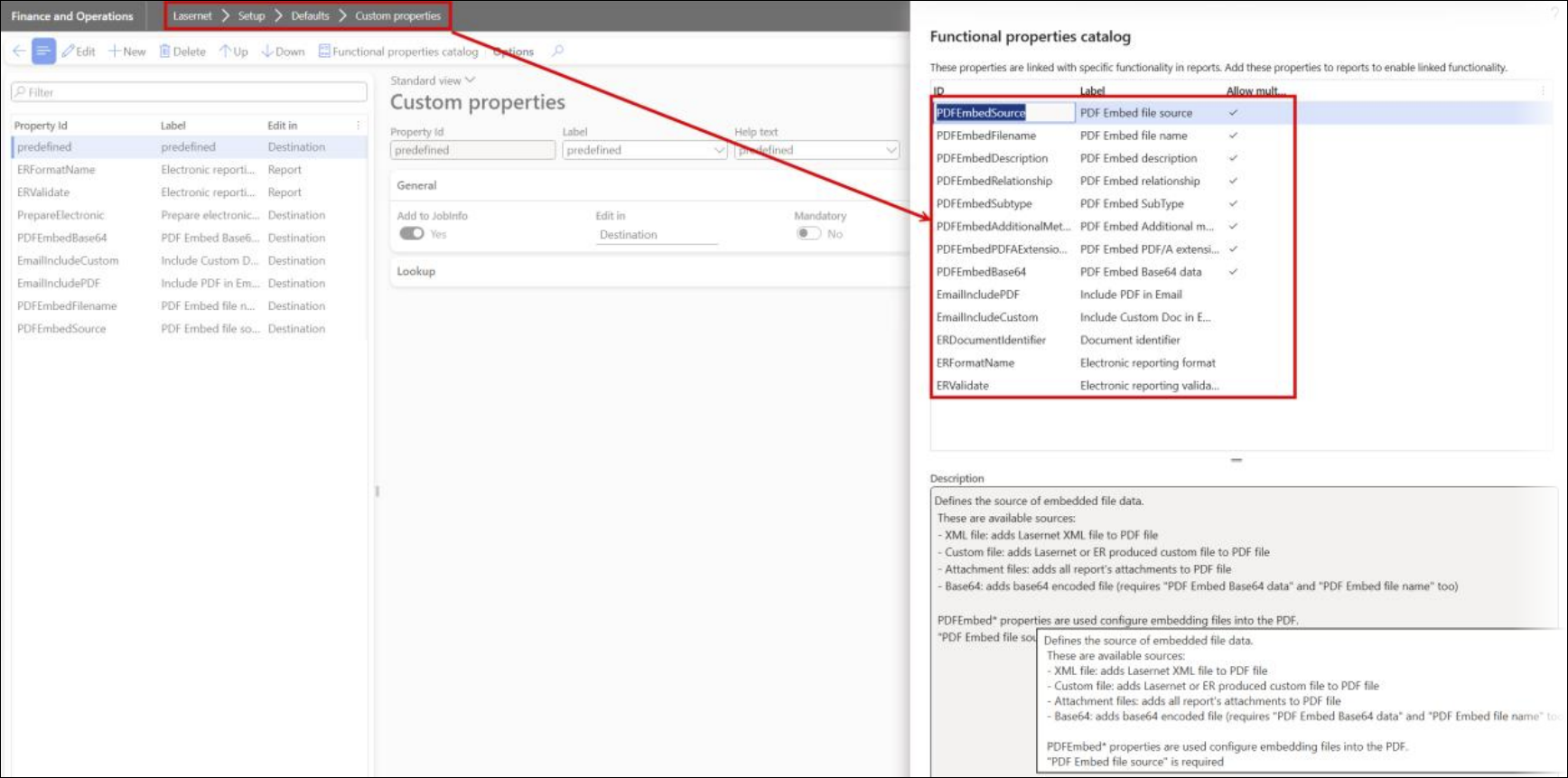
Functional property | Description |
|---|---|
PDFEmbedSource | Defines the source of embedded file data. The available sources are:
PDFEmbed* properties are used to configure and embed files into a PDF. PDFEmbedSource is required for all of them. |
PDFEmbedFilename | Defines the file name for the embedded file. It replaces default file names for the source XML and custom file. |
PDFEmbedDescription | Defines the file description for the embedded file. |
PDFEmbedRelationship | Defines the embedded file relationship with the PDF document: Alternative, Supplement, or Schema. |
PDFEmbedSubtype | Defines the file MIME type (application/xml, text/xml, etc.) for the embedded file. |
PDFEmbedAdditionalMetadataElement | Defines the behind-the-scenes information about the embedded file, its purpose, and its origin. |
PDFEmbedPDFAExtensionSchema | Defines the XML schema for the embedded file. It should be used in a second embedded file where Relationship=Schema. |
PDFEmbedBase64 | Defines Base64-encoded data for the embedded file. It should be used in connection with PDFEmbedSource=Base64. |
EmailIncludePDF | Determines if the PDF is sent as an email attachment. If left empty, the PDF is included by default. |
EmailIncludeCustom | Determines if the custom document is sent as an email attachment. If left empty, the document is included by default. |
ERDocumentIdentifier | Used for early destination validation of supported documents. It is used instead of the document identifier from the electronic document, which is not yet ready when generating destinations. Document identifiers are loaded from the XML file that can be updated using PEPPOL document lists. |
ERFormatName | Determines the format used for electronic reporting. This overwrites the Electronic reporting parameter format setting in the Account receivables and Account payables modules. |
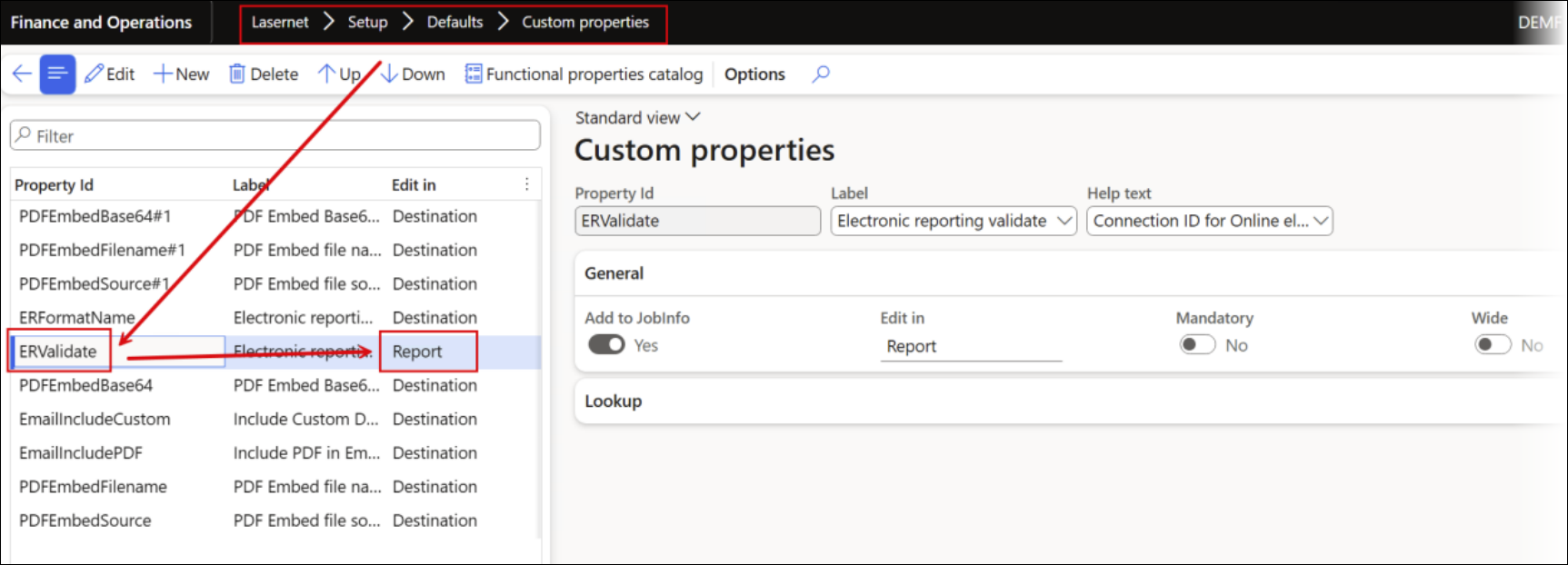
ERValidate | Connection ID for online electronic report validation. It validates Electronic Reporting documents prior to delivery. If validation fails, the document is not sent. Archive and Document Handling records are still created where applicable. This impacts performance, as online communication and validation are synchronous, and adds time to each run.
|
Custom properties enable the use of different electronic documents for each customer by setting the Edit in field to Destination. They also enable users to specify whether a PDF, an XML file, both, or neither should be included in an email, and provide a simple way to embed files into a PDF.
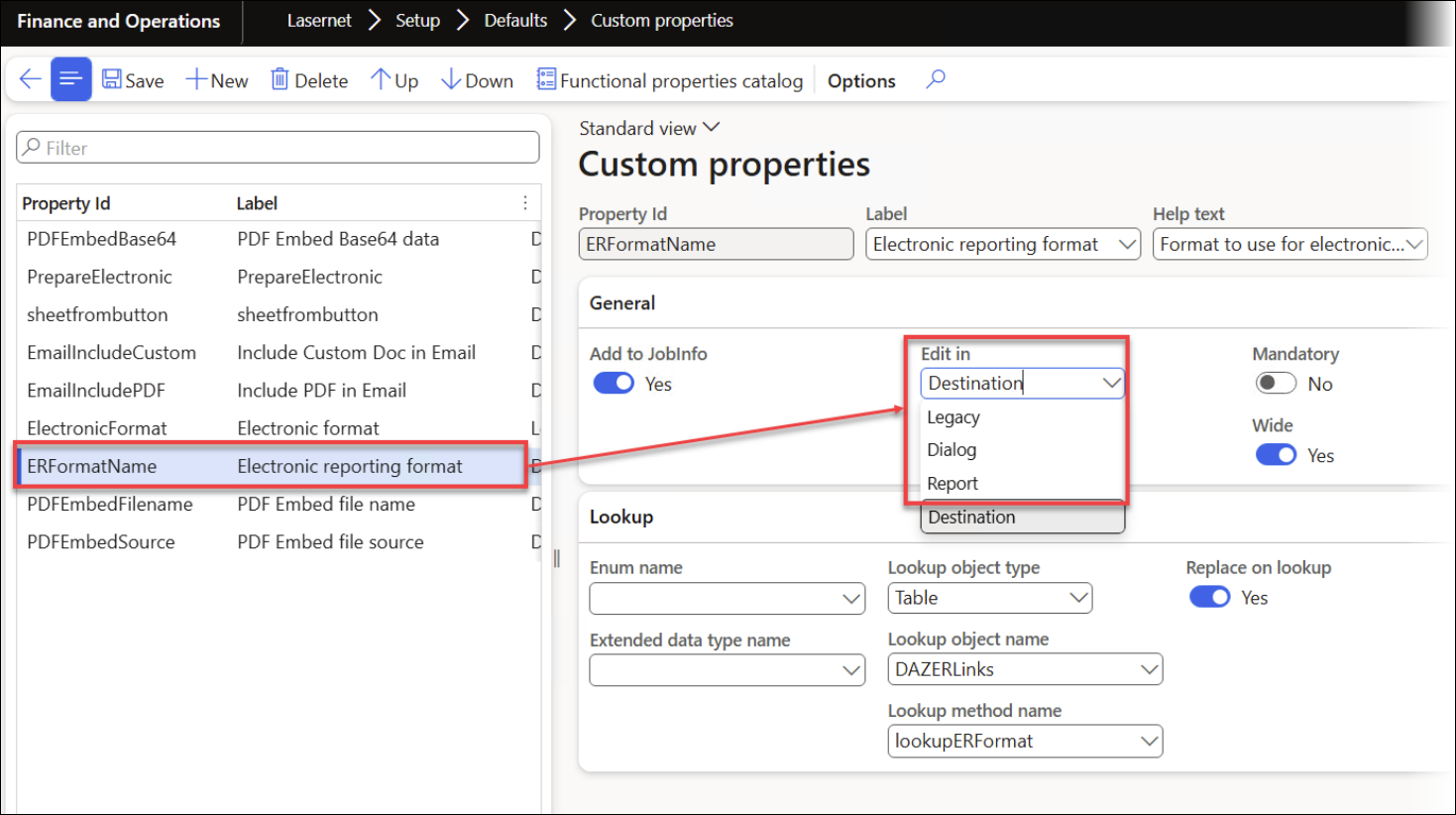
Edit in provides the option to specify where the property/field should be displayed:
Legacy: The property is displayed for the print button, report, and predefined destination (the mechanism is the same as in previous versions).
Dialog: The property is only displayed for the print button. Information can then be used as a condition for the report or in the predefined destinations.
Report: The property is only displayed at the report level. Information can then be used as a condition in the predefined destinations.
Destination: The property is only displayed within the predefined destination. Information can then be used as a condition at the report level.
Add to JobInfo: Adds the value from the field into the JobInfo section within the XML file.
Mandatory: If a field is mandatory, it will be highlighted in red.
Wide: Extends the width of the field.
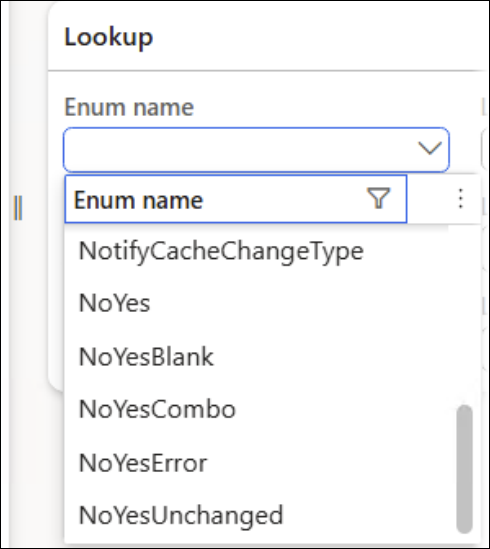
Enum name: Provides the option to use an enum for the field.
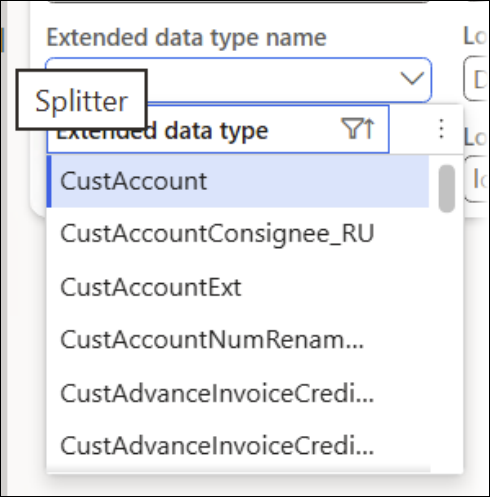
Extended data type name: Provides the option to use an extended data type for the lookup.
Adding custom properties from the Functional properties catalog automatically configures the lookup for the property/field. The following section provides examples of different scenarios in which custom properties are defined by Destination.
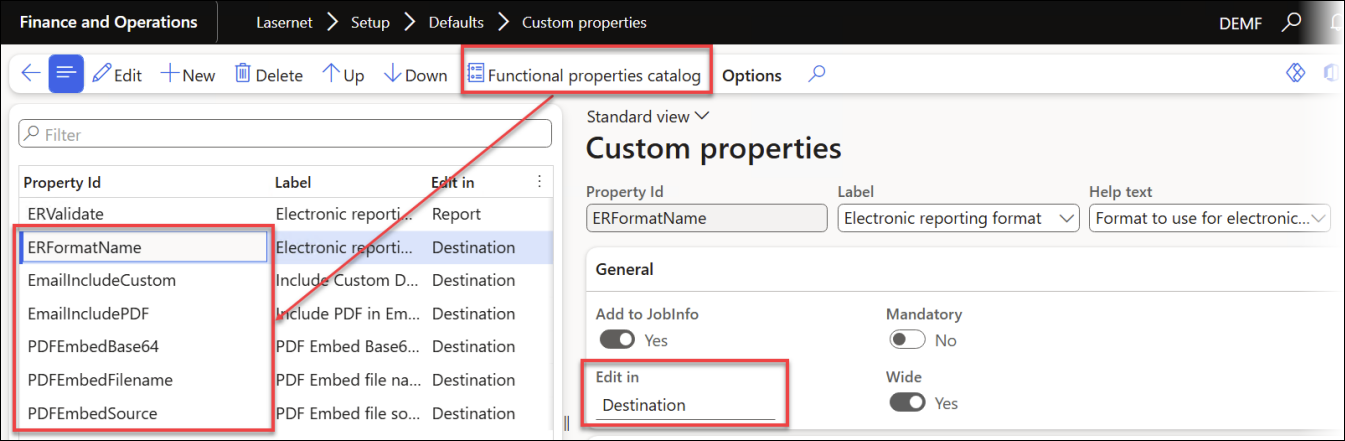
ZUGFeRD via email
In the following example, email is used as the distribution means of choice. Similar approaches can be used for SFTP/FTP or the PEPPOL network by configuring a custom port for the respective protocol within the Electronic Reporting Connector.
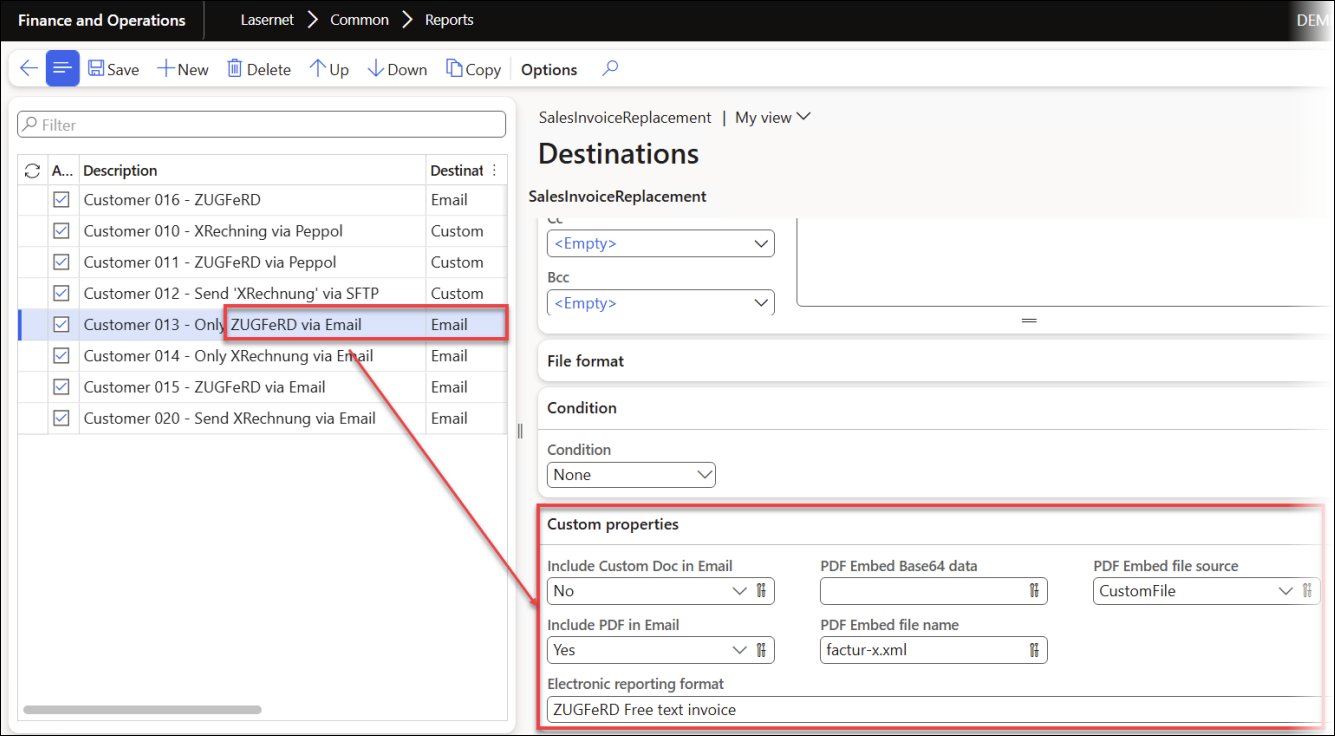
Include Custom Doc in Email: Selecting No prevents the electronic document from being added as an attachment.
Include PDF in Email: Selecting Yes ensures the PDF file and the attached XML file are added as attachments.
PDF Embed file source: Selecting CustomFile ensures the electronic document is attached to the PDF file.
PDF Embed file name: Selecting factur-x.xml sets the filename for the attachment to
factur-x.xml.Electronic reporting format: Selecting ZUGFeRD Free text invoice ensures ZUGFeRD (CII) is used as the electronic format.
The resulting report looks as follows:
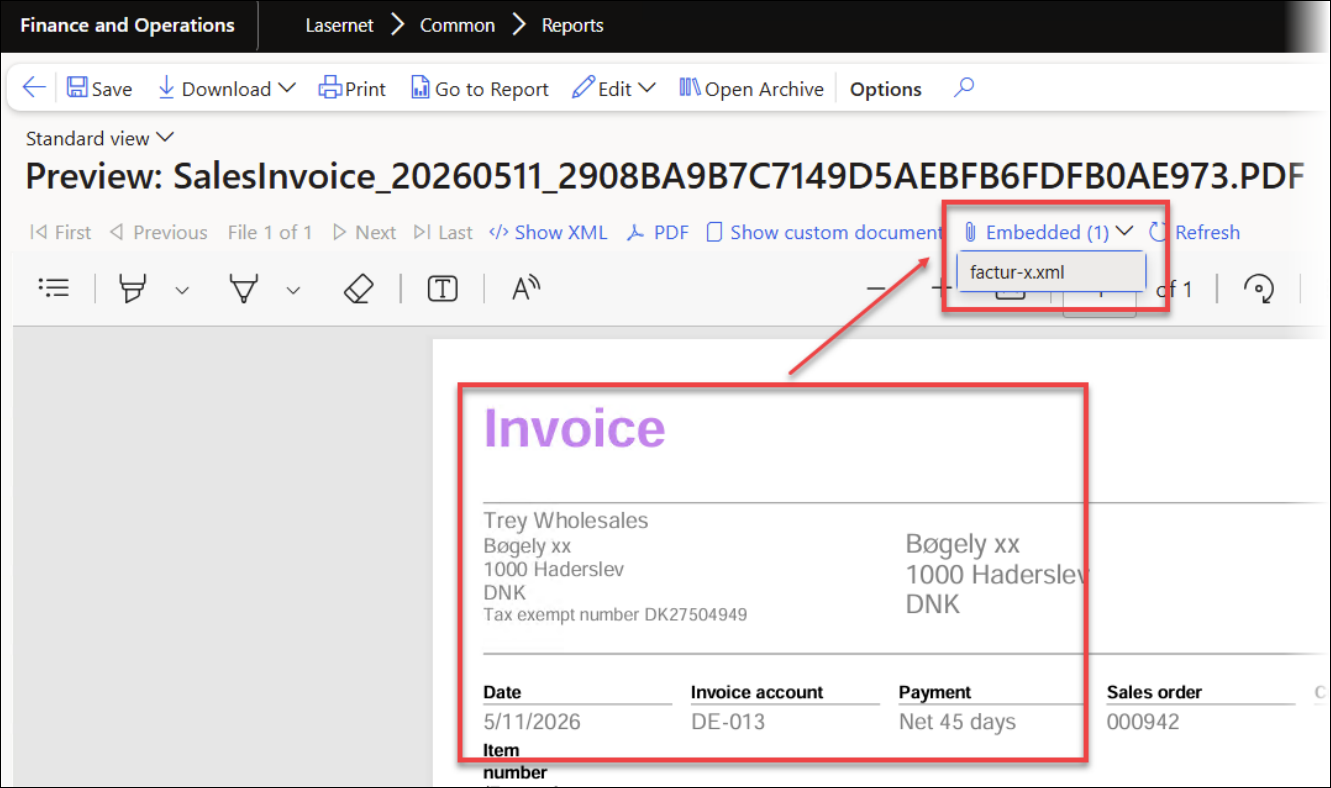
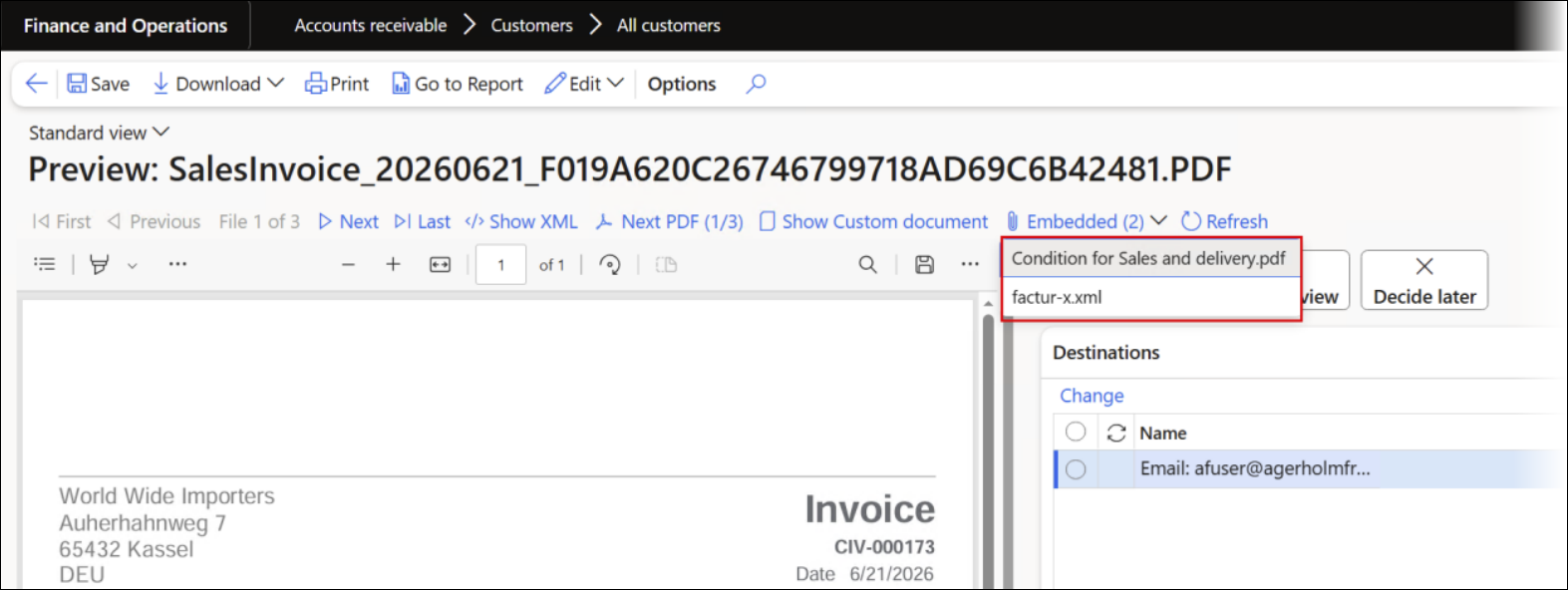
Clicking the factur-x.xml option from the Embedded (1) menu displays the CII version of the e-invoice, since this was specified as the format within Predefined destinations.
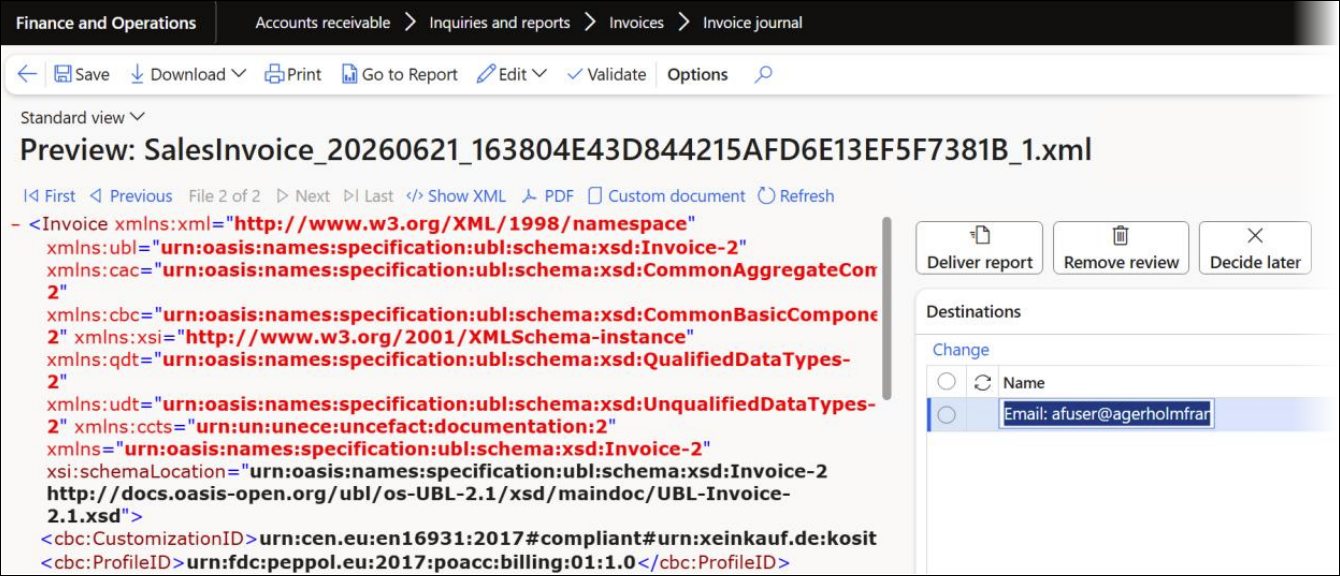
When multiple documents are included within the same report, they are listed as follows and you can view any of them directly in FinOps:
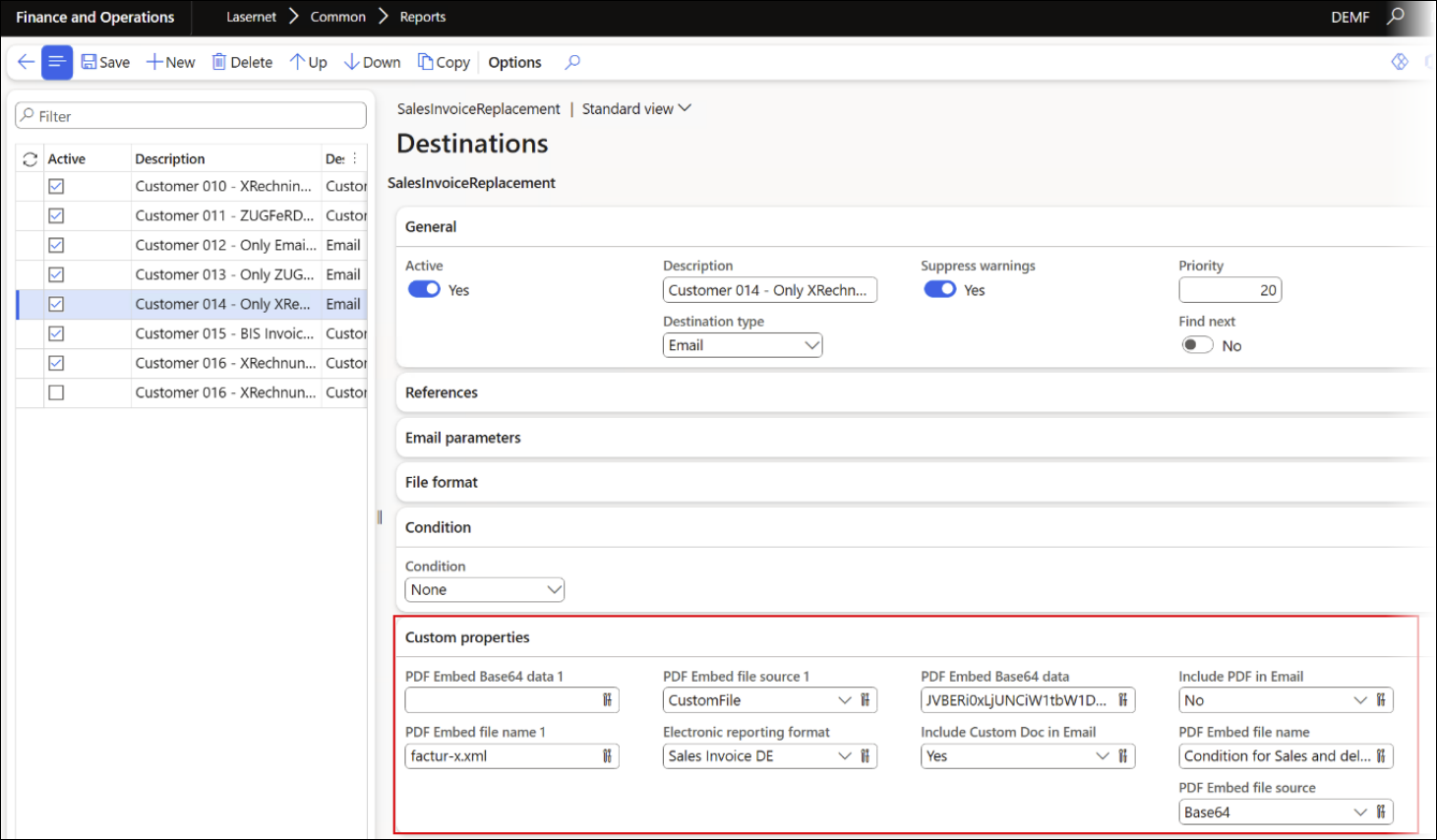
The configuration in Predefined destinations looks as follows:
Using the ERValidate custom property and Report as its Edit in option automatically identifies the document type.
Electronic reporting validation at the report level:
Xrechnung via FTP/SFTP
The following example illustrates the use of XRechnung via SFTP. It is also possible to send the e-document through the PEPPOL network using a custom port, or alternatively via email.
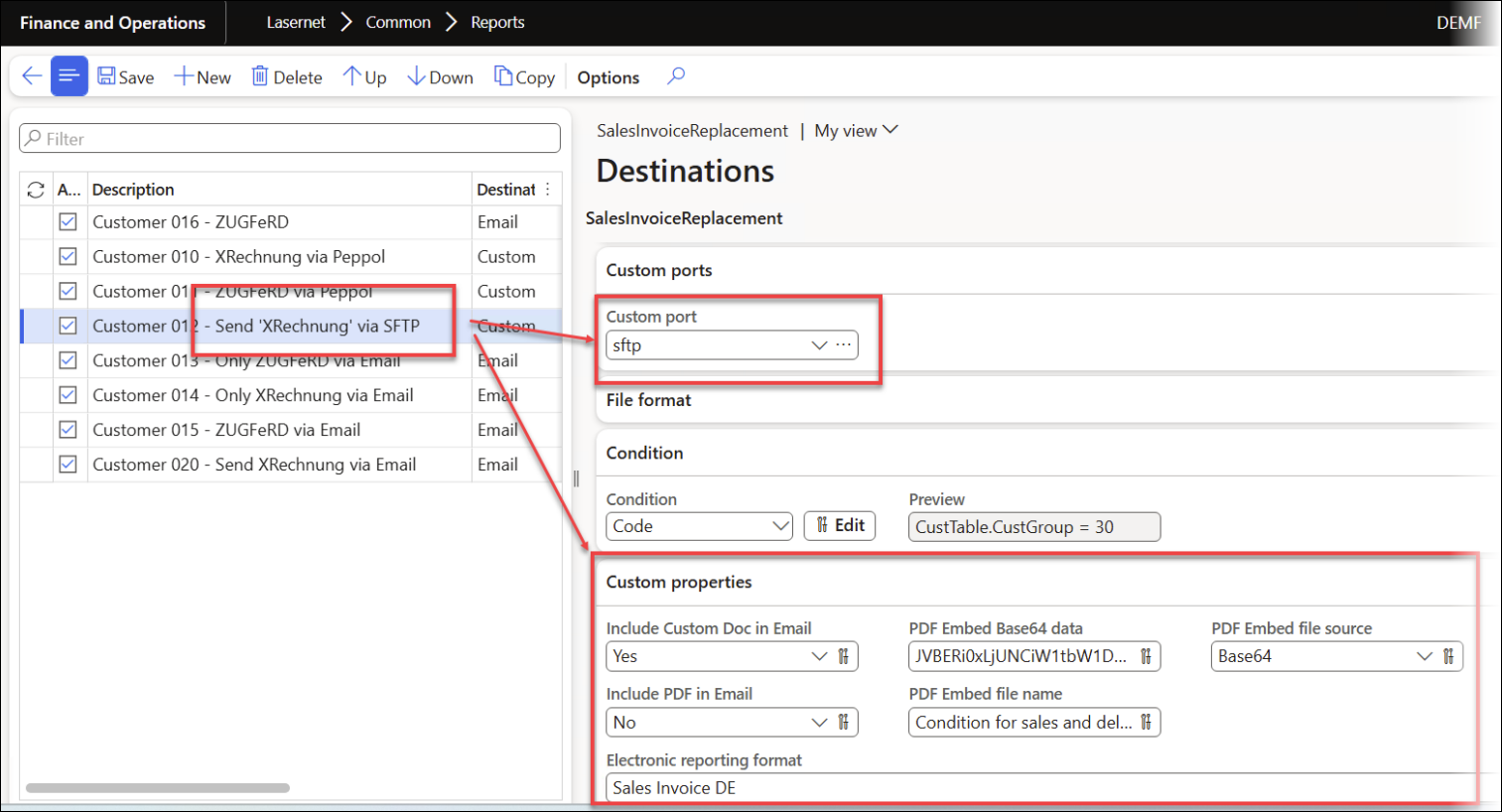
Include Custom Doc in Email: Selecting Yes ensures the electronic document is added as an attachment.
Include PDF in Email: Selecting No prevents the PDF file from being attached.
PDF Embed file source: Selecting Base64 ensures the encoded value from PDFEmbedBase64 data is attached to the PDF file’
PDF Embed file name: Selecting Condition for sales and delivery.pdf sets the filename for the attachment to
Condition for sales and delivery.pdf.Electronic reporting format: Selecting Sales Invoice DE ensures ZUGFeRD (UBL XRechnung 3.0.) is used as the electronic format.
The resulting report looks as follows:
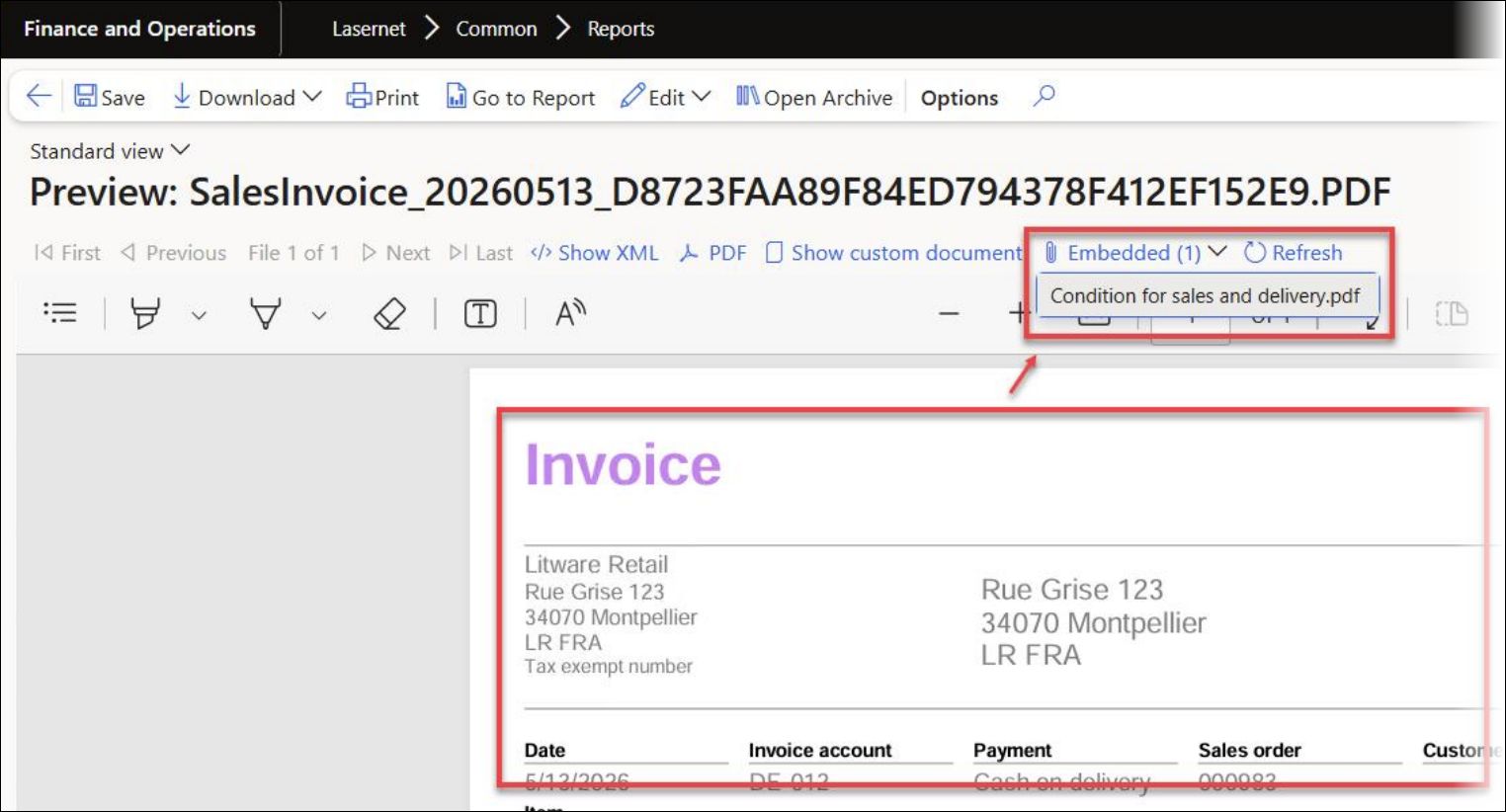
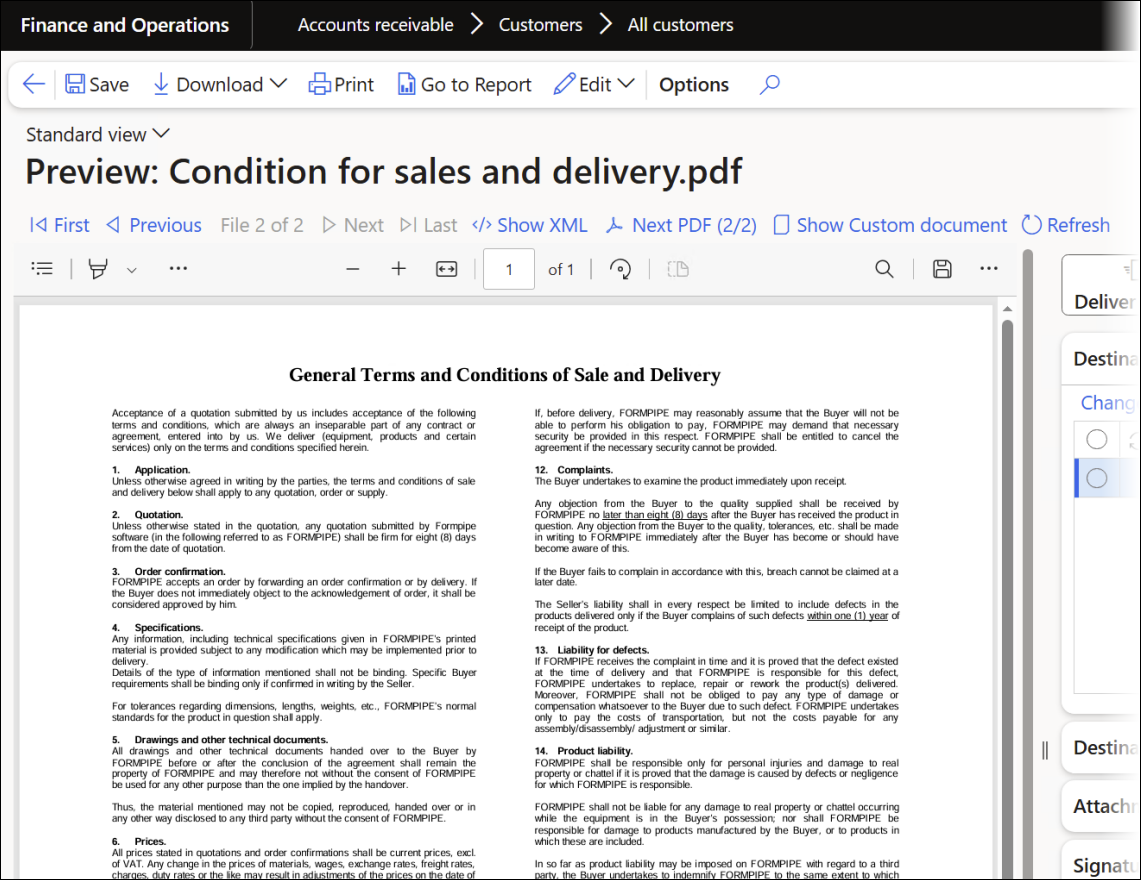
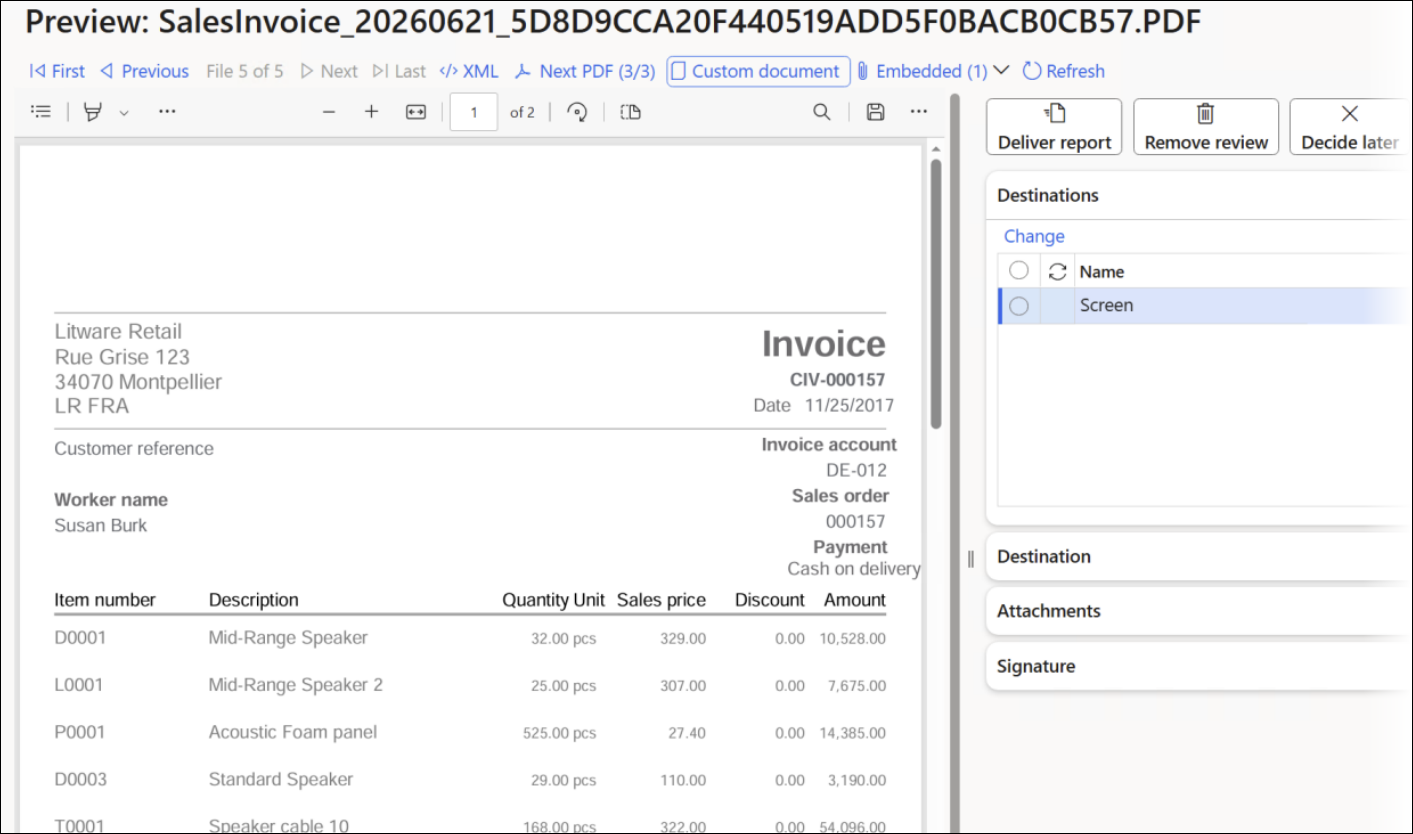
Clicking the Condition for sales and delivery.pdf option from the Embedded (1) menu previews the document directly in FinOps:
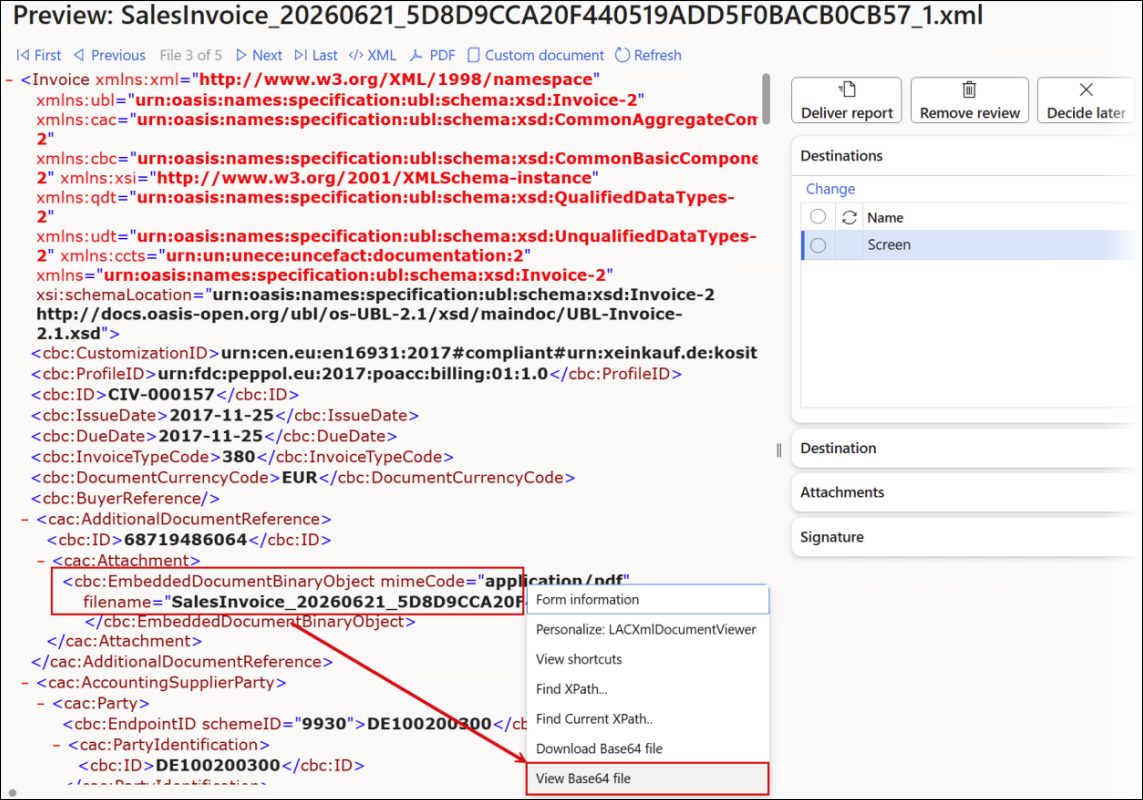
Right-clicking the EmbeddedDocumentBinaryObject node and selecting View Base64 file shows the SSRS (render as PDF) or Lasernet report that was embedded into the XML file:
Autoform DM and Lasernet Keep 11
Lasernet FO Connector 7.3 automatically detects whether the Autoform DM or Lasernet Keep 11 API should be used, depending on which version of the software is used, ensuring backward compatibility.
73437@Dynazure – MailMerge document handling implementation
Implemented document handling for the MailMerge module. The logic that processes and routes mail-merge documents was built and corrected, enabling the module to handle its documents end to end.
73434@LAC365FO – Storage browser when clicked multiple times on same folder, was building wrong path
Fixed the storage browser so that clicking the same folder multiple times no longer builds an incorrect path. The path-construction logic was corrected so repeated navigation into a folder resolves to the right location every time.
73433@LAC365FO – Custom properties calculation issues were causing some issues
Fixed defects in the custom-properties calculation logic that were producing incorrect downstream results. The problems surfaced as Electronic Reporting files not being processed synchronously and as failures during mail-merge handling. The calculation routine was corrected so custom properties resolve reliably, restoring correct ER file processing and stable mail-merge behaviour for affected reports.
73365@LAC365FO – The label translations for version 7.3 have been completed
The label translations for version 7.3 have been completed. All new and updated EN-US labels across the editable LAC, Lasernet, and DAZ modules have been translated into the supported languages, ensuring the 7.3 release includes fully localized user-facing text.
73308@Dynazure – The initial check-in of the iEDI document loading feature has been performed
The initial check-in of the iEDI document-loading feature has been performed. This has established the foundation for loading iEDI documents into Lasernet FO Connector, providing the starting point for further development of inbound EDI document handling.
73264@Dynazure – The initialization of email, FTP, and SFTP inbound loading has been updated to handle cases where the loaded file is not XML
The initialization of email, FTP, and SFTP inbound loading has been updated to handle cases where the loaded file is not XML. The logic has been made more tolerant, so non-XML inbound files no longer cause initialization to fail, improving the robustness of inbound file processing across the email, FTP, and SFTP channels.
73263@Dynazure – An invalid number of hours is initialized for Email Tracking status updates, and labels are missing
An issue causing an invalid number of hours to be initialized for Email Tracking status updates has been fixed, and missing labels have been added. The correction ensures that Email Tracking status update intervals are initialized with valid values and that the related UI text is properly labeled, improving reliability and clarity of Email Tracking.
73259@LAC365FO – Several small fixes to the SFTP and FTP handling have been applied, and error reporting has been improved
Several small fixes to the SFTP and FTP handling have been applied, and error reporting has been improved. These refinements have increased the robustness of FTP/SFTP file transfers and given clearer diagnostic messages when transfers fail, making issues easier to identify and resolve.
73243@LAC365FO – Custom properties with similar expressions reuse cached values instead of recalculating, producing incorrect results
In previous versions, custom properties with similar expressions reused cached values rather than recalculating, resulting in incorrect results. Forced recalculation has been implemented so that custom properties sharing similar expressions can be evaluated independently (rather than reusing another property's cached value), ensuring each property returns its correct computed value.
73231@Dynazure – The HTML editor format painter does not work
The format painter in the HTML editor, which was not working, has been fixed. The fix has restored the format painter functionality, enabling users to copy and apply formatting within the HTML editor as intended.
73230@LAC365FO – The Order ID and Document ID fields have been extended to 40 characters to accommodate a GUID
73229@Dynazure – Custom properties have been removed from the Azure Service Bus message
Custom properties have been removed from the Azure Service Bus message. The properties are already included in the JobInfo and loaded with the file, so sending them on the Service Bus message was redundant. Removing them streamlines the message and helps keep its size within limits.
73228@LAC365FO – The PDFEmbed custom property for Embedded has been fixed, since it was failing and duplicating file names
The PDFEmbed custom property for Embedded has been fixed, since it was failing and duplicating file names. Additionally, custom property handling has been corrected so that properties present in the catalog (such as PDFEmbedBase64) are no longer added to the Azure Service Bus message, which was causing messages to become oversized. This ensures embedded PDFs are generated with unique, correct file names without bloating the Service Bus payload.
73226@LAC365FO – Report attachments are missing for the CaseDetailBase table
The report attachments that did not work for the CaseDetailBase table have been fixed. The fix ensures that attachments for CaseDetailBase are correctly included in the report's XML JobInfo section, even when multiple cases each carry multiple attachments.
73167@Dynazure – Multiple Email Tracking batch jobs have been created
An issue has been fixed, which allowed multiple Email Tracking batch jobs to be created. The fix prevents duplicate Email Tracking batch jobs, ensuring email status updates are driven by a single batch and avoiding redundant or conflicting processing.
73163@LAC365FO – The re-printing of label layouts from a mobile device has been fixed
The re-printing of label layouts from a mobile (WHS) device has been fixed. Previously, when Label layout was enabled, re-printing a license plate label from the warehouse app always used the Quick destination setup on Document routing, ignoring any printer the user had overridden or selected in the dialog. The fix ensures the user-selected or overridden printer is respected on re-print, so labels print to the intended device.
73154@Dynazure – The initial check-in for the MailMerge module has been performed
The initial check-in for the MailMerge module has been performed, including a missing object that completed the initial set. This has established the module's foundation within the codebase, enabling subsequent mail merge functionality to be developed.
73128@LAC365FO – Support has been added for manual Cloud Print Connector setup in Lasernet FO Connector
Support has been added for manual Cloud Print Connector (CPC) setup in Lasernet FO Connector, including the generation of the required SAS URLs. With CPC's enhanced authentication, this has minimized the permissions stored in Lasernet FO Connector by letting users supply limited-permission SAS URLs and edit blob and queue name fields directly, rather than relying on Lasernet FO Connector to perform management tasks such as creating, deleting, or validating queues and blobs. This has reduced the impact of a potential credential leak and simplified the use of the new authentication modes.
73095@LAC365FO – The way LACDictData metadata dictionary (tables, classes, and forms) is populated has been redesigned
The way LACDictData metadata dictionary (tables, classes, and forms) is populated has been redesigned. The previous on-demand fill became extremely slow after a Platform update and suffered from approach-related issues that led to a memory-leak crash. The redesign has introduced a batch-job-based metadata fill that can run parallel tasks and is started automatically on Clear cache, replacing the old, slow on-demand approach, and making cache rebuilds far more reliable and performant.
73090@LAC365FO – The Test and Performance Suite error “Expected type Date, got type String” occurs during automatic type conversion when running reports with Top picking or Batch bundling
The Test and Performance Suite error “Expected type Date, got type String” caused by automatic type conversion when running reports with Top picking or Batch bundling has been fixed. The issue occurred when a date operand was compared with a non-numeric string. The fix has corrected the type handling, so these reports run without the conversion error during Top picking and Batch bundling.
73066@Dynazure – The redirect behavior for custom alerts used in the Lasernet Tracking workspace has been updated
The redirect behavior for custom alerts used in the Lasernet Tracking workspace has been updated, covering both the in-client info center link and the email link. The redirect and record selection logic has been reworked to align with the newly introduced statuses and workspace filters (potentially spanning multiple models), so opening an alert correctly navigates to and selects the relevant tracking record.
73049@Dynazure – The file name of the inbound file import is autogenerated
Inbound file import has been fixed so that the file name is taken from the inbound record rather than being autogenerated. File name initialization has been added, so imported files retain their original, meaningful names rather than system-generated ones, improving the traceability of inbound documents.
73048@Dynazure – Better throttling handling in mail reader
Throttling handling has been improved in the mail reader to better cope with concurrent sessions hitting the Microsoft Graph rate limits. The updated logic now loads as many messages as possible and retains the loaded messages, passing already-read messages to the batch even when throttling occurs. Guidance has been added recommending no more than four batches per mailbox concurrently, reducing failures and lost work when multiple jobs share a mailbox.
73031@LAC365FO – Opening an attachment from the report review form strips the file extension
An issue has been fixed, whereby opening an attachment from the report review form stripped the file extension. The fix preserves the original file extension when attachments are opened from the review form, so files open correctly in their associated applications.
73030@Dynazure – Loading of inbound files from FTP and SFTP sources has been implemented
Loading of inbound files from FTP and SFTP sources has been implemented. This has added the ability to retrieve documents for processing directly from FTP and SFTP locations, extending Lasernet FO Connector’s inbound integration channels alongside email-based loading, with scope to consolidate the email and FTP/SFTP loading code in the future.
73029@LAC365FO – An issue arises regarding attachments when the server has remote report storage
An issue has been fixed regarding attachments when the server is configured to use remote report storage. Attachment handling has been corrected so that documents are resolved and processed reliably even when reports are stored remotely, ensuring attachments are included as expected in that configuration.
73010@LAC365FO – The HTML source editor switch control is unexpectedly visible
An issue has been fixed, which caused the HTML source editor switch control to be unexpectedly visible. The update has corrected the editor so that the source toggle is shown only when appropriate, restoring the intended HTML editing experience.
73008@LAC365FO – Support has been added for embedding multiple files within the Embedded PDF renderer
Support has been added for embedding multiple files within the Embedded PDF renderer. Previously, only a single embedded file was handled; this enhancement enables several files to be embedded into the generated PDF output, broadening the document composition options available through Lasernet Embedded.
73007@LAC365FO – Lasernet Embedded: emailing fails for multiple recipients due to comma separator
A failure in Lasernet Embedded has been fixed, whereby emailing to multiple recipients in the To field failed because recipients were separated by commas. Since FinOps email only supports semicolon separators, multi-recipient addresses returned by the connector were rejected. The fix ensures multi-part To addresses are correctly separated so emails to multiple recipients are sent successfully through the embedded renderer.
73000@Dynazure – The mail reader and sender functionalities have been separated into their own dedicated module
The mail reader and sender functionalities have been separated into their own dedicated module. Extracting this logic from the main codebase has improved modularity and maintainability of the email reading and sending features, laying the groundwork for independent evolution of mail handling alongside related inbound channels.
72981@LAC365FO – The envelope sub XPath must come from the document, not from the root element
The metadata sub-element XPath selection has been fixed so that envelope sub-paths are taken relative to the document rather than the root element. Previously, selecting an XPath on metadata sub-elements required the full path including the report prefix, whereas the corrected behavior produces shorter, document-relative paths (for example, “JobInfo”). Supporting class modifications have been added so that envelope sub-selection consistently uses the document-relative path.
72980@LAC365FO – XML viewer performance update
XML viewer performance has been improved by removing the HTML-based rendering path and the associated string manipulation. The viewer now displays XML more efficiently, giving users faster load and display times when previewing report XML, particularly for larger documents.
72827@Dynazure – The email batch status batch job has been improved so it no longer requires specifying which companies to update, since the message ID already determines the affected archive records and company
The email batch status batch job has been improved so it no longer requires specifying which companies to update, since the message ID already determines the affected archive records and company. The company parameter has been clarified to apply only to where mailbox authorization is loaded from, with a message added to explain this. A safeguard has also been considered to detect and prevent multiple batch jobs reusing the same mailbox, reducing duplicate processing and configuration confusion.
72759@Dynazure – Major validation update
A major validation update for Lasernet FO Connector has been delivered. The XML validation rules concept has been reworked, and new rule types (Group and Online) have been introduced, with validation now applied during report run and the import loading process. The validation form has been simplified to a single selection field, a “Not delivered” status has been added to Tracking, and LogStr has been added to the Archive. Together, these changes have made validation more powerful and easier to configure while improving the traceability of validation outcomes.
72670@Dynazure – It is now possible to compare Electronic Reporting-generated XML documents as part of Test checkpoints and Test flows
It is now possible to compare Electronic Reporting-generated XML documents as part of Test checkpoints and Test flows. A new Compare custom (XML) field has been added to both LACTestCheckpoint and LACTestFlow (shown alongside Compare PDF, with help text and the same overwrite-driven logic), and the test classes have been updated to compare the ER-generated file from the Lasernet Archive using the existing XML comparison. This enables users to automatically validate ER output as part of regression testing.
72191@LAC365FO – In the Test and Performance Suite, subreports are incorrectly added to the Lasernet Archive during a checkpoint test
An issue in the Test and Performance Suite has been fixed, whereby subreports were incorrectly added to the Lasernet Archive during a checkpoint test, even when those subreports were not configured to be saved. The fix ensures that only reports explicitly configured for archiving are written during the checkpoint test, keeping the Archive clean and consistent with the configured save settings.
72180@LAC365FO – Lasernet FO Connector has been migrated from the legacy Azure Service Bus SDK to the new SDK libraries
Lasernet FO Connector has been migrated from the legacy Azure Service Bus SDK to the new SDK libraries. The work has covered reserving labels and preparing for the multi-DLL new library set, taking into account that Finance and Operations still ships older versions of shared dependencies, such as Azure.Core. This positions Lasernet FO Connector to remain functional as Microsoft phases out the legacy Service Bus libraries, reducing the long-term risk of broken Service Bus Queue connectivity.
72072@LAC365FO – AOS restart is sometimes required to trigger Lasernet alert report
An intermittent issue has been fixed, whereby newly created Lasernet alert link reports were not triggered until the AOS was restarted, even though the underlying FinOps alert fired correctly. Resolving it ensures that Lasernet alert reports are picked up and processed reliably as soon as the corresponding alert is raised, removing the operational need for service restarts to recover alert-driven report delivery.
507051@LAC365FO – A Base64 content viewer has been added to the report Preview screen
A Base64 content viewer has been added to the report Preview screen, enabling users to inspect Base64-encoded data embedded in XML files directly from the Preview interface. Improved detection logic for Base64-encoded images within XML has been implemented, improving accuracy across a wider range of formats and file-naming conventions.
506957@LAC365FO – XML validation rules have been updated
A major overhaul of the XML validation rules framework has been completed. The framework has been redesigned to support new rule types, including Group and Online validation. Validation has been integrated into the report run pipeline and the inbound document loading process. The configuration form has been simplified to a single selection field. Not-delivered status tracking and LogStr output have been added to the Archive and Tracking modules for better visibility of validation outcomes.
506771@LAC365FO – A header is missing in the Connections form
The Connections form has been updated to correct a missing header and improve the layout for the “Lasernet Keep” Connection type. The Site field has been repositioned relative to the SSO option to clarify the setup flow. A bug has also been fixed, whereby the SSO toggle could only be changed from No to Yes when creating a new connection, but not from Yes to No when editing it. This fix ensures that the SSO field is editable in both directions during connection creation and editing.
506724@Dynazure – The default value for the Show data for last number of days parameter should be 1
The default value for the Show data for last number of days parameter has been updated from 0 to 1 in the Email API import dialog. Previously, users who left this field at 0 received no emails; the fix ensures at least 1 day of emails is loaded by default, reducing the risk of missed inbound documents.
506723@LAC365FO – The Designer option is missing for the Preview and Resend actions when Force rerun is not enabled
A fix has been implemented to restore the Designer option for the Preview and Resend actions when Force rerun is not enabled. Previously, when an XML file existed for a document, the Designer should have been accessible for preview and resend operations, but the option was missing from the interface. This correction ensures that the Designer option is shown as an available action whenever a valid XML file is present.
506478@LAC365FO – An option has been implemented to automatically send emails in Embedded mode once they reach the Waiting status in the Email history
An option has been implemented to automatically send emails in Embedded mode once they reach the Waiting status in the Email history. Previously, emails that had reached the Waiting status required manual intervention to be sent. This new automatic behavior is particularly useful in demonstration environments, where unattended email dispatch simplifies testing and showcases the end-to-end workflow without requiring manual steps.
506371@LAC365FO – In the Expression Editor, typing characters before a string value containing a space corrupts the JSON syntax highlighting
A bug in the Expression Editor has been fixed, which caused typing characters before a string value containing a space to corrupt JSON syntax highlighting. For example, if the value test two was present and a user began typing before it, the autocomplete and highlight rendering broke. This fix ensures that JSON highlighting remains stable when editing expressions adjacent to quoted string values containing spaces.
506330@Dynazure – iEDI validation support for ZUGFeRD documents has been added
iEDI validation support for ZUGFeRD documents has been added. Validation rules specific to the ZUGFeRD electronic invoice format have been implemented through the iEDI validation pipeline, enabling automated compliance checking for ZUGFeRD-formatted documents prior to processing or distribution.
505713@LAC365FO – The following error occurs intermittently: “A control with the name 'LACDownloadButton_SalesInvoice_20260502_DE096CBCC267413A970BD862A1E9D896PDF' already exists on the form”
An error that intermittently occurred when opening the Inbound form has been fixed. This caused the system to throw an exception stating that a control with a dynamically generated name already existed on the form. The control name generation logic has been updated to prevent duplicate names, eliminating the conflict that caused the form to fail to load under certain conditions.
505710@LAC365FO – An option has been implemented to validate documents before distribution and skip sending if any validation errors are detected
An option has been implemented to validate documents before distribution and skip sending if any validation errors are detected. When enabled, failing documents are routed to the tracking/outbound queue with an error status rather than being sent. The feature is especially beneficial for email-based distribution where no prior validation existed, and is configurable as an opt-in option per report.
505708@Dynazure – Using ER import format in the Import as Vendor invoice configuration causes an error in relation to the model mapping
An error thrown when selecting an ER import format in the Import as Vendor invoice configuration has been fixed. A model mapping issue caused a runtime failure during import setup. This fix has corrected the default attachment display in DocuRef and improved the file-loading logic, resolving the mapping error.
505707@Dynazure – A Validate button and supporting validation logic for ZUGFeRD embedded documents have been added
A Validate button and supporting validation logic for ZUGFeRD embedded documents, including XML and XRechnung CII formats, have been added. Validation has been extended to cover all XML document types in the embedded document workflow, and a previously broken iEDI validation path has been fixed.
505706@Dynazure – A Tenant label has been added to the tenant identifier field displayed during Email API connection configuration
A Tenant label has been added to the tenant identifier field displayed during Email API connection configuration. Previously, the field had no descriptive label, making it unclear to users. The label update improves usability and clarity of the Email API setup form.
505704@LAC365FO – Sending a ZUGFeRD (PDF+XML) document without enabling Include Custom Doc in Email results in an email with no attachments
An issue has been resolved, whereby sending a ZUGFeRD (PDF+XML) document without enabling Include Custom Doc in Email resulted in an email with no attachments. Both the ER file and the ZUGFeRD combined PDF+XML attachment should have been included by default. Multiple fixes have been applied: the custom properties calculation that determined which attachments to include has been corrected, and a missing file name for embedded attachments has also been resolved, ensuring all expected files are delivered.
505696@LAC365FO – It is now possible to open embedded files directly within the Dynamics 365 Finance and Operations interface
Support has been added to open embedded files directly within the Dynamics 365 Finance and Operations interface using the existing report previewer. Previously, embedded file attachments required downloading before they could be viewed. The feature has been extended so that XML and PDF files attached as embedded content can be opened inline within the same preview window, removing the need to leave the application to inspect attachment content.
505695@LAC365FO – It is now possible to jump directly to the predefined destination associated with the displayed document
A context menu item has been added to the XML file viewer, enabling users to jump directly to the predefined destination associated with the displayed document. Previously, navigating from the XML viewer to the destination configuration required multiple manual steps. The new menu option provides a single-click path from the XML file view to the relevant predefined destination record.
505646@Dynazure – The initial Email API integration for importing files from email has been implemented
The initial Email API integration for importing files from email has been implemented. The feature enables the system to connect to an email account via API, read incoming messages, and load attached documents as inbound records. Mail-reading logic has been added along with foundational infrastructure for future email-based import workflows.
505372@Dynazure – License enforcement has been added for Inbound and E-Document functionality
License enforcement has been added for Inbound and E-Document functionality. License checks have been introduced at the Load, Import, and Outbound status update entry points, so these features are now inaccessible without a valid license. An option that appeared without license validation has also been removed from the interface.
504603@LAC365FO – The status of FTP and SFTP deliveries has been updated to correctly reflect the Delivered status upon a successful file transfer
The status of FTP and SFTP deliveries has been updated to correctly reflect the Delivered status upon a successful file transfer. Previously, the status remained non-final even after the file had been transmitted without error. Users monitoring outbound FTP and SFTP deliveries in the Tracking module or Archive could not reliably distinguish between completed and in-progress transfers because the final success status was not being set. This fix has updated the status assignment logic in the FTP and SFTP delivery processing paths to set the Delivered status once the file transfer completes successfully. Now, FTP and SFTP delivery tracking aligns with the behavior of other channels and enables downstream processes that depend on delivery status to function correctly for file-transfer-based destinations.
504584@LAC365FO – Data from tables added as data sources to a report configuration is not included in the report’s XML output
A bug has been fixed, which prevented data from tables added as data sources in the report configuration from being included in the report’s XML output. The issue originated from a regression introduced with the extended tables support feature. Raw values in the XML have also been corrected as part of the fix. This solution ensures that all configured data source tables contribute their fields to the XML as expected.
504310@LAC365FO – Journal validation functionality for Electronic Reporting invoices has been implemented
Journal validation functionality for Electronic Reporting (ER) invoices has been implemented, providing a mechanism to validate Journal data before an ER-based invoice document is generated and sent. The feature introduces a validation step that checks Journal records against configurable criteria, preventing malformed or incomplete Journal entries from reaching the ER output pipeline. Label files for the new validation messages have been checked in as part of the implementation. Additional adjustments have been made to the Lasernet Journal validation logic to align it with the ER invoice workflow. This provides users with earlier feedback on data quality issues in the Journal, reducing the incidence of failed or incorrectly formatted ER invoice outputs that would otherwise only be detected after document generation has already been attempted.
504169@LAC365FO – An option to override or ignore validation errors during ER XML online validation has been introduced
An option to override or ignore validation errors during ER XML online validation has been introduced. Previously, validation failures, such as an empty Invoice ID on a Pro forma invoice, would block processing with no bypass available. The new setting enables users to configure the system to continue past non-critical XML validation errors when certain fields are intentionally left blank.
504002@Dynazure – The custom property ERFormatName does not work at the report level
A defect has been corrected in the ERFormatName custom property evaluation when the property is set at the report level. The custom property value was not being correctly picked up during report rendering because the calculation chain did not propagate to the report-level configuration. This fix has updated the property resolution logic to properly traverse the report hierarchy and return the ERFormatName value defined at the report level.
504001@Dynazure – The Digisense network registration process has been enhanced to support constrained API keys
The Digisense network registration process has been enhanced to support constrained API keys, improving security for environments where API access is scoped to specific operations. The registration workflow has been updated to handle the reduced-permission key model used by Digisense, enabling the system to complete network registration successfully with constrained credentials rather than requiring full-access keys.
503985@Dynazure – The vendor invoice import process has been updated to run only against a user-selected subset of records
The vendor invoice import process has been updated to run only against a user-selected subset of records, rather than always processing the entire available set. Users can now mark specific records before triggering the import, and the import routine respects the selection, skipping unselected entries. This change reduces the risk of unintended bulk processing and gives Accounts Payable teams finer control over which invoices are brought into the system.
503984@Dynazure – In the Digisense inbound document loading, the look-back days parameter is not respected during file retrieval
A defect in the Digisense inbound document loading has been fixed, which caused the look-back days parameter to not be respected during file retrieval. Because the Digisense API does not natively support filtering by received date-time, the loading process has been updated to stop fetching records once the calculated look-back date threshold is reached. This prevents the system from loading older documents beyond the configured retention window.
503982@Dynazure – In multi-format ER rendering, predefined destinations configured with different ERFormatName custom properties do not each trigger their own ER document rendering pass
A bug in multi-format ER rendering has been fixed. This prevented predefined destinations configured with different ERFormatName custom properties from triggering their own ER document rendering pass. The system was incorrectly reusing a single rendered document across all destinations. This fix ensures that when two predefined destinations have distinct ERFormatName values, each destination renders its ER format independently, producing separate output documents.
503890@LAC365FO – A bug affects the formatting of the “Review before sending” form
A bug in the Review before sending form caused the splitter divider between the document preview panel and the information panel to be fully draggable to the left, making it impossible to reposition it back. Once the divider reached the leftmost position, users could not restore the document preview without reloading the form. A GroupName property has been added to constrain splitter behavior, and resize handling has been corrected so that dragging over the embedded PDF viewer is handled gracefully without losing the splitter control. Missing object references that affected the form have also been resolved. Now, the panel divider in the Review before sending form can be resized in both directions without the control becoming irrecoverable.
503790@LAC365FO – The option to collapse the FastTab in the Destinations form has been added
An option to collapse the FastTab for email destinations has been added, enabling users to minimize the HTML editor area when shifting between records in the Destinations form. Scrolling or switching between destination records when using the new Lasernet HTML editor was noticeably slow because the editor re-rendered on every record change. By enabling FastTab collapse, users can avoid triggering the editor render when not actively editing the email body, significantly improving navigation performance. The collapsible FastTab follows the standard Dynamics 365 FinOps tab collapsing pattern, and the state is preserved per user. This change is particularly beneficial in configurations with several destination records, where the impact of continuous HTML editor re-renders is most pronounced.
503712@LAC365FO – Now, all Service Bus Queue and Topic logic must use AMQP
A temporary fix has been implemented to force all Azure Service Bus Queue and Topic connection strings to use AMQP transport when processed within Lasernet, as a mitigation for Microsoft’s retirement of the legacy SBMP-based Azure Service Bus SDK. The old SDK used by Lasernet FO Connector did not support the newer AMQP-only requirements enforced by the deprecation timeline. Rather than waiting for the full SDK migration, a preprocessing step has been introduced to rewrite connection strings at usage time and include the required AMQP transport protocol flag. Unused references to the old Service Bus libraries have also been removed to keep the codebase clean. This ensures that Service Bus-based delivery channels remain operational after the SBMP retirement date while the full SDK upgrade is prepared.
503683@LAC365FO – An issue arises regarding the Wide setting for custom properties in Predefined Destinations
A layout issue with the Wide setting for custom properties within Predefined Destinations has been corrected. When a custom property field was configured with the Wide setting to expand its display width, it did not actually stretch to fill the available space; instead, it remained at its narrow default width. This fix has corrected the control width binding so that fields marked as Wide render at full width, giving administrators a clearer and more usable interface when configuring wide-format custom properties on Predefined Destinations. This usability fix brings the Wide setting behavior in line with the expected Dynamics 365 FinOps form layout standards and removes the inconsistency between the configuration setting and the visual result.
503540@LAC365FO – The ERFormatName custom property has been extended to also apply within the LACXSLViewer form. XML Base64-encoded values can be downloaded directly as a file through the LACXSLViewer form.
The ERFormatName custom property has been extended to also apply within the LACXSLViewer form, enabling consistent format name resolution across all viewer contexts. Additionally, the ability to download XML Base64-encoded values directly as a file has been added to the LACXSLViewer form, matching the download capability already present in other archive and viewer interfaces. Both enhancements improve usability when inspecting and extracting ER-generated XML content.
503514@LAC365FO – In Lasernet FO Connector 7.2.2, cross-company SharePoint attachments do not work as expected
A bug has been fixed, which caused SharePoint attachments to be incorrectly handled in the XML output when Cross-Company Data Sharing and cross-company query settings were used together. The absolute file URL and the source company identifier (ActualCompanyId) are now persisted in the attachment record, enabling cross-company lookups to resolve the correct SharePoint file path. Previously, the attachment URL was built relative to the current company, resulting in broken links when accessed from a different legal entity.
503508@LAC365FO – Files can now be downloaded from Base64 nodes in XML viewer
A feature has been added to the XML viewer that enables users to download files encoded as Base64 nodes within the XML content. Previously, Base64-encoded attachments embedded in XML could only be viewed as raw encoded text. The new Download action decodes the Base64 content and saves it as a file, enabling users to extract and inspect embedded binary content, such as PDFs or images, directly from the XML viewer.
503240@LAC365FO – Include Custom Doc in Email and Include PDF in Email features are not respected at the report level and within Predefined Destinations
A bug has been fixed, which caused the Include Custom Doc in Email and Include PDF in Email settings defined at the report level and within Predefined Destinations to not be respected during email dispatch. Documents were therefore sent without the expected attachments. Various related fixes have been applied to ensure these properties are correctly evaluated during email distribution.
503238@LAC365FO – Errors occur for all inbound ER documents, but no message appears
An issue has been corrected, which caused error indicators to be displayed against all inbound documents in the ER Inbound documents form. Yet, no descriptive error message was shown, leaving users unable to determine the cause of the failures. The underlying message population logic has been corrected to properly record and display error details alongside each inbound document.
503233@LAC365FO – Base64-encoded content is truncated
A defect has been resolved, which caused Base64-encoded content to appear intact when reviewed before sending, even though it had been mistakenly truncated during document distribution via Predefined Destinations. Various related fixes have been applied to stabilize Base64 handling across the distribution pipeline, so that the Base64 payload is no longer cut off in the distributed output.
503232@LAC365FO – The Subject and E-mail body fields in the Archive view have been updated to provide a larger display area and resizing capability
The Subject and E-mail body fields in the Archive view have been updated to provide a larger display area and resizing capability. Previously, these fields were rendered in a small, fixed-height text box, making it difficult to read the full subject line or email body of archived email deliveries without additional navigation. The layout and control dimensions for both fields in the Archive’s grid and detail view have been adjusted, making the content easier to read at a glance. The change has been applied consistently across the Archive email delivery records, reducing the need for users to expand or export records to read the email body. This is a usability improvement that makes the Archive a more practical tool for reviewing the content of outbound email communications.
503231@Dynazure – iEDI is now supported as a broker when using the ER Connector
Initial integration support for iEDI as a broker for E-Documents and the ER Connector workflows has been implemented. The integration targets the iEDI endpoint to submit payloads and transactions for status queries. Validation logic has been added as a foundational step, with further development dependent on additional API information.
502810@LAC365FO – Lasernet Keep 11 is now compatible with Lasernet FO Connector
Lasernet Keep 11 (formerly Autoform DM) was not compatible with Lasernet FO Connector. Partners implementing Keep 11 reported that while authentication succeeded, attempting to add a Keep application in FinOps returned a “400 Bad Request” error. Investigation revealed that the Keep 11 API introduced breaking changes that the connector did not support. This fix has updated the connector to handle the new Keep 11 API contract, enabling successful application registration and restoring the FinOps-Keep integration for customers using Lasernet Keep 11.
502799@LAC365FO – Delivery status update handling has been overhauled, and two new custom properties (EmailIncludePDF and EmailIncludeCustom) have been introduced. Tickstar sending validation has been updated
Delivery status updates for Tickstar and Digisense integrations, including metadata extraction of sender and receiver from invoice data, have been implemented. The EmailIncludePDF and EmailIncludeCustom custom properties have been introduced to control attachment inclusion in emails. Tickstar sending validation has been updated and Expression Editor performance has been improved.
502608@LAC365FO – The product name “Autoform DM” has been rebranded to “Lasernet Keep” throughout the Lasernet module
The product name “Autoform DM” has been rebranded to “Lasernet Keep” throughout the Lasernet module as part of a product renaming initiative. Label resources have been updated to reflect the new name, while all underlying code objects, table names, and class names have been preserved to maintain backward compatibility. Label files across all applicable languages have been updated so that users see the Lasernet Keep branding in all UI-facing locations, including menus, form titles, and configuration screens.
502443@Dynazure – Error reporting for network participant ID search operations needs improvement
Error reporting for network participant ID search operations has been improved. Previously, when a Tickstar network search failed, the system ignored or misreported the underlying error. This fix has updated the Tickstar search path to capture and surface specific error responses from the network API, giving users clear diagnostic messages when participant lookups return no results or encounter connectivity issues. Missing objects required by the search flow have also been added.
502358@LAC365FO – The following error occurs when running reports via Form Links: “QueryBuildRange object not initialized”
A “QueryBuildRange object not initialized” error that occurred when running reports via Form Links under certain conditions has been resolved. The error occurred when more than approximately 40 location records were selected, and a label size was chosen. Fewer records did not trigger the issue. This was due to Form Link default ranges becoming stale or uninitialized for certain selection combinations. A reset of Form Link default ranges before the query is run has been introduced, ensuring that QueryBuildRange objects are properly initialized regardless of record count. After this fix, reports run via Form Links with large record selections complete without the initialization error, and all selected records are processed correctly.
502229@Dynazure – An Offline mode selector has been introduced to the KSeF values form, with the option to hold the mode value
An Offline mode selector has been added to the KSeF values form, enabling users to explicitly set a document's KSeF submission mode to either Offline or Offline24. A field has been added to the Electronic reporting connector parameters section to store the mode value. A certificate-generation error related to the KSeF offline workflow has also been identified and resolved during implementation, ensuring the offline submission path can be configured and run without error.
502228@Dynazure – A dedicated security role has been created for the KSeF values functionality, covering both Customer Invoice Journal and Project Invoice Journal
A dedicated security role has been created for the KSeF values functionality, covering both Customer Invoice Journal and Project Invoice Journal. The role grants the necessary privileges to view and enter KSeF-related values, such as UUID and QR barcode data, on both journal types. A single role has been designed to serve both CustInvoiceJour and ProjInvoiceJour for future extensibility, and the security structure has been validated against the Dynamics 365 FinOps role framework.
502136@LAC365FO – A new “KSeF Offline mode” field has been introduced
A new KSeF Offline mode field has been added to the CustInvoiceJour_W and ProjInvoiceJour extension tables to record whether a document was submitted in Offline or Offline24 mode. A corresponding parameter has been added to the ER Connector configuration to set the default Offline mode. The implementation has gone through several iterations, including rollbacks and recreations, to correctly integrate with the existing KSeF number and QR barcode fields without introducing regressions.
502051@LAC365FO – In the Test Flow import process, test checkpoints with duplicate names are silently skipped
A defect has been identified in the Test and Performance Suite Test Flow import process, whereby test checkpoints with duplicate names were silently skipped during import. Although these checkpoints were correctly added to the Test Checkpoints list, they were omitted from the imported test flow, resulting in incomplete Test Flow structures. The root cause was a gap in the import logic for handling name collisions. The issue has been resolved, and all checkpoints, including those with the same name, are now included in the imported test flow. This ensures that test flows retain their full checkpoint coverage after import, preventing false-positive gaps in environments relying on automated validation workflows.
501974@Dynazure – The resource key LegalEntityNetworkParticipantData contains the misspelling “Netowrk” in its English label text
A label spelling error in the ER Connector label file has been corrected. The resource key LegalEntityNetworkParticipantData contained the misspelling “Netowrk” in its English label text. The label file has been updated to read “Network participant data - Legal entities”. Additional label updates have been made in parallel for the KSeF manual entry form within the Electronic reporting connector module.
501971@LAC365FO – The following API Connections error occurs when a timeout value is not specified: "Specified argument was out of the range of valid values. Parameter name: value"
A crash has been resolved, which occurred when validating a Tickstar or Digisense API connection if the Timeout parameter in Lasernet Parameters had not been set. The error “Specified argument was out of the range of valid values. Parameter name: value” occurred because the code attempted to use the null timeout value directly without a default fallback. This fix has added a null guard and default timeout assignment, so connection validation completes successfully even without an explicit timeout configuration.
501954@LAC365FO – A memory leak causes AOS crashes when updating LACDictData with table information
A memory leak that caused AOS crashes has been resolved. The leak occurred when users opened the Query Wizard after clearing the Lasernet cache, which removed all records from the LACDictData table. As the system attempted to repopulate LACDictData, memory consumption grew uncontrollably, consuming approximately 10% of available AOS memory before the server crashed. The issue prevented affected customers from modifying their reports until the AOS was restarted and LACDictData was manually repopulated. This fix has corrected the data update logic in the LACDictData refresh process to properly release memory during batch population, eliminating the runaway memory growth. After the fix, the Lasernet cache clears normally, and the Query Wizard can be opened without elevated memory consumption or AOS instability.
501940@LAC365FO – A spurious warning is displayed when validating a connection: “File delete from storage failed”
A spurious warning message reading “File delete from storage failed” has been removed from the connection validation process for storage-based connections in Lasernet. When a user validated an Azure Storage or similar file storage connection, the validation process performed a test write and then cleaned up the test file; if the cleanup step encountered an issue, a warning was displayed, leading users to believe the connection was faulty. In most cases, the connection functioned correctly, and the warning reflected only a benign cleanup failure. This fix has corrected the file-deletion handling during connection validation, so that non-critical cleanup failures are handled without generating a user-visible warning. Now, connection validation only reports genuine connectivity problems.
501928@LAC365FO – It is not possible to reset any added or customized ranges in Top Picking within the Test and Performance Suite
A defect has been resolved that prevented resetting custom or added query ranges in Top Picking. Users who had added custom ranges to the Top Picking query could not clear or reset those ranges back to the default state; the Reset action had no effect, leaving the custom ranges permanently applied until the configuration was manually rebuilt. This fix has corrected the range reset logic so that the Reset action properly clears all user-added and customized ranges from the Top Picking query, restoring the default behavior. This enables administrators to reconfigure Top Picking setups without deleting and recreating the entire configuration, saving time and reducing the risk of errors.
501927@LAC365FO – The isCopy flag is always set to True on the TaxDocumentsReport
A bug has been fixed, which set the isCopy flag on the TaxDocumentsReport to True regardless of whether the report was run as an original or a copy. Per print management rules, isCopy should only have been set when the report was explicitly printed as a copy; however, every run of TaxDocumentsReport, including original prints, was incorrectly flagged as a copy. This caused downstream logic that differentiated between original and copy prints, such as watermarking and copy-specific formatting, to behave incorrectly for all runs. This fix has corrected the conditional logic that determines the isCopy value, ensuring it is set to True only when print management settings explicitly request a copy run. After the fix, original prints of TaxDocumentsReport are processed and rendered correctly as originals.
501636@Dynazure – License validation for the ER Connector has been enforced at runtime
License validation for the ER Connector has been enforced at runtime, so attempts to use ER features without a valid license are now blocked, and an infolog is displayed. Previously, license checks were either absent or only evaluated at configuration time. The updated validation ensures that every runtime invocation of ER-related processing verifies the license state, preventing silent failures or incorrect behavior in unlicensed environments.
501635@LAC365FO – Configuring report attachments with multiple document types, specifically mixing File and MyFile types, causes attachments for only one of the configured types to be generated
A bug has been fixed, which caused configuring report attachments with multiple document types, specifically mixing File and MyFile types, to generate attachments for only one of the configured types, with the other type silently excluded. Users who set up attachment rules covering both standard file attachments and custom file types found that only one category was processed during document generation, resulting in incomplete attachment sets on the outbound document. This fix has corrected the attachment processing loop to iterate through all configured attachment types and generate the corresponding files for each, regardless of type mixing. After the fix, reports with mixed attachment types produce the full set of expected attachments, ensuring that both File and MyFile attachments are included in the delivered document.
501625@LAC365FO – The copyright year in the Test and Performance Suite has been updated from 2012 to 2025
The copyright year in the Test and Performance Suite has been updated from 2012 to 2025. The outdated year appeared in the suite's header and metadata. The change is included in a broader set of delivery status and Digisense-related fixes applied in the same changeset.
501624@LAC365FO – The following error occurs when creating a new Digisense connection: “Authentication API Key is required”
Two errors in the Digisense connection management have been resolved: creating a new Digisense connection entry incorrectly triggered an “Authentication API Key is required” validation error before the user had a chance to enter credentials, and validating an existing connection caused a “Specified argument was out of the range of valid values” error. This fix has corrected premature validation runs for new entries and added proper null handling for the timeout parameter, enabling both new connection creation and existing connection validation to complete without errors.
501280@Dynazure – An issue arises that prevents documents from being successfully resent after correcting underlying data problems
An issue has been resolved, which prevented documents from being successfully resent after correcting underlying data problems, such as missing VAT or NIP numbers in company or customer records. The resend operation failed because the system did not re-evaluate the corrected data before attempting resubmission. Offline mode calculation logic has also been updated, and delivery message handling and error reporting for the certificate-based submission path have been improved to provide clearer feedback during retry operations.
501278@LAC365FO – Renaming a custom query report deletes Lasernet Embedded Form Design revisions
A data-loss bug in the embedded Lasernet Designer has been resolved. Renaming a report in FinOps permanently deleted the associated embedded form design rather than re-linking it to the new report name. After the rename, subsequent runs of the report returned a blank form, the Designer opened without any design elements, and the Versions list was empty. The designs were not recoverable via export. The rename handling in the LACDesignerConfig data layer has been corrected so that renaming a report updates the reference to the existing design rather than deleting it. After the fix, renaming a report preserves all associated embedded Form Design revisions, and the Designer continues to show the correct design content under the new report name.
501255@LAC365FO – The Copy/Rename option adds a duplicate Calculated.NewGuidStr() causing file name overflow
A bug has been fixed, which caused the Copy/Rename function on a report to duplicate the Calculated.NewGuidStr() expression in the file name configuration with each operation. After several copies, the accumulated expressions caused the generated file name to exceed the 259-character path limit, resulting in corrupted output files with missing extensions or failed file generation. The fix has corrected the Copy/Rename logic to detect and skip adding a new GUID expression if one is already present in the file name template, ensuring that only one instance of the GUID expression is carried forward into the copied report configuration. File names generated from copied reports now respect the character limit and no longer produce corrupted outputs.
501245@LAC365FO – All Formpipe branding references have been updated to Lasernet Group, including logos, copyright notices, and metadata files
All Formpipe branding references have been updated to Lasernet Group across the codebase, including logos, copyright notices, and metadata files. The large logo rendering issue has been resolved, and image processing logic has been corrected to handle the updated assets consistently. Copyright year headers have been revised throughout the source files, and package version metadata has been prepared for the 7.3.0 release. Website URL references embedded in generated outputs and configuration files have also been updated to reflect the rebrand.
501199@LAC365FO – Resending a document to a custom port erases the UUID (KSeF number) and QR barcode
In previous versions, resending a document to a custom port erased the UUID (KSeF number) and QR barcode that had been stored from the original successful submission. With this fix, the KSeF number and QR barcode fields on CustInvoiceJour_W are preserved during the resend flow and only overwritten when a new valid response is returned. Company registration in the Connections setup and support for offline QR variants have also been added.
501034@LAC365FO – Resending a document to a custom port without enabling “Force rerun” leaves the outbound record stuck in Pending status
A bug has been fixed, which caused resending a document to a custom port without enabling Force rerun to leave the outbound record stuck in Pending status rather than progressing through the dispatch pipeline. The status transition logic for non-force rerun resend operations has been corrected so the outbound record moves to the appropriate In progress and then Completed status after the custom port accepts the document, restoring expected delivery tracking behavior.
501031@LAC365FO – A font size selector has been introduced to the Lasernet HTML editor
A font size selector has been added to the Lasernet HTML editor, placed adjacent to the existing font family control, giving users direct control over text size within the body editor. Previously, the HTML editor did not expose a font size option in its toolbar, meaning users who needed to adjust text sizing either had to switch to source view and manually edit HTML tags or were unable to change the font size through the visual interface. This enhancement brings the HTML editor toolbar closer to parity with standard rich-text editing tools, improving the usability of the email template authoring experience. The control has been integrated into the existing editor toolbar layout, maintaining visual consistency with present formatting controls.
500986@LAC365FO – Duplicate action handling has been implemented for the Document Handling configuration in Lasernet reports
Duplicate action handling has been implemented for the Document Handling configuration in Lasernet reports. The existing behavior saved a Document Handling entry each time a document was generated, potentially leading to redundant entries for repeated runs of the same report. A Save option has been introduced that mirrors the existing attachment-first-occurrence-only logic, enabling administrators to configure whether a Document Handling entry should always be saved or only when no prior entry exists for that document. Label resources for the new option have been added and checked in. This gives report designers precise control over the Document Handling record-creation behavior, preventing unnecessary duplication in the Document Handling log while ensuring that first-time deliveries are always recorded correctly.
500982@LAC365FO – An option has been added to save and reuse the last-entered values for Form Link fields and parameters when running a test plan
An option has been added to save and reuse the last-entered values for Form Link fields and parameters when running a test plan. Previously, users had to re-enter all parameter values each time a test plan was run, even when the same values were being used repeatedly. The new feature persists the most recently used values per Test Plan configuration and pre-populates the parameter dialog on subsequent runs, reducing manual data entry and speeding up iterative test runs.
500971@LAC365FO – Multi-selection support has been added for Form Link and parameter fields in test plans
Multi-selection support has been added for Form Link and parameter fields in test plans. Users can now select multiple records in lookup fields when configuring or replaying a test plan, enabling a report or process to be run against a set of records in a single run. The implementation has extended the parameter input dialog and the recording playback mechanism to handle multi-value selections, enabling test plans to cover bulk-processing scenarios that previously required separate runs.
500970@LAC365FO – An option has been added to suppress the creation of “Batch print review” records when no documents are processed in a batch run
An option has been added to suppress the creation of Batch print review records when no documents are processed in a batch run. When using Batch Bundling or Top Picking with the Unprocessed only filter, several batch runs resulted in zero documents being handled, yet review records were always created. The new setting enables customers who use Unprocessed only as a completeness check to avoid accumulating empty review entries. A related fix has also been applied to ensure LACTestParameters are correctly flushed after updates within batch sessions.
500969@LAC365FO – Resending a document via a custom port using “Force rerun” to the Digisense network clears the KSeF number (UUID) and QR barcode
A bug has been fixed, which caused resending a document via a custom port using Force rerun to the Digisense network to clear the KSeF number (UUID) and QR barcode that had been correctly saved during the first submission. The resend path was overwriting these fields with empty values before the new submission response was received. Now, the existing KSeF number and QR barcode are preserved throughout the resend lifecycle and are updated only upon a successful new response from Digisense.
500963@LAC365FO – A predefined destination configured to send a document to both Screen and Email produces an extra, unexpected PDF on screen
A bug has been resolved, which caused a predefined destination configured to send a document to both Screen and Email to produce an extra PDF on screen in addition to the intended one. The correct behavior was for one PDF to appear on screen and the other to be sent by email, matching the destination configuration; however, a second PDF was being rendered to the screen as a side effect of the dual-destination processing logic. This fix has introduced a dedicated Result setting to control how the Screen output is determined when multiple destinations are active simultaneously, preventing duplication. Now, Predefined Destination configurations targeting both Screen and Email correctly produce a single on-screen preview and a single email attachment, without any redundant screen output.
500819@LAC365FO – An error message has been added to test run logging for when a form control referenced in a recording is not visible or is disabled at replay time
Test run logging has been improved by adding explicit error messages when a form control referenced in a recording is not visible or is disabled at replay time. Previously, when a test plan stopped mid-run due to an unavailable control, the log provided no indication of the cause, making diagnosis difficult. This fix has added contextual log entries that identify the specific control and form involved. Informational messages about view navigation steps have also been suppressed to reduce log noise.
500737@Dynazure – Several updates have been delivered, including HTML new features, inbound tracking, and tracking updates
Several updates have been delivered: new HTML rendering features have been added to the output pipeline, inbound document tracking support has been introduced to record receipt events, and tracking mechanism updates have improved the reliability of delivery status reporting. Version metadata has been incremented, KSeF certificate upload functionality has been added to support Polish e-invoicing workflows, and missing object references required by the new inbound tracking path have been resolved.
500407@LAC365FO – Embedded Designer: Saving an imported design creates a new version without incrementing the version name
A defect in the embedded Lasernet Designer has been corrected, which caused saving changes to an imported design to create a new version record without incrementing the version name, resulting in multiple version entries sharing the same name. This made it impossible for users to distinguish between versions by name and effectively broke the version history for imported designs. This fix has updated the save logic to increment the version name each time a new version is created upon saving changes, aligning the behavior with the expected versioning pattern and restoring meaningful version tracking for imported designs in the Embedded Designer.
500073@LAC365FO – When using the embedded delivery mode, recipients specified in the CC and BCC fields of a destination configuration are ignored
CC and BCC field support has been added to the embedded email sending channel in Lasernet FO Connector. Previously, when using the embedded delivery mode, recipients specified in the CC and BCC fields of a destination configuration were silently ignored, and the email was sent only to the primary To recipients. This fix has extended the embedded email dispatch logic to read and populate CC and BCC recipient lists, ensuring that all configured recipient fields are respected when documents are sent via the embedded email channel.
500023@LAC365FO – New features and updates for Tickstar, Digisense KSeF URL, and ZuGFeRD have been implemented
Inbound document loading from Tickstar has been implemented, enabling the system to retrieve incoming electronic documents from the Tickstar network. Delivery status update handling for Tickstar has been added, along with an update to the Digisense KSeF URL and object-loading logic. A lookback days parameter for inbound document retrieval has been introduced to limit the number of days the system scans for new documents. The Custom Ports configuration form has been updated, and ZuGFeRD network entries that were no longer applicable have been removed.
499899@LAC365FO – In Lasernet FO Connector 7.2.2, PDF Compare operations fail when the compared PDF documents contain rotated elements
A regression was identified in Lasernet FO Connector 7.2.2, which caused PDF Compare operations to fail when the compared PDF documents contained rotated elements. Documents that passed comparison successfully in version 7.1.3 began producing failures in 7.2.2 due to a change in how rotated words and page elements were processed during comparison. The comparison algorithm has been updated to correctly handle rotated content, restoring parity in comparison results between rotated and non-rotated documents. This fix has resolved false-negative test results for customers who relied on PDF comparison checkpoints in their automated testing and quality-assurance workflows within the Test and Performance Suite.
499729@Dynazure – The “Number of days to check” parameter on Email Tracking batch tasks reverts to 30 every time the task is reconfigured or re-saved
A defect has been resolved, which caused the Number of days to check parameter on the Email Tracking batch task to revert to 30 every time the task was reconfigured or re-saved. The field did not persist the user-specified value, meaning any custom retention window set by an administrator was silently overridden on the next load. Now, the configured number of days is correctly stored and reloaded from the batch task parameters, so that the Email Tracking job respects the intended lookback window. This is particularly important for customers whose email volume or compliance requirements need a tracking horizon different from the default 30-day value. This fix has eliminated the need for repeated manual reconfiguration and made the batch task behave predictably after restarts or reschedules.
499337@Dynazure – Several ER-related bugs have been fixed
The reuse of ER-format configurations within the same report has been fixed to prevent configuration bleed-over between multiple report destinations. Delivery status update logic has been corrected to properly transition records to their final states. The KSeF number field name has been updated to reflect the correct column identifier, and PEPPOL identifier list handling and a comparison operation fix have also been applied.
499254@LAC365FO – The following error occurs when using Bindings or Setup options within a test plan: “Query extended range failure: LACTestPlanParm.TEST is not a valid datasource.field pair near pos 8”
An error in the Test and Performance Suite has been resolved, which caused a query extended range failure exception when users attempted to access the Bindings or Setup options within a test plan. The error occurred because an invalid field reference was constructed for the Test Plan parameter query, resulting in a runtime failure before the binding dialog could open. The query construction logic for Test Plan parameters has been corrected so that field pair references are properly validated and built, enabling users to configure bindings and parameter setups without encountering the query range exception.
498764@LAC365FO – Several display issues were reported regarding the Lasernet rich text email editor for users accessing the system via Google Chrome
Several display issues with the Lasernet rich text email editor have been resolved for users accessing the system via Google Chrome. Reported problems included visual glitches and rendering inconsistencies specific to the Chrome browser that were not present in other browsers. The fixes have addressed Chrome-specific rendering behavior in the DevExtreme-based HTML editor, ensuring consistent visual appearance and correct functionality for formatting, image insertion, and placeholder display when users compose email bodies using Chrome.
498555@LAC365FO – An issue in the Fix Report function causes the following error when attempting to fix any SSRS report: “Cannot find descriptor file for model at”
A bug in the Fix Report function has been resolved, whereby attempting to fix any SSRS report caused the following error: “Cannot find descriptor file for model at”. The error occurred because the Fix Report logic attempted to read a model descriptor from a folder that did not exist in the environment, and the folder-reading code did not handle the missing folder case correctly. The fix has added an existence check around the folder-reading step so that non-existent folders are skipped without raising an exception. Now, Fix Report completes successfully for SSRS reports, regardless of whether the expected descriptor folder is present, restoring functionality for those who rely on Fix Report as part of their troubleshooting and maintenance workflow.
498301@LAC365FO – In the TMSInvoiceTable form, the buttons added through Form Links are added twice
A duplication issue in the TMSInvoiceTable form has been fixed, which caused buttons added through the Lasernet Form Links feature to appear twice on the form toolbar. Each time the form was opened or Form Links were processed, the button registration logic ran without checking for existing registrations, resulting in two identical buttons being added. This fix has corrected the Form Links button registration to verify whether a button has already been added before inserting it, preventing duplicates. Now, the TMSInvoiceTable form displays each Form Link button once as intended.
498120@LAC365FO – In the Top Picking batch job setup, the task Description field is not refreshed when a user selects a different report name from the lookup
A usability defect has been fixed in the Top Picking batch job setup, whereby the task Description field was not refreshed when a user selected a different report name from the lookup. This caused confusion because the description displayed the label of the previously selected report rather than the newly chosen one, leading users to believe they had configured the wrong job. The Description field has been updated to refresh dynamically upon report name selection, ensuring users always see an accurate description for the currently selected report and reducing misconfiguration risk in batch print scheduling.
498102@LAC365FO – In the Top Picking batch job functionality, an invalid argument exception is thrown when the method LACRunQueryServiceController newReport is called
A defect has been resolved in the Top Picking batch job functionality, which caused an invalid argument exception when the method LACRunQueryServiceController newReport was called. The error occurred during post-upgrade validation, preventing the batch print job from running correctly. The issue was caused by an incorrect argument being passed when constructing a new report controller instance in the Top Picking run logic. The method call has been corrected to pass valid parameters, restoring normal running of Top Picking batch print jobs and enabling customers performing post-upgrade validation to complete their testing successfully.
498060@LAC365FO – In Lasernet Essentials, the “Document type” field is unavailable, causing random document type selection and SharePoint errors
A defect in Lasernet Essentials made the Document type selection field in Lasernet Parameters inaccessible, causing the system to randomly select a document type. For some customers, the random selection picked the document type configured for SharePoint, triggering SharePoint-related errors during document processing. With this fix, access to the Document type field has been restored for Essentials-licensed environments, enabling administrators to explicitly configure the correct type. An additional enhancement has been included to expose the Preview in new browser tab option in the Essentials experience. Both changes ensure that Essentials users have access to the minimum configuration controls needed to operate Lasernet without encountering random or erroneous behavior due to missing default settings.
497966@LAC365FO – The option to embed files into PDF via Custom Properties has been implemented, and a Custom Properties catalog has been introduced
Support for embedding files into PDF output via Custom Properties has been implemented, enabling additional attachments to be bundled into the generated PDF. A Custom Properties catalog has been introduced to provide a centralized registry of available custom properties. The initial iteration supports a single embedded file due to ConnectorAPI limitations for the embedded designer path, and server-side scripting support for additional embedding scenarios has been planned for a subsequent release.
497965@LAC365FO – The HTML editor email body is overwritten when changing destinations
A data corruption issue in the HTML editor has been fixed, which caused the email body content to be copied from one destination to another when the user clicked between destinations in the destination list. This caused unintended overwriting of independently configured email bodies. This fix has isolated the editor state per destination, so switching between destinations no longer triggers a body synchronization, ensuring each destination retains its own independently authored email content.
497617@LAC365FO – Pro forma invoices printed to the Lasernet Screen destination in non-production environments cause the error: “Connection '<Non existing connection>' is not found”
A bug has been fixed, which caused Pro forma invoices to be printed to the Lasernet Screen destination in non-production environments, resulting in an error stating that a named connection was not found. The error referenced a nonexistent connection identifier that should not have existed in those environments, and the issue was isolated to Pro forma invoices rather than affecting other document types. The Archive Data Source range resolution was incorrectly referencing a connection from a context irrelevant to the screen preview. The Archive Data Source range lookup for the screen preview path has been fixed so that Pro forma invoices can be rendered without attempting to resolve a non-existent connection. Now, Pro forma invoice screen previews complete without errors in all affected environments.
497569@LAC365FO – The processing logic for the Test Flow “Build and run” feature has been updated with several improvements related to data cleanup and archive management
The processing logic for the Test Flow Build and run feature has been updated with several improvements related to data cleanup and archive management. When the Remove archive if passed option was enabled, the system was changed so that upon a passing comparison, the archive record, associated checkpoint, and flow item were all removed, leaving only the flow log in place. This enhancement prevents unnecessary record and data accumulation in the database over time, reducing storage overhead and improving the clarity of test run history by ensuring that only relevant logs are retained after successful Test Flow runs.
497564@LAC365FO – In the Lasernet Editor, an email template created through code cannot be edited while sending an email
An enhancement has been delivered, which enables email templates created programmatically through code to be edited in source HTML mode while composing an email through the Send email workflow. Following Microsoft’s introduction of a new rich-text editor in Dynamics 365 FinOps, email templates containing custom HTML markup could not be reliably edited through the visual editor without the formatting being corrupted or stripped. A source-only editing option has been added that renders the full raw HTML for direct manipulation, bypassing the visual editor normalization behavior. This has restored the editing capability customers previously relied on for complex HTML email templates and ensured that programmatically defined templates can be adjusted at send time without data loss. This fix supports all HTML constructs that the standard editor previously distorted.
497487@LAC365FO – ER support has been extended for embedding ER-generated documents as custom file attachments, validation logic has been updated, and Digisense network validation support has been introduced
ER support has been extended to enable embedding of ER-generated documents into existing SSRS reports as custom file attachments. Integration with the standard SalesInvoice and ProjInvoice SSRS reports has been added. The validation logic has been updated to cover the new embedding scenarios, and Digisense network validation support has been introduced to verify participant registration status during pre-send checks.
497362@LAC365FO – DirPartyTable-based attachment configuration has stopped working
A regression has been corrected, which caused the DirPartyTable-based attachment configuration to stop working. The attachment location setup that used DirPartyTable to drive document routing was confirmed to work in Lasernet FO Connector 7.1.3, but broke in later versions. This fix has restored the lookup and resolution logic for DirPartyTable references in attachment setups, ensuring party-based document routing functions correctly across all applicable report and destination configurations.
497357@LAC365FO – If, in a test flow, a report checkpoint test fails and the report contains a subreport, the Set as checkpoint button is incorrectly disabled
A defect in the Test Flow feature has been corrected: if a report checkpoint test failed and the report contained a subreport, the Set as checkpoint button was incorrectly disabled. This prevented users from updating the checkpoint with the new result after a failed test involving hierarchical report structures. The logic controlling button availability has been updated to correctly evaluate checkpoint eligibility regardless of whether a subreport is present in the failed test result, ensuring users can still set new checkpoints after failures involving composite report structures.
497329@LAC365FO – In the Test Plan run dialog, the “Force and show print destinations” option does not display Lasernet destinations in the available destination list
A defect has been resolved in the Test Plan run dialog, where the Force and show print destinations option did not display Lasernet destinations in the available destination list. This regression prevented users from selecting Lasernet-managed print destinations when running test plans with the force-destination override. The destination lookup in the run dialog has been corrected to include Lasernet destinations alongside standard print destinations, restoring full destination visibility when users choose to force and display print destinations during a Test Plan run.
496570@LAC365FO – New ParticipantID generation for multiple networks and from multiple available sources has been introduced. Inbound document loading from Digisense has been implemented.
The participant ID generation framework has been redesigned to support multiple e-invoicing networks and multiple data sources simultaneously. A Networks table has been introduced to centralize network configuration, and support for RegistrationId fields has been updated with links and forms for customers, vendors, and legal entities. The Connections form has been reworked for API-based network setups, JSON deserialization has been added for API connection responses, and new parameters for document type and validation lifespan have been introduced. Inbound document loading from Digisense has been implemented with preview capability, and improvements to the delivery log and status update job have been applied.
496558@LAC365FO – The Archive button on the Form Link menu is not always correctly displayed
A visibility logic error has been corrected in the Form Link menu, where the Archive button was shown only when Copy preview, Original preview, or Resend was enabled, even when the Hide archive option was not set. This meant users had no access to the Archive entry point through the Form Link menu unless other preview options were also active. This fix has updated the button visibility conditions so that the Archive option appears independently of the preview and resend buttons, respecting only the explicit Hide archive setting.
496557@LAC365FO – In the Test Plan form, the “Load all parameters” feature fails to populate the parameter fields
A defect has been fixed in the Test Plan form, where the Load all parameters feature failed to populate the parameter fields. Users who clicked the button expected all available parameters for the selected test plan to be loaded into the parameter grid, but the action completed without loading any values. The underlying data retrieval and parameter binding logic has been corrected so that Load all parameters correctly fetches and populates all parameter definitions associated with the test plan, enabling users to proceed with Test Plan configuration without needing to add parameters individually.
496439@LAC365FO – The :Label and :Name parameter notation for enum-type fields displays incorrectly in the report structure for the InventTransTransferJour report
The :Label and :Name parameter notation for enum-type fields has been fixed so that enum values display correctly in the report structure for the InventTransTransferJour report and similar SSRS and replacement reports. After the Lasernet FO Connector 7.2 release, enum parameter values were rendered as raw integer identifiers instead of their translated labels or names. This fix has corrected parameter type handling and parameter value reading from dialogs, ensuring enum labels and names resolve properly in report structures and expression results.
496391@LAC365FO – Enhancements have been made to the Test and Performance Suite Tools forms by adding placeholder buttons that serve as anchors for quick automated action creation
Enhancements have been implemented in the Test and Performance Suite Tools forms (Test form 1 and Test form 2) by adding placeholder buttons that serve as anchors for the quick automated action creation feature. These dummy buttons provide stable reference points within the forms, enabling the quick-create mechanism to correctly position and associate new automated actions without requiring users to manually identify anchor elements.
496384@LAC365FO – In Top Picking, documents are distributed through Lasernet when a record is added to a test flow using the Add to test flow option
A behavioral correction has been applied to the Top Picking feature to prevent documents from being distributed through Lasernet when a record is added to a test flow using the Add to test flow option. Previously, triggering this action caused the system to attempt document distribution through the standard Lasernet output pipeline, which was not the intended behavior in a testing context. The distribution logic has been updated to suppress document output when the Add to test flow action is used, ensuring that Test Flow creation from Top Picking operates in isolation from the live document distribution process.
496141@LAC365FO – A new validation option has been introduced, enabling existing Archive entries to serve as the basis for Test Flow checkpoint creation via Resend with compare
A new validation option has been introduced, enabling existing Archive entries to serve as the basis for Test Flow checkpoint creation via Resend with compare. Previously, checkpoints could only be created manually, requiring significant effort to validate existing archived documents. The new feature enables users to select Archive entries and automatically generate corresponding Test Flow checkpoints by resending documents and comparing the output against the archived reference. This significantly reduces the manual effort required to establish a test baseline from production Archive data and improves the overall usability of regression testing within the Test and Performance Suite.
496064@LAC365FO – A Not operator has been introduced to the Test and Performance Suite Condition expression to enable easy creation of automated actions for non-existing records
A new Not operator has been added to the condition expression builder within the Test and Performance Suite Condition expression. This operator enables users to define conditions that match scenarios where a specified record or value does not exist, making it straightforward to create automated actions that run only when a particular record is absent. Previously, building negative conditions required complex workarounds. The addition of the Not operator to the Condition expression syntax simplifies the definition of non-existence-based conditions, broadening the automation framework’s expressiveness and reducing the setup effort for common flow-control scenarios.
496063@LAC365FO – Opening a form via a menu recording closes or replaces the calling context, preventing users from rolling back to the previous state
The behavior of the Test and Performance Suite recording feature has been changed when a recorded form is opened from the main menu. Previously, opening a form via a menu recording closed or replaced the calling context, preventing users from rolling back to the previous state if needed. Now, the calling form remains open in the background when a user navigates to a recorded form from the main menu. This preserves the user’s ability to roll back to the prior form context during a recording or playback session, improving the safety and flexibility of the recording workflow.
496062@LAC365FO – The quick automated action creation process in the Test and Performance Suite has been updated to prompt the user to reload the current form after a new automated action is created, following the same pattern used when entering a license code in the system parameters
An enhancement has been implemented for the quick automated action creation feature. The system has been updated to prompt the user to reload the current form after a new automated action is created, following the same pattern used when entering a license code in the system parameters. This prompt ensures that newly created automated actions become immediately visible and available in the form interface without requiring the user to manually navigate away and back. This change improves workflow consistency for users who frequently create automated actions and need immediate feedback that the new action is properly registered.
496052@LAC365FO – The OutputDeleteAfterSending flag is incorrectly set to YES when a document is directed to the Lasernet Screen destination through “Default printer setup” with Archive set to No
A bug has been resolved, whereby the OutputDeleteAfterSending flag was incorrectly set to YES when a document was directed to the Lasernet Screen destination through Default printer setup dialog with the Archive option set to No. This caused the output file to be saved to the Archive and then immediately deleted, preventing the user from viewing the PDF in the Lasernet Screen viewer. This fix has corrected the logic governing the delete-after-sending flag so that documents routed to the screen destination are retained for preview as expected, regardless of the Archive setting.
495738@LAC365FO – The menu label for Form Link buttons appears differently depending on whether the user holds the Lasernet Administrator role versus the Lasernet User or Advanced User role
A display inconsistency has been resolved, which caused the menu label for Form Link buttons to appear differently depending on whether the user held the Lasernet Administrator role versus the Lasernet User or Advanced User role. The label configured for a report's Form Link was shown correctly for administrators but rendered differently for other roles. This fix has updated the Form Link print button arrangement so that all roles display the configured menu label consistently, eliminating confusion for users who customize button captions on replacement reports.
495729@LAC365FO – The Culture info adjustment form does not consistently accept the SPACE separator
An inconsistency in the Culture info adjustment form has been corrected, whereby setting the group separator to SPACE was not reliably applied to reports. The SPACE separator was reflected as NONE on the report output and only took effect after unrelated changes were made on the same form. Now, the SPACE separator is treated as a valid value throughout the processing pipeline, so that numeric formatting respects the chosen group separator immediately upon saving the Culture info adjustment settings without requiring additional form interactions.
495597@LAC365FO – An error occurs when using Custom Alerts for Custom Ports
An error that occurred when configuring Custom Alerts for Custom Port destinations in the Tracking workspace has been resolved. Users attempting to set up alert rules targeting Custom Port deliveries encountered an exception that prevented the alert from being saved, rendering the Custom Alert feature unusable for that destination type. Now, the alert configuration form completes successfully when a Custom Port is selected as the trigger source. This fix has restored full Custom Alert functionality for Custom Port monitoring, allowing administrators to configure threshold and event-based notifications in the same way as for other tracked destination types. The fix has been validated against the affected environment to confirm that no further exceptions are raised during alert creation or modification.
495595@LAC365FO – An error occurs when attempting to export a report in electronic reporting format
An error that occurred when attempting to export a report in electronic reporting format has been resolved. Users who tried to export an ER-configured report encountered an exception during the export operation, preventing the file from being generated. The issue has been fixed within the ER export pipeline, restoring the ability to successfully export ER reports to file. This fix has resolved a blocking issue for customers using ER-based reports, such as ZUGFeRD and PEPPOL invoice formats, which rely on the export mechanism to produce compliant structured output files.
495515@LAC365FO – When opened from a Test Plan parameter, the Binding setup dialog opens the setup for the first parameter in the list rather than the parameter from which the user initiates the action
A defect has been fixed regarding the Binding setup dialog. When opened from a Test Plan parameter, the Binding setup dialog opened the setup for the first parameter in the list rather than the parameter the user had initiated the action from. This occurred when two or more Test Plan parameters existed, causing the binding setup to consistently target the wrong parameter record. The parameter context passed to the binding dialog has been corrected so that the setup form always opens relative to the specific parameter record the user selects, ensuring accurate binding configuration for each Test Plan parameter.
495513@LAC365FO – A cross-company preview issue arises in the Test and Performance Suite “Background print review” form, where previewing log entries for a company other than the current session company fails
A cross-company preview issue has been resolved in the Test and Performance Suite Background print review form, where previewing log entries for a company other than the current session company failed. Users running background print cross-company could not open the preview for log entries from the inactive company, and the flow items preview failed as well. This fix has corrected the company-context lookup used when retrieving preview files for log entries, enabling the preview to work correctly across all company log entries in the review form.
495275@LAC365FO – In the Test and Performance Suite, a “View details” option is missing, and there is no direct link to jump to the associated Lasernet report from the Test Plan or Test Flow context
A new navigation feature has been implemented in the Test and Performance Suite, where no option or direct link to the associated Lasernet report was available from the Test Plan or Test Flow context, and users had to manually locate the corresponding report in the Lasernet report configuration. A View details navigation option has been added to provide a direct link from the Test Plan or Test Flow entry to the originating Lasernet report record. This improves the efficiency of troubleshooting and configuration review workflows.
495216@LAC365FO – Usability improvements have been made to the Test Flow interface by disabling the XML and PDF action buttons when no entries are present in the current view
Usability improvements have been made to the Test Flow interface by disabling the XML and PDF action buttons when no entries are present in the current view. Previously, these buttons remained enabled regardless of whether any test flow entries existed, leading to unhelpful error states when users clicked them in an empty grid. The button-enablement logic has been updated to match the behavior of the Remove archive if passed option after a successful run.
494999@LAC365FO – A new custom property type has been introduced to enable Electronic Reporting validation rules
A new custom property type has been introduced to enable Electronic Reporting validation rules to be configured and driven by custom properties on report definitions. This enables report designers to attach ER validation behavior declaratively via the custom properties interface, without requiring code changes. This feature has been applied as a new entry in the custom property framework and associated validation run pipeline.
494778@LAC365FO – Envelope building must include HTTP decoding of field values during document processing
Envelope building has been updated to include HTTP decoding of field values during document processing. Certain field values arriving in encoded form were not being decoded before being used to construct envelope metadata, resulting in malformed or unreadable envelope content. This fix has added HTTP URL-decoding at the envelope assembly stage, along with improved prefix handling for error reporting, ensuring that encoded characters in field values are correctly resolved before envelope construction and that related errors include more descriptive context.
494325@LAC365FO – A new user calculation method has been introduced for the Lasernet Connector base license
A new user calculation method has been introduced for the Lasernet Connector base license to address inaccuracies in the existing user count in non-production and non-Microsoft-hosted environments. The previous calculation method produced unreliable results in local development and sandbox environments not managed by Microsoft, making license compliance difficult to verify. A configurable option has been added that enables administrators to switch between the legacy calculation approach and the new method, which uses a database table-based query for improved speed and accuracy. A batch job has also been implemented to run the new calculation on a schedule, and the corresponding enumeration for the method selector has been added to the data model. This gives customers operating in diverse environments a reliable, auditable way to determine their user count for licensing purposes.
494139@LAC365FO – A validation error in the Autoform DM field mapping configuration within Lasernet FO Connector prevents special characters from being used in metadata field values
A validation error in the Autoform DM field mapping configuration within Lasernet FO Connector has been fixed, which prevented special characters, specifically the ampersand symbol, from being used in metadata field values. When a customer mapped a field, such as a customer name containing an ampersand, the report failed to print, and an error occurred. This fix has corrected the character encoding and validation applied to metadata mapping values, ensuring special characters are properly escaped and transmitted to Autoform DM without triggering errors.
493972@LAC365FO – Custom properties have been enhanced to specify whether a given custom property should apply to Print Button operations, Predefined Destination operations, or both
Custom properties have been enhanced with a new scope selector that enables report configurators to specify whether a given custom property applies to Print Button operations, Predefined Destination operations, or both. Properties scoped to Print Buttons can then be referenced as conditions within Predefined Destination rules, while properties scoped to Predefined Destinations are passed directly to Lasernet. The HTML editor in the custom properties form now includes new features, including a source view and a format painter. Moreover, a bug in the stale-value existence check has been corrected.
493907@LAC365FO – A new Lasernet rich-text editor for email bodies has been introduced
A new rich-text email editor has been introduced, built on the DevExtreme jQuery HTML editor component backed by QuillJS. The new editor has been designed to match Dynamics 365 design patterns and integrates Lasernet FO Connector image and placeholder support. Issues discovered during the initial rollout have been resolved, including fixes for image selection behavior, the addition of scrollbars, corrected border coloring, an invalid loop in image data reading, and a body field refresh after paste operations to ensure content is correctly persisted when switching between destinations.
493895@LAC365FO – The Autoform DM SSO connection configuration has been consolidated into the LACConnection record structure so that SSO settings are included in Lasernet Backup and Restore operations
The Autoform DM (now Lasernet Keep) SSO connection configuration has been consolidated into the LACConnection record structure so that SSO settings are included in Lasernet Backup and Restore operations. Previously, SSO settings were stored in a separate DAZOAuthTable record linked via ModelID, which was excluded from the backup and restore processes. This fix has moved SSO configuration data into the LACConnection record, ensuring that a full environment backup captures SSO connection details and that restoring a configuration to a new environment correctly includes all connection settings.
493748@LAC365FO – The Adjust archive connection function has been updated to clearly communicate to users that the operation was performed in the context of the currently active legal entity only, not across all legal entities
The Adjust archive connection function has been updated to clearly inform users that the operation is performed in the context of the currently active legal entity, not across all legal entities. Previously, the Archive’s Browse view displayed files from all legal entities in the storage, giving the impression that any operation performed there would apply globally. However, the Adjust archive connection action affected only records for the current company, causing confusion when administrators expected a cross-company update. A notification has been added to inform users of this scope limitation before or during the operation. This change has improved transparency and reduced the risk that administrators incorrectly assume Archive connection adjustments were applied organization-wide.
493581@LAC365FO – The addressing parameter binding for a test plan incorrectly inherits the binding configuration from a different test plan
A defect has been resolved, which caused the addressing parameter binding for a test plan to incorrectly inherit the binding configuration from a different test plan. When multiple test plans were configured with addressing parameters, the binding setup for one test plan referenced the bindings defined in another test plan rather than its own. The binding lookup and assignment logic for addressing parameters has been corrected to ensure strict isolation between test plans, so that each test plan’s addressing parameter bindings are evaluated and stored independently without cross-contamination from other Test Plan configurations.
493219@LAC365FO – The UX Test form layout has been redesigned to follow the same structural pattern used in the Test Plan form
The UX Test form layout has been redesigned to follow the same structural pattern used by the Test Plan form. Previously, the UX Test form combined the Log and Structure views into a single form, whereas the Test Plan used separate forms for logs and structural content. The UX Test form was updated to separate these concerns, with test results now displayed in a dedicated results form consistent with the Test Plan form. The redesign has improved navigational consistency across the Test and Performance Suite, making it easier for users familiar with the Test Plan interface to work effectively with UX tests without needing to learn a different form structure.
493218@LAC365FO – A test plan whose name contains parentheses causes an error when the test plan is opened via a Form Link button
A defect has been corrected, whereby a test plan whose name contained parentheses caused an error when it was opened via a Form Link button. The error occurred because the parentheses were interpreted as query syntax characters during navigation link construction, resulting in a query parse failure upon form load. The Form Link generation and query construction logic has been updated to properly escape or handle special characters, such as parentheses in Test Plan names, ensuring that test plans with non-alphanumeric characters in their titles can be opened without error through Form Link navigation.
493132@LAC365FO – The LACTransRefRecId field is populated with incorrect values on order confirmations and invoices when using the new Bundle Product functionality introduced in Dynamics 365
A data accuracy bug has been fixed, which caused the LACTransRefRecId field to be populated with incorrect values on order confirmations and invoices when using the new Bundle Product functionality introduced in Dynamics 365. The incorrect reference record ID caused downstream Lasernet processes that rely on this field for document matching and archiving to reference the wrong transaction. This fix has corrected the logic that derives LACTransRefRecId during Bundle Product confirmation and invoice posting, ensuring the stored reference correctly identifies the originating transaction.
492963@LAC365FO – The FTP and SFTP attachment location handling has been updated to correctly distinguish between a bare directory path and a path-plus-file-mask pattern
The FTP and SFTP attachment location handling has been updated to correctly distinguish between a bare directory path and a path-plus-file-mask pattern. An option to ignore the file mask entirely has been implemented, enabling files to be deposited directly into the target path without any subfolder or mask-based routing. Compressed file support has also been extended to include ZIP files alongside existing archive formats.
492362@Dynazure – The LAC Mailer Graph integration references the wrong object during error handling
A bug in the LAC Mailer Graph integration has been corrected, which caused the wrong object to be referenced during error handling, leading to misleading or incorrect error log entries when a Graph API call failed. The error-handling path invoked a log call on an object that did not correspond to the actual failing operation, obscuring the true cause of failures and making debugging significantly harder. The error handler has been updated to call the logging method on the correct object, ensuring that Graph-related failures produce accurate and actionable log entries. This improvement benefits administrators troubleshooting email delivery issues via the Microsoft Graph channel, as they can now rely on error messages to accurately reflect what has gone wrong rather than receiving misleading diagnostic information.
492272@LAC365FO – In Top Picking, the system fetches all records from the associated table instead of applying the intended query filter
A performance defect in Top Picking has been resolved. When the query name was not configured as expected, the system returned all records from the associated table rather than applying the intended query filter. This regression, introduced in version 7.2.1, caused Top Picking to retrieve an unbounded result set, leading to significant performance degradation and incorrect record selection in environments with large data volumes. The query run logic has been updated to correctly handle cases where the query name is absent or invalid, preventing full-table scans and ensuring only the intended filtered records are retrieved during Top Picking batch operations.
492126@LAC365FO – Security roles and permissions have been implemented for the action buttons added to forms through the UX Test and Test Plan features
Security roles and permissions have been implemented for the action buttons added to FinOps forms through the UX Test and Test Plan features. Previously, buttons created via these features lacked formal security privilege assignments, meaning all users with form access could see and interact with them regardless of their security role. Dedicated security privileges have been created and assigned to control visibility and access to these dynamically added buttons, consistent with the permission model used elsewhere in the Lasernet Connector security framework. This ensures proper access governance for test-driven UI automation elements added to standard FinOps forms.
492079@Dynazure – Clicking the clear (X) button on a lookup or reference field does not successfully remove an existing value
A defect has been fixed, whereby clicking the clear (X) button in a lookup or reference field did not successfully remove an existing value. The field retained the old value after clearing it, requiring users to manually overwrite it. This fix has corrected the clear handler to explicitly set the field to an empty value and trigger the appropriate update events, restoring the expected clear-on-X behavior.
491822@LAC365FO – Full support for PDF embedded files has been implemented to meet ZUGFeRD e-invoicing requirement
Full support for embedded PDF files has been implemented to meet ZUGFeRD e-invoicing requirements, which mandate that structured XML files be embedded in the PDF invoice. The DAZPDF DLL has been updated to support loading and writing embedded file streams. The default PDF viewer integration has been extended to expose embedded file attachments, and the PDF comparison utility has been updated to account for embedded files so they are no longer ignored during comparison operations. License validation error messaging has also been improved.
491785@LAC365FO – The preview file logic has been extended to all Test and Performance Suite locations. Previously, these forms used an older approach that did not correctly reflect Pending or Custom preview states.
The preview file enable, disable, and visibility logic introduced in the LACArchive form has been extended to all Test and Performance Suite locations, including Background print review, Test Checkpoints, Test Flows, Test Plans, and other review forms that expose Preview PDF or Preview XML buttons. Previously, these forms used an older approach that did not correctly reflect Pending or Custom preview states. This fix has brought all Test and Performance Suite preview controls in line with the updated archive approach, ensuring consistent behavior and correct Pending state handling throughout.
491650@LAC365FO – Documents containing validation errors are incorrectly transitioned to the Delivered status instead of the Failed status when using FTP or SFTP as the delivery channel
A status management defect has been corrected, which caused documents with validation errors to be incorrectly transitioned to the Delivered status rather than the Failed status when using FTP or SFTP as the delivery channel. This misclassification caused failed deliveries to appear successful in the Archive, making it difficult to identify and reprocess documents containing errors. This fix has updated the error handling and status assignment logic for FTP and SFTP delivery so that validation errors correctly result in a Failed status.
491431@LAC365FO – In the Test and Performance Suite, the Adjust and Set as checkpoint actions fail when test checkpoints or test flows exist across multiple legal entities
A defect has been resolved in the Test and Performance Suite, whereby the Adjust and Set as checkpoint actions failed when checkpoints or flows existed across multiple legal entities. When the active company was set to a single entity, but the relevant checkpoint or flow records existed in a different company, the actions were not run in the correct company context, resulting in errors or no operations. The cross-company data access logic for these actions has been corrected to ensure that Adjust and Set as checkpoint operations are performed in the context of the company owning the respective checkpoint or flow, regardless of the user’s current active company.
491345@LAC365FO – The literal placeholder text %1 is displayed instead of the actual custom port name when sending documents to the PEPPOL network via a custom port configuration
A defect has been resolved, which caused the literal placeholder text (%1) to be displayed instead of the actual custom port name when sending documents to the PEPPOL network via a Custom Port configuration. The label substitution logic that constructs status and error messages has been corrected to properly resolve the dynamic parameter at runtime. Performance improvements have also been applied to the relevant processing path to reduce overhead during PEPPOL dispatch operations.
491288@LAC365FO – An error occurs when a user attempts to open or navigate to the source record from an Alert notification email
An error that occurred when a user attempted to open or navigate to the source record from an Alert notification email has been resolved. Alerts generated by the Test Flow or Test Checkpoint Custom Alert types sent email notifications, but clicking the embedded link to open the triggering record raised an exception rather than navigating to the correct form. The issue was traced to incorrect handling of the navigation context within the Alert email action. Now, users can reliably follow Alert Email links directly into the relevant FinOps form, improving the responsiveness of the Alert workflow and reducing manual investigation time.
491281@LAC365FO – The delivery record creation process has been updated to proceed even when validation errors are present on the outbound document
The delivery record creation process has been updated to proceed even when validation errors are present on the outbound document. Previously, validation errors caused the delivery record to be skipped entirely, leaving no trace in the delivery log for failed submissions. The change ensures a delivery record is always created, with validation error details recorded against it, giving operations teams full visibility into failed dispatch attempts.
491279@LAC365FO – Error messaging has been improved by adding a conditional check that suppresses stack trace output in the infolog
Error messaging has been improved by adding a conditional check that suppresses stack trace output in the infolog when the performance logging level is not set to FULL, and the current user does not match the logging target user. Previously, stack traces were shown indiscriminately, adding noise to infolog messages for standard users. This fix ensures that detailed stack trace information is exposed only when the appropriate logging level and user conditions are met, resulting in cleaner infolog output for normal operations.
491277@LAC365FO – Using a query as the data source for a destination does not work on certain platform builds in Predefined Destinations
A regression has been resolved in the Predefined Destination configuration, where using a query as the data source for a destination did not work on certain platform builds. The feature functioned correctly on one build but failed on another, indicating a version-sensitive code path. This fix has corrected the platform version dependency in the extended table query resolution, ensuring that query-based predefined destinations operate consistently across supported platform versions.
491243@Dynazure – The Reports form has been updated to automatically refresh its list after a new Electronic Reporting format configuration is created
The Reports form has been updated to automatically refresh its list after a new Electronic Reporting format configuration is created. Previously, users had to manually navigate away and back to see newly created ER reports appear in the list. The refresh call has been added to the post-creation handler so the grid updates immediately, improving the usability of the ER report management workflow.
491237@Dynazure – An error about a missing license for the Electronic reporting connector module must occur when trying to access the PEPPOL-related information and forms
License validation for the Electronic reporting connector module has been enforced at the form and data access level so that users without a valid ER Connector license receive a clear error message when attempting to open PEPPOL-related forms or access ER network information. Previously, unlicensed users could navigate to these forms and encounter silent failures. The validation gate has been added to all relevant entry points to provide immediate and actionable feedback.
491235@LAC365FO – Query warnings are displayed at the time of validation when the query contains a subquery with an EXISTS join
A validation warning that appeared when a query containing a subquery with an EXISTS join has been resolved. Users who added a subquery with an EXISTS join type encountered a validation warning that incorrectly suggested elements needed to be reloaded; however, the referenced table was absent from both the Structure and Data sources views, making a reload impossible. Investigation revealed that the issue was isolated to the validation logic, which did not correctly account for tables joined via EXISTS. Now, the validation step recognizes EXISTS-joined tables as valid and present, suppressing the false warning. Queries with EXISTS join subqueries validate correctly without spurious warnings, removing a source of confusion for report designers working with complex query structures.
490806@LAC365FO – The option to save the latest selection for the printer settings when the printer is used via Test Plan parameters has been introduced
Two enhancements have been delivered for the Test and Performance Suite printer settings integration. Support has been added for non-Lasernet print destinations in the Test Plan run dialog, enabling users to include standard Dynamics print destinations alongside Lasernet destinations when configuring Test Plan runs. Moreover, an option has been introduced to persist the last-used printer selection when printer settings are modified through a Test Plan parameter. Previously, printer selections made during a Test Plan run reverted to the default on subsequent runs. The new save-last-selection behavior ensures that the most recently used printer remains the default for future runs, reducing the need to reconfigure.
490785@LAC365FO – Cross-company tracking and API delivery response logging have been implemented
Cross-company tracking support has been implemented, enabling delivery tracking records to be created and queried across multiple legal entities within the same FinOps instance. API delivery response logging has been added to capture and store the raw response payloads received from external network APIs after document submission, improving diagnostics and audit capability. Transaction record handling and several related data model updates have been implemented to support cross-company data access patterns.
490363@Dynazure – The Tracking module has been updated to persist the user report selection as part of the last-value and usage-data mechanism in FinOps
The Tracking module has been updated to persist the user report selection as part of the last-value and usage-data mechanism in FinOps. Previously, when a user selected a specific report on the Tracking form and then closed and reopened it, the report selection was not remembered, requiring the user to re-select their preferred report each session. With this change, the selected report is saved, so the Tracking form reopens pre-filtered to the previously chosen report. This reduces the number of repetitive navigation steps for users who regularly monitor a specific report delivery history.
489889@LAC365FO – Validation behavior has been improved when envelope configuration is not set on an outbound document
Validation behavior has been improved when envelope configuration is not set on an outbound document. Rather than producing a generic or cryptic error, the system now displays a specific, actionable validation message indicating that the envelope is missing. Several smaller updates to the participant ID validation logic have also been implemented to address edge cases in PEPPOL and related network registration checks.
489751@LAC365FO – An error occurs when a customer-level attachment and the Render as PDF option are active on an SSRS report with no Replacement Document Model, and Document Handling is enabled on CustInvoiceJour
An error has been resolved, which occurred when both a customer-level attachment and the Render as PDF option were active on an SSRS report in Lasernet FO Connector without using the Replacement Document Model, and Document Handling was also enabled on CustInvoiceJour. The combination caused an exception during document assembly. This fix has updated the SSRS PDF rendering path to correctly handle the e-Invoice attachment alongside the rendered PDF, enabling the two features to coexist without errors.
489563@LAC365FO – It is not possible to record and play back a recording involving the loading of ER documents
A defect has been resolved, which prevented the recording and playback of sessions that loaded ER documents in the Test and Performance Suite. The root cause was identified as the Electronic reporting connector module deleting the generated output file before the recording or playback process could retrieve it, resulting in a file-not-found condition during replay. The file lifecycle management has been corrected so that the ER-generated document is preserved long enough for the recording framework to pick it up, enabling test flows and UX recordings that include ER document loading steps to be captured and replayed successfully.
489560@LAC365FO – An option has been introduced to enable logging of UX tests and test plans to be disabled
An option has been introduced in the Test and Performance Suite to enable the logging of UX tests and test plans to be disabled. Previously, all test runs generated log records, which created excessive data accumulation when recordings were used for automated playback. The new disable-logging option is particularly useful when recordings are replayed frequently, and log entries serve no diagnostic purpose. By enabling this setting, administrators can suppress log generation for specific tests or globally, reducing database growth and improving performance of high-frequency automated playback operations.
489371@LAC365FO – ER license validation has been added to the PDF attachment creation path triggered from Lasernet FO Connector
ER license validation has been added to the PDF attachment creation path triggered from Lasernet FO Connector. Previously, when Lasernet FO Connector attempted to create a PDF attachment via ER-based rendering, no license check was performed, potentially leading to unhandled errors in unlicensed environments. This fix has introduced an explicit license check at the start of the PDF attachment creation process, producing a clear license error message if the ER Connector license is absent rather than letting the operation fail further down the call stack.
489342@LAC365FO – An enum value replay defect in the UX Test playback causes extendable enum values recorded in one environment to be played back incorrectly in a different environment
An enum value replay defect has been corrected in Test and Performance Suite UX Test playback, where extendable enum values recorded in one environment were played back incorrectly in another one. The issue occurred because the recording stored the enum entry's integer value, and when the enum had different integer assignments in the target environment, the replay selected the wrong value. The fix has updated the replay logic to match enum entries by their symbolic name rather than integer value, ensuring consistent behavior when test recordings are exported and replayed across environments.
489341@LAC365FO – Single Sign-On connection support has been implemented for the Autoform DM integration
Single Sign-On (SSO) connection support has been implemented for the Autoform DM (now Lasernet Keep) integration, enabling the Autoform DM module to authenticate to the document management system using SSO credentials rather than API key authentication. The Connection type selection in the DM connection setup has been extended to support SSO as an authentication method, and the connection helper has been updated to acquire and forward OAuth tokens when SSO mode is active.
489260@Dynazure – The Tracking log for Custom Port deliveries has been updated to display the correct delivery status
The Tracking log for Custom Port deliveries has been updated to display the correct delivery status, rather than always showing None, whether the document was successfully delivered or failed. The Status column has been wired to reflect the actual delivery outcome for Custom Port records, bringing them in line with the status behavior already in place for other destination types. Workspace navigation has also been updated so that clicking a Custom Port tracking entry takes the user to the correct record in context, rather than landing on an unrelated or empty view. These changes made Custom Port delivery monitoring fully functional within the Tracking workspace, giving operators clear visibility into the outcome of each outbound Custom Port transaction.
489215@Dynazure – Web links for XML validation have been added to the Electronic Reports interface
Web links for XML validation have been added to the Electronic Reports interface in FinOps, enabling users to quickly open relevant external validation resources directly from within the Lasernet setup. A stylesheet refresh mechanism has also been implemented so that newly created reports immediately appear in the ER form without requiring a manual page reload. A cache refresh has been introduced, which automatically runs after any modifications are saved to ER links, ensuring the user always sees up-to-date configuration data. These changes reduce friction for administrators who routinely validate XML-based report outputs, eliminating the need to manually clear caches or navigate away and back to observe changes. Overall, the feature improves the consistency and responsiveness of the XML report validation workflow in the Electronic reporting connector module.
489214@LAC365FO – Documents processed through a Custom Port destination in a batch job get stuck in Processing status indefinitely
Multiple issues with Custom Port delivery running in Batch mode have been resolved. Documents processed through a Custom Port destination in a batch job became stuck in Processing status indefinitely, rather than completing or failing, due to several code paths handling batch job state management for Custom Port deliveries. Fixes have been applied to ensure that batch-run Custom Port jobs correctly transition to final states upon completion or error.
488922@Dynazure – Asynchronous search has been implemented for the PEPPOL directory lookup
Asynchronous search has been implemented for the PEPPOL directory lookup in Lasernet, replacing the previously synchronous call that made the user interface unresponsive while waiting for directory results. Users can now continue interacting with the form while the PEPPOL participant search runs in the background. Results are displayed once the lookup completes. PEPPOL directory services used to be slow or unavailable, and the destination configuration screen would freeze. The asynchronous approach has also improved resilience by enabling timeouts to be handled without blocking the entire form. This enhancement is particularly beneficial for implementations with high PEPPOL transaction volumes, where directory lookups are frequently performed during document routing.
488869@LAC365FO – A database synchronization error for the LACTestUXLoadStep table causes the “Managed Sync Table Worker encountered an exception…” error during deployment on developer box environments
A database synchronization error in the LACTestUXLoadStep table has been resolved, which caused a “Managed sync table worker encountered an exception” error during deployment in developer box environments. The error occurred because the table field and index definitions were in an inconsistent state, triggering a failure in the FinOps table synchronization process. The table definition has been corrected to ensure proper alignment between the metadata and the expected database schema, enabling the database sync to complete successfully during environment provisioning and deployment, preventing deployment failures from blocking developer setup workflows.
488013@LAC365FO – Validation of the Custom Port configuration has been introduced at the point of destination selection
Validation of the Custom Port configuration has been introduced at the point of destination selection, so that PEPPOL sender and receiver identifiers are checked before a document can be submitted for delivery. Previously, misconfigured PEPPOL credentials were only discovered at send time, resulting in failed deliveries that required troubleshooting after the fact. By moving this validation earlier in the workflow, users receive immediate feedback when sender or receiver values are missing or incorrectly formatted. This reduces the number of outbound documents that fail due to configuration errors and gives administrators confidence that the Custom Port is correctly configured before committing to a specific destination. This change aligns with broader validation improvements across the Custom Port and PEPPOL delivery stack.
488005@Dynazure – XML validation for custom file outputs has been extended beyond the Custom Port destination and made available across all destinations whenever a report preview is initiated
XML validation for custom file outputs has been extended beyond the Custom Port destination and made available across all destinations whenever a report preview is initiated. Previously, validation of custom file XML was only triggered when the Custom Port destination was selected, leaving other destinations, such as Email and Predefined Destinations, without this safeguard. With this change, users who preview documents via any destination type benefit from the same XML structure checks previously exclusive to Custom Ports. This improvement helps catch malformed XML earlier in the workflow, reducing errors that would otherwise only surface at runtime. This fix applies consistently across the destination framework, ensuring that all delivery paths provide equivalent validation coverage during the design and testing phase.
487989@LAC365FO – Output files generated during the SalesInvoice posting process are not passed to the originally configured destination when a predefined destination is in use
A routing defect has been corrected, which caused output files generated during the SalesInvoice posting process to not be passed to the originally configured destination when a predefined destination was in use. Instead of reaching the intended destination, the files were dropped or sent to an incorrect location. This fix has updated the output file handoff logic in the SalesInvoice processing path to ensure predefined destination configurations are respected and that output files reliably reach their intended targets.
487927@LAC365FO – Electronic report sending has been corrected to be withheld during sales invoice and project invoice posting when the Review before sending option is active
Electronic report sending has been corrected to be withheld during sales invoice and project invoice posting when the Review before sending option is active. Previously, the standard invoice posting process triggered the immediate electronic XML send, even when a review step had been configured, bypassing the review workflow. The sendXML flag has been propagated from the FormLetterJournalPrint parameter through the Lasernet processing chain, and a synchronous process has been added to ensure document handling and attachment reporting back to the journal is complete before the review step enables sending.
487206@Dynazure – A Forward to option has been implemented for Custom Port delivery records within the Delivery view of the Tracking module
A Forward to option has been implemented for Custom Port delivery records within the Delivery view of the Tracking module. This feature enables users to re-route a document that was already sent via a Custom Port to a different recipient or endpoint directly from the Tracking interface, mirroring the Forward function for email deliveries. The implementation followed the established forward pattern used in the Tracking module and integrated with the Custom Port delivery framework to generate and dispatch the forwarded output. This addition gives operations staff a self-service mechanism for handling delivery corrections without requiring a full reprint or reprocessing cycle from the originating transaction, reducing manual effort in document re-delivery scenarios.
487205@Dynazure – An issue arises regarding Email Tracking when a graph is configured
Email Tracking behavior has been corrected for environments that use Microsoft Graph as the mail transport. When Graph was configured, the Email Tracking status did not correctly reflect the Bounced versus Sent states after Send emails and Check status operations. A custom mailer implementation based on the MS Graph API has been added to support message header injection required for proper tracking correlation. The Graph mailer project has been created, and serialization, name handling, and proxy initialization for the Graph client have also been fixed.
487079@LAC365FO – A lookup capability has been added to the Addressing and Address fields within the Test and Performance Suite
A lookup capability has been added to the Addressing and Address fields in the Test and Performance Suite dynamic dialog feature, enabling users to search for and select an address directly from the field rather than entering it manually. Previously, Address fields in dynamic dialogs required manual text entry, which was error-prone and time-consuming when working with complex address structures. The lookup now returns the relevant address information, including the name and associated fields, and populates the dialog accordingly. This has improved the usability of address-related parameter configuration within test plans and automated action definitions, reducing data entry errors and accelerating setup of address-sensitive test scenarios.
487077@LAC365FO – The Form Links filter interface in the Test and Performance Suite has been enhanced to support searching for form links by their content
The Form Links filter interface in the Test and Performance Suite has been enhanced to support searching for form links by their content. Previously, the filter functionality did not cover Form Link records, making it difficult to locate specific links in environments where many had been created across forms and reports. The filter has been extended to include Form Link data as a searchable scope. Additionally, a relation issue with a new view used by the Form Link feature has been corrected, ensuring accurate data retrieval when Form Link records are queried through the filter interface.
487076@LAC365FO – Users can jump directly to the record from which the button created via Form Links originates
A navigation enhancement has been implemented to enable users to jump directly to the record from which the button created via Form Links originates. As the number of Form Link-based buttons grew across multiple forms and records, locating the source record that generated a particular button became increasingly difficult. A Go to origin action has been added to Form Link buttons in both the UX Test and Test Plan feature areas, enabling users to navigate directly to the record and form from which the button was created.
486365@LAC365FO – The option to send a custom format Electronic Reporting file and a PDF attachment simultaneously for the same document has been implemented in the Lasernet destination configuration
The ability to send a custom-format Electronic Reporting file and a PDF attachment simultaneously for the same document has been implemented in the Lasernet destination configuration. Previously, users had to choose between the ER-format output and PDF, with no mechanism to attach both to a single delivery. A flexible attachment-selection approach has been introduced, similar to the existing Document Handling attachment controls, enabling administrators to specify which file types should be included for each destination. Expression-based filtering has also been considered to prevent unintended attachments from being included. Updates have been made to the DocumentAttachment handling logic to support the new dual-format attachment flow, ensuring both ER file and PDF can be delivered together in a single outbound message.
486189@Dynazure – The Data Explorer has been enhanced to enforce read-only mode automatically when operating in non-development environments
The Data Explorer has been enhanced to automatically enforce read-only mode in non-development environments. A configuration check for VS Tools count has been added to distinguish developer environments from sandbox and production instances. This ensures that users in non-DEV environments can browse and inspect table data but are prevented from making any modifications, aligning the module's behavior with the standard FinOps table browser restrictions.
486081@LAC365FO – DocuValue records are not deleted by Lasernet periodic cleanup batch job
A cleanup gap has been resolved. DocuValue records created by Lasernet for PDF preview purposes were not being deleted by the Lasernet periodic cleanup batch job. Over time, this caused DocuValue table growth, as preview records accumulated without being purged. This fix has extended the periodic cleanup job to identify and delete DocuValue records associated with Lasernet preview operations, ensuring that temporary preview storage is reclaimed during scheduled maintenance runs.
485305@LAC365FO – The Hide actions pane on replay setting is not respected when a recording is run as part of a test plan
A defect has been corrected, which caused the Hide actions pane on replay option not to be respected when a recording was run as part of a test plan. When recordings were run standalone, the setting correctly suppressed the action pane during replay. However, when the same recording was invoked via a Test Plan segment, the action pane remained displayed, contrary to the configured preference. The replay path invoked through the Test Plan runner has been updated to respect the Hide actions pane on replay option, ensuring a consistent replay experience whether a recording was run directly or as part of a larger Test Plan workflow.
485301@LAC365FO – An option has been introduced in the Test and Performance Suite to specify a pause duration after the run of a recording segment
An option has been introduced in the Test and Performance Suite to specify a pause duration after a recording segment is run. Previously, when running multi-segment test plans or recordings, there was no mechanism to insert a deliberate wait between segments, which caused issues when the system required processing time before the next segment could safely start. The new pause-after-segment option, consistent with the pause mechanism already available within individual recording steps, enables users to configure a delay in seconds after a segment completes. This fix has improved the reliability of complex automated playback sequences that depend on system-side processing completing before the following segment begins.
485234@LAC365FO – A new feature has been implemented throughout the Tracking module and Archive views, enabling users to jump directly to the related Account number, Order ID, or Document ID record
A navigation feature has been implemented throughout the Tracking module and Archive views, enabling users to jump directly to the related Account number, Order ID, or Document ID record from any tracking entry. Previously, users had to note the reference value and manually navigate to the relevant form. A generic Archive navigation mechanism has been developed that works consistently across both the Tracking tabs and the Archive grid. Missing object dependencies have also been added. The feature significantly reduces the number of steps required to investigate a document source record, making it easier for users to trace delivery history back to the originating transaction in a single click.
485233@Dynazure – The Matching reports list displayed in the Custom Port tracking view shows incorrect or unrelated reports
An issue has been resolved, whereby the Matching reports list displayed in the Custom Port tracking view showed incorrect or unrelated reports instead of only those associated with the tracked Custom Port delivery. The mismatch caused confusion for users trying to identify which report configuration had produced a given Custom Port output, as unrelated reports appeared alongside or instead of the correct ones. This fix has corrected the filtering logic used to populate the Matching reports list, ensuring that only reports genuinely linked to the Custom Port in question are displayed. This improves the accuracy of the tracking view and makes it easier to trace a Custom Port delivery back to its source report configuration without manual cross-referencing.
485179@Dynazure – An issue arises that prevents documents sent via Custom Ports from being branched
An issue that prevented documents sent via Custom Port from being branched has been resolved by updating the Tracking Delivery logic. Document branching enables a single outbound document to be split or copied to multiple destinations or recipients during the delivery workflow. This functionality did not work correctly when the source delivery channel was a Custom Port. This fix has corrected the Tracking Delivery update path so that branched documents originating from Custom Port sends are correctly recorded and processed. Administrators can now use the branching feature with Custom Port destinations the same way it operated for other delivery channels, restoring full document routing flexibility and eliminating the need for workarounds in multi-endpoint distribution scenarios.
485153@LAC365FO – Support for document entry creation has been extended to non-Custom Port destinations, including Email and Predefined Destinations
Support for document entry creation has been extended to non-Custom Port destinations, including Email and Predefined Destinations. Previously, document archive entries were only generated when the Custom Port was used as the delivery mechanism, meaning sends via Email or Predefined Destinations left no traceable document record. The implementation has introduced options to enable document creation for any destination type, bringing consistency to the Archive and Tracking behavior, regardless of how documents are delivered. Forced resend handling for Custom Ports has also been updated, and attachment display logic has been revised to correctly reflect files associated with deliveries made through the newly supported destination types. These changes give operators a complete document trail across all delivery channels.
484908@Dynazure – New PEPPOL participant ID lookup functionality has been introduced, providing methods to resolve and validate participant identifiers across supported networks
New PEPPOL participant ID lookup functionality has been introduced, providing methods to resolve and validate participant identifiers across supported networks. Default identifier scheme auto-loading has been added so that, when no defaults are configured, the system automatically populates them from the available scheme registry. Labels and default value initialization logic have been updated, and a fix has been applied to ensure the correct scheme is selected during participant ID resolution.
484000@LAC365FO – The Set as checkpoint button remains incorrectly enabled after a test run completes with a passing result, when the Remove archive if passed option is active
A defect has been fixed, which caused the Set as checkpoint button to remain incorrectly enabled after a test run completed with a passing result, when the Remove archive if passed option was active. Since the Archive record was deleted upon passing a test, attempting to set a checkpoint from the deleted Archive entry was not a valid operation. The button visibility logic has been updated to correctly detect when no result Archive record exists and disable the Set as checkpoint option accordingly, preventing users from triggering an operation against a non-existent Archive record after a passed-and-cleaned test run.
483760@Dynazure – An error occurs when attempting to save a tree structure in Data Explorer
An error that occurred when attempting to save a tree structure in the Data Explorer has been resolved. The underlying cause was a sequencing problem in the tree node ordering logic. The node sequencing algorithm has been updated to correctly assign and persist order values, enabling tree saves to complete successfully.
483369@LAC365FO – A new connection type for the Digisense API has been implemented
A new connection type for the Digisense API has been implemented, enabling FinOps users to integrate with Digisense services directly through the Lasernet FO Connector framework. The connection has been added as a supported option alongside existing connection types, following the established pluggable connection helper architecture. Configuration fields for authenticating and communicating with the Digisense API have been wired into the connection setup form, enabling administrators to define the endpoint and credentials without custom code. The implementation provides the foundation for routing documents or data to Digisense as part of standard Lasernet delivery workflows. This expands the set of supported external integrations available natively within the Lasernet module in FinOps.
482901@LAC365FO – A Troubleshooting Tools panel has been introduced, which includes configuration options, features, flights, certificates, and an optional registry
A Troubleshooting Tools panel has been introduced to assist support engineers in diagnosing issues in environments that cannot be directly accessed, such as Service Fabric and Production instances. The tool provides language-agnostic, en-US formatted output for configuration settings, enables features and flights, certificates, and optional registry values. Buttons for searching and comparing configuration, assembly info, certificate details, and feature or flight states have been added, along with best practice corrections and support for testing in Service Fabric environments.
482886@LAC365FO – A usability improvement has been implemented in the Test Flow interface to automatically refresh the Test Flow view after the “Run test flow” action is used from within the Test Flow form
A usability improvement has been implemented in the Test Flow interface to automatically refresh the Test Flow view after the Run test flow action is run from within the Test flow form. Previously, after triggering an internal Test Flow run, the form did not update to reflect the new run status and results, requiring the user to manually refresh the grid. The post-run refresh logic has been added to automatically update the Test Flow list and status indicators upon run completion, providing immediate visual confirmation of the run outcome without additional user interaction.
482726@LAC365FO – Housekeeping changes in preparation for Lasernet FO Connector 7.3.0
Preparation work for the 7.3.0 release has been completed, including updating version-number references across the relevant metadata files and ensuring that the LACParameters find modules call pattern is updated to the latest form. These housekeeping changes have established the correct version baseline for the 7.3.0 release artifacts and ensured that module version reporting within the Lasernet parameters interface reflects the new release version. The updates have been consistently applied across the affected descriptor and parameter files to prevent version mismatches during environment deployments and package imports targeting the 7.3.0 release.
479912@LAC365FO – Compatibility issues with the new HTML editor on the FinOps platform 10.0.44 have been addressed
Compatibility issues with the new HTML editor on the Dynamics 365 FinOps platform version 10.0.44 have been addressed by incorporating a copy of the previous Microsoft editor implementation. The new platform version has introduced changes to image and link handling in the standard HTML editor that broke expected behavior in the Lasernet email editor. This fix preserves the previous editor behavior by including the legacy editor code as a fallback, ensuring that image embedding and link insertion continue to function correctly on the updated platform.
479737@LAC365FO – Handling of the “Archive the last entry” option during export causes an issue
Handling of the Archive the last entry option during export has been corrected. The existing behavior was inconsistent, leading to incorrect archiving or skipping the archiving logic. Labels have been reserved, and only the most recent export entry is now archived when the option is enabled, ensuring predictable Archive behavior for export scenarios where only the final output should be retained.
479148@LAC365FO – The multi-selection process of records through a batch job stops on records containing errors and does not continue
A defect has been corrected, which caused a batch job processing multiple selected records via a table method to stop when it encountered an error on one record, abandoning the remaining records rather than continuing to the next. When users selected multiple records and triggered a batch run that invoked a table method within the report structure, any exception thrown for a single record halted the entire batch. Now, any error is logged, and the system continues to the next record, ensuring that all selected records are attempted. This fix has also been applied to Group by reports and similar batch scenarios. Now, failed records are logged for review while successfully processed records proceed normally, making batch runs more resilient and reducing the need for manual re-runs.
464131@LAC365FO – Parameter and condition support has been added to test plans
Parameter and condition support has been added to test plans. Users can now define a set of manually configurable parameters that are prompted at Test Plan run time via a dialog, making plans reusable across different data scenarios without re-recording. Parameters are accessible from report expressions and can be bound to Test Plan segment user actions so that recorded field values are replaced with parameter values at replay time. Conditions have also been added to control which dialog or recording starts and which recording plays, enabling conditional branching within Test Plan runs.
459648@LAC365FO – A cross-contamination issue arises in the report selection tree. In Lasernet FO Connector 7.1, interacting with the selected tables tree in the lower portion of a configuration form inadvertently affects the selected reports list at the top.
A cross-contamination issue in the report selection tree has been fixed, which caused interacting with the selected tables tree in the lower portion of a configuration form to inadvertently affect the selected reports list at the top. Changes to table selections unintentionally modified the report selection state, leading to reports being unexpectedly selected or deselected. Now, the selection backup is cleared whenever a report is explicitly marked as selected, and the report selection persistence logic has been corrected to keep the two tree controls fully independent.
455936@LAC365FO – Several updates and optimizations have been implemented for test plans
Several improvements and optimizations have been applied to the Test Plan feature based on issues identified through periodic test runs across multiple environments. A version compatibility error that occurred when loading a test plan from the catalog, where the plan had been published from a development environment with a newer Lasernet version, has been resolved by introducing version-agnostic parameter handling. Additional updates have improved the overall stability of the Test Plan load, parameter passing, and run pipeline across different environment configurations, reducing the frequency of environment-specific failures and ensuring more reliable Test Plan runs in heterogeneous deployments.
381928@LAC365FO – UX Test run validation steps disappear from the test replay preview pane and are not evaluated during playback
A replay fidelity issue has been corrected in UX Test runs, which caused validation steps to disappear from the test replay preview pane and not be evaluated during playback. When the Ignore last values parameter was disabled, and a test included validations on form fields across multiple expanded tabs, the validation steps passed without actually evaluating the expected values, and their status was not displayed. Now, validation steps are retained and correctly run during replay, with accurate Pass or Fail status shown in the review pane.